2021 TOYOTA YARIS CROSS power
[x] Cancel search: powerPage 129 of 650

127
2
YARIS CROSS Owner's Manual_Europe_M52K60_en
2-1. Instrument cluster
Vehicle status information and indicators
past 15 minutes is divided by color
into past averages and averages
attained since the power switch
was last turned to ON. Use the dis-
played average fuel consumption
as a reference.
The image is an example only, and may
vary slightly from actual conditions.
■History
1 Press the “MENU” button.
2 Select “Info” on the “Menu”
screen.
If a screen other than “History” is dis- played, select “History”.
Best recorded fuel consumption
Latest fuel consumption
Previous fuel consumption
record
Updating the latest fuel con-
sumption data
Resetting the history data
The average fuel consumption his-
tory is divided by color into past
averages and the average fuel con-
sumption since the last updated.
Use the displayed average fuel
consumption as a reference.
The image is an example only, and may
vary slightly from actual conditions.
■Updating the history data
Update the latest fuel consumption by selecting “Update” to measure the cur-
rent fuel consumption again.
■Resetting the data
The fuel consumption data can be deleted by selecting “Clear”.
■Cruising range
Displays the estimated maximum dis- tance that can be driven with the quan-tity of fuel remaining.
This distance is computed based on your average fuel consumption. As a result, the actual distance that can
be driven may differ from that displayed.
■Drive information
1 Press the “HOME” button.
2 Select “Vehicle” on the “Home”
screen.
If a screen other than “Drive informa-
tion” is displayed, select “Drive info”.
Selected drive mode
Average speed vehicle speed
since the vehicle was started.
Consumption (vehicles with
9-inch display multimedia
system)
Page 131 of 650
3
129
YARIS CROSS Owner's Manual_Europe_M52K60_en
3
Before driving
Before driving
3-1. Key information
Keys.................................. 130
3-2. Opening, closing and locking
the doors
Side doors ........................ 135
Back door ......................... 139
Smart entry & start system 152
3-3. Adjusting the seats
Front seats........................ 157
Rear seats ........................ 158
Head restraints ................. 160
3-4. Adjusting the steering wheel
and mirrors
Steering wheel .................. 164
Inside rear view mirror ...... 165
Outside rear view mirrors . 166
3-5. Opening and closing the win-
dows
Power windows................. 169
Page 134 of 650
132
YARIS CROSS Owner's Manual_Europe_M52K60_en
3-1. Key information
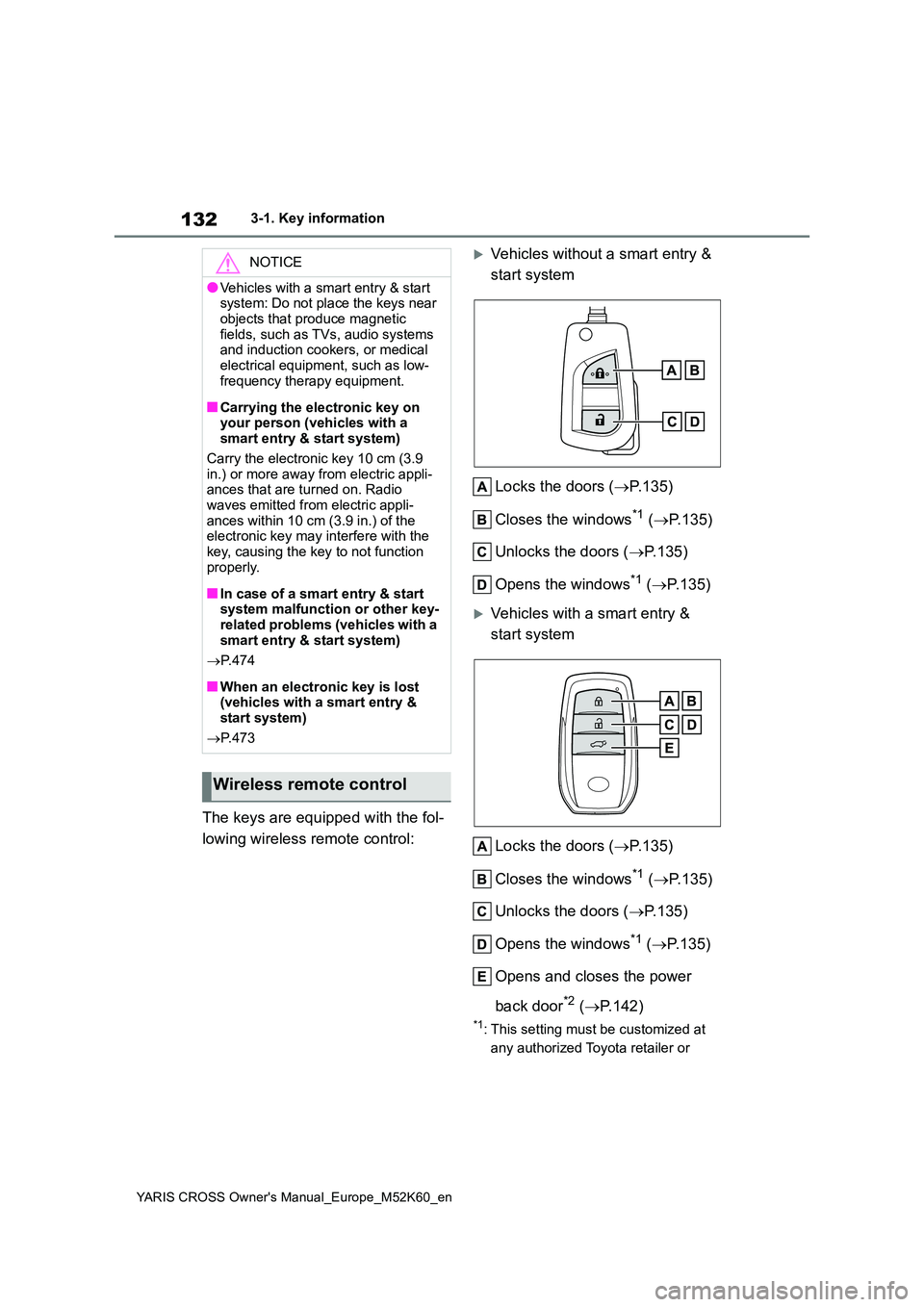
The keys are equipped with the fol-
lowing wireless remote control:
Vehicles without a smart entry &
start system
Locks the doors ( P.135)
Closes the windows*1 ( P.135)
Unlocks the doors ( P.135)
Opens the windows*1 ( P.135)
Vehicles with a smart entry &
start system
Locks the doors ( P.135)
Closes the windows*1 ( P.135)
Unlocks the doors ( P.135)
Opens the windows*1 ( P.135)
Opens and closes the power
back door*2 ( P.142)
*1: This setting must be customized at
any authorized Toyota retailer or
NOTICE
●Vehicles with a smart entry & start system: Do not place the keys near
objects that produce magnetic fields, such as TVs, audio systems and induction cookers, or medical
electrical equipment, such as low- frequency therapy equipment.
■Carrying the electronic key on your person (vehicles with a smart entry & start system)
Carry the electronic key 10 cm (3.9 in.) or more away from electric appli-ances that are turned on. Radio
waves emitted from electric appli- ances within 10 cm (3.9 in.) of the electronic key may interfere with the
key, causing the key to not function properly.
■In case of a smart entry & start system malfunction or other key-related problems (vehicles with a
smart entry & start system)
P. 4 7 4
■When an electronic key is lost (vehicles with a smart entry & start system)
P. 4 7 3
Wireless remote control
Page 135 of 650

133
3
YARIS CROSS Owner's Manual_Europe_M52K60_en
3-1. Key information
Before driving
Toyota authorized repairer, or any
reliable repairer.
*2: If equipped
■Conditions affecting the operation of the wireless remote control (vehicles without a smart entry &
start system)
The wireless remote control function may not operate normally in the follow-
ing situations:
●When the wireless key battery is
depleted
●Near a TV tower, electric power plant,
gas station, radio station, large dis- play, airport or other facility that gen-erates strong radio waves or electrical
noise
●When carrying a portable radio, cellu-
lar phone or other wireless communi- cation devices
●When the wireless key is in contact with, or is covered by a metallic object
●When another wireless key (that emits radio waves) is being used nearby
●If window tint with a metallic content or metallic objects are attached to the rear window
■Conditions affecting the operation
of the smart entry & start system or wireless remote control (vehicles
with a smart entry & start system)
P. 1 5 4
1Releasing
To release the key, press the button
2Folding
To stow the key, press the button then
fold the key.
To take out the mechanical key,
slide the release lever and take
the key out.
The mechanical key can only be
inserted in one direction, as the key
only has grooves on one side. If the
key cannot be inserted in a lock cyl-
inder, turn it over and re-attempt to
insert it.
After using the mechanical key,
store it in the electronic key. Carry
the mechanical key together with
the electronic key. If the electronic
key battery is depleted or the entry
function does not operate properly,
Using the key (vehicles with-
out a smart entry & start
system)
Using the mechanical key
(vehicles with a smart entry
& start system)
Page 139 of 650

137
3
YARIS CROSS Owner's Manual_Europe_M52K60_en
3-2. Opening, closing and locking the doors
Before driving
■Door lock buzzer (vehicles with a
smart entry & start system)
If an attempt to lock the doors using the entry function or wireless remote control
is made when a door is not fully closed, a buzzer will sound continuously for 5 seconds. Fully close the door to stop the
buzzer, and lock the doors again.
■Alarm (if equipped)
Locking the doors will set the alarm sys- tem. ( P.86)
■Conditions affecting the operation
of the smart entry & start system or wireless remote control
Vehicles without a smart entry & start
system
P. 1 3 3
Vehicles with a smart entry & start system
P. 1 5 4
■If the smart entry & start system or
the wireless remote control does not operate properly
Vehicles without a smart entry & start
system
Replace the key battery with a new one
if it is depleted. ( P.415)
Vehicles with a smart entry & start system
Use the mechanical key to lock and
unlock the doors. ( P.474)
Replace the key battery with a new one
if it is depleted. ( P.415)
■If the 12-volt battery is discharged
(vehicles with a smart entry & start system)
The doors cannot be locked and
unlocked using the entry function or wireless remote control. Lock or unlock the doors using the mechanical key.
( P.474)
■Rear seat reminder function
●In order to remind you not to forget
luggage, etc., in the rear seat, when the power switch is turned to OFF
after any of the following conditions
are met, a buzzer will sound and a message will be displayed on the multi-information display for approxi-
mately 6 seconds. • The hybrid system is started within 10 minutes after opening and closing a
rear door. • A rear door has been opened and closed after the hybrid system was
started.
However, if a rear door is opened and
then closed within approximately 2 sec-
onds, the rear seat reminder function
may not operate.
●The rear seat reminder function deter-
mines that luggage, etc., has been placed in a rear seat based on open-ing and closing of a rear door. There-
fore, depending on the situation, the rear seat reminder function may not operate and you may still forget lug-
gage, etc., in the rear seat, or it may operate unnecessarily.
●The rear seat reminder function can be enabled/disabled. ( P.498)
■Customization
Some functions can be customized.
( P.498)
WARNING
■To prevent an accident
Observe the following precautions
while driving the vehicle. Failure to do so may result in a door opening and an occupant being
thrown out of the vehicle, resulting in death or serious injury.
●Ensure that all doors are properly closed and locked.
●Do not pull the inside door handle while driving.Be especially careful of the front
doors, as the doors may be opened even if the inside lock buttons are in the locked position.
Page 140 of 650

138
YARIS CROSS Owner's Manual_Europe_M52K60_en
3-2. Opening, closing and locking the doors
■Door lock switches (to
lock/unlock)
1 Locks all the doors
2 Unlocks all the doors
■Inside lock buttons
1 Locks the door
2 Unlocks the door
The front doors can be opened by pull-
ing the inside handle even if the lock
buttons are in the lock position.
■Locking the front doors from the outside without a key
1 Move the inside lock button to the
lock position.
2 Close the door while pulling the door handle.
Vehicles without a smart entry & start
system
The door cannot be locked if the key is
in the power switch.
Vehicles with a smart entry & start system
The door cannot be locked if the power
switch is in ACC or ON, or the electronic
key is left inside the vehicle.
The key may not be detected correctly
and the door may be locked.
■Open door warning buzzer
If a door or the back door is not fully closed, a buzzer will sound when the vehicle speed reaches 5 km/h (3 mph).
The open door(s) or back door is indi- cated on the multi-information display.
WARNING
●Set the rear door child-protector locks when children are seated in
the rear seats.
■When opening or closing a door
Check the surroundings of the vehicle such as whether the vehicle is on an incline, whether there is enough
space for a door to open and whether a strong wind is blowing. When open-ing or closing the door, hold the door
handle tightly to prepare for any unpredictable movement.
■When using the wireless remote control or the key and operating the power windows
Operate the power windows after checking to make sure that there is no possibility of any passenger having
any of their body parts caught in the windows. Also, do not allow children to operate the wireless remote control
or the key. It is possible for children and other passengers to get caught in the power windows.
Unlocking and locking the
doors from the inside
Page 142 of 650
140
YARIS CROSS Owner's Manual_Europe_M52K60_en
3-2. Opening, closing and locking the doors
WARNING
■Back door handles
Do not hang any object to the back
door handles. If any object is hung, the back door may suddenly shut, causing parts of
the body to be caught, resulting in death or serious injury.
■Operating the back door
Observe the following precautions. Failure to do so may cause parts of
the body to be caught, resulting in death or serious injury.
●Remove any heavy loads, such as snow and ice, from the back door before opening it. Failure to do so
may cause the back door to sud- denly shut again after it is opened.
●When opening or closing the back door, thoroughly check to make sure the surrounding area is safe.
●If anyone is in the vicinity, make sure they are safe and let them
know that the back door is about to open or close.
●Use caution when opening or clos-ing the back door in windy weather as it may move abruptly in strong
wind.
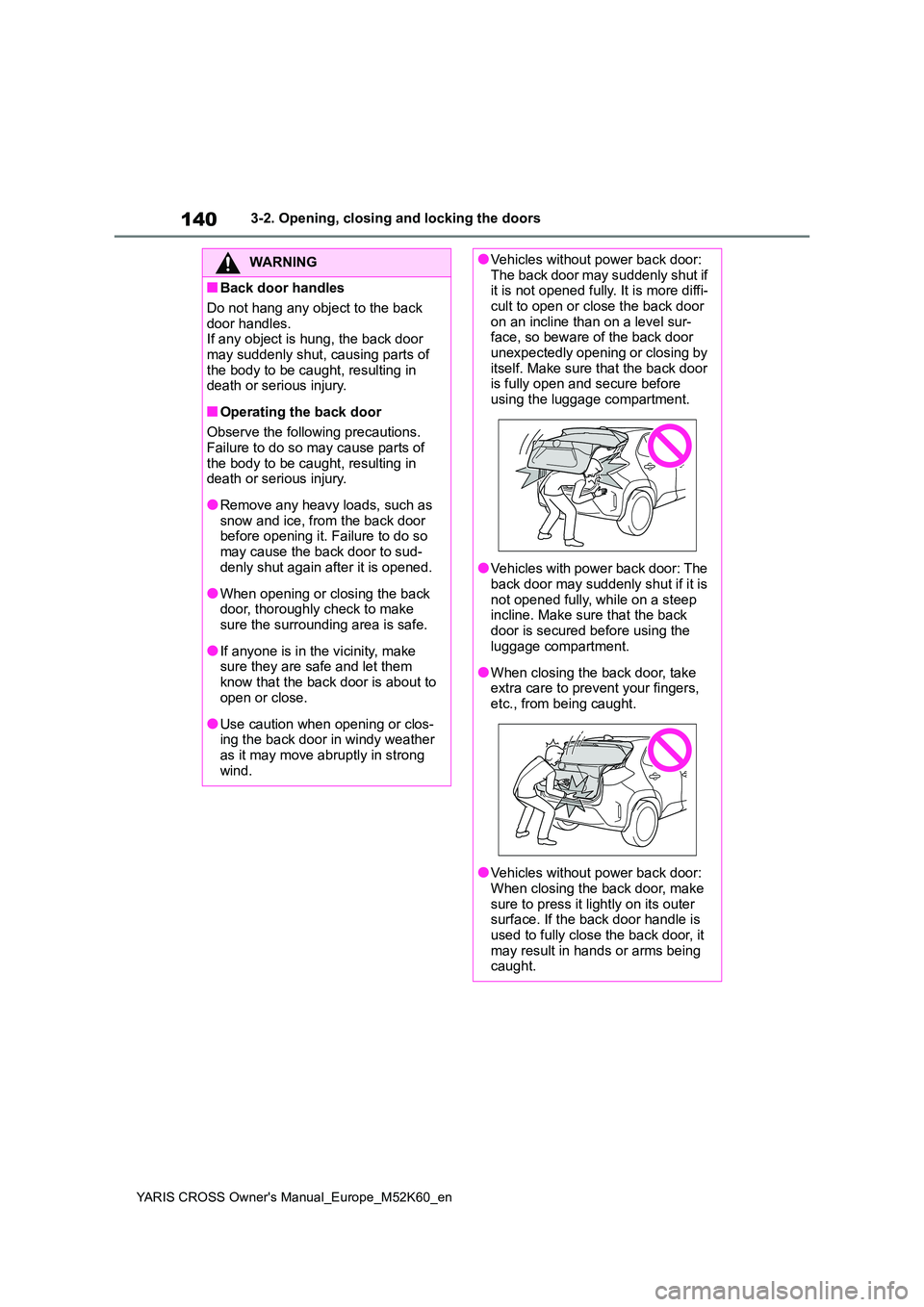
●Vehicles without power back door: The back door may suddenly shut if it is not opened fully. It is more diffi-
cult to open or close the back door on an incline than on a level sur-face, so beware of the back door
unexpectedly opening or closing by itself. Make sure that the back door is fully open and secure before
using the luggage compartment.
●Vehicles with power back door: The
back door may suddenly shut if it is not opened fully, while on a steep incline. Make sure that the back
door is secured before using the luggage compartment.
●When closing the back door, take extra care to prevent your fingers, etc., from being caught.
●Vehicles without power back door: When closing the back door, make
sure to press it lightly on its outer surface. If the back door handle is used to fully close the back door, it
may result in hands or arms being caught.
Page 143 of 650
141
3
YARIS CROSS Owner's Manual_Europe_M52K60_en
3-2. Opening, closing and locking the doors
Before driving
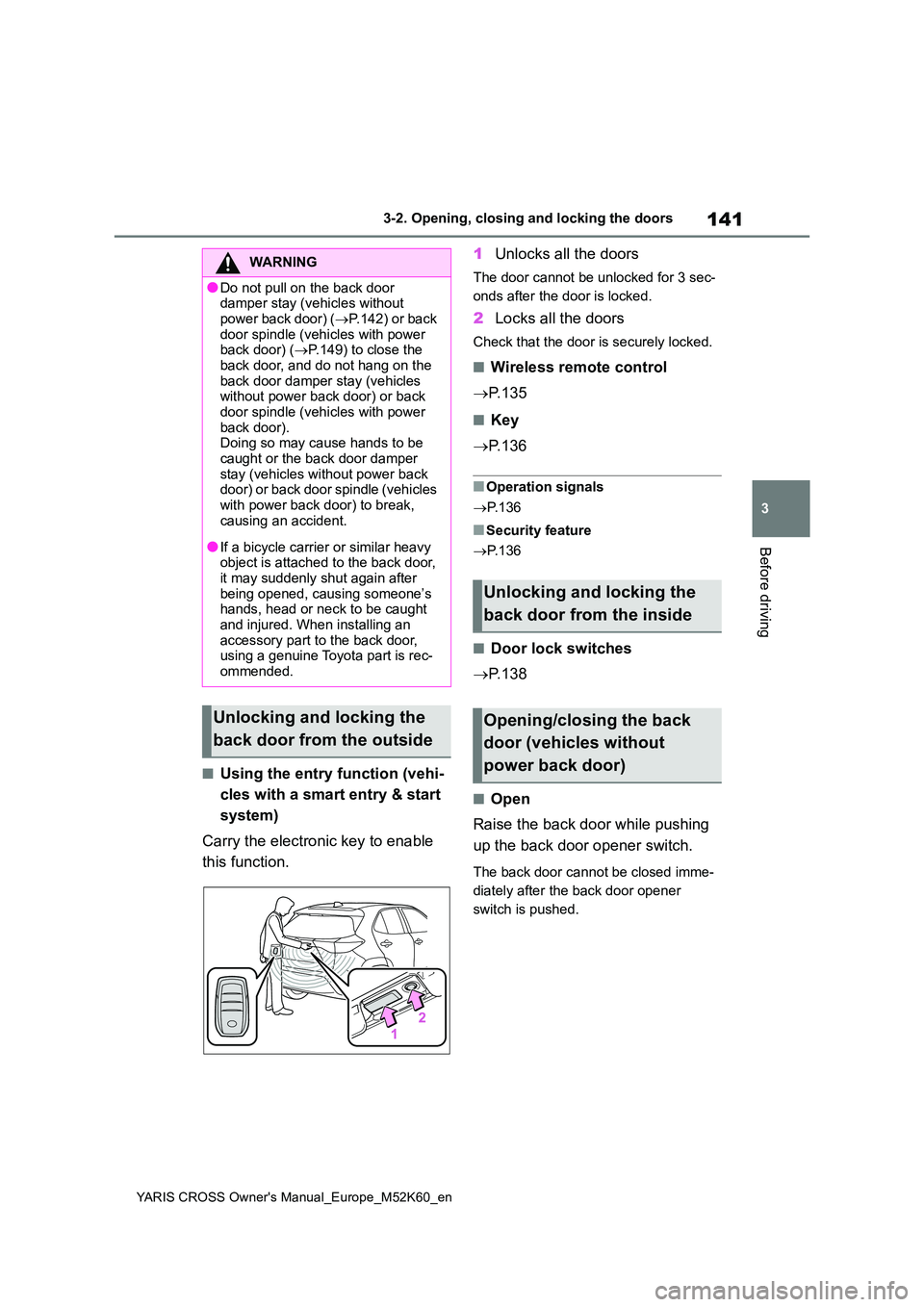
■Using the entry function (vehi-
cles with a smart entry & start
system)
Carry the electronic key to enable
this function.
1 Unlocks all the doors
The door cannot be unlocked for 3 sec-
onds after the door is locked.
2 Locks all the doors
Check that the door is securely locked.
■Wireless remote control
P. 1 3 5
■Key
P. 1 3 6
■Operation signals
P. 1 3 6
■Security feature
P. 1 3 6
■Door lock switches
P. 1 3 8
■Open
Raise the back door while pushing
up the back door opener switch.
The back door cannot be closed imme-
diately after the back door opener
switch is pushed.
WARNING
●Do not pull on the back door damper stay (vehicles without
power back door) ( P.142) or back door spindle (vehicles with power back door) ( P.149) to close the
back door, and do not hang on the back door damper stay (vehicles without power back door) or back
door spindle (vehicles with power back door).Doing so may cause hands to be
caught or the back door damper stay (vehicles without power back door) or back door spindle (vehicles
with power back door) to break, causing an accident.
●If a bicycle carrier or similar heavy object is attached to the back door, it may suddenly shut again after
being opened, causing someone’s hands, head or neck to be caught and injured. When installing an
accessory part to the back door, using a genuine Toyota part is rec-ommended.
Unlocking and locking the
back door from the outside
Unlocking and locking the
back door from the inside
Opening/closing the back
door (vehicles without
power back door)