2021 TOYOTA YARIS CROSS braking
[x] Cancel search: brakingPage 201 of 650

199
4
YARIS CROSS Owner's Manual_Europe_M52K60_en
4-2. Driving procedures
Driving
shift lever can be shifted.
Releasing the shift lock:
1 Set the parking brake.
2 Turn the power switch off.
3 Depress the brake pedal.
4 Ply the cover up with a flathead screwdriver or equivalent tool.To prevent damaging the cover,
wrap the tip of the flathead screw- driver with a tape.
5 Press and hold the shift lock override button and then push the button on the shift knob.
The shift lever can be shifted while the both buttons are pressed.
■About engine braking
When shift position B is selected, releasing the accelerator pedal will
apply engine braking.
●When the vehicle is driven at high
speeds, compared to ordinary gaso- line-fueled vehicles, the engine brak-ing deceleration is felt less than that of
other vehicles.
●The vehicle can be accelerated even
when shift position B is selected.
If the vehicle is driven continuously in the B position, fuel efficiency will
become low. Usually, select the D posi- tion.
P. 3 3 0
WARNING
■To prevent an accident when releasing the shift lock
Before pressing the shift lock override button, make sure to set the parking brake and depress the brake pedal.
If the accelerator pedal is accidentally depressed instead of the brake pedal when the shift lock override button is
pressed and the shift lever is shifted out of P, the vehicle may suddenly start, possibly leading to an accident
resulting in death or serious injury.
Selecting the driving mode
Page 205 of 650
203
4
YARIS CROSS Owner's Manual_Europe_M52K60_en
4-2. Driving procedures
Driving
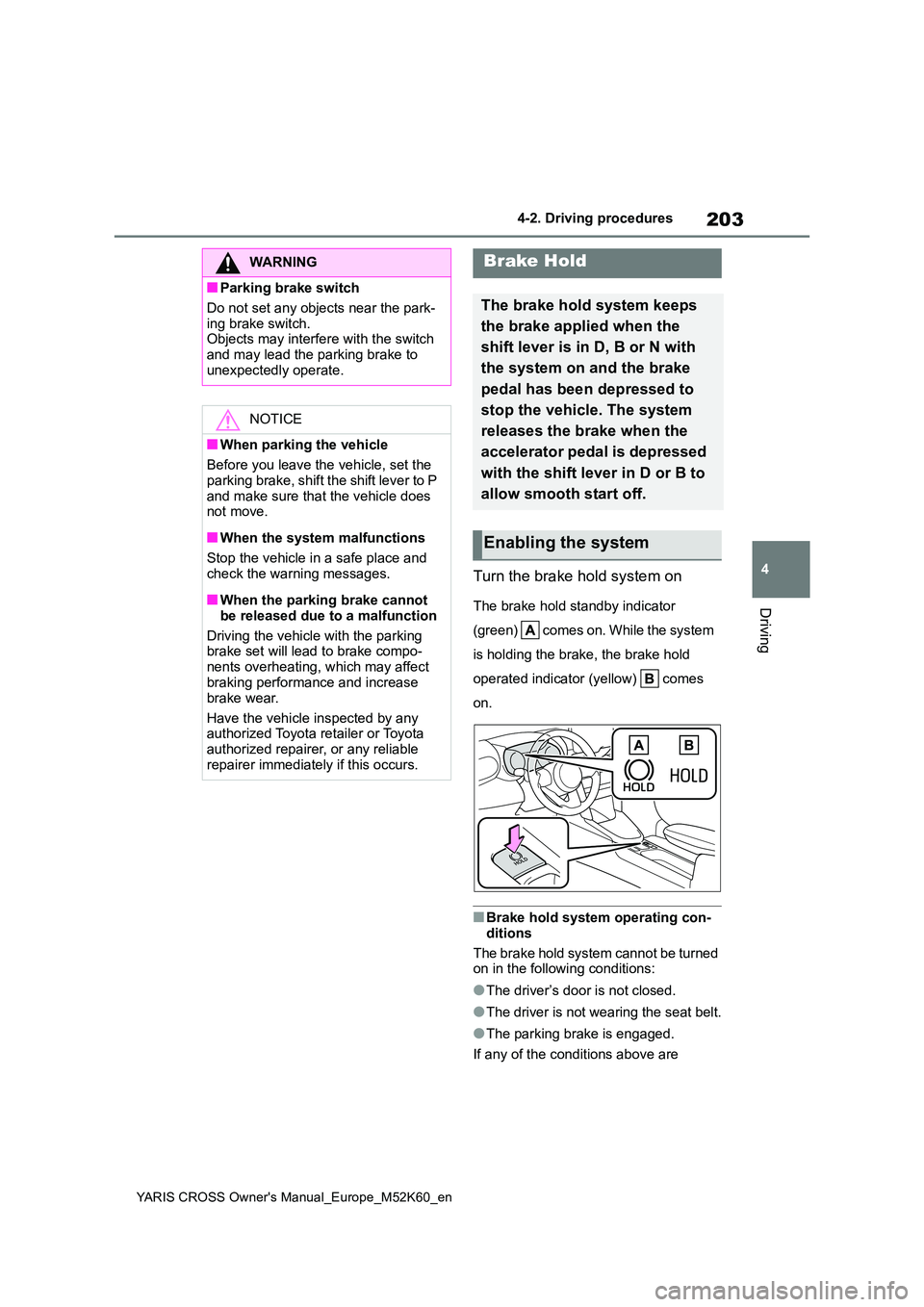
Turn the brake hold system on
The brake hold standby indicator
( gr e e n) co me s o n. W hi l e t he sy st e m
is holding the brake, the brake hold
operated indicator (yellow) comes
on.
■Brake hold system operating con-
ditions
The brake hold system cannot be turned on in the following conditions:
●The driver’s door is not closed.
●The driver is not wearing the seat belt.
●The parking brake is engaged.
If any of the conditions above are
WARNING
■Parking brake switch
Do not set any objects near the park-
ing brake switch. Objects may interfere with the switch and may lead the parking brake to
unexpectedly operate.
NOTICE
■When parking the vehicle
Before you leave the vehicle, set the
parking brake, shift the shift lever to P and make sure that the vehicle does not move.
■When the system malfunctions
Stop the vehicle in a safe place and
check the warning messages.
■When the parking brake cannot
be released due to a malfunction
Driving the vehicle with the parking brake set will lead to brake compo-
nents overheating, which may affect braking performance and increase
brake wear.
Have the vehicle inspected by any authorized Toyota retailer or Toyota
authorized repairer, or any reliable repairer immediately if this occurs.
Brake Hold
The brake hold system keeps
the brake applied when the
shift lever is in D, B or N with
the system on and the brake
pedal has been depressed to
stop the vehicle. The system
releases the brake when the
accelerator pedal is depressed
with the shift lever in D or B to
allow smooth start off.
Enabling the system
Page 233 of 650

231
4
YARIS CROSS Owner's Manual_Europe_M52K60_en
4-5. Using the driving support systems
Driving
*: If equipped
The system can detect the following (The detectable objects differs
depending on the function.):
The countries and areas for each region listed in the table are current as of
September 2021. However, depending on when the vehicle was sold , the
countries and areas of each region may be different. Contact an y autho-
rized Toyota retailer or Toyota authorized repairer, or any rel iable repairer
for details.
PCS (Pre-Collision System)*
The pre-collision system uses a rad ar sensor and front camera to
detect objects ( P.231) in front of the vehicle. When the system
determines that the possibility of a frontal collision with an object is
high, a warning operates to urge the driver to take evasive act ion
and the potential brake pressure is increased to help the drive r
avoid the collision. If the syste m determines that the possibility of a
frontal collision with an object is extremely high, the brakes are
automatically applied to help avoid the collision or help reduc e the
impact of the collision.
The pre-collision system can be disabled/enabled and the warnin g timing
can be changed. ( P.235)
Detectable objects and function availability
RegionsDetectable objectsFunction availabilityCountries/areas
AVe hi cl e s
Bicyclists
Pedestrians
The pre-collision warn-
ing, pre-collision brake
assist, pre-collision brak-
ing, emergency steering
assist and intersection
right/left turn assistance
are available
Except for Azerbaijan,
Colombia, Ecuador and
Georgia
BThe pre-collision warn-
ing, pre-collision brake
assist and pre-collision
braking are available
Colombia and Ecuador
CVe hi cl e sAzerbaijan and Georgia
Page 234 of 650
232
YARIS CROSS Owner's Manual_Europe_M52K60_en
4-5. Using the driving support systems
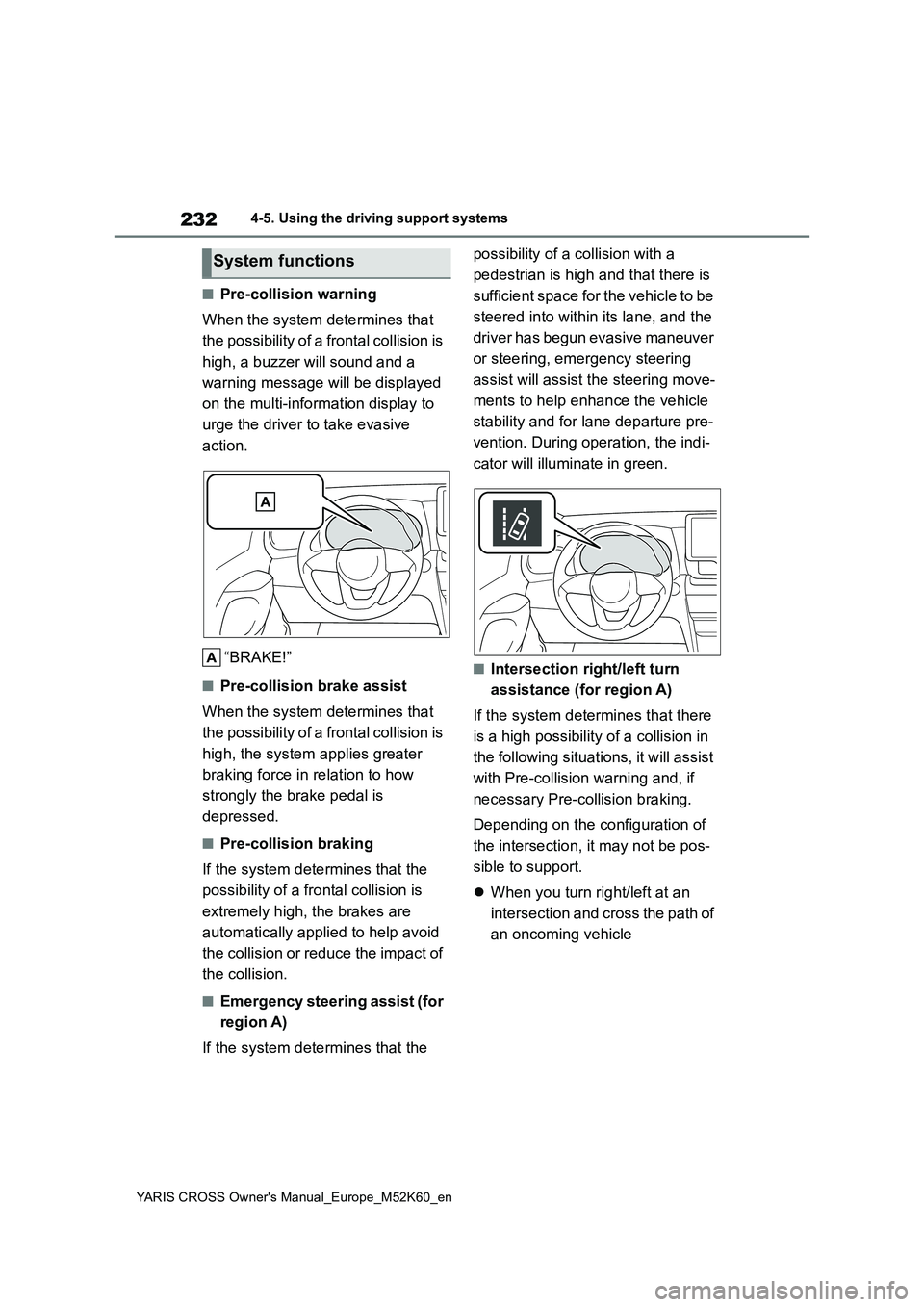
■Pre-collision warning
When the system determines that
the possibility of a frontal collision is
high, a buzzer will sound and a
warning message will be displayed
on the multi-information display to
urge the driver to take evasive
action.
“BRAKE!”
■Pre-collision brake assist
When the system determines that
the possibility of a frontal collision is
high, the system applies greater
braking force in relation to how
strongly the brake pedal is
depressed.
■Pre-collision braking
If the system determines that the
possibility of a frontal collision is
extremely high, the brakes are
automatically applied to help avoid
the collision or reduce the impact of
the collision.
■Emergency steering assist (for
region A)
If the system determines that the
possibility of a collision with a
pedestrian is high and that there is
sufficient space for the vehicle to be
steered into within its lane, and the
driver has begun evasive maneuver
or steering, emergency steering
assist will assist the steering move-
ments to help enhance the vehicle
stability and for lane departure pre-
vention. During operation, the indi-
cator will illuminate in green.
■Intersection right/left turn
assistance (for region A)
If the system determines that there
is a high possibility of a collision in
the following situations, it will assist
with Pre-collision warning and, if
necessary Pre-collision braking.
Depending on the configuration of
the intersection, it may not be pos-
sible to support.
When you turn right/left at an
intersection and cross the path of
an oncoming vehicle
System functions
Page 235 of 650
233
4
YARIS CROSS Owner's Manual_Europe_M52K60_en
4-5. Using the driving support systems
Driving
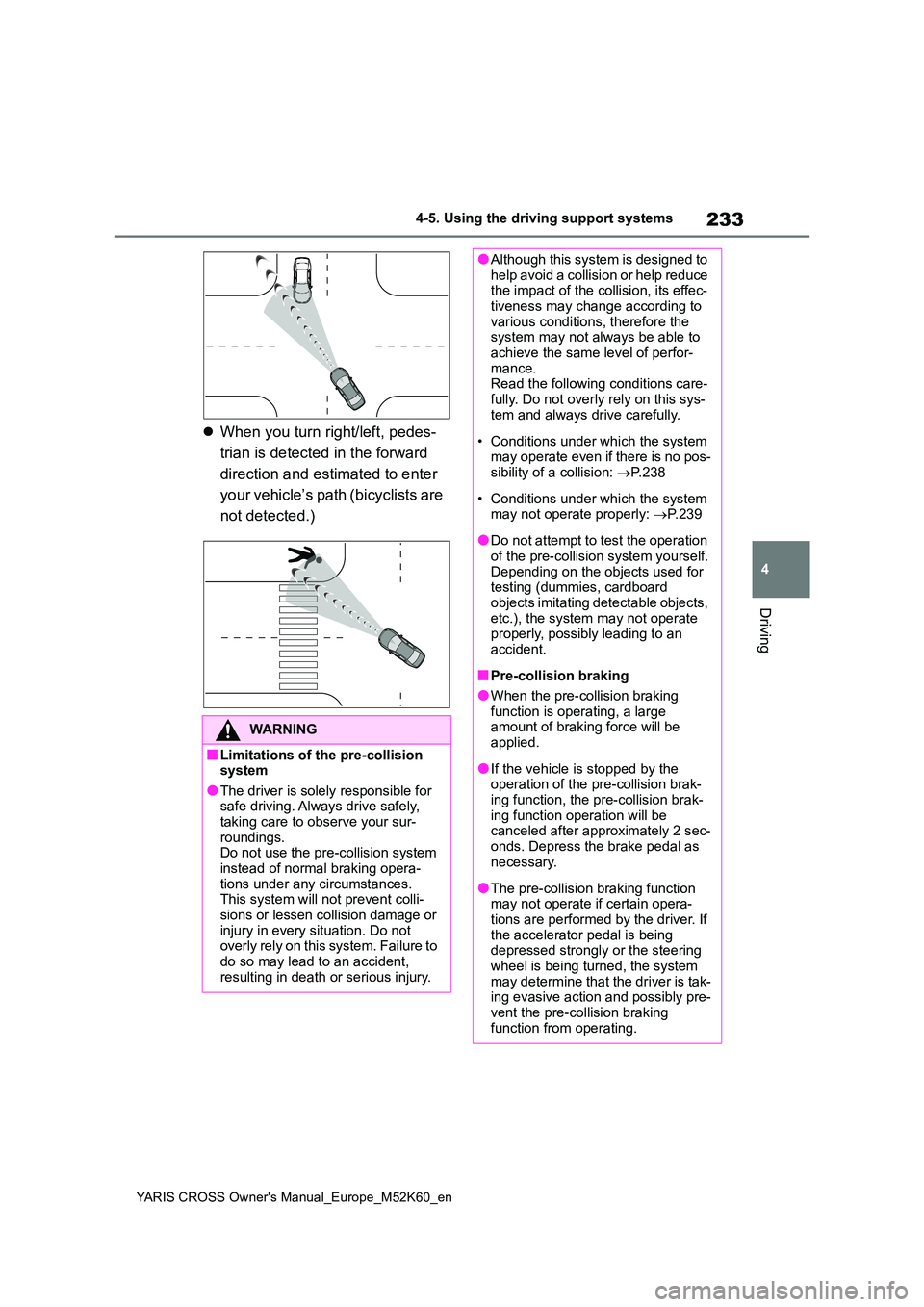
When you turn right/left, pedes-
trian is detected in the forward
direction and estimated to enter
your vehicle’s path (bicyclists are
not detected.)
WARNING
■Limitations of the pre-collision system
●The driver is solely responsible for safe driving. Always drive safely, taking care to observe your sur-
roundings. Do not use the pre-collision system instead of normal braking opera-
tions under any circumstances. This system will not prevent colli-sions or lessen collision damage or
injury in every situation. Do not overly rely on this system. Failure to do so may lead to an accident,
resulting in death or serious injury.
●Although this system is designed to help avoid a collision or help reduce the impact of the collision, its effec-
tiveness may change according to various conditions, therefore the system may not always be able to
achieve the same level of perfor- mance.Read the following conditions care-
fully. Do not overly rely on this sys- tem and always drive carefully.
• Conditions under which the system may operate even if there is no pos-sibility of a collision: P. 2 3 8
• Conditions under which the system may not operate properly: P. 2 3 9
●Do not attempt to test the operation of the pre-collision system yourself.
Depending on the objects used for testing (dummies, cardboard objects imitating detectable objects,
etc.), the system may not operate properly, possibly leading to an accident.
■Pre-collision braking
●When the pre-collision braking
function is operating, a large amount of braking force will be applied.
●If the vehicle is stopped by the operation of the pre-collision brak-
ing function, the pre-collision brak- ing function operation will be canceled after approximately 2 sec-
onds. Depress the brake pedal as necessary.
●The pre-collision braking function may not operate if certain opera-tions are performed by the driver. If
the accelerator pedal is being depressed strongly or the steering wheel is being turned, the system
may determine that the driver is tak- ing evasive action and possibly pre-vent the pre-collision braking
function from operating.
Page 236 of 650

234
YARIS CROSS Owner's Manual_Europe_M52K60_en
4-5. Using the driving support systems
WARNING
●In some situations, while the pre- collision braking function is operat-
ing, operation of the function may be canceled if the accelerator pedal is depressed strongly or the steer-
ing wheel is turned and the system determines that the driver is taking evasive action.
●If the brake pedal is being depressed, the system may deter-
mine that the driver is taking eva- sive action and possibly delay the operation timing of the pre-collision
braking function.
■Emergency steering assist (for
region A)
●As emergency steering assist oper- ation will be canceled when the sys-
tem determines that lane departure prevention function has been com-pleted.
●Emergency steering assist may not operate or may be cancel in the fol-
lowing cases as the system may determine the driver is taking actions.
• If the accelerator pedal is being depressed strongly, the steering
wheel is being operated sharply, the brake pedal is being depressed or the turn signal lever is being
operated. In this case, the system may determine that the driver is tak-ing evasive action and the emer-
gency steering assist may not operate.
• In some situations, while the emer- gency steering assist is operating, operation of the function may be
canceled if the accelerator pedal is depressed strongly, the steering wheel is operated sharply or the
brake pedal is being depressed and the system determines that the driver is taking evasive action.
• When the emergency steering assist is operating, if the steering wheel is held firmly or is operated in
the opposite direction to that which the system is generating torque, the function may be canceled.
■When to disable the pre-colli-sion system
In the following situations, disable the system, as it may not operate prop-erly, possibly leading to an accident
resulting in death or serious injury:
●When the vehicle is being towed
●When your vehicle is towing another vehicle
●When transporting the vehicle via truck, boat, train or similar means of
transportation
●When the vehicle is raised on a lift
with the hybrid system on and the tires are allowed to rotate freely
●When inspecting the vehicle using a drum tester such as a chassis dynamometer or speedometer tes-
ter, or when using an on vehicle wheel balancer
●When a strong impact is applied to the front bumper or front grille, due to an accident or other reasons
●If the vehicle cannot be driven in a stable manner, such as when the
vehicle has been in an accident or is malfunctioning
●When the vehicle is driven in a sporty manner or off-road
●When the tires are not properly inflated
●When the tires are very worn
●When tires of a size other than
specified are installed
●When tire chains are installed
Page 238 of 650
236
YARIS CROSS Owner's Manual_Europe_M52K60_en
4-5. Using the driving support systems
a frontal collision with a detected object is high.
The system may not operate in the following situations:
• If a 12-volt battery terminal has been disconnected and reconn ected and then the
vehicle has not been driven for a certain amount of time
• If the shift lever is in R
• When the VSC OFF indicator is illuminated (only the pre-collis ion warning function will be operational)
The operation speeds and operation cancellation for each functi on is listed below.
●Pre-collision warning
●Pre-collision brake assist
●Pre-collision braking
If either of the following occur while the pre-collision brakin g function is operating, it
will be canceled:
• The accelerator pedal is depressed strongly.
• The steering wheel is turned sharply or abruptly.
●Emergency steering assist (for region A)
When the turn signal lights are flashing, emergency steering as sist will not operate in
case of an emergency.
Detectable objectsVehicle speedRelative speed between
your vehicle and object
Ve hi cl e sApprox. 10 to 180 km/h (7
to 110 mph)
Approx. 10 to 180 km/h (7
to 110 mph)
For region A and B: Bicy-
clists and pedestrians
Approx. 10 to 80 km/h (7 to
50 mph)
Approx. 10 to 80 km/h (7 to
50 mph)
Detectable objectsVehicle speedRelative speed between
your vehicle and object
Ve hi cl e sApprox. 30 to 180 km/h
(20 to 110 mph)
Approx. 30 to 180 km/h (20
to 110 mph)
For region A and B: Bicy-
clists and pedestrians
Approx. 30 to 80 km/h (20
to 50 mph)
Approx. 30 to 80 km/h (20
to 50 mph)
Detectable objectsVehicle speedRelative speed between
your vehicle and object
Ve hi cl e sApprox. 10 to 180 km/h (7
to 110 mph)
Approx. 10 to 180 km/h (7
to 110 mph)
For region A and B: Bicy-
clists and pedestrians
Approx. 10 to 80 km/h (7 to
50 mph)
Approx. 10 to 80 km/h (7 to
50 mph)
Page 239 of 650
237
4
YARIS CROSS Owner's Manual_Europe_M52K60_en
4-5. Using the driving support systems
Driving
If any of the following occur while the emergency steering assist function is operat- ing, it will be canceled:
• The accelerator pedal is depressed strongly.
• The steering wheel is turned sharply or abruptly.
• The brake pedal is depressed.
●Intersection right/left turn assistance (pre-collision warning) (for region A)
When the turn signal lights are not flashing, support for turni ng left or right at an inter-
section which targets oncoming vehicles does not work.
●Intersection right/left turn assistance (pre-collision braking) (for region A)
When the turn signal lights are not flashing, support for turni ng left or right at an inter-
section which targets oncoming vehicles does not work.
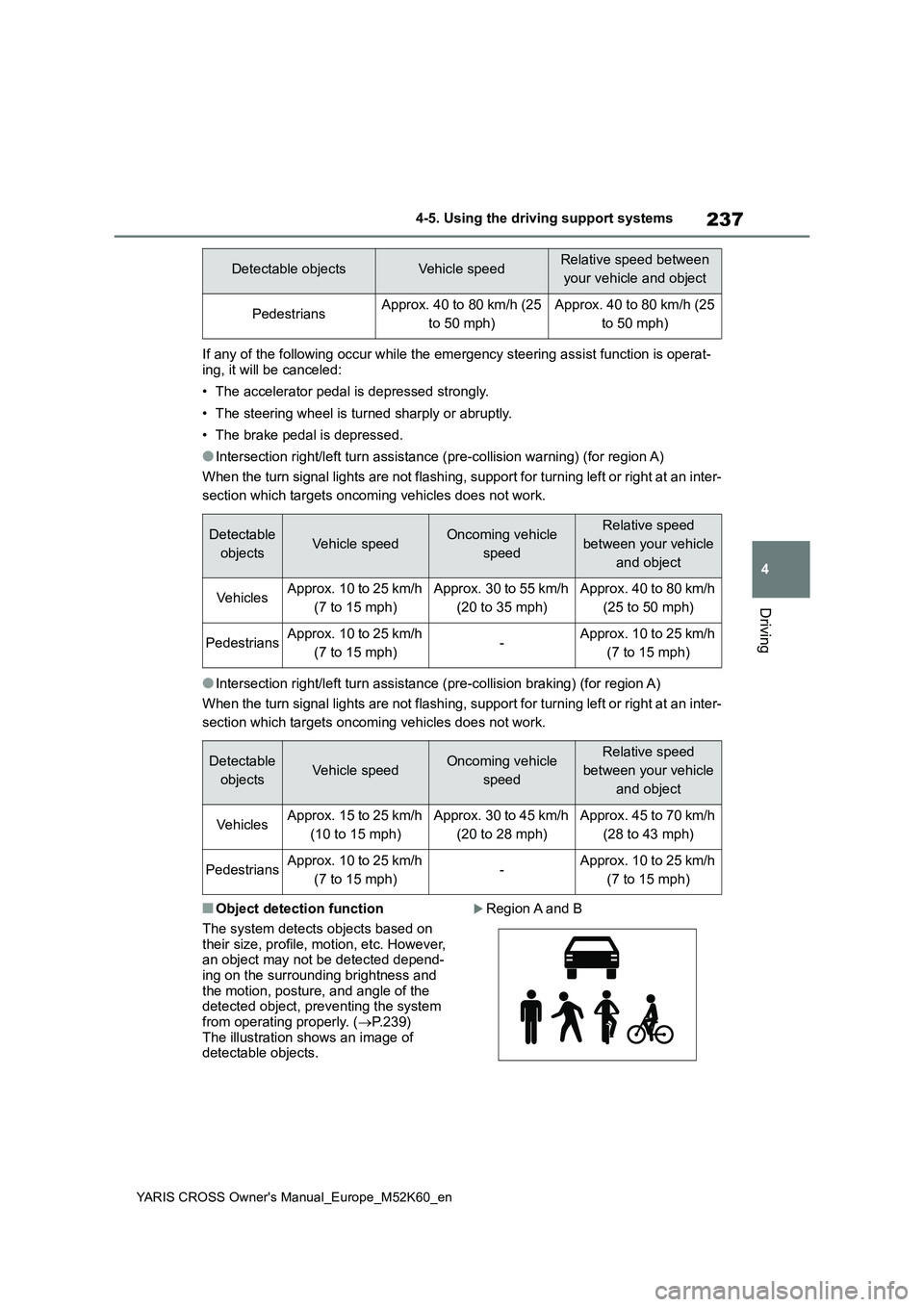
■Object detection function
The system detects objects based on
their size, profile, motion, etc. However, an object may not be detected depend-ing on the surrounding brightness and
the motion, posture, and angle of the detected object, preventing the system from operating properly. ( P.239)
The illustration shows an image of detectable objects.
Region A and B
Detectable objectsVehicle speedRelative speed between
your vehicle and object
PedestriansApprox. 40 to 80 km/h (25
to 50 mph)
Approx. 40 to 80 km/h (25
to 50 mph)
Detectable
objectsVehicle speedOncoming vehicle
speed
Relative speed
between your vehicle
and object
VehiclesApprox. 10 to 25 km/h
(7 to 15 mph)
Approx. 30 to 55 km/h
(20 to 35 mph)
Approx. 40 to 80 km/h
(25 to 50 mph)
PedestriansApprox. 10 to 25 km/h
(7 to 15 mph)-Approx. 10 to 25 km/h
(7 to 15 mph)
Detectable
objectsVehicle speedOncoming vehicle
speed
Relative speed
between your vehicle
and object
VehiclesApprox. 15 to 25 km/h
(10 to 15 mph)
Approx. 30 to 45 km/h
(20 to 28 mph)
Approx. 45 to 70 km/h
(28 to 43 mph)
PedestriansApprox. 10 to 25 km/h
(7 to 15 mph)-Approx. 10 to 25 km/h
(7 to 15 mph)