2021 TOYOTA RAV4 PHEV child lock
[x] Cancel search: child lockPage 209 of 666

207
4
4-2. Opening, closing and locking the doors
Before driving
■Setting the alarm (if equipped)
Locking the doors will set the alarm sys - tem. ( →P.78)
■Conditions affecting the operation
of the smart entry & start system or
wireless remote control
→ P.225
■If the smart entry & start system or
the wireless remote control does
not operate properly
●Use the mechanical key to lock and
unlock the doors. ( →P.604)
●Replace the key battery with a new
one if it is depleted. ( →P.543)
■If the 12-volt battery is discharged
The doors cannot be locked and
unlocked using the smart entry & start
system or wireless rem ote control. Lock or unlock the doors using the mechani -
cal key. ( →P.604)
■Rear seat reminder function
●In order to remind you not to forget
luggage, etc. in the rear seat, when
the power switch i s turned to OFF after any of the fo llowing conditions
are met, a buzzer will sound and a
message will be displayed on the multi-information di splay for approxi-
mately 6 seconds.
• The hybrid system is started within 10 minutes after opening and closing a
rear door.
• A rear door has been opened and closed after the hy brid system was
started.
However, if a rear door is opened and
then closed within approximately 2 sec-
onds, the rear seat reminder function
may not operate.
●The rear seat reminder function deter - mines that luggage, etc. has been
placed in a rear seat based on open -
ing and closing of a rear door. There - fore, depending on t he situation, the
rear seat reminder function may not
operate and you may still forget lug - gage, etc. in the rear seat, or it may
operate unnecessarily.
●The rear seat reminder function can
be enabled/disabled. ( →P.629)
■Customization
Settings (e.g. unlocking function using a key) can be changed.
(Customizable features: →P.633)
WARNING
■To prevent an accident
Observe the following precautions while driving the vehicle.
Failure to do so may result in a door
opening and an occupant could be thrown out of the v ehicle, resulting in
death or serious injury.
●Ensure that all doo rs are properly closed.
●Do not pull the in side handle of the doors while driving.
Be especially care ful for the front
doors, as the doors may be opened even if the inside lock buttons are in
locked position.
●Set the rear door child-protector
locks when childre n are seated in
the rear seats.
■When opening or closing a door
Check the surroundings of the vehicle such as whether the vehicle is on an
incline, whether there is enough
space for a door to open and whether a strong wind is blowing. When open -
ing or closing the door, hold the door
handle tightly to prepare for any unpredictable movement.
Page 210 of 666

2084-2. Opening, closing and locking the doors
■Using the door lock switches
1 Locks all the doors
2 Unlocks all the doors
■Using the inside lock buttons
1 Locks the door
2 Unlocks the door
The front doors can be opened by pull-
ing the inside handle even if the lock
buttons are in the lock position.
■Locking the front doors from the
outside without a key
1 Move the inside lock button to the
lock position.
2 Close the door while pulling the door handle.
The door cannot be locked if the power
switch is in ACC or ON, or the electronic
key is left insi de the vehicle.
Depending on the position of the elec -
tronic key, the key m ay not be detected
correctly and the door may be locked.
■Open door warning buzzer
If the vehicle speed r eaches 5 km/h (3
mph), a buzzer sounds to indicate that
the door(s) or the hood is not fully closed.
The open door(s) or hood is displayed
on the multi-information display.
■When all the doors are locked with
the entry functi on or wireless remote control
●The doors cannot b e unlocked with the door lock switch.
●The door lock switc hes can be reset by unlocking all th e doors with the
entry function or w ireless remote con-
WARNING
■When using the wireless remote
control or mechanical key and
operating the power windows or panoramic moon roof (if
equipped)
Operate the power window or pan - oramic moon roof a fter checking to
make sure that there is no possibility
of any passenger having any of their
body parts caught in the side window or panoramic moon r oof. Also, do not
allow children to o perate the wireless
remote control or me chanical key. It is possible for chil dren and other pas-
sengers to get caugh t in the side win-
dow or panoramic moon roof.
Unlocking and locking the
doors from the inside
Page 211 of 666
209
4
4-2. Opening, closing and locking the doors
Before driving
trol.
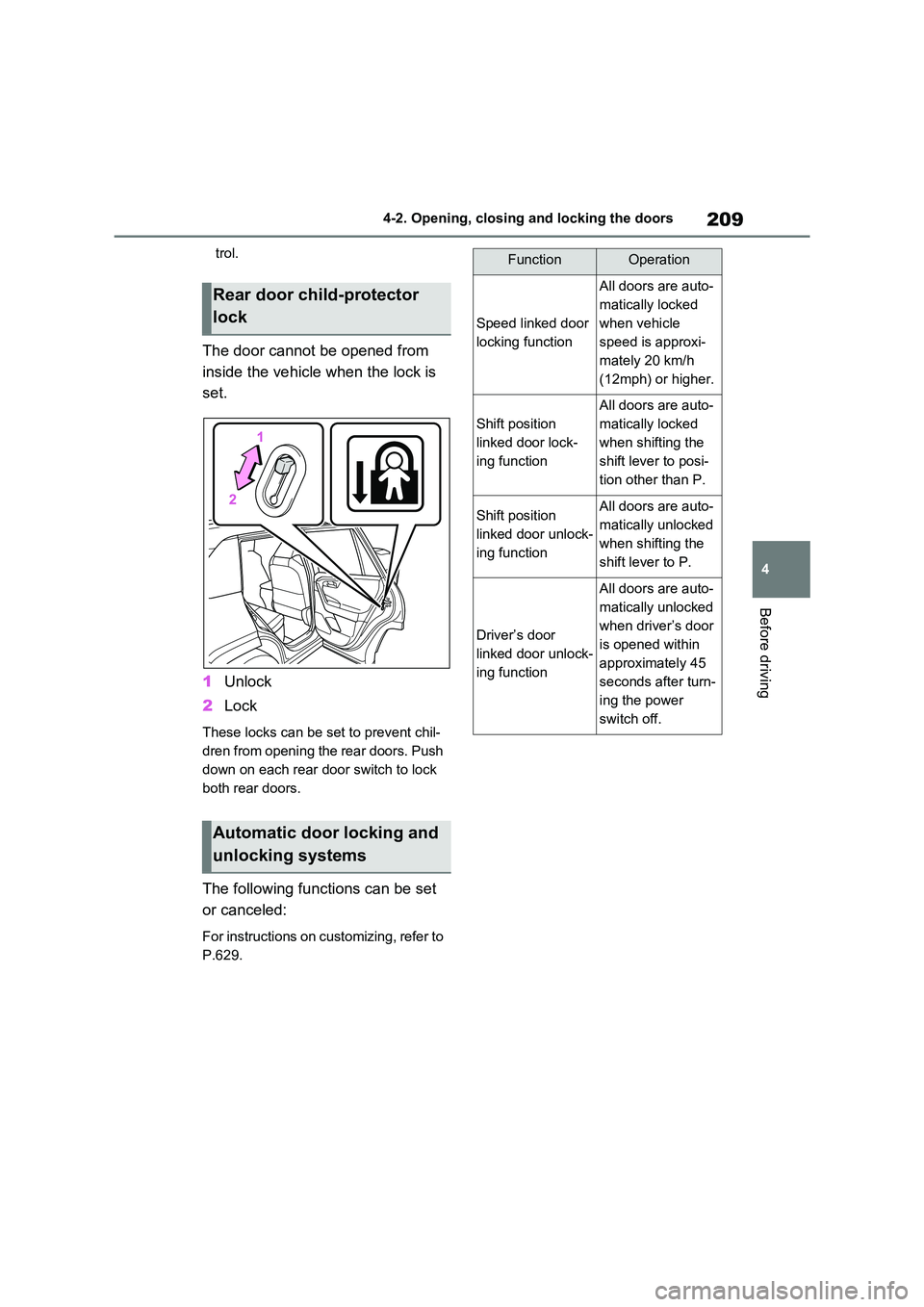
The door cannot be opened from
inside the vehicle when the lock is
set.
1 Unlock
2 Lock
These locks can be set to prevent chil-
dren from opening the rear doors. Push
down on each rear door switch to lock
both rear doors.
The following functions can be set
or canceled:
For instructions on customizing, refer to
P.629.
Rear door child-protector
lock
Automatic door locking and
unlocking systems
FunctionOperation
Speed linked door
locking function
All doors are auto -
matically locked
when vehicle
speed is approxi -
mately 20 km/h
(12mph) or higher.
Shift position
linked door lock -
ing function
All doors are auto -
matically locked
when shifting the
shift lever to posi -
tion other than P.
Shift position
linked door unlock -
ing function
All doors are auto -
matically unlocked
when shifting the
shift lever to P.
Driver’s door
linked door unlock -
ing function
All doors are auto -
matically unlocked
when driver’s door
is opened within
approximately 45
seconds after turn -
ing the power
switch off.
Page 212 of 666
2104-2. Opening, closing and locking the doors
Back door
The back door can be
locked/unlocked and
opened/closed by the follow -
ing procedures.
Charging port lid and charging
connector will also be locked and
unlocked. ( →P.121)
WARNING
Observe the following precautions.
Failure to do so may result in death or
serious injury.
■Before driving
●Make sure that the back door is fully closed.
If the back door is not fully closed, it
may open unexpectedly while driv - ing and hit near-by objects or lug -
gage in the luggage compartment
may be thrown out, causing an accident.
●Do not allow children to play in the luggage compartment.
If a child is accidentally locked in
the luggage compartment, they could get heat exhaustion or other
injuries.
●Do not allow a child to open or
close the back door.
Doing so may cause the back door to operate unexpectedly, or cause
the child’s hands, head, or neck to
be caught by the closing back door.
■Important points while driving
●Keep the back door closed while driving.
If the back door is left open, it may
hit near-by objects or luggage in the luggage compartment may be
thrown out, causing an accident.
●Never let anyone sit in the luggage compartment.
In the event of sudden braking, sud -
den swerving or a collision, they are susceptible to death or serious
injury.
■Back door handles
Do not hang any ob ject to the back
door handles. If any object is hung, the back door
may suddenly shut, causing parts of
the body to be caught, resulting in death or serious injury.
■Operating the back door
Observe the following precautions.
Failure to do so may cause parts of
the body to be caught, resulting in death or serious injury.
●Remove any heavy loads, such as
snow and ice, from the back door before opening it. Failure to do so
may cause the back door to sud -
denly shut again af ter it is opened.
●When opening or closing the back
door, thoroughly check to make sure the surrounding area is safe.
●If anyone is in the vicinity, make sure they are safe and let them
know that the back door is about to
open or close.
●Use caution when opening or clos -
ing the back door in windy weather as it may move abr uptly in strong
wind.
Page 275 of 666

273
4
4-3. Adjusting the seats
Before driving
*: If equipped
■Recording procedure
1 Check that the shift lever is in P.
2 Turn the power switch to ON.
3 Adjust the driver’s seat to the
desired positions.
4 While pressing the “SET” but-
ton, or within 3 seconds after the
“SET” button is pressed, press
button “1” or “2” until the buzzer
sounds.
If the selected butt on has already been preset, the previously recorded position
WARNING
●Do not allow chil dren to enter the
luggage compartment.
●Do not operate the rear seat if it is
occupied.
●Be careful not to get feet or hands
caught in the moving parts or joints
of the seats dur ing operation.
●Do not allow children to operate the
seat.
■After returning the rear seatback
to the upright position
●Make sure that the seatback is securely locked in position by lightly
pushing it back and forth.
If the seatback is not securely locked, the red marking will be visi -
ble. Make sure that the red marking
is not visible.
●Check that the sea t belts are not
twisted or caught in the seatback.
Driving position mem-
ory*
This feature automatically
adjusts the driver’s seat to suit
your preferences.
Your preferred driving position
(the position of the driver’s
seat) can be recorded and
recalled by pr essing a button.
Two different driving positions
can be recorded into memory.
Each electronic key can be
registered to recall your pre -
ferred driving position.
Recording/recalling a driv -
ing position
Page 294 of 666

2924-5. Opening, closing the windows and moon roof
direction, and hold it there for
approximately 4 seconds or more.
6 Pull and hold the power window switch in the one-touch closing
direction again. After the side win -
dow is completely closed, continue holding the switch for a further 1 sec -
ond or more.
If you release the switch while the side window is moving, start again from the
beginning.
If the side window reverses and cannot be fully closed or opened, have the vehi -
cle inspected by any authorized Toyota
retailer or Toyota authorized repairer, or any reliable repairer.
■Door lock linked power window
operation
●The power windows can be opened
and closed using the mechanical key.*
( →P.605)
●The power windows can be opened
and closed using the wireless remote
control.* ( →P.205)
●Vehicles with alarm: The alarm may
be triggered if the alarm is set and the
power window is c losed using the door lock linked power window opera -
tion function. ( →P.78)*: These settings must be customized at
any authorized Toy ota retailer or
Toyota authorized repairer, or any reli -
able repairer.
■Power window open reminder func -
tion
The buzzer sounds and a message is
shown on the multi-in formation display
when the power switch is turned to OFF and the driver’s doo r is opened with the
power windows open.
■Customization
Settings (e.g. linked door lock operation)
can be changed. (Customizable fea - tures: →P.636)
WARNING
Observe the following precautions.
Failing to do so may result in death or
serious injury.
■Closing the power windows
●The driver is responsible for all the power window operations, including
the operation for the passengers. In
order to prevent accidental opera -
tion, especially by a child, do not let a child operate the power windows.
It is possible for children and other
passengers to have body parts caught in the power window. Also,
when riding with a child, it is recom -
mended to use the window lock switch. ( →P.293)
●Check to make sure that all passen- gers do not have any part of their
body in a position where it could be
caught when a po wer window is being operated.
●When using the wi reless remote control or mechanical key and oper -
ating the power windows, operate
the power window after checking to make sure that there is no possibil -
ity of any passenger having any of
their body parts caught in the side window. Also, do not let a child
operate the power window by the
wireless remote control or mechani - cal key. It is po ssible for children
and other passengers to get caught
in the power window.
Page 295 of 666
293
4
4-5. Opening, closing the windows and moon roof
Before driving
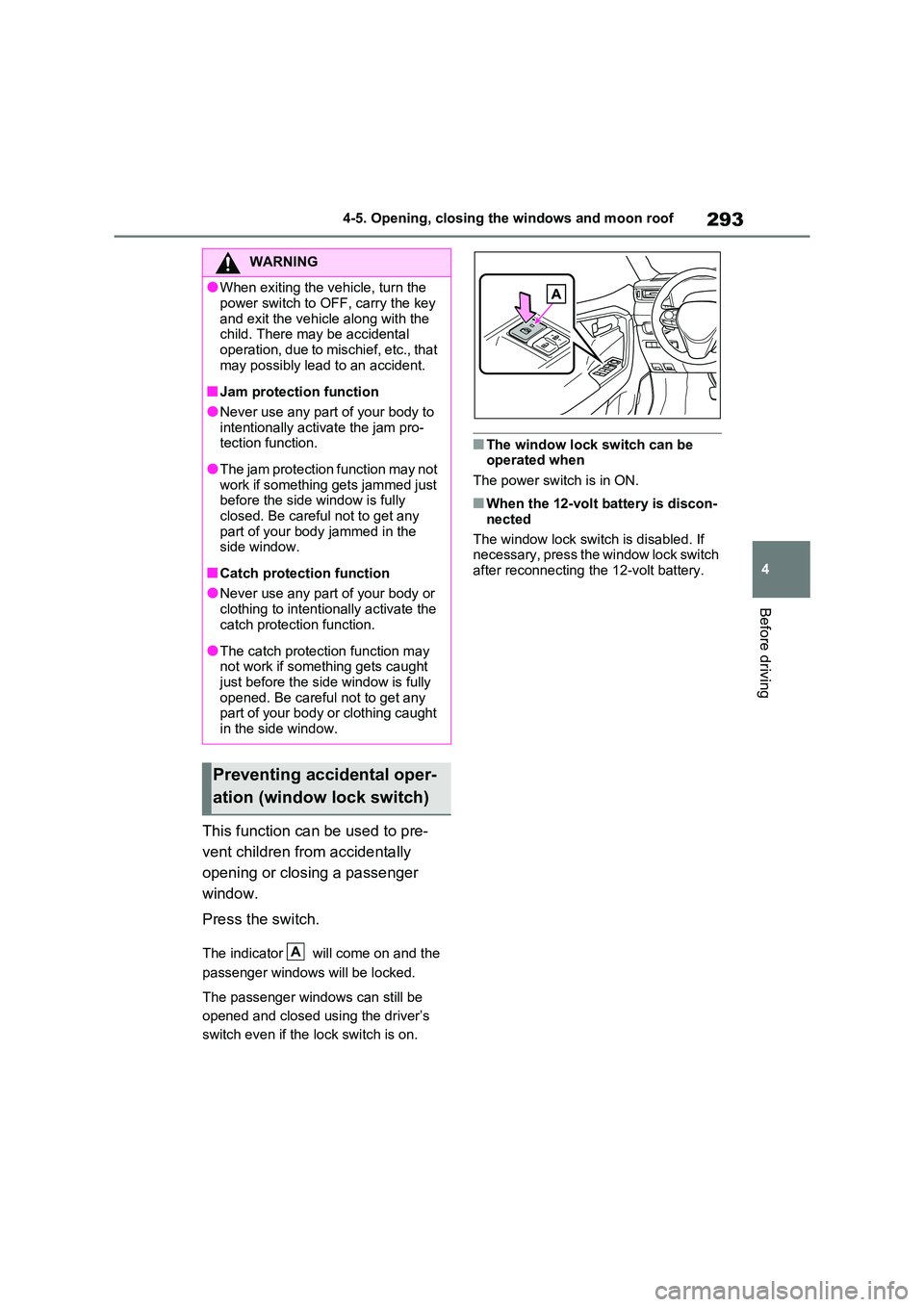
This function can be used to pre -
vent children from accidentally
opening or closing a passenger
window.
Press the switch.
The indicator will come on and the
passenger windows will be locked.
The passenger windows can still be
opened and closed us ing the driver’s
switch even if the lock switch is on.
■The window lock switch can be operated when
The power switch is in ON.
■When the 12-volt battery is discon -
nected
The window lock switch is disabled. If
necessary, press the window lock switch
after reconnecting the 12-volt battery.
WARNING
●When exiting the v ehicle, turn the
power switch to OFF, carry the key
and exit the vehicle along with the child. There may be accidental
operation, due to mischief, etc., that
may possibly lead to an accident.
■Jam protection function
●Never use any part of your body to
intentionally activ ate the jam pro- tection function.
●The jam protection function may not work if something gets jammed just
before the side window is fully
closed. Be careful not to get any part of your body jammed in the
side window.
■Catch protection function
●Never use any part of your body or
clothing to intentionally activate the catch protection function.
●The catch protection function may not work if something gets caught
just before the side window is fully
opened. Be careful not to get any part of your body or clothing caught
in the side window.
Preventing accidental oper -
ation (window lock switch)
A
Page 298 of 666
2964-5. Opening, closing the windows and moon roof
panoramic moon roof or electronic
sunshade closes and reopens. The panoramic moon roo f and electronic
sunshade will start to close.*
4 Check that the panoramic moon roof
and electronic sunshade are fully closed and release the switch.*: If the switch is released at the incor -
rect time, the procedure will have to
be performed again from the begin -
ning.
If the panoramic moon roof or electronic
sunshade does not fully close even after performing the above procedure cor -
rectly, have the vehicle inspected by any
authorized Toyota retailer or Toyota authorized repairer, or any reliable
repairer.
■Panoramic moon roof open
reminder function
A buzzer sounds and a message is
shown on the multi-in formation display
when the power switch is turned to OFF and the driver’s doo r is opened with the
panoramic moon roof open.
■Customization
Settings (e.g. linked door lock operation) can be changed. (Customizable fea -
tures: →P.636)
WARNING
Observe the following precautions.
Failure to do so may result in death or serious injury.
■Opening and closing the elec - tronic sunshade
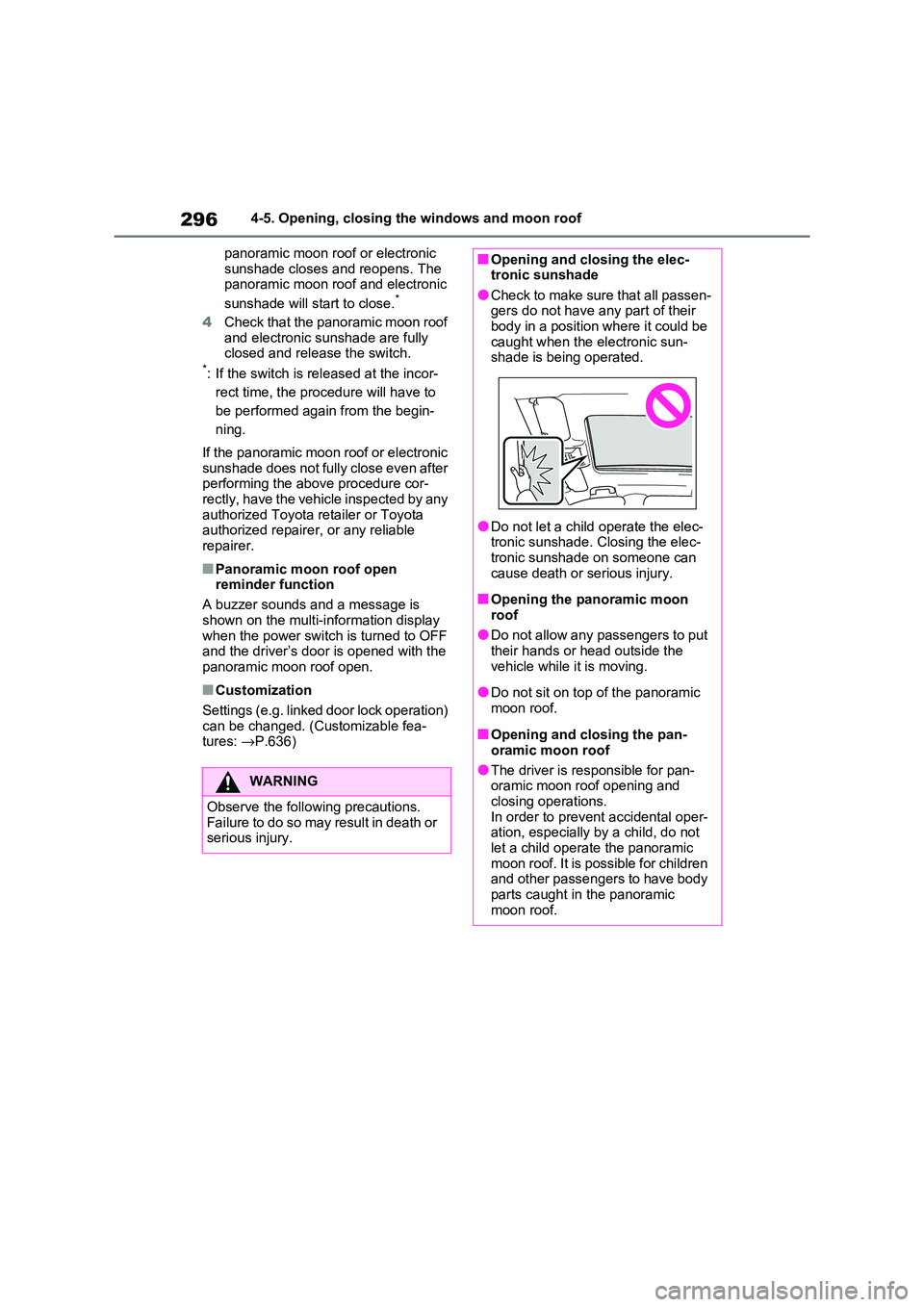
●Check to make sure that all passen -
gers do not have any part of their body in a position where it could be
caught when the electronic sun -
shade is being operated.
●Do not let a child operate the elec -
tronic sunshade. Closing the elec - tronic sunshade on someone can
cause death or serious injury.
■Opening the panoramic moon
roof
●Do not allow any passengers to put their hands or head outside the
vehicle while it is moving.
●Do not sit on top of the panoramic
moon roof.
■Opening and closing the pan -
oramic moon roof
●The driver is responsible for pan - oramic moon roof opening and
closing operations.
In order to prevent accidental oper - ation, especially by a child, do not
let a child operat e the panoramic
moon roof. It is possible for children and other passengers to have body
parts caught in the panoramic
moon roof.