2021 TOYOTA RAV4 HYBRID immobilizer
[x] Cancel search: immobilizerPage 2 of 752
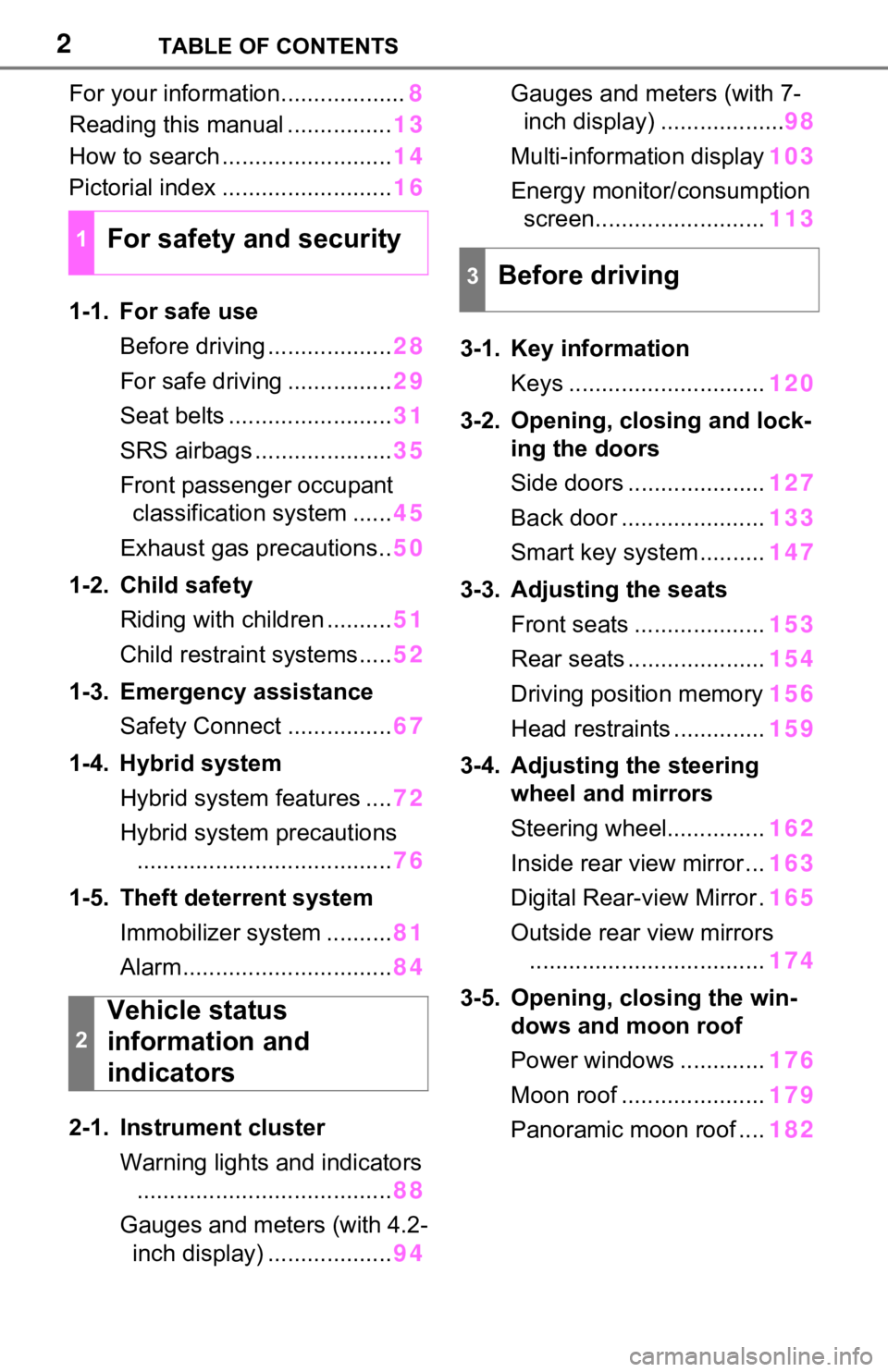
2TABLE OF CONTENTS
For your information...................8
Reading this manual ................ 13
How to search .......................... 14
Pictorial index .......................... 16
1-1. For safe use Before driving ................... 28
For safe driving ................ 29
Seat belts ......................... 31
SRS airbags ..................... 35
Front passenger occupant classification system ...... 45
Exhaust gas precautions.. 50
1-2. Child safety Riding with children .......... 51
Child restraint systems..... 52
1-3. Emergency assistance Safety Connect ................ 67
1-4. Hybrid system Hybrid system features .... 72
Hybrid system precautions ....................................... 76
1-5. Theft deterrent system Immobilizer system .......... 81
Alarm................................ 84
2-1. Instrument cluster Warning lights and indicators....................................... 88
Gauges and meters (with 4.2- inch display) ................... 94Gauges and meters (with 7-
inch display) ................... 98
Multi-information display 103
Energy monitor/ consumption
screen.......................... 113
3-1. Key information Keys .............................. 120
3-2. Opening, closing and lock- ing the doors
Side doors ..................... 127
Back door ...................... 133
Smart key system .......... 147
3-3. Adjusting the seats Front seats .................... 153
Rear seats ..................... 154
Driving position memory 156
Head restraints .............. 159
3-4. Adjusting the steering wheel and mirrors
Steering wheel............... 162
Inside rear view mirror ... 163
Digital Rear-view Mirror . 165
Outside rear view mirrors .................................... 174
3-5. Opening, closing the win- dows and moon roof
Power windows ............. 176
Moon roof ...................... 179
Panoramic moon roof .... 182
1For safety and security
2
Vehicle status
information and
indicators
3Before driving
Page 27 of 752

27
1
1
For safety and security
For safety and security
1-1. For safe useBefore driving ................. 28
For safe driving .............. 29
Seat belts ....................... 31
SRS airbags ................... 35
Front passenger occupant classification system .... 45
Exhaust gas precautions 50
1-2. Child safety Riding with children ........ 51
Child restraint systems... 52
1-3. Emergency assistance Safety Connect .............. 67
1-4. Hybrid system Hybrid system features .. 72
Hybrid system precautions ..................................... 76
1-5. Theft deterrent system Immobilizer sys tem ........81
Alarm.............................. 84
Page 81 of 752

811-5. Theft deterrent system
1
For safety and security
1-5.Theft deterrent system
Vehicles without smart key
system
The indicator light flashes after
the key has been removed from
the power switch to indicate that
the system is operating.
The indicator light goes off after
the registered key has been
inserted into the power switch to
indicate that the system has
been canceled.
Vehicles with smart key sys-
tem
The indicator light flashes after
the power switch has been
turned to OFF to indicate that
the system is operating.
The indicator light goes off after
the power switch has been
turned to ACC or ON to indicate
that the system has been can-
celed.
■System maintenance
The vehicle has a maintenance-free
type immobilizer system.
■Conditions that may cause the
system to malfunction
●If the grip portion of the key is in
contact with a metallic object
●If the key is in close proximity to or
touching a key to the security sys-
tem (key with a built-in transpon-
der chip) of another vehicle
Immobilizer system
The vehicle’s keys have
built-in transponder chips
that prevent the hybrid sys-
tem from starting if a key
has not been previously
registered in the vehicle’s
on-board computer.
Never leave the keys inside
the vehicle when you leave
the vehicle.
This system is designed to
help prevent vehicle theft but
does not guarantee absolute
security against all vehicle
thefts.
Operating the system
Page 82 of 752

821-5. Theft deterrent system
■Certification for the immobilizer system
For vehicles sold in t he U.S.A., Hawaii, American Samoa, Guam, Saipan
and Puerto Rico
For vehicles sold in Canada
Page 148 of 752

1483-2. Opening, closing and locking the doors
●When an exterior alarm sounds
once for 5 seconds
●When an interior alarm pings con-
tinuously
■Battery-saving function
The battery-saving function will be
activated in order to prevent the
electronic key battery and the 12-
volt battery from being discharged
while the vehicle is not in operation
for a long time.
●In the following situations, the
smart key system may take some
time to unlock the doors.
• The electronic key has been left in an area of approximately 6 ft. (2
m) of the outside of the vehicle for
10 minutes or longer.
• The smart key system has not been used for 5 days or longer.
●If the smart key system has not
been used for 14 days or longer,
the doors canno t be unlocked at
any doors except the driver’s
door. In this case, take hold of the
driver’s door handle, or use the
wireless remote control or the mechanical key, to unlock the
doors.
■Turning an electronic key to
battery-saving mode
●When battery-saving mode is set,
battery depletion is minimized by
stopping the electronic key from
receiving radio waves.
Press twice while pressing
and holding .
Confirm that the ele ctronic key indi-
cator flashes 4 times.
While the battery-saving mode is
set, the smart key system cannot be
used. To cancel the function, press
any of the electronic key buttons.
●Electronic keys that will not be
used for long periods of time can
be set to the battery-saving mode
in advance.
■Conditions affecting operation
The smart key system uses weak
radio waves. In the following situa-
tions, the communication between
the electronic key and the vehicle
may be affected, preventing the
smart key system, wireless remote
control and immobilizer system from
operating properly.
(Ways of coping: P.670)
●When the electronic key battery is
depleted
●Near a TV tower, electric power
plant, gas station, radio station,
large display, airpo rt or other facil-
ity that generates strong radio
waves or electrical noise
●When the electronic key is in con-
SituationCorrection pro-
cedure
An attempt was
made to lock the
vehicle while a
door was open.Close all of the
doors and lock
the doors again.
SituationCorrection pro-cedure
The power
switch was
turned to ACC
while the driver’s
door was open
(or the driver’s
door was opened
while the power
switch was in
ACC).
Turn the power
switch to OFF
and close the
driver’s door.
Page 210 of 752

2104-2. Driving procedures
4-2.Driving procedures
1Pull the parking brake switch
to check that the parking
brake is set. ( P.224)
The parking brake indicator will
come on.
2Check that the shift lever is in
P.
3 Firmly depress the brake
pedal.
4 Turn the power switch to
START to start the hybrid
system.
If the “READY” indicator turns on,
the hybrid system will operate nor-
mally.
Continue depressing the brake
pedal until the “READY” indicator is
illuminated.
5Check that the “READY” indi-
cator is illuminated.
The vehicle will not move when the
“READY” indicator is off.
■If the hybrid system does not
start
The immobilizer system may not
have been deactivated. ( P.81)
Contact your Toyota dealer.
■When the steering lock cannot
be released
When starting the hybrid system,
the power switch may seem stuck in
OFF. To free it, turn the key while
turning the steering wheel slightly
left and right.
■When the ambient temperature
is low, such as during winter
driving conditions
●When starting th e hybrid system,
the flashing time of the “READY”
indicator may be long. Leave the
vehicle as it is until the “READY”
indicator is steady on, as steady
means the vehicle is able to move.
●When the hybrid battery (traction
battery) is extremely cold (below
approximately -22°F [-30°C])
under the influenc e of the outside
temperature, it ma y not be possi-
ble to start the hybrid system. In
this case, try to start the hybrid
system again after the tempera-
ture of the hybrid battery
increases due to the outside tem-
perature increase etc.
■Sounds and vibrations specific
to a hybrid vehicle
P.74
■If the “READY” indicator does
not come on
In the event that the “READY” indi-
cator does not come on even after
performing the proper procedures
Power (ignition)
switch (vehicles with-
out smart key system)
Starting the hybrid sys-
tem
Page 213 of 752

2134-2. Driving procedures
4
Driving
from any power switch mode.
5Check that the “READY” indi-
cator is illuminated.
The vehicle will not move when the
“READY” indicator is off.
■If the hybrid system does not
start
●The immobilizer system may not
have been deactivated. ( P.81)
Contact your Toyota dealer.
●If a message related to start-up is
shown on the multi-information
display, read the message and fol-
low the instructions.
■When the ambient temperature
is low, such as during winter
driving conditions
●When starting the hybrid system,
the flashing time of the “READY”
indicator may be long. Leave the
vehicle as it is until the “READY”
indicator is steady on, as steady
means the vehicle is able to move.
●When the hybrid battery (traction
battery) is extremely cold (below
approximately -22°F [-30°C])
under the influence of the outside
temperature, it may not be possi-
ble to start the h ybrid system. In
this case, try to start the hybrid
system again after the tempera-
ture of the hybrid battery
increases due to the outside tem-
perature increase etc.
■Sounds and vibrations specific
to a hybrid vehicle
P.74
■If the 12-volt b attery is dis-
charged
The hybrid system cannot be
started using the smart key system.
Refer to P.672to r estart the hybrid
system.
■Electronic key battery depletion
P.120
■Conditions affecting operation
P.148
■Note for the entry function
P.149
■Steering lock function
●After turning the power switch to
OFF and opening and closing the
doors, the steeri ng wheel will be
locked due to the steering lock
function. Operating the power
switch again automatically can-
cels the steering lock.
●When the steering lock cannot be
released, “Push power switch
while turning the steering wheel in
either direction” will be displayed
on the multi-information display.
Check that the shift lever is set in
P. Press the power switch shortly
and firmly while turning the steer-
ing wheel left and right.
●To prevent the steering lock motor
from overheating , the motor may
be suspended if the hybrid system
is turned on and off repeatedly in
a short period of ti me. In this case,
refrain from operating the power
switch. After about 10 seconds,
the steering lo ck motor will
resume functioning.
Page 666 of 752

6668-2. Steps to take in an emergency
One of the following may be the
cause of the problem:
The electronic key may not be
functioning properly.
( P.670)
There may not be sufficient
fuel in the vehicle’s tank.
Refuel the vehicle. ( P.241)
There may be a malfunction
in the immobilizer system.
( P.81)
There may be a malfunction
in the steering lock system.
The hybrid system may be
malfunctioning due to an elec-
trical problem such as elec-
tronic key battery depletion or
a blown fuse. However,
depending on the type of mal-
function, an interim measure
is available to start the hybrid
system. ( P.668)
There is a possibility that the
temperature of the hybrid bat-
tery (traction battery) is
extremely low (approximately
below -22°F [-30°C]). ( P.77,
210, 213)
One of the following may be the
cause of the problem:
The 12-volt battery may be
discharged. ( P.672)
The 12-volt battery terminal
connections may be loose or
corroded. ( P.589)
One of the following may be the
cause of the problem:
The 12-volt battery may be
discharged. ( P.672)
One or both of the 12-volt bat-
tery terminals may be discon-
nected. ( P.589)
Contact your Toyota dealer if
the problem cannot be repaired,
or if repair procedures are
unknown.
If the hybrid system
will not start
Reasons for the hybrid sys-
tem not starting vary
depending on the situation.
Check the following and
perform the appropriate
procedure:
The hybrid system will not
start even though the cor-
rect starting procedure is
being followed ( P.210,
212)
The interior lights and
headlights are dim, or the
horn does not sound or
sounds at a low volume
The interior lights and
headlights do not turn on,
or the horn does not
sound