Page 175 of 272
175
In the event of a breakdown
8
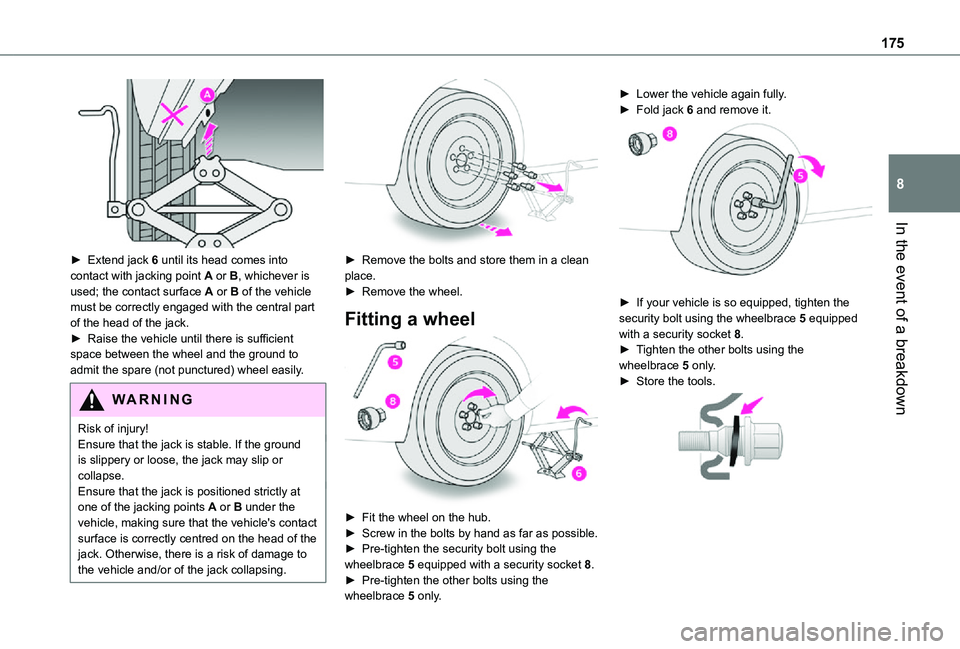
► Extend jack 6 until its head comes into contact with jacking point A or B, whichever is used; the contact surface A or B of the vehicle must be correctly engaged with the central part of the head of the jack.► Raise the vehicle until there is sufficient space between the wheel and the ground to admit the spare (not punctured) wheel easily.
WARNI NG
Risk of injury!
Ensure that the jack is stable. If the ground is slippery or loose, the jack may slip or collapse.Ensure that the jack is positioned strictly at one of the jacking points A or B under the vehicle, making sure that the vehicle's contact surface is correctly centred on the head of the jack. Otherwise, there is a risk of damage to the vehicle and/or of the jack collapsing.
► Remove the bolts and store them in a clean place.► Remove the wheel.
Fitting a wheel
► Fit the wheel on the hub.► Screw in the bolts by hand as far as possible.► Pre-tighten the security bolt using the wheelbrace 5 equipped with a security socket 8.► Pre-tighten the other bolts using the wheelbrace 5 only.
► Lower the vehicle again fully.► Fold jack 6 and remove it.
► If your vehicle is so equipped, tighten the security bolt using the wheelbrace 5 equipped with a security socket 8.► Tighten the other bolts using the wheelbrace 5 only.► Store the tools.
Page 176 of 272
176
NOTIC E
Fitting a steel or "space-saver" type spare wheelIf the vehicle is equipped with alloy wheels, the washers do not make contact with the steel or "space-saver" type spare wheel. The wheel is secured by the conical contact of each bolt.
WARNI NG
After changing a wheelStow the punctured wheel in the carrier.Go to a TOYOTA dealer or a qualified workshop as soon as possible.Have the punctured tyre examined. After inspection, the technician will advise you on whether the tyre can be repaired or if it must be replaced.
NOTIC E
Some driving aid functions should be disabled, e.g. the Active Safety Brake.
NOTIC E
If your vehicle has tyre under-inflation detection, check the tyre pressures and reinitialise the system.For more information on Under-inflation detection, refer to the corresponding section.
NOTIC E
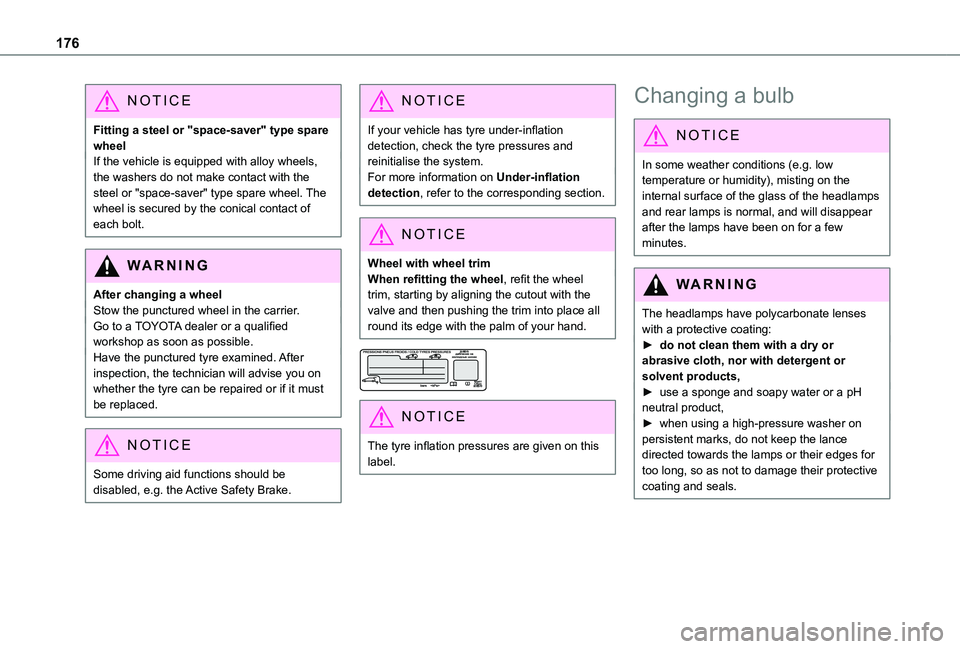
Wheel with wheel trimWhen refitting the wheel, refit the wheel trim, starting by aligning the cutout with the valve and then pushing the trim into place all round its edge with the palm of your hand.
NOTIC E
The tyre inflation pressures are given on this label.
Changing a bulb
NOTIC E
In some weather conditions (e.g. low temperature or humidity), misting on the internal surface of the glass of the headlamps and rear lamps is normal, and will disappear after the lamps have been on for a few minutes.
WARNI NG
The headlamps have polycarbonate lenses with a protective coating:► do not clean them with a dry or abrasive cloth, nor with detergent or solvent products,► use a sponge and soapy water or a pH neutral product,► when using a high-pressure washer on persistent marks, do not keep the lance
directed towards the lamps or their edges for too long, so as not to damage their protective coating and seals.
Page 194 of 272
194
Identification markings
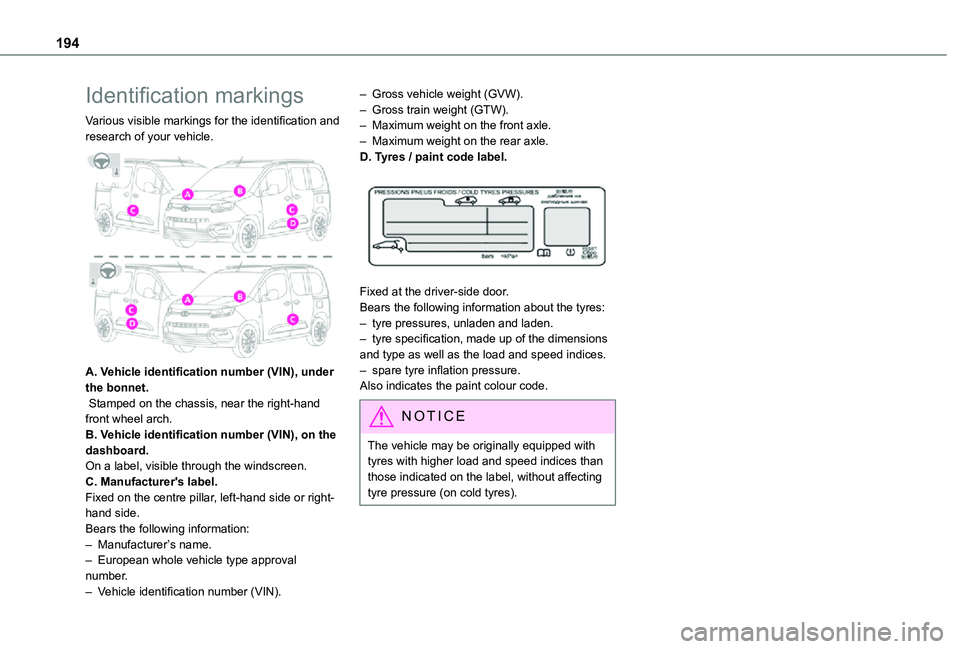
Various visible markings for the identification and research of your vehicle.
A. Vehicle identification number (VIN), under the bonnet. Stamped on the chassis, near the right-hand front wheel arch.B. Vehicle identification number (VIN), on the dashboard.On a label, visible through the windscreen.C. Manufacturer's label.Fixed on the centre pillar, left-hand side or right-hand side.Bears the following information:– Manufacturer’s name.
– European whole vehicle type approval number.– Vehicle identification number (VIN).
– Gross vehicle weight (GVW).– Gross train weight (GTW).– Maximum weight on the front axle.– Maximum weight on the rear axle.D. Tyres / paint code label.
Fixed at the driver-side door.Bears the following information about the tyres:– tyre pressures, unladen and laden.– tyre specification, made up of the dimensions and type as well as the load and speed indices.– spare tyre inflation pressure.Also indicates the paint colour code.
NOTIC E
The vehicle may be originally equipped with tyres with higher load and speed indices than those indicated on the label, without affecting tyre pressure (on cold tyres).
Page 250 of 272
250
A
ABS 78Accessories 75, 104Access to the 3rd row 46Access to the spare wheel 173Active Safety Brake 133–135AdBlue® 164AdBlue® tank 166Additive, Diesel 162–163Adjusting headlamps 70Adjusting head restraints 47Adjusting seat 40, 46Adjusting the air distribution 57–58Adjusting the air flow 57–58Adjusting the date 220, 246Adjusting the height and reach of the steering wheel 42Adjusting the lumbar support 40Adjusting the temperature 57–58Adjusting the time 220, 246Advanced Grip Control 80–81
Advice on care and maintenance 167Advice on driving 7, 99–100Airbags 86, 88–89, 91Airbags, curtain 87, 89Airbags, front 86, 88, 92Airbags, lateral 87–88Air conditioning 55, 58, 59, 61Air conditioning, digital 60Air conditioning, dual-zone automatic 57–58
Air conditioning, electronic (with display screen) 61Air conditioning, manual 56–57Air intake 57–58Air vents 55Alarm 34–36Android Auto connection 236Anti-lock braking system (ABS) 78–79Antitheft / Immobiliser 25Apple CarPlay connection 216, 235Applications 237Armrest 40Armrest, front 48Assistance call 76–77Assistance, emergency braking 79, 135Audible warning 78Audio streaming (Bluetooth) 201, 214, 241
B
Battery 157, 184, 187
Battery, 12 V 162, 184–186Battery, charging 186Battery, remote control 30, 64Bench seat, one-piece, fixed 46Blind spot monitoring system 140Blind spot monitoring system, active 141Blind spot sensors 139, 141Bluetooth (hands-free) 202–203, 217–218, 242Bluetooth (telephone) 217–218, 242–243
Bodywork 168Bonnet 158–159Boot lid 27, 29Bottle holder 48Brake discs 163Brake lamps 180Brakes 163Braking assistance system 78–79Braking, automatic emergency 133–135Braking, dynamic emergency 106–108Brightness 219Bulbs 177Bulbs (changing) 176–178Bulbs (changing, type) 177
C
Capacity, fuel tank 151–152Cap, fuel filler 152Care of the bodywork 168CD 201, 214
CD, MP3 201, 214Central locking 24, 27Changing a bulb 176–178Changing a fuse 182–184Changing a wheel 170, 173Changing a wiper blade 72–73Changing the remote control battery 30Charger, induction 51Charger, wireless 51Checking the levels 160–161
Page 255 of 272
255
Alphabetical index
Telephone, Bluetooth with voice recognition 205Temperature, coolant 16Three flashes (direction indicators) 67Time (setting) 220, 246TMC (Traffic info) 232Tools 169Topping-up AdBlue® 166Top Rear Vision 145Towbar 80, 154–155Towed loads 191–193Towing another vehicle 188–189Towing device 155Towing eye 189Traction control (ASR) 79, 81Traffic information (TA) 198Traffic information (TMC) 232Trailer 80, 154Trailer stability assist (TSA) 80Trajectory control systems 78–79Triangle, warning 55Trip computer 21–22
Type of bulbs 177Tyres 164, 194Tyre under-inflation detection 11 6, 172
U
Under-inflation (detection) 11 6Unlocking 23, 25–26Unlocking from the inside 31
Updating the date 220, 246Updating the time 220, 246USB 200, 214, 235, 240
V
Ventilation 55–57, 61–63Video 240Voice commands 226–229
W
Warning and indicator lamps 11Warning lamp, driver''s seat belt not fastened 84Warning lamps 11Warning lamp, seat belts 84Warnings and indicators 11Washer jets, heated 60Washing 120
Washing (advice) 167–168Weights 191–193Welcome lighting 24Wheel, spare 11 6, 164, 169–170, 173, 176Windows, rear doors 38Windscreen, heated 60–61Windscreen wipers 71Wiper blades (changing) 72–73Wiper, rear 72Wipers 71, 73–74
Wipers, automatic rain sensitive 71, 73–74
Page:
< prev 1-8 9-16 17-24