2021 SUBARU OUTBACK eyesight
[x] Cancel search: eyesightPage 2 of 172

© 2020 Subaru of America, Inc. Printed in USA. All rights reserved. Contents may not be
reproduced in whole or in part without prior written permission of publisher\
. Specifications
in this Guide are based on the latest product information available at the time of
publication. Some images shown are for illustration purposes only. Some equipment
shown in photography within this Guide is optional at extra cost. Specifi\
c options may
be available only in combination with other options. Specific combinat\
ions of equipment
or features may vary from time to time, and by geographic area. Subaru of America, Inc.
reserves the right to change or discontinue at any time, without notice: \
Prices, colors,
materials, equipment, accessories, specifications, models and packages\
, without incurring
any obligation to make the same or similar changes on vehicles previously sold. Colors
shown may vary due to reproduction and printing processes. Subaru of America, Inc.
is not responsible for typographical errors. Aha
™ is a trademark of Harman International
Industries, Incorporated. Alcantara® is a registered trademark of Alcantara S.p.A., and
Alcantara is produced by the Toray Group. App Store® is a registered trademark of
Apple, Inc. Apple® is a registered trademark of Apple, Inc. Apple CarPlay® is a registered
trademark of Apple, Inc. Android Auto™ is a trademark of Google, LLC. BBS® is a registered
trademark of BBS Kraftahrzeugtechnik, AG. Bluetooth® is a registered trademark of
Bluetooth SIG, Inc. Brembo® is a registered trademark of Freni Brembo, S.p.A. GreenEdge®
is a registered trademark of Harman International Industries, Incorporated. Glympse® is a
registered trademark of Glympse, Inc. Grand Luxe® is a registered trademark of Seiren Co.,
Ltd. HARMAN® is a registered trademark of HARMAN International Industries, Incorporated.
Harman Kardon® is a registered trademark of Harman International Industries, Incorporated.
Quantum logic™ is a trademark of Harman International Industries, Incorporated. HD
Radio® is a registered trademark of iBiquity Digital Corporation. HomeLink® and the
HomeLink® house icon are registered trademarks of Gentex Corporation. iHeartRadio®
is a registered trademark of iHeartMedia, Inc. iPod® is a registered trademark of Apple,
Inc. iTunes® is a registered trademark of Apple, Inc. Magellan® is a registered trademark
of MiTAC International Corporation. Michelin® is a registered trademark of Compagnie
Générale des Etablissments Michelin. Metal-Matrix Diaphragm (MMD®) is a registered
trademark of Harman International Industries, Incorporated. MirrorLink™ is a trademark of
Car Connectivity Consortium, LLC. Pandora® is a registered trademark of Pandora Media,
Inc. SACHS® is a registered trademark of ZF Friedrichshafen AG. Siri® is a registered
trademark of Apple, Inc. Smart Way® is a registered trademark of the U.S. Environmental
Protection Agency. Stitcher™ is a trademark of Stitcher™, Inc. TomTom® is a registered
trademark of TomTom International BV. TORSEN LSD® is a registered trademark of JTEKT
TORSEN North America, Inc. SiriusXM® All Access Radio is a registered trademark of
Sirius XM Radio, Inc. SiriusXM Traffic® is a registered trademark of Sirius XM Radio, Inc.
SiriusXM Travel Link® is a registered trademark of SiriusXM Radio, Inc. Ultrasuede® is a
registered trademark of Toray Industries, Inc. Yelp® is a registered trademark of Yelp, Inc.
Ascent, DriverFocus, and StarDrive, are trademarks of Subaru of America, Inc. Added
Security, Crosstrek, Forester, Outback, StarTex and XV Crosstrek are registered trademarks
of Subaru of America, Inc. BRZ, Confidence in Motion, EyeSight, Impreza, Lineartronic,
Legacy, S209, Subaru, SUBARU STARLINK
®, SUBARU BOXER, tS (Design), WRX, STI and
X-MODE are registered trademarks of Subaru Corporation.
Page 4 of 172
PASSENGER/CARGO AREAS
FOLDING THE REAR SEATS...51
CHILD SAFETY LOCKS.......52
LATCH/ANCHOR............53
REAR SEAT REMINDER.......54
CARGO COVER.............55
SPARE TIRE................56
ENGINE COMPARTMENT
HOOD PROP................57
2.5L ENGINE................58
2.4L TURBO ENGINE.........59
ADDITIONAL SPECIFICATIONS
NEW VEHICLE BREAK-IN......60
ENGINE OIL................60
ENGINE OIL CAPACITY.......60
ROOF RAIL CAPACITY.......61
TRAILER TOWING CAPACITY . . 61
TIRE PRESSURE MONITORING
SYSTEM (TPMS).............62
STARLINK OVERVIEW
OVERVIEW OF YOUR MULTIMEDIA
SYSTEM...................65
BUTTONS..................67
TOUCHSCREEN.............68
STEERING WHEEL CONTROLS . . 69
VOICE RECOGNITION........70
STARLINK HOME
HOME SCREEN ICONS.......72
REARRANGING ICONS.......73
ADDING SHORTCUTS........74
CREATING A DRIVER PROFILE
CREATING A DRIVER PROFILE . . 76
HOW TO CREATE A PROFILE . . 76
MULTIMEDIA
RADIO.....................80
MEDIA.....................82
PHONE
PAIRING A PHONE...........83
MAKING A CALL.............84
RECEIVING A CALL..........85
TEXT MESSAGES............86
APPS
SUBARU STARLINK®IN-VEHICLE
APPS......................87
SUBARU STARLINK
®MOBILE
APP.......................88
MYSUBARU................90
MAPS
MAPS OVERVIEW............91
STARLINK SAFETY AND
SECURITY
SAFETY AND SECURITY
OVERVIEW.................92
ENROLLMENT..............93
MYSUBARU INTEGRATION....94
SUBARU STARLINK
®WI-FI
HOTSPOT..................94
SETTINGS AND UPDATES
SETTINGS AND UPDATES
OVERVIEW.................95
SOUND....................96
PHONE....................97
MAPS/NAVIGATION..........98
CLOCK....................99
EYESIGHT
EYESIGHT®OVERVIEW......100
OPERATION...............101
FUNCTIONS...............101
STEERING WHEEL
CONTROLS................107
EYESIGHT
®ASSIST MONITOR
(EAM).....................109
LANE DEPARTURE WARNING AND
PRE-COLLISION BRAKING
SYSTEM OFF..............110
DRIVER ASSIST
TECHNOLOGIES
REAR-VISION CAMERA......111
FRONT VIEW MONITOR.....112
BLIND-SPOT DETECTION (BSD)/
REAR CROSS-TRAFFIC ALERT
(RCTA)...................112
HIGH BEAM ASSIST (HBA)...113
STEERING RESPONSIVE
HEADLIGHTS (SRH).........114
TABLE OF CONTENTS
2
Page 5 of 172

REVERSE AUTOMATIC BRAKING
(RAB)....................114
DRIVERFOCUS DISTRACTION
MITIGATION SYSTEM
DRIVERFOCUS®OVERVIEW . . 115
DRIVERFOCUS®
COMPONENTS.............115
DROWSY/INATTENTIVE
WARNINGS................117
DRIVER PROFILE/CONVENIENCE
SETTINGS.................117
DRIVER MONITORING SYSTEM
OFF......................119
CARE AND LIMITATIONS
STEREO CAMERA
PRECAUTIONS.............120
WINDSHIELD GLASS AND
DASHBOARD..............120
FRONT VIEW
OUTBACK.................121
EYESIGHT DISCLAIMER
EYESIGHT®DISCLAIMER....122
HOW TO APPENDIX
HOW TO OVERVIEW.........123
SETTING THE CLOCK.......123
MEMORY HEIGHT..........128
MEMORY DRIVER’S SEAT....129
BLUETOOTH
®PAIRING......130
ANDROID AUTO™..........136
APPLE CARPLAY
®..........137
WI-FI.....................139
MAPS....................142
FIRMWARE AND SOFTWARE
UPDATES.................161
INDEX.....................162
TABLE OF CONTENTS
3
Page 6 of 172

WELCOME
Congratulations on choosing a Subaru Outback and welcome to the Subaru family!
Subaru is more than a car company™. We are committed to making the world a better
place, and the Subaru Love Promise is our vision to show love and respect to all people at
every interaction with Subaru. We believe in building lifelong relationships with our
customers, earning your trust and exceeding your expectations by providing customer
service with integrity and compassion.
This Getting Started Guide will introduce you to your new Subaru Outback by providing
information on the basic operation and key features of your Subaru as well as the
STARLINK
®and EyeSight®systems in your vehicle.
IMPORTANT SAFETY INFORMATION
The Getting Started Guide is not intended as a substitute for the Owner’s Manuals. We
strongly encourage you to review the vehicle, STARLINK®, and EyeSight®Owner’s
Manuals to ensure complete understanding.
As part of routine maintenance and continuous improvement, Subaru releases updates to
the firmware and software in your vehicle. Following the installation of these updates, the
screens and menus in your vehicle may differ from what appears in this guide.
For the most current information on firmware and software updates, please refer to
the “Owner’s Resources” in the following section or contact your Subaru Retailer.
PURPOSE OF THIS GUIDE
4
Page 38 of 172

ADVANCED ADAPTIVE CRUISE CONTROL
1Adaptive Cruise Control On/Off
2Lane Centering
3Increase Distance
4Decrease Distance
5Resume (RES)/Increase Speed and Set
(SET)/Decrease Speed
For more information on the Advanced
Adaptive Cruise Control switches, please refer
to page 107 or the EyeSight
®Owner’s Manual.
I SWITCH
The “i” switch and arrows allow you to cycle
through useful driving information in the
Combination Meter Display (CMD) such as fuel
consumption, driving time, speed, and tire
pressure, among others. You can change the
information displayed by pulling the up and
down arrows.
Important vehicle information or warning
screens can be displayed when the "i"
appears in the CMD. Pull and hold the “i”
switch to access the important messages. Use
the arrows to cycle through multiple messages.
For more information, please refer to “Combination Meter Display” in your Subaru
Owner’s Manual.
CONTROLS
36
Page 102 of 172

EYESIGHT®OVERVIEW
Your Subaru features a variety of safety
systems that are the culmination of everything
Subaru Engineers know about safety. These
systems are referred to as “Driver Assist
Technologies” and add confidence to every
trip you and your passengers take. Working
together, these systems provide enhanced
awareness, safety, and convenience in front,
to the sides, and behind your Subaru. Subaru
Driver Assist Technologies include:
• EyeSight
®Driver Assist Technology
• Rear-Vision Camera
• Pre-Collision Braking
• Front View Monitor
• Blind-Spot Detection (BSD)
• Rear Cross-Traffic Alert (RCTA)
• Reverse Automatic Braking (RAB)
• High Beam Assist (HBA)
• Lane Departure Prevention
• Steering Responsive Headlights (SRH)
EYESIGHT
100
Page 103 of 172

OPERATION
EyeSight®is a driver assist technology that
uses dual color cameras to serve as an extra
pair of eyes on the road ahead to identify
vehicles in front, pedestrians, traffic lanes, or
other objects. If need be, the EyeSight
®
system can apply the brakes and/or reduce
engine power to help avoid or reduce the
severity of a collision. During these events, the
system will provide audible and visual alerts to
assist you in making decisions.
Since the characteristics and limitations of the
EyeSight
®color cameras are similar to human
eyes, it is important that the cameras,
windshield, and area in front of the cameras
are treated with special care. Please refer to
“Care and Limitations” on page 120 for more
details.
FUNCTIONS
The EyeSight®system features several distinct functions designed to provide extra
awareness, improve safety, reduce fatigue, and add peace of mind every time you drive
your Subaru. EyeSight
®functions include:
• Pre-Collision Braking (PCB)
• Pre-Collision Brake Assist
• Pre-Collision Throttle Management
• Lane Departure Warning (LDW)
• Lane Sway Warning
• Lane Departure Prevention
• Advanced Adaptive Cruise Control
• Advanced Adaptive Cruise Control (AACC)
• Lane Centering
• Conventional Cruise Control
• Lead Vehicle Start Alert
EyeSight Cameras (inside)
EyeSight Cameras (outside)
EYESIGHT
101
Page 104 of 172
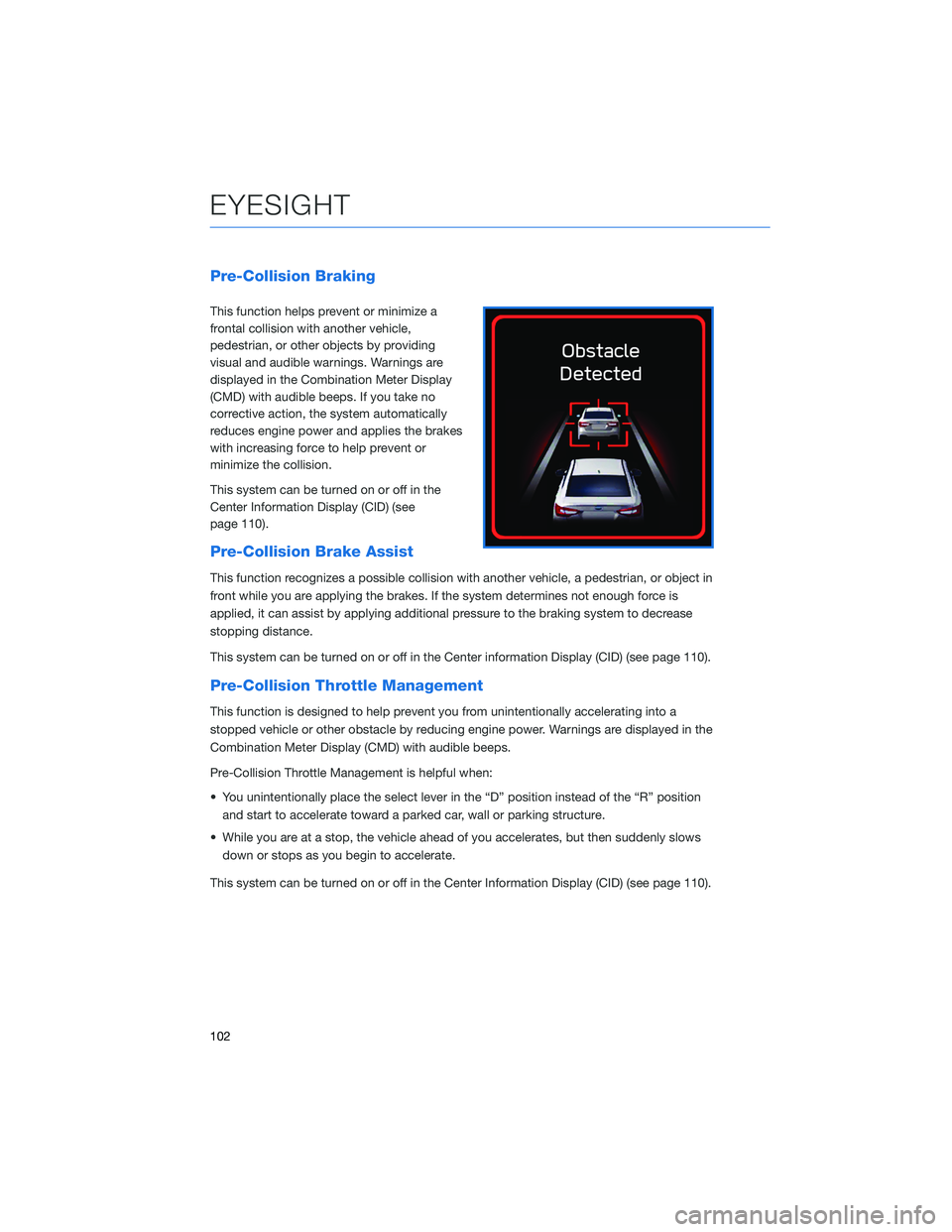
Pre-Collision Braking
This function helps prevent or minimize a
frontal collision with another vehicle,
pedestrian, or other objects by providing
visual and audible warnings. Warnings are
displayed in the Combination Meter Display
(CMD) with audible beeps. If you take no
corrective action, the system automatically
reduces engine power and applies the brakes
with increasing force to help prevent or
minimize the collision.
This system can be turned on or off in the
Center Information Display (CID) (see
page 110).
Pre-Collision Brake Assist
This function recognizes a possible collision with another vehicle, a pedestrian, or object in
front while you are applying the brakes. If the system determines not enough force is
applied, it can assist by applying additional pressure to the braking system to decrease
stopping distance.
This system can be turned on or off in the Center information Display (CID) (see page 110).
Pre-Collision Throttle Management
This function is designed to help prevent you from unintentionally accelerating into a
stopped vehicle or other obstacle by reducing engine power. Warnings are displayed in the
Combination Meter Display (CMD) with audible beeps.
Pre-Collision Throttle Management is helpful when:
• You unintentionally place the select lever in the “D” position instead of the “R” position
and start to accelerate toward a parked car, wall or parking structure.
• While you are at a stop, the vehicle ahead of you accelerates, but then suddenly slows
down or stops as you begin to accelerate.
This system can be turned on or off in the Center Information Display (CID) (see page 110).
EYESIGHT
102