2021 SUBARU OUTBACK eyesight
[x] Cancel search: eyesightPage 115 of 172
Rear Cross-Traffic Alert (RCTA)
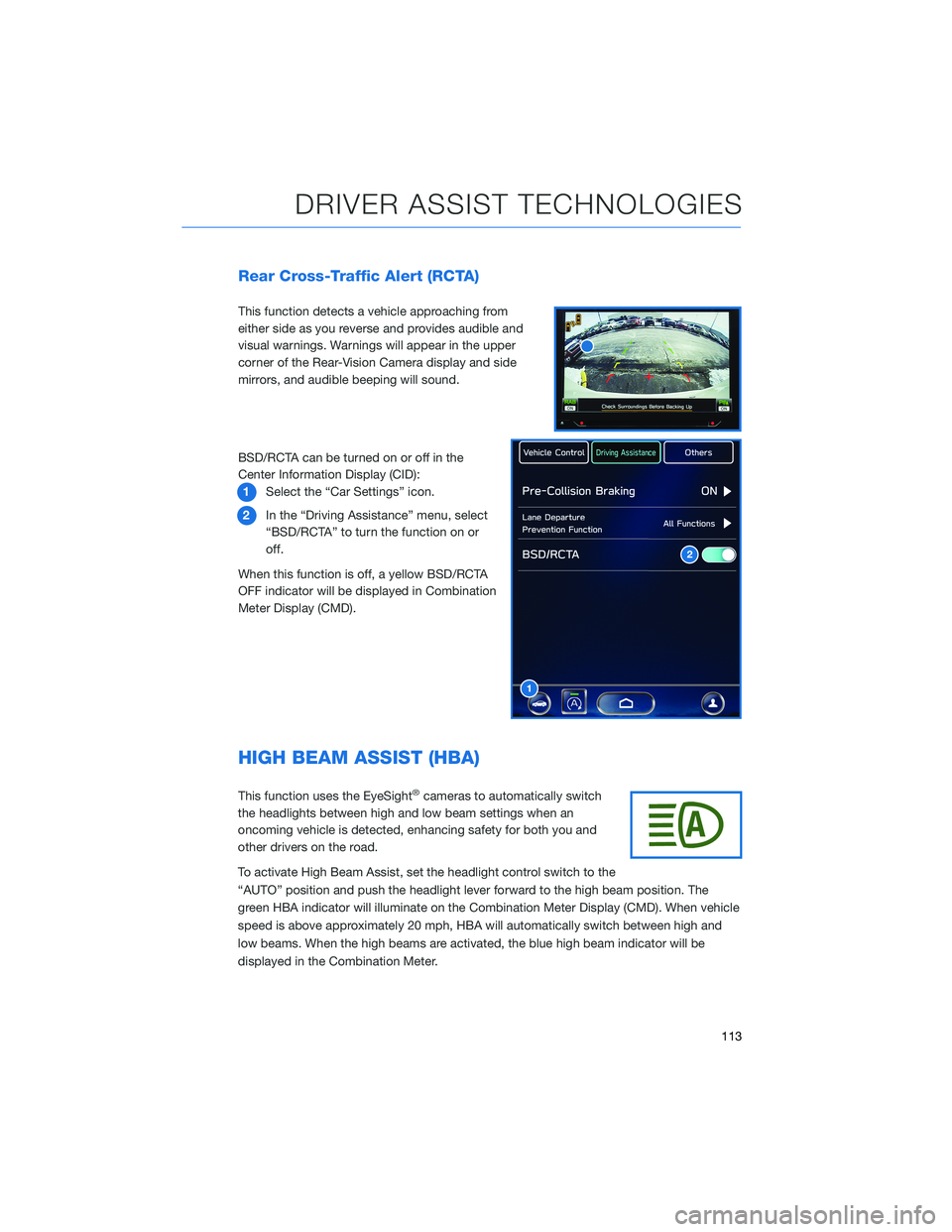
This function detects a vehicle approaching from
either side as you reverse and provides audible and
visual warnings. Warnings will appear in the upper
corner of the Rear-Vision Camera display and side
mirrors, and audible beeping will sound.
BSD/RCTA can be turned on or off in the
Center Information Display (CID):
1Select the “Car Settings” icon.
2In the “Driving Assistance” menu, select
“BSD/RCTA” to turn the function on or
off.
When this function is off, a yellow BSD/RCTA
OFF indicator will be displayed in Combination
Meter Display (CMD).
HIGH BEAM ASSIST (HBA)
This function uses the EyeSight®cameras to automatically switch
the headlights between high and low beam settings when an
oncoming vehicle is detected, enhancing safety for both you and
other drivers on the road.
To activate High Beam Assist, set the headlight control switch to the
“AUTO” position and push the headlight lever forward to the high beam position. The
green HBA indicator will illuminate on the Combination Meter Display (CMD). When vehicle
speed is above approximately 20 mph, HBA will automatically switch between high and
low beams. When the high beams are activated, the blue high beam indicator will be
displayed in the Combination Meter.
1
2
DRIVER ASSIST TECHNOLOGIES
113
Page 117 of 172

DRIVERFOCUS®OVERVIEW(if equipped)
Your Subaru features DriverFocus®, a state-of-the-art system that helps reduce distracted
driving for both new and experienced drivers.
Working with our award-winning EyeSight
®Driver Assist Technology, DriverFocus®is like
having an attentive co-pilot along for the ride, available to give a helpful alert if a driver
becomes distracted or drowsy. For added convenience, DriverFocus
®can also recognize
up to five drivers and remember their preferences, such as seat position, climate settings,
and outside mirror positions.
For more information, please refer to “Driver Monitoring System” in your Owner’s
Manual.
DRIVERFOCUS®COMPONENTS
Camera
DriverFocus uses a near-infrared camera to
focus on the driver’s eyes and head positions.
Center Information Display (CID)
The Center Information Display (CID) is used
to register and delete users. Navigate the CID
screens using the touch input on the CID
screen.
DRIVERFOCUS DISTRACTION MITIGATION SYSTEM
115
Page 122 of 172

STEREO CAMERA PRECAUTIONS
Your EyeSight®stereo cameras are precision components that must be kept free from
obstruction and contamination, such as fingerprints or cleaning solutions. When the
system detects that the stereo camera lenses are impaired, a malfunction indicator will be
displayed and EyeSight
®functions will not be available.
When you are in the vicinity of the EyeSight
®stereo cameras, always observe the following
precautions:
• Do not touch or attempt to clean the EyeSight
®camera lenses inside the vehicle. Extra
caution should be used when cleaning the inside of the windshield. Over-spray from
cleaning solutions may impair or even damage the camera lenses. Please inform others
who may attempt to clean the windshield, such as car wash staff, of this precaution.
• Electronic Toll Collection devices, such as EZPass
TM, must be installed in an area that
does not obstruct the stereo cameras' field of vision. See "Prohibited Area" on
page 121.
• Adjust the rearview mirror so it does not obstruct the stereo cameras' field of vision.
• Do not install any interior rearview mirror accessories, such as a wide-type mirror or
hanging objects. Only approved Genuine SUBARU accessories may be installed.
For more detailed information, please refer to your EyeSight®Owner’s Manual.
WINDSHIELD GLASS AND DASHBOARD
Since the characteristics and limitations of the EyeSight®stereo cameras are similar to
human eyes, it is important that the area in front of the cameras be kept free from dirt,
scratches, cracks, fogging, or accessories mounted to the windshield, hood or dashboard.
Visual impairments or reflections can affect EyeSight
®system performance. Extra caution
should be taken when cleaning the windshield to prevent over-spray from cleaning
solutions.
The image in the following section outlines those areas that must be kept clean and free
from obstruction. Please refer to the Owner’s Manual for a complete listing of limitations.
CARE AND LIMITATIONS
120
Page 124 of 172

EYESIGHT®DISCLAIMER
EyeSight®is a driver assist technology which may not operate optimally under all driving
conditions. The driver is always responsible for safe and attentive driving. System
effectiveness depends on many factors such as vehicle maintenance, weather and road
conditions. See Owner’s Manual for complete details on system operations and limitations.
The Pre-Collision Braking system is designed to provide automatic braking that either
prevents a collision or reduces the severity of a frontal impact.
The Pre-Collision Throttle Management system is designed to reduce acceleration and
minimize the severity of certain frontal impacts.
Advanced Adaptive Cruise Control and Brake Light Recognition are designed to assist the
driver and are not substitutes for safe and attentive driving.
Lane Centering function operates only when used in conjunction with Advanced Adaptive
Cruise Control.
Lane Departure Prevention operates only when the lane markings are visible, and system
effectiveness depends on many factors.
Blind-Spot Detection, Lane Change Assist and Rear Cross Traffic Alert are systems
designed to assist the driver by monitoring the rear and side areas of the vehicle during a
lane change or reversing and are not a substitute for safe and attentive driving.
The Reverse Automatic Braking System is not a substitute for safe and attentive driving.
System effectiveness depends on many factors, such as vehicle maintenance, weather
and road conditions. Always exercise caution and use vehicle mirrors and the Rear-Vision
Camera when backing up. See Owner’s Manual for complete details on system operation
and limitations.
The Driver Focus Distraction Mitigation System is a driver recognition technology designed
to alert drivers if their attention to the road wavers or if the driver’s face appears to turn
away. The driver is always responsible for safe and attentive driving. System effectiveness
may be affected by articles of clothing worn on the head or face. See Owner’s Manual for
complete details on system operation and limitations.
EYESIGHT DISCLAIMER
122
Page 164 of 172
2.4L TURBO ENGINE . . . ........ 59
2.5L ENGINE . . . . . . . . . . . . . . . . 58
A
ACCESSORY CONNECTIONS . . . . . . 34
ADDING SHORTCUTS . ......... 74
ADVANCED ADAPTIVE CRUISE
CONTROL . . . . . . . . ........ 36
ANDROID AUTO™ . . . . . . . . . . . . 136
Cables . . . . . . . . . . . . .....136
Compatible Models . . . . . . . . . . 137
Connecting an Android Phone....136
APPLE CARPLAY
®............ 137
Cables . . . . . . . . . . . . .....137
Compatible Models . . . . . . . . . . 138
Connecting an iPhone . . . . . . . . 138
AUDIO CONTROLS . . . . . . . . . . . . 35
AUTO START–STOP . . . . . . ..... 44
B
BLIND-SPOT DETECTION (BSD)/ REAR
CROSS-TRAFFIC ALERT (RCTA) . . 112
Blind-Spot Detection (BSD) . . . . . 112
Lane Change Assist (LCA) . . . . . . 112
Rear Cross-Traffic Alert (RCTA) . . . 113
BLUETOOTH
®PAIRING . . . ...... 130
Pairing an Android Device......130
Pairing an iOS/Apple Device . . . . . 133
BUTTONS . . . . . . . . . . . . . . . . . 67
Controlling the Volume . ........67
C
CARGO COVER . . . . . . ........ 55
CENTER CONSOLE STORAGE ..... 25
CHILD SAFETY LOCKS .......... 52
CLIMATE CONTROL . . . . . . ..... 26
11.6–Inch Automatic Climate
Control . . . . . . . . . .........27
Dual 7–Inch Automatic Climate
Control . . . . . . . . . .........26Heated Seats..............32
Heated Steering Wheel . . ......33
Rear Heated Seats . ..........33
Remote Engine Start with Climate
Control . . . . . . . . . . . . . . . . . . 33
Ventilated Seats . ...........32
CLOCK . .................. 99
COMBINATION METER . ......... 41
CREATING A DRIVER PROFILE . . . . . 76
D
DRIVERFOCUS
®COMPONENTS . . . 115
Camera . ................115
Center Information Display (CID) . . 115
Combination Meter Display (CMD). . 116
DRIVERFOCUS®OVERVIEW..... 115
DRIVER MONITORING SYSTEM OFF . . 119
DRIVER PROFILE/CONVENIENCE
SETTINGS............... 117
Deleting a Driver . . . . . . ......118
Recognizing a Driver . . . . . . . . . 118
Registering a Driver . . . . ......117
DRIVING THE VEHICLE . . . . . . . . . . 43
Automatic Transmission Shift Mode..43
Paddle Shift Control Switches .....43
DROWSY/INATTENTIVE WARNINGS . . 117
E
ELECTRONIC PARKING BRAKE (EPB) . . 46
Auto Vehicle Hold (AVH)........47
ENGINE OIL................ 60
ENGINE OIL CAPACITY ......... 60
ENROLLMENT............... 93
EYESIGHT
®DISCLAIMER....... 122
EYESIGHT®OVERVIEW . . . . ..... 100
EYESIGHT®ASSIST MONITOR
(EAM).................. 109
INDEX
162
Page 167 of 172
With Push-button Ignition.......42
STEERING RESPONSIVE HEADLIGHTS
(SRH) . . . . . . . ........... 114
STEERING WHEEL CONTROLS..... 69
Advanced Adaptive Cruise Control. . 107
Customizing EyeSight®Settings . . 108
STEREO CAMERA PRECAUTIONS . . 120
SUBARU STARLINK
®IN-VEHICLE
APPS . . . . . . . ........... 87
Android™ Auto . . . ..........87
Apple CarPlay
®.............87
SiriusXM®Travel Link . . . . . . . . . . 88
SUBARU STARLINK®MOBILE APP . . 88
Chimani . . . . . . . ..........89
eBird . . . . . . . . . . . . . . . . . . . 89
Quick Reference Guide........89
SUBARU STARLINK®WI-FI HOTSPOT . . 94
T
TEXT MESSAGES . . . . . ........ 86
TILT AND TELESCOPIC STEERING
COLUMN . . . . . ........... 21
TIRE PRESSURE MONITORING SYSTEM
(TPMS) . . . . . . . . . . ........ 62
TOUCHSCREEN . . . . . . . . . . . . . . 68
TOWING YOUR ALL-WHEEL DRIVE
SUBARU . . . . . . . . . ........ 7
TRAILER TOWING CAPACITY . . . . . . 61
TURNING OFF THE VEHICLE...... 49
Without Push-button Ignition .....49
With Push-button Ignition.......49
TURN SIGNALS . . . . . ......... 38V
VOICE RECOGNITION.......... 70
Common Commands..........71
Tips....................70
W
WARNING AND INDICATOR LIGHTS . . 41
WELCOME . . . . . . . . . ......... 4
WI-FI . . . . ................ 139
Connecting to a Wi-Fi Network . . . 139
Wi-Fi Hotspot Subscription.....140
WINDSHIELD GLASS AND
DASHBOARD . . ........... 120
WINDSHIELD WIPERS . . . ....... 38
X
X-MODE
®.................. 48
Hill Descent Control (HDC) . . .....49
NOTES
165