2021 PEUGEOT 508 pressure
[x] Cancel search: pressurePage 190 of 292
188
In the event of a breakdown
Should the pressure of one or more tyres
be adjusted, it is necessary to reinitialise
the under-inflation detection system.
For more information on Tyre under-inflation
detection, refer to the corresponding section.
Spare wheel
Scan the QR Code on page 3 to view
explanatory videos.
For more information on the Tool kit,
refer to the corresponding section.
Accessing the spare wheel
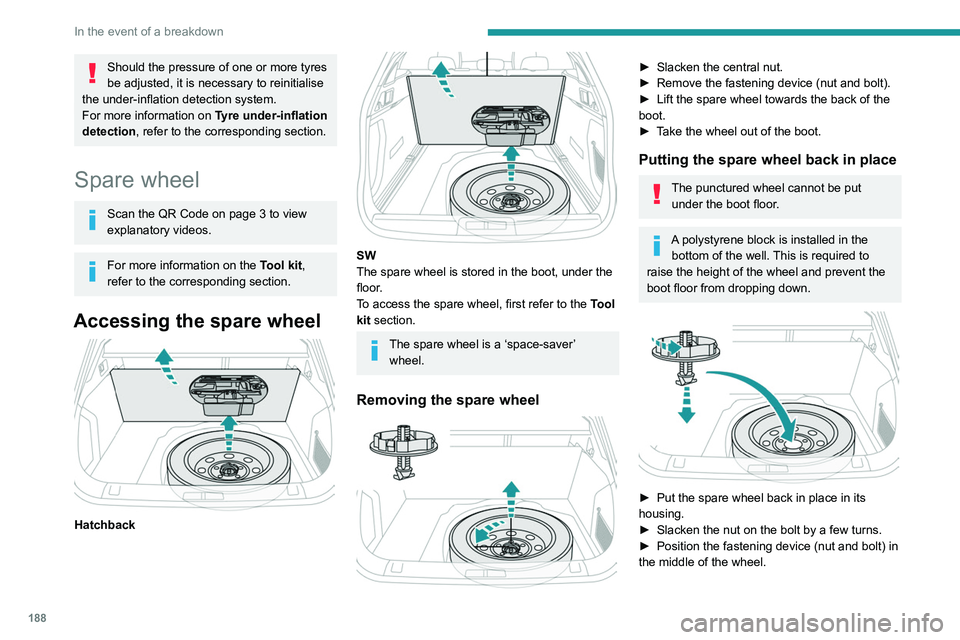
Hatchback
SW
The spare wheel is stored in the boot, under the
floor.
To access the spare wheel, first refer to the
Tool
kit
section.
The spare wheel is a ‘space-saver’ wheel.
Removing the spare wheel
► Slacken the central nut.
► Remove the fastening device (nut and bolt).
►
Lift the spare wheel towards the back of the
boot.
►
T
ake the wheel out of the boot.
Putting the spare wheel back in place
The punctured wheel cannot be put under the boot floor.
A polystyrene block is installed in the bottom of the well. This is required to
raise the height of the wheel and prevent the
boot floor from dropping down.
► Put the spare wheel back in place in its
housing.
►
Slacken the nut on the bolt by a few turns.
►
Position the fastening device (nut and bolt) in
the middle of the wheel.
Page 193 of 292
191
In the event of a breakdown
8
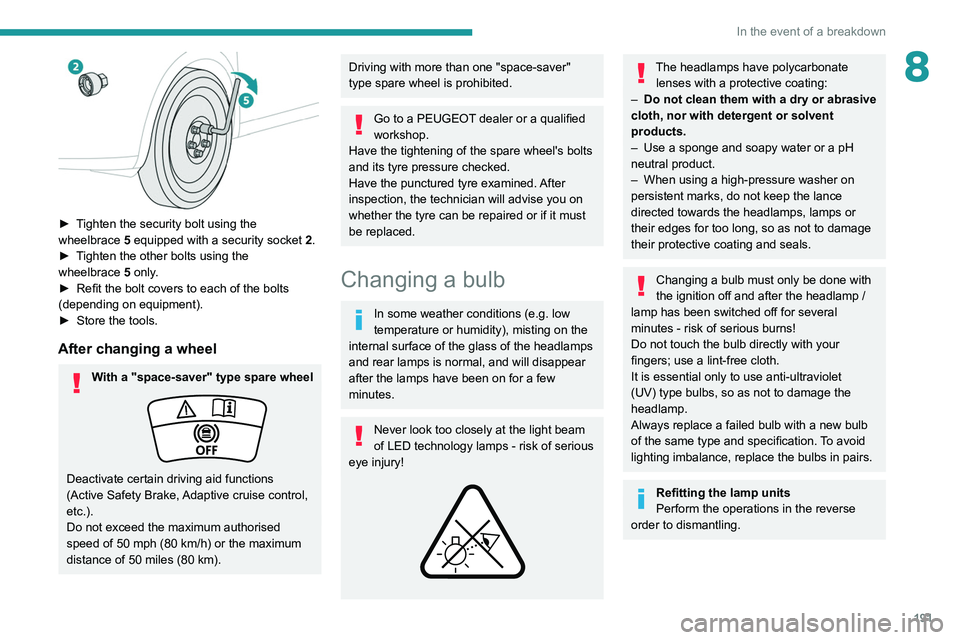
► Tighten the security bolt using the
wheelbrace 5 equipped with a security socket 2 .
►
T
ighten the other bolts using the
wheelbrace
5
only.
►
Refit the bolt covers to each of the bolts
(depending on equipment).
►
Store the tools.
After changing a wheel
With a "space-saver" type spare wheel
Deactivate certain driving aid functions
(Active Safety Brake, Adaptive cruise control,
etc.).
Do not exceed the maximum authorised
speed of 50 mph (80 km/h) or the maximum
distance of 50 miles (80 km).
Driving with more than one "space-saver"
type spare wheel is prohibited.
Go to a PEUGEOT dealer or a qualified
workshop.
Have the tightening of the spare wheel's bolts
and its tyre pressure checked.
Have the punctured tyre examined. After
inspection, the technician will advise you on
whether the tyre can be repaired or if it must
be replaced.
Changing a bulb
In some weather conditions (e.g. low
temperature or humidity), misting on the
internal surface of the glass of the headlamps
and rear lamps is normal, and will disappear
after the lamps have been on for a few
minutes.
Never look too closely at the light beam
of LED technology lamps - risk of serious
eye injury!
The headlamps have polycarbonate lenses with a protective coating:
–
Do not clean them with a dry or abrasive
cloth, nor with detergent or solvent
products.
–
Use a sponge and soapy water or a pH
neutral product.
–
When using a high-pressure washer on
persistent marks, do not keep the lance
directed towards the headlamps, lamps or
their edges for too long, so as not to damage
their protective coating and seals.
Changing a bulb must only be done with
the ignition off and after the headlamp /
lamp has been switched off for several
minutes - risk of serious burns!
Do not touch the bulb directly with your
fingers; use a lint-free cloth.
It is essential only to use anti-ultraviolet
(UV) type bulbs, so as not to damage the
headlamp.
Always replace a failed bulb with a new bulb
of the same type and specification. To avoid
lighting imbalance, replace the bulbs in pairs.
Refitting the lamp units
Perform the operations in the reverse
order to dismantling.
Page 212 of 292

210
Technical data
SW
Identification markings
Various visible markings for vehicle identification
and vehicle search.
A. Vehicle Identification Number (VIN), under
the bonnet.
Stamped on the chassis.
B. Vehicle Identification Number (VIN), on the
dashboard.
Printed on an adhesive label visible through the
windscreen.
C. Manufacturer's label.
Affixed to the right-hand door.
Bears the following information:
–
Manufacturer
’s name.
–
European whole vehicle type approval
number
.
–
V
ehicle Identification number (VIN).
–
Gross vehicle weight (GVW).
–
Gross train weight (GTW).
–
Maximum weight on the front axle.
–
Maximum weight on the rear axle.
D. T
yres/paint code label.
Affixed to the driver's door.
Bears the following information about the tyres:
–
T
yre pressures, unladen and laden.
–
T
yre specification, made up of the dimensions
and type as well as the load and speed indices.
–
Spare tyre inflation pressure.
Also indicates the paint colour code.
The vehicle may be originally equipped with tyres with higher load and speed
indices than those indicated on the label,
without affecting tyre pressure (on cold tyres).
In the event of a change in the type of tyres,
contact a PEUGEOT dealer for the tyre fits
approved for the vehicle.
Page 251 of 292

249
Event data recorders
12Event data recorders
Electronic control units are installed in your
vehicle. Control units process data which is
received by vehicle sensors, for example, or
which they generate themselves or exchange
amongst themselves. Some control units are
necessary for the safe functioning of your
vehicle, others assist you while you drive (driver
assistance systems), while others provide
comfort or infotainment functions.
The following contains general information about
data processing in the vehicle. You will find
additional information as to which specific data is
uploaded, stored and passed on to third parties
and for what purpose in your vehicle under
the key word Data Protection closely linked
to the references for the affected functional
characteristics in the relevant owner's manual
or in the general terms of sale. These are also
available online.
Operating data in the
vehicle
Control units process data for operation of the
vehicle.
This data includes, for example:
–
vehicle status information (e.g. speed,
movement delay
, lateral acceleration, wheel
rotation rate, "seat belts fastened" display)
–
ambient conditions (e.g. temperature, rain
sensor
, distance sensor) As a rule such data is transient and is not stored
for longer than an operational cycle, and only
processed on board the vehicle itself. Often
control units include data storage (including the
vehicle key). This is used to allow information
to be documented temporarily or permanently
on vehicle condition, component stress,
maintenance requirements and technical events
and errors.
Depending on technical equipment levels, the
data stored is as follows:
–
system component operating states (e.g. fill
level, tyre pressure, battery status)
–
faults and defects in important system
components (e.g. lights, brakes)
–
system reactions in special driving situations
(e.g. triggering of an airbag, actuation of the
stability control systems)
–
information on events damaging the vehicle
–
for electric vehicles the amount of charge in
the high-voltage battery
, estimated range
In special cases (e.g. if the vehicle has detected
a malfunction), it may be necessary to save data
that would otherwise just be volatile.
When you use services (e.g. repairs,
maintenance), the operating data saved can
be read together with the vehicle identification
number and used where necessary. Staff
working for the service network (e.g. garages,
manufacturers) or third parties (e.g. breakdown
services) can read the data from the vehicle.
The same applies to warranty work and quality
assurance measures. Data is generally read via the OBD (On-Board
Diagnostics) port prescribed by law in the
vehicle. The operating data read documents the
technical condition of the vehicle or individual
components and assists with fault diagnosis,
compliance with warranty obligations and quality
improvement. This data, in particular information
on component stress, technical events, operator
errors and other faults, is transmitted to the
manufacturer where appropriate, together
with the vehicle identification number. The
manufacturer is also subject to product liability.
The manufacturer potentially also uses operating
data from vehicles for product recalls. This data
can also be used to check customer warranty
and guarantee claims.
Fault memories in the vehicle can be reset by a
service company when carrying out servicing or
repairs or at your request.
Comfort and infotainment
functions
Comfort settings and custom settings can be
stored in the vehicle and changed or reset at any
time.
Depending on the equipment level in question,
these include
–
seat and steering wheel position settings
–
chassis and air conditioning settings
–
custom settings such as interior lighting
Y
ou can input your own data in the infotainment
functions for your vehicle as part of the selected
features.
Page 254 of 292

252
Alphabetical index
Changing the remote control battery 32
Charge level indicator (Rechargeable
hybrid)
21
Charger, induction
60
Charger, wireless
60
Charging cable
163
Charging cable (Rechargeable
hybrid)
161–162, 167
Charging connector (Rechargeable
hybrid)
160, 166–168
Charging flap (Rechargeable hybrid)
160,
166–168
Charging the traction battery
(Rechargeable hybrid)
21, 159, 166–168
CHECK
22
Checking the engine oil level
19
Checking the levels
175–176
Checking tyre pressures (using
the kit)
185, 187
Checks
175, 176–178
Checks, routine
176–178
Child lock
98–99
Children
85, 92–97
Children (safety)
98
Child seats
85, 89–92
Child seats, conventional
91–92
Child seats, i-Size
97
Child seats, ISOFIX
93–96
Cigar lighter
59
Cleaning (advice)
160, 181–182
Closing the boot
30, 37
Closing the doors
30, 35Collision Risk Alert 133–134
Comfort mode
11 3
Configuration, vehicle
24
Connected applications
236
Connection, Bluetooth
219–220,
236–237, 241–242
Connection, MirrorLink
218
Connection, Wi-Fi network
237
Connectivity
235
Consumption figures
25
Container, AdBlue®
179
Control, emergency boot release
37
Control, emergency door
31
Control, heated seats
47
Controls, steering mounted
106–108
Control stalk, lighting
69–70
Control stalk, wipers
75–78
Control unit
161–163, 167
Courtesy lamp, front
63
Courtesy lamps
63–64
Cover, load space
65
Cruise control
120, 123–125
Cruise control, adaptive
125–126
Cruise control by speed limit recognition
120
Cruise control, dynamic with Stop function
120
Cup holder
59
D
DAB (Digital Audio Broadcasting) -
Digital radio
216, 239
Date (setting) 222, 244
Daytime running lamps
70, 192
Deactivating the passenger airbag
86, 90–91
Deadlocking
28, 30
Deferred charging
25, 168
Deferred charging (Rechargeable
hybrid)
25–26, 160, 166
Defrosting
48, 55
Defrosting, front
55
Demisting
48, 55
Demisting, front
55
Demisting, rear
56
Demisting, rear screen
56
Dials and gauges
10
Digital instrument panel
10–11
Dimensions
209
Dipstick
19, 175
Direction indicators
70, 192–194
Domestic charging
163
Domestic charging (Rechargeable
hybrid)
167–168
Door pockets
59
Doors
35
Drive Assist Plus
125
Driver’s attention warning
136
Driving
44, 100
Driving aids camera (warnings)
11 7
Driving aids (recommendations)
11 6
Driving economically
8
Driving modes
111
Driving positions (storing)
47
Dynamic stability control (DSC)
82–83
Page 257 of 292

255
Alphabetical index
Menus (audio) 213–214, 225–226
Menu short cuts
24
Messages
243
Messages, quick
243
Mirror, rear view
49
Mirrors, door
48–49, 56, 140
Mirror, vanity
59
Misfuel prevention
158–159
Mobile application
25–26, 58, 166, 168
Motor, electric
111–112, 159, 208
Motorised tailgate
37–38
Mountings, ISOFIX
93
N
Navigation 230–232
Navigation, connected
233–235
Net, high load retaining
66–67
Night vision
74
Night Vision
74
O
Obstacle detection 142
Oil change
175
Oil consumption
175
OIl, engine
175
On-board tools
68, 184–185
Opening the bonnet
173–174
Opening the boot
29, 36
Opening the doors 29, 35
Opening the windows
27
P
Pads, brake 177–178
Paint
181, 210
Paint colour code
210
Parcel shelf, rear
65
Park Assist
148
Parking brake, electric
103–105, 177
Parking sensors, audible and visual
142
Parking sensors, front
143
Parking sensors, rear
142
Passenger compartment temperature pre-
conditioning (Rechargeable hybrid)
26, 58
Pedestrian horn (Rechargeable hybrid)
80
Personalisation
11
Plates, identification
210
Player, Apple®
217, 240
Player, USB
216, 239
Port, USB
59, 63, 216, 218, 235, 239
Power
21
Power indicator (Rechargeable
hybrid)
9, 10, 21
Pressures, tyres
178, 186, 188, 210
Pre-tensioning seat belts
85
Priming pump
184
Priming the fuel system
183
Profiles
221, 244
Programmable cruise control
123
Protecting children 86, 89–97
Puncture
185–186, 188
R
Radar (warnings) 11 7
Radio
214–215, 238
Radio, digital (Digital Audio
Broadcasting - DAB)
216, 239
Range, AdBlue®
20, 176
RDS
215, 238
READY lamp
173
Rear screen, demisting
56
Rechargeable hybrid engine
9, 25, 172–173, 200, 208
Rechargeable hybrid system
6, 9, 25,
102, 112, 159
Recharging the battery
196, 198–199
Recharging the traction battery
163
Recharging the traction battery (
Rechargeable hybrid)
159, 166–168
Recirculation, air
54–55
Recovery
200–202
Recovery of the vehicle
200–202
Reduction of electrical load
173
Regeneration of the particle filter
177
Regenerative braking (deceleration
by engine braking)
109
Reinitialisation of the under-inflation
detection system
11 6
Reinitialising the remote control
33