2021 NISSAN ROGUE light
[x] Cancel search: lightPage 413 of 556
WAF0521XExample
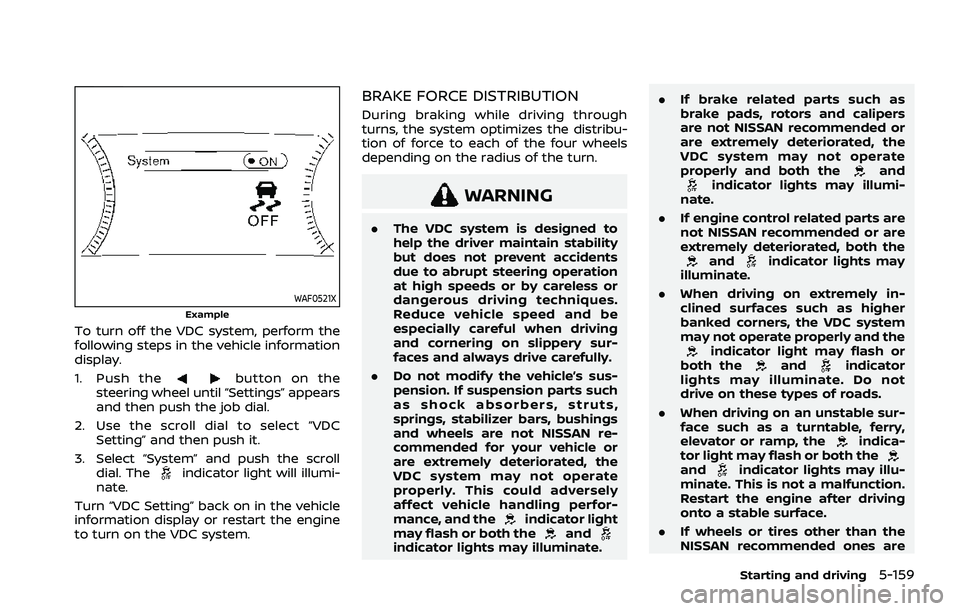
To turn off the VDC system, perform the
following steps in the vehicle information
display.
1. Push the
button on the
steering wheel until “Settings” appears
and then push the job dial.
2. Use the scroll dial to select “VDC Setting” and then push it.
3. Select “System” and push the scroll dial. The
indicator light will illumi-
nate.
Turn “VDC Setting” back on in the vehicle
information display or restart the engine
to turn on the VDC system.
BRAKE FORCE DISTRIBUTION
During braking while driving through
turns, the system optimizes the distribu-
tion of force to each of the four wheels
depending on the radius of the turn.
WARNING
. The VDC system is designed to
help the driver maintain stability
but does not prevent accidents
due to abrupt steering operation
at high speeds or by careless or
dangerous driving techniques.
Reduce vehicle speed and be
especially careful when driving
and cornering on slippery sur-
faces and always drive carefully.
. Do not modify the vehicle’s sus-
pension. If suspension parts such
as shock absorbers, struts,
springs, stabilizer bars, bushings
and wheels are not NISSAN re-
commended for your vehicle or
are extremely deteriorated, the
VDC system may not operate
properly. This could adversely
affect vehicle handling perfor-
mance, and the
indicator light
may flash or both theandindicator lights may illuminate. .
If brake related parts such as
brake pads, rotors and calipers
are not NISSAN recommended or
are extremely deteriorated, the
VDC system may not operate
properly and both the
andindicator lights may illumi-
nate.
. If engine control related parts are
not NISSAN recommended or are
extremely deteriorated, both the
andindicator lights may
illuminate.
. When driving on extremely in-
clined surfaces such as higher
banked corners, the VDC system
may not operate properly and the
indicator light may flash or
both theandindicator
lights may illuminate. Do not
drive on these types of roads.
. When driving on an unstable sur-
face such as a turntable, ferry,
elevator or ramp, the
indica-
tor light may flash or both the
andindicator lights may illu-
minate. This is not a malfunction.
Restart the engine after driving
onto a stable surface.
. If wheels or tires other than the
NISSAN recommended ones are
Starting and driving5-159
Page 414 of 556
5-160Starting and driving
used, the VDC system may not
operate properly and the
indicator light may flash or both
theandindicator lights
may illuminate.
. The VDC system is not a substi-
tute for winter tires or tire chains
on a snow covered road. The chassis control is an electric control
module that includes the following func-
tions:
.
Intelligent Trace Control
. Active Ride Control
INTELLIGENT TRACE CONTROL
This system senses driving based on the
driver’s steering and acceleration/braking
patterns, and controls brake pressure at
individual wheels to aid tracing at corners
and help smooth vehicle response.
When the VDC system is turned off, the
Intelligent Trace Control is also turned off.
Amount of brake control is changed
based on Drive Mode selector.
When Intelligent Trace Control is not
functioning properly, the master warning
light illuminates, and warning message
“Chassis Control System Error” will also
appear in the vehicle information display.
If the chassis control warning message
appears in the vehicle information dis-
play, it may indicate that the Intelligent
Trace Control is not functioning properly.
Have the system checked as soon as
possible. It is recommended that you visit
a NISSAN dealer for this service. (See
“Vehicle information display warnings
and indicators” (P.2-34).)
WARNING
The Intelligent Trace Control may not
be effective depending on the driv-
ing condition. Always drive carefully
and attentively.
When the Intelligent Trace Control is
operating, you may feel a pulsation in
the brake pedal, sense slight deceleration,
or hear a noise. This is normal and
indicates that Intelligent Trace Control is
operating properly.
ACTIVE RIDE CONTROL
This system senses upper body motion
and controls four wheel brake pressure.
This will enhance ride comfort in effort to
restrain uncomfortable upper body
movement when passing over undulated
road surfaces. When the VDC system is
turned off, the Active Ride Control is also
turned off.
If the chassis control warning message
appears in the vehicle information dis-
play, it may indicate that the Active Ride
Control is not functioning properly. Have
the system checked as soon as possible.
It is recommended that you visit a NISSAN
dealer for this service.
CHASSIS CONTROL
Page 415 of 556

WARNING
The Active Ride Control may not be
effective depending on the driving
condition. Always drive carefully and
attentively.
When the Active Ride Control is operating,
you may feel a pulsation in the brake
pedal, sense slight deceleration, or hear a
noise. This is normal and indicates that
Active Ride Control is operating properly.
WARNING
. Never rely solely on the hill start
assist system to prevent the ve-
hicle from moving backward on a
hill. Always drive carefully and
attentively. Depress the brake
pedal when the vehicle is stopped
on a steep hill. Be especially care-
ful when stopped on a hill on
frozen or muddy roads. Failure
to prevent the vehicle from rolling
backwards may result in a loss of
control of the vehicle and possi-
ble serious injury or death.
. The hill start assist system is not
designed to hold the vehicle at a
standstill on a hill. Depress the
brake pedal when the vehicle is
stopped on a steep hill. Failure to
do so may cause the vehicle to
roll backwards and may result in
a collision or serious personal
injury.
. The hill start assist system may
not prevent the vehicle from roll-
ing backwards on a hill under all
load or road conditions. Always
be prepared to depress the brake
pedal to prevent the vehicle from
rolling backwards. Failure to do so may result in a collision or
serious personal injury.
The hill start assist system automatically
keeps the brakes applied to help prevent
the vehicle from rolling backwards in the
time it takes the driver to release the
brake pedal and apply the accelerator
when the vehicle is stopped on a hill.
The hill start assist system will operate
automatically under the following condi-
tions:
. The transmission is shifted to a for-
ward or reverse gear.
. The vehicle is stopped completely on a
hill by applying the brake.
The maximum holding time is 2 seconds.
After 2 seconds the vehicle will begin to
roll back and the hill start assist system
will stop operating completely.
The hill start assist system will not
operate when the transmission is shifted
to the N (Neutral) or P (Park) position or
on a flat and level road.
When the slip indicator light illuminates in
the meter, the hill start assist system will
not operate. (See “Slip indicator light” (P.2-
20).)
Starting and driving5-161
HILL START ASSIST SYSTEM
Page 430 of 556

6-2In case of emergency
SIC2574
Push the switch on to warn other drivers
when you must stop or park under
emergency conditions. All turn signal
lights will flash.
WARNING
.If stopping for an emergency, be
sure to move the vehicle well off
the road.
. Do not use the hazard warning
flashers while moving on the
highway unless unusual circum-
stances force you to drive so
slowly that your vehicle might
become a hazard to other traffic. .
Turn signals do not work when
the hazard warning flasher lights
are on.
The flasher can be actuated with the
ignition switch in any position.
Some state laws may prohibit the use of
the hazard warning flasher switch while
driving. In the event of a roadside emergency,
Roadside Assistance Service is available
to you. Please refer to your Warranty
Information Booklet (U.S.) or Warranty &
Roadside Assistance Information Booklet
(Canada) for details.
HAZARD WARNING FLASHER SWITCHCONNECTION TO ROADSIDE ASSISTANCE
Page 431 of 556

To shut off the engine in an emergency
situation while driving, perform the fol-
lowing procedure:
.Rapidly push the push-button ignition
switch 3 consecutive times in less
than 1.5 seconds, or
. Push and hold the push-button igni-
tion switch for more than 2 seconds.TIRE PRESSURE MONITORING SYS-
TEM (TPMS)
This vehicle is equipped with the Tire
Pressure Monitoring System (TPMS). It
monitors tire pressure of all tires except
the spare. When the low tire pressure
warning light is lit, and the “Tire Pressure
Low - Add Air” warning message is
displayed in the vehicle information dis-
play, one or more of your tires is sig-
nificantly under-inflated. If the vehicle is
being driven with low tire pressure, the
TPMS will activate and warn you of it by
the low tire pressure warning light. This
system will activate only when the vehicle
is driven at speeds above 16 MPH (25
km/h). For more details, see “Warning
lights, indicator lights and audible remin-
ders” (P.2-13) and “Tire Pressure Monitor-
ing System (TPMS)” (P.5-6).
WARNING
.If the low tire pressure warning
light illuminates while driving,
avoid sudden steering maneu-
vers or abrupt braking, reduce
vehicle speed, pull off the road
to a safe location and stop the
vehicle as soon as possible. Driv-
ing with under-inflated tires may
permanently damage the tires and increase the likelihood of tire
failure. Serious vehicle damage
could occur and may lead to an
accident and could result in ser-
ious personal injury. Check the
tire pressure for all four tires.
Adjust the tire pressure to the
recommended COLD tire pressure
shown on the Tire and Loading
Information label to turn the low
tire pressure warning light OFF. If
the light still illuminates while
driving after adjusting the tire
pressure, a tire may be flat. If
you have a flat tire, replace it with
a spare tire as soon as possible.
. Since the spare tire is not
equipped with the TPMS, when a
spare tire is mounted or a wheel
is replaced, the TPMS will not
function and the low tire pressure
warning light will flash for ap-
proximately 1 minute. The light
will remain on after 1 minute.
Have your tires replaced and/or
TPMS system reset as soon as
possible. It is recommended you
visit a NISSAN dealer for these
services.
. Replacing tires with those not
originally specified by NISSAN
could affect the proper operation
In case of emergency6-3
EMERGENCY ENGINE SHUT OFF FLAT TIRE
Page 440 of 556

6-12In case of emergency
WAG0091X
WARNING
Always follow the instructions below.
Failure to do so could result in
damage to the charging system and
cause personal injury.1. If the booster battery is in another
vehicle
, position the two vehicles (and) to bring their batteries into
close proximity to each other.
Do not allow the two vehicles to
touch. 2. Apply the parking brake.
3. Push the park button to engage the P
(Park) position.
4. Switch off all unnecessary electrical systems (headlights, heater, air condi-
tioner, etc.).
5. Connect jumper cables in the se- quence as illustrated (
???).
CAUTION
.Always connect positive (+) to
positive (+) and negative (−) to
body ground (for example, as
illustrated), not to the battery.
. Make sure the jumper cables do
not touch moving parts in the
engine compartment and that
the cable clamps do not contact
any other metal.
6. Start the engine of the booster vehicle
and let it run for a few minutes.
7. Keep the engine speed of the booster vehicle
at about 2,000 rpm, and
start the engine of the vehiclebeing
jump started.
Page 448 of 556

7-2Appearance and care
In order to maintain the appearance of
your vehicle, it is important to take proper
care of it.
To protect the paint surfaces, wash your
vehicle as soon as you can:
.after a rainfall to prevent possible
damage from acid rain
. after driving on coastal roads
. when contaminants such as soot, bird
droppings, tree sap, metal particles or
bugs get on the paint surface
. when dust or mud builds up on the
surface
Whenever possible, store or park your
vehicle inside a garage or in a covered
area.
When it is necessary to park outside, park
in a shady area or protect the vehicle with
a body cover.
Be careful not to scratch the paint
surface when putting on or removing
the body cover.
WASHING
Wash dirt off the vehicle with a wet
sponge and plenty of water. Clean the
vehicle thoroughly using a mild soap, a
special vehicle soap or general purpose
dishwashing liquid mixed with clean, lu-
kewarm (never hot) water.
CAUTION
. Do not concentrate water spray
directly on the sonar sensors on
the bumper as this will result in
damage to the sensors. Do not
use pressure washers capable of
spraying water over 1,200 psi
(8,274 kPa) to wash your vehicle.
Use of high-pressure washers
over, 1,200 psi (8,274 kPa) can
result in damage to or removal
of paint or graphics. Avoid using a
high-pressure washer closer than
12 inches (30 cm) to the vehicle.
Always use a wide-angle nozzle
only, keep the nozzle moving and
do not concentrate the water
spray on any one area.
. Do not use car washes that use
acid in the detergent. Some car
washes, especially brushless
ones, use some acid for cleaning.
The acid may react with some
plastic vehicle components, caus-
ing them to crack. This could
affect their appearance, and also
could cause them not to function
properly. Always check with your
car wash to confirm that acid is
not used. .
Do not wash the vehicle with
strong household soap, strong
chemical detergents, gasoline or
solvents.
. Do not wash the vehicle in direct
sunlight or while the vehicle body
is hot, as the surface may become
water-spotted.
. Avoid using tight-napped or
rough cloths, such as washing
mitts. Care must be taken when
removing caked-on dirt or other
foreign substances so the paint
surface is not scratched or da-
maged.
Rinse the vehicle thoroughly with plenty
of clean water.
Inside flanges, seams and folds on the
doors, hatches and hood are particularly
vulnerable to the effects of road salt.
Therefore, these areas must be regularly
cleaned. Make sure that the drain holes in
the lower edge of the door are open.
Spray water under the body and in the
wheel wells to loosen the dirt and wash
away road salt.
Avoid leaving water spots on the paint
surface by using a damp chamois to dry
the vehicle.
CLEANING EXTERIOR
Page 450 of 556

7-4Appearance and care
CAUTION
Follow the directions below to avoid
staining or discoloring the wheels:
.Do not use a cleaner that uses
strong acid or alkali contents to
clean the wheels.
. Do not apply wheel cleaners to
the wheels when they are hot.
The wheel temperature should be
the same as ambient tempera-
ture.
. Rinse the wheel to completely
remove the cleaner within 15
minutes after the cleaner is ap-
plied.
CHROME PARTS
Clean chrome parts regularly with a non-
abrasive chrome polish to maintain the
finish.
TIRE DRESSING
NISSAN does not recommend the use of
tire dressings. Tire manufacturers apply a
coating to the tires to help reduce dis-
coloration of the rubber. If a tire dressing
is applied to the tires, it may react with
the coating and form a compound. This
compound may come off the tire while driving and stain the vehicle paint.
If you choose to use a tire dressing, take
the following precautions:
.
Use a water-based tire dressing. The
coating on the tire dissolves more
easily with an oil-based tire dressing.
. Apply a light coat of tire dressing to
help prevent it from entering the tire
tread/grooves (where it would be
difficult to remove).
. Wipe off excess tire dressing using a
dry towel. Make sure the tire dressing
is completely removed from the tire
tread/grooves.
. Allow the tire dressing to dry as
recommended by tire dressing manu-
facturer.
Occasionally remove loose dust from the
interior trim, plastic parts and seats using
a vacuum cleaner or soft bristled brush.
Wipe the vinyl and leather surfaces with a
clean, soft cloth dampened in mild soap
solution, then wipe clean with a dry soft
cloth.
Regular care and cleaning is required in
order to maintain the appearance of the
leather (if so equipped).
Before using any fabric protector, read
the manufacturer’s recommendations.
Some fabric protectors contain chemicals
that may stain or bleach the seat materi-
al.
Use a cloth dampened only with water, to
clean the meter and gauge lens.
WARNING
Do not use water or acidic cleaners
(hot steam cleaners) on the seat. This
can damage the seat or occupant
classification sensors. This can also
affect the operation of the air bag
system and result in serious perso-
nal injury.
CLEANING INTERIOR