2021 NISSAN LEAF cruise control
[x] Cancel search: cruise controlPage 320 of 602
I-BSI system limitations.....................5-49
I-BSI driving situations .......................5-50
System temporarily unavailable .............5-55
System malfunction ......................... 5-55
System maintenance .......................5-56
RearCrossTrafficAlert(RCTA) .................. 5-58
RCTA system operation .....................5-58
How to enable/disable the RCTA
system ...................................... 5-60
RCTA system limitations .....................5-61
System temporarily unavailable .............5-62
System maintenance .......................5-63
Cruise control (if so equipped) ..................5-65
Precautions on cruise control ...............5-65
Cruise control operations ...................5-65
Intelligent Cruise Control (ICC) (for vehicles
without ProPILOT Assist) (if so equipped) .......5-67
How to select the cruise control mode ......5-69
Vehicle-to-vehicle distance control
mode ....................................... 5-69
Vehicle-to-vehicle distance control
mode operation ............................. 5-70
Vehicle-to-vehicle distance control
mode switches ............................. 5-72Vehicle-to-vehicle distance control
mode limitations
............................ 5-79
System temporarily unavailable .............5-83
System maintenance .......................5-85
Conventional (fixed speed) cruise
control mode ............................... 5-86
ProPILOT Assist (if so equipped) ................5-91
ProPILOT Assist system operation ...........5-93
Turning the conventional (fixed speed)
cruise control mode on .....................5-96
Operating ProPILOT Assist ...................5-97
How to enable/disable the Steering
Assist ...................................... 5-101
Intelligent Cruise Control (ICC)
(for vehicles with ProPILOT Assist) ..........5-102
Steering Assist ............................. 5-112
Conventional (fixed speed) cruise
control mode .............................. 5-119
Automatic Emergency Braking (AEB) with
Pedestrian Detection .......................... 5-123
AEB with Pedestrian Detection system
operation .................................. 5-124
Turning the AEB with Pedestrian
Detection
system on/off ................... 5-126
Page 342 of 602

The e-Pedal system provides the following
driving features:
When driving and stopping the vehicle:
• Depressing or returning the acceleratorpedal changes the degree of accelera-
tion and deceleration accordingly.
• Returning the accelerator pedal gener- ates more deceleration than normal. (The
maximum deceleration changes accord-
ing to the vehicle speed.)
• Releasing (taking your foot off ) the accel- erator pedal reduces the vehicle speed
until the vehicle comes to a stop.
• The vehicle’s brake lights illuminate when the deceleration level reaches an ordi-
nary braking operation.
If the deceleration is not sufficient when the
accelerator pedal is returned or released,
depress the brake pedal. The brake pedal
can be operated to reduce the vehicle
speed in the same way as normal even
when the e-Pedal system is activated.
When restarting the vehicle:
• Af ter the vehicle comes to a stop by the e-Pedal system function, the vehicle re-
mains at a stop as long as the accelerator
pedal is released. • The vehicle’s brake lights remain illumi-
nated when the vehicle is stopped by the
e-Pedal system.
• Depress the accelerator pedal to start the vehicle again from a stop.
When the vehicle needs to be stopped for a
certain period of time, place the vehicle in
the P (Park) position and apply the parking
brake.
CAUTION
When the e-Pedal system is turned off,
remember to depress the brake pedal
firmly to prevent the vehicle from mov-
ing with the shif t lever in any position
other than P (Park).
When backing up the vehicle:
• With the shif t lever in the R (Reverse) po- sition, operating the accelerator pedal
adjusts the vehicle speed (acceleration,
deceleration, or stopping) in the same
way as the D (Drive) position. Other driving tips for the e-Pedal
system:
• For smooth deceleration when the
e-Pedal system is activated, it is recom-
mended that you adjust the accelerator
pedal by either depressing or returning,
not releasing, the pedal.
• Moving the shif t lever from D (Drive) to B mode or from B mode to D (Drive) does
not affect the e-Pedal system feature.
• The e-Pedal system does not function under the following conditions:– When the vehicle is placed in the P (Park) or N (Neutral) position
– When cruise control (if so equipped), ProPILOT Assist (if so equipped), or Au-
tomatic Emergency Braking with Pe-
destrian Detection operates
Starting and driving5-23
Page 353 of 602
–When rain, snow or dirt adheres to
the windshield in front of the lane
camera unit.
– When the headlights are not
bright due to dirt on the lens or if
the aiming is not adjusted
properly.
– When strong light enters the lane
camera unit (for example, the light
directly shines on the front of the
vehicle at sunrise or sunset).
– When a sudden change in bright-
ness occurs (for example, when
the vehicle enters or exits a tunnel
or under a bridge).
While the I-LI system is operating, you may
hear a sound of brake operation. This is
normal and indicates that the I-LI system is
operating properly.SYSTEM TEMPORARILY
UNAVAILABLE
Condition A:
The warning and assist functions of the I-LI
system are not designed to work under the
following conditions:
• When you operate the lane change signal and change the traveling lanes in the di-
rection of the signal. (The I-LI system will
be deactivated for approximately 2 sec-
onds af ter the lane change signal is
turned off.)
• When the vehicle speed lowers to less than approximately 37 mph (60 km/h).
Af ter the above conditions have finished
and the necessary operating conditions
are satisfied, the warning and assist func-
tions will resume.
Condition B:
The assist function of the I-LI system is not
designed to work under the following con-
ditions (warning is still functional):
• When the brake pedal is depressed.
• When the steering wheel is turned as far as necessary for the vehicle to change
lanes.
• When the vehicle is accelerated during I-LI system operation. • When the Intelligent Cruise Control (ICC)
approach warning occurs.
• When the hazard warning flashers are operated.
• When driving on a curve at high speed.
Af ter the above conditions have finished
and the necessary operating conditions
are satisfied, the I-LI system application of
the brakes will resume.
Condition C:
If the following messages appear in the
vehicle information display, a chime will
sound and the I-LI system will be turned off
automatically.
• “Not Available - Poor Road Conditions”: When the Vehicle Dynamic Control (VDC)
system (except Traction Control System
[TCS] function) or ABS operates.
• “Currently not available”: When the VDC system is turned off.
Action to take:
When the above conditions no longer exist,
turn off the I-LI system. Push the ProPILOT
Assist switch (models with ProPILOT Assist)
or dynamic driver assistance switch (mod-
els without ProPILOT Assist) to turn the I-LI
system back on.
5-34Starting and driving
Page 384 of 602
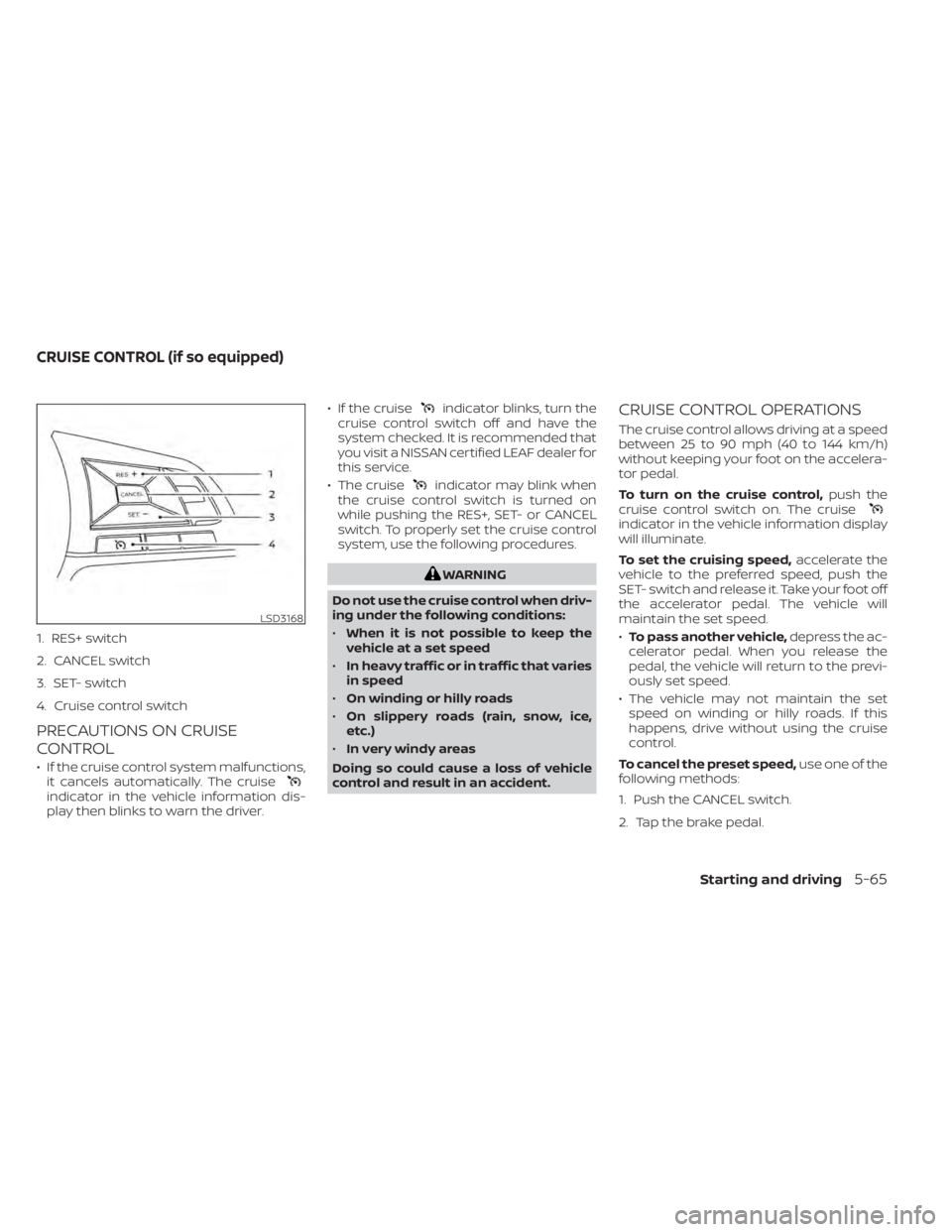
1. RES+ switch
2. CANCEL switch
3. SET- switch
4. Cruise control switch
PRECAUTIONS ON CRUISE
CONTROL
• If the cruise control system malfunctions,it cancels automatically. The cruise
indicator in the vehicle information dis-
play then blinks to warn the driver. • If the cruise
indicator blinks, turn the
cruise control switch off and have the
system checked. It is recommended that
you visit a NISSAN certified LEAF dealer for
this service.
• The cruise
indicator may blink when
the cruise control switch is turned on
while pushing the RES+, SET- or CANCEL
switch. To properly set the cruise control
system, use the following procedures.
WARNING
Do not use the cruise control when driv-
ing under the following conditions:
• When it is not possible to keep the
vehicle at a set speed
• In heavy traffic or in traffic that varies
in speed
• On winding or hilly roads
• On slippery roads (rain, snow, ice,
etc.)
• In very windy areas
Doing so could cause a loss of vehicle
control and result in an accident.
CRUISE CONTROL OPERATIONS
The cruise control allows driving at a speed
between 25 to 90 mph (40 to 144 km/h)
without keeping your foot on the accelera-
tor pedal.
To turn on the cruise control, push the
cruise control switch on. The cruise
indicator in the vehicle information display
will illuminate.
To set the cruising speed, accelerate the
vehicle to the preferred speed, push the
SET- switch and release it. Take your foot off
the accelerator pedal. The vehicle will
maintain the set speed.
• To pass another vehicle, depress the ac-
celerator pedal. When you release the
pedal, the vehicle will return to the previ-
ously set speed.
• The vehicle may not maintain the set speed on winding or hilly roads. If this
happens, drive without using the cruise
control.
To cancel the preset speed, use one of the
following methods:
1. Push the CANCEL switch.
2. Tap the brake pedal.
LSD3168
CRUISE CONTROL (if so equipped)
Starting and driving5-65
Page 385 of 602
3. Turn the cruise control switch off. Thecruiseindicator in the vehicle infor-
mation display will turn off.
• If you depress the brake pedal while pushing the RES+ or SET- switch and re-
set at the cruising speed, the cruise con-
trol will disengage. Turn the cruise control
switch off once and then turn it on again.
• The cruise control will automatically can- cel if the vehicle slows more than 8 mph
(13 km/h) below the set speed.
• If you move the shif t lever to the N (Neu- tral) position, the cruise control will be
canceled.
To reset at a faster cruising speed, use
one of the following methods:
• Depress the accelerator pedal. When the vehicle attains the preferred speed, push
and release the SET- switch.
• Push and hold the RES+ switch. When the vehicle attains the preferred speed, re-
lease the switch.
• Push, then quickly release the RES+ switch. Each time you do this, the set
speed will increase by about 1 mph or 1.6
km/h. To reset at a slower cruising speed,
use
one of the following methods:
• Lightly tap the brake pedal. When the ve- hicle attains the preferred speed, push
the SET- switch and release it.
• Push and hold the SET- switch. Release the switch when the vehicle slows down
to the preferred speed.
• Push, then quickly release, the SET- switch. Each time you do this, the set
speed will decrease by about 1 mph or
1km/h.
To resume the preset speed, push and
release the RES+ switch. The vehicle will
resume the last set cruising speed when
the vehicle speed is over 25 mph (40 km/h).
5-66Starting and driving
Page 386 of 602
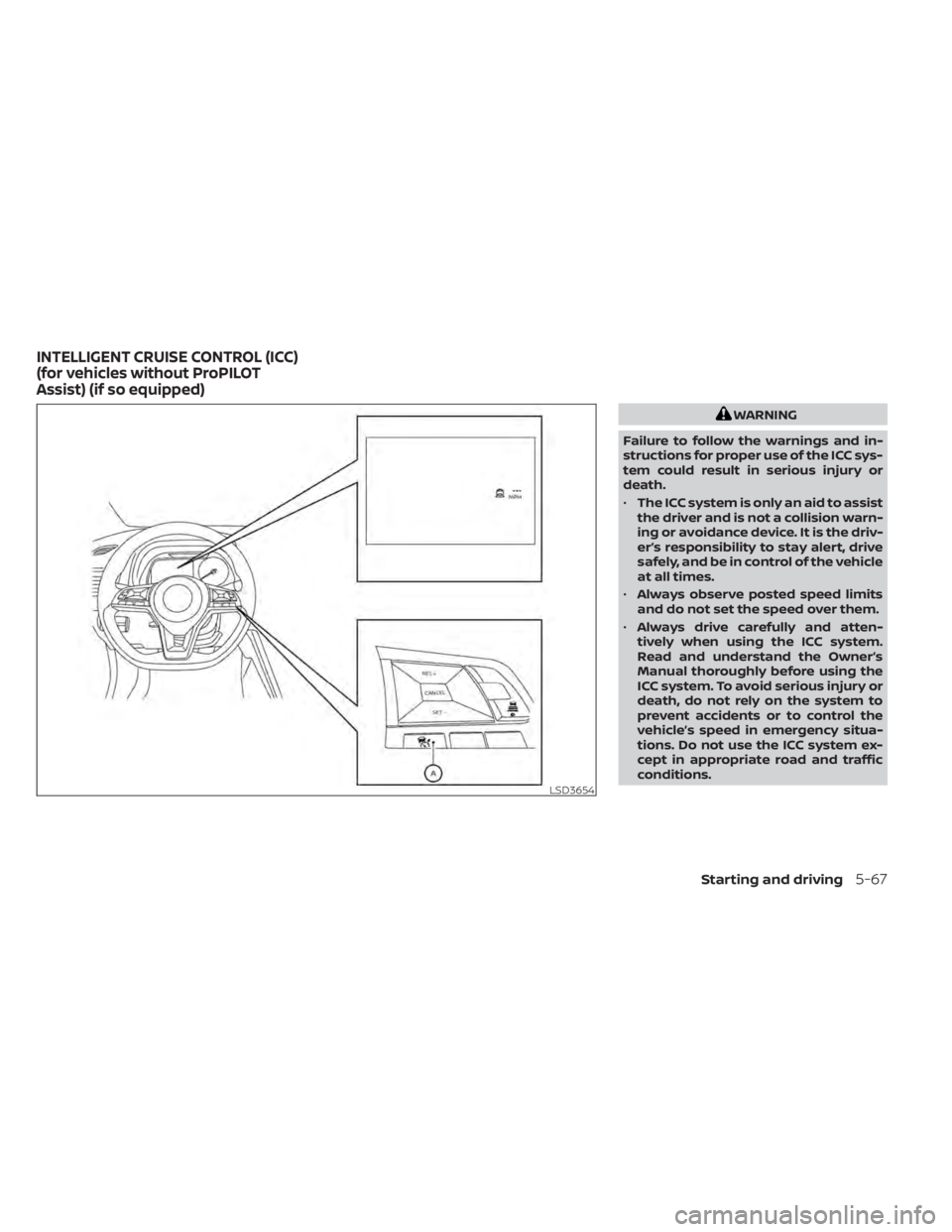
WARNING
Failure to follow the warnings and in-
structions for proper use of the ICC sys-
tem could result in serious injury or
death.
• The ICC system is only an aid to assist
the driver and is not a collision warn-
ing or avoidance device. It is the driv-
er’s responsibility to stay alert, drive
safely, and be in control of the vehicle
at all times.
• Always observe posted speed limits
and do not set the speed over them.
• Always drive carefully and atten-
tively when using the ICC system.
Read and understand the Owner’s
Manual thoroughly before using the
ICC system. To avoid serious injury or
death, do not rely on the system to
prevent accidents or to control the
vehicle’s speed in emergency situa-
tions. Do not use the ICC system ex-
cept in appropriate road and traffic
conditions.
LSD3654
INTELLIGENT CRUISE CONTROL (ICC)
(for vehicles without ProPILOT
Assist) (if so equipped)
Starting and driving5-67
Page 387 of 602
•In the conventional (fixed speed)
cruise control mode, a warning
chime will not sound to warn you if
you are too close to the vehicle
ahead. Pay special attention to the
distance between your vehicle and
the vehicle ahead of you or a collision
could occur
The ICC system maintains a selected dis-
tance from the vehicle in front of you within
the speed range of 0 to 90 mph (0 to 144
km/h) up to the set speed. The set speed
can be selected by the driver between 20 to
90 mph (32 to 144 km/h).
The vehicle travels at a set speed when the
road ahead is clear.
The ICC system can be set to one of two
cruise control modes:
• Vehicle-to-vehicle distance control
mode: For maintaining a selected dis-
tance between your vehicle and the ve-
hicle in front of you up to the present
speed
• Conventional (fixed speed) cruise con-
trol mode: For cruising at a preset speed
Always confirm the setting in the ICC sys-
tem display. For the vehicle-to-vehicle distance control
mode, see “Vehicle-to-vehicle distance
control mode” (P. 5-69).
For the conventional (fixed speed) cruise
control mode, see “Conventional (fixed
speed) cruise control mode” (P. 5-86).
5-68Starting and driving
Page 388 of 602
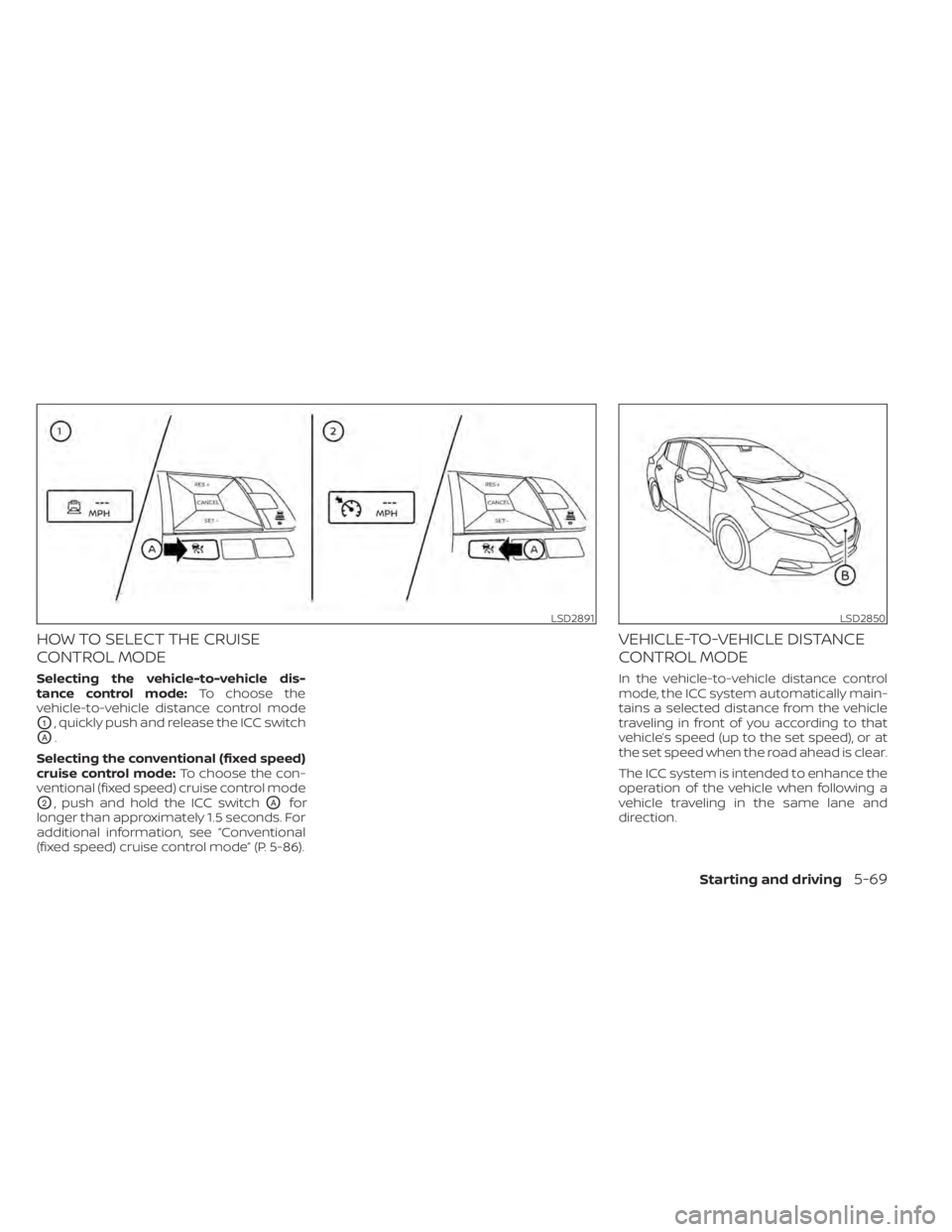
HOW TO SELECT THE CRUISE
CONTROL MODE
Selecting the vehicle-to-vehicle dis-
tance control mode:To choose the
vehicle-to-vehicle distance control mode
O1, quickly push and release the ICC switch
OA.
Selecting the conventional (fixed speed)
cruise control mode: To choose the con-
ventional (fixed speed) cruise control mode
O2, push and hold the ICC switchOAfor
longer than approximately 1.5 seconds. For
additional information, see “Conventional
(fixed speed) cruise control mode” (P. 5-86).
VEHICLE-TO-VEHICLE DISTANCE
CONTROL MODE
In the vehicle-to-vehicle distance control
mode, the ICC system automatically main-
tains a selected distance from the vehicle
traveling in front of you according to that
vehicle’s speed (up to the set speed), or at
the set speed when the road ahead is clear.
The ICC system is intended to enhance the
operation of the vehicle when following a
vehicle traveling in the same lane and
direction.
LSD2891LSD2850
Starting and driving5-69