2021 MERCEDES-BENZ METRIS fuel
[x] Cancel search: fuelPage 108 of 290

Re
strictin gthe shi ftrange Re
quirements:
R Transmission position 005Bis engaged
(/ page105). #
Torestrict th eshiftrange: briefly pull steer‐
ing wheel gearshif tpaddle 1.
The automatic transmissio nshifts tothen ext
lo we rgear ,dependin gonthegear cur rently
engaged .The shi ftrang eisa lsor estricted.
The shif trang eselected is shown in them ulti‐
function displa y.The automatic transmission
shifts onl yasfar as thes elected gear. #
Pull and hold steering wheel gearshif tpaddle
1.
The automatic transmissio nwillch ang etoa
shif trang ewhich allo wseasy acceleration
and deceleration. Todo this, thea utomatic
transmission shifts down one or mor egears
and restricts thes hiftrange.
Th es hift rang es elected is shown in them ulti‐
function displa y.The automatic transmission
shifts onl yasfar as thes elected gear.
% The automatic transmissio
ndoes no tshift
down if youp ullsteering wheel gearshif tpad‐
dle 1whils ttrave ling at tooh igh aspeed.
If th em aximum engine speed fort he restric‐
te ds hiftrang eisr eached and youc ontinue
to depress thea ccelera torp edal, thea uto‐
matic transmission will shif tupautomaticall y.
This pr otects agains tengine overrev. #
Tode-restric tthe shi ftrange: briefly pull
st eering wheel gearshif tpaddle 2.
The automatic transmissio nshifts tothen ext
ge ar up, dependin gonthegear cur rently
engaged .Thisd e-re stricts thes hiftrang eat
th es ame time.
The shif trang eselected is shown in them ulti‐
function displa y.The automatic transmission
shifts onl yasfar as thes elected gear. #
Tode-restric tthe shi ftrange: pull and hold
st eering wheel gearshif tpaddle 2. or #
Engage transmission position 005Bagain
(/ page 105).
The auto matic transmission shifts up one or
mor egear sdepending on theg ear cur rently
engaged .Simultaneously ,the shif trange
re striction is deactivated and thet ransmis‐
sion position appear sinthe multifunction dis‐
play 005B.
Re commended shi ftranges fort he following driv‐
ing conditions:
0049 Use
thee ngine' sbraking ef fect.
0048 Use
thee ngine' sbraking ef fect on downhill
gradients and whe ndriving on steep roads,
in mountainous areas as well as under ardu‐
ous operatin gconditions.
0047 Use
thee ngine' sbraking ef fect on extreme ly
st eep downhill gradients and on long down‐
hill stre tches. Usin
gkickdown #
Form aximum acceleration: depressthe
accelerator pedal be yond thep ressur epoint. Re
fueling Re
fueling thev ehicle &
WARNING Risk offire or explosion from
fuel
Fu els ar ehighly flammable. #
Fire, open flames ,smokin gand creation
of spar ksmus tbea voided. #
Swit chofft he ignition and, if available,
th es tationar yheater ,befor eand while
re fueling thev ehicle. &
WARNING Risk of inju ryfrom fuels
Fu els ar epoisonous and hazardous to your
health. #
Do no tswa llowf uel or le titcomeinto
con tact wi thskin, eyes or clo thing. #
Do no tinhale fuel vapor. #
Keep children away from fuel. #
Keep door sand windo wsclosed du ring
th er efueling process. 106
Driving and pa rking
Page 109 of 290

If
yo uoro ther people come int ocontact with
fuel, obser vethef ollowing: #
Immediatel yrins efueloffyo ur skin with
soap and water. #
If fuel comes int ocontact wit hyour
ey es, immediatel yrins ethem thor‐
oughly wit hclean water.Seek medical
attentio nimmediately. #
Ifyo us wallowf uel, seek medical atten‐
tio nimmediatel y.Do no tinduce vomit‐
ing. #
Chang eimmediately out of clo thing that
has com eintoc ontact wi thfuel. &
WARNING Risk offire and explosion due
to electros tatic charge
Electros tatic charge can igni tefuel vapor. #
Befor eyou open thef uel filler cap or
ta ke hold of thep um pn ozzle, touc ht he
me tallic vehicle body. #
Toavo id creatin ganother electros tatic
ch arge ,don otget intot he vehicle again
during ther efueling process. *
NO
TEDo no tuse diese ltorefuel vehicles
wit hag asoline engine If
yo uh ave accidentally refueled wit hthe
wrong fuel:
R Do no tswit ch th eignition on. Otherwise
fuel can enter thee ngine.
Even small amounts of thew rong fuel
could result in damag etothe fuel sy stem
and thee ngine. The repair costs ar ehigh. #
Consult aqualified specialis tworks hop. #
Have thef uel tank and fue llin es drained
comple tely. *
NO
TEDama getothef uel sy stem caused
by ove rfilled fuel tanks #
Only fill th ef uel tank unti lthe pump
nozzle switches off. Re
quirements:
R The vehicle is unloc ked.
R The ignition is switched off.
R The front left-hand door is open. %
Do no
tget back intot he vehicle during the
re fueling process. Otherwise, electros tatic
ch arge could buil dupagain.
Obser vethen otes on operating fluids
(/ page227). #
Open fuel filler flap 1 . #
Turn fuel filler cap 2coun ter-clockwise and
re mo veit. #
Close all vehicle door stopreve nt fue lvapors
from entering thev ehicle interior. #
Comple tely slide thef iller nec kofthe pump
nozzle int othe tank ,h oo kinp lace and refuel. #
Fillthef uel tank only unti lthe pum pnozzle
switches off. #
Replace fuel filler cap 2and tur nitclock‐
wise.
Yo uw ill hear aclickw hen thef uel filler cap is
close dfully. #
Open thef ront left-hand door. #
Close fuel filler flap 1.
% If
th ef uel tank ha sbeenr un comple tely dr y,
add at leas t1.3gal(5l)off uel. Befor estart‐
ing thee ngine again, switc honthe ignition
th re eorf our times.
% Ve
hicles that can use amixtur eoff uels can
be recognized bythes ticker"Ethanol up to
E85!" on thef uel filler flap. Drivin
gand parking 107
Page 110 of 290

Problems with
thef uel and fuel tank Problem
Possible causes/consequences and 0050 0050Solutions
Fu el is leaking from the
ve hicle. The fuel line or
thef uel tank is faulty. #
Turn thek ey to position 005Ainthei gnition loc kimmediately and
re mo veit. #
Do no tres tart thee ngine under an ycircums tances. #
Consult aqualified specialis tworks hop. Park
ing Pa
rking thev ehicle &
WARNING Risk offire caused byhot
ex haus tsystemp arts
Flammable materials suc hasleaves, grass or
twigs ma yignite. #
Park thev ehicle so that no flammable
material can com eintoc ontact wi thhot
ve hicle components. #
In particular ,donotpar kond rygrass‐
land or har vested grain fields. &
WARNING Risk of accident and inju ry
due tochildren lef tunat tende dint he
ve hicle
If ch ildren ar eleftu nsupervised in thev ehi‐
cle, they could, in pa rticular:
R Open doors, thereb yendangering other
persons or road users.
R Getout and be stru ck byoncomin gtraf‐
fi c.
R Ope rate ve hicle equipment and become
trapped, fore xamp le.
In addition ,the children could also se tthe
ve hicle in motion, fore xamp leby:
R Releasing thep arking brake.
R Changing thet ransmission position.
R Startin gthe vehicle. #
Neverlea ve children unat tende dint he
ve hicle. #
When leaving thev ehicle, alw ayst ake
th eS martK eywit hyou and loc kthe
ve hicle. #
Keep thev ehicle SmartK eyout of reach
of children. *
NO
TEDama getothev ehicle or thed rive‐
train due torolling away #
Alwaysp arky our vehicle safely and
according tolegal requirements. #
Alwaysp roper lysecur ethe vehicle
agains trolling away. *
NO
TETransmission damag ecause dby
ro lling in neut ralp osition If
th ee ngine is switched of fand thev ehicle
ro lls in neut ralp osition (e.g. when towing),
th is can cause damag etothe driv etra in and
transmission. #
Onlyallowt he vehicle toroll brief lyin
th en eutral position. &
WARNING Risk of accident and injur yif
pa rking brak eisnotapplied
If yo up arkt he vehicle wit hthe transmission
in par kposition 005Dand thep arking brak eis
no te ngaged, thev ehicle ma yroll away.
Engaging pa rkposition 005Dis no tafully ade‐
qu ater eplacement fort he parking brake.
Ther eisar isk of accident and injur y. #
Secu rethev ehicle agains trolling away
as desc ribed belo w. Obser
vethef ollowing points toensur ethat the
ve hicle is properly secured agains trolling away
unin tentionally: #
alwa ys appl ythe parking brake. #
On uphill or downhill inclines: turnthe
front wheels towa rdst he curb. #
Shif tthe transmission toposition 005D. #
Turn thek ey to position 005Aand switc hoffthe
engine. 108
Driving and pa rking
Page 118 of 290

St
oring and maintainin gthe cur rent speed #
Brief lypress thec ruise cont rolleve rup1or
down 3. #
Remo veyour foot from thea ccelerator pedal.
The cur rent speed is then sa veda nd main‐
ta ined bythev ehicle.
When youa ctivat ecruise control, amessag ewith
th es tore ds peed is brief lyshown in them ulti‐
function display's text field. The multifunction dis‐
pla yalso sho ws the 00B2symbol and thes tored
speed.
Calling up thes toreds peed &
WARNING Risk of accident du etostored
speed
If yo uc all up thes tore ds peed and this is
lo we rthan your cur rent speed ,the vehicle
decelerates. #
Take intoa ccount thet raffic situation
befor ecallin gupt hestored speed. #
Brief lypull thec ruise cont rolleve rind irection
2.
The las tstore ds peed is called up and main‐
ta ined bythev ehicle.
If th el asts tore ds peed has pr eviousl ybeen
dele ted, thec urrently driven speed is stored.
% When
yous wit ch offt he vehicle, thel ast
speed stored is cleared.
Increasing or reducing the speed #
Press thec ruise cont rolleve rup1or down
3 asfarast he 1s tpressur epoint.
The stored speed is increased or reduced by
1m ph (1 km/h).
or #
Press thec ruise cont rolleve rup1or down
3 beyond the1 stpressur epoint.
The stored speed is increased or reduced by
5m ph (1 0km/h).
Switching of fcruise control #
Brief lypress thec ruise cont rolleve rfor wa rds
4 .
The 00B2 symbo land thes tore ds peed in the
multifunction displa ythen go out.
% Cruise contro lisdeactivated in thef ollowing
situations:
R youa ppl ythe brakes.
R youd rive belo was peedof20m ph
(30 km/h).
R yous hiftthe transmission toposition 005C.
R ESP ®
inter venes.
R youd eactivat eESP®
.
R ther eisam alfunction wit hthe ABS or
ESP ®
sy stem.
If cruise cont rola utomaticall ydeactivates, a
wa rning tone sounds and theCRUISE CONTROL
Canceled messageappear sbriefly in them ulti‐
function displa y. Ac
tiv eD ista nce Assis tDISTRONIC Fu
nction of Activ eD ista nce Assis tDISTR ON IC
Ac tiveD ista nce Assi stDISTRONI Cmaintains the
se ts peed on free-flowing roads. If vehicles ahead
ar ed etected, thes etdis tan ce is maintained, if
necessar yuntil thev ehicle comes toah alt.The
ve hicle accelerates or brakes, depending on the
dis tance tothev ehicle in front and thes etspeed.
Speed and dis tance ar esetand stored on the
st eering wheel. The speed can be se tintherange
between 13mp h(20 km/h )and 125m ph
(200 km/h).
Other features of ActiveD istan ce Assi st
DISTRONIC:
R Depending on thep reselected dis tance,
DISTRONIC inter venes ei ther dynamically
(shor tdista nce) or tosave fuel (long dis‐
ta nce).
R Depending on thev ehicle mass de tected, the
dynamics of theD ISTRONIC inter vention are
re duced.
R Accele ratio ntot hestored speed is initiated if
th et urns ignal indicator is switched on to
ch ang etot heove rtakin glane. 11 6
Driving and pa rking
Page 138 of 290
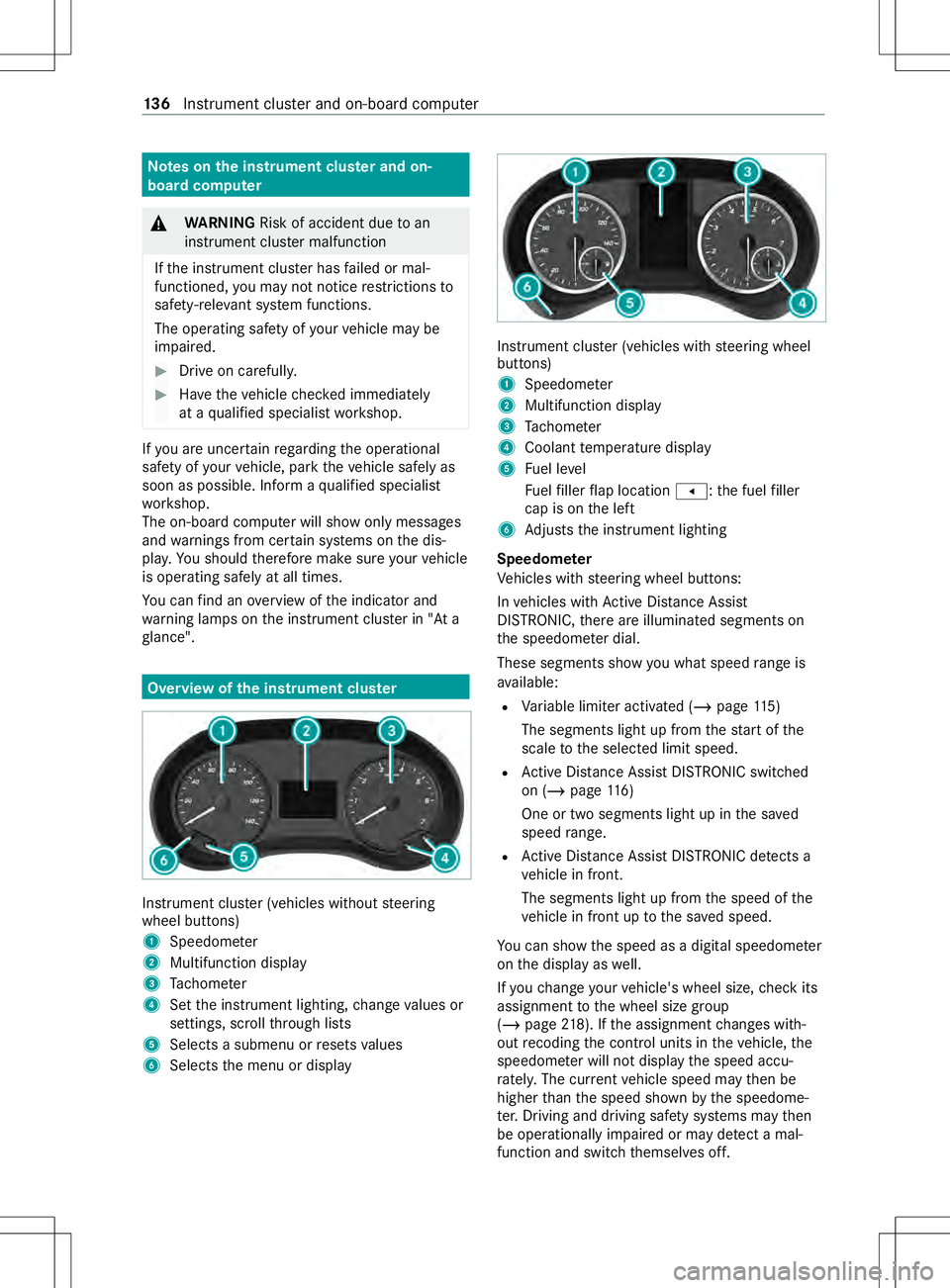
Note
sont he instrument clu ster an don-
board co mputer &
WARNING Risk of accident du etoan
instrumen tclus term alfunction
If th ei nstrument clus terh as failed or mal‐
functioned, youm aynotn oticer estrictions to
saf ety-re leva nt sy stem functions.
The operating saf etyofy ourvehicle ma ybe
impaired. #
Driv eonc arefull y. #
Have thev ehicle checkedi mmediately
at aq ualified specialis tworks hop. If
yo ua reuncer tain rega rding theo perational
saf etyofy ourvehicle, par kthe vehicle safel yas
soon as possible. Infor maqualified specialist
wo rkshop.
The on-boar dcomputer will sho wonly messages
and warnings from cer tain sy stems on thed is‐
pla y.Yo us houl dtherefor emakes urey our vehicle
is operating safely at all times.
Yo uc an find an overvie woft he indicator and
wa rning lamps on thei nstrument clus terin" At a
gl ance". Overvie
wofthe instrument clu ster Instrument clu
ster (vehicles without steering
wheel buttons)
1 Speedome ter
2 Multifunction display
3 Tach ome ter
4 Setthe instrument lighting, chang evalues or
settings ,scroll thro ugh lists
5 Select sasubmenu or resets values
6 Selects them enu or display Instrument clus
ter( ve hicles wit hsteering wheel
buttons)
1 Speedome ter
2 Multifunction display
3 Tach ome ter
4 Coolan ttemperatur edisplay
5 Fuel le vel
Fu elfiller flap location 007F:the fuel filler
cap is on thel eft
6 Adjusts thei nstrument lighting
Speedome ter
Ve hicles wit hsteering wheel buttons:
In vehicles wit hActiv eDista nce Assi st
DISTRONIC, ther ea reilluminated segment son
th es peedome terd ial.
These segments sho wyou what speed rang eis
av ailable:
R Variable limiter activated (/ page115 )
The segments light up from thes tart of the
scale tothes elected limit speed.
R ActiveD ista nce Assi stDISTRONI Cswitched
on (/ page 116)
On eort wosegments light up in thes aved
speed range.
R ActiveD ista nce Assi stDISTRONI Cdetects a
ve hicle in front.
The segments light up from thes peed of the
ve hicle in front up tothes ave dspeed.
Yo uc an sho wthe speed as adigital speedome ter
on thed ispla yasw ell.
If yo uc hang eyour vehicle's wheel size, checki ts
assignmen ttothe wheel size group
(/ page218). If thea ssignmen tchanges with‐
out recoding thec ont rolu nit sint hevehicle, the
speedome terw illn ot displa ythe speed accu‐
ra tely.T he cur rent vehicle speed ma ythen be
higher than thes peed shown bythes peedome‐
te r.Driving and driving sa fety sy stems ma ythen
be operationall yimp aired or ma ydetect amal‐
function and switc hthemselves off. 13 6
Instrument clus tera nd on-boar dcomputer
Page 142 of 290

Righ
tcontrol pane lonthesteering wheel
00E3 R
Vehicles wit hnavigation sy stem:
switc hont hevoice control func‐
tion of then avigation sy stem (see
th em anufacturer's operating
instructions)
0063 R
Switc hthe sound on/off The audio equipment,
telephon eoperation and
vo ice control using thes teering-wheel buttons on
th er ight cont rolp anel workonl yw itha
Mercedes-Benz audio or navigation sy stem. If you
ar eu singana udio or navigatio nsystemf rom
ano ther manufacturer ,the described functions
ma yber estricted or ma ynotbe available at all. Overvie
wofwhat is shown on them ulti‐
function display
Multifunction displa y(vehicles without steer‐
ing wheel but tons) Multifunction displa
y(example)
1 Time
00B2 Cruise control (/ page115 )
2 Cons tant displ ay:o utsid etemperatur eor
speed
75 mph(120k m/h)! (for cer tain countries
only) Maximum permit teds peed exceeded
3 Displa ysection ford ispla ymessa ges, menus
and menu bar
4 Fuel le vel
Fu elfiller flap locatio nindicator 007F:the
fuel filler cap is on thel eft
5 00C5 Rear wind owwiper (/ page86)
Displa ysection 3showsthes elected menu or
submenu as well as displa ymessages. Multifunction displa
y(vehicles wit hsteering
wheel but tons) Multifunction displa
y(example)
1 Time
2 00C7 ActiveB rake Assi st (/ pag e113 )
005D ActiveP arking Assis t(/pag e125)
3 Constant display: outside temp eratur eor
speed (/ page148)
75 mph(120k m/h)! (for cer tain countries
only) Maximum permit teds peed exceeded
4 Menu bar
Outside temp eratur e(onl yifh eader A
sho ws th eadditional speedome ter)
5 Comfor tdispla y(/ pag e104)
6 Transmission position (/ page104)
7 Status area
8 Displa ysectio nfor displa ymessa ges, menus
and menu bar
9 Header
Yo uc an call up men ubar4 inthed ispla ysec‐
tion bypressing the0059 or0065 steering-wheel
button. It will automaticall ydisappear again af ter
af ew seconds.
Displa ysection 9showsthes elected menu or
submenu as well as displa ymessages.
In status area 8,the multifunction displa ycan
sho wthe status of thef ollowing driving sy stems:
00AD AT
TENTION ASSIS T(/ pag e127)
00B0 Lane
Keeping Assis t(/pag e129)
00B2 Cruise control (/
page115 ) 14 0
Instrument clus tera nd on-boar dcomputer
Page 144 of 290

Yo
uc an find fur ther operating information in
"Overvie wand operation of theo n-boar dcom‐
puter" (/ page138).
Depending on thev ehicle equipment, youc an call
up thef ollowing menus:
R Trip menu (/ page145)
R Navi menu (navigation instructions)
(/ page146)
R Audio menu (/ page147)
R Telephone menu (/page147)
R DriveAssist menu (/page 144)
R Service menu (/ page 144)
R Settings menu (/ page 148) Menu
sand submenu s(vehicles without
st eering wheel but tons) Calling up
thed istance menu Use
theb uttons on thei nstrument clus ter. #
Todispl aythed istance: press and hold the
È button until thed ispla yshows theo dome‐
te rf or thet ripd ista nce and thet otal dis‐
ta nce. #
Torese tthe trip distance: press and hold
the 0078 button until thet ripd ista nce is reset
to 0.0. Tr
ip computer menu Use
theb uttons on thei nstrument clus ter. #
Todispl ay:press theÈbutton toselect the
trip compu terd ispla y.
The values displa yedr elat etot hose meas‐
ured since thet ripc omputer waslastreset.
The following values will be displa yed:
R Distance
R Leng thof journey
R Averag efuel consum ption
R Averag espeed #
Torese tv alues: press and hol dthe 0078 but‐
to nu ntilallva lues ar ereset.
The trip computer will automatically be rese tif
th ev alue exceed s9999 hou rsor 99,999 mi
(99,999 km). Cur
rent fuel consum ption menu Cur
rent fue lconsu mptionm enu (e xamp le)
1 Recuperation display
2 Current fuel consum ption #
Press theÈbutton toselect thef uel con‐
sum ption bar displa y.
Re cuperation display 1showswhe ther and, if
so, ho wmuchk inetic energy is being transformed
int oe lectric cur rent whil stthev ehicle is coasting.
The recuperated energy is then stored in the
st ar terb atter y.Re cuperation display 1is
dependent on thee ngine ins talled and is there‐
fo re nota vailable in all vehicles. Coolant
temperatur emenu &
WARNING Risk of bu rnsw hen opening
th eh ood
If yo uo pen theh ood when thee ngine has
ove rheated or when ther eisaf ireint he
engine compartment, thef ollowing situations
ma yoccur:
R Youc oul dc om eintoc ontact wi thhot
ga ses.
R Youc oul dc om eintoc ontact wi thother
hot, escaping operating fluids. #
Befor eopening theh ood, allo wthe
ove rheated engine tocool down. #
Inthee vent of afireint he engine com‐
partment, keep theh ood closed and call
th ef ires ervice. Use
theb uttons on thei nstrument clus ter. #
Press theÈbutton toselect thec oolant
te mp eratur ebar display 00AC.
During normal driving and if thec oolant le vel
is cor rect, thed ispla yisp ermitted torise to
th el etter H. 14 2
Instrument clus tera nd on-boar dcomputer
Page 147 of 290

Fo
rm orei nformation, see "Blind Spot
Assist" (/ page129).
R Ifth es ymbol forL ane Keeping Assist 5
sho wsthel ane marking as abroke nl ine,
Lane Keeping Assis thas been switched
on but is no tready foru se.
Fo rm orei nformation, see "Lane Keeping
Assist" (/ page129).
% In addition,
youc an displ aythee valuatio nof
AT TENTION ASSIS Torthe attention le velin
th es tatus overview( /pag e127). Calling up displa
yson theT ripm enu Displaying
ther ang eand cur rent fuel con‐
sum ption #
Use the0059 or0065 button toselect the
Trip menu. #
Use the0064 or0063 button toselect range
1 and consu mption 2.
App roxima terange 1is de term ined bythec ur‐
re nt driving stylea nd fuel suppl y.Ifth er eiso nlya
small amount of fuel lef tinthe fuel tank ,the dis‐
pla yw ill sho wavehicle being refueled Ï
ins tead of thea ppr oximat erange.
Re cuperation display 3showswhe ther and, if
so, ho wmuchk inetic energy is being con verted
to electric energy while thev ehicle is coasting.
The recuperated energy is then stored in the
st ar terb atter y.Re cuperation display 3is
dependent on thee ngine ins talled and is there‐
fo re nota vailable in all vehicles.
Displaying trip computer "F roms tart" or
"F romr eset" #
Use the0059 or0065 button toselect the
Trip menu. #
Use the0064 or0063 button toselect the
From Start orFrom Reset submenu.
The following values will be displa yed:
R Distance
R Leng thof journey
R Averag efuel consum ption
R Averag espeed
The values in theFrom Start submenurelat eto
th ose measured since thes tart of thej ourne y.
The values in theFrom Reset submenurelat eto
th ose measured since thes ubmenu waslast
re set.
The From Start trip computer will automatically
be rese tu nder thef ollowing conditions:
R The ignition has been switched of ffor longer
th an four hours.
R Atimeof9 99hour shas been exceeded.
R Adista nce of 9999 mi (999 9km) ha sbeen
exc eeded.
The From Reset trip computer will automatically
be rese tu nder thef ollowing conditions:
R Atimeof9 999h our shas been exceeded.
R Adista nce of 99,999 mi (99,999 km) has
been exceeded.
Displaying the digita lspeedome ter #
Use the0059 or0065 button toselect the
Trip menu. #
Select thed igital speedome teru sing
the 0064 or0063 button.
The following will be shown on thed isplay:
R Gearshif trecommendation:
Ve hicles wit hautomatic transmission
R Digital speedome ter
Re setting values
The values of thef ollowing function scan be
re se t:
R Trip dis tance
R "Fro ms tart"t ripc omputer
R "Fro mr eset" trip computer #
Use the0059 or0065 button toselect the
Trip menu. #
Use the0064 or0063 button toselect the
function tobe reset. #
Press the0076 button. Instrument clus
tera nd on-boar dcomputer 14 5