2021 MERCEDES-BENZ GLE SUV change wheel
[x] Cancel search: change wheelPage 6 of 545
Mir
rors ........................................................ 157
Area pe rmeable toradio wav es on the
windscreen ................................................ .160
Infrared-reflective windscreen function ...... 16 0Climate control
......................................... 161
Overview of climate contro l systems ........... 161
Operating the climate control sy stem ......... 16 2 Driving and pa
rking .................................. 17 3
Driving ........................................................ 173
DY NA MIC SELECT switch ........................... 188
Au tomatic transmission .............................. 19 2
Tr ans fer case .............................................. 19 6
Fu nction of the 4MATIC .............................. 19 8
Re fuelling .................................................... 19 8
Pa rking ...................................................... .205
Driving and driving saf ety sy stems .............. 211
Tr ailer hit ch................................................ 283
Bicycle rack function .................................. 289
Ve hicle towing instructions ........................ .291 Instrument display and on-board
compu
ter.................................................. 292
No tes on the instrument display and on-
board computer .......................................... 292
Instrument display overview ...................... .293
Overview of the buttons on thesteering
wheel ..........................................................2 94
Operating the on-board computer .............. 294
Overview of what is shown on the multi‐
function display .......................................... 296
Head-up display .......................................... 296 MBUX multimedia sy
stem ...................... 299
Overview and operation .............................. 299
Sy stem settings .......................................... 308
Na vigation ................................................... 312
Te lephone .................................................. .321
Mercedes me and apps .............................. 324
Mercedes-Benz emer gency call sy stem ...... 333
Ra dio, media & TV...................................... 341
Sound settings ............................................ 347 Main
tenance and care ............................. 349
ASS YST PLUS service inter val display ........ 349 Engine compartment .................................. 350
Cleaning and care ......................................
.356 Breakdown assi
stance ............................ 365
Emergency ................................................. .365
Flat tyre ...................................................... 367
Battery (vehicle) .......................................... 374
To w- starting or towing away ....................... 379
Electrical fuses ........................................... 384 Wheels and tyres
..................................... 387
No tes on noise or unusual handling char‐
acteristics .................................................. .387
No tes on regular lyinspecting wheels and
tyres .......................................................... .387
No tes on snow chains ................................ 387
Ty re pressure .............................................. 388
Wheel change ............................................ .391
Emergency spare wheel .............................. 401
Collapsible spare wheel .............................. 403 Te
ch nical data .......................................... 406
No tes on tech nical da ta.............................. 406 Contents
3
Page 40 of 545
data can also be used
toexamine the cus tom‐
er's warranty and guarantee claims.
Fa ult memories in theve hicle can be reset by a
service outlet or at your requ est as part of repair
or maintenance work.
Con venience and inf otainment functions
Yo u can store con venience settings and individ‐
ual settings in theve hicle and change or reset
th em at any time.
Depending on theve hicle equipment, this
includes thefo llowing settings, forex ample:
R seat and steering wheel positions
R suspension and climate control settings
R individual settings, such as interior lighting
Depending on the selected equipment, you can
import data into vehicle inf otainment functions
yo urself.
Depending on theve hicle equipment, this
includes thefo llowing data, forex ample:
R multimedia data, such as music, films or pho‐
to sfo r playback in an integrated multimedia
sy stem R
address book data for use in connection with
an integrated hands-free sy stem or an inte‐
grated navigation sy stem
R entered navigation destinations
R data about the use of Internet services
These data for con venience and inf otainment
functions may be sa ved locally in theve hicle or
th ey may be located on a device which you ha ve
connected totheve hicle, such as a smartphone,
USB flash drive or MP3 pla yer.If yo u ha ve
entered these data yourself, you can dele tethem
at any time.
This data is transmit ted from theve hicle tothird
parties only at your requ est. This applies, in par‐
ticular, when you use online services in accord‐
ance with the settings that you ha veselected.
Smartphone integ ration (e.g. Android Autoor
Apple CarPlay ®
)
If yo ur vehicle is accordingly equipped, you can
connect your smartphone or ano ther mobile end
device totheve hicle. You can then control them
by means of the control elements integrated in
th eve hicle. Images and audio from the smart‐ phone can be output via
the multimedia sy stem.
Cer tain information is simultaneously transfer‐
re dto yo ur smartphone. Depending on the type
and integration, this includes position data, day/
night mode and other general vehicle statuses.
Fo r more information please consult the Owner's
Manual of theve hicle/inf otainment sy stem.
This integration allo wsthe use of selected
smartphone apps, such as navigation or music
pla yer apps. There is no fur ther interaction
between the smartphone and theve hicle; in par‐
ticular, vehicle data is not directly accessible.
The type of additional data processing is de ter‐
mined bythe pr ovider of the app being used.
Which settings you can make, if an y,depends on
th e specific app and the operating sy stem of
yo ur smartphone. Online services
Wi
reless network connection
If yo ur vehicle has a wireless network connec‐
tion, it enables data tobe exc hanged between
yo ur vehicle and additional sy stems. The wire‐
less network connection is made possible bythe Gene
ral no tes 37
Page 115 of 545
or
#
b) Press a memory position button or a
seat adjustment switch on the driver's
door.
The adjustment process will be stop‐
ped. Re
quirements:
R Adapting the driver's seat and steering wheel
position tobody size: automatic seat adjust‐
ment has been switched on.
Multimedia sy stem:
4 © 5
Settings 5
Vehicle
5 Automatic seat adjustment
Switching automatic seat adjustment on/off
When the active user profile is changed while
th eve hicle is stationar y,the driver's seat, steer‐
ing wheel, outside mir rors and seat con tour will
automatically be adap tedto the driver. #
Select OnorOff.
% This setting is available on lyfor individual
user profiles. Forth e guest profile, auto‐
matic seat adjustment cannot be switchedon or off.
Further information about user
profiles .
Ad justing driver's seat and steering wheel
position tobody size
The vehicle calculates a suitable driver's seat
and steering wheel position on the basis of the
driver's body size and sets this directly. #
Toset the unit of measurement: selectcm
or ft/in. #
Set the size using the scale. #
Select Start positioning.
The driver's seat and steering wheel position
is adjus tedto the body size that has been
set.
% Ifth e driver's seat and steering wheel posi‐
tion calculated bytheve hicle is not practical
or comfor table, it can be manually changed
at any time via the buttons.
The exterior mir rors are not set via this func‐
tion. Ins tead, they have tobe set manually
via the switches.
% You can also configure these settings via the
Mercedes me por talfo ryo ur user profile. By syn
chro nising the profiles in theve hicle and
th e Mercedes me connect profiles, you can
car ryove rth ese settings foryo ur vehicle.
Fu rther information about synchronising
user profiles .
Setting the easy entry and exitfeature #
Select Steer. wheel and seat, Steering wheel
only orOff.
% Ifyo u use an individual user profile and ha ve
set your body size, this information is car ried
ove rfo rth e easy entry andexitfeature. This
will cause the driver's seat and steering
wheel tomo veinto the cor rect position auto‐
matically . Overview of massage prog
rammes R
Hot Relaxing back Combination of heat and
massa ge. It starts bymassaging the bac k.In
addition, warm pressure points become
noticeable, starting in the pelvic area.
R Hot Relaxing shoulder Combination of heat
and massage. It starts bymassaging the
shoulders . In addition, warm pressure points 11 2
Seats and stowing
Page 169 of 545
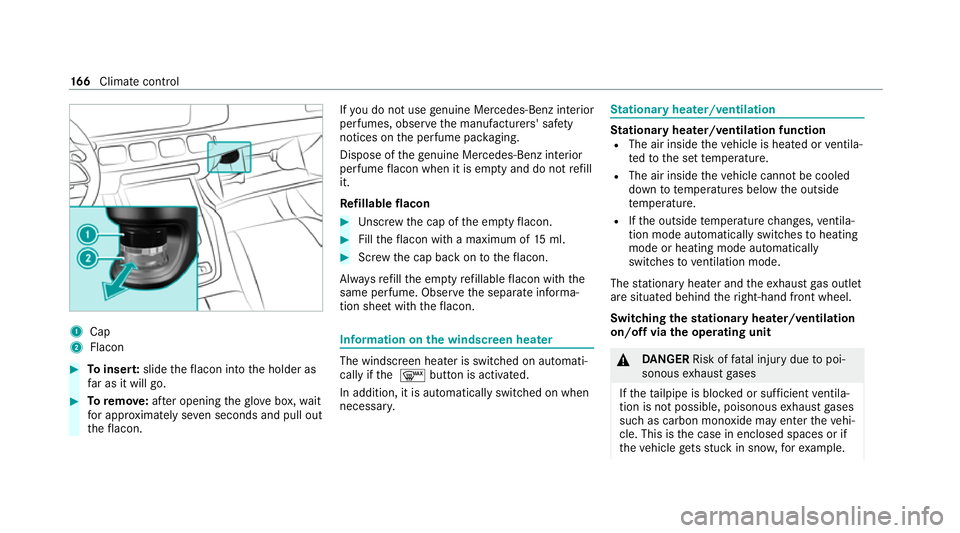
1
Cap
2 Flacon #
Toinser t:slide theflacon into the holder as
fa r as it will go. #
Toremo ve:af te r opening theglov e box, wait
fo r appro ximately se ven seconds and pull out
th eflacon. If
yo u do not use genuine Mercedes-Benz interior
pe rfumes, obse rveth e manufacturers' saf ety
notices on the perfume pac kaging.
Dispose of thege nuine Mercedes-Benz interior
pe rfume flacon when it is em pty and do not refill
it.
Re fillable flacon #
Unscr ew the cap of the em ptyflacon. #
Filltheflacon with a maximum of 15ml. #
Screw the cap back on totheflacon.
Alw aysre fill th e em ptyre fillable flacon with the
same perfume. Obser vethe separate informa‐
tion sheet with theflacon. Information on
the windscreen heater The windscreen heater is swit
ched on automati‐
cally if the 0064 button is activated.
In addition, it is automatically switched on when
necessar y. St
ationary heater/ventilation St
ationary heater/ventilation function
R The air inside theve hicle is heated or ventila‐
te dto the set temp erature.
R The air inside theve hicle cannot be cooled
down to temperatures below the outside
te mp erature.
R Ifth e outside temp erature changes, ventila‐
tion mode au tomatical lyswitches toheating
mode or heating mode automatically
switches toventilation mode.
The stationary heater and theex haust gas outlet
are situated behind theright-hand front wheel.
Switching thest ationary heater/ventilation
on/off via the operating unit &
DANG ER Risk of fata l injury due topoi‐
sonous exhaust gases
If th eta ilpipe is bloc ked or suf ficient ventila‐
tion is not possible, poisonous exhaust gases
such as carbon monoxide may enter theve hi‐
cle. This is the case in enclosed spaces or if
th eve hicle gets stuck in sn ow,fo rex ample. 16 6
Climate cont rol
Page 185 of 545
Clean
the brakes af ter driving off-road. If you
th en notice reduced braking ef fect or hear
scraping noises, ha vethe brake sy stem checked
at a qualified specialist workshop. Adapt your
driving style to thech anged braking characteris‐
tics.
* NO
TEDama gecaused bydriving over
obs tacles The
vehicle can be damaged by:
R driving onto high kerbs or unpa vedro ads.
R quickly driving over obs tacles su chas
ke rbs, speed bumps or po tholes.
R heavy objects hitting the underbody or
ch assis components. #
Do not drive over obs tacles that could
damage theve hicle. #
Check theve hicle regular lyfor dama ge
during off-road driving. #
Adjust theve hicle speed tosuit the
ro ad sur face conditions. #
Ifth ere is damage, consult a qualified
specialist workshop immediately. +
ENVIRONMENTAL
NOTEEnvironmental
dama gedue tonon-obser vance of pro‐
hibition signs Environmental pr
otection has priority. Treat
nature with respect. #
Be sure toobser veprohibition signs. Checklist before driving off-road
Check
thefo llowing points before driving off-
ro ad:
R Fuel le vel
R Vehicles with a diesel engine: AdBlue ®
le vel
R Engine oil le vel:fill engine oil tothe maxi‐
mum le velto ensure full gradeability
(/ page 352).
R Tyre-change tool kit and spare wheel
R Tyres and wheels %
Further information about special all-ter rain
tyres forre trofitting can be ob tained from a
qu alified specialist workshop.
Off-road driving
Re ad this section before driving your vehicle off-
ro ad. Practise bydriving over more gentle off-
ro ad terrain firs t.
R Obse rveth e no tes on the cross-country ABS
(/ page 214).
R Ifnecessa ry, select theF orG drive
program (vehicles with Off-road pac kage)
before driving off-road (/ page190).
R Before driving off-road, shift the transfer
case totheLO W RANGE off-roadgear (vehi‐
cles with Off- road pac kage ) (/ page 197).
R Select a vehicle le vel suitable for off-road ter‐
ra in (/ page 252). Toavo id damaging the
ve hicle, make sure there is alw ays suf ficient
ground clearance.
R Alw ayske ep the engine running and in gear
when driving on downhill gradients and
slopes. Obse rveth e no tes on driving in
mountainous terrain. 18 2
Driving and pa rking
Page 237 of 545
Ac
tive Steering Assist Fu
nction of Active Steering Assist
Ac tive Steering Assist is only available up to a
speed of 210 km/h. The sy stem helps youto
st ay inthe cent reofthe lane bymeans of mod‐
erate steering inter ventions. Depending on the
speed driven, Active Steering Assist uses the
ve hicles ahead and lane markings as a refer‐
ence.
% Depending on the count ry, in the lo wer
speed range Active Steering Assist can use
th e sur rounding traf fic as a refere nce. If nec‐
essar y,Ac tive Steering Assist can then also
pr ov ide assis tance when driving outside the
centre of the lane, forex ample, toform a
re scue lane.
If th e de tection of lane markings and vehicles
ahead is impaired, Active Steering Assist
switches topassive mode. The sy stem pr ovides
no support in this case.
St atus display of Active Steering Assist in
th e multifunction display
R Ø (gre y): activated and passive
R Ø (gre en): activated and active R
Ø (red): sy stem limits de tected
R Ø (white, red hands): "hands on thesteer‐
ing wheel" prom pt
% During the transition from active topassive
st atus, theØ symbol is shown as
enlar ged and flashing. Once the sy stem is
passive, theØ symbol is shown as gr eyin
th e multifunction displa y.
% Depending on the selected vehicle settings,
Ac tive Steering Assist may be una vailable.
Ste ering and touch de tection
The driver is requiredtokeep their hands on the
st eering wheel at all times and be able tointer‐
ve ne at any time tocor rect the course of the
ve hicle and keep it in lane. The driver must
ex pect a change from active topassive mode or
vice versa at any time. If
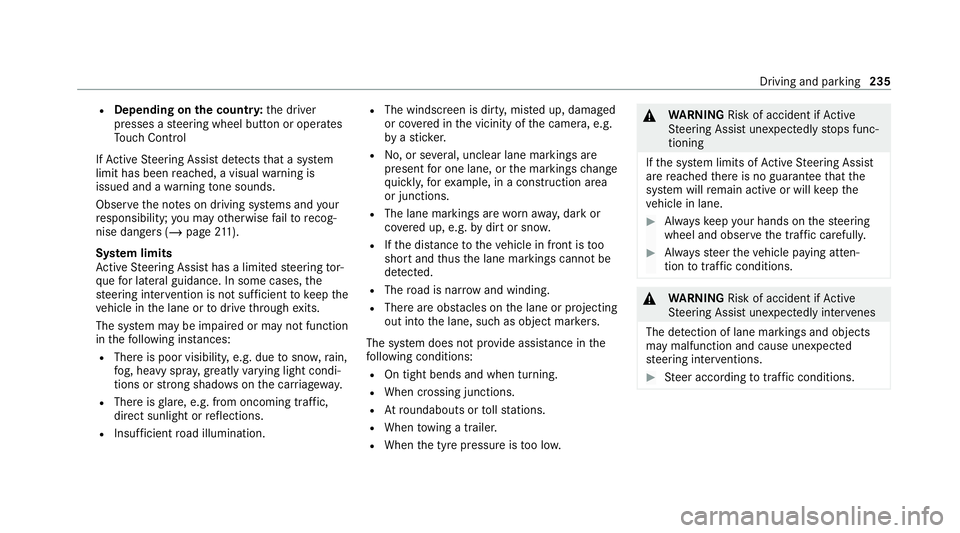
th e sy stem de tects that the driver has not
st eered theve hicle for a considerable period of
time or has remo vedth eir hands from thesteer‐
ing wheel, display 1appears. If the driver still
does not steer theve hicle, a warning tone
sounds in addition tothe visual warning mes‐
sage.
If th e driver does not react tothewa rning for a
considerable period, the sy stem can initiate an
emer gency stop (/ page 236).
The warning is not issued or is stopped when the
driver gives con firm ation tothe sy stem:
R The driver steers theve hicle. 234
Driving and parking
Page 238 of 545
R
Depending on the count ry:th e driver
presses a steering wheel button or operates
To uch Control
If Ac tive Steering Assist de tects that a sy stem
limit has been reached, a visual warning is
issued and a warning tone sounds.
Obser vethe no tes on driving sy stems and your
re sponsibility; you may otherwise failto recog‐
nise dangers (/ page 211).
Sy stem limits
Ac tive Steering Assist has a limited steering tor‐
qu efo r lateral guidance. In some cases, the
st eering inter vention is not su fficient tokeep the
ve hicle in the lane or todrive thro ugh exits.
The sy stem may be impaired or may not function
in thefo llowing ins tances:
R The reis poor visibilit y,e.g. due tosno w,rain,
fo g, heavy spr ay, greatly varying light condi‐
tions or strong shado wsonthe car riag ewa y.
R There is glare, e.g. from oncoming traf fic,
di re ct sunlight or reflections.
R Insuf ficient road illumination. R
The windsc reen is dirty, mis ted up, damaged
or co vered in the vicinity of the camera, e.g.
by ast icke r.
R No, or se veral, unclear lane markings are
present for one lane, or the markings change
qu ickl y,forex ample, in a con stru ction area
or junctions.
R The lane markings are wornaw ay, dark or
co vered up, e.g. bydirt or sno w.
R Ifth e dis tance totheve hicle in front is too
short and thus the lane markings cann otbe
de tected.
R The road is nar rowand winding.
R There are obs tacles on the lane or projecting
out into the lane, such as object mar kers.
The sy stem does not pr ovide assis tance in the
fo llowing conditions:
R On tight bends and when turning.
R When crossing junctions.
R Atroundabouts or tollst ations.
R When towing a trailer.
R When the tyre pressure is too lo w. &
WARNING Risk of accident if Active
St eering Assist unexpectedly stops func‐
tioning
If th e sy stem limits of Active Steering Assist
are reached there is no guarantee that the
sy stem will remain active or will keep the
ve hicle in lane. #
Alw ayske ep your hands on thesteering
wheel and obser vethe tra ffic carefull y. #
Alw aysst eer theve hicle paying atten‐
tion totraf fic conditions. &
WARNING Risk of accident if Active
St eering Assist unexpectedly inter venes
The de tection of lane markings and objects
may malfunction and cause unexpected
st eering inter ventions. #
Steer according totraf fic conditions. Driving and park
ing235
Page 371 of 545
In
theeve nt of a flat tyre, thefo llowing options
are available depending on your vehicle's equip‐
ment:
R Vehicles with MOExtended tyres: it is pos‐
sible tocontinue the journey for a short
period of time. Make sure you obse rvethe
no tes on MOExtended tyres (run-flat tyres)
(/ page 368).
R Vehicles with a TIREFIT kit: you can repair
th e tyre so that it is possible tocontinue the
jou rney for a short period of time. Todo this,
use the TIREFIT kit (/ page370).
R Vehicles with Mercedes me connect: you
can make a call for breakdown assi stance via
th eove rhead control panel in the case of a
breakdown (/ page 326).
R Allvehicles: change the wheel
(/ page 396). Note
s on MOExtended tyres (run-flat tyres) &
WARNING Risk of accident when driving
in limp -home mode
Driving in emergency mode impairs the han‐
dling characteristics of theve hicle. #
Do not exceed the permissible maxi‐
mum speed of the MOEx tended tyres. #
Avoid any abrupt steering and driving
manoeuvres as well as driving over
obs tacles (kerbs, pot holes, off-road).
This applies, in pa rticular, toa loaded
ve hicle. #
Stop driving in the emer gency mode if
yo u notice:
R banging noise
R vehicle vibration
R smoke which smells like rubber
R continuous ESP ®
inter vention
R crac ksinthe tyre side walls #
After driving in emergency mode, ha ve
th erims checkedby aqu alified special‐ ist
workshop with rega rd totheir fur ther
use. #
The defective tyre must be replaced in
eve rycase. Wi
th MOExtended tyres (run-flat tyres), you can
continue todrive your vehicle even if there is a
tot al loss of pressure in one or more tyres. How‐
eve r,th e tyre af fected must not show any clearly
visible damage.
Yo u can recognise MOExtended tyres bythe
MOExtended marking which appears onthe side
wa ll of the tyre.
Ve hicles with tyre pressure monitoring sys‐
te m: MOExtended tyres may only be used in
conjunction wi than activated tyre pressure mon‐
itoring sy stem.
If a pressure loss warning message appears in
th e multifunction displa y,proceed as follo ws:
R Check the tyre for dama ge.
R If driving on, obser vethefo llowing no tes. 368
Breakdown assis tance