2021 MERCEDES-BENZ GLE COUPE ESP
[x] Cancel search: ESPPage 150 of 525
Au
tomatic anti-dazzle mir rors function &
WARNING Risk of acid burn s and poi‐
soning due tothe anti-dazzle mir ror elec‐
trolyte
Electrolyte may escape if theglass in an
automatic anti-dazzle mir ror breaks.
The electrolyte is hazardous tohealth and
causes ir rita tion. It mu stnot come into con‐
ta ct with your skin, eyes,respiratory or gans
or clo thing or be swallo wed. #
Ifyo u come into contact with electro‐
ly te , obser vethefo llowing:
R Immediately rinse the electrolyte
from your skin with water and seek
medical attention.
R If electrolyte comes into contact
with your eyes, immediately rinse
th em thoroughly with clean water
and seek medical attention.
R Ifth e electrolyte is swallo wed,
immediately rinse your mouth out
th oroughl y.Do not induce vomiting.
Seek medical attention immediately. R
Immedia tely ch ange out of clo thing
which has been con taminated with
electrolyte.
R If an allergic reaction occurs, seek
medical attention immediatel y. The inside
rear-view mir ror and the outside mir‐
ro r on the driver's side will automatically go into
anti-dazzle mode if light from a headlamp hits
th e sensor on the inside rear-view mir ror.
Sy stem limits
The sy stem will not go into anti-dazzle mode if:
R The engine is switched off.
R Reversege ar is engaged.
R The interior lighting is swit ched on. Fr
ont-passenger outside mir ror parking posi‐
tion function %
The pa rking position is available on ly invehi‐
cles with a memory function.
The parking position makes parking easier. In
thefo llowing situations, the front-passen ger
outside mir ror will swive l downwards in the
direction of there ar wheel on the front passeng‐
er's side:
R the parking position is stored (/ page148)
R The front-passenger mir ror is selected
R Reversege ar is engaged.
The front-passenger outside mir ror will mo ve
back toits original position in thefo llowing sit‐
uations:
R You shift the transmission toano ther trans‐
mission position
R You are tra velling at speeds greaterth an
15 km/h
R You press the button forth e outside mir ror
on the driver's side Light and sight
147
Page 153 of 525
Overview of climate control sy
stems Note
s on climate control An interior air
filter in combination with the pre‐
fi lter in the engine compartment must alw ays be
used so that the air conditioning sy stem, pollu‐
tion le vel monitoring and the air filtration work
cor rectl y.Use filters recommended and
appr ovedby Mercedes-Benz. Alw ays ha vemain‐
te nance workcar ried out at a qualified specialist
wo rkshop. Overview of
the air conditioning control
panel The indicator lamps on
the buttons indicate that
th e cor responding function is activated.
Plug-in hybrid: be sure toobser vethe no tes in
th e Supplement. You could otherwise failto rec‐
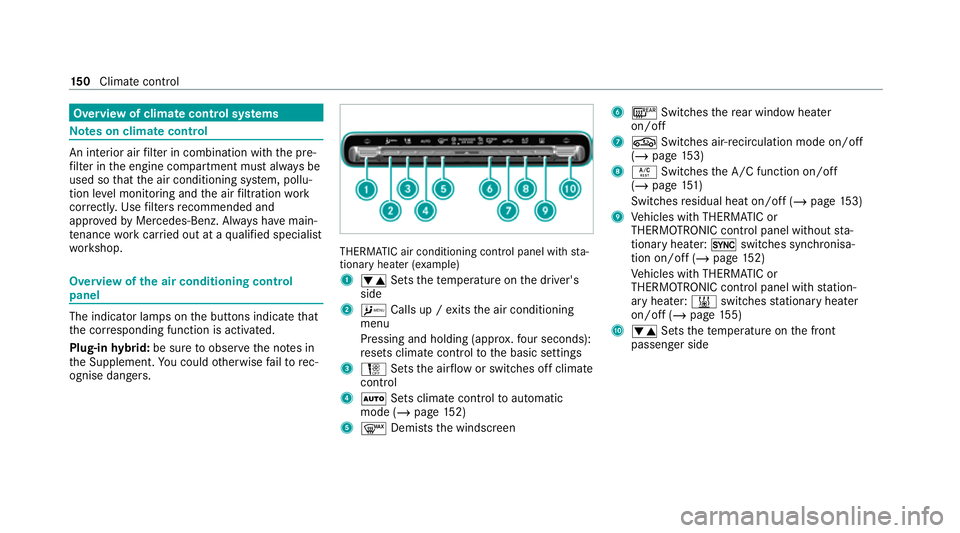
ognise dangers. THERMATIC air conditioning control panel wi
th sta‐
tionary heater (e xamp le)
1 0082 Setsthete mp erature on the driver's
side
2 A Calls up / exits the air conditioning
menu
Pressing and holding (appr ox.fo ur seconds):
re sets climate contro lto the basic settings
3 H Setsthe air flow or switches off climate
control
4 0058 Sets climate control toautomatic
mode (/ page152)
5 0064 Demists the windscreen 6
006C Switches there ar wind owheater
on/off
7 0072 Switches air-recirculation mode on/off
(/ page 153)
8 0056 Switches the A/C function on/off
(/ page 151)
Switches residual heat on/off (/ page153)
9 Vehicles with THERMATIC or
THERMOTRONIC contro l panel withoutsta‐
tionary heater: 0switches synchronisa‐
tion on/off (/ page152)
Ve hicles with THERMATIC or
THERMOTRONIC contro l panel withstation‐
ary heater: 003Bswitches stationary heater
on/off (/ page155)
A 0082 Setsthete mp erature on the front
passenger side 15 0
Climate cont rol
Page 169 of 525
R
Avoid overstraining theve hicle, e.g. driving at
full thro ttle.
R Do not depress the accelerator pedal past
th e pressure point (kickdown).
R Only increase the engine speed gradually and
accelera tetheve hicle tofull speed af ter
1, 500 km.
This also applies when the engine or parts of the
driv etra in ha vebeen replaced.
Please also obser vethefo llowing running-in
no tes:
R in cer tain driving and driving saf ety sy stems,
th e sensors adjust automatically while a cer‐
ta in dis tance is being driven af terth eve hicle
has been delivered or af terre pairs. Full sys‐
te m ef fectiveness is not reached until the
end of this teach-in process.
R brakepads, brake discs and tyres that are
either new or ha vebeen replaced only ach‐
ie ve optimum braking ef fect and grip af ter
se veral hundred kilom etre s of driving. Com‐
pensate forth ere duced braking ef fect by
applying greaterfo rc eto the brake pedal. Note
s on optimised acceleration If all necessary
requ irements and activation con‐
ditions are fulfilled, the best possible accelera‐
tion can be achie ved from a standstill.
Do not use the optimised acceleration on public
ro ads. Individual wheels could spin and you
could lose control of theve hicle. There is an
increased risk of skidding and/or accident.
Be sure toobser vethe saf ety no tes and informa‐
tion on ESP ®
(/ page 201). Moving
away with optimised acceleration &
WARNING Risk of skidding and having
an accident from wheels spinning
When you use optimised acceleration, indi‐
vidual wheels could spin and you could lose
cont rol of theve hicle.
If ESP ®
is deactivated, there is a risk of skid‐
ding and accident! #
Make sure that no persons or obstacles
are in the close vicinity of your vehicle. Re
quirements:
R theve hicle is run in (/ page 165).
R theve hicle and tyres are in good condition.
R you are on a high-g rip ro adw ay.
R the engine and transmission are at normal
operating temp erature.
* NO
TEIncreased wear due tooptimised
acceleration When pulling
away with optimised accelera‐
tion, all components of the driv etra in are
subjected toave ry high load.
This can lead toinc reased component wear. #
Do not alw ays pull away with optimised
acceleration. #
Engage the005B drive position (/ page183). #
Movethesteering wheel tothest ra ight-
ahead position. #
Select the sportiest available drive program
B orC(/ page178). #
Deactivating ESP ®
(/ page 203). 16 6
Driving and pa rking
Page 170 of 525
#
Dep ress and hold the brake pedal firm ly wi th
yo ur left foot. #
With your right foot , fully depress the accel‐
erator pedal. #
After no more than five seconds, take your
left foot quickly off the brake, but keep the
accelerator pedal depressed.
The vehicle pulls away at maximum accelera‐
tion. #
Swit chon ESP ®
once the acceleration proce‐
dure is comple te.
Ending optimised acceleration #
Remo veyour foot from the accelerator pedal. #
Reactivate the ESP ®
.
% Afteryo u pull away with optimised accelera‐
tion, components of the driv etra in can
become very hot, which means that opti‐
mised acceleration values may be reached
again on lyafte r a few minutes. Note
s on driving &
WARNING Risk of accident due to
objects in the driver's foot we ll
Objects in the driver's foot we ll may impede
pedal tr avel or block a depressed pedal.
This jeopardises the operating and road
saf ety of theve hicle. #
Stow all objects in theve hicle securely
so that they cannot getinto the driver's
fo ot we ll. #
Alw aysfit th efloor mats securely and
as prescribed in order toensure that
th ere is alw ays suf ficient room forthe
pedals. #
Do not use loose floor mats and do not
place floor mats on top of one ano ther. &
WARNING Risk of accident due toincor‐
re ct foot we ar
Incor rect foot we ar includes, forex ample:
R shoes with plat form soles
R shoes with high heels
R slippers
There is a risk of an accident. #
Alw ayswe ar suitable foot we ar so that
yo u can operate the pedals safel y. &
WARNING Risk of accident if the ignition
is switched off while driving
If yo u swit choff the ignition while driving,
saf ety functions are restricted or no longer
av ailable.
This may af fect the po werst eering sy stem
and the brake forc e boosting, forex ample.
Yo u will need touse considerably more force
to steer and brake, forex ample. #
Do not swit choff the ignition while driv‐
ing. Driving and parking
167
Page 174 of 525
Clean
the brakes af ter driving off-road. If you
th en notice reduced braking ef fect or hear
scraping noises, ha vethe brake sy stem checked
at a qualified specialist workshop. Adapt your
driving style to thech anged braking characteris‐
tics.
* NO
TEDama gecaused bydriving over
obs tacles The
vehicle can be damaged by:
R driving onto high kerbs or unpa vedro ads.
R quickly driving over obs tacles su chas
ke rbs, speed bumps or po tholes.
R heavy objects hitting the underbody or
ch assis components. #
Do not drive over obs tacles that could
damage theve hicle. #
Check theve hicle regular lyfor dama ge
during off-road driving. #
Adjust theve hicle speed tosuit the
ro ad sur face conditions. #
Ifth ere is damage, consult a qualified
specialist workshop immediately. +
ENVIRONMENTAL
NOTEEnvironmental
dama gedue tonon-obser vance of pro‐
hibition signs Environmental pr
otection has priority. Treat
nature with respect. #
Be sure toobser veprohibition signs. Checklist before driving off-road
Check
thefo llowing points before driving off-
ro ad:
R Fuel le vel
R Vehicles with a diesel engine: AdBlue ®
le vel
R Engine oil le vel:fill engine oil tothe maxi‐
mum le velto ensure full gradeability
(/ page 336).
R Tyre-change tool kit and spare wheel
R Tyres and wheels %
Further information about special all-ter rain
tyres forre trofitting can be ob tained from a
qu alified specialist workshop.
Off-road driving
Re ad this section before driving your vehicle off-
ro ad. Practise bydriving over more gentle off-
ro ad terrain firs t.
R Obse rveth e no tes on the cross-country ABS
(/ page 200).
R If necessar y,select theF (/page 178)
drive program befo redriving off-road.
R Select a vehicle le vel suitable for off-road ter‐
ra in (/ page 239). Toavo id damaging the
ve hicle, make sure there is alw ays suf ficient
ground clearance.
R Alw ayske ep the engine running and in gear
when driving on downhill gradients and
slopes. Obse rveth e no tes on driving in
mountainous terrain.
R Do not drive on unknown terrain that is not
easily visible and stay on mar kedro utes.
R Alw ayske ep the doors and windo wsclosed
while theve hicle is in motion. Driving and parking
171
Page 179 of 525
Displ
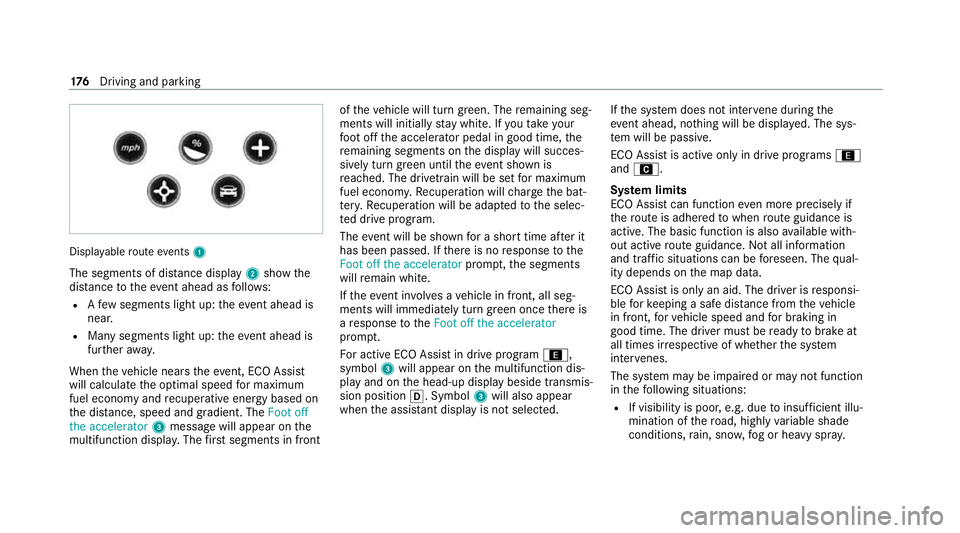
ayable route events 1
The segments of di stance display 2show the
dis tance totheeve nt ahead as follo ws:
R Afew segments light up: theeve nt ahead is
nea r.
R Many segments light up: theeve nt ahead is
fur ther aw ay.
When theve hicle nears theeve nt, ECO Assi st
will calculate the optimal speed for maximum
fuel economy and recuperati veenergy based on
th e dis tance, speed and gradient. The Foot off
the accelerator 3messa gewill appear on the
multifunction displa y.The firs t segments in front of
theve hicle will turn green. The remaining seg‐
ments will initially stay white. If youta ke your
fo ot off the accelerator pedal in good time, the
re maining segments on the display will succes‐
sively turn green until theeve nt shown is
re ached. The driv etra in will be set for maximum
fuel econom y.Re cuperation will charge the bat‐
te ry.Re cuperation will be adap tedto the selec‐
te d drive prog ram.
The event will be shown for a short time af ter it
has been passed. If there is no response tothe
Foot off the accelerator prompt,th e segments
will remain white.
If th eev ent in volves a vehicle in front, all seg‐
ments will immediately turn green once there is
a re sponse totheFoot off the accelerator
prom pt.
Fo r active ECO Assist in drive program ;,
symbol 3will appear on the multifunction dis‐
play and on the head-up display beside transmis‐
sion position 005B. Symbol3will also appear
when the assis tant displ ayis not selec ted. If
th e sy stem does not inter vene du ring the
eve nt ahead, no thing will be displa yed. The sys‐
te m will be passive.
ECO Assist is active only in drive programs ;
and A.
Sy stem limits
ECO Assist can function even more precisely if
th ero ute is adhered towhen route guidance is
active. The basic function is also available with‐
out active route guidance. Notall information
and traf fic situations can be fore seen. The qual‐
ity depends on the map data.
ECO Assist is only an aid. The driver is responsi‐
ble forke eping a safe dis tance from theve hicle
in front, forve hicle speed and for braking in
good time. The driver must be ready tobrake at
all times ir respective of whe ther the sy stem
inter venes.
The sy stem may be impaired or may not function
in thefo llowing situations:
R If visibility is poor, e.g. due toinsuf ficient illu‐
mination of thero ad, high lyvariable shade
conditions, rain, sno w,fog or heavy spr ay.176
Driving and pa rking
Page 181 of 525
R
Balance between traction and stability
R Recommended for all road conditions
% Depending on the situation, the cylinder can
be brief lydeactivated in the drive pro‐
grams ;andA, depending on the
engine.
% The ESP ®
settings in the drive pro‐
grams ;andA are designed forst a‐
bilit y.Therefore, choose one of these driving
programs, especially when transporting roof
loads, in trailer operation and when theve hi‐
cle is fully loaded or fully occupied.
Depending on the drive program, thefo llowing
sy stems change their characteristics:
R Drive
- Engine and transmission management
- Active Dis tance Assi stDISTRONIC
R ESP ®
R Vehicles with AIRMATIC or E‑ACTIVE
BO DY CONT ROL:
- Suspension tuning
- Vehicle le vel R
Electric po werst eering Note
s onthero of load display Cer
tain drive programs and ESP ®
settings are
unsui table for transporting a roof load.
If one of these drive programs is set or selected,
th eW symbol is shown as a warning. When
th is symbol is shown, the selected drive prog ram
is not suitable for transporting a load on the
ro of.
The following drive programs are af fected:
R Sport drive program
R Sport + drive program
R Individual drive program with th e ESP®
set‐
ting Sport or Sport+
% The symbol is also shown in thefo llowing sit‐
uations:
R Within theth emes if a cor responding
drive program is sa ved
Fo r more information on themes see . R
Within there set display if the pr eviously
active drive progra m is unsuitableforthe
transpo rtof a roof load
Fo r fur ther information on there set dis‐
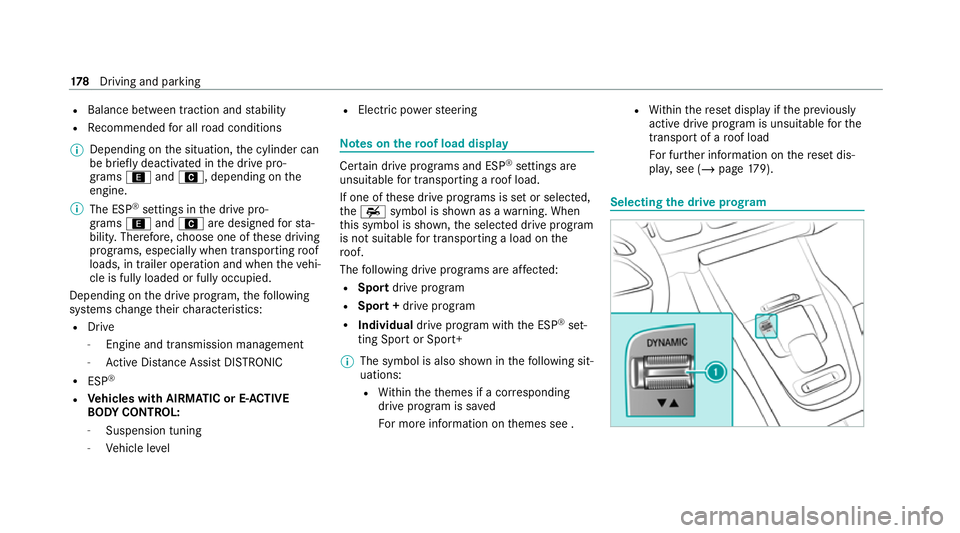
pla y,see (/ page179). Selecting
the drive prog ram 17 8
Driving and pa rking
Page 188 of 525
Glide mode is activated if
thefo llowing condi‐
tions are me t:
R Drive program ;is selec ted.
R The speed is within a suitable range.
R The road's course is suitable, e.g. no steep
uphill or downhill inclines or tight bends.
R There is no trailer hitched up tothe trailer
hitch, and no bicycle rack Fitted.
R You do not depress the accelera tor or brake
pedal (e xcept for light brake applications).
% Glide mode can also be activated if you ha ve
selected the "Eco" setting forth e drive in the
drive prog ram =.
Glide mode is deactivated again if one of the
conditions is no longer met.
Glide mode can also be pr evented bythefo llow‐
ing parame ters:
R Incline
R Downhill gradient
R Temp erature
R Height R
Speed
R Operating status of the engine
R Traf fic situation Fu
nction of the 4MATIC
4MATIC ensures that all four wheels are driven.
To ge ther with ESP ®
and 4ETS, 4MATIC impr oves
th e traction of your vehicle whene ver a driven
wheel spins due toinsuf ficient traction.
If yo ufa ilto adapt your driving style, 4MATIC can
neither reduce therisk of an accident nor over‐
ri de the la wsof ph ysics. 4MATIC cannot take
account of road, weather and traf fic conditions.
4MATIC is only an aid. You are responsible espe‐
cially for maintaining a safe dis tance from the
ve hicle in front, forve hicle speed, for braking in
good time and forst ay ing in lane.
% In wint ryroad conditions, the maximum
ef fect of 4MATIC can be achie ved only if you
use winter tyres (M+S tyres), with sn ow
ch ains if necessar y. Re
fuelling Re
fuelling theve hicle &
WARNING Risk offire or explosion from
fuel
Fu els are highly flammable. #
Fire, naked flames, smoking and crea‐
tion of spar ksmust be avoided. #
Swit choff the ignition and, if available,
th est ationary heater, before and while
re fuelling theve hicle. &
WARNING Risk of injury from fuels
Fu els are poisonous and hazardous to your
health. #
Do not swallow fuel or let it come into
contact with skin, eyes or clo thing. #
Do not inhale fuel vapour. #
Keep children away from fuel. #
Keep doors and windo wsclosed du ring
th ere fuelling process. Driving and parking
18 5