Page 301 of 577
support and
recuperation po wer of the elec-
tric mo tor)
Plug-in hybrid: cur rent state of charge ofthe
high- voltage battery
7 Selected drive prog ram
8 Selected transmission position
9 Centre display area of the inst rument display
(e xamp le: standard display for a trip): assis-
ta nce/telephone/navigation/trip/media/
ra dio/styles and displa ys/service/possible
settings for head-up display
A Fuel le vel and fuel �/ller �0ap location indicator Ov
Ov
er
ervie
vie w of butt
w of butt ons on t
ons on the st
he steer
eering wheel
ing wheel
Depending on the equipment, the la yout and the
design of the control elements on the steering
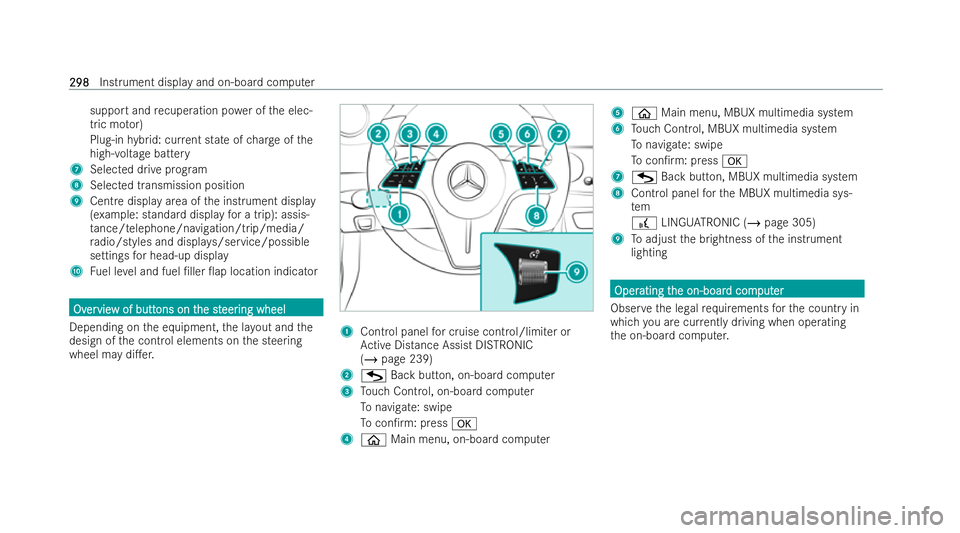
wheel may di�.er. 1
Control panel for cruise control/limiter or
Ac tive Distance Assist DISTRONIC
(/ page 239)
2 G Back button, on-boa rdcomputer
3 Touch Control, on-board computer
To navigate: swipe
To con�/rm: press a
4 ò Main menu, on-board computer 5
ò Main menu, MBUX multimedia system
6 Touch Control, MBUX multimedia system
To navigate: swipe
To con�/rm: press a
7 G Back button, MBUX multimedia system
8 Cont rol panel forth e MBUX multimedia sys-
tem
£ LINGU ATRO NIC (/ page 305)
9 Toadjust the brightness of the inst rument
lighting Oper Oper
ating t
ating t he on-boar
he on-boar d com
d comput
puter
er
Obser vethe legal requ irements forth e country in
which you are cur rently driving when ope rating
th e on-board computer. 298
298
Instrument display and on-board computer
Page 302 of 577
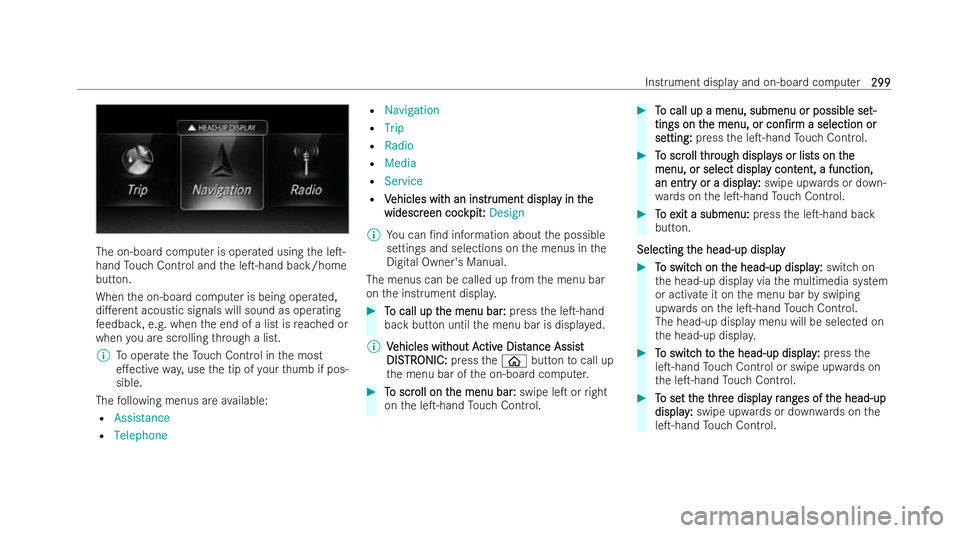
The on-board computer is ope
rated using the le�T-
hand Touch Control and the le�T-hand back/home
button.
When the on-board computer is being operated,
di�.erent acoustic signals will sound as operating
fe edbac k,e.g. when the end of a list is reached or
when you are scrolling thro ugh a list.
% Tooperate theTo uch Control in the most
e�.ective way,use the tip of your thumb if pos-
sible.
The following menus are available:
R Assistance
R Telephone R
Navigation
R Trip
R Radio
R Media
R Service
R V
V ehicles wit ehicles with an ins h an instr
trument displa
ument displa y in t
y in t he
he
widescr
widescr een coc
een coc kpit:
kpit:Design
% You can �/nd information about the possible
settings and selections on the menus in the
Digital Owner's Manual.
The menus can be called up from the menu bar
on the inst rument displa y. #
T
To call up t
o call up t he menu bar:
he menu bar: pressthe le�T-hand
back button until the menu bar is displa yed.
% V
Vehicles wit
ehicles wit hout A
hout Activ
ctive Dist
e Dist ance Assis
ance Assist t
DIS
DIS TR
TRONIC:
ONIC: presstheò button tocall up
th e menu bar of the on-board computer. #
T
To scr
o scr oll on t
oll on t he menu bar
he menu bar :
:swipe le�T or right
on the le�T-hand Touch Control. #
T
To call up a menu, submenu or possible se
o call up a menu, submenu or possible se t-
t-
tings on t
tings on t he menu, or
he menu, or con�/rm
con�/rma selection or
a selection or
se
se tting:
tting: press the le�T-hand Touch Control. #
T
To scr
o scr oll t
oll thr
hrough display
ough display s or lis
s or lists on tts on the
he
menu, or select displa
menu, or select displa y cont
y content, a function,
ent, a function,
an entr
an entr y or a display
y or a display :
:swipe upwards or down-
wa rds on the le�T-hand Touch Control. #
T
To e
o e xit a submenu:
xit a submenu: pressthe le�T-hand back
button.
Selecting t
Selecting t he head-up display
he head-up display #
T
To switc
o switc h on t
h on the head-up display
he head-up display :
:switch on
th e head-up display via the multimedia system
or activate it on the menu bar byswiping
upwards on the le�T-hand Touch Control.
The head-up display menu will be selected on
th e head-up displa y. #
T To switc
o switc h t
h to t
o t he head-up display
he head-up display :
:press the
le�T-hand Touch Control or swipe upwards on
th e le�T-hand Touch Control. #
T
To se
o se t t
t the t
he t hr
hree displa
ee displa y r
y rang
ang es of t
es of t he head-up
he head-up
display
display :
:swipe upwards or down wards on the
le�T-hand Touch Control. Instrument display and on-board computer
299
299
Page 303 of 577
F
F
ull-scr
ull-scr een menus
een menus
Yo u can display thefo llowing menus full-screen on
th e inst rument displa y:
R Assistance
R Trip
R Navigation #
Onthe cor responding menu, use the le�T-hand
To uch Control toscroll tothe end of the list. #
Press the le�T-hand Touch Control.
The selected menu will be displa yed full-
screen. F
F
unction of t
unction of t he pow
he power met
er meter (plug-in h
er (plug-in h ybr
ybr id)
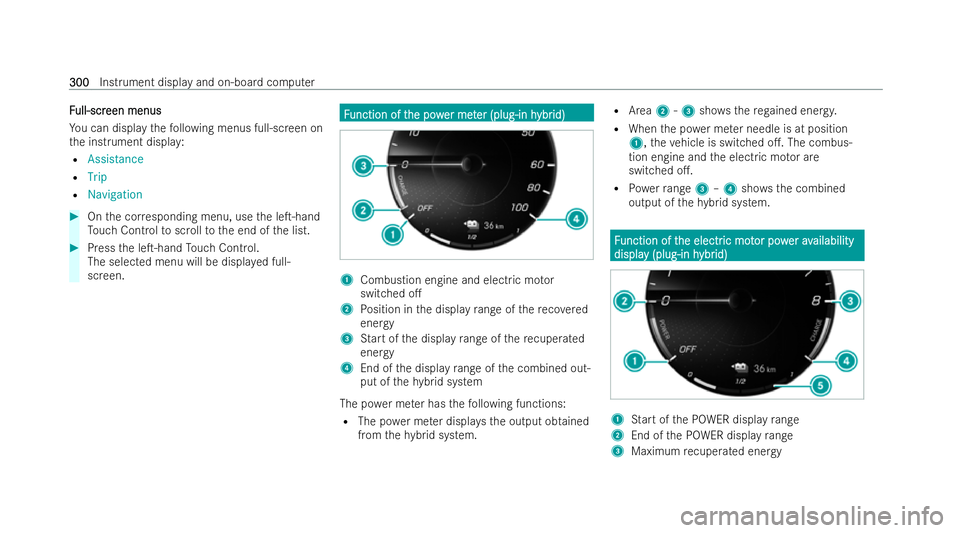
id) 1
Combustion engine and electric mo tor
switched o�.
2 Position in the display range of there co vered
energy
3 Start of the display range of there cuperated
energy
4 End of the display range of the combined out-
put of thehy brid system
The po wer me ter has thefo llowing functions:
R The po wer me ter displa ys the output obtained
from thehy brid system. R
Area 2-3 shows th ere ga ined energy.
R When the po wer me ter needle is at position
1, theve hicle is switched o�.. The combus-
tion engine and the electric mo tor are
switched o�..
R Powe rra nge 3–4 show sth e combined
output of thehy brid system. F
F
unction of t
unction of t he electr
he electric mot
ic mot or pow
or pow erav
er availability
ailability
displa
displa y (plug-in h
y (plug-in h ybr
ybrid)
id) 1
Start of the POWER display range
2 End of the POWER display range
3 Maximum recuperated energy 300
300
Instrument display and on-board computer