Page 10 of 577
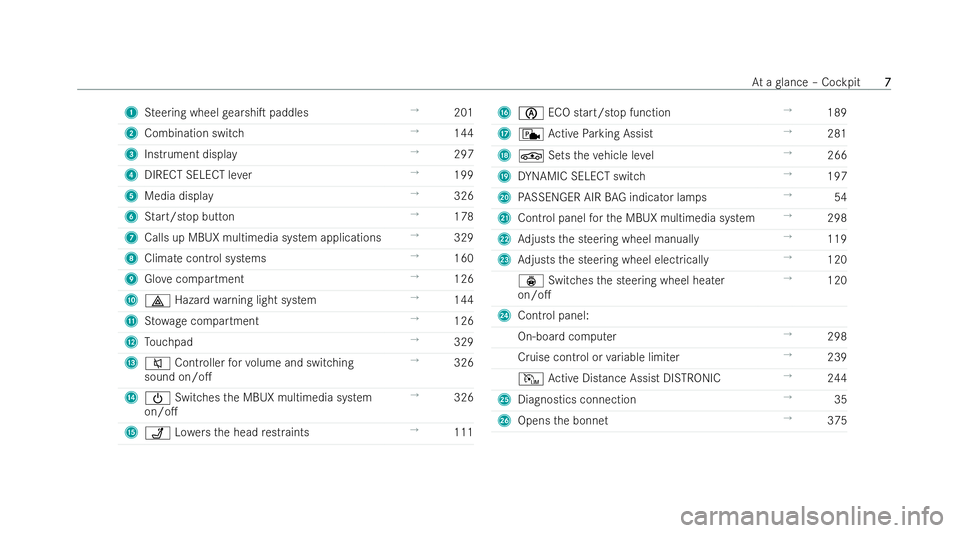
1
Steering wheel gearshi�T paddles →
201
2 Combination switch →
144
3 Instrument displ ay →
297
4 DIRECT SELECT le ver →
199
5 Media display →
326
6 Start/stop but ton →
178
7 Calls up MBUX multimedia system applications →
329
8 Climate control systems →
160
9 Glovecompartment →
126
A £ Hazard warning light system →
144
B Stow age compartment →
126
C Touchpad →
329
D 8 Controller forvo lume and switching
sound on/o�. →
326
E Ü Switches the MBUX multimedia system
on/o�. →
326
F ü Lowe rsthe head restraints →
111 G
è ECO start/stop function →
189
H c Active Parking Assist →
281
I É Setstheve hicle le vel →
266
J DYNAMIC SELECT switch →
197
K PASSENGER AIR BAG indicator la mps→
54
L Control panel forth e MBUX multimedia system →
298
M Adjusts the steering wheel manually →
119
N Adjusts the steering wheel electrically →
120
ý Switches the steering wheel heater
on/o�. →
120
O Control panel:
On-board computer →
298
Cruise control or variable limi ter →
239
I Active Distance Assist DISTRONIC →
244
P Diagnostics connection →
35
Q Opens the bonnet →
375 At
a glance – Cockpit
7 7
Page 217 of 577
ity
for high-voltage charging of your vehi-
cle. Pur chase these parts at a Mercedes-
Benz Service Centre and obtain advice
th ere. #
Check the setting of the maximum
ch arge cur rent using thech arging capa-
city shown in the Instrument Displa y.Before
charging at a mains soc ket, ha vethe maxi-
mum permissible charging cur rent forth ere leva nt
mains soc ket or the building inspected byaqu ali-
�/ed elect rician. The charging cable supplied is set
to a countr y-speci�/c maximum charging cur rent
va lue. When charging abroad, the maximum value
may exceed the permitted value forth at countr y.
When abroad, obser vethe count ry-speci�/c la ws
when charging. If you ha vequestions concerning
setting thech arging cur rent or if there is a mal-
function, please contact a quali�/ed specialist
wo rkshop. #
Set the maximum permissible charging cur-
re nt in the multimedia system menu
(/ page 341). If
th eex act value of the maximum permissible
ch arging cur rent cannot be set, select the next
smaller adjustable value.
% Ifth eve hicle requ ires more time than usual to
ch arge the high-voltage batter y,ch eck the
maximum charging cur rent settings in the
multimedia system menu. Ov Ov
er
ervie
vie w of t
w of t he c
he char
harging cable contr
ging cable contr ol panel
ol panel The
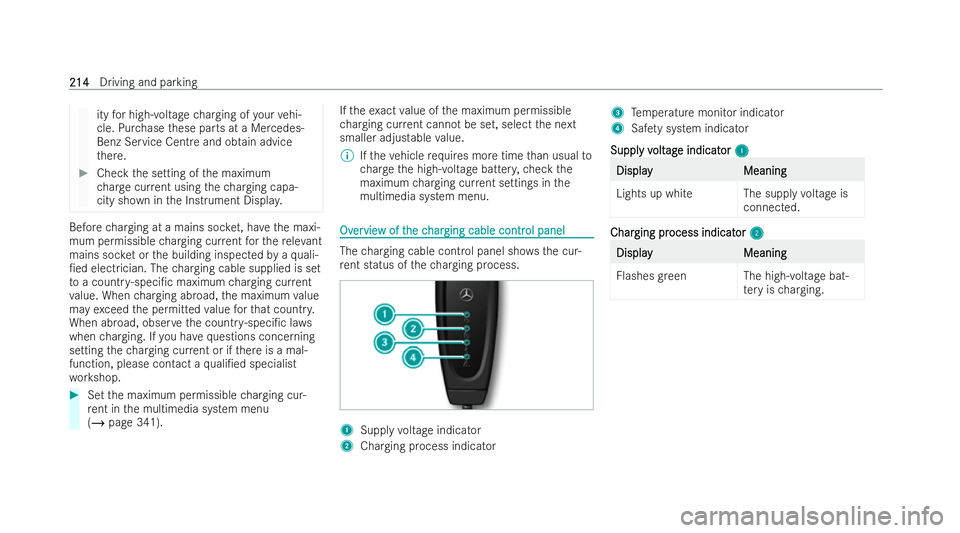
charging cable cont rol panel sho ws the cur-
re nt status of thech arging process. 1
Supply voltage indicator
2 Charging process indicator 3
Temp erature monitor indicator
4 Safety sy stem indicator
Suppl
Suppl y v
y volt
oltag
age indicat
e indicat or
or1
1 Display
Display
Meaning
Meaning
Lights up whit eThe supplyvoltage is
connected. Char
Char
ging pr
ging pr ocess indicat
ocess indicat or
or2
2 Display Display
Meaning Meaning
Flashes green The high-voltage bat-
tery isch arging. 214
214
Driving and parking
Page 244 of 577
#
Brie�0y press MorN on control panel
1.
The stored speed is inc reased or decreased to
th e next increment of ten (e.g. to50 km/h or
60 km/h).
or #
Press and hold MorN on control panel
1.
The stored speed is increased or decreased to
th e next increment of ten and a�Ter wards by
increments of 10 km/h.
or #
Accelerate theve hicle tothe desired speed. #
Press Mon control panel 1.
% When theva riable limi ter is switched topas-
sive mode, you cannot increase or decrease
its stored speed in increments of 1 km/h.
A
A dop dop ting a det
ting a det ect
ected speed
ed speed
If cruise control/variable limiter is activated and
Tr a�1c Sign Assist has de tected a speed restric-
tion sign wi tha maximum permissible speed and
th is is displa yed in the inst rument cluster: #
Press J.
The maximum permissible speed shown bythe
tra�1c sign is stored andtheve hicle main tains
or does not exceed this speed.
Deactiv Deactiv ating cr
ating cr uise contr
uise contr ol or t
ol or the v
he var
ariable limit
iable limit er
er #
Press ±.
% Ifyo u brake, deactivate ESP ®
or if ESP ®
inter-
ve nes, cruise cont rol is deactivated. The varia-
ble limi ter is not deactivated.
Inf
Inf or
ormation on t
mation on t he per
he permanent limit
manent limit er
er
If th eve hicle should ne verex ceed a speci�/c
speed (e.g. for driving in winter tyre mode), you
can set this speed with the permanent limiter.
Yo u do this by limiting the speed between
160 km/h and 240 km/h in the multimedia sys-
te m (/ page 241).
Shortly before the set speed is reached, it
appears in the Instrument Displa y.When you con-
�/rm the message, display messages no longer
appear until you switch o�. theve hicle. The speed
will only be displ ayed again once theve hicle has
been restar ted or if the set speed is changed. The permanent limi
ter does not switch topassive
mode even during kickdown and the driven speed
re mains below the set speed.
Se
Se tting t
tting t he limit speed f
he limit speed f or wint
or winter tyr
er tyres
es
Multimedia system:
4 © 5
Settings 5
Vehicle
5 Winter tyres limit #
Select a speed or deactivate the function. A
A
ctiv
ctiv e Dist
e Dist ance Assis
ance Assist DIS t DISTR
TRONIC
ONIC F
F
unction of A
unction of A ctiv
ctive Dist
e Dist ance Assis
ance Assist DIS t DISTR
TRONIC
ONIC
Ac tive Distance Assist DISTRONIC maintains the
set speed on free-�0owing roads. If vehicles in
front are de tected, the set distance is maintained,
if necessar y,until theve hicle comes toa halt. The
ve hicle accelerates or brakes depending on the
distance totheve hicle in front and the set speed.
The speed and distance totheve hicle in front are
set and sa ved using the steering wheel.
Av ailable speed range:
R V
V ehicles wit
ehicles wit hout Dr
hout Driving Assist
iving Assist ance P
ance Pack
ackag
age:
e:
20 km/h - 200 km/h Driving and parking
241
241
Page 301 of 577
support and
recuperation po wer of the elec-
tric mo tor)
Plug-in hybrid: cur rent state of charge ofthe
high- voltage battery
7 Selected drive prog ram
8 Selected transmission position
9 Centre display area of the inst rument display
(e xamp le: standard display for a trip): assis-
ta nce/telephone/navigation/trip/media/
ra dio/styles and displa ys/service/possible
settings for head-up display
A Fuel le vel and fuel �/ller �0ap location indicator Ov
Ov
er
ervie
vie w of butt
w of butt ons on t
ons on the st
he steer
eering wheel
ing wheel
Depending on the equipment, the la yout and the
design of the control elements on the steering
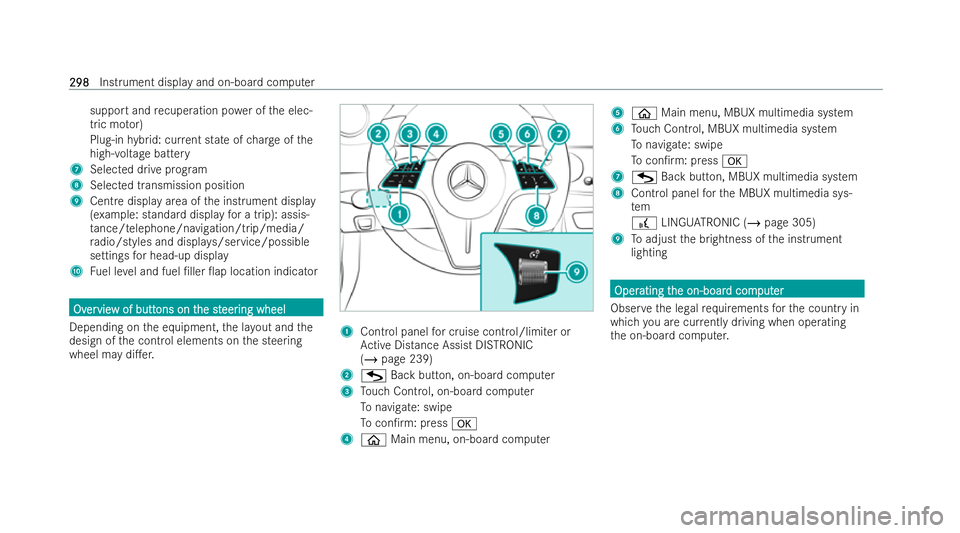
wheel may di�.er. 1
Control panel for cruise control/limiter or
Ac tive Distance Assist DISTRONIC
(/ page 239)
2 G Back button, on-boa rdcomputer
3 Touch Control, on-board computer
To navigate: swipe
To con�/rm: press a
4 ò Main menu, on-board computer 5
ò Main menu, MBUX multimedia system
6 Touch Control, MBUX multimedia system
To navigate: swipe
To con�/rm: press a
7 G Back button, MBUX multimedia system
8 Cont rol panel forth e MBUX multimedia sys-
tem
£ LINGU ATRO NIC (/ page 305)
9 Toadjust the brightness of the inst rument
lighting Oper Oper
ating t
ating t he on-boar
he on-boar d com
d comput
puter
er
Obser vethe legal requ irements forth e country in
which you are cur rently driving when ope rating
th e on-board computer. 298
298
Instrument display and on-board computer