2021 MAZDA MODEL 6 lights
[x] Cancel search: lightsPage 326 of 634

360° View Monitor*
The 360° View Monitor consists of the following functions which assist the driver in
checking the area surrounding the vehicle using various indicat ions in the center display and
a warning sound while the vehicle is being driven at low speeds or while parking.
To p v i e w
The top view displays an image of the vehicle from directly abo ve on the center display
by combining the images taken fro m the 4 cameras set on all sides of the vehicle. The top
view displays on the right side of the screen when the front vi ew or rear view screen is
being displayed. The top view assists the driver in checking th e area surrounding the
vehicle when the vehicle is m oving forward or in reverse.
Front view/front wide view
The image from the front of the vehicle is displayed on the cen ter display.
The view from the fron t assists the driver in checking the fron t of the vehicle by
displaying guide lines on the displayed image taken from the fr ont of the vehicle.
Side view
The images taken from the front left and right sides of the vehicle are displayed on the
center display.
The side view assists the driver in checking the front sides of the vehicle by displaying
guide lines on the displayed image taken from the front left and right sides of the vehicle.
Rear view/rear wide view
The image from the rear of the vehicle is displayed on the cent er display.
The image from the rear assists t he driver in checking the rear of the vehicle by displaying
guide lines on the displayed image taken from the rear of the v ehicle.
Parking sensor
If there are any obstructions near the vehicle while the top view/side view is displayed, an
obstruction detection indication on the center display turns on .
The parking sensors use ultrasonic sensors to detect obstructio ns around the vehicle when
the vehicle is driven at low speeds, such as during garage or p arallel parking, and notifies
the driver of the approximate dis tance from the vehicle to the surrounding obstruction
using sound and an obstruction detection indication.
Refer to Parking Sensor System on page 4-248.
Rear Cross Traffic Alert (RCTA)
If there is the possibility of a collision with an approaching vehicle while the rear view/
rear wide view is displayed, a warning is displayed on the cent er display.
The Rear Cross Traffic Alert (RCTA) uses radar sensors (rear) t o detect vehicles
approaching from the rear left a nd right sides of the vehicle, and it assists the driver in
checking the rear of the vehicle while reversing by flashing th e Blind Spot Monitoring
(BSM) warning lights and ac tivating the warning sound.
Refer to Rear Cross Traffic Alert (RCTA) on page 4-146.
When Driving
i-ACTIVSENSE
4-188*Some models.
Mazda6_8JN3-EA-20H_Edition1_old 2020-6-18 17:31:27
Page 329 of 634

NOTE
If there are water droplets, snow, or mud on the camera lens, wipe it off using a soft cloth.
If the camera lens is especially dirty, wash it off with mild detergent.
If the area where the camera is installed, such as the trunk or door mirrors, has been
damaged in a vehicle accident, the camera (position, installation angle) may have shifted.
Always consult an Authorized Mazda Dealer to have the vehicle inspected.
If the camera is subjected to excessive changes in temperature such as by pouring hot
water on the camera during cold weather, the 360°View Monitor may not operate
normally.
If the battery voltage is low, the screen might be temporarily difficult to view, however,
this does not indicate a problem.
The 360°View Monitor has limitations. Objects under the bumper or near both ends of the
bumper cannot be displayed.
Obstructions above the upper image range of the camera are not displayed.
Under the following conditions, the screen mi ght be difficult to view, however this does
not indicate a problem.
The temperature near the lens is high/low.
Rainy conditions, water droplets on the camera, or high humidity.
Mud or foreign matter near the camera.
Extremely bright light such as sunlight or headlights hitting the camera lens directly.
Because the 360°View Monitor camera uses a special lens, the distance displayed on the
screen differs from the actual distance.
Obstructions displayed on the screen ma y appear differently than in actuality.
(Obstructions may appear fallen, larger, or longer than they actually are.)
Do not apply stickers to a camera or the ar ea around it. In addition, do not install
accessories or an illuminated number/chara cter license plate to the area around a
camera. Otherwise, the camera may not correctly display the surrounding conditions.
When Driving
i-ACTIVSENSE
4-191
Mazda6_8JN3-EA-20H_Edition1_old 2020-6-18 17:31:27
Page 345 of 634

Display/IconContent
Projected vehicle path distance guide
lines (red/amber)These guide lines indicate the
approximate distance to a point
measured from the rear of the vehicle (from the end of the
bumper).
The red line indicates the point about 0.5 m (19 in) from the
rear end of the bumper.
The amber lines indicate the po ints about 1 m (39 in) and 2
m (78 in) from the rear end of the bumper.
Blind Spot Monitoring (BSM) warning
lights Indicates when the Rear Cross Tr
affic Alert (RCTA) has oper‐
ated.
For details, refer to Rear Cross Traffic Alert (RCTA).
Refer to Rear Cross Traffic Alert (RCTA) on page 4-146.
NOTE
The setting can be changed so that the projected vehicle path lines are not displayed.
Refer to the Settings section in the Mazda Connect Owner's Manual.
How to use the projected v ehicle path line function
CAUTION
The front of the vehicle swings out wide wh en turning the steering wheel while reversing.
Maintain sufficient distance betwee n the vehicle and an obstruction.
The parking sensor detection range has limita tions. For example, obstructions closing in
from the side and objects short in height may not be detected. Always confirm the safety
around the vehicle vi sually when driving.
For details, refer to the parking sensor obstruction detection indication and warning sound.
Refer to Parking Sensor System on page 4-248.
NOTE
Because there might be a difference between the image displayed on the screen, such as
indicated in the following, and the actual conditions when parking, always check the
safety at the rear of the vehicle and the surrounding area directly with your eyes.
Even though the back end of the parking space (or garage) displayed on the screen and
distance guide lines appear parallel, they may not actually be parallel.
When parking in a space with a division line on only one side of the parking space, even
though the division line and the vehicle widt h guide line appear parallel, they may not
actually be parallel.
The following shows an example of vehicle parking with the steering wheel turned to the
left while backing up the vehicle. When backing into a parking space from the opposite
direction, the steering operation is reversed.
When Driving
i-ACTIVSENSE
4-207
Mazda6_8JN3-EA-20H_Edition1_old 2020-6-18 17:31:27
Page 348 of 634
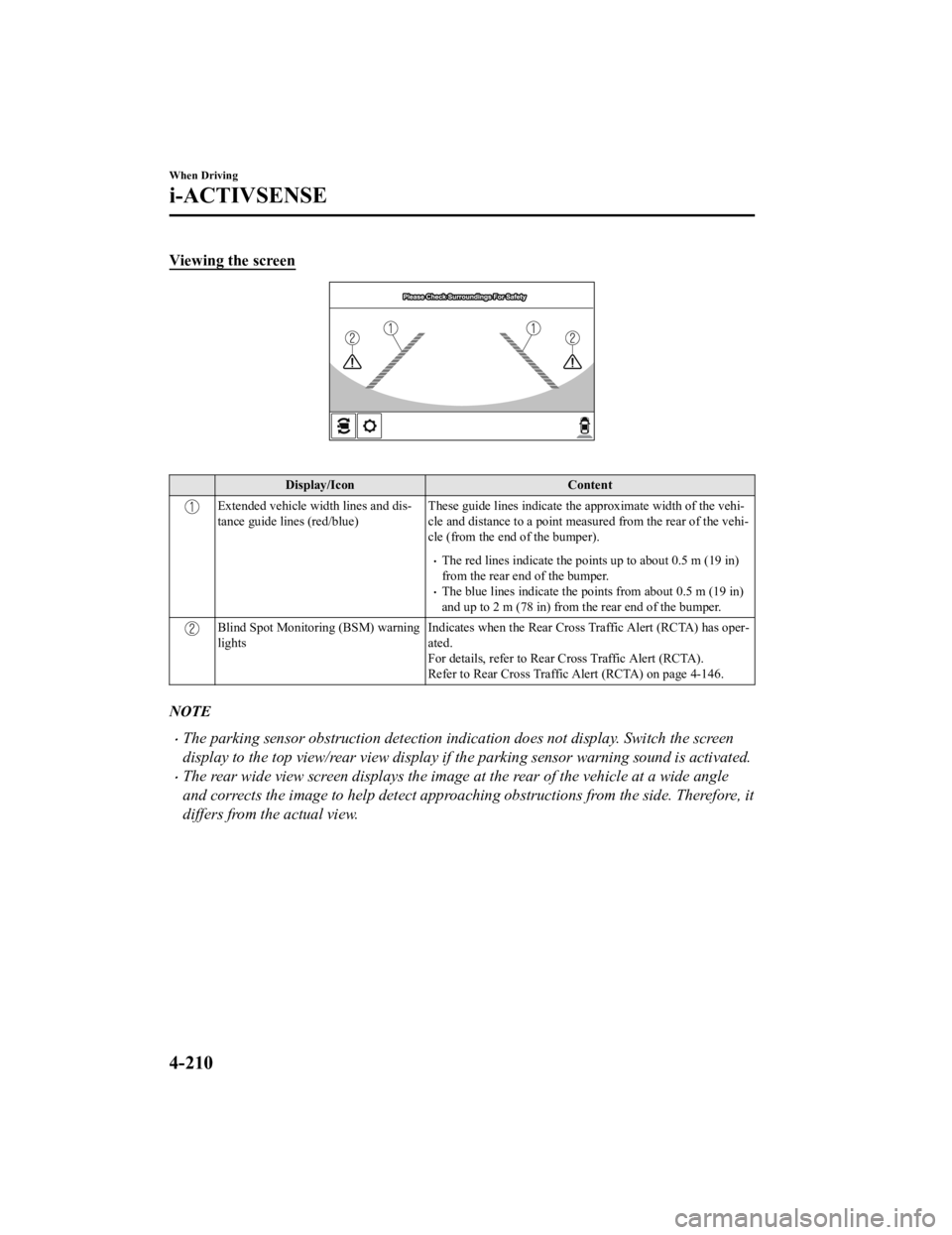
Viewing the screen
Display/IconContent
Extended vehicle width lines and dis‐
tance guide lines (red/blue) These guide lines indicate the
approximate width of the vehi‐
cle and distance to a point measured from the rear of the vehi‐
cle (from the end of the bumper).
The red lines indicate the points up to about 0.5 m (19 in)
from the rear end of the bumper.
The blue lines indicate the po ints from about 0.5 m (19 in)
and up to 2 m (78 in) from the rear end of the bumper.
Blind Spot Monitoring (BSM) warning
lights Indicates when the Rear Cross Traffic Alert (RCTA) has oper‐
ated.
For details, refer to Rear Cross Traffic Alert (RCTA).
Refer to Rear Cross Traffic Alert (RCTA) on page 4-146.
NOTE
The parking sensor obstruction detection indication does not display. Switch the screen
display to the top view/rear view display if the parking sensor warning sound is activated.
The rear wide view screen displays the image at the rear of the vehicle at a wide angle
and corrects the image to help detect approaching obstructions from the side. Therefore, it
differs from the actual view.
When Driving
i-ACTIVSENSE
4-210
Mazda6_8JN3-EA-20H_Edition1_old
2020-6-18 17:31:27
Page 355 of 634

Always use tires for all wheels that are of the
specified size, and the same manufacturer,
brand, and tread pattern. In addition, do not use tires with significantly different wear
patterns on the same vehicle as the system may not operate normally.
The Forward Sensing Camera (FSC) includes a function for detecting a soiled windshield
and informing the driver, however, depending on the conditions, it may not detect plastic
shopping bags, ice or snow on the windshield . In such cases, the system cannot accurately
determine a vehicle ahead and may not be able to operate normally. Always drive carefully
and pay attention to the road ahead.
NOTE
In the following cases, the Forward Sensing Camera (FSC) cannot detect target objects
correctly, and each system may be unable to operate normally.
The height of the vehicle ahead is low.
You drive your vehicle at the same speed as the vehicle ahead.
Headlights are not turned on during the night or when going through a tunnel.
In the following cases, the Forward Sensing Camera (FSC) may not be able to detect
target objects correctly.
Under bad weather condition, such as rain, fog and snow.
The window washer is being used or the windshield wipers are not used when it's
raining.
Ice, fog, snow, frost, rainfall, dirt, or foreign matter such as a plastic bag is stuck on the
windshield.
Trucks with low loading platforms and vehicl es with an extremely low or high profile.
When driving next to walls with no patterning (including fences and longitudinally
striped walls).
The taillights of the vehicle ahead are turned off.
A vehicle is outside the illumi nation range of the headlights.
The vehicle is making a sharp turn, or ascending or descending a steep slope.
Entering or exiting a tunnel.
Heavy luggage is loaded causing the vehicle to tilt.
Strong light is shone at the front of the vehicle (back light or high-beam light from
on-coming vehicles).
There are many light emitters on the vehicle ahead.
When the vehicle ahead is not equipped with taillights or the taillights are turned off at
nighttime.
Elongated luggage or cargo is loaded onto installed roof rails and covers the Forward
Sensing Camera (FSC).
Exhaust gas from the vehicle in front, sand, snow, and water vapor rising from
manholes and grating, and water splashed into the air.
When towing a malfunctioning vehicle.
When Driving
i-ACTIVSENSE
4-217
Mazda6_8JN3-EA-20H_Edition1_old 2020-6-18 17:31:27
Page 356 of 634

The vehicle is driven with tires having significantly different wear.
The vehicle is driven on down slopes or bumpy roads.
There are water puddles on the road.
The surroundings are dark such as during the night, early evening, or early morning, or
in a tunnel or indoor parking lot.
The illumination brightness of the headlights is reduced or the headlight illumination is
weakened due to dirt or a deviated optical axis.
The target object enters the blind spot of the Forward Sensing Camera (FSC).
A person or object bursts onto the road from the shoulder or cuts right in front of you.
You change lanes and approach a vehicle ahead.
When driving extremely close to the target object.
Tire chains or a temporary spare tire is installed.
The vehicle ahead has a special shape. For example, a vehicle towing a trailer house or
a boat, or a vehicle carrier carrying a vehicle with its front pointed rearward.
If the Forward Sensing Camera (FSC) cannot operate normally due to backlight or fog,
the system functions related to the Forward Sensing Camera (FSC) are temporarily
stopped and the following warn ing lights turn on. However, this does not indicate a
malfunction.
High Beam Control System (HBC) warning light (amber)
Lane-keep Assist System (LAS) & Lane Departure Warning System (LDWS) warning
indication
Mazda Radar Cruise Control with Stop & Go function (MRCC with Stop & Go
function) warning indication
Smart Brake Support/Smart City Brake Support (SBS/SCBS) warning indication/
warning light (amber)
If the Forward Sensing Camera (FSC) cannot operate normally due to high temperatures,
the system functions related to the Forward Sensing Camera (FSC) are temporarily
stopped and the following warn ing lights turn on. However, this does not indicate a
malfunction. Cool down the area around the Forward Sensing Camera (FSC) such as by
turning on the air conditioner.
High Beam Control System (HBC) warning light (amber)
Lane-keep Assist System (LAS) & Lane Departure Warning System (LDWS) warning
indication
Mazda Radar Cruise Control with Stop & Go function (MRCC with Stop & Go
function) warning indication
Smart Brake Support/Smart City Brake Support (SBS/SCBS) warning indication/
warning light (amber)
When Driving
i-ACTIVSENSE
4-218
Mazda6_8JN3-EA-20H_Edition1_old 2020-6-18 17:31:27
Page 357 of 634

If the Forward Sensing Camera (FSC) detects that the windshield is dirty or foggy, the
system functions related to the Forward Sensing Camera (FSC) are temporarily stopped
and the following warning lights turn on. However, this does not indicate a problem.
Remove the dirt from the windshield or press the defroster switch and defog the
windshield.
High Beam Control System (HBC) warning light (amber)
Lane-keep Assist System (LAS) & Lane Departure Warning System (LDWS) warning
indication
Mazda Radar Cruise Control with Stop & Go function (MRCC with Stop & Go
function) warning indication
Smart Brake Support/Smart City Brake Support (SBS/SCBS) warning indication/
warning light (amber)
If there are recognizable cracks or damage caused by flying gravel or debris on the
windshield, always have the windshield replaced. Consult an Authorized Mazda Dealer
for replacement.
(With Advanced Smart City Brake Support (Advanced SCBS))
The Forward Sensing Camera (FSC) recognizes pedestrians when all of the following
conditions are met:
The height of a pedestrian is about 1 to 2 meters.
An outline such as the head, both shoulders, or the legs can be determined.
In the following cases, the Forward Sensing Camera (FSC) may not be able to detect
target objects correctly:
Multiple pedestrians are walking, or there are groups of people.
A pedestrian is close to a separate object.
A pedestrian is crouching, lying, or slouching.
A pedestrian suddenly jumps into the road right in front of the vehicle.
A pedestrian opens an umbrella, or is carrying large baggage or articles.
A pedestrian is in a dark location such as during the night, or blends into the
background by wearing clothes matching the background color.
When Driving
i-ACTIVSENSE
4-219
Mazda6_8JN3-EA-20H_Edition1_old 2020-6-18 17:31:27
Page 395 of 634

5Interior Features
Use of various features for ride comfort, including air-conditioning and
audio system.
Climate Control System.................... 5-2 Operating Tips.............................. 5-2
Vent Operation.............................. 5-3
Fully Automatic Type................... 5-5
Mazda Connect.................................. 5-9 What is Mazda Connect ?............. 5-9
Mazda Connect Basic
Operations...................................5-12
Interior Equipment......................... 5-27
Sunvisors.................................... 5-27
Interior Lights............................. 5-28
Accessory Sockets...................... 5-32
USB Power Outlet
*.................... 5-33
Cup Holder................................. 5-34
Bottle Holder.............................. 5-35
Storage Compartments............... 5-36
*Some models.5-1
Mazda6_8JN3-EA-20H_Edition1_old 2020-6-18 17:31:27