2021 MAZDA MODEL 6 lights
[x] Cancel search: lightsPage 193 of 634

The display indicating a quarter or less
remaining fuel has more segments to
show the remaining fuel level in greater
detail.
The direction of the arrow () indicates
that the fuel-filler lid is on the left side
of the vehicle.
▼ Dashboard Illumination
When the lights are turned on with the
ignition switched ON, the brightness of
the dashboard illumination is dimmed.
However, when the light sensor detects
that the surrounding area is bright such as
when the lights are turned on in the
daytime, the dashboard illumination does
not dim.
NOTE
When the ignition is
switched ON in the
early evening or at dusk, the dashboard
illumination is dimmed for several
seconds until the light sensor detects the
brightness of the surrounding area,
however, the dimming may cancel after
the brightness is detected.
When the lights are turned on, the
lights-on indicato r light in the
instrument cluster turns on.
Refer to Headlights on page 4-78.
The brightness of the instrument cluster
and dashboard illuminations can be
adjusted by rotating the knob.
The brightness decreases by rotating the
knob to the left. A beep sound will be
heard when the knob has been rotated to
the maximum dim position.
The brightness increases by rotating the
knob to the right.
Dim
Bright
Function for canceling illumination
dimmer
The illumination dimmer can be canceled
by rotating the dashboard illumination
knob to the right until a beep sound is
heard while the instrument cluster is
dimmed with the ignition switched ON. If
the instrument clust er's visibility is
reduced due to glare from surrounding
brightness, cancel the illumination
dimmer.
NOTE
When the illumination dimmer is
canceled, the instrument cluster cannot
be dimmed even if the lights are turned
on.
When the illumination dimmer is
canceled, the screen in the center
display switches to constant display of
the daytime screen.
When Driving
Instrument Cluster and Display
4-55
Mazda6_8JN3-EA-20H_Edition1_old 2020-6-18 17:31:27
Page 197 of 634

▼Warning/Indicator Lights
Instrument Cluster varies depending on model and specifications
.
Front Center of Headliner
Warning lights will appear in any of the highlighted areas
Instrument Cluster
▼
Warning Indication/Warning Lights
These lights turn on or flash to
notify the user of the system operation status or a system
malfunction.
Signal Warning Page
Brake System Warning Light*1*27-25
ABS Warning Light*1
Electronic Brake
Force Distribu‐ tion System
Wa r n i n g
7-25
ABS warning 7-28
Charging System Warning Light*17-25
Engine Oil Warning Light*17-25
Power Steering Malfunction Indicator Light*17-25
Master Warning Light*17-28
When Driving
Instrument Cluster and Display
4-59
Mazda6_8JN3-EA-20H_Edition1_old 2020-6-18 17:31:27
Page 199 of 634

*1 The light turns on when the ignition is switched on for an operation check, and turns off a few seconds later or
when the engine is started. If t he light does not turn on or remains turned on, have the vehicle inspected at an
Authorized Mazda Dealer.
*2 The light turns on continuously when the parking brake is appl ied.
▼Indication/Indicator Lights
These lights turn on or flash to
notify the user of the system operation status or a system
malfunction.
Signal Indicator Page
(Green)Seat Belt Indicator Light (Rear seat) 2-68
*Front Passenger Air Bag Deactivation Indicator Light*12-68
(Green)KEY Indicator Light 4-5
Security Indicator Light*13-41
Wrench Indication/Indicator Light*14-63
Shift Position Indication
4-69
Lights-On Indication/Indicator Light 4-78
Headlight High-Beam Indicator LightHeadlight
High-Low Beam 4-82
Flashing the Headlights 4-82
Turn Signal/Hazard Warning Indicator Lights Turn and
Lane-Change Signals4-84
Hazard Warning Flasher4-91
(Green) Brake Pedal Operation demand Indicator Light 4-101
AUTOHOLD Active Indicator Light*14-107
When Driving
Instrument Cluster and Display
*Some models.4-61
Mazda6_8JN3-EA-20H_Edition1_old
2020-6-18 17:31:27
Page 206 of 634
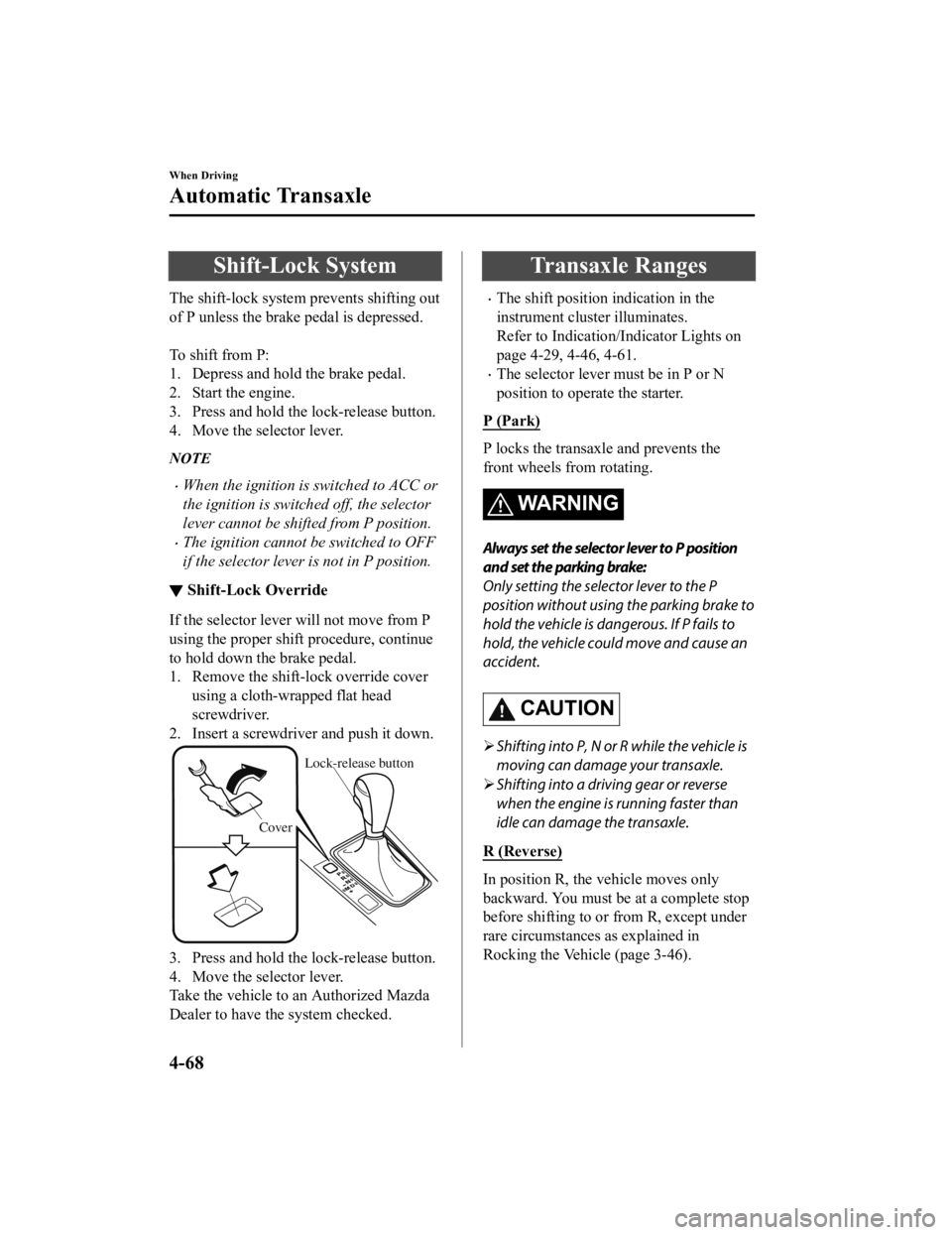
Shift-Lock System
The shift-lock system prevents shifting out
of P unless the brake pedal is depressed.
To shift from P:
1. Depress and hold the brake pedal.
2. Start the engine.
3. Press and hold the lock-release button.
4. Move the selector lever.
NOTE
When the ignition is switched to ACC or
the ignition is switched off, the selector
lever cannot be shifted from P position.
The ignition cannot be switched to OFF
if the selector lever is not in P position.
▼ Shift-Lock Override
If the selector lever will not move from P
using the proper shift procedure, continue
to hold down the brake pedal.
1. Remove the shift-lock override cover
using a cloth-wrapped flat head
screwdriver.
2. Insert a screwdriver and push it down.
Cover
Lock-release button
3. Press and hold the lock-release button.
4. Move the selector lever.
Take the vehicle to an Authorized Mazda
Dealer to have the system checked.
Transaxle Ranges
The shift position indication in the
instrument cluster illuminates.
Refer to Indication/Indicator Lights on
page 4-29, 4-46, 4-61.
The selector lever must be in P or N
position to operate the starter.
P (Park)
P locks the transaxle and prevents the
front wheels from rotating.
WA R N I N G
Always set the selector lever to P position
and set the parking brake:
Only setting the selector lever to the P
position without using the parking brake to
hold the vehicle is dangerous. If P fails to
hold, the vehicle could move and cause an
accident.
CAUTION
Shifting into P, N or R while the vehicle is
moving can damage your transaxle.
Shifting into a driving gear or reverse
when the engine is running faster than
idle can damage the transaxle.
R (Reverse)
In position R, the vehicle moves only
backward. You must be at a complete stop
before shifting to or from R, except under
rare circumstances as explained in
Rocking the Vehicle (page 3-46).
When Driving
Automatic Transaxle
4-68
Mazda6_8JN3-EA-20H_Edition1_old 2020-6-18 17:31:27
Page 216 of 634

Lighting Control
▼Headlights
Turn the headlight switch to tur
n the headlights and other exterior lights on or off.
When the lights are turned on, the lights-on indicator light in the instrument cluster turns on.
NOTE
If the light switch is left on, the lights will automatically switch off approximately 30
seconds after switching the ignition off.
The time setting can be changed.
Refer to the Settings section in the Mazda Connect Owner's Manual.
To prevent discharging the battery, do not leave the lights on while th e engine is off unless
safety requires them.
Without auto-light control
Switch Position OFF
Ignition PositionONACC or
OFF ONACC or
OFF ONACC or
OFF
Headlights Off Off Off Off On
On
*2
Daytime running lightsOn*1OffOn*1Off Off Off
Taillights
Parking lights
License plate lights
Side-marker lights Off Off On
On
*2OnOn*2
*1 The lights are turned on wh ile the vehicle is driven.*2 The lights are turned on for th e specified period by the auto headlight off function.
When Driving
Switches and Controls
4-78
Mazda6_8JN3-EA-20H_Edition1_old 2020-6-18 17:31:27
Page 217 of 634

With auto-light control
(Except Canada)
Switch PositionOFFAUTO
Ignition Position ONACC or
OFF ONACC or
OFF ONACC or
OFF ONACC or
OFF
Headlights Off Off
Auto
*2Auto*4Off Off On On*4
Daytime running lights On*1OffOn*3OffOn*1Off Off Off
Taillights
Parking lights
License plate lights
Side-marker lights Off Off
Auto
*2Auto*4OnOn*4OnOn*4
*1 The lights are turned on wh ile the vehicle is driven.*2 The lights are turned on by the auto light function.*3 The lights are turned on while t he vehicle is driven, and turned off when the headlights are turned on by the
auto light function.
*4 The lights are turned on for the specified period by the auto headlight off function.
When Driving
Switches and Controls
4-79
Mazda6_8JN3-EA-20H_Edition1_old 2020-6-18 17:31:27
Page 218 of 634

(Canada)
Ignition PositionACC or OFF ON
Switch Position OFF
*1AUTOOFF*1AUTO
Headlights Off Off Off Off
Auto
*2*4Auto*3*4
On
Daytime running
lights Off Off Off Off
Off
Taillights
Parking lights
License plate lights
Side-marker lights Off
On
*5OnOn*5On
*1 The light switch returns to t he AUTO position automatically.*2 During the daytime, the daytime running lights turn on automat ically. During the nighttime, the headlights,
parking lights, taillights, and the license plate lights turn o n automatically.
*3 During the daytime, the daytime running lights, parking lights , taillights, and the license plate lights turn on
automatically. During the nighttime, the headlights, parking lights, taillights, and the lic ense plate lights turn
on automatically.
*4 When the light switch is switched to the OFF position while th e vehicle is stopped, all of the lights that are
turned on turn off. When the li ght switch is switched from a po sition other than
to the position
while the vehicle is stopped, the daytime running lights or the headlights turn off. When starting to drive the
vehicle, the lights that are turned off turn on again.
*5 The lights are turned on for th e specified period by the auto headlight off function.
Auto-light control*
(Except Cnnada)
When the headlight switch is in the AUTO position and the ignit ion is switched ON, the
light sensor senses the surrounding lightness or darkness and a utomatically turns the
headlights and other exterior lights on or off.
(Canada)
When the headlight switch is in a position other than
and the ignition is switched ON, the
light sensor senses the surrounding lightness or darkness and a utomatically turns the
headlights and other exterior lights on or off.
When Driving
Switches and Controls
4-80*Some models.
Mazda6_8JN3-EA-20H_Edition1_old 2020-6-18 17:31:27
Page 219 of 634

CAUTION
Do not shade the light sensor by adhering a st icker or a label on the windshield. Otherwise
the light sensor will not operate correctly.
The light sensor also works as a rain sensor for the auto-wiper control. Keep hands and
scrapers clear of the windshield when the wi per lever is in the AUTO position and the
ignition is switched ON as fingers could be pinched or the wipers and wiper blades could be
damaged when the wipers activa te automatically. If you are going to clean the windshield,
be sure the wipers are turned off completely wh en it is particularly tempting to leave the
engine running. This is particularly important when clearing ice and snow.
NOTE
The headlights and other exterior lights may not turn off immediately even if the
surrounding area becomes well-lit because the light sensor determines that it is night time
if the surrounding area is continuously dark for several minute s such as inside long
tunnels, traffic jams inside tunn els, or in indoor parking lots.
In this case, the ligh ts turn off if the light switch is turned to the OFF position.
If the headlight switch and the windshield wiper switch are in AUTO, and the wipers are
operated at low or high speed by the auto wi per control for several seconds, bad weather
conditions are determined and the headlights may be turned on.
The sensitivity of the auto-light control may be changed.
Refer to the Settings section in the Mazda Connect Owner's Manual.
When Driving
Switches and Controls
4-81
Mazda6_8JN3-EA-20H_Edition1_old 2020-6-18 17:31:27