2021 MAZDA MAZDA power
[x] Cancel search: powerPage 124 of 612

Powe r Wi n d ow s
▼Powe r Wi n d ow s
The windows can be opened/closed
by operating the power window
switches.
WARNING
Make sure the opening is clear before
closing a window:
Closing a power window is dangerous.
A person's hands, head, or even neck
could be caught by the window and
result in serious injury or even death.
This warning applies especially to
children.
Never allow children to play with
power window switches:
Power window switches that are not
locked with the power window lock
switch would allow children to operate
power windows unintentionally, which
could result in serious injury if a child's
hands, head or neck becomes caught
by the window.
Make sure nothing blocks the window
just before it reaches the fully closed
position or while fully holding up the
power window switch:
Blocking the power window just before
it reaches the fully closed position or
while fully holding up the power
window switch is dangerous.
In this case, the jam-safe function may
not prevent the window from closing
all the way. If
fingers are caught,
serious injuries could occur.
Do not let a child put a hand or head
out of the window while driving the
vehicle:
If the person's hand or head hits
something outside the vehicle, or
sudden braking is applied, it could
result in serious injury or death.
NOTE
When driving with only 1 of the rear
windows open, your ears might
experience a resonating sound.
However, this does not indicate a
problem. The sound can be reduced
by slightly opening a front window or
by changing the size of the rear
window opening.
▼ Opening/Closing Windows
The window opens while the switch is
pressed and it closes while the switch
is pulled up with the ignition switched
ON. Do not open or close 3 or more
windows at the same time.
The front passenger's window and rear
windows can be opened/closed when
the power window lock switch on the
driver's door is in the unlocked
position. Keep this switch in the locked
position while children are in the
vehicle.
Before Driving
Windows
3-34
Mazda3_8JM2-EA-20H_Edition2_new
2020-8-19 13:13:07
Page 125 of 612
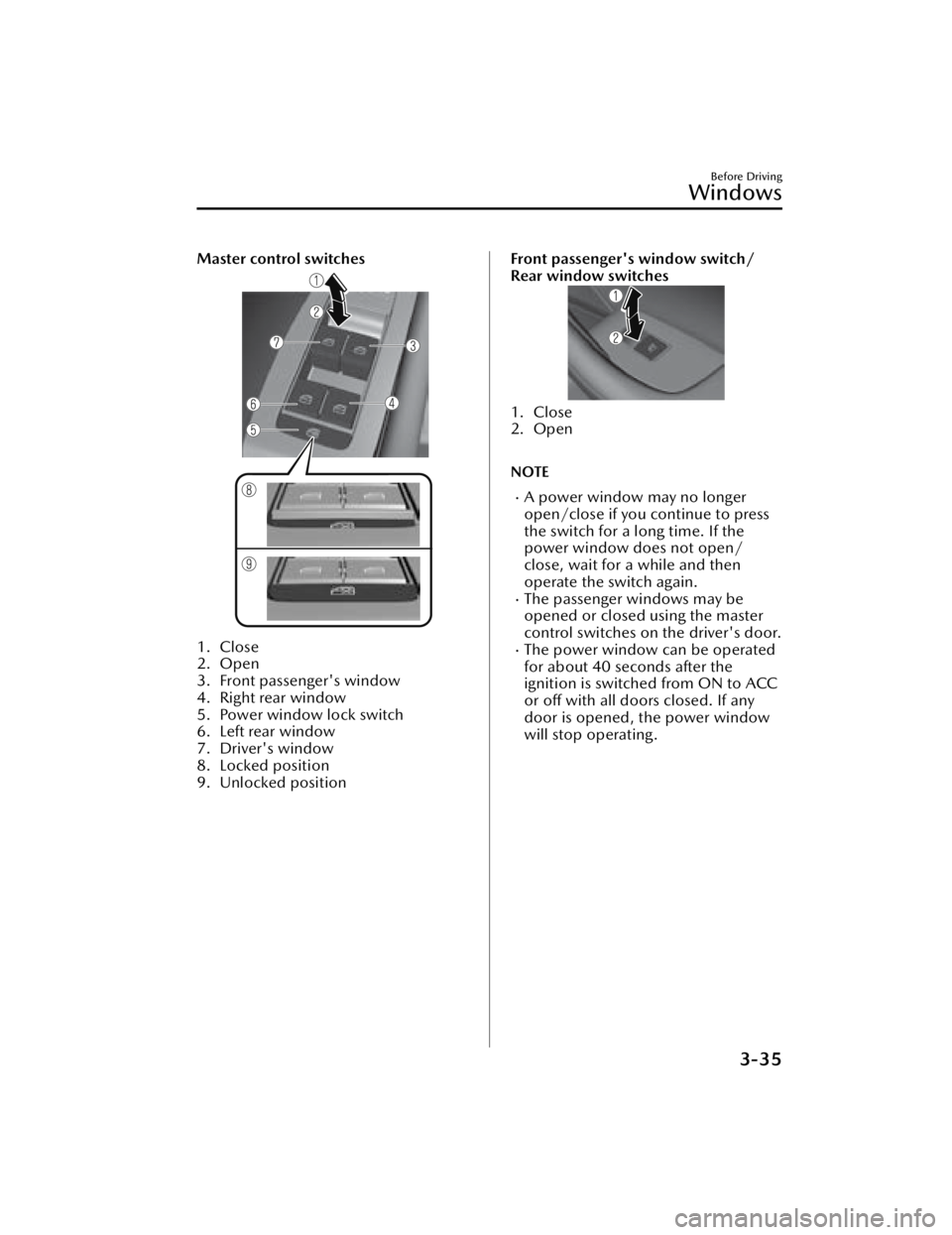
Master control switches
1. Close
2. Open
3. Front passenger's window
4. Right rear window
5. Power window lock switch
6. Left rear window
7. Driver's window
8. Locked position
9. Unlocked position
Front passenger's window switch/
Rear window switches
1. Close
2. Open
NOTE
A power window may no longer
open/close if you continue to press
the switch for a long time. If the
power window does not open/
close, wait for a while and then
operate the switch again.
The passenger windows may be
opened or closed using the master
control switches on the driver's door.
The power window can be operated
for about 40 seconds after the
ignition is switched from ON to ACC
or off with all doors closed. If any
door is opened, the power window
will stop operating.
Before Driving
Windows
3-35
Mazda3_8JM2-EA-20H_Edition2_new2020-8-19 13:13:07
Page 126 of 612

▼Auto-opening/Closing
To fully open the window
automatically, press the switch
completely down, then release. The
window will fully open automatically.
To fully close the window
automatically, pull the switch
completely up, then release. The
window will fully close automatically.
To stop the window partway, pull or
press the switch in the opposite
direction and then release it.
NOTE
Power window system initialization
procedure
If you operate the switch any number
of times with the power window not
fully closed, the window may no longer
fully open/close automatically.
The power window auto function will
only resume on a power window that
has been reset.
1. Switch the ignition ON.
2. Make sure that the power window
lock switch located on the driver's
door is not depressed.
3. Press the switch and fully open the
window.
4. Pull up the switch to fully close the
window and continue holding the
switch for about 2 seconds after the
window fully closed.
5. Make sure that the power windows operate correctly using the door
switches.
▼Jam-safe Window
When the window is closing and a
foreign object is detected between the
window and the window frame, the
window stops closing and
automatically opens partway.
NOTE
The jam-safe function may operate
under the following conditions:
A strong impact is detected while
the window is closing.
The window is closing in very low
temperatures.
(A window cannot be closed)
If the jam-safe function has operated
and the window cannot be closed,
check around the window frame for
a foreign object.
If there is no foreign object around
the window frame, forcibly close a
window using the following
procedure.
1. After switching the ignition OFF,
wait for 45 seconds or longer.
2. Switch the ignition ON.
3. Operate the switch in the direction to close the window
until the jam-safe function
operates and the window stops.
Repeat this operation a total of 5
times.
4. Continue pulling up the switch to fully close the window.
Before Driving
Windows
3-36
Mazda3_8JM2-EA-20H_Edition2_new 2020-8-19 13:13:07
Page 135 of 612

WARNING
Never stop the engine when going
down a hill:
Stopping the engine when going down
a hill is dangerous. This causes the loss
of power steering and power brake
control, and may cause damage to the
drivetrain. Any loss of steering or
braking control could cause an
accident.
Hazardous Driving
▼Hazardous Driving
WARNING
Be extremely careful if it is necessary
to downshift on slippery surfaces:
Downshifting into lower gear while
driving on slippery surfaces is
dangerous. The sudden change in tire
speed could cause the tires to skid.
This could lead to loss of vehicle
control and an accident.
When driving on ice or in water, snow,
mud, sand, or similar hazards:
Be cautious and allow extra distance
for braking.
Avoid sudden braking and sudden
maneuvering.
Do not pump the brakes. Continue
to press down on the brake pedal.
Refer to Antilock Brake System (ABS)
on page 4-77.
If you get stuck, select a lower gear
and accelerate slowly. Do not spin
the front wheels.
For more traction in starting on
slippery surfaces such as ice or
packed snow, use sand, rock salt,
chains, carpeting , or other nonslip
material under the front wheels.
NOTE
Use snow chains only on the front
wheels.
Before Driving
Driving Tips
3-45
Mazda3_8JM2-EA-20H_Edition2_new
2020-8-19 13:13:07
Page 140 of 612

Driving on Uneven Road
▼Driving on Uneven Road
Your vehicle's suspension and
underbody can be damaged if driven
on rough/uneven roads or over speed
bumps at excessive speeds. Use care
and reduce speed when traveling on
rough/uneven roads or over speed
bumps.
Use care not to damage the vehicle's
underbody, bumpers or
muffler(s)
when driving under the following
conditions:
Ascending or descending a slope
with a sharp transition angle
Ascending or descending a driveway
or trailer ramp with a sharp transition
angle
This vehicle is equipped with low
profile tires allowing class-leading
performance and handling. As a result,
the sidewall of the tires are very thin
and the tires and wheels can be
damaged if driven through potholes or
on rough/uneven roads at excessive
speeds. Use care and reduce speed
when traveling on rough/uneven roads
or through potholes.
Turbocharger Information (SKYACTIV-G 2.5T)
▼Turbocharger Information
(SKYACTIV-G
2.5T)
CAUTION
After driving at freeway speeds or up
a long hill, idle the engine at least 30
seconds before stopping it.
Otherwise, the turbocharger could
be damaged.
Racing or over-revving the engine,
particularly after it's just been
started, can damage the
turbocharger.
To protect the engine from damage,
the engine is designed so that it
cannot be raced just after starting it
in extremely cold weather.
The turbocharger greatly enhances
engine power. Its advanced design
provides improved operation and
requires minimum maintenance.
To get the most from it, observe the
following.
1. Change engine oil and filter according to Scheduled
Maintenance.
Refer to Scheduled Maintenance
(U.S.A. and Puerto Rico) on page
6-4.
Refer to Scheduled Maintenance
(Canada) on page 6-6.
Refer to Scheduled Maintenance
(Mexico) on page 6-9.
2. Use only recommended engine oil (page 6-17). Extra additives are
NOT recommended.
Before Driving
Driving Tips
3-50
Mazda3_8JM2-EA-20H_Edition2_new 2020-8-19 13:13:07
Page 143 of 612

4When Driving
Information concerning safe driving and stopping.
Start/Stop Engine..................... 4-4 Ignition Switch.......................4-4
Starting the Engine................. 4-5
Turning the Engine Off.......... 4-10
Cylinder Deactivation...........4-11
Instrument Cluster and
Display.................................. 4-12 Instrument Cluster and
Display................................4-12
Instrument Cluster............... 4-12
Active Driving Display
*......... 4-30
Manual Transmission
Operation.............................. 4-33 Manual Transmission Shift
Pattern................................ 4-33
Automatic Transmission........... 4-35 Automatic Transmission
Controls.............................. 4-35
Shift-Lock System................. 4-36
Transmission Ranges............ 4-37
Manual Shift Mode.............. 4-38
Direct Mode
*.......................4-44
Driving Tips......................... 4-45
Switches and Controls............. 4-46 Lighting Control................... 4-46
Turn and Lane-Change
Signals................................ 4-52
Windshield Wipers and
Washer............................... 4-53
Rear Window Wiper and
Washer
*.............................. 4-57
Rear Window Defogger........ 4-58
Horn................................... 4-59
Hazard Warning Flasher....... 4-60
HomeLink Wireless Control
System
*............................... 4-60
Brake.....................................4-65 Brake System....................... 4-65
AUTOHOLD........................ 4-71
Hill Launch Assist (HLA)........4-75
ABS/TCS/DSC....................... 4-77 Antilock Brake System
(ABS).................................. 4-77
Tra c t i o n C o n t r o l Sy s t e m
(TCS).................................. 4-78
Dynamic Stability Control
(DSC)................................. 4-79
Drive Selection....................... 4-81 Drive Selection
*................... 4-81
i-ACTIV AWD......................... 4-83 i-ACTIV AWD Operation
*..... 4-83
Power Steering....................... 4-84 Power Steering.....................4-84
i-ACTIVSENSE......................... 4-85 i-ACTIVSENSE
*..................... 4-85
*Some models.4-1
Mazda3_8JM2-EA-20H_Edition2_new 2020-8-19 13:13:07
Page 146 of 612

Ignition Switch
▼Push Button Start Positions
The system operates only when the key
is within operational range.
Each time the push button start is
pressed, the ignition switches in the
order of
off, ACC, and ON. Pressing
the push button start again from ON
switches the ignition off.
1. Indicator light
2. Push button start
NOTE
The engine starts by pressing the
push button start while depressing
the clutch pedal (manual
transmission) or the brake pedal
(automatic transmission). To switch
the ignition position, press the push
button start without depressing the
pedal.
Do not leave the ignition switched
ON while the engine is not running.
Doing so could result in the battery
going dead. If the ignition is left in
ACC (For automatic transmission,
the selector lever is in the P position,
and the ignition is in ACC), the
ignition switches off automatically
after about 25 minutes.
Off
The power supply to electrical devices
turns off and the indicator light
(amber) also turns off.
WARNING
Before leaving the driver's seat,
always switch the ignition off, set the
parking brake, and make sure the
selector lever is in P (automatic
transmission) position or in 1st gear
or R (manual transmission):
Leaving the driver's seat without
switching the ignition off, setting the
parking brake, and shifting the selector
lever to P (automat ic transmission)
position or to 1st gear or R (manual
transmission) is dangerous.
Unexpected vehicle movement could
occur which could result in an
accident.
In addition, if your intention is to leave
the vehicle for even a short period, it is
important to switch the ignition off, as
leaving it in another position will
disable some of the vehicle's security
systems and run the battery down.
ACC (Accessory)
Some electrical accessories will
operate and the indicator light (amber)
illuminates.
NOTE
The keyless entry system does not
function while the push button start
has been pressed to ACC, and the
doors will not lock/unlock even if they
have been locked manually.
When Driving
Start/Stop Engine
4-4
Mazda3_8JM2-EA-20H_Edition2_new 2020-8-19 13:13:07
Page 152 of 612

Turning the Engine Off
▼Turning the Engine
Off
WARNING
Do not stop the engine while the
vehicle is moving:
Stopping the engine while the vehicle
is moving for any reason other than in
an emergency is dangerous. Stopping
the engine while the vehicle is moving
will result in reduced braking ability
due to the loss of power braking ,
which could cause an accident and
serious injury.
1. Stop the vehicle completely.
2.(Manual transmission)
Shift into neutral and set the
parking brake.
(Automatic transmission)
Shift the selector lever to the P
position and set the parking brake.
3. Press the push button start to turn
off the engine. The ignition position
is off.
CAUTION
When leaving the vehicle, make sure
the push button start is off.
NOTE
(SKYACTIV-G 2.0, SKYACTIV-G 2.5)
The cooling fan in the engine
compartment could turn on for a few
minutes after the ignition is switched
from ON to OFF, whether or not the
A/C is on or off, to cool the engine
compartment quickly.
If the system detects that the
remaining battery power of the key is
low when the ignition is switched
from ON to ACC or OFF, the
following is indicated.
Replace with a new battery before
the key becomes unusable.
Refer to Key Battery Replacement on
page 6-31.
A message is indicated in the display
of the instrument cluster.
Refer to KEY Warning Indication/
Warning Light (Red) on page 7-33.
(Automatic transmission)
If the engine is turned off while the
selector lever is in a position other
than P, the ignition switches to ACC.
▼ Emergency Engine Stop
Continuously pressing the push button
start or quickly pressing it any number
of times while the engine is running or
the vehicle is being driven will turn the
engine
off immediately. The ignition
switches to ACC.
When Driving
Start/Stop Engine
4-10
Mazda3_8JM2-EA-20H_Edition2_new 2020-8-19 13:13:07