2021 MAZDA MAZDA power
[x] Cancel search: powerPage 91 of 612

3Before Driving
Use of various features, including keys, doors, mirrors and
windows.
Keys........................................ 3-2 Keys...................................... 3-2
Keyless Entry System...............3-4
Advanced Keyless Entry
System.....................................3-9 Advanced Keyless Entry
System
*................................. 3-9
Operational Range...............3-10
Doors and Locks..................... 3-11 Door Locks.......................... 3-11
Liftgate/Trunk Lid.................3-19
Inside Trunk Release Lever (4-
door)
*................................. 3-24
Fuel and Emission................... 3-25 Fuel and Engine Exhaust
Precautions......................... 3-25
Fuel-Filler Lid and Cap..........3-27
Mirrors.................................. 3-30 Mirrors................................3-30
Windows............................... 3-34 Power Windows...................3-34
Moonroof*.......................... 3-37
Security System.......................3-40 Modification and Add-
On Equipment..................... 3-40
Immobilizer System..............3-40
Theft-Deterrent System
*........3-42
Driving Tips............................ 3-44 Break-In Period.................... 3-44
Saving Fuel and Protection of the
Environment........................ 3-44
Hazardous Driving............... 3-45
Floor Mat............................ 3-46
Rocking the Vehicle..............3-46
Winter Driving..................... 3-47
Driving In Flooded Area........3-49
Overloading........................ 3-49
Driving on Uneven Road.......3-50
Turbocharger Information
(SKYACTIV-G 2.5T).............. 3-50
Towing.................................. 3-51 Trailer Towing...................... 3-51
Recreational Towing............. 3-51
*Some models.3-1
Mazda3_8JM2-EA-20H_Edition2_new 2020-8-19 13:13:07
Page 92 of 612

Keys
▼Keys
WARNING
Do not leave the key in your vehicle
with children and keep them in a
place where your children will not
find or play with them:
Leaving children in a vehicle with the
key is dangerous. This could result in
someone being badly injured or even
killed. Children may find these keys to
be an interesting toy to play with and
could cause the power windows or
other controls to operate, or even
make the vehicle move.
CAUTION
Because the key (transmitter) uses
low-intensity radio waves, it may not
function correctly under the
following conditions:
The key (transmitter) is carried with
communication devices such as
cellular phones.
The key (transmitter) contacts or is
covered by a metal object.
The key (transmitter) is near
electronic devices such as personal
computers.
Non-Mazda genuine electronic
equipment is installed in the
vehicle.
There is equipment which
discharges radio waves near the
vehicle.
The key (transmitter) may consume
battery power excessively if it
receives high-intensity radio waves.
Do not place the key (transmitter)
near electronic devices such as
televisions or personal computers.
To avoid damage to the key
(transmitter), DO NOT:
Drop the key (transmitter).
Get the key (transmitter) wet.
Disassemble the key (transmitter).
Expose the key (transmitter) to
high temperatures on places such
as the dashboard, under direct
sunlight.
Expose the key (transmitter) to any
kind of magnetic field.
Place heavy objects on the key
(transmitter).
Put the key (transmitter) in an
ultrasonic cleaner.
Put any magnetized objects close
to the key (transmitter).
NOTE
The driver must carry the key
(transmitter) to ensure the system
functions properly.
Before Driving
Keys
3-2
Mazda3_8JM2-EA-20H_Edition2_new 2020-8-19 13:13:07
Page 97 of 612

(Turning on the alarm)
Pressing the panic button for 1 second
or more will trigger the alarm for about
2 minutes and 30 seconds, and the
following will occur:
The horn sounds intermittently.The hazard warning lights flash.
(Turning off the alarm)
The alarm stops by pressing any button
on the key.
Power saving function
By turning on the transmitter power
saving function, the advanced keyless
entry
*1 and push button start system
functions turn off and the battery
power consumption of the transmitter
is restricted.
The remote control function is
operational by operating the
transmitter switch even while the
power saving function is turned on.
However, the operation indicator light
of the transmitter does not turn on/
flash.
Turning on the power saving function
After you have turned on the power
saving function according to the
following procedure, the hazard
warning lights and sound operate
*1
one time.
1. Press the lock button on the transmitter 4 times within 3
seconds to turn on the operation
indicator light.
2. Press the lock button continuously for 1.5 seconds or longer while the
operation indicator light turns on
(for 5 seconds).
3. Press any of the buttons on the transmitter to make sure that the
operation indicator light does not
turn on/flash.
Turning off the power saving function
After you have turned off the power
saving function according to the
following procedure, the hazard
warning lights and sound operate
*1
one time.
1. Press any of the buttons on the transmitter to make sure that the
operation indicator light does not
turn on/flash.
2. Press the lock button on the transmitter 4 times within 3
seconds to turn on the operation
indicator light.
3. Press the lock button continuously for 1.5 seconds or longer while the
operation indicator light turns on
(for 5 seconds).
*1 With the advanced keyless function
▼Operational Range
The system operates only when the
driver is in the vehicle or within
operational range while the key is
being carried.
Starting the engine
NOTE
Starting the engine may be possible
even if the key is outside of the
vehicle and extremely close to a door
and window, however, always start
the engine from the driver's seat.
If the vehicle is started and the key is
not in the vehicle, the vehicle will not
restart after it is shut off and the
ignition is switched off.
The luggage compartment/trunk is
out of the assured operational range,
however, if the key (transmitter) is
operable the engine will start.
Before Driving
Keys
3-7
Mazda3_8JM2-EA-20H_Edition2_new
2020-8-19 13:13:07
Page 100 of 612

Operational Range
▼Operational Range
The system operates only when the
driver is in the vehicle or within
operational range while the key is
being carried.
NOTE
When the battery power is low, or in
places where there are high-intensity
radio waves or noise, the operational
range may become narrower or the
system may not operate. For
determining battery replacement,
Refer to Keyless Entry System on page
3-4.
▼Locking/Unlocking Using Touch
Sensor
1. Exterior antenna
2. 80 cm (31 in)
3. Operational range
NOTE
The system may not operate if you
are too close to the windows or door
handles.
If the key is left in the following areas
and you leave the vehicle, the doors
may be locked depending on the
radio wave conditions even if the key
is left in the vehicle.
Around the dashboardIn the storage compartments such
as the glove compartment or the
center console
On the rear parcel shelf (4–door)Next to a communication device
such as a mobile phone
▼
Locking Using Door-Lock Switch
(5–door)/Unlocking Using Electric
Opener
1. Exterior antenna
2. 80 cm (31 in)
3. Operational range
Before Driving
Advanced Keyless Entry System
3-10
Mazda3_8JM2-EA-20H_Edition2_new
2020-8-19 13:13:07
Page 102 of 612

NOTE
Always stop the engine and lock the
doors. In addition, to prevent theft of
valuables, do not leave them inside
the cabin.
If the key is left in the following areas
and you leave the vehicle, the doors
may be locked depending on the
radio wave conditions even if the key
is left in the vehicle.
Around the dashboardIn the storage compartments such
as the glove compartment or the
center console
On the rear parcel shelf (4–door)Next to a communication device
such as a mobile phone
When the ignition is switched to
ACC or ON, the vehicle lock-out
prevention feature prevents you from
locking yourself out of the vehicle.
All doors, fuel-filler lid, and liftgate
will automatically unlock if they are
locked using the power door locks
with any door or the liftgate open.
The vehicle lock-out prevention
feature does not operate while the
ignition is switched off.
When all doors, fuel-filler lid, and
liftgate are locked using the power
door lock with any door or the
liftgate/trunk lid open, the closed
doors, fuel-filler lid, and liftgate are
locked. After that, when all doors
and the liftgate/trunk lid are closed,
all doors and the liftgate/trunk lid
are locked. However, if the key is
inside the vehicle, all doors, fuel-filler lid, and liftgate are
automatically unlocked.
(With the advanced keyless
function)
The beep sound is heard for about
10 seconds to notify the driver that
the key has been left in the vehicle.
(Without the advanced keyless
function)
The horn sound is heard twice to
notify the driver that the key has
been left in the vehicle.
(Door unlock (control) system with
collision detection)
This system automatically unlocks the
doors, fuel-filler lid, and liftgate in
the event the vehicle is involved in an
accident to allow passengers to get
out of the vehicle immediately and
prevent being trapped inside. While
the ignition is switched ON and in
the event the vehicle receives an
impact strong enough to inflate the
air bags, all the doors, fuel-filler lid,
and liftgate are automatically
unlocked after about 6 seconds have
elapsed from the time of the
accident.
The doors, fuel-filler lid, and liftgate
may not unlock depending on how
an impact is applied, the force of the
impact, and other conditions of the
accident.
If door-related systems or the battery
is malfunctioning, the doors, fuel-filler lid, and liftgate may not
unlock depending on your vehicle
type.
Before Driving
Doors and Locks
3-12
Mazda3_8JM2-EA-20H_Edition2_new 2020-8-19 13:13:07
Page 105 of 612

A beep sound is heard for
confirmation when the doors,
fuel-filler lid, and liftgate are locked/
unlocked using the touch sensor. If
you prefer, the beep sound can be
turned off.
The volume of the beep sound can
also be changed. Refer to the
Settings section in the Mazda
Connect Owner's Manual.
(With theft-deterrent system)
The hazard warning lights flash when
the theft-deterrent system is armed
or turned off.
Refer to Theft-Deterrent System on
page 3-42.
The setting can be changed so that
the doors, fuel-filler lid, and liftgate
are locked automatically without
touching the sensing area of the
touch sensor.
Refer to the Settings section in the
Mazda Connect Owner's Manual.
(Walk-away auto lock function)
A beep sound is heard when all
doors and the liftgate/trunk lid are
closed while the transmitter is being
carried. All the doors, fuel-filler lid,
and liftgate are locked automatically
when the transmitter is out of the
operational range. Also, the hazard
warning lights flash once. (Even if the
driver is in the operational range, all
the doors, fuel-filler lid, and liftgate
are locked automatically after about
30 seconds.) If you are out of the
operational range before the doors
and the liftgate/trunk lid are
completely closed or another
transmitter is left in the vehicle, the
walk-away auto lock function will
not work. Always make sure that all
doors and the liftgate/trunk lid are
closed and locked before leaving the
vehicle. The walk-away auto lock
function does not close the power
windows.
Before Driving
Doors and Locks
3-15
Mazda3_8JM2-EA-20H_Edition2_new2020-8-19 13:13:07
Page 120 of 612
Mirrors
▼Mirrors
Before driving , adjust the inside and
outside mirrors.
▼Outside Mirrors
WARNING
Be sure to look over your shoulder
before changing lanes:
Changing lanes without taking into
account the actual distance of the
vehicle in the convex mirror is
dangerous. You could have a serious
accident. What you see in the convex
mirror is closer than it appears.
Mirror type
Flat type (driver's side)
Flat surface mirror.
Convex type (front passenger side)
The mirror has single curvature on its
surface.
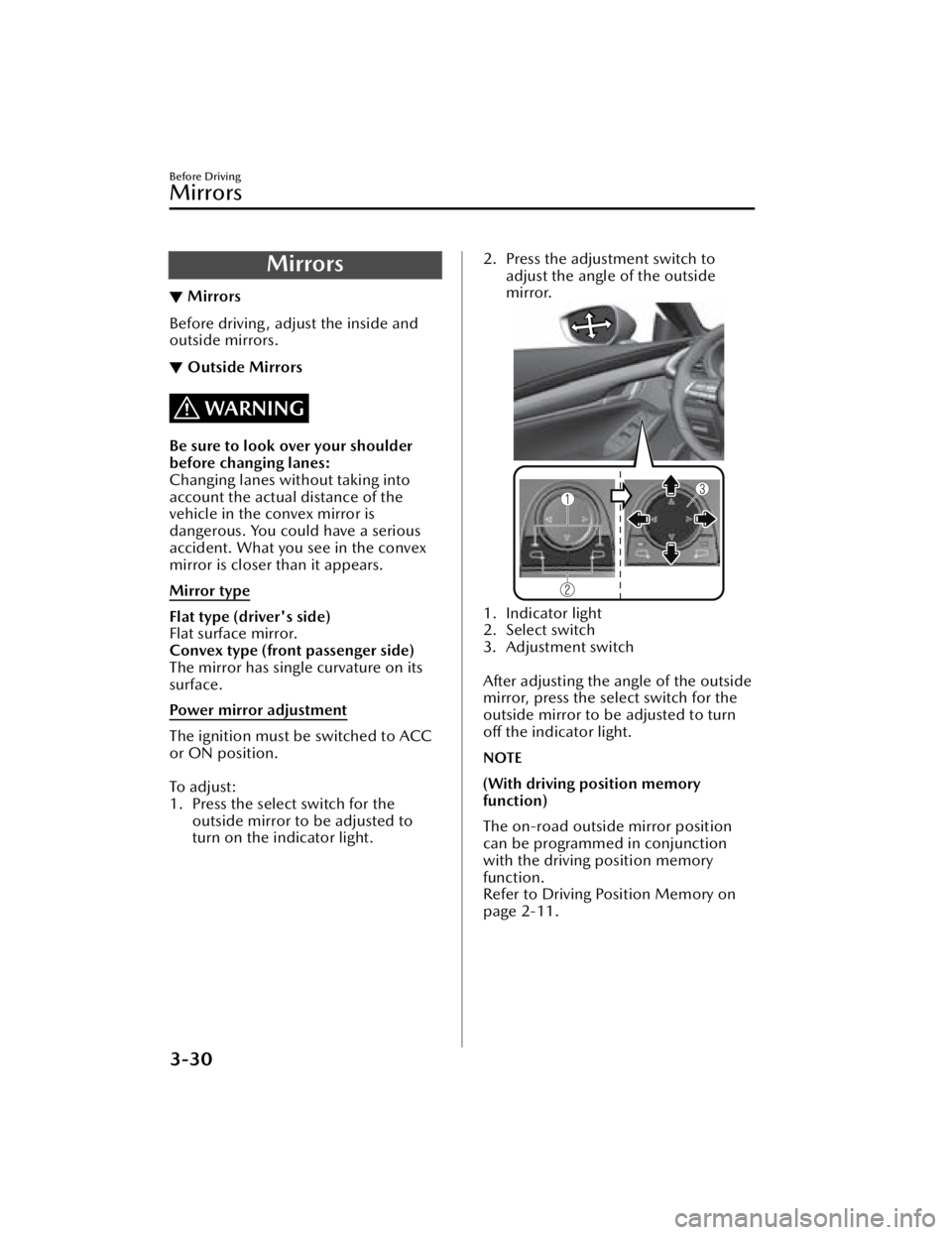
Power mirror adjustment
The ignition must be switched to ACC
or ON position.
To a d j u s t :
1. Press the select switch for the
outside mirror to be adjusted to
turn on the indicator light.
2. Press the adjustment switch toadjust the angle of the outside
mirror.
1. Indicator light
2. Select switch
3. Adjustment switch
After adjusting the an gle of the outside
mirror, press the select switch for the
outside mirror to be adjusted to turn
off the indicator light.
NOTE
(With driving position memory
function)
The on-road outside mirror position
can be programmed in conjunction
with the driving position memory
function.
Refer to Driving Position Memory on
page 2-11.
Before Driving
Mirrors
3-30
Mazda3_8JM2-EA-20H_Edition2_new
2020-8-19 13:13:07
Page 121 of 612

Power mirrors with reverse tilt down
function*
The outside mirrors tilt downward to
facilitate the view of the lower area on
each side of the vehicle.
1. Switch the ignition ON.
2. Press the select switch for theoutside mirror to be tilted
downward to turn on the indicator
light of the select switch.
3. Shift the shift lever/selector lever to the R position to tilt the outer
mirror on the side where the select
button was pressed downward.
NOTE
When any of the following condition is
met, the outer mirrors return to their
normal positions.
The ignition is switched to a position
other than ON.
The shift lever/selector lever is
shifted to a position other than R.
The select switch is pressed again.
Folding outside mirror
WARNING
Always return the outside mirrors to
the driving position before you start
driving:
Driving with the outside mirrors folded
in is dangerous. Your rear view will be
restricted, and you could have an
accident.
Manually fold the outside mirror
rearward until it is flush with the
vehicle.
Engine-off outside mirror operation
The outside mirrors can be operated
for about 40 seconds after the ignition
is switched from ON to off.
Driver's side auto-dimming outside
mirror*
The movement of the auto-dimming
outside mirror is interlocked with the
auto-dimming rearview mirror in the
interior to automatically reduce glare
from rear on-coming vehicles.
Refer to Rearview Mirror on page
3-32.
NOTE
The front passenger-side outside
mirror does not have the
auto-dimming feature.
Before Driving
Mirrors
*Some models.3-31
Mazda3_8JM2-EA-20H_Edition2_new 2020-8-19 13:13:07