Page 150 of 579
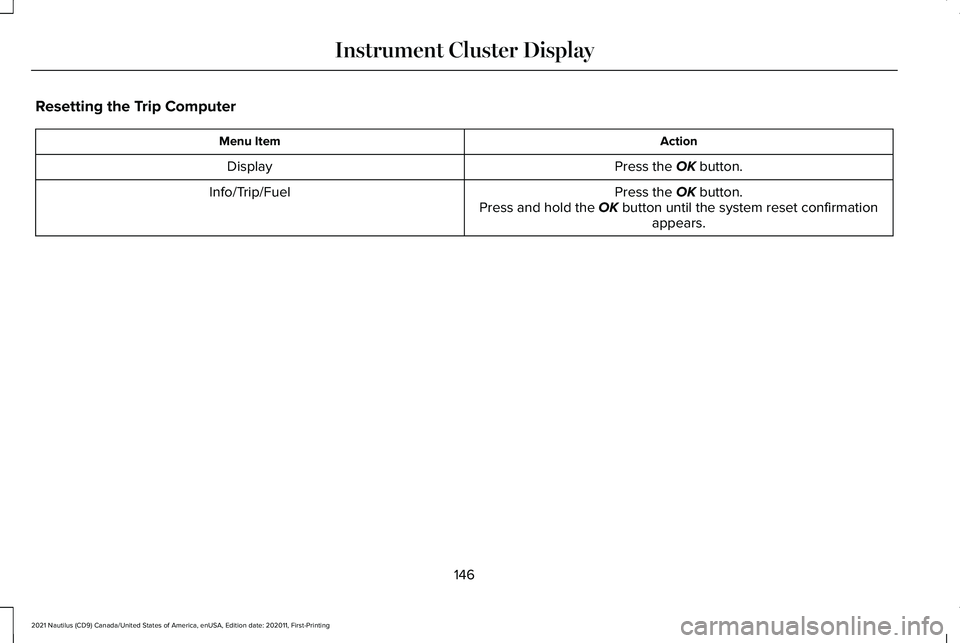
Resetting the Trip Computer
Action
Menu Item
Press the OK button.
Display
Press the
OK button.
Press and hold the OK button until the system reset confirmation appears.
Info/Trip/Fuel
146
2021 Nautilus (CD9) Canada/United States of America, enUSA, Edition date: 202011, First-Printing Instrument Cluster Display
Page 151 of 579
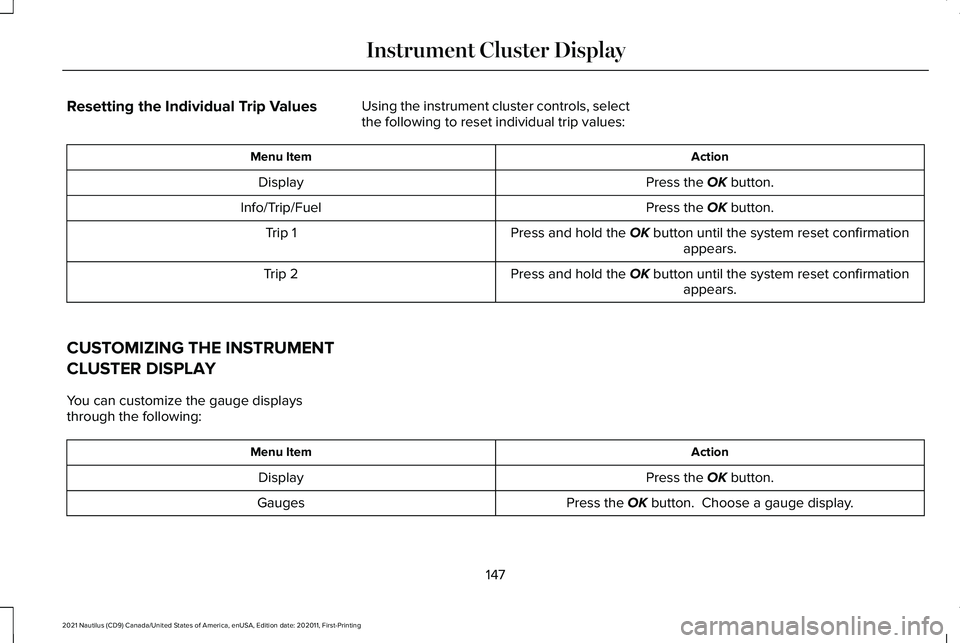
Resetting the Individual Trip Values
Using the instrument cluster controls, select
the following to reset individual trip values: Action
Menu Item
Press the OK button.
Display
Press the
OK button.
Info/Trip/Fuel
Press and hold the
OK button until the system reset confirmationappears.
Trip 1
Press and hold the
OK button until the system reset confirmationappears.
Trip 2
CUSTOMIZING THE INSTRUMENT
CLUSTER DISPLAY
You can customize the gauge displays
through the following: Action
Menu Item
Press the
OK button.
Display
Press the
OK button. Choose a gauge display.
Gauges
147
2021 Nautilus (CD9) Canada/United States of America, enUSA, Edition date: 202011, First-Printing Instrument Cluster Display
Page 156 of 579

Remotely Stopping the Vehicle
Within three seconds, press the
button on the remote control.
Within three seconds, press the
button again.
EXTENDING THE REMOTE START
DURATION
To extend the remote start duration during
remote start, do the following: Press the button on the remote
control.
Within three seconds, press the
button on the remote control.
Within three seconds, press the
button again.
If the duration is set to 15 minutes, the
duration extends by another 15 minutes. This
provides a total of 30 minutes.
Note: Remote start can only be extended
once. Note:
A maximum of two remote starts, or
one remote start with an extension, are
allowed. To reset the restart procedure
switch the vehicle to on, then to off.
REMOTE START REMOTE
CONTROL INDICATORS
Remote Control Feedback
An LED on the remote control provides status
feedback of remote start or stop commands. Status
LED
Remote startsuccessful.
Solid green.
Remote stopsuccessful.
Solid red.
Request failed or
status not received.
Blinking red.
Status incomplete.
Blinking green. REMOTE START SETTINGS
Switching Climate Control Last
Settings On and Off
1. Using the instrument cluster display
controls on the steering wheel, select
Settings.
2. Select
Vehicle.
3. Select
Remote Start Setup.
4. Select
Climate Control.
5. Select
Auto or Last settings.
Note: If you switch the last settings on, the
system remembers the last used settings.
Switching the Heated Seat Settings On
and Off
1. Using the instrument cluster display controls on the steering wheel, select
Settings
.
2. Select
Vehicle.
3. Select
Remote Start.
4. Select
Seats.
152
2021 Nautilus (CD9) Canada/United States of America, enUSA, Edition date: 202011, First-Printing Remote StartE138625 E138623 E138625
Page 169 of 579

MANUAL SEATS
Head Restraint Components
Rear Seat Outermost Head Restraints
The head restraints consist of:
An energy absorbing head
restraint.
A
Two steel stems.
B
Guide sleeve unlock and remove
buttons.
C
Fold button.
D Rear Seat Center Head Restraint
The head restraint consists of:
An energy absorbing head
restraint.
A
Two steel stems.
B
Guide sleeve adjust and unlock
button.
C
Guide sleeve unlock and remove
button.
D Adjusting the Head Restraint
Raising the Head Restraint
To raise the center head restraint, pull the
head restraint up.
Lowering the Head Restraint
To lower the center head restraint:
1. Press and hold the adjust and unlock
button.
2. Push the head restraint down.
Folding the Head Restraint
1. Press and hold the fold button.
2. Pull the head restraint back up to reset.
Removing the Head Restraint
Outermost Head Restraints
1. Press and hold the unlock and remove buttons.
2. Pull the head restraint up.
165
2021 Nautilus (CD9) Canada/United States of America, enUSA, Edition date: 202011, First-Printing Rear SeatsE201128 E138645
Page 174 of 579

SWITCHING REAR OCCUPANT
ALERT SYSTEM ON AND OFF
1. Press Settings on the touchscreen.
2. Press
Vehicle.
3. Switch
Rear Occupant Alert on or off.
Note: The default setting is on.
Note: Performing a master reset causes the
system to switch on again.
Semiannual Reminder
(If Equipped)
When you switch the system off, a message
appears every six months as a reminder that
the system is off. You can switch the system
back on or leave it off. REAR OCCUPANT ALERT SYSTEM
INDICATORS
Message
Check rear seats for occupants.
Displays when you switch your vehicle off
after the alert conditions are met.
The message displays for a short period of
time. Press
Close to acknowledge and
remove the message. REAR OCCUPANT ALERT SYSTEM
AUDIBLE WARNINGS
Sounds when you switch your vehicle off
after the alert conditions are met.
The warning sounds for a short period of
time.
170
2021 Nautilus (CD9) Canada/United States of America, enUSA, Edition date: 202011, First-Printing Rear Occupant Alert System
(If Equipped)E325002
Page 175 of 579

HOW DOES THE MEMORY
FUNCTION WORK
The memory function recalls the position of
these features:
•
Driver seat.
• Power mirrors.
• Optional power steering column.
MEMORY FUNCTION
PRECAUTIONS WARNING: Before activating the
memory seat, make sure that the area
immediately surrounding the seat is clear
of obstructions and that all occupants are
clear of moving parts. WARNING:
Do not use the memory
function when your vehicle is moving. LOCATING THE MEMORY
FUNCTION BUTTONS
The memory function buttons are on the
driver door.
SAVING A PRESET POSITION
1. Switch the ignition on.
2. Adjust the memory features to your
preferred position.
3. Press and hold the preferred preset button until you hear a single tone. A confirmation message appears in the
information display.
You can save up to three preset memory
positions at any time.
RECALLING A PRESET POSITION
Press and release a preset button.
Note:
You can only recall a preset memory
position when the ignition is off, or when you
place the transmission in park (P) or neutral
(N) if the ignition is on and the vehicle is not
moving.
Note: Pressing any of the memory feature
controls during a memory recall cancels the
operation.
You can also recall a preset memory position
by:
• Pressing the unlock button on your
remote control if you linked it to a preset
position.
• Unlocking the intelligent driver door
handle if a linked remote control is
present.
171
2021 Nautilus (CD9) Canada/United States of America, enUSA, Edition date: 202011, First-Printing Memory FunctionE142554
Page 184 of 579

WHAT IS THE POWER OUTLET
The power outlet can power devices that use
a household plug.
POWER OUTLET PRECAUTIONS
WARNING: Do not keep electrical
devices plugged in the power point
whenever the device is not in use. Do not
use any extension cord with the 110 volt
AC power point, since it will defeat the
safety protection design. Doing so may
cause the power point to overload due to
powering multiple devices that can reach
beyond the 150 watt load limit and could
result in fire or serious injury.
Note: The power point turns off when you
switch off the ignition, when the vehicle is
not in accessory mode, or when the battery
voltage drops below 11 volts. LOCATING THE POWER OUTLET
The power outlet is on the instrument panel
or the rear of the center console.
POWER OUTLET INDICATORS
The power outlet indicator illuminates to let
you know the status of the system.
Description
Indicator Status
The power point is
working, the ignition is on, or the vehicle is in accessory mode.
On
The power point is
off, the ignition is off, or the vehicle is notin accessory mode.
Off
The power point is infault mode.
Flashing Note:
Due to different technologies used on
its construction, some devices may exceed
the capacity shown on its label when they
are initially plugged in.
Note: The power outlet temporarily turns off
power when in fault mode if the device
exceeds the Watt limit. Unplug your device
and switch the ignition off. Switch the ignition
back on, but do not plug your device back
in. Let the system cool off and switch the
ignition off to reset the fault mode. Switch
the ignition back on and make sure the
indicator light remains on.
180
2021 Nautilus (CD9) Canada/United States of America, enUSA, Edition date: 202011, First-Printing Power Outlet - Vehicles With: 110V Power Outlet
Page 194 of 579

How Does Automatic Engine Stop
Work
Automatic engine stop turns the engine off.
The ignition also turns off in order to save
battery power. Before the engine shuts
down, a message appears in the information
display showing a timer counting down. If
you do not intervene within 30 seconds, the
engine shuts down. Another message
appears in the information display to inform
you that the engine has shut down in order
to save fuel. Start your vehicle as you
normally do.
Switching Automatic Engine Stop On
and Off
1. Press the menu button on the steering
wheel to enter the information display
main menu.
2. Select Settings.
3. Switch
Auto Engine Off on or off.
Note: You cannot permanently switch off
the automatic shutdown. If you switch it off,
it turns on each time you switch the ignition
on. Overriding Automatic Engine Stop
Note:
You cannot permanently switch off the
automatic engine shutdown feature. When
you switch it off temporarily, it turns on at
the next ignition cycle.
You can stop the engine shutdown, or reset
the timer, at any point before the 30-second
countdown has expired by doing any of the
following:
• Pressing the brake pedal or accelerator
pedal.
• Pressing the OK or RESET button during
the countdown.
ACCESSING THE PASSIVE KEY
BACKUP POSITION
If you are unable to start the engine, do the
following: 1. Open the floor console storage
compartment lid.
190
2021 Nautilus (CD9) Canada/United States of America, enUSA, Edition date: 202011, First-Printing Starting and Stopping the EngineE203693