2021 LEXUS RX350 ECU
[x] Cancel search: ECUPage 201 of 508

2014-4. Refueling
4
Driving
1With the doors unlocked, press the
center of the rear edge of the fuel
filler door.
Push inward and take your hand away to
slightly open the fuel filler door. Then open
the door fully by hand.
2Open the fuel filler door until it is
securely locked.
3 Turn the fuel tank cap slowly and
remove it, then put it into the holder
on the fuel filler door.
■If the fuel filler door cannot be opened
P.430
1 After refueling, turn the fuel tank
cap until you hear a click. Once the cap is released, it will turn slightly in
the opposite direction.
2 Close the fuel filler door, and press
the center of the rear edge of the
fuel filler door.
When you lock the doors, the fuel filler
door will lock also.
■Fuel filler door lock condition
The fuel filler door may not be locked even
when the vehicle’s doors are locked in the
following conditions:
●When operating the door lock button
inside the vehicle
●When the automatic door locking system
is operated ( P.102)
●When the fuel filler door is closed after
the vehicle’s doors are locked
Opening the fuel tank cap
Closing the fuel tank cap
Page 241 of 508

2414-5. Using the driving support systems
4
Driving
the farther away the vehicle will be detected, causing the outside rear view mirror indi-
cator to illuminate or flash.
■The Blind Spot Monitor is operational
when
The Blind Spot Monitor is operational when
all of the following conditions are met:
●The Blind Spot Monitor is on.
●The shift lever is in a position other than R.
●The vehicle speed is greater than approx-
imately 10 mph (16 km/h).
■The Blind Spot Monitor will detect a
vehicle when
The Blind Spot Monitor will detect a vehicle
present in the detection area in the follow-
ing situations:
●A vehicle in an adj acent lane overtakes
your vehicle.
●You overtake a vehicle in an adjacent lane
slowly.
●Another vehicle enters the detection
area when it changes lanes.
■Conditions under wh ich the Blind Spot
Monitor will not detect a vehicle
The Blind Spot Monitor is not designed to
detect the following types of vehicles and/or
objects:
●Small motorcycles, bicycles, pedestrians,
etc.*
●Vehicles traveling in the opposite direc-
tion
●Guardrails, walls, signs, parked vehicles
and similar stationary objects*
●Following vehicles th at are in the same
lane*
●Vehicles traveling 2 lanes away from your
vehicle*
●Vehicles which are being overtaken rap-
idly by your vehicle*
*
: Depending on the conditions, detection of a vehicle and/or object may occur.
■Conditions under which the Blind Spot
Monitor may not function correctly
●The Blind Spot Monitor may not detect
vehicles correctly in the following situa-
tions:
• When the sensor is misaligned due to a
strong impact to the sensor or its sur-
rounding area
• When mud, snow, ice, a sticker, etc. is
covering the sensor or surrounding area
on the rear bumper
• When driving on a road surface that is
wet with standing water during bad
weather, such as heavy rain, snow, or fog
• When multiple vehicles are approaching
with only a small gap between each vehi-
cle
• When the distance between your vehicle
and a following vehicle is short
• When there is a significant difference in speed between your vehicle and the vehi-
cle that enters the detection area
• When the difference in speed between your vehicle and another vehicle is
changing
• When a vehicle enters a detection area traveling at about the same speed as your
vehicle
• As your vehicle starts from a stop, a vehi- cle remains in the detection area
• When driving up and down consecutive steep inclines, such as hills, dips in the
road, etc.
• When driving on roads with sharp bends, consecutive curves, or uneven surfaces
• When vehicle lanes are wide, or when
driving on the edge of a lane, and the
vehicle in an adjacent lane is far away
from your vehicle
• When an accessory (such as a bicycle carrier) is installed to the rear of the vehi-
cle
• When there is a significant difference in height between your vehicle and the
vehicle that enters the detection area
• Immediately after the Blind Spot Monitor
is turned on
●Instances of the Blind Spot Monitor
unnecessarily detecting a vehicle and/or
object may increase in the following situ-
Page 242 of 508

2424-5. Using the driving support systems
ations:
• When the sensor is misaligned due to a strong impact to the sensor or its sur-
rounding area
• When the distance between your vehicle and a guardrail, wall, etc. that enters the
detection area is short
• When driving up an d down consecutive
steep inclines, such as hills, dips in the
road, etc.
• When vehicle lanes are narrow, or when driving on the edge of a lane, and a vehi-
cle traveling in a lane other than the adja-
cent lanes enters the detection area
• When driving on roads with sharp bends,
consecutive curves, or uneven surfaces
• When the tires are slipping or spinning
• When the distance between your vehicle and a following vehicle is short
• When an accessory (such as a bicycle carrier) is installed to the rear of the vehi-
cle
*: If equipped
■Intuitive parking assist (if
equipped)
Ultrasonic sensors are used to detect
static objects in the detection area
when driving at a low speed or backing
up. ( P.244)
■RCTA (Rear Cross Traffic Alert)
function (if equipped)
Rear side radar sensors are used to
detect approaching vehicles in the
detection areas behind the vehicle
when backing up. ( P.250)
■Adjusting the buzzer volume
The buzzer volume can be adjusted on
the multi-information display. The vol-
ume of buzzers for the intuitive parking
assist and RCTA function will be
PKSA (Parking Support
Alert)*
The Parking Support Alert system
consists of the following functions
that operate when driving at a low
speed or backing up, such as when
parking. When the system deter-
mines that the possibility of a colli-
sion with a detected object or such
as a wall is high, a warning operates
to urge the driver to take evasive
action.
PKSA (Parking Support Alert)
system
Setting the buzzer volume
Page 317 of 508
3175-5. Using the storage features
5
Interior features
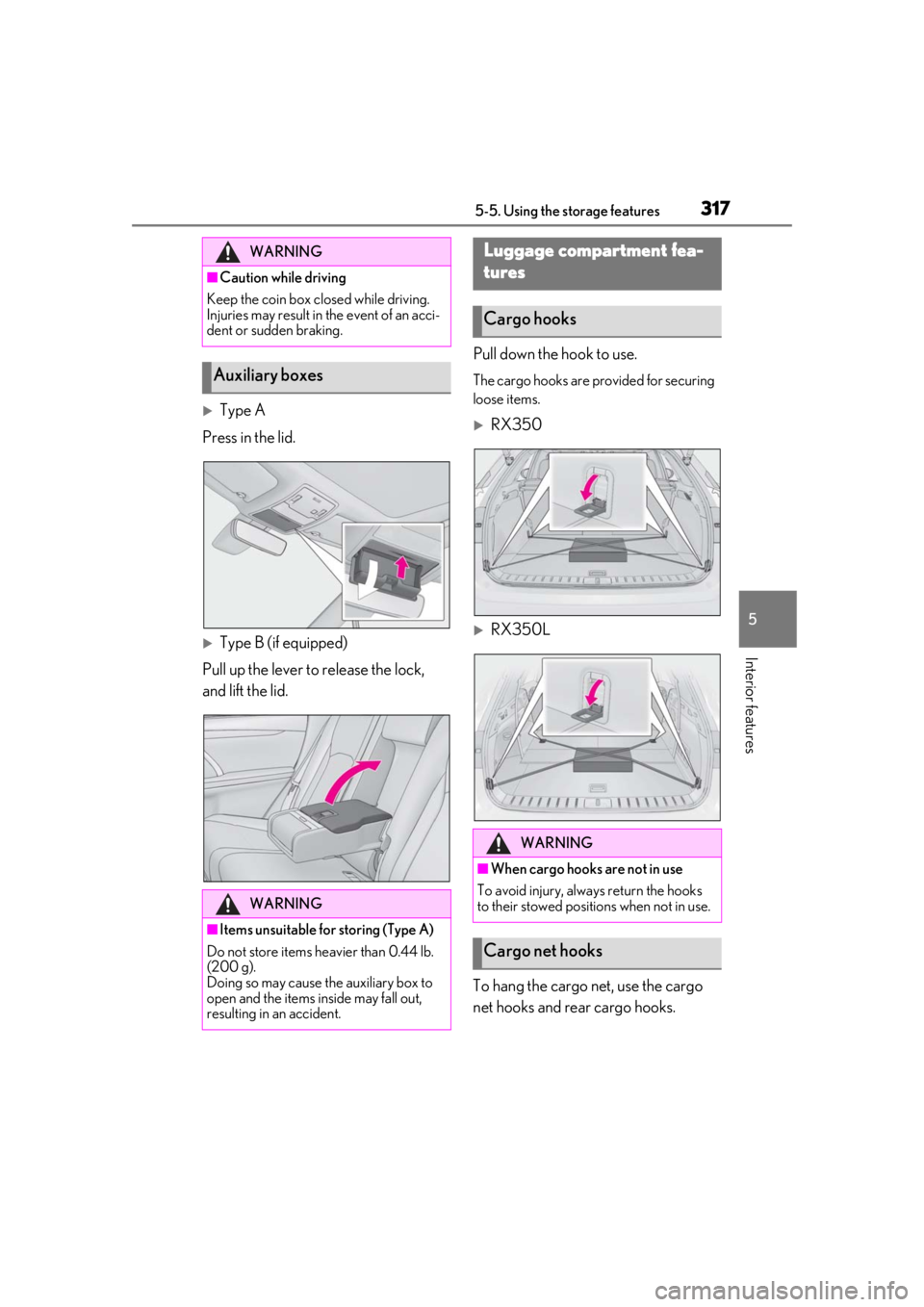
Type A
Press in the lid.
Type B (if equipped)
Pull up the lever to release the lock,
and lift the lid. Pull down the hook to use.
The cargo hooks are provided for securing
loose items.
RX350
RX350L
To hang the cargo net, use the cargo
net hooks and rear cargo hooks.
WARNING
■Caution while driving
Keep the coin box closed while driving.
Injuries may result in the event of an acci-
dent or sudden braking.
Auxiliary boxes
WARNING
■Items unsuitable for storing (Type A)
Do not store items he avier than 0.44 lb.
(200 g).
Doing so may cause the auxiliary box to
open and the items inside may fall out,
resulting in an accident.
Luggage compartment fea-
tures
Cargo hooks
WARNING
■When cargo hooks are not in use
To avoid injury, always return the hooks
to their stowed positions when not in use.
Cargo net hooks
Page 334 of 508
3345-6. Using the other interior features
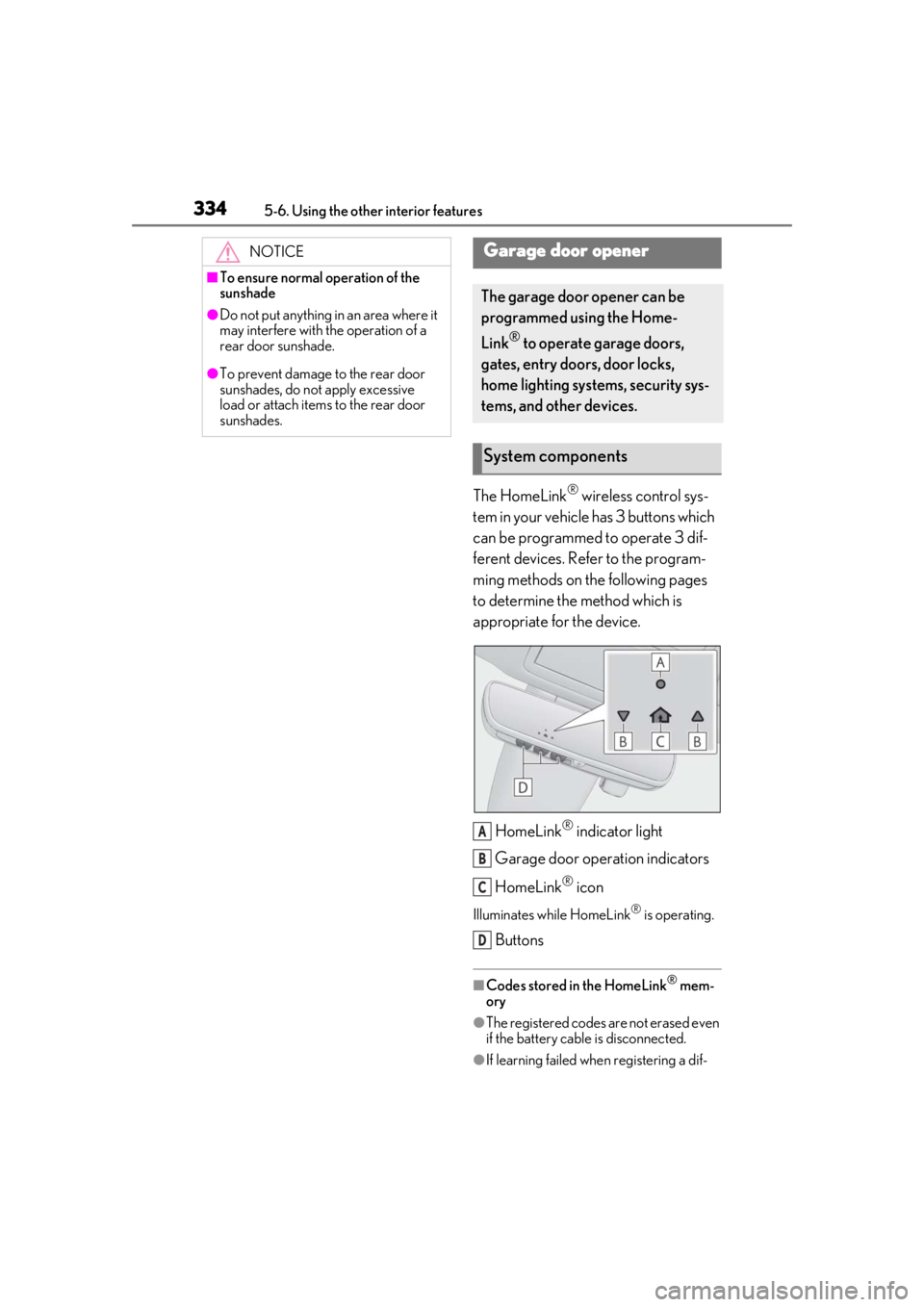
The HomeLink® wireless control sys-
tem in your vehicle has 3 buttons which
can be programmed to operate 3 dif-
ferent devices. Refer to the program-
ming methods on the following pages
to determine the method which is
appropriate for the device.
HomeLink
® indicator light
Garage door operation indicators
HomeLink
® icon
Illuminates while HomeLink® is operating.
Buttons
■Codes stored in the HomeLink® mem-
ory
●The registered codes are not erased even
if the battery cable is disconnected.
●If learning failed when registering a dif-
NOTICE
■To ensure normal operation of the
sunshade
●Do not put anything in an area where it
may interfere with the operation of a
rear door sunshade.
●To prevent damage to the rear door
sunshades, do not apply excessive
load or attach items to the rear door
sunshades.
Garage door opener
The garage door opener can be
programmed using the Home-
Link
® to operate garage doors,
gates, entry doors, door locks,
home lighting systems, security sys-
tems, and other devices.
System components
A
B
C
D
Page 342 of 508

3425-6. Using the other interior features
3Drive the vehicle at 5 mph (8
km/h) or less in a circle until a
direction is displayed.
If there is not enough space to drive in a
circle, drive around the block until a direc-
tion is displayed.
WARNING
■When doing the circling calibration
Secure a wide space, and watch out for
people and vehicles in the vicinity. Do not
violate any local traffic rules while per-
forming circling calibration.
Page 352 of 508
3526-2. Maintenance
Radiator/con-
denser
The radiator and con-
denser should be free
from foreign objects.
( P.362)
Washer fluid
Is there sufficient
washer fluid?
( P.364)
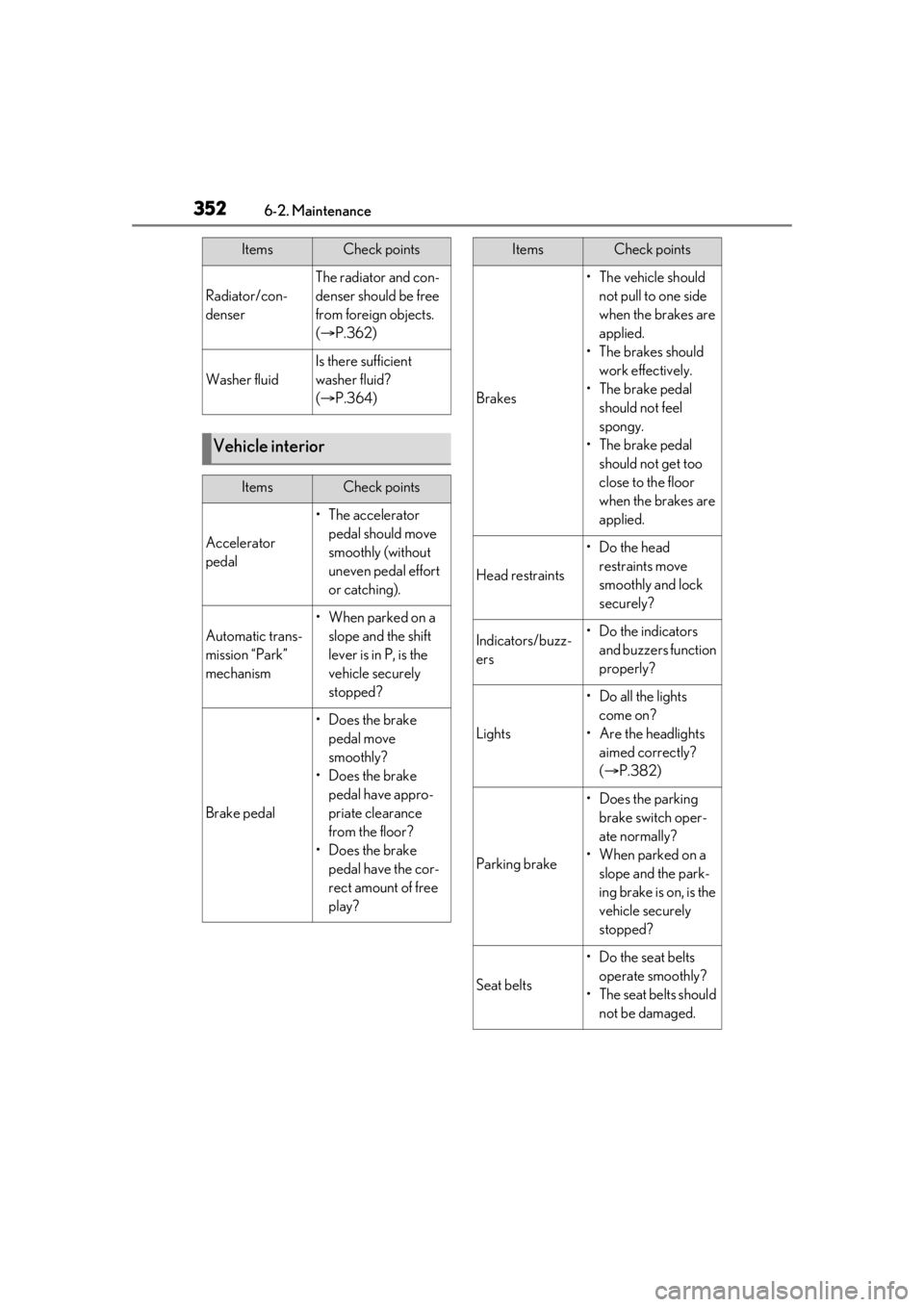
Vehicle interior
ItemsCheck points
Accelerator
pedal
• The accelerator
pedal should move
smoothly (without
uneven pedal effort
or catching).
Automatic trans-
mission “Park”
mechanism
•When parked on a slope and the shift
lever is in P, is the
vehicle securely
stopped?
Brake pedal
• Does the brake pedal move
smoothly?
• Does the brake pedal have appro-
priate clearance
from the floor?
• Does the brake pedal have the cor-
rect amount of free
play?
ItemsCheck points
Brakes
• The vehicle should not pull to one side
when the brakes are
applied.
•The brakes should work effectively.
• The brake pedal should not feel
spongy.
• The brake pedal should not get too
close to the floor
when the brakes are
applied.
Head restraints
•Do the head restraints move
smoothly and lock
securely?
Indicators/buzz-
ers•Do the indicators and buzzers function
properly?
Lights
• Do all the lights come on?
• Are the headlights aimed correctly?
( P.382)
Parking brake
• Does the parking
brake switch oper-
ate normally?
• When parked on a slope and the park-
ing brake is on, is the
vehicle securely
stopped?
Seat belts
• Do the seat belts operate smoothly?
• The seat belts should not be damaged.
ItemsCheck points
Page 378 of 508
3786-3. Do-it-yourself maintenance
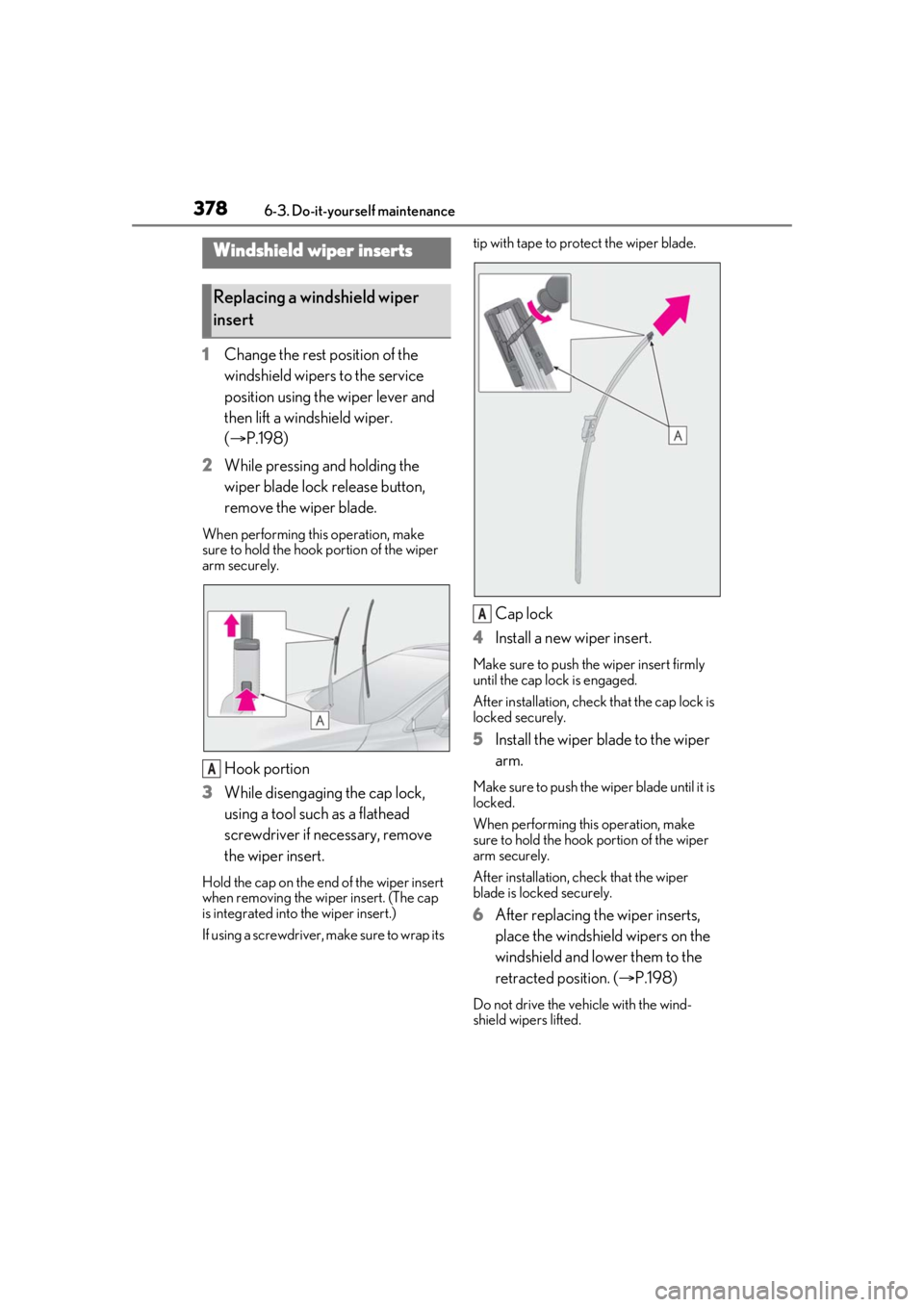
1Change the rest position of the
windshield wipers to the service
position using the wiper lever and
then lift a windshield wiper.
(P.198)
2 While pressing and holding the
wiper blade lock release button,
remove the wiper blade.
When performing this operation, make
sure to hold the hook portion of the wiper
arm securely.
Hook portion
3 While disengaging the cap lock,
using a tool such as a flathead
screwdriver if necessary, remove
the wiper insert.
Hold the cap on the end of the wiper insert
when removing the wi per insert. (The cap
is integrated into the wiper insert.)
If using a screwdriver, make sure to wrap its tip with tape to protect the wiper blade.
Cap lock
4 Install a new wiper insert.
Make sure to push the wiper insert firmly
until the cap lock is engaged.
After installation, check that the cap lock is
locked securely.
5Install the wiper blade to the wiper
arm.
Make sure to push the wiper blade until it is
locked.
When performing this operation, make
sure to hold the hook portion of the wiper
arm securely.
After installation, check that the wiper
blade is locked securely.
6 After replacing the wiper inserts,
place the windshield wipers on the
windshield and lower them to the
retracted position. ( P.198)
Do not drive the vehicle with the wind-
shield wipers lifted.
Windshield wiper inserts
Replacing a windshield wiper
insert
A
A