2021 LEXUS RX350 ECU
[x] Cancel search: ECUPage 65 of 508

651-3. Lexus Enform
1
For safety and security
120 scientists, engineers, and physi-
cians from universi ties, and govern-
ment health agencies and industries
reviewed the available body of
research to develop the ANSI Stan-
dard (C95.1).
The design of Safety Connect com-
plies with the FCC guidelines in addi-
tion to those standards.
Page 66 of 508
661-4. Theft deterrent system
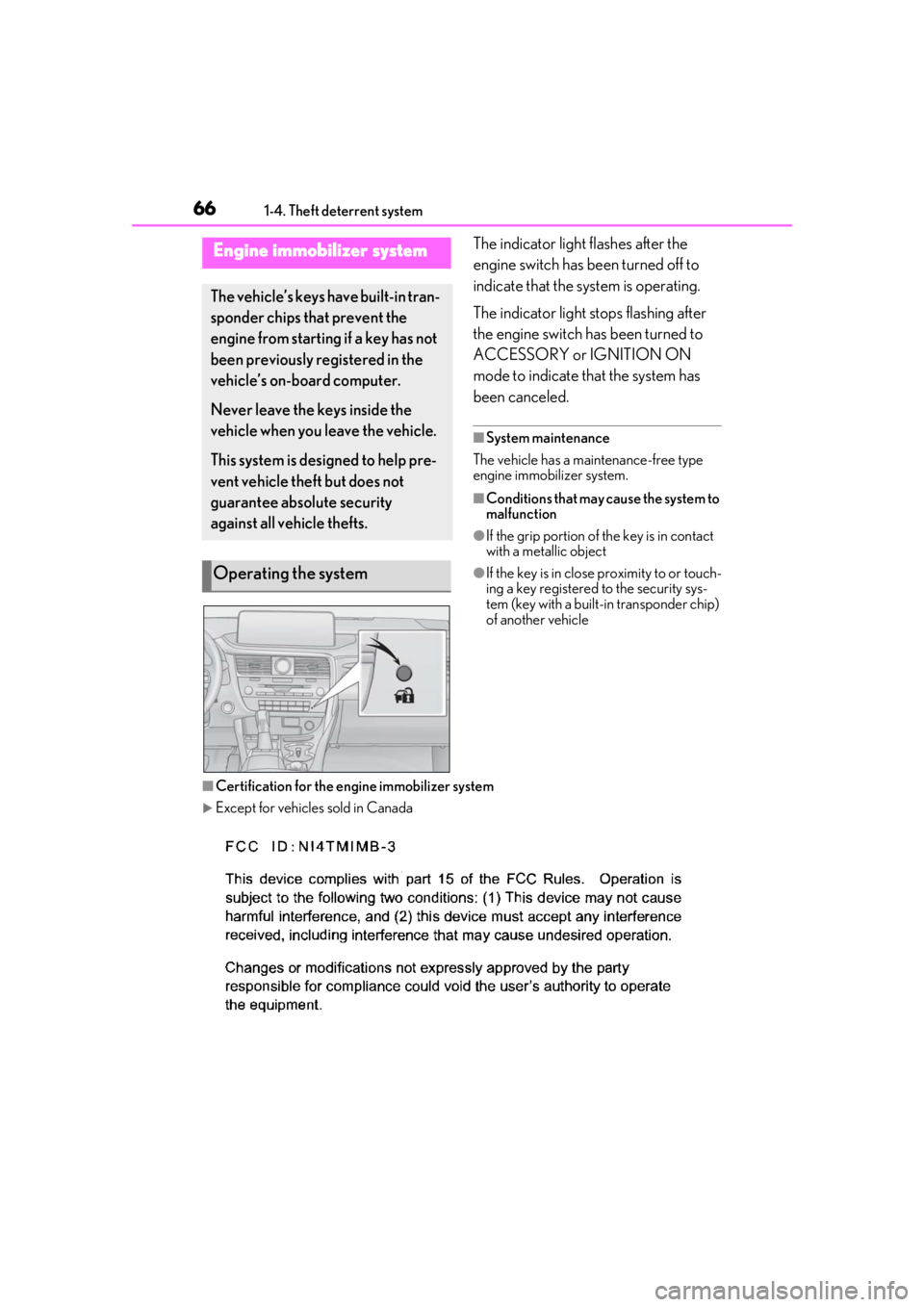
1-4.Theft deterrent systemThe indicator light flashes after the
engine switch has been turned off to
indicate that the system is operating.
The indicator light stops flashing after
the engine switch has been turned to
ACCESSORY or IGNITION ON
mode to indicate that the system has
been canceled.
■System maintenance
The vehicle has a maintenance-free type
engine immobilizer system.
■Conditions that may cause the system to
malfunction
●If the grip portion of the key is in contact
with a metallic object
●If the key is in close proximity to or touch-
ing a key registered to the security sys-
tem (key with a built-in transponder chip)
of another vehicle
■Certification for the en gine immobilizer system
Except for vehicles sold in Canada
Engine immobilizer system
The vehicle’s keys have built-in tran-
sponder chips that prevent the
engine from starting if a key has not
been previously registered in the
vehicle’s on-board computer.
Never leave the keys inside the
vehicle when you leave the vehicle.
This system is designed to help pre-
vent vehicle theft but does not
guarantee absolute security
against all vehicle thefts.
Operating the system
Page 67 of 508
671-4. Theft deterrent system
1
For safety and security
For vehicles sold in Canada
WARNING
■Certifications for the engine immobi-
lizer system
Changes or modifications not expressly
approved by the party responsible for
compliance could void the user’s author-
ity to operate the equipment.
NOTICE
■To ensure the system operates cor-
rectly
Do not modify or remove the system. If
modified or removed, the proper opera-
tion of the system cannot be guaranteed.
Page 69 of 508
691-4. Theft deterrent system
1
For safety and security
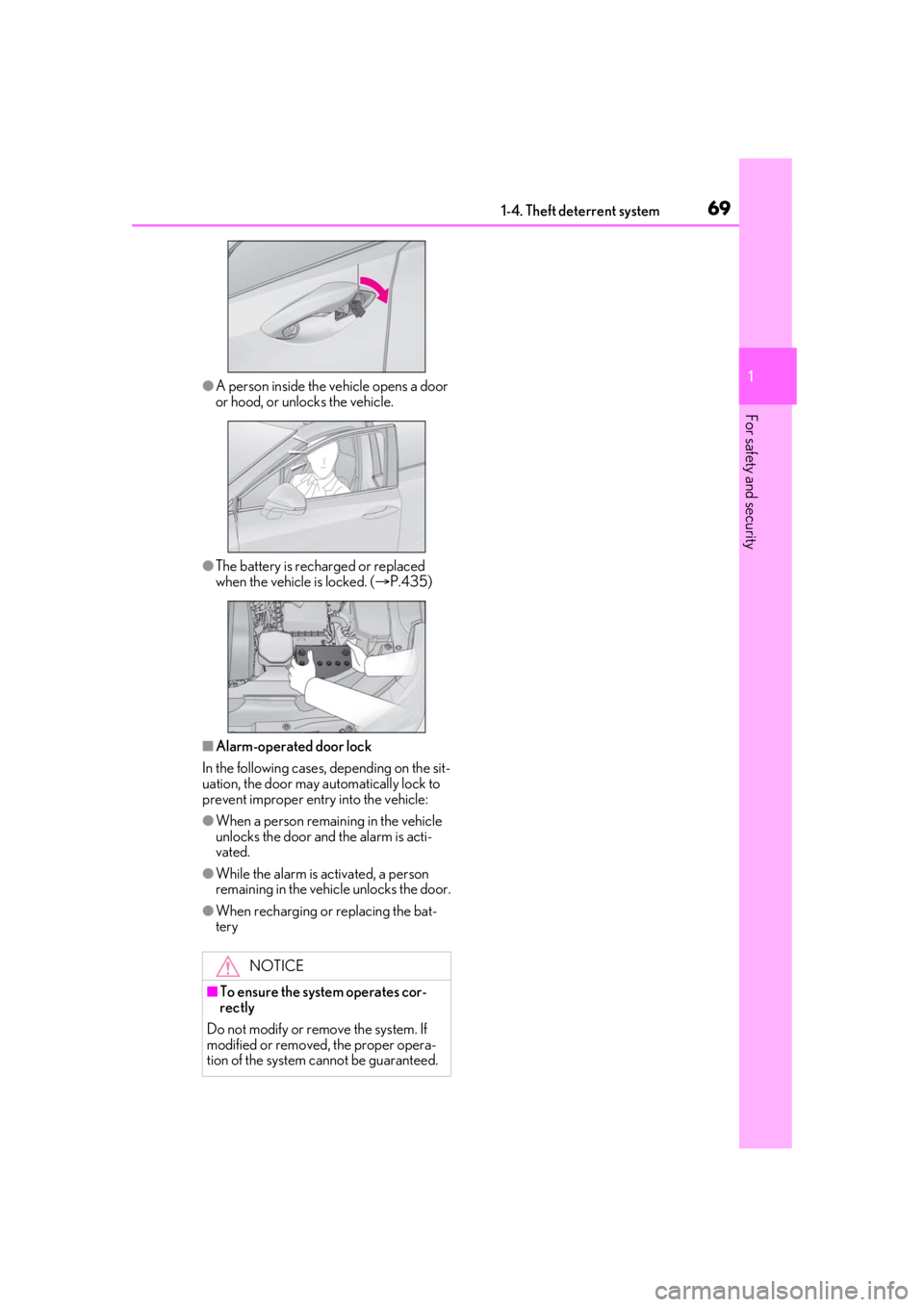
●A person inside the vehicle opens a door
or hood, or unlocks the vehicle.
●The battery is recharged or replaced
when the vehicle is locked. ( P.435)
■Alarm-operated door lock
In the following cases, depending on the sit-
uation, the door may automatically lock to
prevent improper entry into the vehicle:
●When a person remaining in the vehicle
unlocks the door and the alarm is acti-
vated.
●While the alarm is activated, a person
remaining in the vehicle unlocks the door.
●When recharging or replacing the bat-
tery
NOTICE
■To ensure the system operates cor-
rectly
Do not modify or remove the system. If
modified or removed, the proper opera-
tion of the system cannot be guaranteed.
Page 75 of 508

752-1. Instrument cluster
2
Vehicle status information and indicators
Drive mode indicators
Except F SPORT models
F SPORT models
*1: These lights turn on when the engine
switch is turned to IGNITION ON
mode to indicate that a system check is
being performed. They will turn off after
the engine is started, or after a few sec-
onds. There may be a malfunction in a
system if a light does not come on, or
turn off. Have the vehicle inspected by
your Lexus dealer.
*2: This light comes on when the system is turned off.
*3: In order to confirm operation, the BSM
outside rear view mirror indicators illu-
minate in the following situations:
When the BSM function is enabled
on of the multi-information dis-
play, the engine switch is turned to
IGNITION ON mode.
When the engine switch is in IGNI-
TION ON mode, the BSM function
is enabled on of the multi-infor-
mation display.
If the system is functioning correctly,
the BSM outside rear view mirror indi-
cators will turn off after a few seconds.
If the BSM outside rear view mirror
indicators do not illuminate or do not
turn off, there may be a malfunction in
PKSB OFF indicator*1, 2 (if
equipped) ( P.256)
All-wheel drive lock indicator
*1
(AWD models only) ( P.273)
(flashes)
Slip indicator*1 ( P.275)
VSC OFF indicator
*1, 2
( P.276)
Smart access system with
push-button start indicator
*5
( P.174)
(U.S.A.)
Parking brake indicator
( P.183)
(Canada)
Parking brake indicator
( P.183)
Brake hold standby indicator
*1
( P.186)
Brake hold operated indicator
*1
( P.186)
Eco Driving Indicator Light
*1
( P.83)
Low outside temperature indi-
cator
*6 ( P.77)
Security indicator
*7 ( P.66,
68)
(U.S.A.)
“AIR BAG ON/OFF”
indicator
*1, 7 ( P.40)
(Canada)
“AIR BAG ON/OFF”
indicator
*1, 7 ( P.40)
Eco drive mode indicator
( P.271)
Sport mode indicator (if
equipped) ( P.271)
Customize mode indicator
( P.271)
Eco drive mode indicator
( P.271)
Sport mode indicator (if
equipped) ( P.271)
Sport S mode indicator
( P.271)
Sport S+ mode indicator
( P.271)
Page 99 of 508

993-2. Opening, closing and locking the doors
3
Before driving
3-2.Opening, closing and locking the doors
■Smart access system with
push-button start
Carry the electronic key to enable this
function.
1 Grip the driver’s door handle to
unlock the door. Grip any passen-
ger door handle to unlock all the
doors.
*
Make sure to touch the sensor on the back
of the handle.
The doors cannot be unlocked for 3 sec-
onds after the doors are locked.
*: The door unlock settings can be
changed.
2 Touch the lock sensor (indentation
on the surface of the door handle)
to lock all the doors.
Check that the door is securely locked.
■Wireless remote control
1 Locks all the doors
Check that the door is securely locked.
2Unlocks all the doors
Pressing the button unlocks the driver’s
door. Pressing the button again within 3
seconds unlocks the other doors.
Press and hold to open the windows
*2 and
the moon roof
*1, 2 or panoramic moon
roof
*1, 2
*1
: If equipped
*2: This setting must be customized at your
Lexus dealer.
■Switching the door unlock function
It is possible to set which doors the entry
function unlocks using the wireless remote
control.
1 Turn the engine switch off.
2 When the indicator light on the key sur-
face is not on, press and hold ,
or for approxi-
mately 5 seconds while pressing and
holding .
The setting changes each time an operation
is performed, as shown below. (When
changing the setting continuously, release
the buttons, wait for at least 5 seconds, and
repeat step 2 .)
Side doors
The vehicle can be locked and
unlocked using the entry function,
wireless remote control or door
lock switches.
Unlocking and locking the doors
from the outside
Page 100 of 508

1003-2. Opening, closing and locking the doors
To prevent unintended triggering of the
alarm, unlock the doors using the wireless
remote control and open and close a door
once after the settings have been changed.
(If a door is not opened within 60 seconds
after is pressed, the doors will be
locked again and the alarm will automati-
cally be set.)
In a case that the alarm is triggered, imme-
diately stop the alarm. (P.68)
■Impact detection door lock release sys-
tem
In the event that the vehicle is subject to a
strong impact, all the doors are unlocked.
Depending on the force of the impact or the
type of accident, however, the system may
not operate.
■Operation signals
Doors:
A buzzer sounds and the emergency flash-
ers flash to indicate that the doors have
been locked/unlocked. (Locked: Once;
Unlocked: Twice)
Windows and moon roof or panoramic
moon roof:
A buzzer sounds.
■Security feature
If a door is not opened within approximately
60 seconds after the vehicle is unlocked,
the security feature automatically locks the
vehicle again.
■When the door cannot be locked by the
lock sensor on the surface of the door
handle
When the door cannot be locked even if the
lock sensor on the surface of the door han-
dle is touched by a finger, touch the lock
sensor with the palm.
When gloves are being worn, remove the
gloves.
■Door lock buzzer
If an attempt to lock the doors using the
smart key system is made when a door is
not fully closed, a buzzer will sound continu-
ously for 5 seconds. Fully close the door to
stop the buzzer, and lock the doors again.
■Setting the alarm
Locking the doors will set the alarm system.
( P.68)
■Conditions affecting the operation of
the smart access system with push-but-
ton start or wireless remote control
P.116
■If the smart access system with
push-button start or the wireless remote
control does not operate properly
Use the mechanical key to lock and unlock
the doors. ( P.431)
Replace the key battery with a new one if it
is depleted. ( P.379)
■If the battery is discharged
The doors cannot be locked and unlocked
using the smart access system with
push-button start or wireless remote con-
trol. Lock or unlock the doors using the
Multi-information display/BeepUnlocking function
Exterior: Beeps 3 times
Interior: Pings once
Holding the driver’s
door handle unlocks
only the driver’s
door.
Holding any of the
passenger door
handles unlocks all
the doors.
Exterior: Beeps twice
Interior: Pings once
Holding a door han-
dle unlocks all the
doors.
Page 103 of 508

1033-2. Opening, closing and locking the doors
3
Before driving
Power back door
The power back door can be
opened using the power back door
opener switch, smart access system
with push-button start or wireless
remote control.
WARNING
Observe the following precautions.
Failure to do so may result in death or
serious injury.
■Before driving the vehicle
Before driving the vehicle, make sure
that the power back door is fully closed. If
the power back door is not fully closed, it
may open unexpectedly while driving,
causing an accident.
■Caution while driving
●Keep the power back door closed
while driving.
If the power back door is left open, it may
hit nearby objects while driving or lug-
gage may be unexpectedly thrown out,
causing an accident.
In addition, exhaust gases may enter the
vehicle, causing death or a serious health
hazard. Make sure to close the power
back door before driving.
●Never let anyone sit in the luggage
compartment. In the event of sudden
braking, sudden swerving or a colli-
sion, they are susceptible to death or
serious injury.
■When children are in the vehicle
Observe the following precautions.
Failure to do so may result in death or
serious injury.
●Do not allow children to play in the lug-
gage compartment.
If a child is accidentally locked in the lug-
gage compartment, they could have heat
exhaustion or other injuries.
●Do not allow a child to open or close
the power back door.
Doing so may cause the power back
door to move unexpectedly, or cause the
child’s hands, arms, head, or neck to be
caught by the closing power back door.
■Operating the power back door
Observe the following precautions.
Failure to do so may cause parts of the
body to be caught, resulting in death or
serious injury.
●Remove any heavy loads, such as snow
and ice, from the power back door
before opening it. Failure to do so may
cause the power back door to sud-
denly shut again after it is opened.
●When opening or closing the power
back door, thoroughly check to make
sure the surrounding area is safe.
●If anyone is in the vicinity, make sure
they are safe and let them know that
the power back door is about to open
or close.
●Use caution when opening or closing
the power back door in windy weather
as it may move abruptly in strong wind.
●The power back door may suddenly
shut if it is not open ed fully. It is more
difficult to open or close the back door
on an incline than on a level surface, so
beware of the back door unexpectedly
opening or closing by itself. Make sure
that the back door is fully open and
secure before using the luggage com-
partment.