2021 LEXUS RCF ignition
[x] Cancel search: ignitionPage 144 of 408

1444-3. Operating the lights and wipers
• Current wiper operation: High speed operation
Wiper intervals can be adjusted when
intermittent operation is selected.
5 Increases the intermittent wind-
shield wiper frequency
6 Decreases the intermittent wind-
shield wiper frequency 7
Washer/wiper dual opera-
tion
Pulling the lever operates the wipers and
washer.
The wipers will automatically operate a
couple of times after the washer squirts.
Vehicles with headlight cleaners: When the
engine switch is in IGNITION ON mode
and the headlights are on, if the lever is
pulled, the headlight cleaners will operate
once. After this, the he adlight cleaners will
operate every 5th time the lever is pulled.
Rain-sensing windshield wipers
1 (U.S.A.) or (Canada)
Wiper lever oper-
ationWiper operation
or Off
Intermittent operation
or High speed operation
or High speed operation
Wiper lever oper-ationWiper operation
or Off
Low speed operation
or No change
or No change
Page 146 of 408

1464-3. Operating the lights and wipers
*1: After temporary operation, the mode will return to AUTO mode.
*2: AUTO mode will be canceled.
When AUTO mode is selected, the
sensor sensitivity can be adjusted by
turning the switch ring.
6 Increases the sensitivity
7 Decreases the sensitivity
8 Washer/wiper dual opera-
tion
Pulling the lever operates the wipers and
washer.
The wipers will automatically operate a
couple of times afte r the washer squirts. Vehicles with headlight cleaners: When the
engine switch is in IGNITION ON mode
and the headlights are
on, if the lever is
pulled, the headlight cleaners will operate
once. After this, the he adlight cleaners will
operate every 5th time the lever is pulled.
The wipers can be used as intermittent
windshield wipers, which operate
regardless of vehicle speed or amount
of raindrops. The intermittent wind-
shield wiper operation can be switched
when the vehicle is stopped and the
wiper is off. The wiper operation can-
not be switched during AUTO mode
or while the intermittent windshield
wipers are operating.
Press and hold until the AUTO
mode indicator stops flashing.
If is pressed and held until the AUTO
mode indicator stops flashing again, it will
return to its previous state.
The wiper can be switched when the vehi-
cle is stopped and the wipers are off.
or Low speed opera-
tion
*2
or High speed opera- tion
*2
Wiper lever oper- ationWiper operation
Switching between the intermit-
tent windshield wipers and
rain-sensing windshield wipers
(vehicles with rain-sensing wind-
shield wipers)
Page 148 of 408

1484-3. Operating the lights and wipers
Wiper intervals can be adjusted when
intermittent operation is selected.
5Increases the intermittent wind-
shield wiper frequency
6 Decreases the intermittent wind-
shield wiper frequency
7 Washer/wiper dual opera-
tion
Pulling the lever operates the wipers and
washer.
The wipers will automatically operate a
couple of times afte r the washer squirts.
Vehicles with headlight cleaners: When the
engine switch is in IGNITION ON mode
and the headlights are on, if the lever is
pulled, the headlight cleaners will operate once. After this, the he
adlight cleaners will
operate every 5th time the lever is pulled.
■The windshield wiper and washer can be
operated when
The engine switch is in IGNITION ON
mode.
■Dripping prevention wiper sweep
After performing a washing and wiping
operation several times, the wipers operate
one more time after a short delay to prevent
dripping.
However, this final wiper operation will not
be performed while driving.
■Effects of vehicle speed on wiper opera-
tion (vehicles with rain-sensing wind-
shield wipers)
Vehicle speed affects the following even
when the wipers are not in AUTO mode.
●Intermittent wiper interval
●Wiper operation when the washer is
being used (delay un til drip prevention
wiper sweep occurs)
With low speed wind shield wiper opera-
tion selected, wiper operation will be
switched from low sp eed to intermittent
wiper operation only when the vehicle is
stationary.
■Raindrop sensor (vehicles with
rain-sensing wind shield wipers)
●The raindrop sensor judges the amount
of raindrops.
An optical sensor is adopted. It may not
operate properly when sunlight from the
rising or setting of the sun intermittently
strikes the windshield, or if bugs etc. are
present on the windshield.
●If the wiper is turned to AUTO mode
while the engine swit ch is in IGNITION
or No change
or No change
Wiper lever oper-
ationWiper operation
Page 150 of 408

1504-4. Refueling
4-4.Refueling
Close both side doors and windows,
and turn the engine switch off.
Confirm the type of fuel.
■Fuel types
P.349
■Fuel tank opening for unleaded gasoline
To help prevent incorrect fueling, your vehi-
cle has a fuel tank opening that only accom-
modates the special nozzle on unleaded
fuel pumps.
■If the malfunction indicator lamp illumi-
nates
The malfunction indicator lamp may illumi-
nate erroneously if refueling is performed
repeatedly when the fuel tank is nearly full.
Opening the fuel tank cap
Perform the following steps to open
the fuel tank cap:
Before refueling the vehicle
WARNING
■When refueling the vehicle
Observe the following precautions while
refueling the vehicle. Failure to do so may
result in death or serious injury.
●After exiting the vehicle and before
opening the fuel door, touch an
unpainted metal surface to discharge
any static electricity. It is important to
discharge static electricity before refu-
eling because sparks resulting from
static electricity can cause fuel vapors
to ignite while refueling.
●Always hold the grips on the fuel tank
cap and turn it slowly to remove it.
A whooshing sound may be heard
when the fuel tank cap is loosened.
Wait until the sound cannot be heard
before fully removing the cap. In hot
weather, pressurized fuel may spray
out the filler neck and cause injury.
●Do not allow anyone that has not dis-
charged static electricity from their
body to come close to an open fuel
tank.
●Do not inhale vaporized fuel.
Fuel contains substances that are
harmful if inhaled.
●Do not smoke while refueling the vehi-
cle.
Doing so may cause the fuel to ignite
and cause a fire.
●Do not return to the vehicle or touch
any person or object that is statically
charged.
This may cause static electricity to
build up, resulting in a possible ignition
hazard.
■When refueling
Observe the following precautions to
prevent fuel overflowing from the fuel
tank:
●Securely insert the fuel nozzle into the
fuel filler neck.
●Stop filling the tank after the fuel noz-
zle automatically clicks off.
●Do not top off the fuel tank.
NOTICE
■Refueling
Do not spill fuel during refueling. Doing
so may damage the vehicle, such as
causing the emission control system to
operate abnormally or damaging fuel
system components or the vehicle’s
painted surface.
Page 175 of 408
1754-5. Using the driving support systems
4
Driving
Large adjustment: Increases or decreases
in 1 mph (1.6 km/h)
*1 or 1 km/h (0.6 mph)*2
increments for as long as the lever is held
■For Canada, Guam and Puerto
Rico
Fine adjustment: By 1 mph (1.6 km/h)*1 or 1
km/h (0.6 mph)
*2 each time the lever is
operated
Large adjustment: Increases or decreases
in 5 mph (8 km/h)
*1 or 5 km/h (3.1 mph)*2
increments for as long as the lever is held
In the constant speed control mode
( P.176), the set speed will be
increased or decreased as follows:
Fine adjustment: By 1 mph (1.6 km/h)*1 or
1.6 km/h (1 mph)
*2 each time the lever is
operated
Large adjustment: The speed will continue
to change while the lever is held.
*1: When the set speed is shown in “MPH”
*2: When the set speed is shown in “km/h”
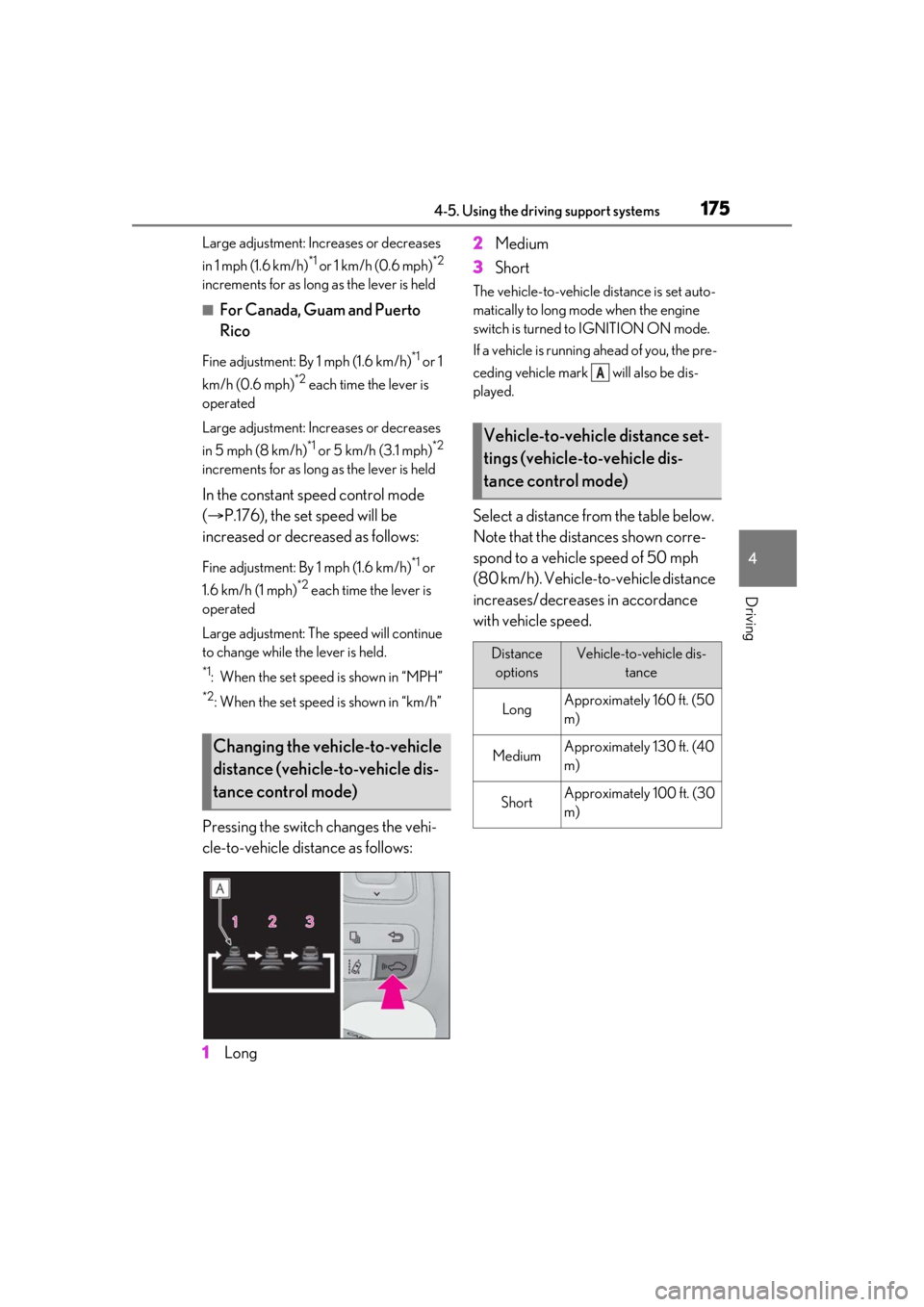
Pressing the switch changes the vehi-
cle-to-vehicle distance as follows:
1 Long 2
Medium
3 Short
The vehicle-to-vehicle distance is set auto-
matically to long mode when the engine
switch is turned to IGNITION ON mode.
If a vehicle is running ahead of you, the pre-
ceding vehicle mark will also be dis-
played.
Select a distance from the table below.
Note that the distances shown corre-
spond to a vehicle speed of 50 mph
(80 km/h). Vehicle-to-vehicle distance
increases/decreases in accordance
with vehicle speed.
Changing the vehicle-to-vehicle
distance (vehicle-to-vehicle dis-
tance control mode)
Vehicle-to-vehicle distance set-
tings (vehicle-to-vehicle dis-
tance control mode)
Distance
optionsVehicle-to-vehicle dis- tance
LongApproximately 160 ft. (50
m)
MediumApproximately 130 ft. (40
m)
ShortApproximately 100 ft. (30
m)
A
Page 189 of 408

1894-5. Using the driving support systems
4
Driving
■The intuitive parking assist can be oper-
ated when
●Front corner sensors:
• The engine switch is in IGNITION ON
mode.
• The shift lever is in a position other than P.
• The vehicle speed is less than about 6
mph (10 km/h).
(At any speed when the shift lever is in R)
●Rear corner and rear center sensors:
• The engine switch is in IGNITION ON mode.
• The shift lever is in R.
■Muting the buzzer sound
●To mute the buzzer sound:
The buzzer can be temporarily muted by
pressing “OK” of the meter control
switches while an obstacle detection dis-
play is shown on the multi-information dis-
play.
●To cancel the mute:
Mute will be automatically canceled in the
following situations.
•When the shift lever is changed (except shifting from D to N, or N to D).
• When the vehicle speed has reached or exceeded 6 mph (10 km/h) with the shift
lever in D.
• When the intuitive par king assist is turned
off once and turned on again.
• When the engine switch is turned off once and turned to IGNITION ON
mode again.
■If “Clean Parking Assist Sensor” is dis-
played on the multi-information display
A sensor may be covered with ice, snow,
dirt, etc. Remove the ice, snow, dirt, etc.,
from the sensor to return the system to nor-
mal.
Also, due to ice forming on a sensor at low
temperatures, a warning message may be
displayed or the sensor may not be able to
detect an object. Once the ice melts, the
system will return to normal.
■Sensor detectio n information
●The following situations may occur
during use.
• The sensors may be able to only detect objects near the fron
t and rear bumpers.
• Depending on the shape of the object and other factors, the detection distance
may shorten, or detection may be impos-
sible.
• There will be a short delay between
object detection and di splay. Even at low
speeds, there is a possibility that the
object will come within the sensor’s
detection areas befo re the display is
shown and the warning beep sounds.
• It might be difficult to hear the buzzer due
to the volume of the audio system or air
flow noise of the air conditioning system.
• It may be difficult to hear the buzzer if
buzzers for other systems are sounding.
■Conditions under wh ich the function
may not function correctly
Certain vehicle conditions and the sur-
rounding environment may affect the ability
of a sensor to correctly detect objects. Par-
ticular instances where this may occur are
listed below.
●There is dirt, snow or ice on a sensor.
(Cleaning the sensors will resolve this
problem.)
●A sensor is frozen. (Thawing the area will
resolve this problem.)
In especially cold weather, if a sensor is
frozen the sensor display may be dis-
played abnormally, or objects, such as a
wall, may not be detected.
●A sensor is covered in any way.
●When a sensor or the area around a sen-
sor is extremely hot or cold.
●On an extremely bumpy road, on an
incline, on gravel, or on grass.
●The vicinity of the vehicle is noisy due to
vehicle horns, motorcycle engines, air
brakes of large vehicles, or other loud
noises producing ultrasonic waves.
●There is another vehicle equipped with
parking assist sensors in the vicinity.
●A sensor is coated with a sheet of spray
or heavy rain.
●If a sensor is hit by a large amount of
water, such as when driving on a flooded
road.
●If the vehicle is significantly tilted.
Page 195 of 408

1954-5. Using the driving support systems
4
Driving
●When starting off on a road surface that
is wet with rain, standing water, etc.
●When starting off on a slick road surface.
●When the vehicle has not been properly
maintained (tires are worn out, tire pres-
sure is low, etc.).
*: If equipped
Multi-information display ( P.73)
Displays the status of the active rear wing
Active rear wing switch
Operates the active rear wing manually
Indicator
Illuminates when the active rear wing is
raised and turns off when it is retracted
■Operating conditions
●The engine switch is in IGNITION ON
mode.
●The trunk is closed.
WARNING
■Launch control precautions
Observe the following precautions.
Failure to do so may result in death or
serious injury.
●Do not use on public roads.
●Use only when road and ambient con-
ditions are safe.
●Before use, ensure that no people or
obstructions are nearby.
●Proper use of launch control requires
an expert level of driving skill. When
using launch control, always check the
track conditions and surrounding area.
●Do not start off with the rear wheels
spinning.
NOTICE
■To avoid damage to the vehicle when
using launch control
●As launch control applies a large load
on vehicle components, do not use it
excessively.
●Always follow the correct operation
procedures as described in this man-
ual.
●Only use launch control on dry, paved
roads, as slippery or loose road sur-
faces may cause damage to the vehi-
cle.
●When using launch control repeatedly,
wait approximately 10 minutes
between each use.
Active rear wing*
The RC F is equipped with an active
rear wing that operates automati-
cally while the ve hicle is being
driven. This active rear wing
enhances aerodynamic perfor-
mance, especially at high speeds,
contributing to a more stable ride.
The active rear wing can be con-
trolled using a switch.
System components
A
B
C
Page 198 of 408

1984-5. Using the driving support systems
2SLALOM mode
This mode emphasizes enhanced steering
response.
3TRACK mode
This mode emphasizes stability for high
speed sporty driving.
■Operating conditions
The engine switch is in IGNITION ON
mode.
■Automatic cancelation of the selected
TVD control mode
SLALOM and TRACK mode are canceled
when the engine switch is turned off. When
the engine switch is turned to IGNITION
ON mode, the TVD system will be in
STANDARD mode.
■Automatic disabling of the TVD system
If a malfunction is detected in the TVD sys-
tem, a warning message will be displayed
on the multi-information display ( P.311)
and the TVD system will be disabled auto-
matically. If the system is disabled, driving
force will not be distributed by the TVD but
through normal differential operation.
■To protect the system
The TVD fluid temperature may become
excessively high when driving for a long
time under extremely high load conditions.
In this case, a warnin g message will be dis-
played on the multi-information display.
( P.311)
The multi-information display shows the distribution of driving force
between the right and left rear wheels.
(
P.73)
WARNING
■Cautions regarding the use of the sys-
tem
The driver is solely responsible for safe
driving. Do not overly rely on the TVD
system. Always drive safely, taking care
to observe your surroundings.
TVD control status on the
multi-information display