2021 LEXUS ES350 warning light
[x] Cancel search: warning lightPage 268 of 464

2685-3. Using the air conditioning system
■Side display (12.3-inch display
model)
Display the heated steering
wheel/seat heaters/seat ventilators
control screen (if equipped)
( P.270)
Adjust the left-hand side tempera-
ture setting
Adjust the fan speed setting
Adjust the right-hand side tem-
perature setting
Set cooling and dehumidification
function on/off
Adjust the temperature for the
driver’s and front passenger’s seats
separately (“DUAL” mode)
( P.269)
Select the air flow mode
■Windshield wiper de-icer (if equipped)
This feature is used to prevent ice from
building up on the wi ndshield and wiper
blades.
The windshield de-icer will automatically
turn off after approximately 15 minutes.
■Eco air conditioning mode
When Eco drive mode is selected using the
Driving Mode Select switch, eco air condi-
tioning mode turns on.
When a drive mode other than Eco drive mode is selected, eco air conditioning
mode may turn off.
1
Press the automatic mode switch
or select “AUTO” on the sub func-
tion menu. ( P.266)
2 Press the outside/recirculated air
mode switch to switch to automatic
air intake mode.
The air conditioning system automatically
switches between outside air and recircu-
lated air modes.
3Adjust the temperature setting.
4 To stop the operation, press the off
switch or select “Off” on the sub
function menu. ( P.266)
If the fan speed setting or air flow
modes are operated, the automatic
mode indicator goes off. However,
automatic mode for functions other
than that operated is maintained.
■Using automatic mode
Fan speed is adjusted automatically
according to the temperature setting and
the ambient conditions.
Therefore, the fan may stop for a while until
warm or cool air is ready to flow immedi-
ately after the automatic mode switch is
pressed or “AUTO” is selected.
Cool air may blow around the upper body
even when the heater is on due to sunlight.
A
B
C
D
E
F
G
WARNING
■To prevent burns (vehicles with wind-
shield wiper de-icer)
Do not touch the glass at lower part of
the windshield or to the side of the front
pillars when the windshield wiper de-icer
is on.
Using automatic mode
Page 277 of 464
2775-5. Using the storage features
5
Interior features
5-5.Using the storage features
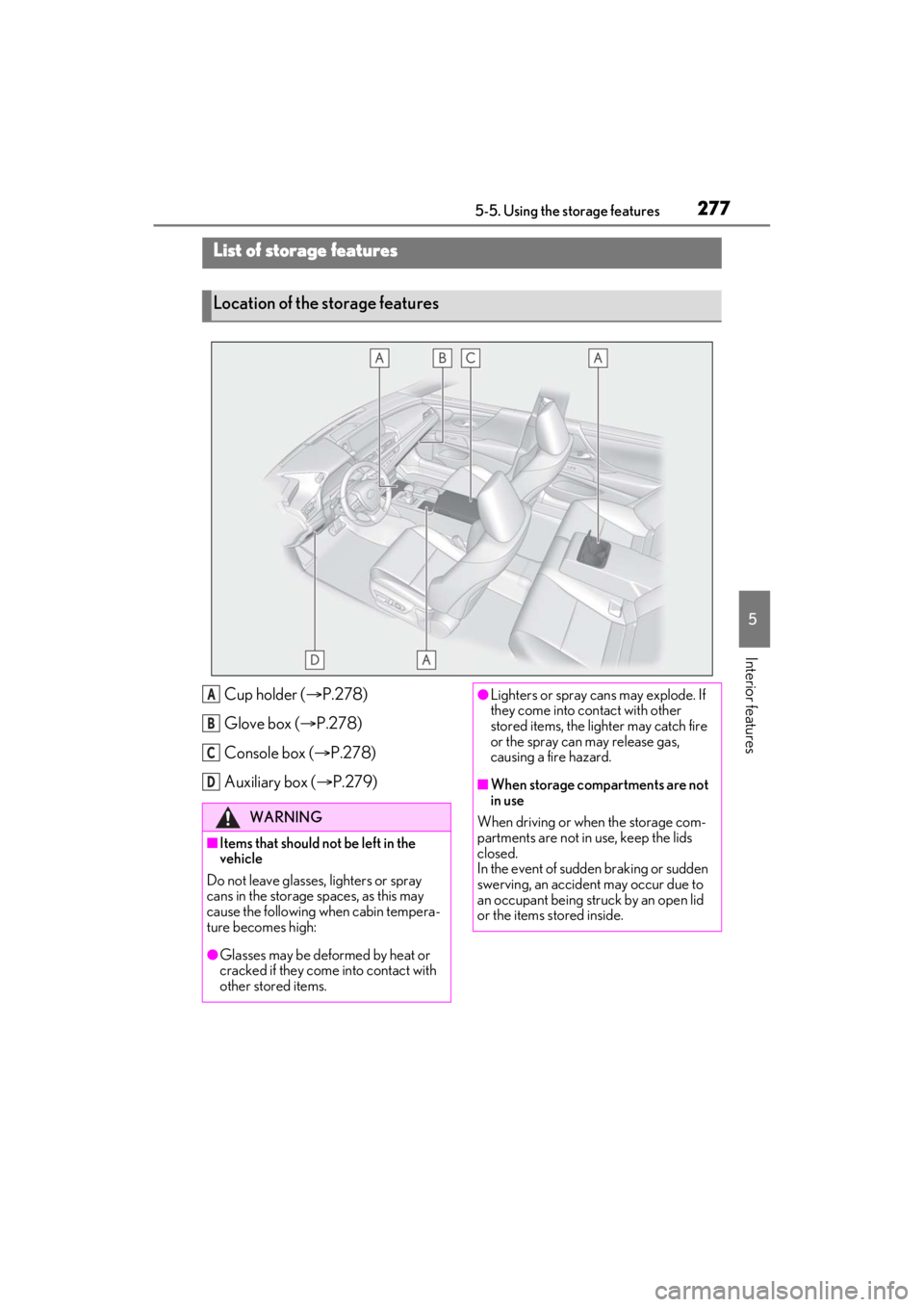
Cup holder (P.278)
Glove box ( P.278)
Console box ( P.278)
Auxiliary box ( P.279)
List of storage features
Location of the storage features
WARNING
■Items that should not be left in the
vehicle
Do not leave glasses, lighters or spray
cans in the storage spaces, as this may
cause the following when cabin tempera-
ture becomes high:
●Glasses may be deformed by heat or
cracked if they come into contact with
other stored items.
A
B
C
D
●Lighters or spray ca ns may explode. If
they come into contact with other
stored items, the lighter may catch fire
or the spray can may release gas,
causing a fire hazard.
■When storage compartments are not
in use
When driving or when the storage com-
partments are not in use, keep the lids
closed.
In the event of sudden braking or sudden
swerving, an accident may occur due to
an occupant being struck by an open lid
or the items stored inside.
Page 278 of 464
2785-5. Using the storage features
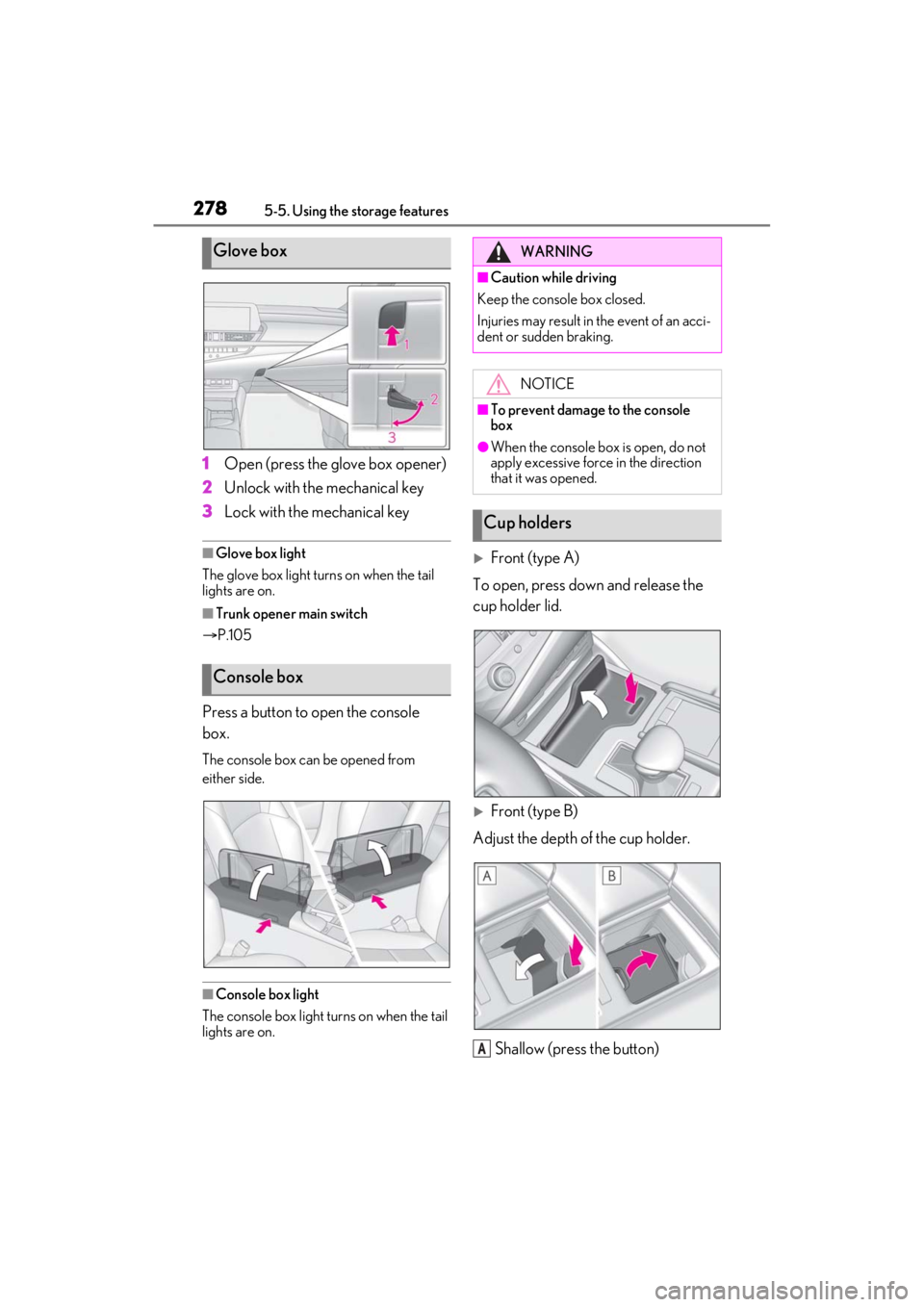
1Open (press the glove box opener)
2 Unlock with the mechanical key
3 Lock with the mechanical key
■Glove box light
The glove box light turns on when the tail
lights are on.
■Trunk opener main switch
P.105
Press a button to open the console
box.
The console box can be opened from
either side.
■Console box light
The console box light turns on when the tail
lights are on.
Front (type A)
To open, press down and release the
cup holder lid.
Front (type B)
Adjust the depth of the cup holder.
Shallow (press the button)
Glove box
Console box
WARNING
■Caution while driving
Keep the console box closed.
Injuries may result in the event of an acci-
dent or sudden braking.
NOTICE
■To prevent damage to the console
box
●When the console box is open, do not
apply excessive force in the direction
that it was opened.
Cup holders
A
Page 289 of 464

2895-6. Using the other interior features
5
Interior features
WARNING
■Caution while driving
When charging a portable device, for
safety reasons, the driver should not
operate the main the part of the portable
device while driving.
■Caution regarding interference with
electronic devices
People with implantable cardiac pace-
makers, cardiac resy nchronization ther-
apy-pacemakers or implantable
cardioverter defibrillators, as well as any
other electrical medical device, should
consult their physician about the usage of
the wireless charger.
The operations of the wireless charger
may have an affect on medical devices.
■To prevent damage or burns
Observe the following precautions.
Failure to do so may result in a possibility
of equipment failure and damage, catch
fire, burns due to overheat.
●Do not insert any metallic objects
between the charging area and the
portable device while charging
●Do not attach stickers, metallic
objects, etc., to the charger area or
portable device
●Do not cover with cloth, etc., and
charge
●Do not charge portable devices other
than designated
●Do not attempt to dismantle for disas-
sembly or modifications
●Do not hit or apply a strong force
NOTICE
■Conditions in which the function may
not operate correctly
In the following conditions, it may not
operate correctly
●The portable device is fully charged
●There is foreign matter between the
charge area and portable device
●The temperature of the portable
device gets higher from charging
●The charging surface of the portable
device is facing up
●The placement of the portable device
is out of alignmen t with the charge
area
●Near a TV tower, electric power plant,
gas station, radio stat ion, large display,
airport or other fac ility that generates
strong radio waves or electrical noise
●When the electronic key is in contact
with, or is covered by the following
metallic objects
• Cards to which aluminum foil is attached
• Cigarette boxes that have aluminum foil inside
• Metallic wallets or bags
•Coins
• Hand warmers made of metal
• Media such as CDs and DVDs
●When other wireless keys (that emit
radio waves) are being used nearby
In addition, excluding the above-men-
tioned, when the charger does not per-
form normally or the operation indicator
light is flashing continuously, it is consid-
ered that the wirele ss charger is malfunc-
tioning. Contact your Lexus dealer.
■To prevent failure or damage to data
●Do not bring magnetic cards, such as
credit cards, or magnetic recording
media, etc., close to the charger while
charging, otherwise, data may disap-
pear under the influence of magne-
tism. Also, do not bring precision
instruments such as wrist watches, etc.,
close to the charger, as such objects
may break.
Page 306 of 464
3066-1. Maintenance and care
WARNING
■Precaution regarding the rear
bumper with Blind Spot Monitor (if
equipped)
If the paint of the rear bumper is chipped
or scratched, the system may malfunc-
tion. If this occurs, consult your Lexus
dealer.
NOTICE
■To prevent paint deterioration and
corrosion on the body and compo-
nents (aluminum wheels etc.)
●Wash the vehicle immediately in the
following cases:
• After driving near the sea coast
• After driving on salted roads
• If coal tar, pollen or tree sap is present on the paint surface
• If dead insects, in sect droppings or
bird droppings are present on the
paint surface
• After driving in an area contaminated with soot, oily smoke, mine dust, iron
powder or chemical substances
• If the vehicle becomes heavily soiled with dust or mud
• If liquids such as benzene and gasoline are spilled on the paint surface
●If the paint is chip ped or scratched,
have it repaired immediately.
●To prevent the wheels from corroding,
remove any dirt and store in a place
with low humidity when storing the
wheels.
■Cleaning the exterior lights
●Wash carefully. Do not use organic
substances or scrub with a hard brush.
This may damage the surfaces of the
lights.
●Do not apply wax to the surfaces of the
lights.
Wax may cause damage to the lenses.
■When using an automatic car wash
(vehicles with rain-sensing windshield
wipers)
Set the wiper switch to the off position.
If the wiper switch is in “AUTO”, the wip-
ers may operate and the wiper blades
may be damaged.
■When using a high-pressure car wash
●When washing the vehicle, do not let
water of the high-p ressure washer hit
directly or the vicinity of the camera.
Due to the shock from the high-pres-
sure water, it is possible the device
may not operate as normal.
●Do not bring the nozzle tip close to
boots (rubber or resin manufactured
cover), connectors or the following
parts. The parts may be damaged if
they come into contact with high-pres-
sure water.
• Traction related parts
•Steering parts
• Suspension parts
• Brake parts
●Keep the cleaning nozzle at least 11.9
in. (30 cm) away from the vehicle
body. Otherwise resin section, such as
moldings and bumpers, may be
deformed and damaged.
Also, do not continuously hold the
nozzle in the same place.
●Do not spray the lower part of the
windshield continuously.
If water enters the air conditioning sys-
tem intake located ne ar the lower part
of the windshield, th e air conditioning
system may not operate correctly.
●Do not wash the underside of the vehi-
cle using a high pressure car washer.
Page 316 of 464
3166-3. Do-it-yourself maintenance
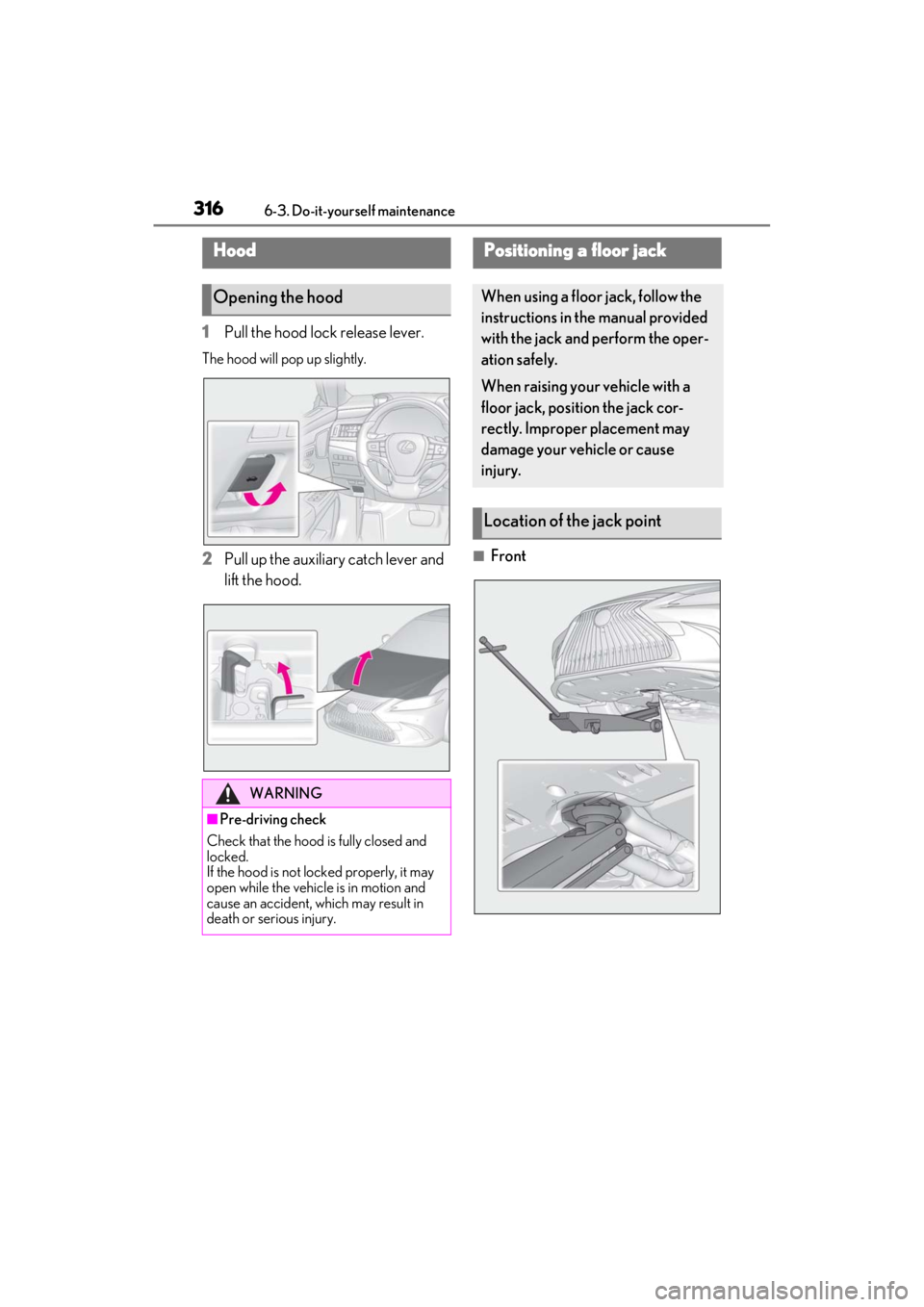
1Pull the hood lock release lever.
The hood will pop up slightly.
2Pull up the auxiliary catch lever and
lift the hood.■Front
Hood
Opening the hood
WARNING
■Pre-driving check
Check that the hood is fully closed and
locked.
If the hood is not locked properly, it may
open while the vehicle is in motion and
cause an accident, which may result in
death or serious injury.
Positioning a floor jack
When using a floor jack, follow the
instructions in the manual provided
with the jack and perform the oper-
ation safely.
When raising your vehicle with a
floor jack, position the jack cor-
rectly. Improper placement may
damage your vehicle or cause
injury.
Location of the jack point
Page 323 of 464

3236-3. Do-it-yourself maintenance
6
Maintenance and care
■Checking fluid level
The brake fluid level should be
between the “MAX” and “MIN” lines
on the tank.
■Adding fluid
Make sure to check the fluid type and
prepare the necessary items.
Fluid type
FMVSS No.116 DOT 3 or SAE J1703
brake fluid
FMVSS No.116 DOT 4 or SAE J1704
brake fluid
Item
Clean funnel
■Brake fluid can absorb moisture from
the air
Excess moisture in the brake fluid can
cause a dangerous loss of braking effi-
ciency. Use only newly opened brake fluid.
Check the battery as follows.
■Battery exterior
Make sure that the battery terminals
are not corroded and that there are no
loose connections, cracks, or loose
clamps.
Terminals
Hold-down clamp
WARNING
■When the engine is hot
Do not touch the radiator or condenser
as they may be hot and cause serious
injuries, such as burns.
Checking and adding the brake
fluid
WARNING
■When filling the reservoir
Take care as brake fluid can harm your
hands and eyes and damage painted sur-
faces.
If fluid gets on your hands or in your eyes,
flush the affected area with clean water
immediately.
If you still experience discomfort, see a
doctor.
NOTICE
■If the fluid level is low or high
It is normal for the brake fluid level to go
down slightly as the brake pads wear out
or when the fluid leve l in the accumulator
is high.
If the reservoir needs frequent refilling,
there may be a serious problem.
Checking the battery
A
B
Page 324 of 464

3246-3. Do-it-yourself maintenance
■Before recharging
When recharging, the battery produces
hydrogen gas which is flammable and
explosive. Therefore, observe the following
precautions before recharging:
●If recharging with the battery installed on
the vehicle, be sure to disconnect the
ground cable.
●Make sure the power switch on the char-
ger is off when connecting and discon-
necting the charger cables to the battery.
■After recharging/reconnecting the bat-
tery
●The engine may not start. Follow the pro-
cedure below to in itialize the system.
1 Shift the shift lever to P.
2 Open and close any of the doors.
3 Restart the engine.
●Unlocking the doors using the smart
access system with pu sh-button start may
not be possible immediately after recon-
necting the battery. If this happens, use
the wireless remote control or the
mechanical key to lock/unlock the doors.
●Start the engine with the engine switch in
ACCESSORY mode. The engine may
not start with the engine switch turned off.
However, the engine will operate nor-
mally from the second attempt.
●The engine switch mode is recorded by
the vehicle. If the battery is reconnected,
the vehicle will return the engine switch
mode to the status it was in before the
battery was disconnect ed. Make sure to
turn off the power before disconnect the
battery. Take extra care when connect-
ing the battery if the engine switch mode
prior to discharge is unknown.
If the engine will not st art even after multiple
attempts at all methods above, contact your
Lexus dealer.
WARNING
■Chemicals in the battery
Battery contains poisonous and corro-
sive sulfuric acid and may produce
hydrogen gas which is flammable and
explosive. To reduce the risk of death or
serious injury, take the following precau-
tions while working on or near the bat-
tery:
●Do not cause sparks by touching the
battery terminals with tools.
●Do not smoke or light a match near the
battery.
●Avoid contact with eyes, skin and
clothes.
●Never inhale or swallow electrolyte.
●Wear protective sa fety glasses when
working near the battery.
●Keep children away from the battery.
■Where to safely charge the battery
Always charge the battery in an open
area. Do not charge the battery in a
garage or closed room where there is
insufficient ventilation.
■How to recharge the battery
Only perform a slow charge (5 A or
less). The battery may explode if charged
at a quicker rate.
■Emergency measures regarding
electrolyte
●If electrolyte gets in your eyes
Flush your eyes with clean water for at
least 15 minutes and get immediate
medical attention. If possible, continue
to apply water with a sponge or cloth
while traveling to the nearest medical
facility.
●If electrolyte gets on your skin
Wash the affected area thoroughly. If
you feel pain or burning, get medical
attention immediately.