2021 KIA SPORTAGE key battery
[x] Cancel search: key batteryPage 203 of 631
4 113
Features of your vehicle
Immobilizer IndicatorLight (Without Smart Key)(if equipped)
This indicator light illuminates:
• When the vehicle detects the immobilizer in your key properly
while the ignition switch is ON.
- At this time, you can start theengine.
- The indicator light goes off after starting the engine.
This indicator light blinks:
• When there is a malfunction with the immobilizer system.
In this case, have your vehicle
inspected by an authorized Kia
dealer.
Immobilizer Indicator
Light (With Smart Key) (if equipped)
This indicator light illuminates for up
to 30 seconds:
• When the vehicle detects the smart key in the vehicle properly
while the Engine Start/Stop Button
is ACC or ON.
- At this time, you can start theengine.
- The indicator light goes off after starting the engine.
This indicator light blinks for a few
seconds:
• When the smart key is not in the vehicle.
- At this time, you can not start theengine. This indicator light illuminates for 2
seconds and goes off:
• When the vehicle can not detect
the smart key which is in the vehi-
cle while the Engine Start/Stop
Button is ON.
In this case, have your vehicle
inspected by an authorized Kia
dealer.
This indicator light blinks:
• When the battery of the smart key is weak.
- At this time, you can not start theengine. However, you can start the
engine if you press the Engine
Start/Stop Button with the smart
key. (For more details, refer to
“Starting the Engine” in chapter 5).
• When there is a malfunction with the immobilizer system.
In this case, have your vehicle
inspected by an authorized Kia
dealer.
Page 217 of 631
4 127
Features of your vehicle
Battery saver function
• The purpose of this feature is toprevent the battery from being dis-
charged if the lights are left in the
ON position. The system automati-
cally shuts off the parking lights 30
seconds after the ignition key is
removed and the driver’s door is
opened and closed.
• With this feature, the parking lights will turn off automatically if the driver
parks on the side of the road at night
and opens the driver’s side door.
If necessary, to keep the parking
lights on when the ignition key is
removed, perform the following:
1) Open the driver-side door.
2) Turn the parking lights OFF and ON again using the light switch
on the steering column.
Daytime running light
(if equipped)
The Daytime Running Lights (DRL)
can make it easier for others to see the
front of your vehicle during the day.
DRL can be helpful in many different
driving conditions, and it is especially
helpful after dawn and before sunset.
The DRL system turns OFF when:
1. The headlight switch is ON.
2. The engine is OFF.
3. Engaging the Parking Brake
4. The front fog light is ON.
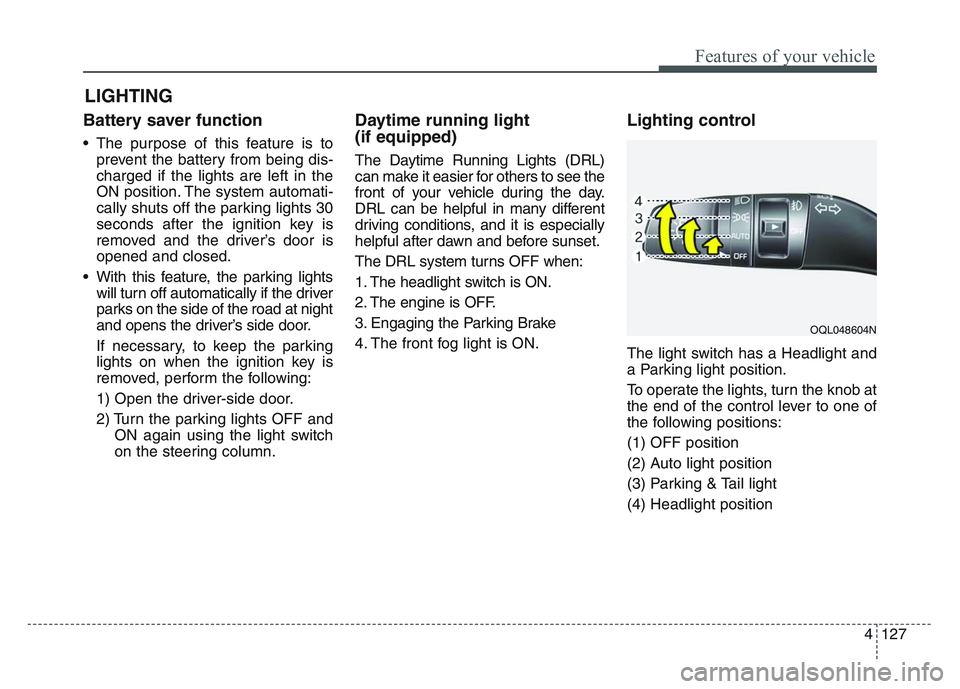
Lighting control
The light switch has a Headlight and
a Parking light position.
To operate the lights, turn the knob at
the end of the control lever to one of
the following positions:
(1) OFF position
(2) Auto light position
(3) Parking & Tail light
(4) Headlight position
LIGHTING
OQL048604N
Page 293 of 631
57
Driving your vehicle
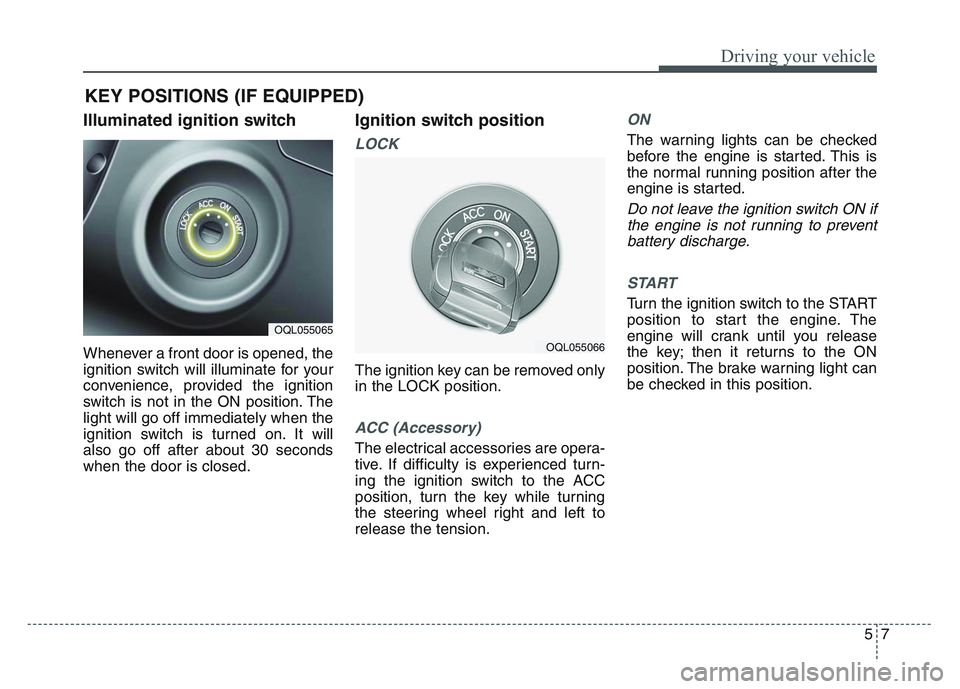
Illuminated ignition switch
Whenever a front door is opened, the
ignition switch will illuminate for your
convenience, provided the ignition
switch is not in the ON position. The
light will go off immediately when the
ignition switch is turned on. It will
also go off after about 30 seconds
when the door is closed.
Ignition switch position
LOCK
The ignition key can be removed only
in the LOCK position.
ACC (Accessory)
The electrical accessories are opera-
tive. If difficulty is experienced turn-
ing the ignition switch to the ACC
position, turn the key while turning
the steering wheel right and left to
release the tension.
ON
The warning lights can be checked
before the engine is started. This is
the normal running position after the
engine is started.
Do not leave the ignition switch ON ifthe engine is not running to preventbattery discharge.
START
Turn the ignition switch to the START
position to start the engine. The
engine will crank until you release
the key; then it returns to the ON
position. The brake warning light can
be checked in this position.
KEY POSITIONS (IF EQUIPPED)
OQL055065
OQL055066
Page 299 of 631
5 13
Driving your vehicle
✽ NOTICE
If you leave the ENGINE START/
STOP button in the ACC or ON
position for a long time, the battery
will discharge.
Starting the engine with a
smart key
1.Carry the smart key or place it
inside the vehicle.
2.Make sure the parking brake is firmly applied
3.Place the transmission shift lever in P (Park). Depress the brake pedal
fully.
You can also start the engine whenthe shift lever is in the N (Neutral)position.
4.Press the ENGINE START/STOP button while depressing the brake
pedal.
It should be started withoutdepressing the accelerator.
5.Do not wait for the engine to warm up while the vehicle remains sta-
tionary.
Start driving at moderate engine
speeds. (Steep accelerating and
decelerating should be avoided.) Starting and stopping the engine for
turbocharger intercooler
1. Do not race or accelerate the
engine immediately after starting.
If the engine is cold, idle for sever-
al seconds before sufficient lubri-
cation is ensured in the tur-
bocharger unit.
2. After high speed or extended driv- ing, requiring a heavy engine load,
idle the engine about 1 minute
before turning it off.
This idle time will allow the tur- bocharger to cool prior to shutting
the engine off.
WARNING- Starting
vehicle
Never press the ENGINE
START/STOP button while the
vehicle is in motion except in an
emergency. This would result in
loss of directional control and
braking function, which could
cause an accident.
CAUTION
Do not turn the engine off imme- diately after it has been subject-ed to a heavy load. Doing somay cause severe damage tothe engine or turbocharger unit.
Page 300 of 631
Driving your vehicle
145
• Even if the smart key is in the vehi-cle, if it is far away from you, the
engine may not start.
• When the ENGINE START/STOP button is in the ACC position or
above, if any door is opened, the
system checks for the smart key. If
the smart key is not in the vehicle,
a message "key is not in the vehi-
cle" will appear on the LCD display.
And if all doors are closed, the
chime will sound for 5 seconds. The
indicator or warning will turn off
while the vehicle is moving. Always
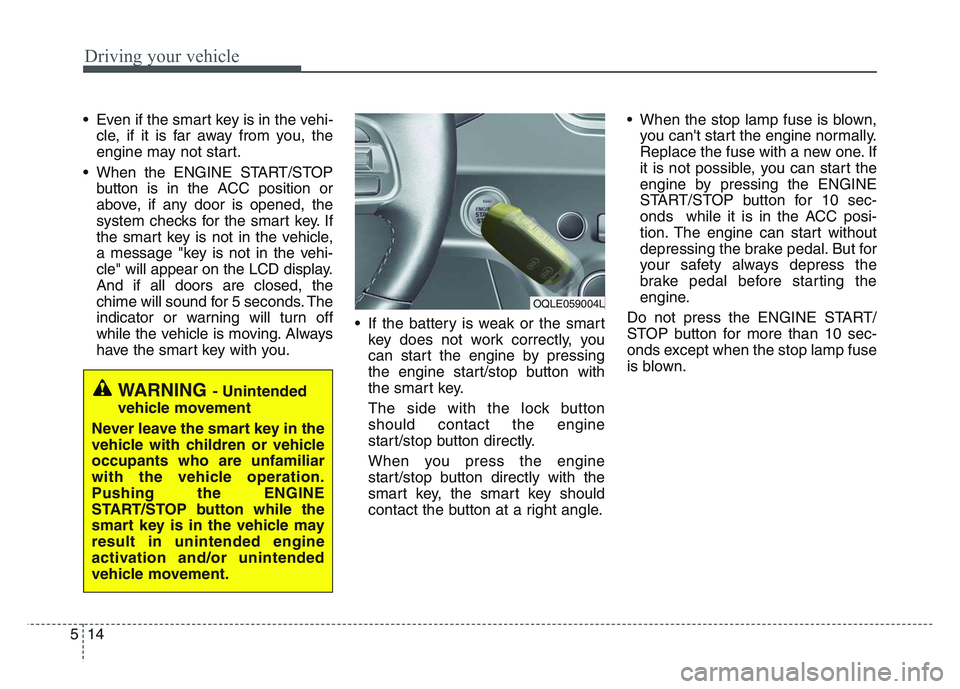
have the smart key with you. • If the battery is weak or the smart
key does not work correctly, you
can start the engine by pressing
the engine start/stop button with
the smart key.
The side with the lock button
should contact the engine
start/stop button directly.
When you press the engine
start/stop button directly with the
smart key, the smart key should
contact the button at a right angle. • When the stop lamp fuse is blown,
you can't start the engine normally.
Replace the fuse with a new one. If
it is not possible, you can start the
engine by pressing the ENGINE
START/STOP button for 10 sec-
onds while it is in the ACC posi-
tion. The engine can start without
depressing the brake pedal. But for
your safety always depress the
brake pedal before starting the
engine.
Do not press the ENGINE START/
STOP button for more than 10 sec-
onds except when the stop lamp fuse
is blown.
WARNING - Unintended
vehicle movement
Never leave the smart key in the
vehicle with children or vehicle
occupants who are unfamiliar
with the vehicle operation.
Pushing the ENGINE
START/STOP button while the
smart key is in the vehicle may
result in unintended engine
activation and/or unintended
vehicle movement.
OQLE059004L
Page 623 of 631
Index
4I
Drive mode integrated control system ..........................5-57DRIVE mode ..............................................................5-57
Driver Attention Warning (DAW)................................5-109 Resetting the system ................................................5-111
System malfunction ..................................................5-111
System setting and activation ..................................5-109
System standby ........................................................5-111
Economical operation ..................................................5-148
Electrical equipment (U.S. only) ..................................8-16 Installation of a mobile two-way radio system ..........8-16
Emergency starting ..........................................................6-5 Jump starting ................................................................6-5
Push-starting ................................................................6-6
Emission control system ..............................................7-102 Crankcase emission control system ..........................7-102
Evaporative emission control (including ORVR: Onboard Refueling Vapor Recovery) system ........7-102
Exhaust emission control system ..............................7-103
Engine ........................................................................\
......8-2
Engine compartment ........................................................2-6
Engine compartment ........................................................7-3
Engine coolant ..............................................................7-29 Changing the coolant ..................................................7-32
Checking the coolant level..........................................7-29
Engine number ..............................................................8-12 Engine oil ......................................................................7-\
27
Changing the engine oil and filter ..............................7-28
Checking the engine oil level ....................................7-27
ENGINE START/STOP button ....................................5-11 ENGINE START/STOP button position ....................5-11
Illuminated ENGINE START/STOP button ..............5-11
Starting the engine with a smart key ..........................5-13
Explanation of scheduled maintenance items ..............7-21
Exterior features ..........................................................4-188 Roof rack ..................................................................4-188
Exterior overview ............................................................2-2
Folding key ......................................................................4-\
5 Battery replacement ......................................................4-8
Immobilizer system ......................................................4-7
Key operations ..............................................................4-5
Record your key number ..............................................4-5
Transmitter precautions ................................................4-7
Forward Collision-Avoidance Assist (FCA) (Front view camera only) ..........................................5-59Brake operation ..........................................................5-63
FCA front view camera sensor ..................................5-64
FCA warning message and system control ................5-61
Limitation of the system ............................................5-67
System malfunction ....................................................5-65
System setting and activation ....................................5-59
E
F
Page 628 of 631

I9
Index
Seat belts ........................................................................\
3-20Care of seat belts ........................................................3-33
Pre-tensioner seat belt ................................................3-28
Seat belt precautions ..................................................3-31
Seat belt restraint system ............................................3-20
Smart Cruise Control(SCC) ........................................5-118 Limitations of the system..........................................5-132\
Smart Cruise Control cancelled ................................5-124
Smart Cruise Control speed ....................................5-120
Smart Cruise Control switch ....................................5-120
To adjust the sensitivity of Smart Cruise Control ....5-131
To convert to Cruise Control mode ........................5-132
Vehicle to vehicle distance setting ............................5-125
When the lane ahead is clear ....................................5-126
When there is a vehicle ahead of you in your lane ..5-127
Smart key ......................................................................4-\
12 Battery replacement ....................................................4-17
Loss of the smart key ..................................................4-16
Record your key number ............................................4-12
Smart key function ......................................................4-12
Smart key immobilizer system ..................................4-18
Smart key precautions ................................................4-14
Special driving conditions ..........................................5-150 Driving at night ........................................................5-153
Driving in flooded areas ........................................5-154
Driving in the rain ..................................................5-153
Driving off-road ......................................................5-154
Hazardous driving conditions ................................5-150 Highway driving ......................................................5-154
Reducing the risk of a rollover ................................5-150
Rocking the vehicle ..................................................5-152
Smooth cornering ......................................................5-152
Snowy or icy conditions ..........................................5-156
Steering wheel ..............................................................4-58 Electronic Power Steering (EPS) ................................4-58
Heated steering wheel ................................................4-60
Horn ........................................................................\
....4-61
Tilt and telescopic steering ........................................4-59
Storage compartments ................................................4-173 Center console storage ..............................................4-173
Glove box ..................................................................4-173
Luggage box.............................................................\
.4-174
Sunglass holder ........................................................4-174
Two types of luggage board levels ..........................4-175
Theft-alarm system ........................................................4-20 Armed stage ................................................................4-20
Disarmed stage ............................................................4-21
Theft-alarm stage ........................................................4-21
Tire Pressure Monitoring System (TPMS) ......................6-8 Changing a tire with TPMS ........................................6-12
Check tire pressure.....................................................\
...6-8
Low tire pressure position telltale ..............................6-10
Low tire pressure telltale ............................................6-10
T