2021 KIA SOUL manual
[x] Cancel search: manualPage 45 of 211
2-11
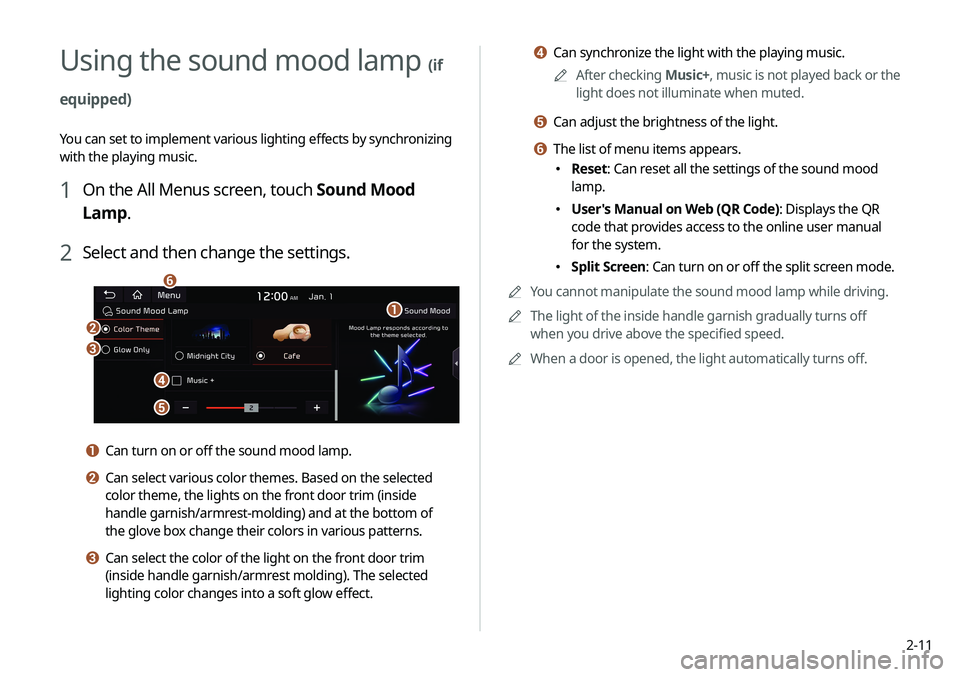
d Can synchronize the light with the playing music.0000
A
After checking Music+, music is not played back or the
light does not illuminate when muted.
e Can adjust the brightness of the light.
f The list of menu items appears.
\225 Reset: Can reset all the settings of the sound mood
lamp.
\225User's Manual on Web (QR Code): Displays the QR
code that provides access to the online user manual
for the system.
\225Split Screen: Can turn on or off the split screen mode.
0000
A
You cannot manipulate the sound mood lamp while driving.
0000
A
The light of the inside handle garnish gradually turns off
when you drive above the specified speed.
0000
A
When a door is opened, the light automatically turns off.
Using the sound mood lamp (if
equipped)
You can set to implement various lighting effects by synchronizing
with the playing music.
1 On the All Menus screen, touch Sound Mood
Lamp.
2 Select and then change the settings.
\037
\036
\035
\034
\033
\032
a Can turn on or off the sound mood lamp.
b Can select various color themes. Based on the selected
color theme, the lights on the front door trim (inside
handle garnish/armrest-molding) and at the bottom of
the glove box change their colors in various patterns.
c Can select the color of the light on the front door trim
(inside handle garnish/armrest molding). The selected
lighting color changes into a soft glow effect.
Page 49 of 211
3-3
\335Warning
Driving while distracted can result in a loss of vehicle control
that may lead to an accident, severe bodily injury, or death. The
driver's primary responsibility is the safe and legal operation of
the vehicle, and the use of any vehicle systems, including the
touch screen and steering wheel controls, which take the driver's
eyes, attention, and focus away from the safe operation of the
vehicle, or which are not permissible by law, should never be used
during the operation of the vehicle.
j The list of menu items appears.
\225Enter Station: Can select or directly enter the desired
radio frequency.
\225Station List: Can see the list of available radio stations.
\225Info: Turns the Radio text information transmitted from
the broadcasting station on and off.
\225Reorder Presets: Can change the location of a channel
by dragging on the presets list.
> See “Changing the order of
registered channels.”
\225 Delete Presets: Can delete a registered channel from the
presets list.
> See “Deleting a registered channel.”
\225Set Number of Presets: Used to set the number of
channels to display on the preset list.
> See “Changing the
number of channels to display on the preset list.”
\225 Sound Settings: Can configure system sound settings.
> See “Configuring the sound settings.”
\225User's Manual on Web (QR Code): Displays the QR code
that provides access to the online user manual for the
system.
\225Split Screen: Can turn on or off the split screen mode.
0000
A
The broadcast station names and local information are
displayed using GPS data. Those information may not appear
when there is no GPS data received.
0000
A
The displayed broadcast station names may not match the
actual ones.
Page 55 of 211
3-9
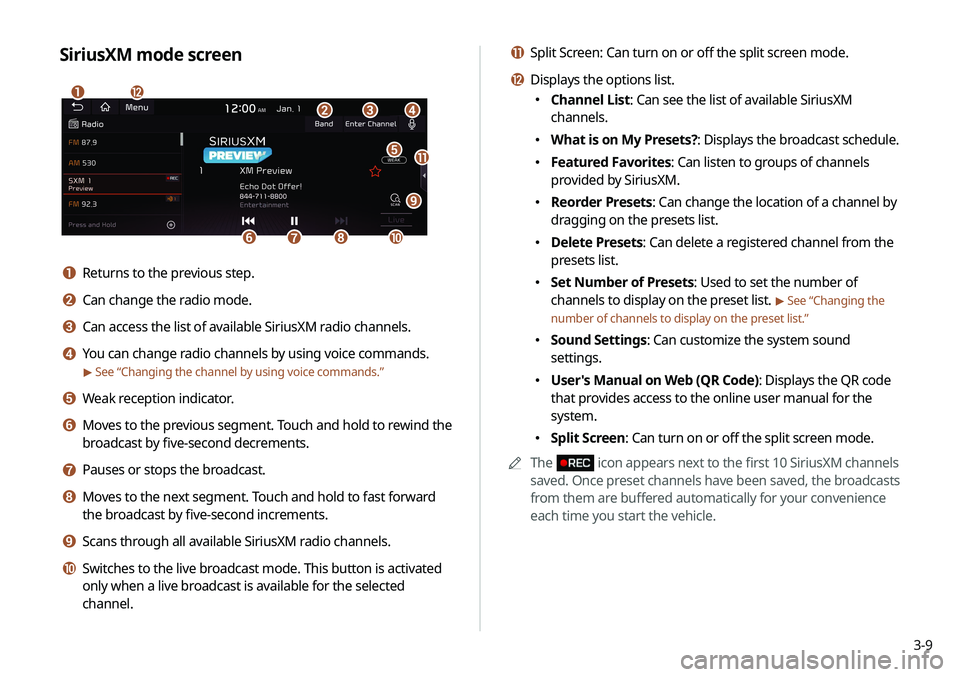
k Split Screen: Can turn on or off the split screen mode.
l Displays the options list.
\225Channel List: Can see the list of available SiriusXM
channels.
\225What is on My Presets?: Displays the broadcast schedule.
\225Featured Favorites: Can listen to groups of channels
provided by SiriusXM.
\225Reorder Presets: Can change the location of a channel by
dragging on the presets list.
\225Delete Presets: Can delete a registered channel from the
presets list.
\225Set Number of Presets: Used to set the number of
channels to display on the preset list.
> See “Changing the
number of channels to display on the preset list.”
\225 Sound Settings: Can customize the system sound
settings.
\225User's Manual on Web (QR Code): Displays the QR code
that provides access to the online user manual for the
system.
\225Split Screen: Can turn on or off the split screen mode.
0000
A
The
icon appears next to the first 10 SiriusXM channels
saved. Once preset channels have been saved, the broadcasts
from them are buffered automatically for your convenience
each time you start the vehicle.
SiriusXM mode screen
\037
\036
\035
\034\033
\032\031
\030
\027
\026
\025
\024
a Returns to the previous step.
b Can change the radio mode.
c Can access the list of available SiriusXM radio channels.
d You can change radio channels by using voice commands.
> See “Changing the channel by using voice commands.”
e Weak reception indicator.
f Moves to the previous segment. Touch and hold to rewind the
broadcast by five-second decrements.
g Pauses or stops the broadcast.
h Moves to the next segment. Touch and hold to fast forward
the broadcast by five-second increments.
i Scans through all available SiriusXM radio channels.
j Switches to the live broadcast mode. This button is activated
only when a live broadcast is available for the selected
channel.
Page 61 of 211
4-3
\335Warning
Driving while distracted can result in a loss of vehicle control that
may lead to an accident, severe bodily injury, or death. The driver's
primary responsibility is the safe and legal operation of the
vehicle, and the use of any vehicle systems, including the touch
screen and steering wheel controls, which take the driver's eyes,
attention, and focus away from the safe operation of the vehicle,
or which are not permissible by law, should never be used during
the operation of the vehicle.
Pause/Resume
You can pause or resume playback of a USB music file.
On the USB music playback screen, touch or .
Rewind
By using the rewind function, you can listen to music in the USB
device from the desired point during playback.
Perform any of the following methods:
\225On the USB music playback screen, touch and hold .
\225On the control panel, press and hold the [ SEEK] button.
0000
A
On the steering wheel, use the [
/] button to run the
function.
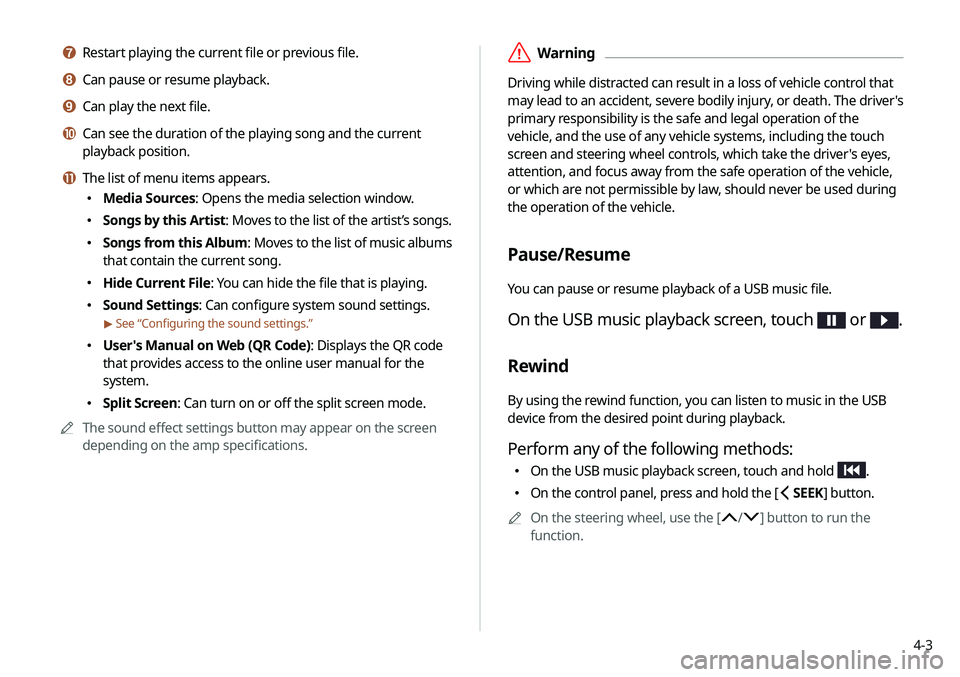
g Restart playing the current file or previous file.
h Can pause or resume playback.
i Can play the next file.
j Can see the duration of the playing song and the current
playback position.
k The list of menu items appears.
\225 Media Sources: Opens the media selection window.
\225Songs by this Artist: Moves to the list of the artist’s songs.
\225Songs from this Album : Moves to the list of music albums
that contain the current song.
\225 Hide Current File: You can hide the file that is playing.
\225Sound Settings: Can configure system sound settings.
> See “Configuring the sound settings.”
\225User's Manual on Web (QR Code): Displays the QR code
that provides access to the online user manual for the
system.
\225Split Screen: Can turn on or off the split screen mode.
0000
A
The sound effect settings button may appear on the screen
depending on the amp specifications.
Page 66 of 211
4-8
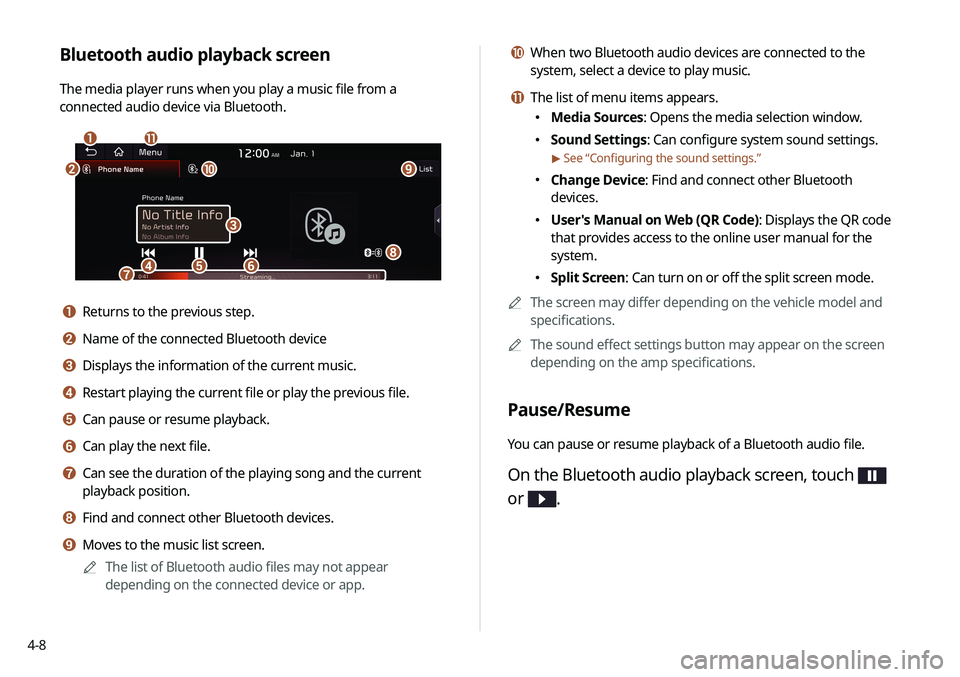
j When two Bluetooth audio devices are connected to the
system, select a device to play music.
k The list of menu items appears.
\225Media Sources: Opens the media selection window.
\225Sound Settings: Can configure system sound settings.
> See “Configuring the sound settings.”
\225Change Device: Find and connect other Bluetooth
devices.
\225User's Manual on Web (QR Code): Displays the QR code
that provides access to the online user manual for the
system.
\225Split Screen: Can turn on or off the split screen mode.
0000
A
The screen may differ depending on the vehicle model and
specifications.
0000
A
The sound effect settings button may appear on the screen
depending on the amp specifications.
Pause/Resume
You can pause or resume playback of a Bluetooth audio file.
On the Bluetooth audio playback screen, touch
or
.
Bluetooth audio playback screen
The media player runs when you play a music file from a
connected audio device via Bluetooth.
\037\036
\035
\034\033\032\031
\030
\027
\026\025
a Returns to the previous step.
b Name of the connected Bluetooth device
c Displays the information of the current music.
d Restart playing the current file or play the previous file.
e Can pause or resume playback.
f Can play the next file.
g Can see the duration of the playing song and the current
playback position.
h Find and connect other Bluetooth devices.
i Moves to the music list screen.
0000
A
The list of Bluetooth audio files may not appear
depending on the connected device or app.
Page 71 of 211
5-3
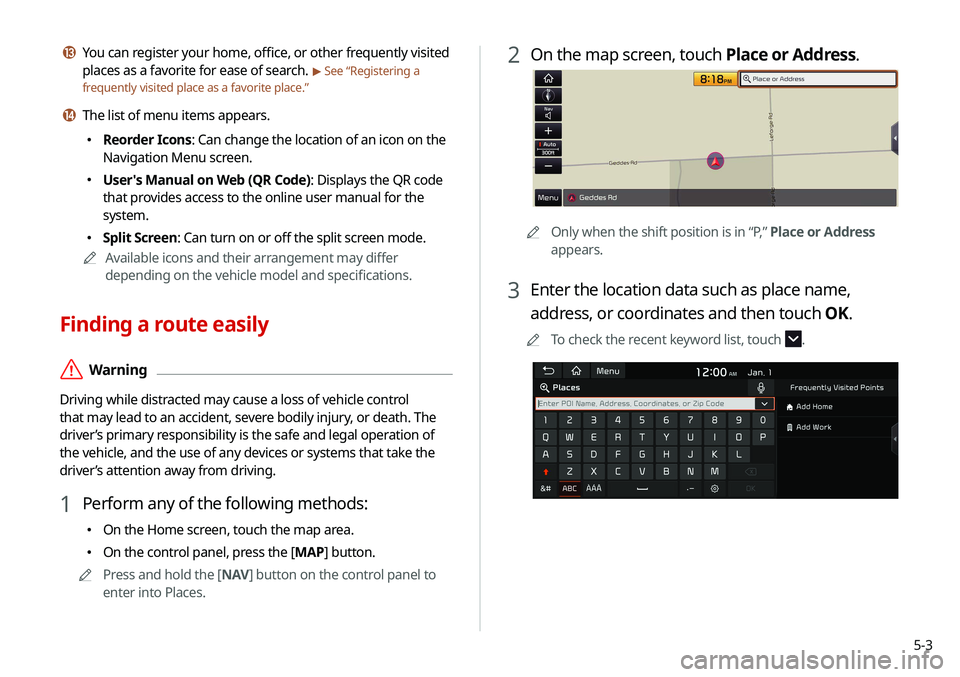
2 On the map screen, touch Place or Address.
0000AOnly when the shift position is in “P,” Place or Address
appears.
3 Enter the location data such as place name,
address, or coordinates and then touch OK.
0000
A
To check the recent keyword list, touch .
m You can register your home, office, or other frequently visited
places as a favorite for ease of search.
> See “Registering a
frequently visited place as a favorite place.”
n The list of menu items appears.
\225 Reorder Icons: Can change the location of an icon on the
Navigation Menu screen.
\225User's Manual on Web (QR Code): Displays the QR code
that provides access to the online user manual for the
system.
\225Split Screen: Can turn on or off the split screen mode.
0000
A
Available icons and their arrangement may differ
depending on the vehicle model and specifications.
Finding a route easily
\335Warning
Driving while distracted may cause a loss of vehicle control
that may lead to an accident, severe bodily injury, or death. The
driver’s primary responsibility is the safe and legal operation of
the vehicle, and the use of any devices or systems that take the
driver’s attention away from driving.
1 Perform any of the following methods:
\225On the Home screen, touch the map area.
\225On the control panel, press the [ MAP] button.
0000
A
Press and hold the [ NAV] button on the control panel to
enter into Places.
Page 79 of 211

5-11
2 Enter the location data such as place name,
address, or coordinates and then touch OK.
0000
A
When there are any similar matches, the
recommendations appear at the right of keypad.
0000
A
To access the online user’s manual on the Places screen,
touch Menu >
User’s Manual on Web (QR Code) and
then scan the displayed QR code.
Searching by keyword
Enter various types of keywords such as place name and address
and then search for the destination.
1 On the Navigation Menu screen, touch Place or
Address.
0000A Available icons and their arrangement may differ
depending on the vehicle model and specifications.
Page 81 of 211

5-13
Searching the nearby points of interest
You can set a destination after searching the nearby points of
interest by the category.
1 On the Navigation Menu screen, touch POI
Categories.
0000AAvailable icons and their arrangement may differ
depending on the vehicle model and specifications.
2 Select the desired destination from the list.
0000
A
To categorize the searched items, select a category.
0000
A
To change the sorting order, touch
and select a sorting
method.
0000
A
To access the online user’s manual on the Previous
Destinations screen, touch Menu >
User’s Manual on
Web (QR Code) and then scan the displayed QR code.
3 Check the location of the destination and then
touch Start Guidance.
Deleting a previous destination
1 On the Previous Destinations screen, touch
Delete.
2 Select the destination(s) to delete and touch
Delete.
You can delete the selected place(s) or all places.