2021 KIA RIO eco setting
[x] Cancel search: eco settingPage 216 of 534

4135
Features of your vehicle
System setting
1. ENGINE START/STOP button isON.
2. Select Floor-Level ( ) air flow direction by pressing Mode
Selection button.
3. With pressing Air Conditioning button, press the Recirculated Air
button more than 4 times within 2
seconds.
4. If the system is set up, the indica- tor on Recirculated Air button will
blinks 6 times.
System cancellation
1. ENGINE START/STOP button isON.
2. Select Floor-Level ( ) air flow direction by pressing Mode
Selection button.
3. With pressing Air Conditioning button, press the Recirculated Air
button more than 4 times within 2
seconds.
4. If the system is cancelled, the indi- cator on Recirculated Air button
will blinks 3 times.
SC PE USA 4.QXP 10/23/2020 5:46 PM Page 135
Page 239 of 534
 . . . . . . . . . . . . 5-78
• Basic function. . . . . . . . . . . . . . . . . . . . . . . . . . . . . . . . \
5-78
• Leading Vehicle Departure Alert function . . .")
Driver Attention Warning (DAW) . . . . . . . . . . . . 5-78
• Basic function. . . . . . . . . . . . . . . . . . . . . . . . . . . . . . . . \
5-78
• Leading Vehicle Departure Alert function . . . . . . . . 5-78
• Detecting sensor . . . . . . . . . . . . . . . . . . . . . . . . . . . . . . 5-78
• Function settings . . . . . . . . . . . . . . . . . . . . . . . . . . . . . 5-79
• Function operation . . . . . . . . . . . . . . . . . . . . . . . . . . . 5-81
• Function malfunction and limitations . . . . . . . . . . . . 5-84
Cruise Control (CC). . . . . . . . . . . . . . . . . . . . . . . . 5-87
• Function operation . . . . . . . . . . . . . . . . . . . . . . . . . . . 5-87
• To increase set speed . . . . . . . . . . . . . . . . . . . . . . . . . . 5-88
• To decrease speed . . . . . . . . . . . . . . . . . . . . . . . . . . . . 5-88
• To temporarily pause the function . . . . . . . . . . . . . . 5-89
• To resume the function . . . . . . . . . . . . . . . . . . . . . . . . 5-89
Lane Following Assist (LFA) . . . . . . . . . . . . . . . . . 5-91
• Detecting sensor . . . . . . . . . . . . . . . . . . . . . . . . . . . . . . 5-91
• Function settings . . . . . . . . . . . . . . . . . . . . . . . . . . . . . 5-92
• Function operation . . . . . . . . . . . . . . . . . . . . . . . . . . . 5-92
• Function malfunction and limitations . . . . . . . . . . . . 5-95
Rear Cross-Traffic Collision Warning (RCCW) . 5-96
• Detecting sensor . . . . . . . . . . . . . . . . . . . . . . . . . . . . . . 5-97
• Functions settings . . . . . . . . . . . . . . . . . . . . . . . . . . . . 5-97
• Function operation . . . . . . . . . . . . . . . . . . . . . . . . . . . 5-98
Function malfunction and limitations . . . . . . . . . . . . . 5-99
Declaration of Conformity . . . . . . . . . . . . . . . . . 5-104
• The radio frequency components(Rear Corner Radar) complies . . . . . . . . . . . . . . . 5-104
Economical operation . . . . . . . . . . . . . . . . . . . . . 5-105
Special driving conditions . . . . . . . . . . . . . . . . . . . 5107
• Hazardous driving conditions . . . . . . . . . . . . . . . . 5-107
• Rocking the vehicle . . . . . . . . . . . . . . . . . . . . . . . . . 5-107
• Smooth cornering . . . . . . . . . . . . . . . . . . . . . . . . . . . 5-108
• Driving at night . . . . . . . . . . . . . . . . . . . . . . . . . . . . 5-108
• Driving in the rain . . . . . . . . . . . . . . . . . . . . . . . . . . . 5-109
• Driving in flooded areas . . . . . . . . . . . . . . . . . . . . . . 5-110
• Driving off-road . . . . . . . . . . . . . . . . . . . . . . . . . . . . . 5-110
• Highway driving . . . . . . . . . . . . . . . . . . . . . . . . . . . . 5-110
Winter driving . . . . . . . . . . . . . . . . . . . . . . . . . . . 5-112
• Snowy or Icy conditions . . . . . . . . . . . . . . . . . . . . . . 5-112
• Use high quality ethylene glycol coolant . . . . . . . . . 5-114
• Check battery and cables . . . . . . . . . . . . . . . . . . . . . 5-114
• Change to "winter weight" oil if necessary . . . . . . 5-115
• Check spark plugs and ignition system . . . . . . . . . . 5-115
• To keep locks from freezing . . . . . . . . . . . . . . . . . . . 5-115
• Use approved window washer anti-freeze in system5-115
• Don't let your parking brake freeze . . . . . . . . . . . . 5-115
• Don't let ice and snow accumulate underneath . . . 5-115
• Carry emergency equipment . . . . . . . . . . . . . . . . . . 5-116
5
SC PE USA 5.QXP 10/23/2020 5:49 PM Page 2
Page 285 of 534

Driving your vehicle
48
5
Prerequisite for activation
FCA will activate when FCA is
selected on the LCD display, and
when the following prerequisites are
satisfied:
The ESC (Electronic Stability
Control) is activated.
When FCA recognizes a vehicle or the pedestrian in front.
FCA warning message and
function control
FCA produces warning messages,
warning alarms, and emergency
braking based on the level of risk of
a frontal collision, such as when a
vehicle ahead suddenly brakes, or
when the function detects that a col-
lision with a pedestrian is imminent.
The driver can select the initial warn-
ing activation time in the User
Settings in the LCD display. The
options for the initial Forward
Collision Warning include Early,
Normal or Late initial warning time.
WARNING
FCA may not recognize every
obstacle or provide warnings
and braking in every situation,
so do not rely on FCA to stop
the vehicle in instances where
the driver sees an obstacle and
has the ability to apply the
brakes
FCA automatically activatesupon placing the ignition
switch or ENGINE
START/STOP button to the ON
position. The driver can deac-
tivate FCA by canceling the
function setting on the LCD
display.
FCA automatically deacti- vates upon canceling the
ESC. When the ESC is can-
celed, FCA cannot be activat-
ed on the LCD display. FCA
warning light will illuminate.
SC PE USA 5.QXP 10/23/2020 5:50 PM Page 48
Page 296 of 534

559
Driving your vehicle
There is an item similar to a per-son's body structure
The pedestrian is small.
The pedestrian has impaired mobility.
The sensor recognition is limited.
The camera is blocked with a for- eign object or debris.
Inclement weather such as heavy rain or snow obscures the field of
view of the camera.
When light coming from a street light or an oncoming vehicle is
reflected on a wet road surface
such as a puddle in the road.
The field of view in front is obstructed by sun glare.
The windshield glass is fogged up; a clear view of the road is obstruct-
ed.
The adverse road conditions cause excessive vehicle vibrations while
driving.
The sensor recognition changes suddenly when passing over a
speed bump. You are on a roundabout.
The pedestrian suddenly interrupts
in front of the vehicle.
There is any other electromagnetic interference.
WARNING
Cancel FCA in the UserSettings on the LCD display,
before towing another vehicle.
While towing, the brake appli-
cation may adversely affect
your vehicle safety.
Exercise extreme caution to the vehicle in front, when it
has heavy loading extended
rearward, or when it has high-
er ground clearance.
Never try to test the operation of FCA. Doing so may cause
severe injury or death.
FCA is designed to detect and monitor the vehicle ahead or
detect a pedestrian in the
roadway through front view
camera recognition. It is not
designed to detect bicycles,
motorcycles, or smaller
wheeled objects such as lug-
gage bags, shopping carts, or
strollers.
(Continued)
SC PE USA 5.QXP 10/23/2020 5:51 PM Page 59
Page 302 of 534
565
Driving your vehicle
✽ ✽NOTICE
• For more details on setting the
functions, refer to "LCD Display
Mode" in chapter 4.
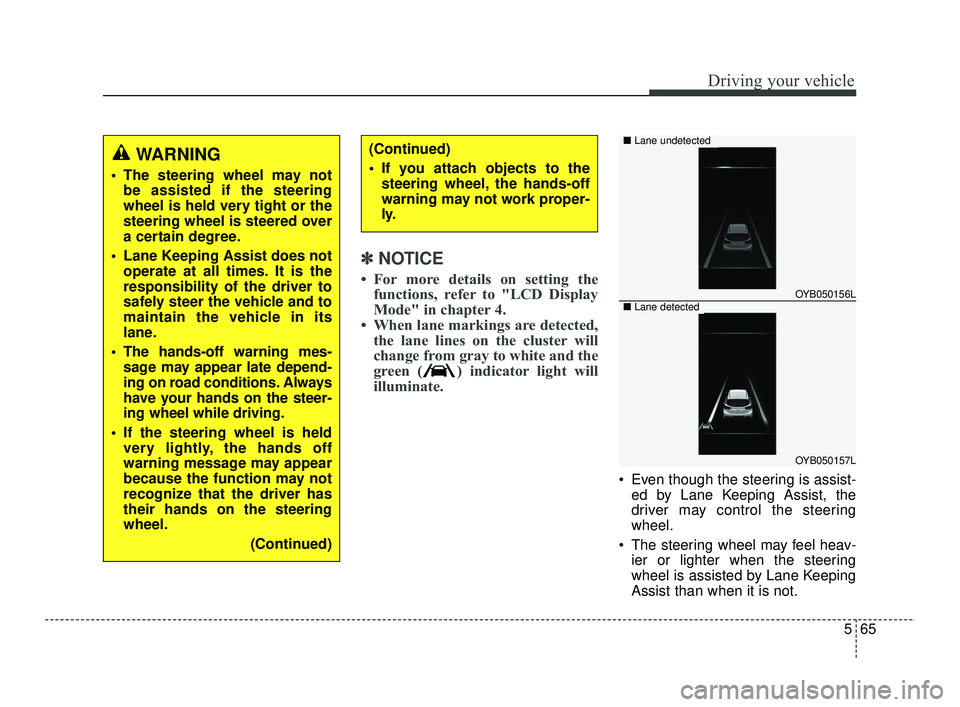
• When lane markings are detected, the lane lines on the cluster will
change from gray to white and the
green ( ) indicator light will
illuminate.
Even though the steering is assist-
ed by Lane Keeping Assist, the
driver may control the steering
wheel.
The steering wheel may feel heav- ier or lighter when the steering
wheel is assisted by Lane Keeping
Assist than when it is not.
WARNING
The steering wheel may notbe assisted if the steering
wheel is held very tight or the
steering wheel is steered over
a certain degree.
Lane Keeping Assist does not operate at all times. It is the
responsibility of the driver to
safely steer the vehicle and to
maintain the vehicle in its
lane.
The hands-off warning mes- sage may appear late depend-
ing on road conditions. Always
have your hands on the steer-
ing wheel while driving.
If the steering wheel is held very lightly, the hands off
warning message may appear
because the function may not
recognize that the driver has
their hands on the steering
wheel.
(Continued)
(Continued)
If you attach objects to thesteering wheel, the hands-off
warning may not work proper-
ly.
OYB050156L
OYB050157L
■ Lane undetected
■Lane detected
SC PE USA 5.QXP 10/23/2020 5:51 PM Page 65
Page 307 of 534

Driving your vehicle
70
5
Function settings
Setting
Blind-Spot Safety
With the ignition switch or ENGINE
START/STOP button in the ON posi-
tion, select or deselect "User
Settings →Driver Assistance →
Blind-Spot Safety" to set whether or
not to use each function.
•If 'Warning Only' is selected, the
function will warn the driver with a
warning message, an audible
warning depending on the collision
risk levels.
If 'Off' is selected, the function will turn off. When the engine is restarted with
the function off, the 'Blind-Spot
Safety System is Off' message will
appear on the cluster.
If you change the setting from 'Off' to
'Warning Only', the warning light on
the outside rearview mirror will blink
for three seconds.
In addition, if the engine is turned on,
when the function is set to 'Warning
Only', the warning light on the out-
side rearview mirror will blink for
three seconds.
(Continued)
The function may not work properly if the bumper hasbeen replaced, or the sur-roundings of the rear cornerradar has been damaged orpaint has been applied.
If a trailer, carrier, etc. is installed, it may adverselyaffect the performance of therear corner radar or the func-tion may not operate.
OSC050106
ODL3A050288
SC PE USA 5.QXP 10/23/2020 5:52 PM Page 70
Page 316 of 534

579
Driving your vehicle
Function settings
Settings
Driver Attention Warning
Driver Attention Warning is set tobe in the OFF position, when your
vehicle is first delivered to you from
the factory.
To turn ON Driver Attention
Warning, turn on the engine, and
then select "User Settings →Driver
Assistance → Driver Attention
Warning" on the LCD display. If 'Inattentive Driving Warning' is
selected, the function will inform
the driver the driver's attention
level and will recommend taking a
break when the level falls below a
certain level.
CAUTION
Always keep the front view cam-era in good condition to main-tain optimal performance ofDriver Attention Warning.
For more details on the precau-tions of the front view camera,refer to "Forward Collision-Avoidance Assist (FCA) (Frontview camera only) (if equipped)"in chapter 5.
CAUTION
When the engine is restarted,Driver Attention Warning willalways turn on.
OSC050284N
SC PE USA 5.QXP 10/23/2020 5:52 PM Page 79
Page 331 of 534

Driving your vehicle
94
5
✽ ✽
NOTICE
• For more details on setting the
functions, refer to "LCD Display
Mode" in chapter 4.
• When both lane markings are detected, the lane lines on the clus-
ter will change from gray to white.
If lane markings are not detected,
steering wheel control by Lane
Following Assist can be limited
depending on whether a vehicle is
in front or the driving conditions of
the vehicle.
WARNING
The steering wheel may notbe assisted if the steering
wheel is held very tight or the
steering wheel is steered over
a certain level.
Lane Following Assist does not operate at all times. It is the
responsibility of the driver to
safely steer the vehicle and to
maintain the vehicle in its lane.
The hands-off warning mes- sage may appear late depend-
ing on road conditions. Always
have your hands on the steer-
ing wheel while driving.
If the steering wheel is held very lightly the hands-off warning
message may appear because
the function may not recognize
that the driver has their hands
on the steering wheel.
If you attach objects to the steering wheel, the hands-off
warning may not work properly.
OYB050156L
OYB050157L
■
Lane undetected
■ Lane detected
SC PE USA 5.QXP 10/23/2020 5:53 PM Page 94