Page 87 of 534

Features of your vehicle
64
Also, if the lock button is pressed
once more within 4 seconds, the
hazard warning lights will blink and
the chime will sound once to confirm
that the door is locked (If equipped).
However, if any door remains open,
the hazard warning lights (and/or the
chime) will not operate. But if all
doors are closed after the lock button
is pressed, the hazard warning lights
will blink once.Unlock (2)
The driver's door is unlocked if the
unlock button is pressed once. The
hazard warning lights will blink twice
and the chime will sound twice to
indicate that the driver’s door is
unlocked.
All doors are unlocked if the unlock
button is pressed once more within 4
seconds. The hazard warning lights
will blink twice again to indicate that
all doors are unlocked. After pressing
this button, the doors will lock auto-
matically unless you open any door
within 30 seconds.
If you attempt to lock or unlock the
door by pressing the door
lock/unlock button in any of the fol-
lowing states, the door will not be
locked or unlocked.
- When you want to lock or unlockthe door in the ACC or ON state.
- When you want to lock a door in a car with one or more doors open.
Depending on the vehicle, the driver
can turn off or set the TWO PRESS
UNLOCK setting function.
✽ ✽ NOTICE
If the keyless entry system is inoper-
ative due to exposure to water or liq-
uids, it will not be covered by your
manufacturer's vehicle warranty.
SC PE USA 4.QXP 10/23/2020 5:39 PM Page 6
Page 107 of 534

Features of your vehicle
26
4
On a vehicle equipped with a smart
key, the trunk can be opened with
no-touch activation using the Smart
Trunk Release system.
How to use the Smart Trunk
Release
The trunk can be opened with no-
touch activation satisfying all the
conditions below.
After 15 seconds when all doors are closed and locked
Positioned in the detecting area for more than 3 seconds.
✽ ✽ NOTICE
• The Smart Trunk Release does not
operate when:
- The smart key is detected within15 seconds after the doors are
closed and locked, and is contin-
uously detected.
- The smart key is detected within 15 seconds after the doors are closed
and locked, and 60 inches (1.5m)
from the front door handles. (for
vehicles equipped with Welcome
Light)
- A door is not locked or closed.
- The smart key is in the vehicle.
• When smart key is left in the range of detection within 15 sec-
onds after the doors are closed and
locked, the function will automati-
cally turn off after 10 minutes.
1. Setting
To activate the Smart Trunk Release,
(1) Change the LCD modes to User
setting mode
(2) Select the Door mode
(3) Check the Smart Trunk.
❈ For more details, refer to “LCD
Display” in this chapter
SMART TRUNK RELEASE (4 DOOR, IF EQUIPPED)
OSC040515N
SC PE USA 4.QXP 10/23/2020 5:40 PM Page 26
Page 120 of 534
439
Features of your vehicle
Opening the hood
1. Pull the release lever to unlatchthe hood. The hood should pop
open slightly.
Open the hood after turning off the
engine on a flat surface, shifting the
shift lever to the P (Park) position for
Intelligent Variable Transmission and
to the 1st (First) gear or R (Reverse)
for Manual Transmission, and setting
the parking brake. 2. Go to the front of the vehicle, raise
the hood slightly, push the second-
ary latch (1) inside of the hood
center and lift the hood (2). 3. Pull out the support rod.
4. Hold the hood open with the sup-
port rod.
HOOD
OYB046022
OSC040504OYB046024
WARNING - Hot parts
Grasp the support rod in the
area wrapped in rubber. The
rubber will help prevent you
from being burned by hot metal
when the engine is hot.
SC PE USA 4.QXP 10/23/2020 5:41 PM Page 39
Page 138 of 534
457
Features of your vehicle
The outside temperature on the dis-
play may not change immediately
like a general thermometer to pre-
vent the driver from being inattentive.
To change the temperature unit (from
°C to °F or from °F to °C)
Press the TRIP button for 5 seconds,
the temperature unit is blink. And
then press the RESET button, the
temperature unit is changed. Press
the TRIP button for more than one
second.
The temperature unit can be
changed by using the “User Settings”
mode of the LCD Display.
❈For more details, refer to “LCD
Display” in this chapter.Transmission Shift Indicator
Intelligent Variable Transmission
(if equipped)
This indicator displays which intelli-
gent variable transmission shift lever
is selected.
Reverse : R
Neutral : N
Manual Mode : 1, 2, 3, 4, 5, 6, 7, 8
ODL3049128
OYB040551L
■ Type A
■ Type B
SC PE USA 4.QXP 10/23/2020 5:42 PM Page 57
Page 142 of 534

461
Features of your vehicle
Automatic reset (for type B cluster)
To make the average fuel economy
be reset automatically whenever refu-
eling, select the "Fuel Econ. Reset"
mode in User Setting menu of the
LCD display (Refer to "User settings
mode" on this chapter).
OFF - You may set to default manu-ally by using the trip switch reset but-
ton.
After Vehicle On – The vehicle is automatically set to default, if open-
ing the driver's door after turning off
the engine or 3 minutes passes after
restarting the engine.
After refueling - After refueling more than 1.6 gallons (6 liters) and driving
over 1 mph (1 km/h), the vehicle will
reset to default automatically.
✽ ✽ NOTICE
The average fuel economy is not dis-
played for more accurate calculation
if the vehicle does not drive more
than 10 seconds or 0.19 miles (300
meters) since the ignition or
ENGINE STRAT/STOP button is
turned to ON.
Instant Fuel Economy (3)
This mode displays the instant fuel
economy during the last few sec-
onds when the vehicle speed is
more than 5 MPH (8 km/h).
- Fuel economy range:
0.0 ~ 50.0 MPG or 0.0 ~ 30.0
L/100km Trip A/B (for type A cluster)
Tripmeter (1)
The tripmeter is the total driving dis- tance since the last tripmeter reset.
- Distance range: 0.0~ 9999.9 mi. orkm
To reset the tripmeter, press the RESET button on the steering
wheel for more than 1 second
when the tripmeter is displayed.
OSC047137N
SC PE USA 4.QXP 10/23/2020 5:43 PM Page 61
Page 146 of 534

465
Features of your vehicle
LCD DISPLAY (FOR TYPE B CLUSTER)
LCD Display Mode
(1) Trip Computer mode
This mode displays driving informa-
tion like the tripmeter, fuel economy,
and so on.
For more details, refer to “Trip
Computer” in this chapter.(2) Driving Assist mode
This mode displays the state of the
below functions.
Lane Departure Warning (if
equipped)
Lane Keeping Assist (if equipped)
Lane Following Assist (if equipped)
Driver Attention Warning (if equipped)
(3) User Settings mode
On this mode, you can change the
settings of the doors, lamps and so
on. (4) Master Warning mode
This mode informs the driver the fol-
lowing situations:
Forward Collision-Avoidance Assist
malfunction (if equipped)
Forward Collision-Avoidance Assist radar blocked (if equipped)
Blind-Spot Collision Warning mal- function (if equipped)
Blind-Spot Collision Warning radar blocked (if equipped)
High Beam Assist malfunction (if equipped)
LED headlamp malfunction (if equipped)
TPMS failure, low pressure (if equipped), etc.
At this time, a Master Warning icon
( ) will appear on the LCD display.
If the warning situations is solved,
the master warning light will be
turned off and the Master warning
icon will disappear.
OSC040119
SC PE USA 4.QXP 10/23/2020 5:43 PM Page 65
Page 183 of 534
Features of your vehicle
102
4
To vary the speed setting, turn the
speed control knob (1).
If the wiper switch is set in AUTO
mode when the ignition switch is ON,
the wiper will operate once to per-
form a self-check of the system. Set
the wiper to off position when the
wiper is not in use.Windshield washers (front)
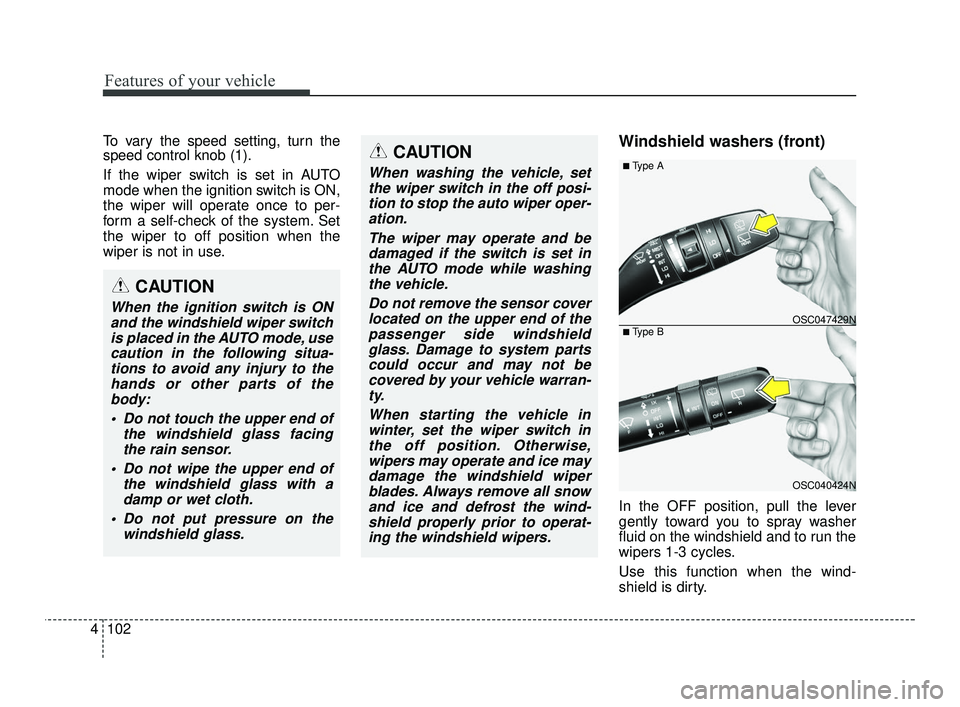
In the OFF position, pull the lever
gently toward you to spray washer
fluid on the windshield and to run the
wipers 1-3 cycles.
Use this function when the wind-
shield is dirty.
CAUTION
When washing the vehicle, set
the wiper switch in the off posi-tion to stop the auto wiper oper-ation.
The wiper may operate and bedamaged if the switch is set inthe AUTO mode while washingthe vehicle.
Do not remove the sensor coverlocated on the upper end of thepassenger side windshieldglass. Damage to system partscould occur and may not becovered by your vehicle warran-ty.
When starting the vehicle inwinter, set the wiper switch inthe off position. Otherwise,wipers may operate and ice maydamage the windshield wiperblades. Always remove all snowand ice and defrost the wind-shield properly prior to operat-ing the windshield wipers.
OSC040424N
OSC047429N
■ Type A
■ Type B
CAUTION
When the ignition switch is ONand the windshield wiper switchis placed in the AUTO mode, usecaution in the following situa-tions to avoid any injury to thehands or other parts of thebody:
Do not touch the upper end of the windshield glass facingthe rain sensor.
Do not wipe the upper end of the windshield glass with adamp or wet cloth.
Do not put pressure on the windshield glass.
SC PE USA 4.QXP 10/23/2020 5:44 PM Page 102
Page 203 of 534
Features of your vehicle
122
4
Activate upon Washer Fluid
Use
To prevent the odor from entering to
inside the vehicle, the ventilation sys-
tem changes to Recirculated Air
Mode for a while when the wind-
shield washer fluid sprayed.
However, at low outside temperature,
to prevent from windshield fogging,
the system continues to outside air
mode.
System setting
1. ENGINE START/STOP button is
ON.
2. Select Floor-Level ( ) air flow direction by pressing Mode
Selection button.
3. With pressing Air Conditioning button, press the Recirculated Air
button more than 4 times within 2
seconds.
4. If the system is set up, the indica- tor on Recirculated Air button will
blinks 6 times.
System cancellation
1. ENGINE START/STOP button isON.
2. Select Floor-Level ( ) air flow direction by pressing Mode
Selection button.
3. With pressing Air Conditioning button, press the Recirculated Air
button more than 4 times within 2
seconds.
4. If the system is cancelled, the indi- cator on Recirculated Air button
will blinks 3 times.
SC PE USA 4.QXP 10/23/2020 5:46 PM Page 122

