2021 HYUNDAI SONATA steering wheel
[x] Cancel search: steering wheelPage 301 of 546
06
6-17
LCD Display Message
Shifting conditions not met
The warning message appears on the
LCD display, when engine RPM is too
high, or when driving speed is too fast to
shift the gear.
We recommend you decrease the engine
speed or slow down before shifting the
gear.
Press brake pedal to change gear
The warning message appears on the
LCD display, when the brake pedal is not
depressed while shifting the gear.
We recommend you to depress the brake
pedal and then shift the gear.
Shift to P after stopping
The warning message appears on the
LCD display, when the gear is shifted to P
(Park) while the vehicle is moving.
Stop the vehicle before shifting to P
(Park).
PARK engaged
The warning message appears on the
LCD display, when the gear is shifted to P
(Park) while the vehicle is moving.
Stop the vehicle before shifting to P
(Park).
Press and hold OK button to stay in
Neutral when vehicle is Off
The warning message appears on
the LCD display, when pushing the N
(Neutral) button. If you want to stay N
(Neutral) after turning off the engine,
press and hold the “OK” button on the
steering wheel more than 1 second.
Vehicle will stay in (N). Change gear
to cancel
The warning message appears on the
LCD display, when depressing the "OK"
button on the steering wheel after the
message ("Press and hold OK button
to stay in Neutral when vehicle is Off")
appears on the cluster LCD display. The
gear stays in N(Neutral) position after
turning off the engine.
NEUTRAL engaged
The message appears on the LCD
display, when the N (Neutral) position is
engaged.
Gear already selected
The message appears on the LCD
display, when pushing the current shift
button again.
Shift button held down
The warning message appears on the
LCD display, when the shift button is
pressed continuously or the shift button
does not properly operate. Clean the
surroundings of gear shift button.
If this message appears again, have
the vehicle inspected by an authorized
HYUNDAI dealer.
Shifter system malfunction
The warning message appears on the
LCD display, when the transmission
or the shift button does not properly
operate in the P (Park) position.
In this case, have the vehicle inspected
by an authorized HYUNDAI dealer.
Check shift controls
The warning message appears on the
LCD display, when there is a malfunction
with transmission shift button.
In this case, have the vehicle inspected
by an authorized HYUNDAI dealer.
Page 303 of 546
06
6-19
WARNING
To reduce the risk of SERIOUS INJURY
or DEATH:
• ALWAYS wear your seatbelt. In a
collision, an unbelted occupant
is significantly more likely to be
seriously injured or killed than a
properly belted occupant.
• Avoid high speeds when cornering or
turning.
• Do not make quick steering wheel
movements, such as sharp lane
changes or fast, sharp turns.
• The risk of rollover is greatly
increased if you lose control of your
vehicle at highway speeds.
• Loss of control often occurs if two or
more wheels drop off the roadway
and the driver over steers to reenter
the roadway.
• In the event your vehicle leaves
the roadway, do not steer sharply.
Instead, slow down before pulling
back into the travel lanes.
• HYUNDAI recommends you follow all
posted speed limits.
Information
Kickdown Mechanism (if equipped)
If you depress the accelerator pedal
equipped with Kickdown device beyond
the pressure point, it maximizes the engine
power. You may feel when the Kickdown
equipment starts to work and hear the
sound of Kickdown operation. It is normal
operation, not a failure.
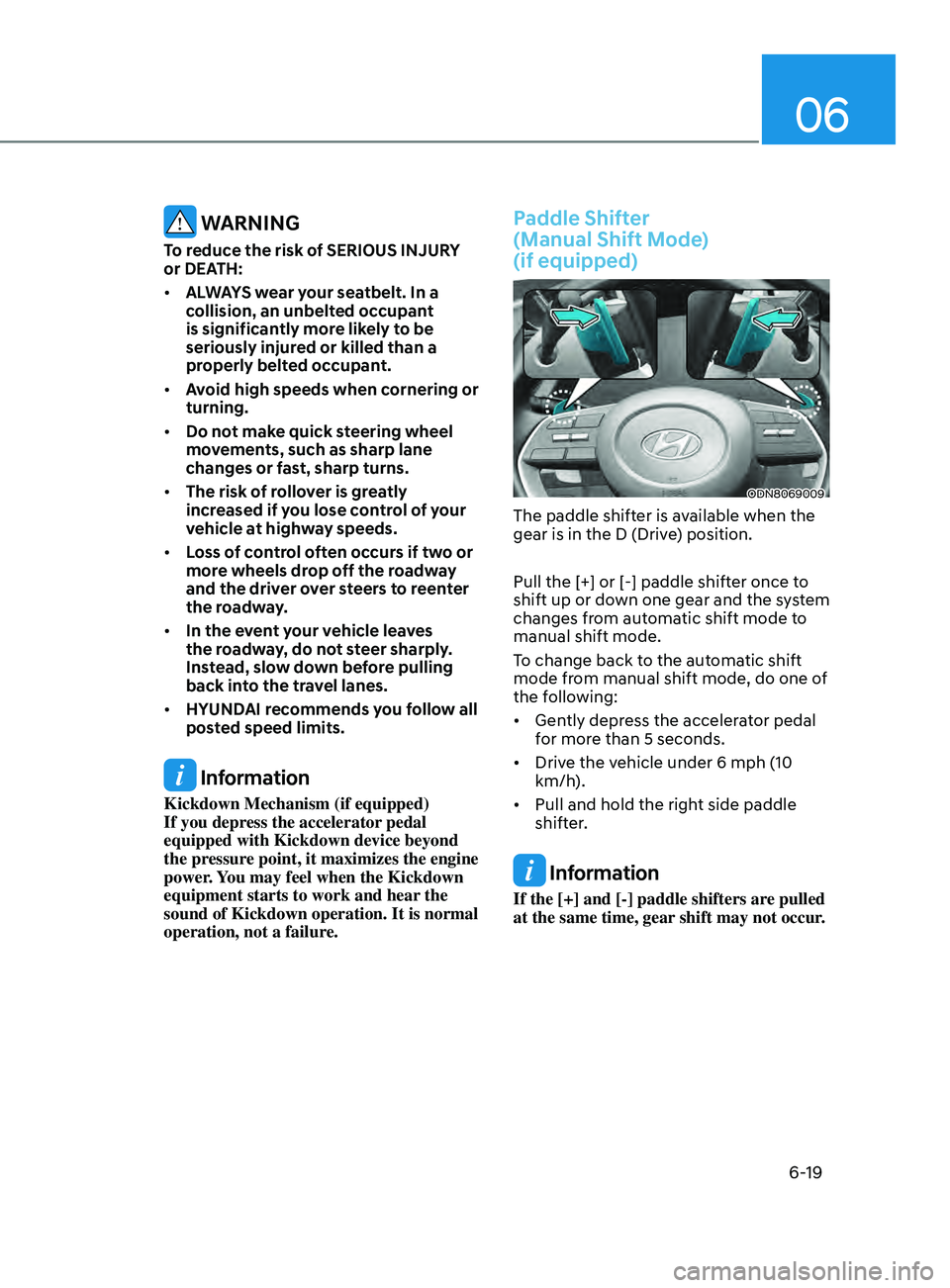
Paddle Shifter
(Manual Shift Mode)
(if equipped)
ODN8069009
The paddle shifter is available when the
gear is in the D (Drive) position.
Pull the [+] or [-] paddle shifter once to
shift up or down one gear and the system
changes from automatic shift mode to
manual shift mode.
To change back to the automatic shift
mode from manual shift mode, do one of
the following:
• Gently depress the accelerator pedal
for more than 5 seconds.
• Drive the vehicle under 6 mph (10
km/h).
• Pull and hold the right side paddle
shifter.
Information
If the [+] and [-] paddle shifters are pulled
at the same time, gear shift may not occur.
Page 312 of 546
6-28
Using ABS
To obtain the maximum benefit from
your ABS in an emergency situation,
do not attempt to modulate your brake
pressure and do not try to pump your
brakes. Depress your brake pedal as hard
as possible.
When you apply your brakes under
conditions which may lock the wheels,
you may hear sounds from the brakes,
or feel a corresponding sensation in the
brake pedal. This is normal and it means
your ABS is active.
ABS does not reduce the time or distance
it takes to stop the vehicle.
Always maintain a safe distance from the
vehicle in front of you.
ABS will not prevent a skid that results
from sudden changes in direction, such
as trying to take a corner too fast or
making a sudden lane change. Always
drive at a safe speed for the road and
weather conditions.
ABS cannot prevent a loss of stability.
Always steer moderately when braking
hard. Severe or sharp steering wheel
movement can still cause your vehicle to
veer into oncoming traffic or off the road.
On loose or uneven road surfaces,
operation of the anti-lock brake system
may result in a longer stopping distance
than for vehicles equipped with a
conventional brake system.
The ABS warning light (
) will stay on
for several seconds after the ignition
switch is in the ON position. During
that time, the ABS will go through self-
diagnosis and the light will go off if
everything is normal. If the light stays on,
you may have a problem with your ABS.
Contact an authorized HYUNDAI dealer
as soon as possible.
WARNING
If the ABS warning light () is on and
stays on, you may have a problem with
the ABS. Your power brakes will work
normally. To reduce the risk of serious
injury or death, contact your HYUNDAI
dealer as soon as possible.
CAUTION
When you drive on a road having poor
traction, such as an icy road, and apply
your brakes continuously, the ABS will
be active continuously and the ABS
warning light (
) may illuminate. Pull
your car over to a safe place and turn
the engine off.
Restart the engine. If the ABS warning
light is off, then your ABS system is
normal.
Otherwise, you may have a problem
with your ABS system. Contact an
authorized HYUNDAI dealer as soon as
possible.
Information
When you jump start your vehicle because
of a drained battery, the ABS warning
light (
) may turn on at the same
time. This happens because of the low
battery voltage. It does not mean your
ABS is malfunctioning. Have the battery
recharged before driving the vehicle.
While Driving
Page 313 of 546
06
6-29
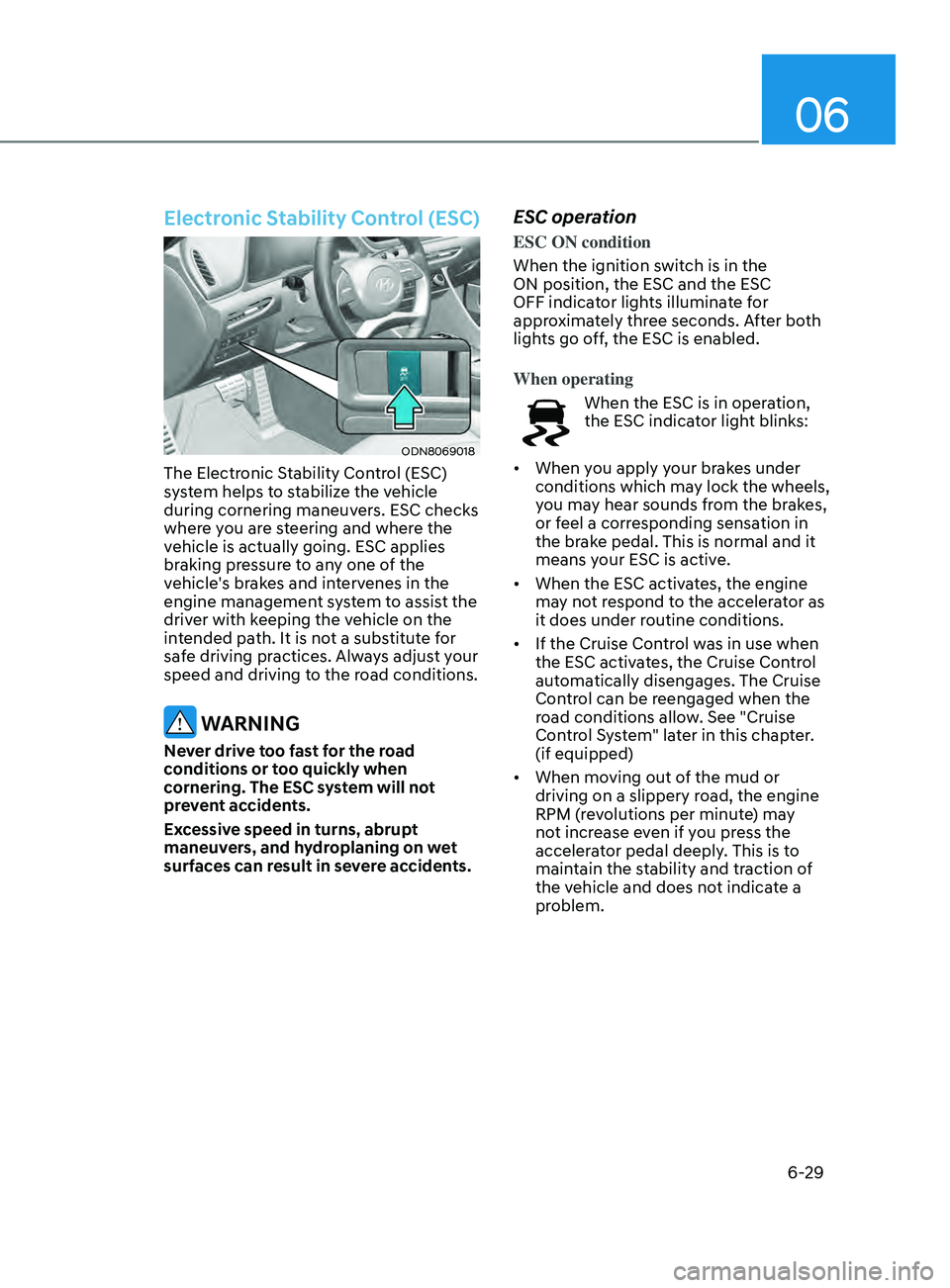
Electronic Stability Control (ESC)
ODN8069018
The Electronic Stability Control (ESC)
system helps to stabilize the vehicle
during cornering maneuvers. ESC checks
where you are steering and where the
vehicle is actually going. ESC applies
braking pressure to any one of the
vehicle's brakes and intervenes in the
engine management system to assist the
driver with keeping the vehicle on the
intended path. It is not a substitute for
safe driving practices. Always adjust your
speed and driving to the road conditions.
WARNING
Never drive too fast for the road
conditions or too quickly when
cornering. The ESC system will not
prevent accidents.
Excessive speed in turns, abrupt
maneuvers, and hydroplaning on wet
surfaces can result in severe accidents.
ESC operation
ESC ON condition
When the ignition switch is in the
ON position, the ESC and the ESC
OFF indicator lights illuminate for
approximately three seconds. After both
lights go off, the ESC is enabled.
When operating
When the ESC is in operation,
the ESC indicator light blinks:
• When you apply your brakes under
conditions which may lock the wheels,
you may hear sounds from the brakes,
or feel a corresponding sensation in
the brake pedal. This is normal and it
means your ESC is active.
• When the ESC activates, the engine
may not respond to the accelerator as
it does under routine conditions.
• If the Cruise Control was in use when
the ESC activates, the Cruise Control
automatically disengages. The Cruise
Control can be reengaged when the
road conditions allow. See "Cruise
Control System" later in this chapter.
(if equipped)
• When moving out of the mud or
driving on a slippery road, the engine
RPM (revolutions per minute) may
not increase even if you press the
accelerator pedal deeply. This is to
maintain the stability and traction of
the vehicle and does not indicate a
problem.
Page 315 of 546
06
6-31
ESC OFF usage
When Driving
The ESC OFF mode should only be used
briefly to help free the vehicle if stuck in
snow by temporarily stopping operation
of the ESC to maintain wheel torque.
To turn ESC off while driving, press the
ESC OFF button while driving on a flat
road surface.
NOTICE
To prevent damage to the transmission:
• Do not allow wheel(s) of one axle to
spin excessively while the ESC, ABS,
and parking brake warning lights
are displayed. The repairs would not
be covered by the vehicle warranty.
Reduce engine power and do not
spin the wheel(s) excessively while
these lights are displayed.
• When operating the vehicle on
a dynamometer, make sure the
ESC is turned off (ESC OFF light
illuminated).
Information
Turning the ESC off does not affect ABS
or standard brake system operation.
Vehicle Stability Management
(VSM)
The Vehicle Stability Management (VSM)
is a function of the Electronic Stability
Control (ESC) system. It helps ensure the
vehicle stays stable when accelerating
or braking suddenly on wet, slippery and
rough roads where traction over the four
tires can suddenly become uneven.
WARNING
Take the following precautions when
using the Vehicle Stability Management
(VSM):
• ALWAYS check the speed and the
distance to the vehicle ahead. The
VSM is not a substitute for safe
driving practices.
• Never drive too fast for the road
conditions. The VSM system will not
prevent accidents. Excessive speed
in bad weather, slippery and uneven
roads can result in severe accidents.
VSM operation
VSM ON condition
The VSM operates when:
The Electronic Stability Control (ESC) is
on.
When operating
When you apply your brakes under
conditions which may activate the ESC,
you may hear sounds from the brakes,
or feel a corresponding sensation in the
brake pedal. This is normal and it means
your VSM is active.
NOTICE
The VSM does not operate when:
• Driving on a banked road such as
gradient or incline.
• Driving rearward.
• ESC OFF indicator light is on.
• EPS (Electric Power Steering)
warning light (
) is on or blinks.
Page 317 of 546
06
6-33
The Idle Stop and Go (ISG) system
automatically and temporarily shuts
down the engine when the vehicle
is stopped and idling to improve fuel
efficiency and reduce exhaust gas
emissions. (i.e. red stop light, stop sign,
and traffic jam).
The engine is automatically started upon
satisfying the starting conditions.
The ISG system is always active, when
the engine is running.
Information
When the engine is automatically started
by the ISG system, some warning
lights (i.e. ABS, ESC, ESC OFF, EPS,
and parking brake warning light) may
illuminate for a few seconds due to the
low battery voltage. However, it does
not indicate a malfunction with the ISG
system.
To Activate the ISG System
Prerequisite for activation
The ISG system operates in the following
situations.
• The driver's seatbelt is fastened
• The driver's door and hood are closed
• The brake vacuum pressure is
adequate
• The battery sensor is activated and
the battery is sufficiently charged
• Outside temperature is not too low or
too high
• The vehicle is driven over a constant
speed and stops
• The climate control system satisfies
the conditions
• The vehicle is sufficiently warmed up
• The incline is gradual
• The steering wheel is turned less than
180 degrees and then the vehicle
stops
Information
• The ISG system is not
activated, when the
prerequisites to activate
the ISG system are
unsatisfied. In this case,
the ISG OFF button indicator
illuminates, and the auto stop indicator
(
) illuminates in yellow on the
instrument cluster.
• When the above indicator remains
illuminated on the instrument cluster,
have the IGS system checked by an
authorized HYUNDAI dealer.
Auto stop
To stop the engine in idle stop mode
1.
Decr
ease the vehicle speed to 0 mph.
2.
Depr
ess the brake pedal with the shift
button in D (Drive) or N (Neutral).
The auto stop indicator (
) illuminates
in green on the instrument cluster, when
the engine stops.
Information
The driving speed must reach at least 3
mph (5 km/h) after an idle stop to stop the
engine in idle stop mode again.
In auto stop mode, when the driver
opens the hood, the ISG system will be
deactivated.
ISG (Idle Stop and Go) SyStem ( I f equ I pped)
Page 322 of 546
6-38
CUSTOM mode
In CUSTOM mode, the driver
can select separate modes
and combine them on the
infotainment system screen.
- E
ngine/Transmission: NORMAL/
SPORT
- S
teering wheel: NORMAL/SPORT
For more infomation, refer to the
separately supplied manual with your
vehicle.
• When CUSTOM mode is selected
by using the DRIVE MODE button,
the CUSTOM mode indicator will
illuminate.
SPORT mode
SPORT mode manages the
driving dynamics by
automatically adjusting the
steering effort, the engine
and transmission control
logic for enhanced driver
performance.
• When SPORT mode is selected by
using the DRIVE MODE button, the
SPORT indicator will illuminate.
• Whenever the engine is restarted,
the Drive Mode will revert back to
NORMAL mode. If SPORT mode is
desired, re-select SPORT mode from
the DRIVE MODE button.
• When SPORT mode is activated:
- The engine rpm will t
end to remain
raised over a certain length of time
even after releasing the accelerator
- Upshifts ar
e delayed when
accelerating
Information
In SPORT mode, the fuel efficiency may
decrease.
SMART mode
00360030002400350037
SMART mode selects the
proper driving mode among
NORMAL and SPORT by
judging the driver’s driving
habits (i.e. Economic or
Aggressive (Sportive)) from
the brake pedal depression
or the steering wheel
operation.
• Toggle the DRIVE MODE button to
select SMART mode. When SMART
mode is selected, the indicator
illuminates on the instrument cluster.
• SMART mode automatically controls
the vehicle driving, such as gear
shifting patterns and engine torque,
in accordance with the driver’s driving
habits.
Information
When you dynamically drive the vehicle
in SMART mode by abruptly decelerating
or sharply turning the driving mode
changes to SPORT mode. However, it may
adversely affect fuel economy.
While Driving
Page 323 of 546
06
6-39
Various driving situations, which you may
encounter in SMART mode
• The driving mode automatically
changes to SMART SPORT, when
you abruptly accelerate the vehicle
or repetitively operate the steering
wheel (Your driving is categorized
to be sporty.). In this mode, your
vehicle drives in a lower gear for
abrupt accelerating/decelerating
and increases the engine brake
performance.
• You may still sense the engine
braking performance, even when
you release the accelerator pedal in
SMART SPORT mode. It is because
your vehicle remains in lower gear
over a certain period of time for next
acceleration. Thus, it is a normal
driving situation, not indicating any
malfunction.
• The driving mode automatically
changes to SMART SPORT mode only
in harsh driving situations. In most
of the normal driving situations, the
driving mode sets to be in SMART
NORMAL mode. Limitation of SMART mode
The SMART mode may be limited in
following situations. (The OFF indicator
illuminates in those situations.)
•
The driver uses the paddle shifter
(manual shift mode) :
It deactivates SMART mode. The
vehicle drives, as the driver manually
changes gear with the paddle shifter.
• The cruise control is activated :
The cruise control system may
deactivate the SMART mode when
the vehicle is controlled by the set
speed of Smart Cruise Control system.
(SMART mode is not deactivated
just by activating the cruise control
system.)
• The transmission oil temperature is
either extremely low or extremely
high :
The SMART mode can be active in
most of the normal driving situations.
However, an extremely high/ low
transmission oil temperature may
temporarily deactivate the SMART
mode, because the transmission
condition is out of normal operation
condition.