2021 HYUNDAI SANTA FE reverse
[x] Cancel search: reversePage 23 of 636
02
2-9
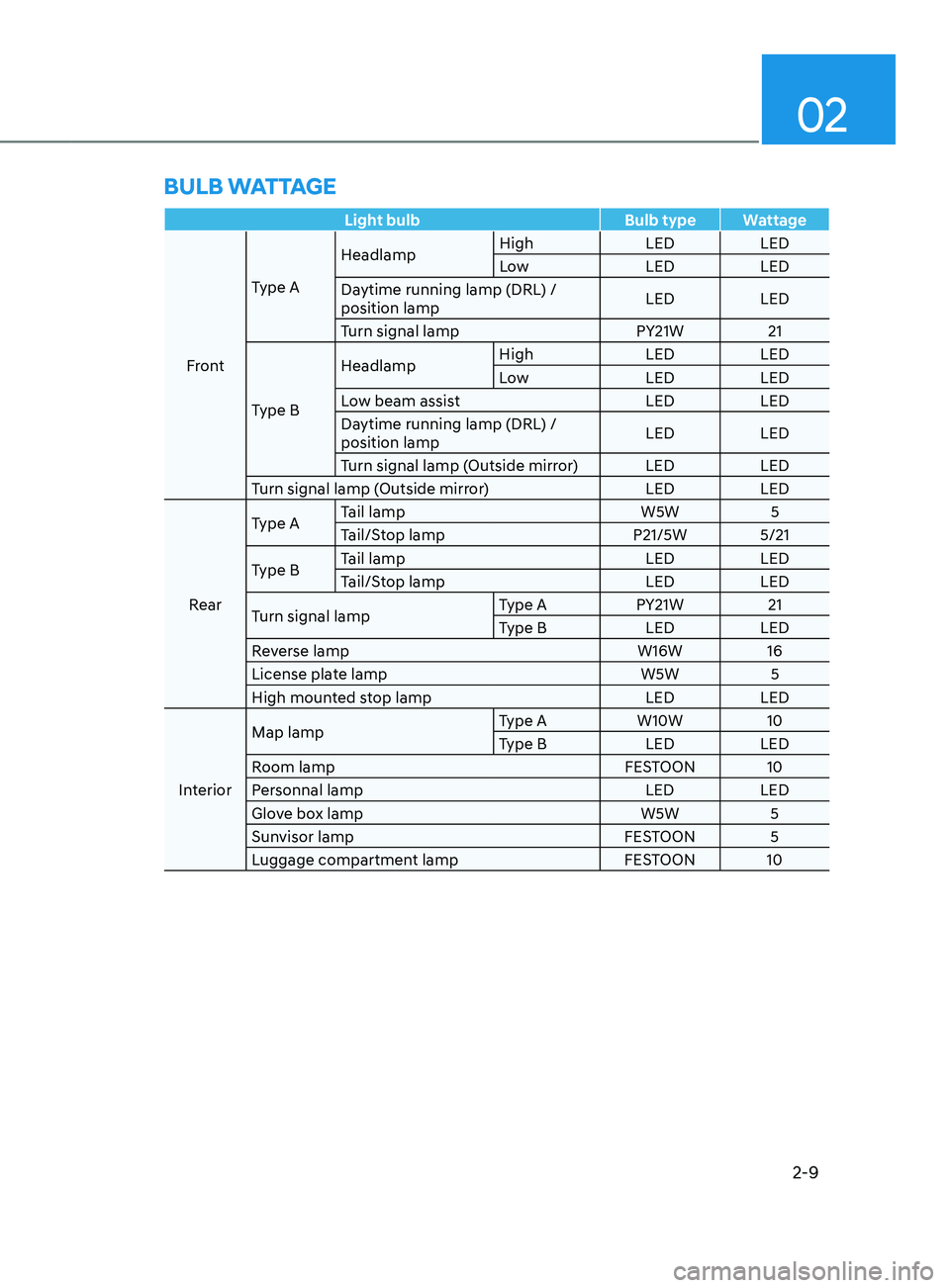
Light bulbBulb type Wattage
Front Type A
Headlamp
High
LEDLED
Low LEDLED
Daytime running lamp (DRL) /
position lamp LED
LED
Turn signal lamp PY21W21
Type B Headlamp
High
LEDLED
Low LEDLED
Low beam assist LEDLED
Daytime running lamp (DRL) /
position lamp LED
LED
Turn signal lamp (Outside mirror) LED LED
Turn signal lamp (Outside mirror) LEDLED
Rear Type A
Tail lamp
W5W5
Tail/Stop lamp P21/5W 5/21
Type B Tail lamp
LEDLED
Tail/Stop lamp LEDLED
Turn signal lamp Type A
PY21W21
Type B LEDLED
Reverse lamp W16W16
License plate lamp W5W5
High mounted stop lamp LEDLED
Interior Map lamp
Type A
W10W10
Type B LEDLED
Room lamp FESTOON 10
Personnal lamp LEDLED
Glove box lamp W5W5
Sunvisor lamp FESTOON 5
Luggage compartment lamp FESTOON 10
BULB WATTAGE
Page 46 of 636
Seats & Safety System
3-14
Armrest
OTM030048
The armrest is located in the center of
the rear seat. Pull the armrest down from
the seatback to use it.
Rear occupant alert system (2nd
seat)
This function alerts driver when you get
out of a car while the passengers remain
in the 2nd row seat.
If the front door is opened with
passengers in the 2nd row seats, A
warning message will appear in the
instrument cluster. After the 1st warning
if movement is detected in the 2nd row
seat after all doors are locked, a second
audible warning will be triggered.
Even if your vehicle is equipped with
Rear Occupant Alert, always make sure
to check the rear seat before you leave
the vehicle.
For more information, refer to the “Rear
occupant alert system” in chapter 3.
Head Restraints
The vehicle’s front and rear (second row
and/or third row) seats have adjustable
head restraints. The head restraints
provide comfort for passengers, but
more importantly they are designed to
help protect passengers from whiplash
and other neck and spinal injuries during
an accident, especially in a rear impact
collision.
WARNING
To reduce the risk of serious injury or
death in an accident, take the following
precautions when adjusting your head
restraints:
• Always properly adjust the head
restraints for all passengers BEFORE
starting the vehicle.
• NEVER let anyone ride in a seat
with the head restraints removed or
reversed.
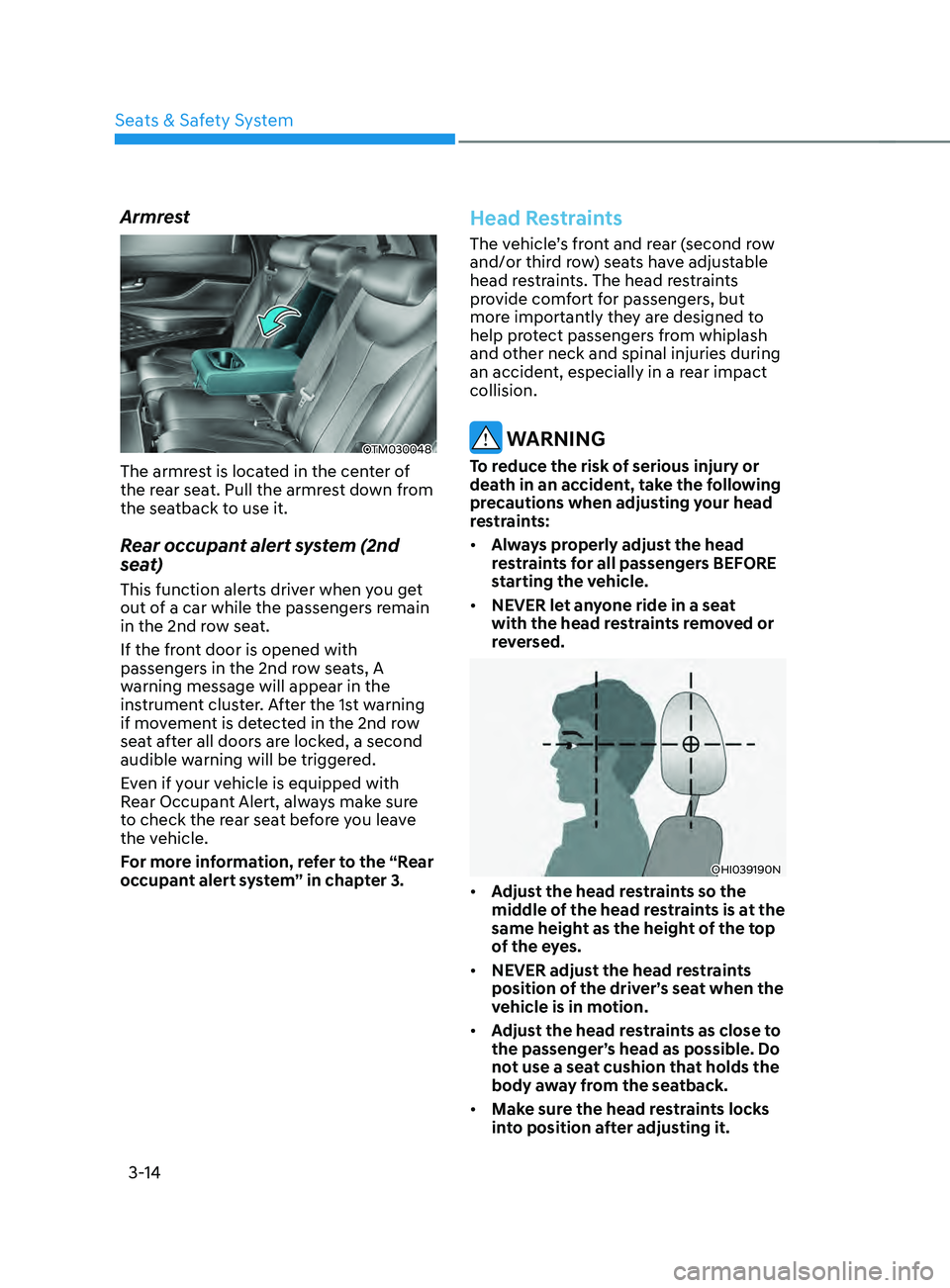
OHI039190N
• Adjust the head restraints so the
middle of the head restraints is at the
same height as the height of the top
of the eyes.
• NEVER adjust the head restraints
position of the driver’s seat when the
vehicle is in motion.
• Adjust the head restraints as close to
the passenger’s head as possible. Do
not use a seat cushion that holds the
body away from the seatback.
• Make sure the head restraints locks
into position after adjusting it.
Page 133 of 636
04
4-35
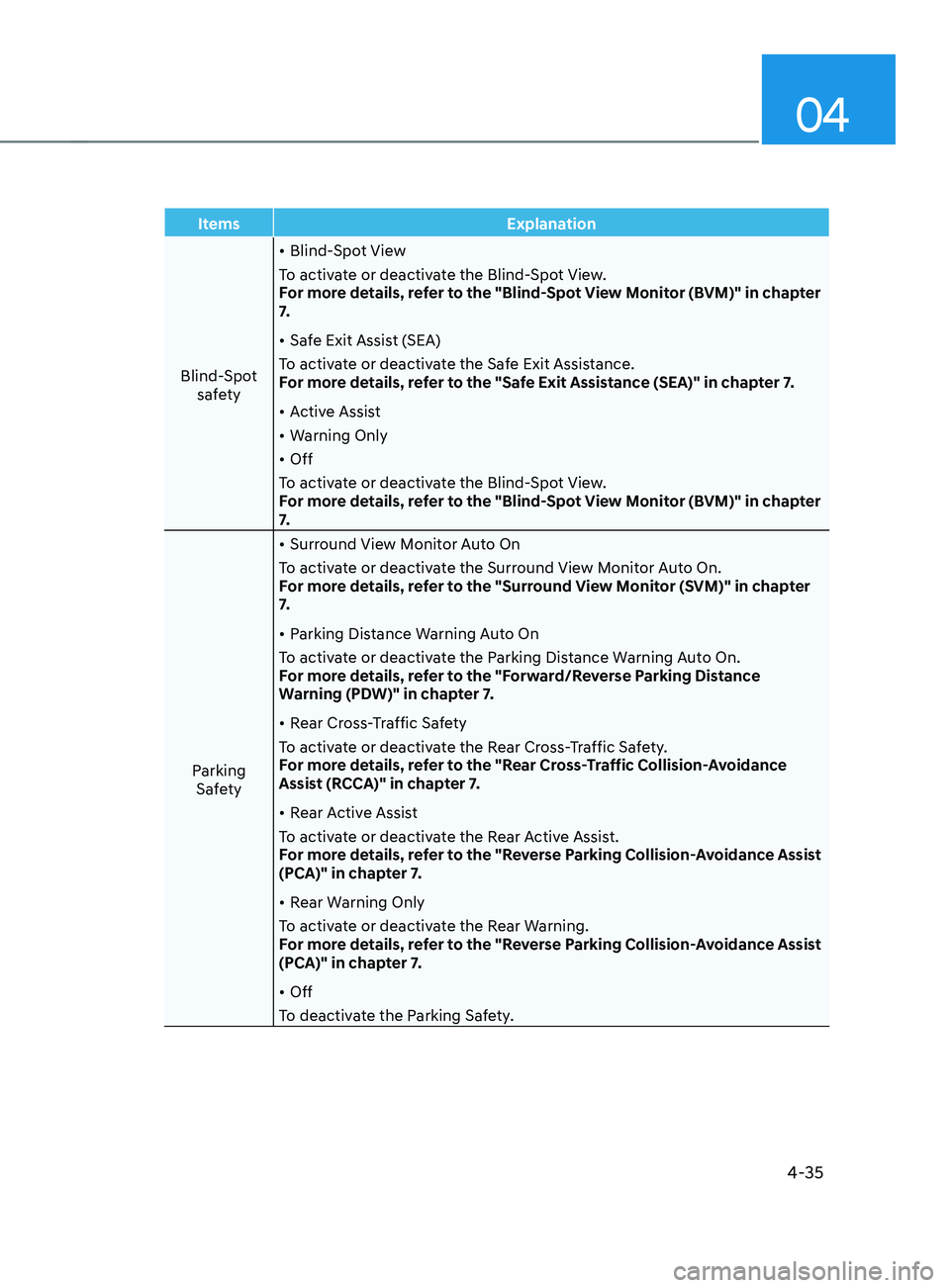
ItemsExplanation
Blind-Spot safety •
Blind-Spot View
To activate or deactivate the Blind-Spot View.
For more details, refer to the "Blind-Spot View Monitor (BVM)" in chapter
7.
• Safe Exit Assist (SEA)
To activate or deactivate the Safe Exit Assistance.
For more details, refer to the "Safe Exit Assistance (SEA)" in chapter 7.
• Active Assist
• Warning Only
• Off
To activate or deactivate the Blind-Spot View.
For more details, refer to the "Blind-Spot View Monitor (BVM)" in chapter
7.
Parking Safety •
Surround View Monitor Auto On
To activate or deactivate the Surround View Monitor Auto On.
For more details, refer to the "Surround View Monitor (SVM)" in chapter
7.
• Parking Distance Warning Auto On
To activate or deactivate the Parking Distance Warning Auto On.
For more details, refer to the "Forward/Reverse Parking Distance
Warning (PDW)" in chapter 7.
• Rear Cross-Traffic Safety
To activate or deactivate the Rear Cross-Traffic Safety.
For more details, refer to the "Rear Cross-Traffic Collision-Avoidance
Assist (RCCA)" in chapter 7.
• Rear Active Assist
To activate or deactivate the Rear Active Assist.
For more details, refer to the "Reverse Parking Collision-Avoidance Assist
(PCA)" in chapter 7.
• Rear Warning Only
To activate or deactivate the Rear Warning.
For more details, refer to the "Reverse Parking Collision-Avoidance Assist
(PCA)" in chapter 7.
• Off
To deactivate the Parking Safety.
Page 136 of 636
Instrument cluster
4-38
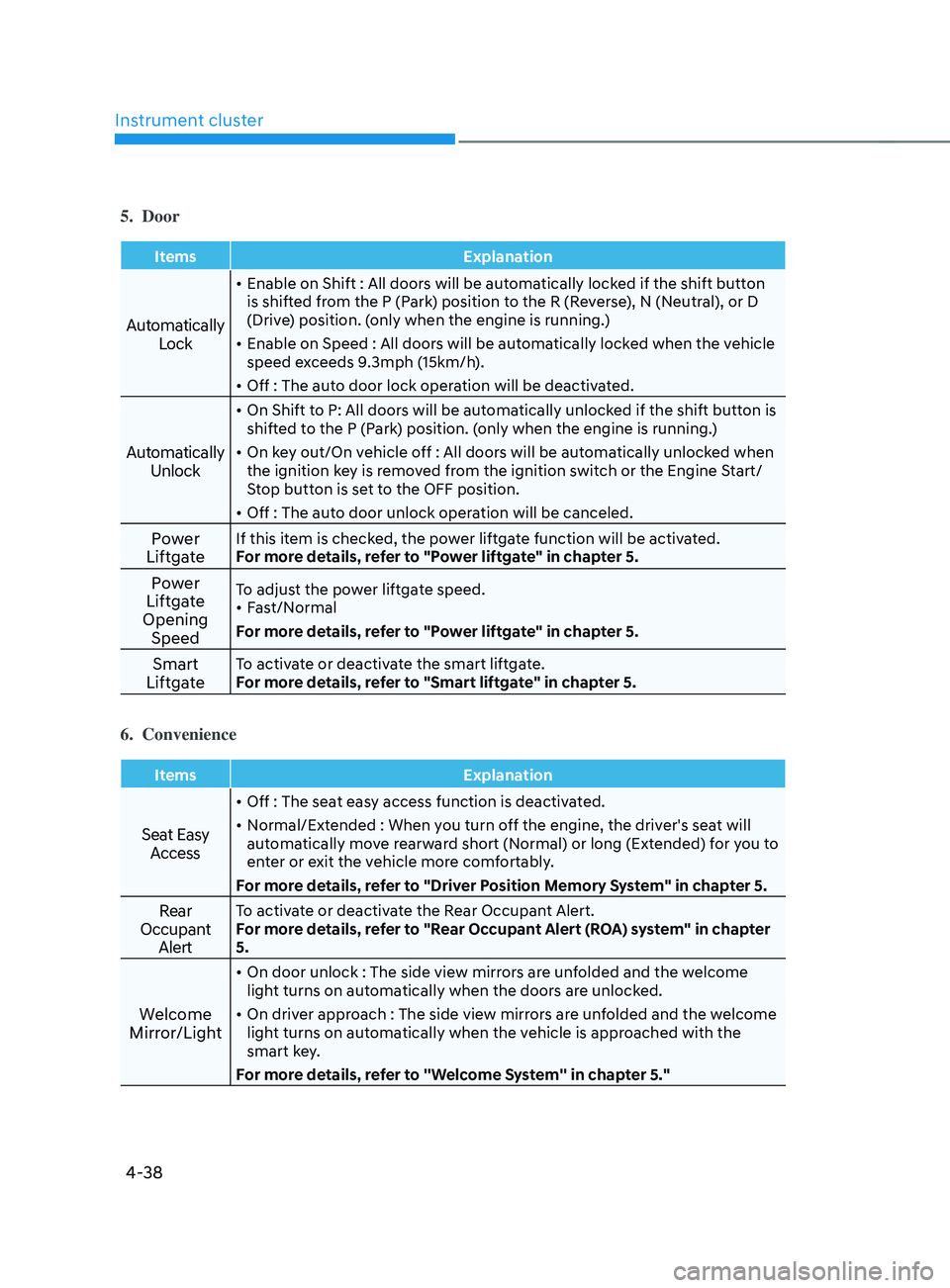
5. Door
ItemsExplanation
Automatically
Lock
• Enable on Shift : All doors will be automatically locked if the shift button
is shifted from the P (Park) position to the R (Reverse), N (Neutral), or D
(Drive) position. (only when the engine is running.)
• Enable on Speed : All doors will be automatically locked when the vehicle
speed exceeds 9.3mph (15km/h).
• Off : The auto door lock operation will be deactivated.
Automatically
Unlock
• On Shift to P: All doors will be automatically unlocked if the shift button is
shifted to the P (Park) position. (only when the engine is running.)
• On key out/On vehicle off : All doors will be automatically unlocked when
the ignition key is removed from the ignition switch or the Engine Start/
Stop button is set to the OFF position.
• Off : The auto door unlock operation will be canceled.
Power
LiftgateIf this item is checked, the power liftgate function will be activated.
For more details, refer to "Power liftgate" in chapter 5.
Power
Liftgate
Opening SpeedTo adjust the power liftgate speed.
• Fast/Normal
For more details, refer to "Power liftgate" in chapter 5.
Smart
LiftgateTo activate or deactivate the smart liftgate.
For more details, refer to "Smart liftgate" in chapter 5.
6. Convenience
Items Explanation
Seat Easy
Access
• Off : The seat easy access function is deactivated.
• Normal/Extended : When you turn off the engine, the driver's seat will
automatically move rearward short (Normal) or long (Extended) for you to
enter or exit the vehicle more comfortably.
For more details, refer to "Driver Position Memory System" in chapter 5.
Rear
Occupant AlertTo activate or deactivate the Rear Occupant Alert.
For more details, refer to "Rear Occupant Alert (ROA) system" in chapter
5.
Welcome
Mirror/Light
• On door unlock : The side view mirrors are unfolded and the welcome
light turns on automatically when the doors are unlocked.
• On driver approach : The side view mirrors are unfolded and the welcome
light turns on automatically when the vehicle is approached with the
smart key.
For more details, refer to ''Welcome System'' in chapter 5."
Page 155 of 636
05
5-11
Opening the liftgate
To open the liftgate:
1.
Make sur
e you have the smart key in
your possession.
2.
Press either the lift
gate open/close
button on the vehicle or press and
hold the liftgate open button on the
smart key for more than one second.
The hazard warning lights will blink
two times and the liftgate will open.
Remotely starting vehicle
(if equipped)
You can start the vehicle using the
Remote Start button on the smart key.
To start the vehicle remotely:
1.
Press the door lock butt
on on the
smart key within 32 feet (10 m) from
the vehicle.
2.
Press the R
emote Start button for
more than 2 seconds within 4 seconds
after pressing the door lock button.
3.
The hazard w
arning lights will blink
and the engine will start.
4.
To turn o
ff the remote start function,
press the Remote Start button once.
Information
• The vehicle must be in P (Park) for the
remote start function to start.
• The engine turns off if you get on the
vehicle without a registered smart key.
• The engine turns off if you do not get
on the vehicle within 10 minutes after
remotely starting the vehicle.
• The Remote Start button may not
operate if the smart key is not within 32
feet (10 m).
• The vehicle will not remotely start if the
engine hood or liftgate is opened.
• Do not idle the engine for a long period.
Remotely moving vehicle forward or
reverse (if equipped)
With the smart key, the driver can move
the vehicle forward or reverse using the
Forward or Reverse button on the smart
key.
For more details, refer to “Remote
Smart Parking Assist (RSPA)” section in
chapter 7.
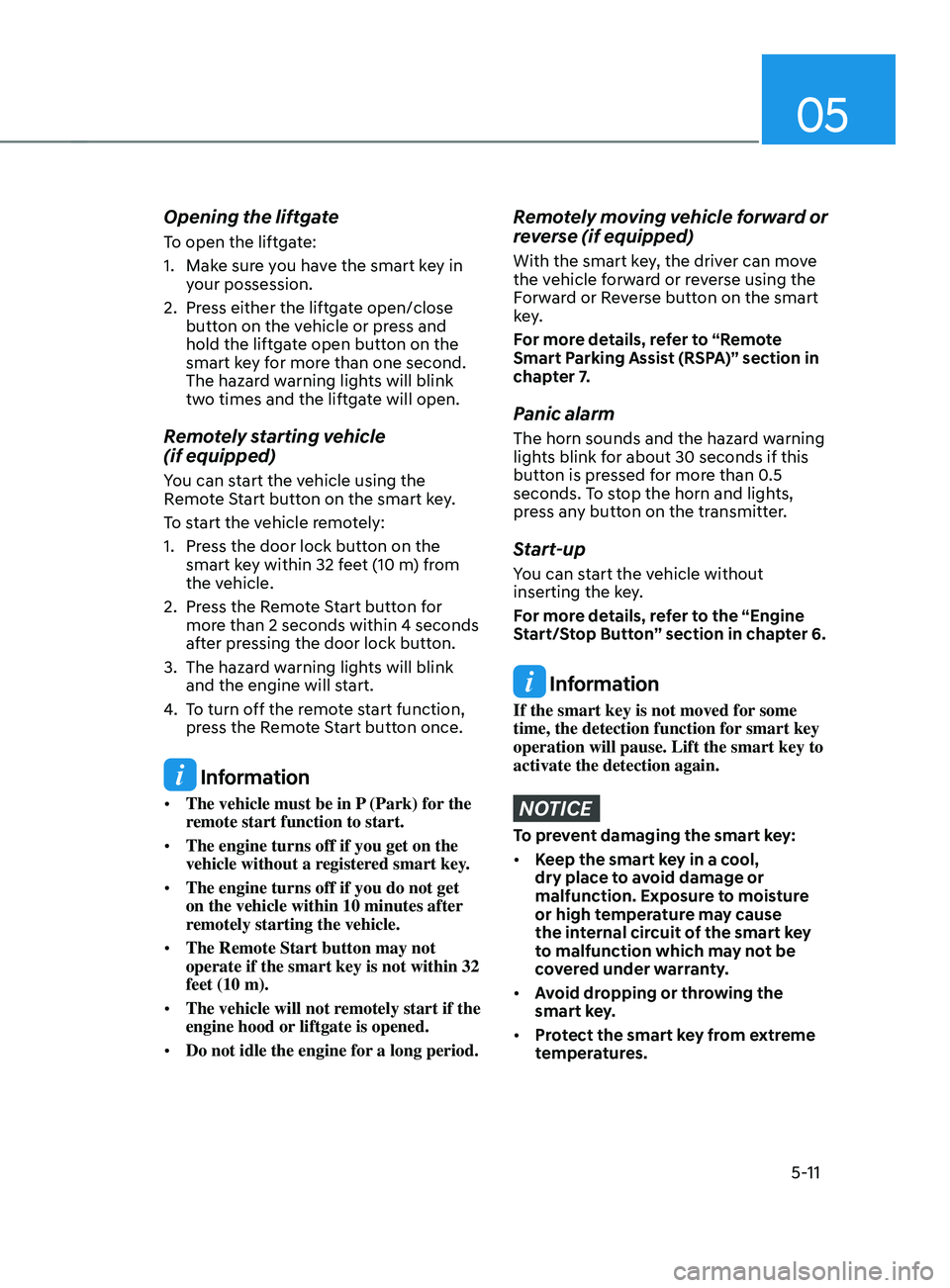
Panic alarm
The horn sounds and the hazard warning
lights blink for about 30 seconds if this
button is pressed for more than 0.5
seconds. To stop the horn and lights,
press any button on the transmitter.
Start-up
You can start the vehicle without
inserting the key.
For more details, refer to the “Engine
Start/Stop Button” section in chapter 6.
Information
If the smart key is not moved for some
time, the detection function for smart key
operation will pause. Lift the smart key to
activate the detection again.
NOTICE
To prevent damaging the smart key:
• Keep the smart key in a cool,
dry place to avoid damage or
malfunction. Exposure to moisture
or high temperature may cause
the internal circuit of the smart key
to malfunction which may not be
covered under warranty.
• Avoid dropping or throwing the
smart key.
• Protect the smart key from extreme
temperatures.
Page 189 of 636
05
5-45
Inside rearview mirror
Before driving your vehicle, check to
see that your inside rearview mirror is
properly positioned. Adjust the rearview
mirror so that the view through the rear
window is properly centered.
WARNING
Make sure your line of sight is not
obstructed. Do not place objects in the
rear seat, cargo area, or behind the rear
headrests which could interfere with
your vision through the rear window.
WARNING
To prevent serious injury during an
accident or deployment of the air bag,
do not modify the rearview mirror and
do not install a wide mirror.
WARNING
NEVER adjust the mirror while driving.
This may cause loss of vehicle control
resulting in an accident.
NOTICE
When cleaning the mirror, use a paper
towel or similar material dampened
with glass cleaner. Do not spray glass
cleaner directly on the mirror as this
may cause the liquid cleaner to enter
the mirror housing.
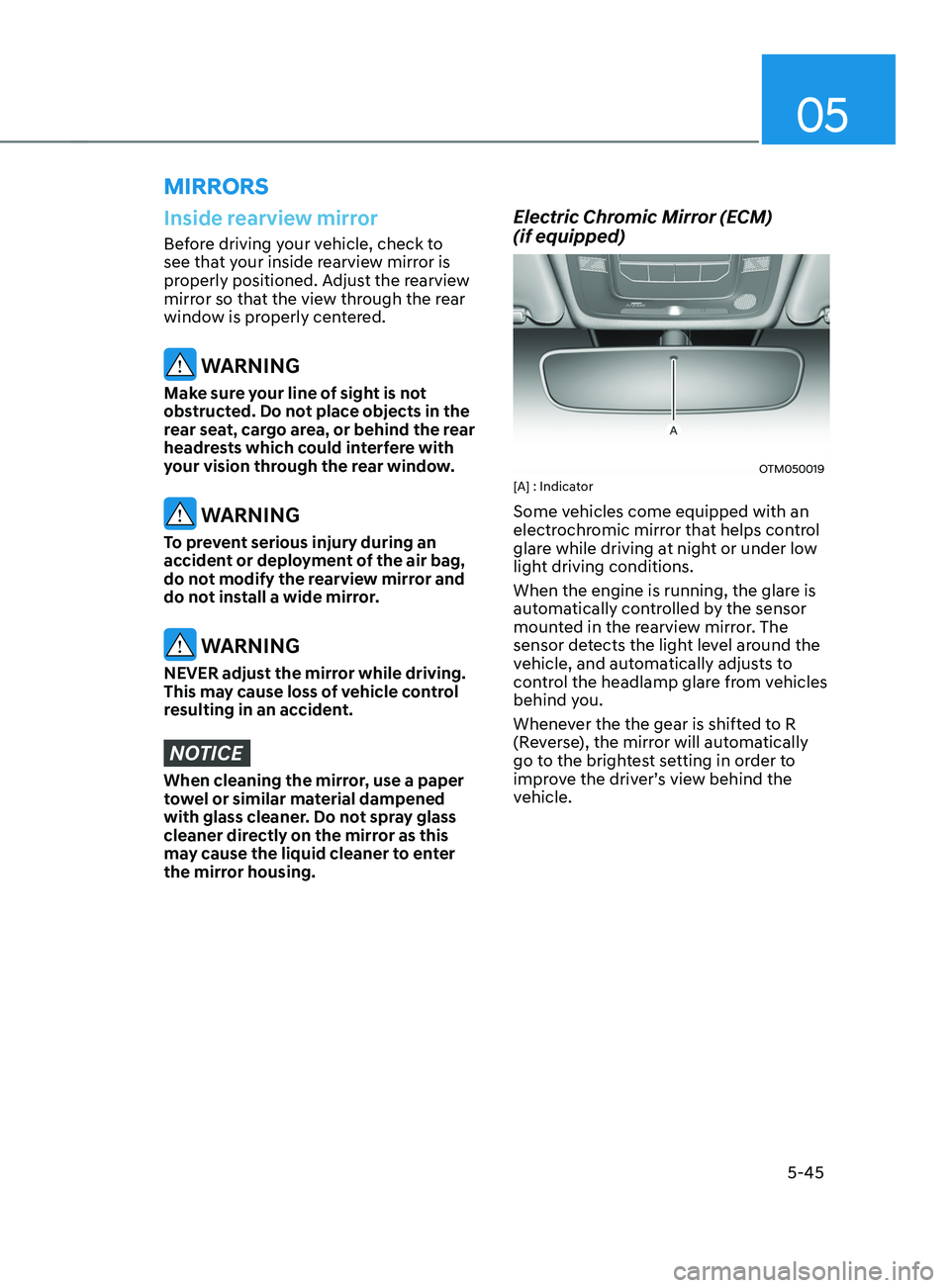
Electric Chromic Mirror (ECM)
(if equipped)
OTM050019[A] : Indicator
Some vehicles come equipped with an
electrochromic mirror that helps control
glare while driving at night or under low
light driving conditions.
When the engine is running, the glare is
automatically controlled by the sensor
mounted in the rearview mirror. The
sensor detects the light level around the
vehicle, and automatically adjusts to
control the headlamp glare from vehicles
behind you.
Whenever the the gear is shifted to R
(Reverse), the mirror will automatically
go to the brightest setting in order to
improve the driver’s view behind the
vehicle.
MIRRORS
Page 191 of 636
05
5-47
Integrated HomeLink® Wireless Control
System
The HomeLink® Wireless Control System
provides a convenient way to replace
up to three hand held radio-frequency
transmitters used to activate compatible
devices such as gate operators, garage
door openers, entry door locks, security
systems, and home lighting.
NOTICE
HomeLink® operates while the ignition
switch is in the ACC or ON position
for safety reasons. It is to prevent
unintentional security problems from
happening when the vehicle is parked
outside the garage.
WARNING
Before programming HomeLink® to a
garage door opener or gate operator,
make sure people and objects are out
of the way of the device to prevent
potential harm or damage. Do not
use the HomeLink® with any garage
door opener that lacks the safety
stop and reverse features required
by U.S. federal safety standards (this
includes any garage door opener model
manufactured before April 1, 1982).
A garage door that cannot detect an
object - signaling the door to stop and
reverse - does not meet current U.S.
federal safety standards. Using a garage
door opener without these features
increases the risk of serious injury or
death.
For more information, contact
HomeLink® at www.homelink.com, or
call Home-Link customer support at
1-800-355-3515.
It is also recommended that a new
battery be replaced in the handheld
transmitter of the device being trained
to HomeLink® for quicker training and
accurate transmission of the radio
frequency. 1. Programming HomeLink
®
The following steps show how to
program HomeLink. If you have any
questions or are having difficulty
programming your HomeLink buttons,
refer to the HomeLink website or call the
HomeLink customer support toll-free
number. Do this before going back to the
dealer who sold you the car.
•
Visit the HomeLink website at: www.
homelink.com. Then at the top of the
page, choose your vehicle make. Then
watch the You Tube video, and/or
access additional website information.
• If you choose to access the website
via your cell phone, scan the QR code.
• Or call HomeLink customer support
at 1-800-355-3515 (Please have the
vehicle make/model and the opener
device make/model readily available.)
Page 201 of 636
05
5-57
• If ‘Convenience → Welcome mirr or/
light → On door unlock’ is select ed in the User Se
ttings mode on the LCD
display, the outside mirror will fold or
unfold automatically as follows:
- The mirror will f
old or unfold when
the door is locked or unlocked by
the smart key.
- The mirror will f
old or unfold when
the door is locked or unlocked by
the button on the outside door
handle.
• If
‘Con
venience
→ W
elcome
mirror/ligh
t
→ On door unlock’ and ‘Conv
enience
→ W
elcome
mirr
or/light
→ On driv
er
appr
oach’
is select
ed
in the User Se
ttings mode on the LCD
display, the outside mirror will unfold
automatically when you approach the
vehicle (all doors closed and locked)
with a smart key in possession.
NOTICE
The electric type side view mirror
operates even though the ignition
switch is in the OFF position. However,
to prevent unnecessary battery
discharge, do not adjust the mirrors
longer than necessary while the engine
is not running.
NOTICE
Do not fold the electric type side view
mirror by hand. It could cause motor
failure.
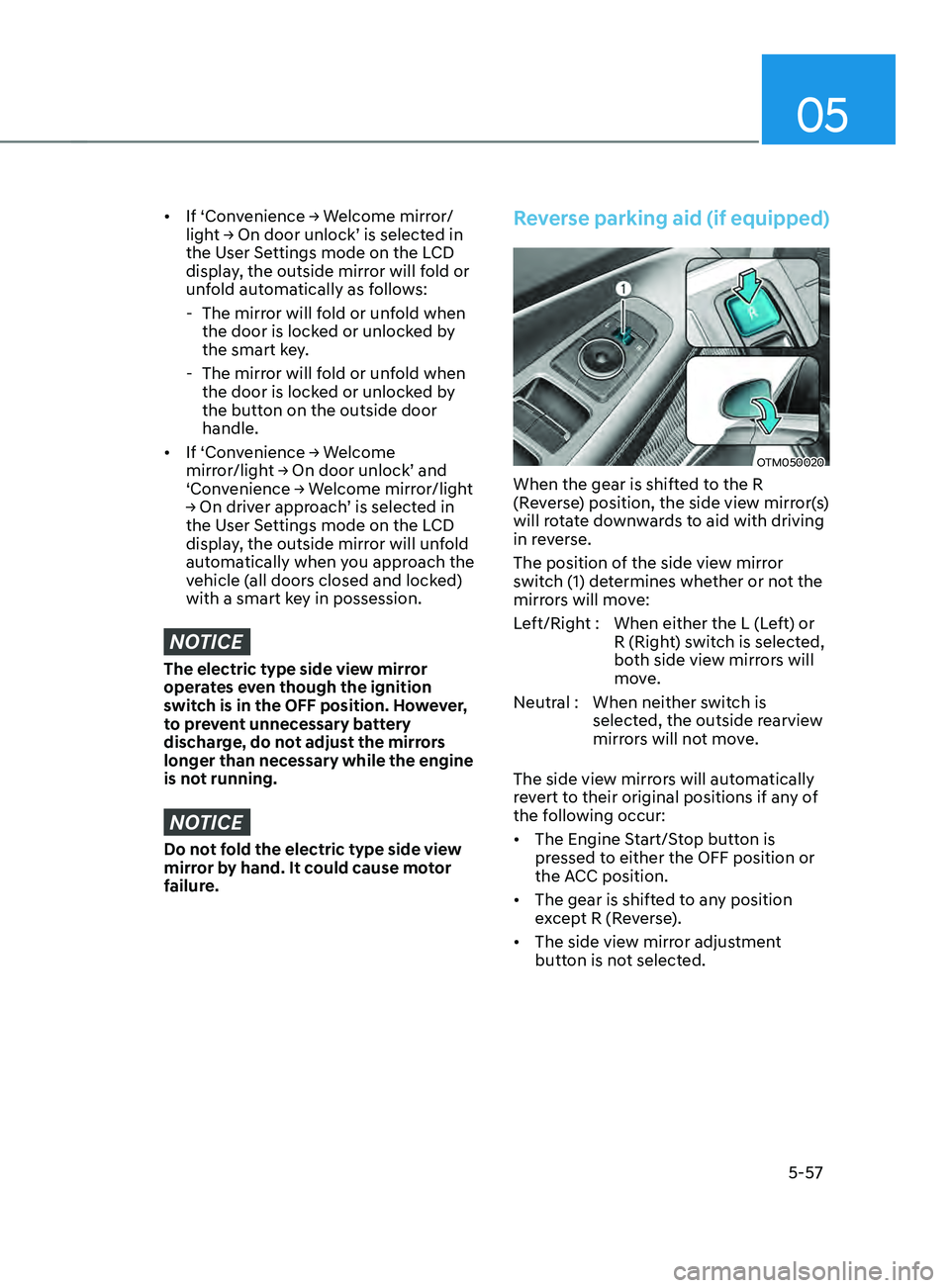
Reverse parking aid (if equipped)
OTM050020
When the gear is shifted to the R
(Reverse) position, the side view mirror(s)
will rotate downwards to aid with driving
in reverse.
The position of the side view mirror
switch (1) determines whether or not the
mirrors will move:
Left/Right : When either the L (Left) or R (Right) switch is selected,
both side view mirrors will
move.
Neutral : When neither switch is selected, the outside rearview
mirrors will not move.
The side view mirrors will automatically
revert to their original positions if any of
the following occur:
• The Engine Start/Stop button is
pressed to either the OFF position or
the ACC position.
• The gear is shifted to any position
except R (Reverse).
• The side view mirror adjustment
button is not selected.