2021 HYUNDAI SANTA FE mode button
[x] Cancel search: mode buttonPage 265 of 636
05
5-121
Recirculating air when washer
fluid is used
Recirculation mode automatically
activates to reduce any objectionable
scent of the washer fluid from entering
the cabin when the windshield washer is
used.
Turning Activate upon Washer Fluid
Use ON or OFF
Climate control system
To turn the Activate upon Washer Fluid
Use feature on or off, select Floor level
(
) mode, and then press the air
intake control () button four times
within two seconds while pressing the
A/C icon.
When Activate upon Washer Fluid Use
ON is turned on, the air intake control
button indicator will blink 6 times. When
turned off, the indicator will blink 3
times.
Infotainment system
Activate upon Washer Fluid Use can be
turned
on and o
ff
b
y
selecting ‘Se
tup
→ Vehicle Se
ttings
→ Clima
te
→ R
ecirculate
Air → A
ctivate
upon W
asher
Fluid U
se
(or In
terlocking washer fluid)’ from the
infotainment system screen.
For detailed information, refer to the
separately supplied infotainment
system manual.
However, in cold weather to prevent
the windshield from fogging up, the
recirculation mode may not be selected.
Sunroof inside air recirculation
(if equipped)
When the is sunroof opened, fresh
mode will be automatically selected.
At this time, if you press the air intake
control button, recirculation mode will
be selected but will change back to fresh
mode after 3 minutes. When the sunroof
is closed, the air intake position will
return to the original position that was
selected.
Auto. Controls That Use Climate
Control Settings (for driver’s
seat)
The temperature of the driver’s seat
warmer, air ventilated seat and heated
steering wheel is automatically
controlled depending on the inside and
outside temperature of the vehicle when
the engine is running.
To use these features, it must be
enabled from the Settings menu in the
infotainment system screen. Select:
- Setup → V
ehicle
Se
ttings
→ Sea
t
→ Hea
ted/Ventilated
F
eatures
→ H
eated/
Ventilated
F
eatures
→ A
uto.
Con
trols
That U
se Climate Control Settings
For more details on Auto Comfort
Control, refer to “Seat Warmers” and
“Air ventilation seats” section in chapter
3 and “Heated Steering Wheel” section
in chapter 5.
Page 273 of 636
![HYUNDAI SANTA FE 2021 Owners Manual 05
5-129
Wireless smart phone charging
system (if equipped)
OTM050022
[A] : Indicator light, [B] : Charging pad
On certain models, the vehicle comes
equipped with a wireless smart phone
charger.
Th](/manual-img/35/41163/w960_41163-272.png "HYUNDAI SANTA FE 2021 Owners Manual 05
5-129
Wireless smart phone charging
system (if equipped)
OTM050022
[A] : Indicator light, [B] : Charging pad
On certain models, the vehicle comes
equipped with a wireless smart phone
charger.
Th")
05
5-129
Wireless smart phone charging
system (if equipped)
OTM050022
[A] : Indicator light, [B] : Charging pad
On certain models, the vehicle comes
equipped with a wireless smart phone
charger.
The system is available when all doors
are closed, and when the Engine Start/
Stop button is in the ACC or ON (or
START) position.
To charge a cellular phone
The wireless smart phone charging
system charges only the Qi-enabled
smart phones (
). Read the label on
the smart phone accessory cover or
visit your smart phone manufacturer’s
website to check whether your smart
phone supports the Qi technology.
The wireless charging process starts
when you put a Qi-enabled smart phone
on the wireless charging unit.
1.
Remo
ve other items, including the
smart key, from the wireless charging
unit. If not, the wireless charging
process may be interrupted. Place
the smart phone on the center of the
charging pad.
2.
The indicat
or light is orange when the
smart phone is charging. The indicator
light will turn blue when phone
charging is complete.
3.
You can turn ON or OFF the wir
eless
charging function from the Settings
menu on the instrument cluster.
Select:
- Setup → U
ser
se
ttings
→ Conv
enience
→ Wir
eless
Char
ging
If your smart phone is no
t charging:
- Slightly change the position o
f the
smart phone on the charging pad.
- Make sur
e the indicator light is
orange.
Page 282 of 636
Convenient features
5-138
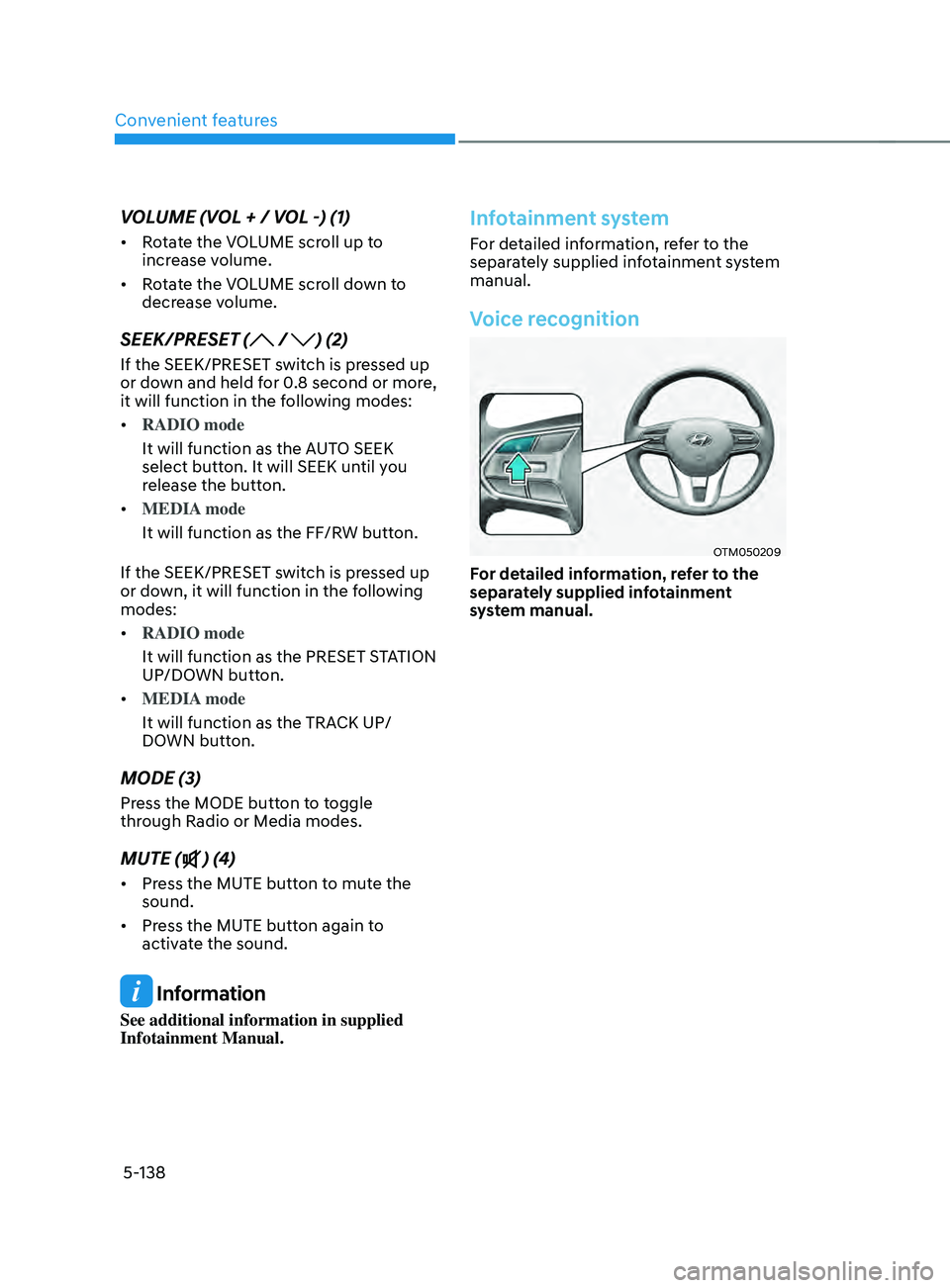
VOLUME (VOL + / VOL -) (1)
• Rotate the VOLUME scroll up to
increase volume.
• Rotate the VOLUME scroll down to
decrease volume.
SEEK/PRESET ( / ) (2)
If the SEEK/PRESET switch is pressed up
or down and held for 0.8 second or more,
it will function in the following modes:
• RADIO mode
It will function as the AUTO SEEK
select button. It will SEEK until you
release the button.
• MEDIA mode
It will function as the FF/RW button.
If the SEEK/PRESET switch is pressed up
or down, it will function in the following
modes:
• RADIO mode
It will function as the PRESET STATION
UP/DOWN button.
• MEDIA mode
It will function as the TRACK UP/
DOWN button.
MODE (3)
Press the MODE button to toggle
through Radio or Media modes.
MUTE () (4)
• Press the MUTE button to mute the
sound.
• Press the MUTE button again to
activate the sound.
Information
See additional information in supplied
Infotainment Manual.
Infotainment system
For detailed information, refer to the
separately supplied infotainment system
manual.
Voice recognition
OTM050209
For detailed information, refer to the
separately supplied infotainment
system manual.
Page 289 of 636

Before driving ........................................................................\
............................6-4Before entering the vehicle ........................................................................\
................6-4
Bef ore starting ........................................................................\
..................................... 6-4
Ignition switch ........................................................................\
...........................6-5Key ignition switch ........................................................................\
............................... 6-5
Ke y ignition switch positions ........................................................................\
.............. 6-6
S
tarting the engine
........................................................................\
............................... 6
-7
Engine Start/Stop button ........................................................................\
.........6-9Engine Stop/Start button positions ........................................................................\
..6-10
S tarting the engine ........................................................................\
.............................. 6-
11
Turning off the engine
........................................................................\
........................ 6-
12
Remote start
........................................................................\
....................................... 6-
13
Automatic transmission ........................................................................\
..........6-14Automatic transmission operation ........................................................................\
....6-14
L CD display message (button type) ........................................................................\
.. 6-19
P
addle shifter (Manual shift mode)
........................................................................\
.. 6-20
Good driving pr
actices
........................................................................\
....................... 6-
21
Dual clutch transmission ........................................................................\
........6-23Dual clutch transmission operation ........................................................................\
..6-23
P arking ........................................................................\
............................................... 6-
30
LCD display message (button type)
........................................................................\
. 6-30
P
addle shifter (Manual shifter mode)
....................................................................... 6-32
Good driving pr
actices
........................................................................\
...................... 6-
33
Braking system ........................................................................\
........................6-34Power-assist brakes ........................................................................\
...........................6-34
Disc br akes wear indicator ........................................................................\
................ 6-34
Electronic Parking Brake (EPB)
........................................................................\
......... 6-35
A
uto Hold (if equipped)
........................................................................\
..................... 6-
39
Anti-lock Brake System (ABS)
........................................................................\
........... 6-43
Electronic S
tability Control (ESC)
........................................................................\
.... 6-44
V
ehicle Stability Management (VSM)
...................................................................... 6-4
7
Hill-Start Assist Control (HAC)
........................................................................\
......... 6-48
Do
wnhill Brake Control (DBC)
........................................................................\
......... 6-48
Good br
aking practices
........................................................................\
...................... 6-51
Four wheel drive (4WD) ........................................................................\
..........6-52Four Wheel Drive (4WD) operation ........................................................................\
...6-53
Emer gency precautions ........................................................................\
.................... 6-58
R
educing the risk of a rollover
........................................................................\
.......... 6-59
6. Driving your vehicle
Driving your vehicle
6
Page 295 of 636
06
6 -7
Starting the engine
WARNING
• Always wear appropriate shoes when
operating your vehicle. Unsuitable
shoes, such as high heels, ski boots,
sandals, flip-flops, etc., may interfere
with your ability to use the brake,
accelerator and clutch pedals.
• Do not start the vehicle with the
accelerator pedal depressed. The
vehicle can move which can lead to
an accident.
• Wait until the engine rpm is normal.
The vehicle may suddenly move if
the brake pedal is released when the
rpm is high.
1.
Make sur
e the parking brake is
applied.
2.
Make sur
e the shift lever/button is in
P (Park).
3.
Depress the br
ake pedal.
4.
Turn the ignition s
witch to the START
position. Hold the key (maximum of
10 seconds) until the engine starts and
release it.
Information
• Do not wait for the engine to warm up
while the vehicle remains stationary.
Start driving at moderate engine
speeds. (Steep accelerating and
decelerating should be avoided.)
• Always start the vehicle with your foot
on the brake pedal. Do not depress the
accelerator while starting the vehicle.
Do not race the engine while warming
it up.
NOTICE
To prevent damage to the vehicle:
• Do not hold the ignition key in the
START position for more than 10
seconds. Wait 5 to 10 seconds before
trying again.
• Do not turn the ignition switch to
the START position with the engine
running. It may damage the starter.
• If traffic and road conditions permit,
you may put the shift lever in the N
(Neutral) position while the vehicle
is still moving and turn the ignition
switch to the START position in an
attempt to restart the engine.
• Do not push or tow your vehicle to
start the engine.
NOTICE
If the engine does not start within 10
seconds after preheating is completed,
turn the ignition switch once more
to the LOCK position and wait for 10
seconds. Then turn the ignition switch
to the ON position in order to preheat
the engine again.
Page 299 of 636
06
6-11
Starting the engine
WARNING
• Always wear appropriate shoes when
operating your vehicle. Unsuitable
shoes, such as high heels, ski boots,
sandals, flipflops, etc., may interfere
with your ability to use the brake and
accelerator pedals.
• Do not start the vehicle with the
accelerator pedal depressed.
The vehicle can move which can lead
to an accident.
• Wait until the engine rpm is normal.
The vehicle may suddenly move if
the brake pedal is released when the
rpm is high.
Information
• The vehicle will start by pressing the
Engine Start/Stop button, only when
the smart key is in the vehicle.
• Even if the smart key is in the vehicle,
and when it is far away from the driver,
the engine may not start.
• When the Engine Start/Stop button
is in the ACC or ON position, if any
door is open, the system checks for the
smart key. When the smart key is not
in the vehicle, the “
” indicator
will blink and the warning 'Key not in
vehicle' will come on. When all doors
are closed, the chime will also sound for
about 5 seconds. Keep the smart key in
the vehicle. Starting the gasoline engine
1.
Alwa
ys carry the smart key with you.
2.
Make sur
e the parking brake is
applied.
3.
Make sur
e the shift lever/button is in
P(Park).
4.
Depress the br
ake pedal.
5.
Press the E
ngine Start/Stop button.
Information
•
Do not wait for the engine to warm up
while the vehicle remains stationary.
Start driving at moderate engine
speeds. Steep accelerating and
decelerating should be avoided.
• Always start the vehicle with your foot
on the brake pedal. Do not depress the
accelerator while starting the vehicle.
Do not race the engine while warming
it up.
Information
If the Engine Start/Stop button is pressed
while the engine is pre-heating, the engine
may start.
Page 303 of 636
06
6-15
The indicator in the instrument cluster
displays the shift lever/button position
when the ignition switch is in the ON
position.
WARNING
To reduce the risk of serious injury or
death:
• ALWAYS check the surrounding
areas near your vehicle for people,
especially children, before shifting a
vehicle into D (Drive) or R (Reverse).
• Before leaving the driver’s seat,
always make sure the shift lever
is in the P (Park) position, then set
the parking brake, and place the
ignition switch in the LOCK/OFF
position. Unexpected and sudden
vehicle movement can occur if these
precautions are not followed.
• When using the paddle shifter
(manual shift mode), do not use
engine braking (shifting from a
high gear to lower gear) rapidly on
slippery roads. The vehicle may slip
causing an accident.
P (Park)
Always come to a complete stop before
shifting into P (Park).
To shift from P (Park), you must depress
firmly on the brake pedal and make sure
your foot is off the accelerator pedal.
If you have done all of the above and
still cannot shift the lever out of P
(Park), see "Shift-Lock Release" in this
chapter. (shift lever type)
The shift lever/button must be in P (Park)
before turning the engine off.
WARNING
• Shifting into P (Park) while the
vehicle is in motion may cause you to
lose control of the vehicle.
• After the vehicle has stopped, always
make sure the shift lever is in P
(Park), apply the parking brake, and
turn the engine off.
• When parking on an incline, shift
the gear to P (Park) and apply the
parking brake to prevent the vehicle
from rolling downhill.
• Do not use the P (Park) position in
place of the parking brake.
R (Reverse)
Use this position to drive the vehicle
backward.
NOTICE
Always come to a complete stop before
shifting into or out of R (Reverse); you
may damage the transmission if you
shift into R (Reverse) while the vehicle is
in motion.
When the vehicle is stopped in R
(Reverse) or D (Drive) position, if you
open the driver’s door with the seat
belt unfastened, the gear is shifted to P
(Park) position automatically.
However when the vehicle moves in R
(Reverse) or D (Drive) position, if you
open the driver’s door with the seat belt
unfastened, the gear may be not shifted
to P (Park) position automatically for
protecting the automatic transmission.
Page 305 of 636
06
6-17
4. Press and hold the OK button on
the steering wheel for more than 1
second.
5.
When the message ‘Vehicle will s
tay in
(N). Change gear to cancel’ (or ‘N will
stay engaged when the vehicle is Off’)
will appear on the cluster LCD display,
press the Engine Start/Stop button
while depressing the brake pedal.
However, if you open the driver's
door, the gear will automatically
shift to P (Park) and the Engine Start/
Stop button will change to the OFF
position.
NOTICE
With the gear in N (Neutral) the Engine
Start/Stop button will be in the ACC
position. Note that the doors cannot be
locked in the ACC position. The battery
may discharge if left in the ACC position
for a long period.
D (Drive)
This is the normal driving position. The
transmission will automatically shift
through an 8-gear sequence, providing
the best fuel economy and power.
To start the vehicle forward, push the D
(Drive) button by depressing the brake
pedal with the engine ON. (button type)
Then depress the accelerator pedal
smoothly.
For extra power when passing another
vehicle or driving uphill, depress the
accelerator fully. The transmission will
automatically downshift to the next
lower gear (or gears, as appropriate).
When the vehicle is stopped in D (Drive)
position, if you open the driver’s door
with the seat belt unfastened, the gear is
shifted to P (Park) position automatically.
(button type)
However while the vehicle is moving in D
(Drive) position, if you open the driver’s
door with the seat belt unfastened, the
gear may not shift to P (Park) position
automatically to protect the automatic
transmission.
The DRIVE MODE switch, located on the
shift lever console, allows the driver to
switch from NORMAL/COMFORT mode
to SPORT or ECO mode. (if equipped)
For more Details, refer to "Drive Mode
Integrated Control System" later in this
chapter.