2021 HYUNDAI SANTA FE HYBRID instrument cluster
[x] Cancel search: instrument clusterPage 433 of 598
Driver assistance system
7-80
Information
• You may change settings from the
instrument cluster (User Settings) or
infotainment system (Vehicle Settings),
whichever option that is provided with
your vehicle. For more details, see
"User Settings" section in chapter 4, or
"Vehicle Settings" section in supplied
Infotainment Manual.
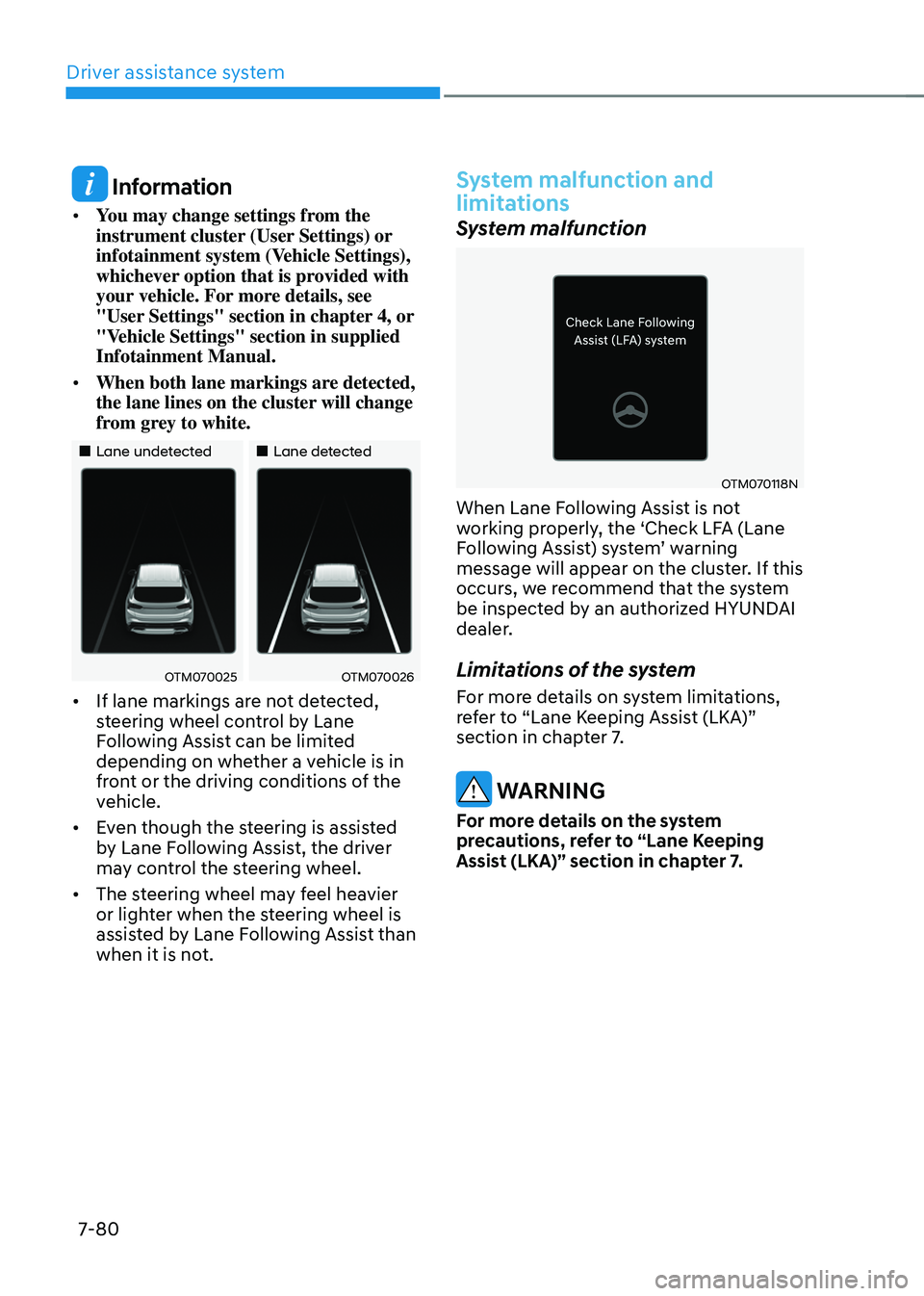
• When both lane markings are detected,
the lane lines on the cluster will change
from grey to white.
„„Lane undetected„„Lane detected
OTM070025OTM070026
• If lane markings are not detected,
steering wheel control by Lane
Following Assist can be limited
depending on whether a vehicle is in
front or the driving conditions of the
vehicle.
• Even though the steering is assisted
by Lane Following Assist, the driver
may control the steering wheel.
• The steering wheel may feel heavier
or lighter when the steering wheel is
assisted by Lane Following Assist than
when it is not.
System malfunction and
limitations
System malfunction
OTM070118N
When Lane Following Assist is not
working properly, the ‘Check LFA (Lane
Following Assist) system’ warning message will appear on the cluster. If this
occurs, we recommend that the system
be inspected by an authorized HYUNDAI
dealer.
Limitations of the system
For more details on system limitations,
refer to “Lane Keeping Assist (LKA)”
section in chapter 7.
WARNING
For more details on the system
precautions, refer to “Lane Keeping
Assist (LKA)” section in chapter 7.
Page 470 of 598
07
7-117
System operation
Operating conditions
If ‘Rear active assist’ or ‘Rear warning only’ is set from the Settings menu, Reverse Parking Collision-Avoidance
Assist will be in the ready status when
the following conditions are satisfied:
-The liftgate is closed
-The gear is shifted to R (Reverse)
-Vehicle speed is below 6 mph (10
km/h)
-System components such as the rear
view camera and the rear ultrasonic
sensors are in normal conditions
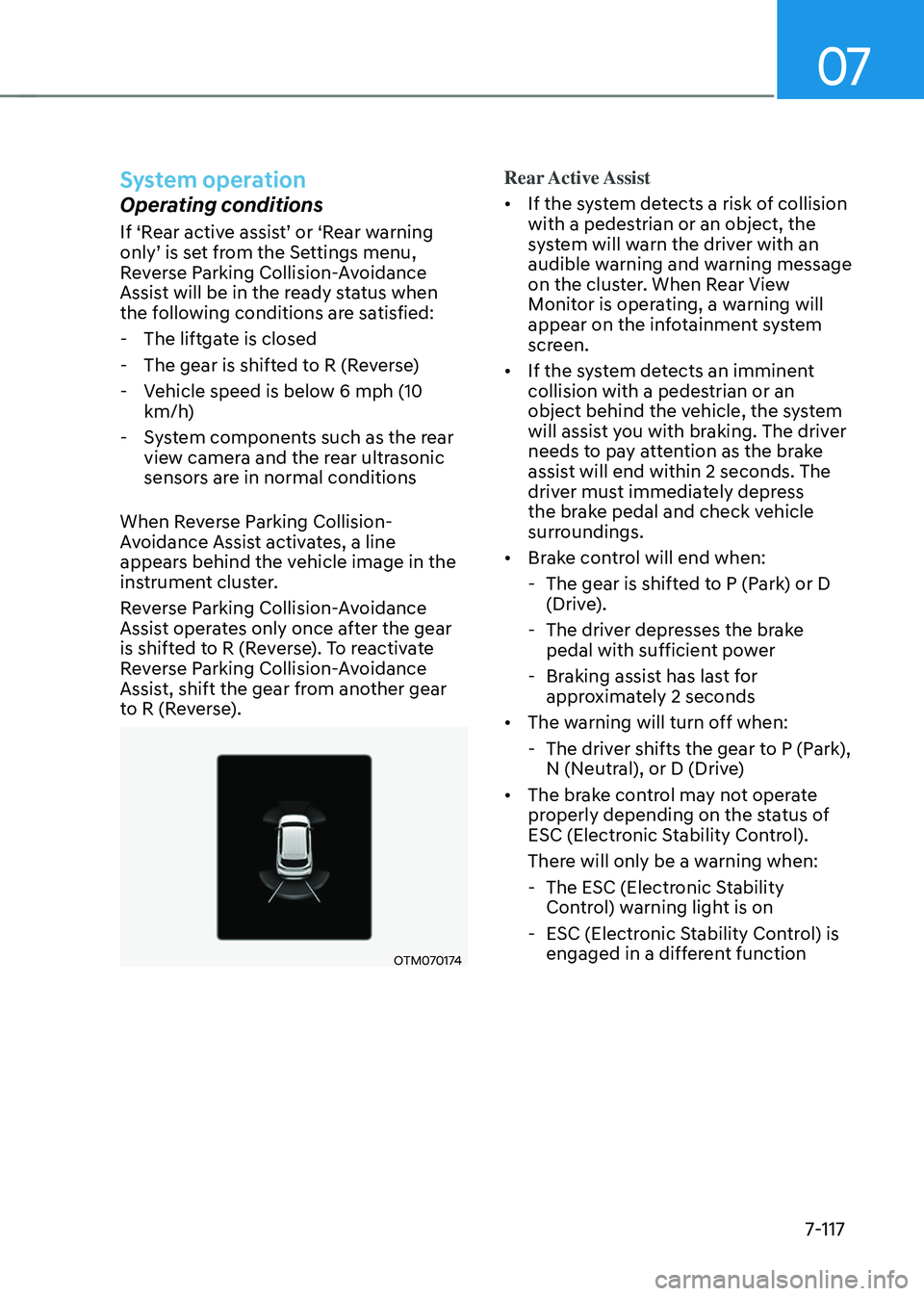
When Reverse Parking Collision-
Avoidance Assist activates, a line
appears behind the vehicle image in the
instrument cluster.
Reverse Parking Collision-Avoidance
Assist operates only once after the gear
is shifted to R (Reverse). To reactivate
Reverse Parking Collision-Avoidance
Assist, shift the gear from another gear
to R (Reverse).
OTM070174
Rear Active Assist
• If the system detects a risk of collision
with a pedestrian or an object, the
system will warn the driver with an
audible warning and warning message
on the cluster. When Rear View
Monitor is operating, a warning will
appear on the infotainment system
screen.
• If the system detects an imminent
collision with a pedestrian or an
object behind the vehicle, the system
will assist you with braking. The driver
needs to pay attention as the brake
assist will end within 2 seconds. The
driver must immediately depress
the brake pedal and check vehicle
surroundings.
• Brake control will end when:
-The gear is shifted to P (Park) or D
(Drive).
-The driver depresses the brake
pedal with sufficient power
-Braking assist has last for
approximately 2 seconds
• The warning will turn off when:
-The driver shifts the gear to P (Park),
N (Neutral), or D (Drive)
• The brake control may not operate
properly depending on the status of
ESC (Electronic Stability Control).
There will only be a warning when:
-The ESC (Electronic Stability
Control) warning light is on
-ESC (Electronic Stability Control) is
engaged in a different function
Page 497 of 598
08
8 -7
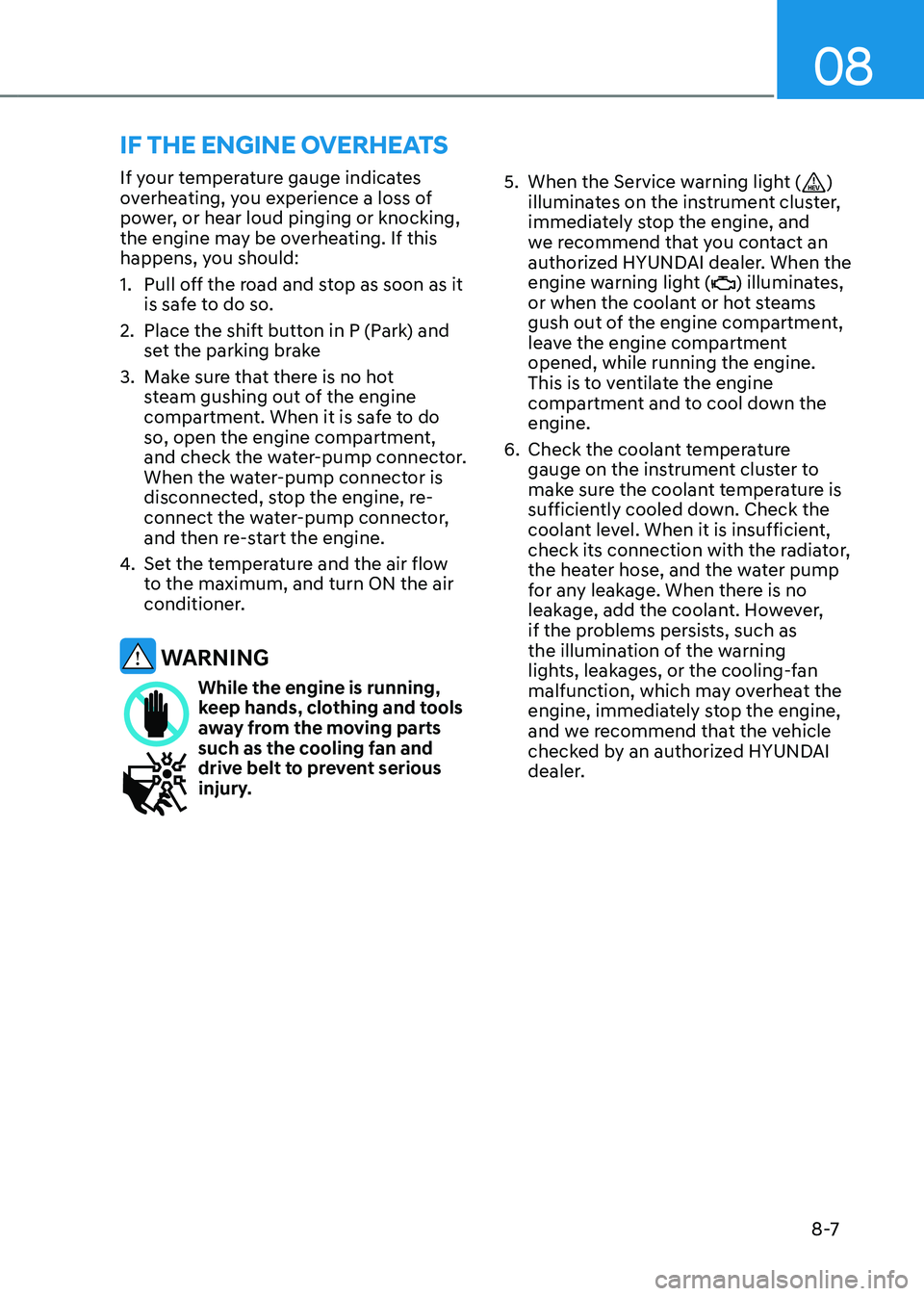
If your temperature gauge indicates
overheating, you experience a loss of
power, or hear loud pinging or knocking,
the engine may be overheating. If this
happens, you should:
1. Pull off the road and stop as soon as it
is safe to do so.
2. Place the shift button in P (Park) and
set the parking brake
3. Make sure that there is no hot
steam gushing out of the engine
compartment. When it is safe to do
so, open the engine compartment,
and check the water-pump connector.
When the water-pump connector is
disconnected, stop the engine, re-
connect the water-pump connector,
and then re-start the engine.
4. Set the temperature and the air flow
to the maximum, and turn ON the air
conditioner.
WARNING
While the engine is running, keep hands, clothing and tools
away from the moving parts
such as the cooling fan and
drive belt to prevent serious
injury.
5. When the Service warning light ()
illuminates on the instrument cluster,
immediately stop the engine, and
we recommend that you contact an
authorized HYUNDAI dealer. When the
engine warning light (
) illuminates,
or when the coolant or hot steams
gush out of the engine compartment,
leave the engine compartment
opened, while running the engine.
This is to ventilate the engine
compartment and to cool down the
engine.
6. Check the coolant temperature
gauge on the instrument cluster to
make sure the coolant temperature is
sufficiently cooled down. Check the
coolant level. When it is insufficient,
check its connection with the radiator,
the heater hose, and the water pump
for any leakage. When there is no
leakage, add the coolant. However,
if the problems persists, such as
the illumination of the warning
lights, leakages, or the cooling-fan
malfunction, which may overheat the
engine, immediately stop the engine,
and we recommend that the vehicle
checked by an authorized HYUNDAI
dealer.
IF THE ENGINE OVERHEATS
Page 559 of 598
Maintenance
9-44
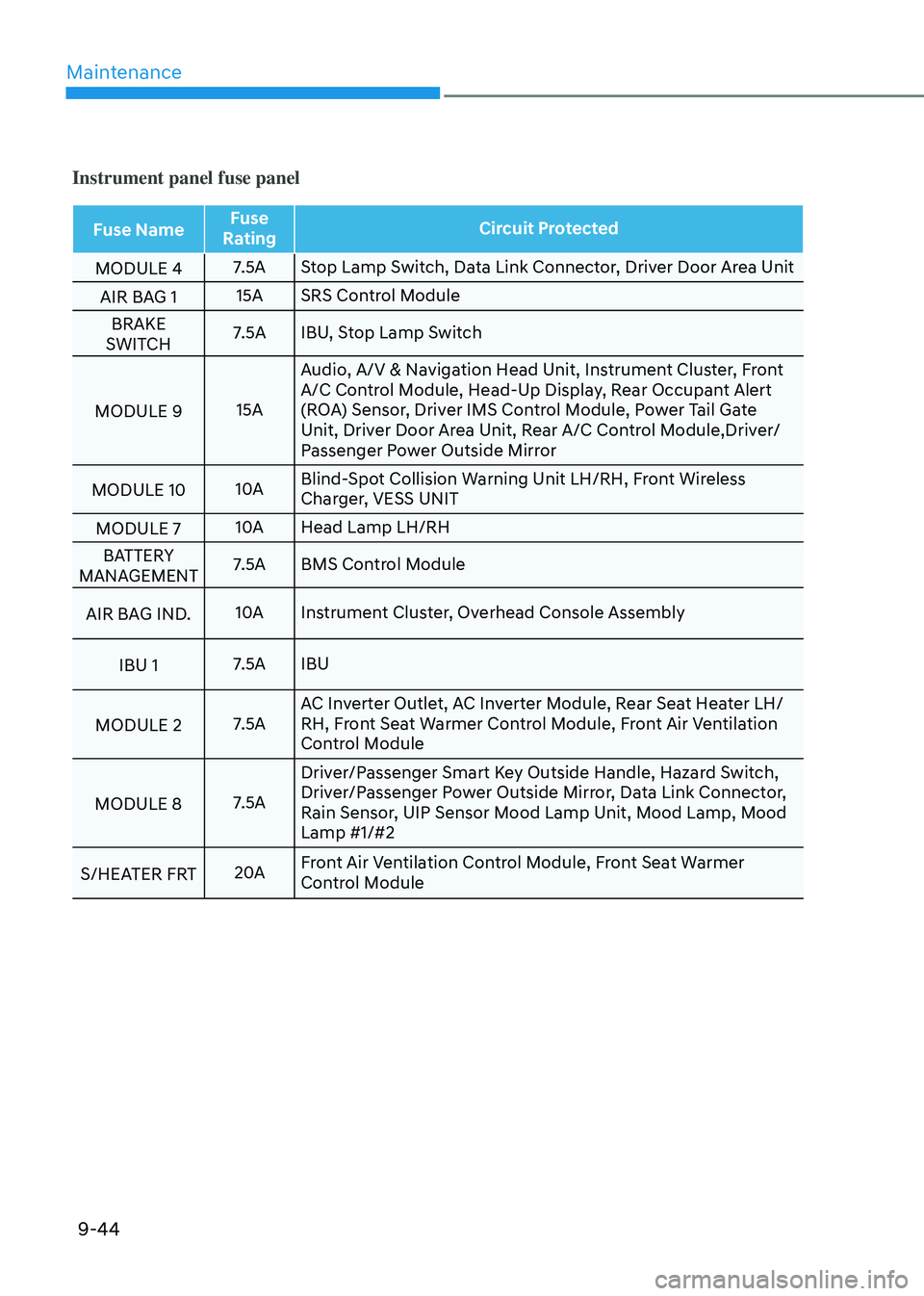
Instrument panel fuse panel
Fuse NameFuse
Rating Circuit Protected
MODULE 4 7.5A
Stop Lamp Switch, Data Link Connector, Driver Door Area Unit
AIR BAG 1 15A
SRS Control Module
BRAKE
SWITCH 7.5A
IBU, Stop Lamp Switch
MODULE 9 15AAudio, A/V & Navigation Head Unit, Instrument Cluster, Front
A/C Control Module, Head-Up Display, Rear Occupant Alert
(ROA) Sensor, Driver IMS Control Module, Power Tail Gate
Unit, Driver Door Area Unit, Rear A/C Control Module,Driver/
Passenger Power Outside Mirror
MODULE 10 10ABlind-Spot Collision Warning Unit LH/RH, Front Wireless
Charger, VESS UNIT
MODULE 7 10A
Head Lamp LH/RH
BATTERY
MANAGEMENT7.5A BMS Control Module
AIR BAG IND. 10A
Instrument Cluster, Overhead Console Assembly
IBU 1 7.5A
IBU
MODULE 2 7.5AAC Inverter Outlet, AC Inverter Module, Rear Seat Heater LH/
RH, Front Seat Warmer Control Module, Front Air Ventilation
Control Module
MODULE 8 7.5ADriver/Passenger Smart Key Outside Handle, Hazard Switch,
Driver/Passenger Power Outside Mirror, Data Link Connector,
Rain Sensor, UIP Sensor Mood Lamp Unit, Mood Lamp, Mood
Lamp #1/#2
S/HEATER FRT 20AFront Air Ventilation Control Module, Front Seat Warmer
Control Module
Page 560 of 598

09
9-45
Instrument panel fuse panel
Fuse NameFuse
Rating Circuit Protected
AIR BAG 2 15A
SRS Control Module
E-SHIFTER 1 10A
Electronic Shift Dial
E-SHIFTER 2 7.5A
Electronic Shift Dial
MODULE 5 7.5ACrash Pad Switch,Upper Console Switch, Surround View
Monitor Unit, Steering Angle Sensor, IBU, Parking Collision
Avoidance Assist Unit, Lane Departure Warning Unit, 4WD
ECM, VESS UNIT
IBU 2 15A
IBU
SUNROOF 2 20A
Panorama Sunroof
MODULE 1 7.5A
IBU
P/WDW RH 25ADriver/Passenger Safety Power Window Module, Rear Safety
Power Window RH, Rear Power Window Switch RH, Passenger
Power Window Switch
RR S/HEATER LH 25A
Rear Seat Heater LH
CLUSTER 7.5A
Instrument Cluster, Head-Up Display
MDPS 10AMDPS Unit
Ã
MDPS(Motor Driven Power Steering) is the same as
EPS(Electric Power Steering)
A/CON 7.5AE/R Junction Block (RLY. 4, RLY. 6, RLY. 9), Front A/C Control
Module, Electronic A/C Compressor HEV)
CHILD LOCK 15A
ICM Relay Box (Child Lock/Unlock Relay)
DOOR LOCK 20ADoor Lock Relay, Door Unlock Relay, Tail Gate Relay, Dead
Lock Relay
Page 592 of 598

I
I -7
Important safety precautions........................................................................\
.......... 3-2
Air bag hazards ........................................................................\
...........................3-2
Always wear your seat belt ........................................................................\
........3-2
Control your speed ........................................................................\
.....................3-2
Driver distraction ........................................................................\
........................3-2
Keep your vehicle in safe condition ...................................................................3-2
Restrain all children ........................................................................\
...................3-2
In case of an emergency while driving
..................................................................8-2
If the engine stalls at a crossroad or crossing .....................................................8-2
If the engine stalls while driving ........................................................................\
8-2
If you have a flat tire while driving ....................................................................8-3
Infotainment system ........................................................................\
................... 5-124
Antenna ........................................................................\
..................................5-124
Bluetooth® Wireless Technology ....................................................................5-126
Infotainment system ........................................................................\
...............5-125
Steering wheel remote controls ......................................................................5-124
USB Port ........................................................................\
................................5-124
Voice recognition ........................................................................\
....................5-125
Instrument cluster
........................................................................\
..........................4-4
Gauges and meters ........................................................................\
.....................4-5
Instrument cluster control ........................................................................\
...........4-5
LCD display messages ........................................................................\
.............4-22
Transmission shift indicator ........................................................................\
.......4-9
Warning and indicator lights ........................................................................\
....4-10
Instrument panel overview (I)
........................................................................\
......2-5
Instrument panel overview (II)
........................................................................\
.....2-6
Integrated memory system
........................................................................\
...........5-33
Easy access function ........................................................................\
.................5-35
Recalling memory positions ........................................................................\
.....5-34
Resetting the system ........................................................................\
.................5-34
Storing memory positions ........................................................................\
........5-33
Interior features
........................................................................\
..........................5-111
AC Inverter ........................................................................\
.............................5-114
Ashtray ........................................................................\
...................................5-112
Cargo security screen ........................................................................\
.............5-122
Clock ........................................................................\
......................................5-119
Coat hook ........................................................................\
...............................5-119
Cup holder ........................................................................\
..............................5-111