2021 HYUNDAI SANTA FE HYBRID fuel type
[x] Cancel search: fuel typePage 10 of 598
Foreword / Hybrid System Overview
1-6
Using Fuel Additives (except Detergent Fuel Additives)
Using fuel additives such as:
-Silicone fuel additive
-Ferrocene (iron-based) fuel additive
-Other metallic-based fuel additives
may result in cylinder misfire, poor acceleration, engine stalling, damage to the
catalyst, or abnormal corrosion, and may cause damage to the engine resulting in a
reduction in the overall life of the powertrain.
- The Malfunction Indicator Lamp (MIL) may illuminate.
NOTICE
Damage to the fuel system or performance problem caused by the use of these fuels
may not be covered by your New Vehicle Limited Warranty.
Gasoline containing MMT
Some gasoline contains harmful manganese-based fuel additives such as MMT
(Methylcyclopentadienyl Manganese Tricarbonyl). HYUNDAI does not recommend the
use of gasoline containing MMT. This type of fuel can reduce vehicle performance and
affect your emission control system.
The malfunction indicator lamp on the cluster may come on.
Detergent Fuel Additives
HYUNDAI recommends that you use good quality gasolines treated with detergent
additives such as TOP TIER Detergent Gasoline, which help prevent deposit formation
in the engine. These gasolines will help the engine run cleaner and enhance
performance of the Emission Control System. For more information on TOP TIER
Detergent Gasoline, please go to the website (www. toptiergas.com).
For customers who do not use TOP Tier Detergent Gasoline regularly, and have
problems starting or the engine does not run smoothly, detergent-based fuel additives
that you can purchase separately may be added to the gasoline. If TOP TIER Detergent
Gasoline is not available, one bottle of additive added to the fuel tank according to the
maintenance schedule is recommended (refer to the Maintenance Schedule in chapter
9).
Additives are available from your authorized HYUNDAI dealer along with information
on how to use them. Do not mix other additives.
Operation in foreign countries
If you are going to drive your vehicle in another country, be sure to:
• Observe all regulations regarding registration and insurance.
• Determine that acceptable fuel is available.
Page 148 of 598
Instrument cluster
4-36
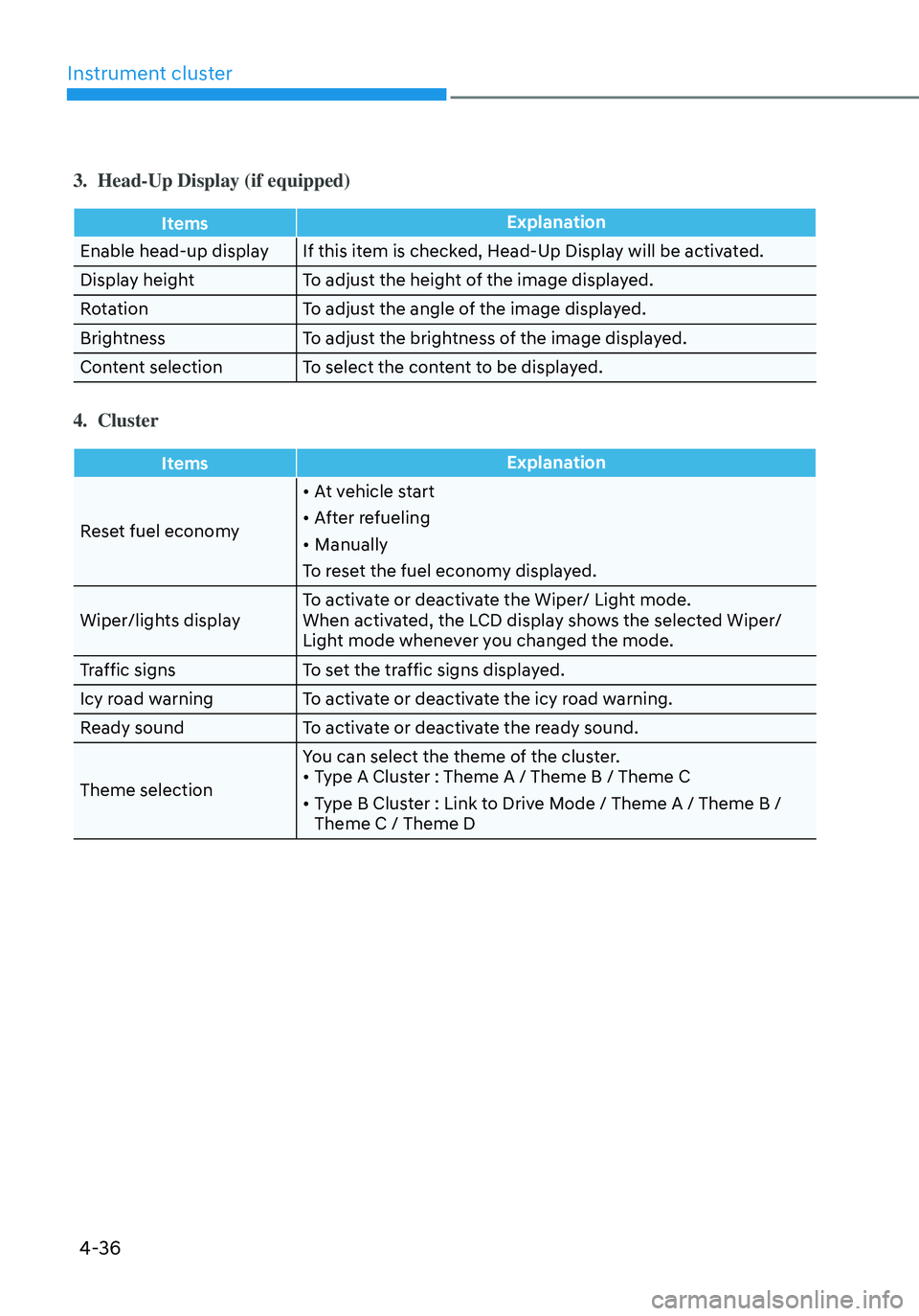
3. Head-Up Display (if equipped)
ItemsExplanation
Enable head-up display If this item is checked, Head-Up Display will be activated.
Display height To adjust the height of the image displayed.
Rotation To adjust the angle of the image displayed.
Brightness To adjust the brightness of the image displayed.
Content selection To select the content to be displayed.
4. Cluster
Items Explanation
Reset fuel economy
• At vehicle start
• After refueling
• Manually
To reset the fuel economy displayed.
Wiper/lights display To activate or deactivate the Wiper/ Light mode.
When activated, the LCD display shows the selected Wiper/
Light mode whenever you changed the mode.
Traffic signs To set the traffic signs displayed.
Icy road warning To activate or deactivate the icy road warning.
Ready sound To activate or deactivate the ready sound.
Theme selection You can select the theme of the cluster.
• Type A Cluster : Theme A / Theme B / Theme C
• Type B Cluster : Link to Drive Mode / Theme A / Theme B /
Theme C / Theme D
Page 153 of 598
04
4-41
Trip computer (Type A)
The trip computer is a microcomputer-
controlled driver information system that
displays information related to driving.
Information
Some driving information stored in the
trip computer (for example Average
Vehicle Speed) resets if the battery is
disconnected.
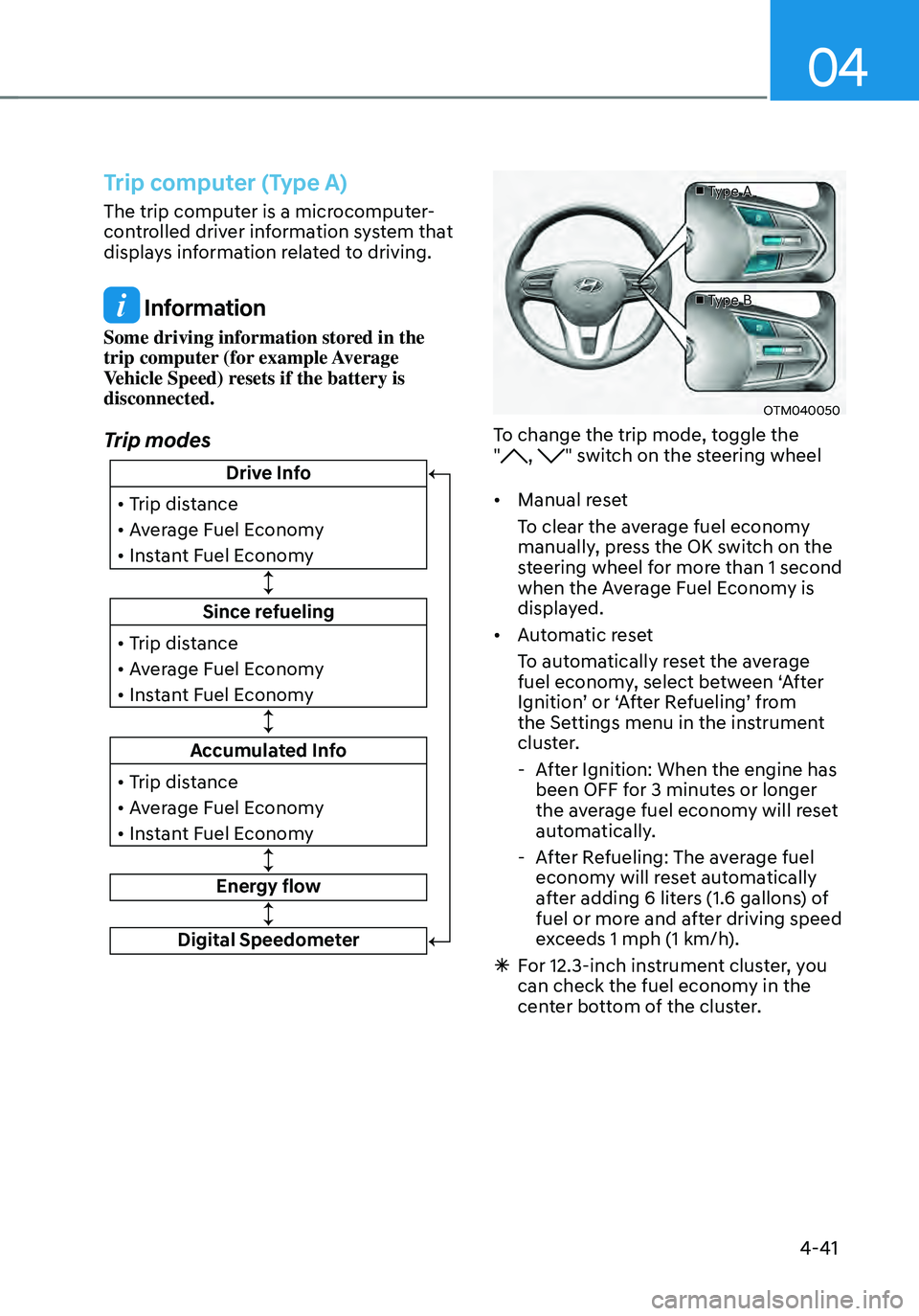
Trip modes
Since refueling
• Trip distance
• Average Fuel Economy
• Instant Fuel Economy
Drive Info
• Trip distance
• Average Fuel Economy
• Instant Fuel Economy
Accumulated Info
• Trip distance
• Average Fuel Economy
• Instant Fuel Economy
Energy flow
Digital Speedometer
■ Type A
■ Type B
OTM040050
To change the trip mode, toggle the
", " switch on the steering wheel
• Manual reset
To clear the average fuel economy
manually, press the OK switch on the
steering wheel for more than 1 second
when the Average Fuel Economy is
displayed.
• Automatic reset
To automatically reset the average
fuel economy, select between ‘After
Ignition’ or ‘After Refueling’ from
the Settings menu in the instrument
cluster.
- After Ignition: When the engine has
been OFF for 3 minutes or longer
the average fuel economy will reset
automatically.
-After Refueling: The average fuel
economy will reset automatically
after adding 6 liters (1.6 gallons) of
fuel or more and after driving speed
exceeds 1 mph (1 km/h).
à For 12.3-inch instrument cluster, you
can check the fuel economy in the
center bottom of the cluster.
Page 154 of 598
Instrument cluster
4-42
„„Type A„„Type B
OTMA040004OTMA040005
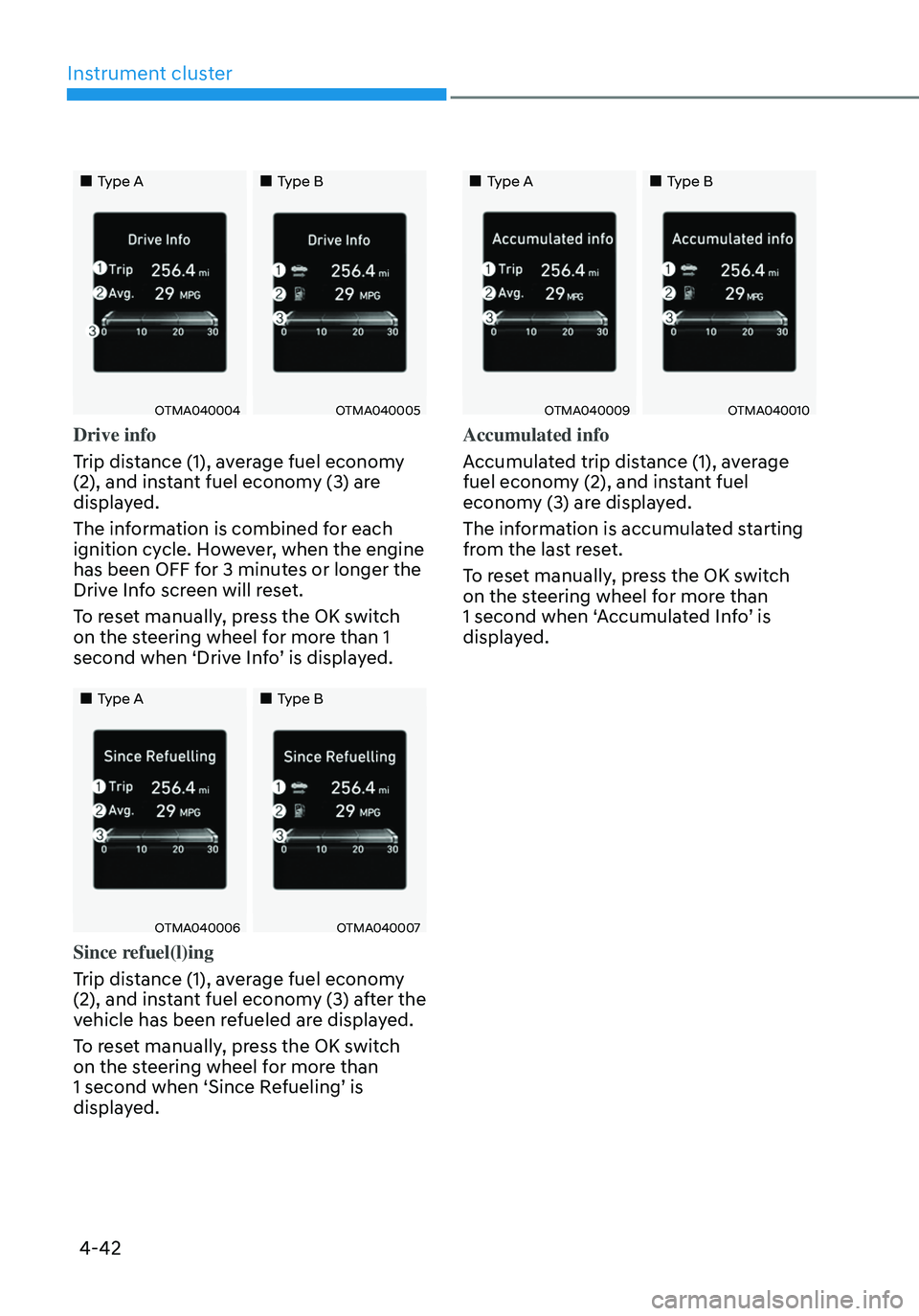
Drive info
Trip distance (1), average fuel economy
(2), and instant fuel economy (3) are
displayed.
The information is combined for each
ignition cycle. However, when the engine
has been OFF for 3 minutes or longer the
Drive Info screen will reset.
To reset manually, press the OK switch
on the steering wheel for more than 1
second when ‘Drive Info’ is displayed.
„„Type A„„Type B
OTMA040006OTMA040007
Since refuel(l)ing
Trip distance (1), average fuel economy
(2), and instant fuel economy (3) after the
vehicle has been refueled are displayed.
To reset manually, press the OK switch
on the steering wheel for more than
1 second when ‘Since Refueling’ is
displayed.
„„Type A„„Type B
OTMA040009OTMA040010
Accumulated info
Accumulated trip distance (1), average
fuel economy (2), and instant fuel
economy (3) are displayed.
The information is accumulated starting
from the last reset.
To reset manually, press the OK switch
on the steering wheel for more than
1 second when ‘Accumulated Info’ is
displayed.
Page 156 of 598
Instrument cluster
4-44
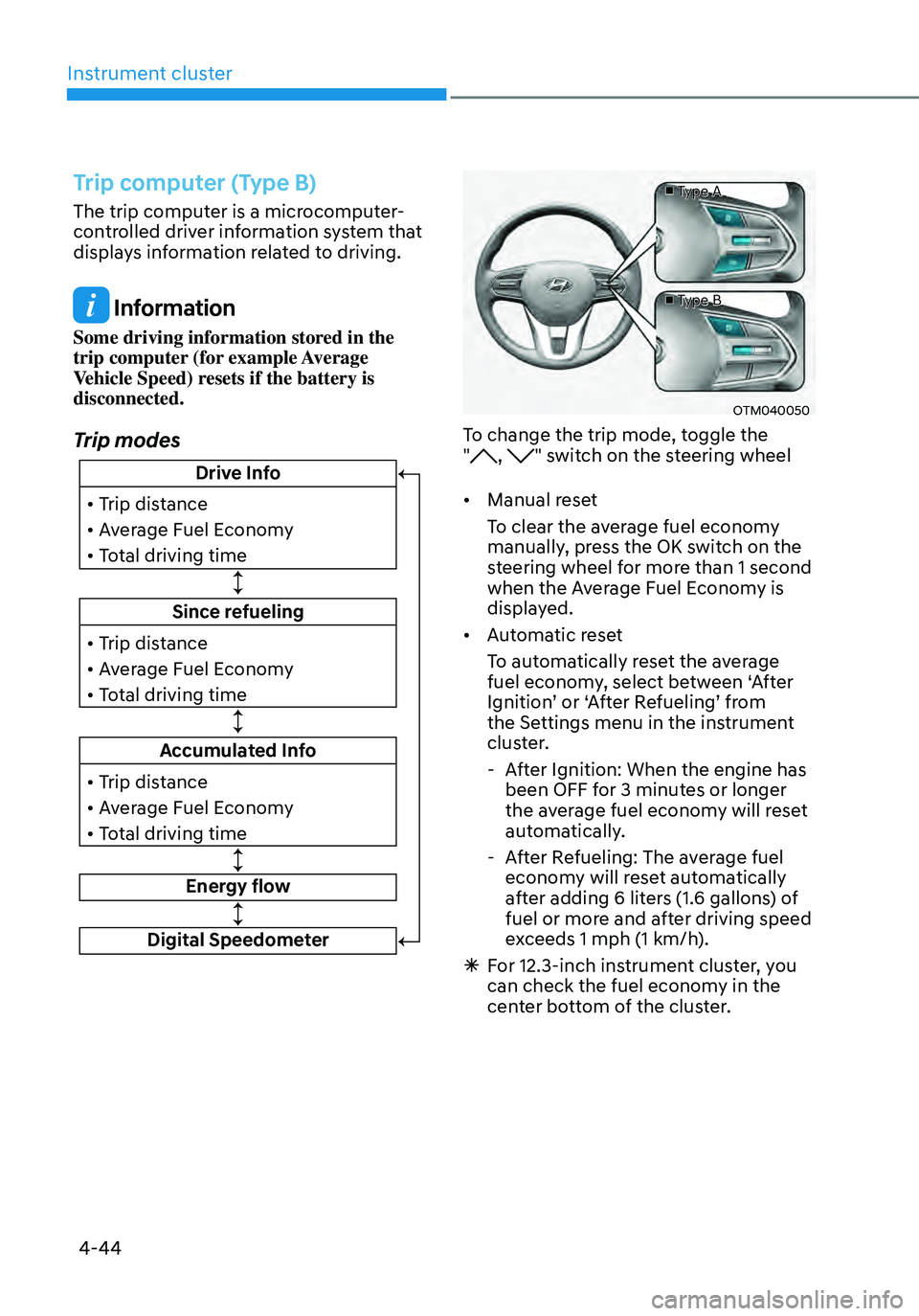
Trip computer (Type B)
The trip computer is a microcomputer-
controlled driver information system that
displays information related to driving.
Information
Some driving information stored in the
trip computer (for example Average
Vehicle Speed) resets if the battery is
disconnected.
Trip modes
Since refueling
• Trip distance
• Average Fuel Economy
• Total driving time
Drive Info
• Trip distance
• Average Fuel Economy
• Total driving time
Accumulated Info
• Trip distance
• Average Fuel Economy
• Total driving time
Energy flow
Digital Speedometer
■ Type A
■ Type B
OTM040050
To change the trip mode, toggle the
", " switch on the steering wheel
• Manual reset
To clear the average fuel economy
manually, press the OK switch on the
steering wheel for more than 1 second
when the Average Fuel Economy is
displayed.
• Automatic reset
To automatically reset the average
fuel economy, select between ‘After
Ignition’ or ‘After Refueling’ from
the Settings menu in the instrument
cluster.
- After Ignition: When the engine has
been OFF for 3 minutes or longer
the average fuel economy will reset
automatically.
-After Refueling: The average fuel
economy will reset automatically
after adding 6 liters (1.6 gallons) of
fuel or more and after driving speed
exceeds 1 mph (1 km/h).
à For 12.3-inch instrument cluster, you
can check the fuel economy in the
center bottom of the cluster.
Page 157 of 598
04
4-45
„„Type A„„Type B
OTMA040012OTMA040013
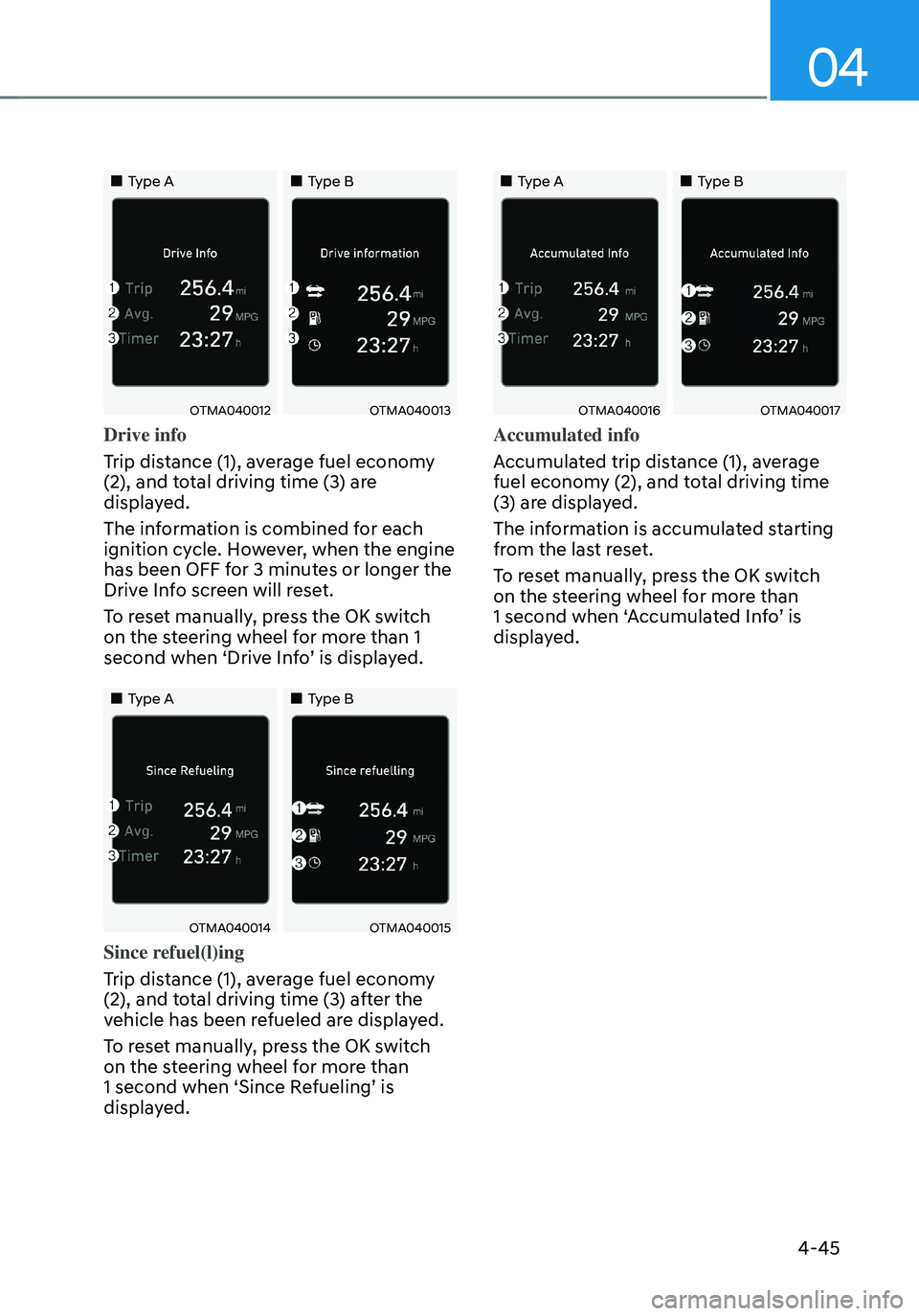
Drive info
Trip distance (1), average fuel economy
(2), and total driving time (3) are
displayed.
The information is combined for each
ignition cycle. However, when the engine
has been OFF for 3 minutes or longer the
Drive Info screen will reset.
To reset manually, press the OK switch
on the steering wheel for more than 1
second when ‘Drive Info’ is displayed.
„„Type A„„Type B
OTMA040014OTMA040015
Since refuel(l)ing
Trip distance (1), average fuel economy
(2), and total driving time (3) after the
vehicle has been refueled are displayed.
To reset manually, press the OK switch
on the steering wheel for more than
1 second when ‘Since Refueling’ is
displayed.
„„Type A„„Type B
OTMA040016OTMA040017
Accumulated info
Accumulated trip distance (1), average
fuel economy (2), and total driving time
(3) are displayed.
The information is accumulated starting
from the last reset.
To reset manually, press the OK switch
on the steering wheel for more than
1 second when ‘Accumulated Info’ is
displayed.
Page 175 of 598
05
5-17
Remote Start with Digital Key
• When the shift button of your vehicle
is in P (Park) and all of the doors
including trunk and hood is locked
and the vehicle is off, press the Door
Lock button in the Hyundai Digital
Key app then press the Remote Start
button within 4 seconds.
You can confirm the engine is on if the
hazard warning lights blinks two times
and the chime sounds.
• If you want to turn off the engine,
press Remote Engine Stop. Air
Conditioner / Heating system
maintains the same status as when
you last used the vehicle.
• Unless you put the registered digital
key(smartphone) on the interior
authentication pad (wireless charger)
when the remote start function is on,
the engine will turn off.
• If you do not get on the vehicle within
10 minutes after the engine turns on,
the vehicle will turn off.
For more information, refer to the Engine
Start/Stop button in chapter 6.
Vehicle information Display
The digital key application displays
the vehicle information such as
driving or door conditions through the
communication with the vehicle.
• How to check : Select the vehicle
what you want to check and touch
the vehicle image, then vehicle
information display page will be
shown.
• Contents : accumulated odometer,
latest fuel economy, driving range,
fuel remaining, tire pressure, doors
lock/unlock status and last data
updated time.
à Displayed vehicle date could be
differed from the current vehicle
condition.
ÃFor more information, please refer to
the ‘Tutorial’ on your Digital key app. Smartphone change/App deletion
If you change your smartphone or delete
the Hyundai Digital Key App, please refer
to the following to set up your Digital
Key:
Smartphone Change/ Reset
If you change or reset the smartphone,
the registered digital key in your previous
smartphone may not be used. Please
refer to following procedure to use the
digital key.
1. Install the digital key application and
log in.
2. If you are the owner, retry the Digital
key save process.
3. If you are the sharer, need to re-share
the key from owner.
App delete & reinstall/ Delete App data
You can re-download the digital key
from server in these cases as follow
procedure.
1. Reinstall the application and log in.
2. Input the PIN number for user
verification.
3. If PIN is correct, digital key data
will be re-downloaded to your
smartphone and you can use it
without any further registration or
sharing.
Smartphone operability with Digital Key
The digital key application may not
be available to old type smartphones.
Please check the available smartphone
models with your dealer. NFC antenna
position on the smartphone can be
confirmed on each smartphone’s manual
or contact to customer service center of
the smartphone manufacture.
Page 233 of 598
05
5-75
• Do not get back into a vehicle
once you have begun refueling.
You can generate a buildup of
static electricity by touching,
rubbing or sliding against any item
or fabric capable of producing
static electricity. Static electricity
discharge can ignite fuel vapors
causing a fire. If you must re-enter
the vehicle, you should once again
eliminate potentially dangerous
static electricity discharge by
touching a metal part of the vehicle,
away from the fuel filler neck, nozzle
or other fuel source, with your bare
hand.
• When using an approved portable
fuel container, be sure to place the
container on the ground prior to
refueling. Static electricity discharge
from the container can ignite fuel
vapors causing a fire.
Once refueling has begun, contact
between your bare hand and the
vehicle should be maintained until
the filling is complete.
• Use only approved portable plastic
fuel containers designed to carry and
store fuel.
• When refueling, always shift the
gear to the P (Park) position, set
the parking brake, and press the
Engine Start/Stop button to the
OFF position. Sparks produced by
electrical components related to the
engine can ignite fuel vapors causing
a fire.
• Do not use matches or a lighter and
do not smoke or leave a lit cigarette
in your vehicle while at a gas station,
especially during refueling.
• Do not over-fill or top-off your
vehicle tank, which can cause fuel
spillage.
• If a fire breaks out during refueling,
leave the vicinity of the vehicle, and
immediately contact the manager
of the gas station and then contact
the local fire department. Follow any
safety instructions they provide.
• If pressurized fuel sprays out, it can
cover your clothes or skin and thus
subject you to the risk of fire and
burns. Always remove the fuel cap
carefully and slowly. If the cap is
venting fuel or if you hear a hissing
sound, wait until the condition stops
before completely removing the cap.
• Always check that the fuel cap is
installed securely to prevent fuel
spillage in the event of an accident.
Information
Make sure to refuel your vehicle according
to the “Fuel Requirements” section in
suggested in chapter 1.
NOTICE
• Do not spill fuel on the exterior
surfaces of the vehicle. Any type of
fuel spilled on painted surfaces may
damage the paint.
• If the fuel filler cap requires
replacement, use only a genuine
HYUNDAI cap or the equivalent
specified for your vehicle. An
incorrect fuel filler cap can result
in a serious malfunction of the fuel
system or emission control system.