Page 144 of 598
Instrument cluster
4-32
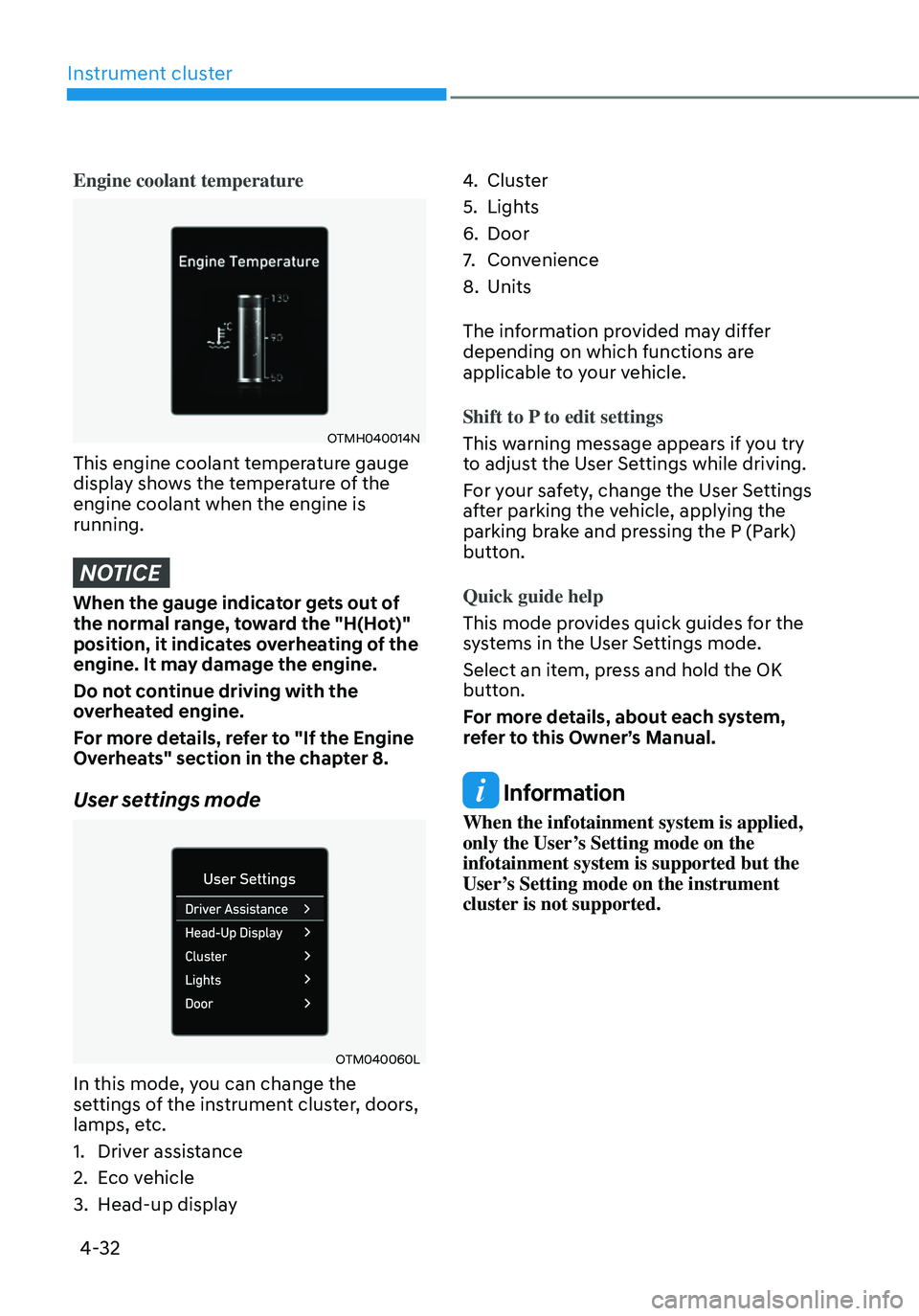
Engine coolant temperature
OTMH040014N
This engine coolant temperature gauge
display shows the temperature of the
engine coolant when the engine is
running.
NOTICE
When the gauge indicator gets out of
the normal range, toward the "H(Hot)"
position, it indicates overheating of the
engine. It may damage the engine.
Do not continue driving with the
overheated engine.
For more details, refer to "If the Engine
Overheats" section in the chapter 8.
User settings mode
OTM040060L
In this mode, you can change the
settings of the instrument cluster, doors,
lamps, etc.
1. Driver assistance
2. Eco vehicle
3. Head-up display
4. Cluster
5. Lights
6. Door
7. Convenience
8. Units
The information provided may differ
depending on which functions are
applicable to your vehicle.
Shift to P to edit settings
This warning message appears if you try
to adjust the User Settings while driving.
For your safety, change the User Settings
after parking the vehicle, applying the
parking brake and pressing the P (Park)
button.
Quick guide help
This mode provides quick guides for the
systems in the User Settings mode.
Select an item, press and hold the OK
button.
For more details, about each system,
refer to this Owner’s Manual.
Information
When the infotainment system is applied,
only the User’s Setting mode on the
infotainment system is supported but the
User’s Setting mode on the instrument
cluster is not supported.
Page 146 of 598
Instrument cluster
4-34
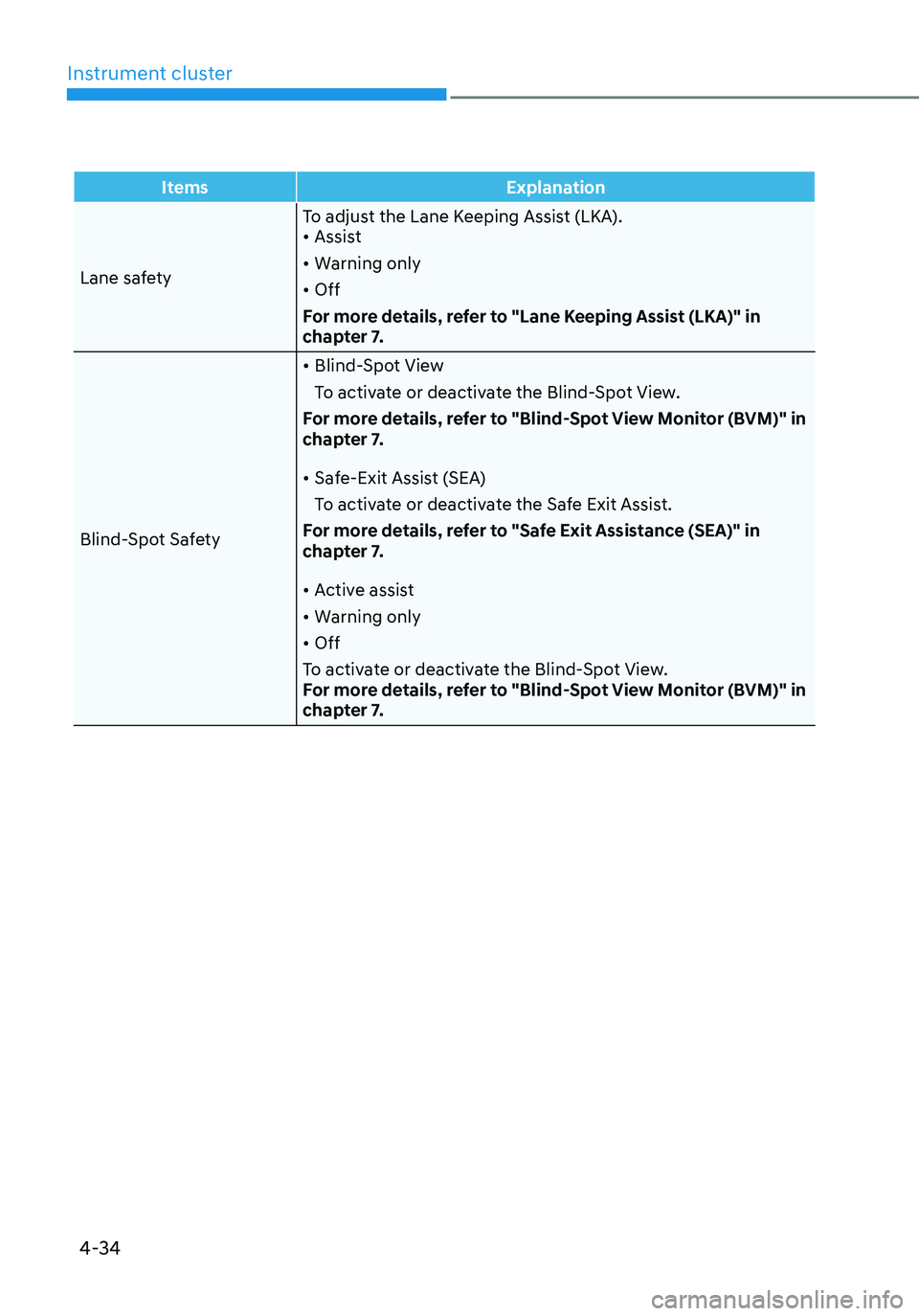
ItemsExplanation
Lane safety To adjust the Lane Keeping Assist (LKA).
• Assist
• Warning only
• Off
For more details, refer to "Lane Keeping Assist (LKA)" in
chapter 7.
Blind-Spot Safety
• Blind-Spot View
To activate or deactivate the Blind-Spot View.
For more details, refer to "Blind-Spot View Monitor (BVM)" in
chapter 7.
• Safe-Exit Assist (SEA)
To activate or deactivate the Safe Exit Assist.
For more details, refer to "Safe Exit Assistance (SEA)" in
chapter 7.
• Active assist
• Warning only
• Off
To activate or deactivate the Blind-Spot View.
For more details, refer to "Blind-Spot View Monitor (BVM)" in
chapter 7.
Page 148 of 598
Instrument cluster
4-36
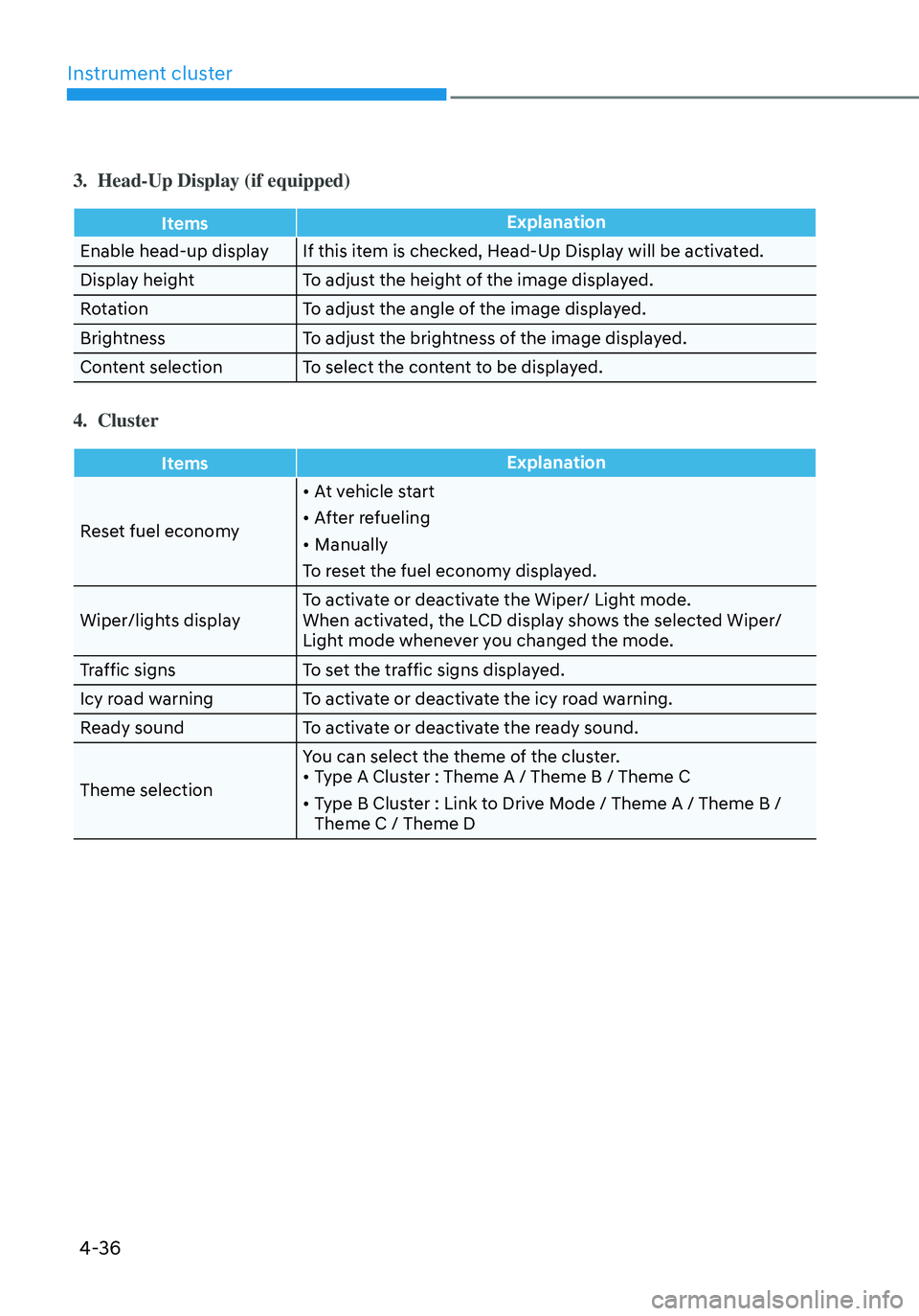
3. Head-Up Display (if equipped)
ItemsExplanation
Enable head-up display If this item is checked, Head-Up Display will be activated.
Display height To adjust the height of the image displayed.
Rotation To adjust the angle of the image displayed.
Brightness To adjust the brightness of the image displayed.
Content selection To select the content to be displayed.
4. Cluster
Items Explanation
Reset fuel economy
• At vehicle start
• After refueling
• Manually
To reset the fuel economy displayed.
Wiper/lights display To activate or deactivate the Wiper/ Light mode.
When activated, the LCD display shows the selected Wiper/
Light mode whenever you changed the mode.
Traffic signs To set the traffic signs displayed.
Icy road warning To activate or deactivate the icy road warning.
Ready sound To activate or deactivate the ready sound.
Theme selection You can select the theme of the cluster.
• Type A Cluster : Theme A / Theme B / Theme C
• Type B Cluster : Link to Drive Mode / Theme A / Theme B /
Theme C / Theme D
Page 150 of 598
Instrument cluster
4-38
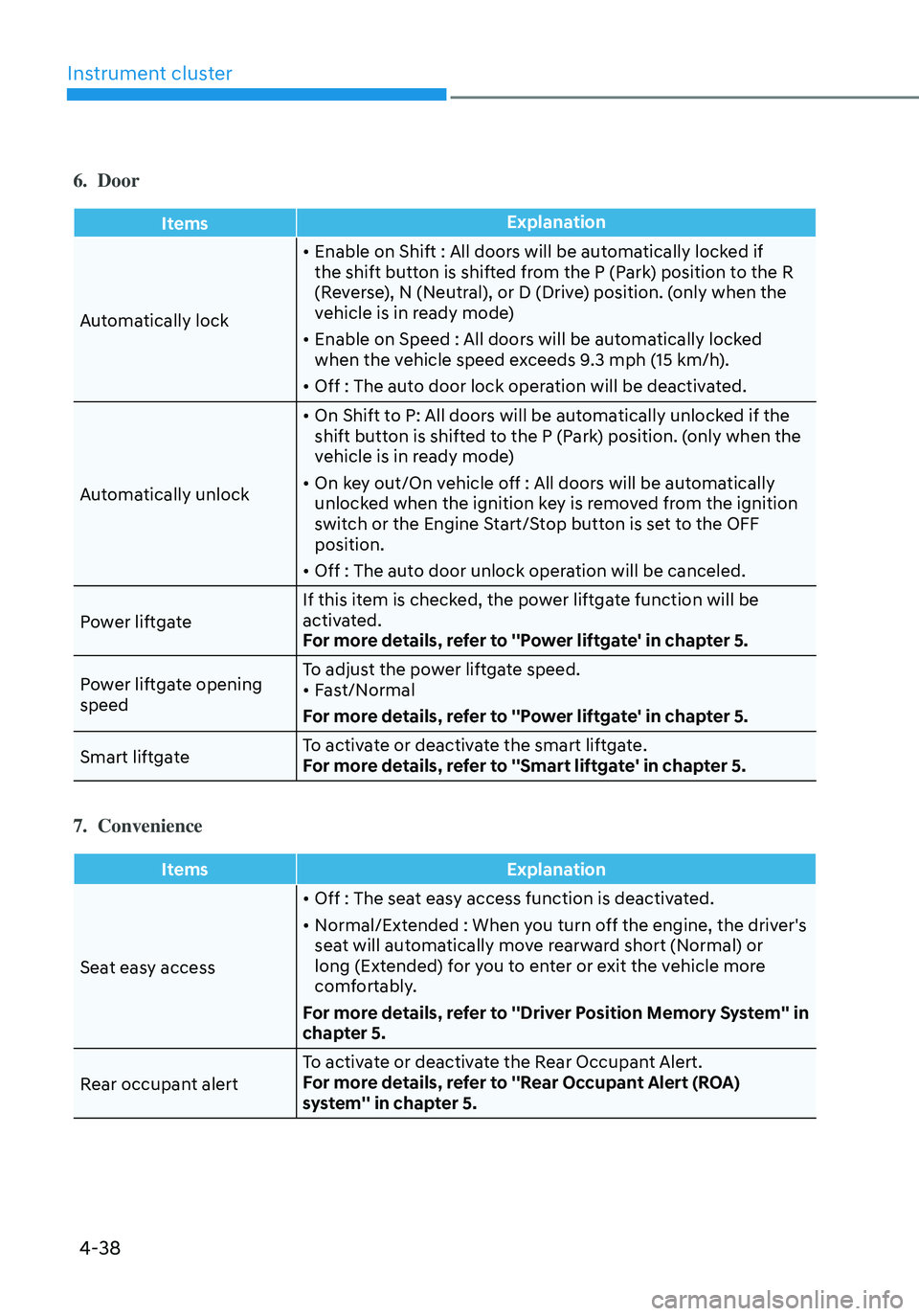
6. Door
ItemsExplanation
Automatically lock
• Enable on Shift : All doors will be automatically locked if
the shift button is shifted from the P (Park) position to the R
(Reverse), N (Neutral), or D (Drive) position. (only when the
vehicle is in ready mode)
• Enable on Speed : All doors will be automatically locked
when the vehicle speed exceeds 9.3 mph (15 km/h).
• Off : The auto door lock operation will be deactivated.
Automatically unlock
• On Shift to P: All doors will be automatically unlocked if the
shift button is shifted to the P (Park) position. (only when the
vehicle is in ready mode)
• On key out/On vehicle off : All doors will be automatically
unlocked when the ignition key is removed from the ignition
switch or the Engine Start/Stop button is set to the OFF
position.
• Off : The auto door unlock operation will be canceled.
Power liftgate If this item is checked, the power liftgate function will be
activated.
For more details, refer to ''Power liftgate' in chapter 5.
Power liftgate opening
speed To adjust the power liftgate speed.
• Fast/Normal
For more details, refer to ''Power liftgate' in chapter 5.
Smart liftgate To activate or deactivate the smart liftgate.
For more details, refer to ''Smart liftgate' in chapter 5.
7. Convenience
Items
Explanation
Seat easy access
• Off : The seat easy access function is deactivated.
• Normal/Extended : When you turn off the engine, the driver's
seat will automatically move rearward short (Normal) or
long (Extended) for you to enter or exit the vehicle more
comfortably.
For more details, refer to ''Driver Position Memory System'' in
chapter 5.
Rear occupant alert To activate or deactivate the Rear Occupant Alert.
For more details, refer to ''Rear Occupant Alert (ROA)
system'' in chapter 5.
Page 152 of 598
Instrument cluster
4-40
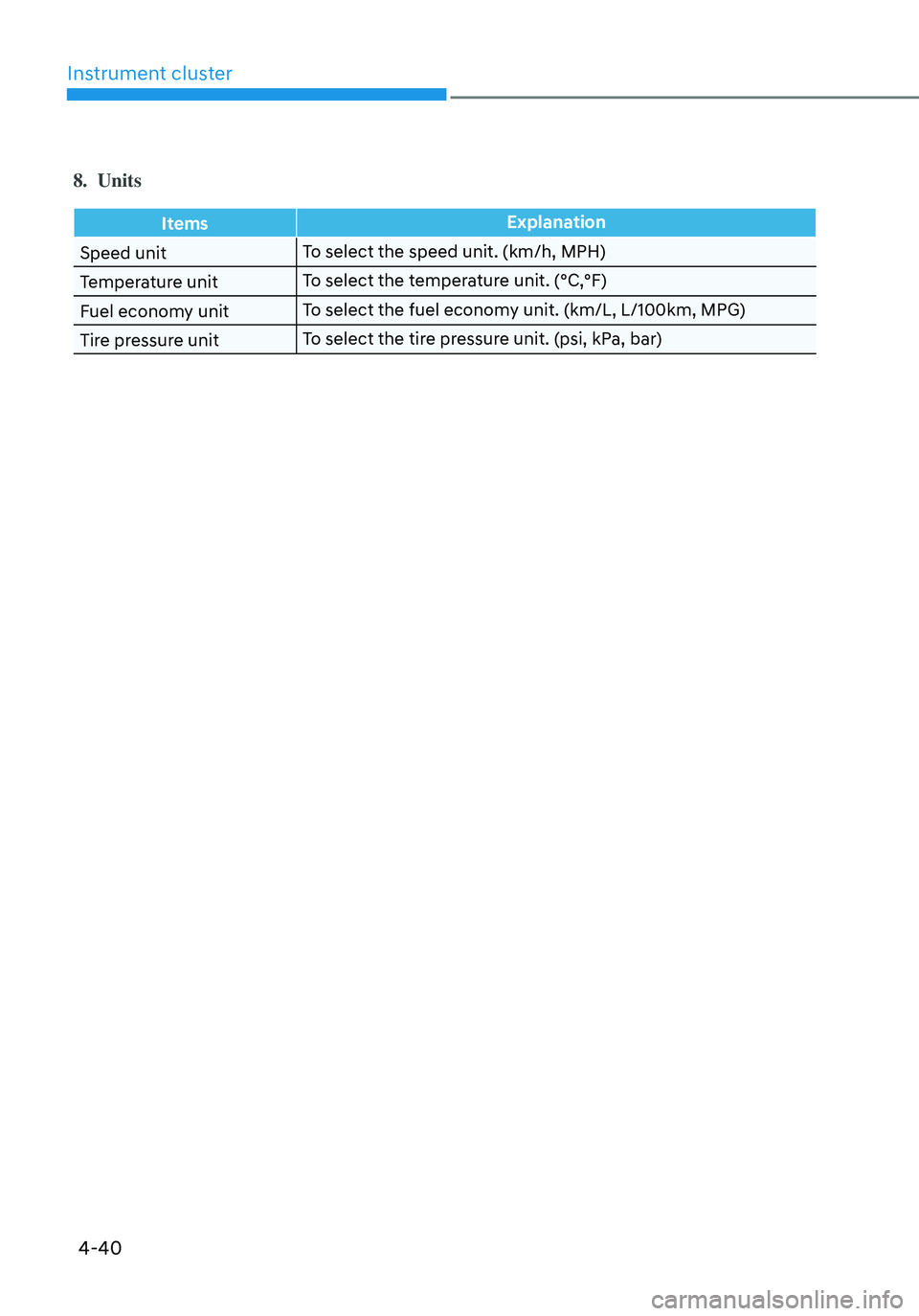
8. Units
ItemsExplanation
Speed unit To select the speed unit. (km/h, MPH)
Temperature unit To select the temperature unit. (°C,°F)
Fuel economy unit To select the fuel economy unit. (km/L, L/100km, MPG)
Tire pressure unit To select the tire pressure unit. (psi, kPa, bar)
Page 153 of 598
04
4-41
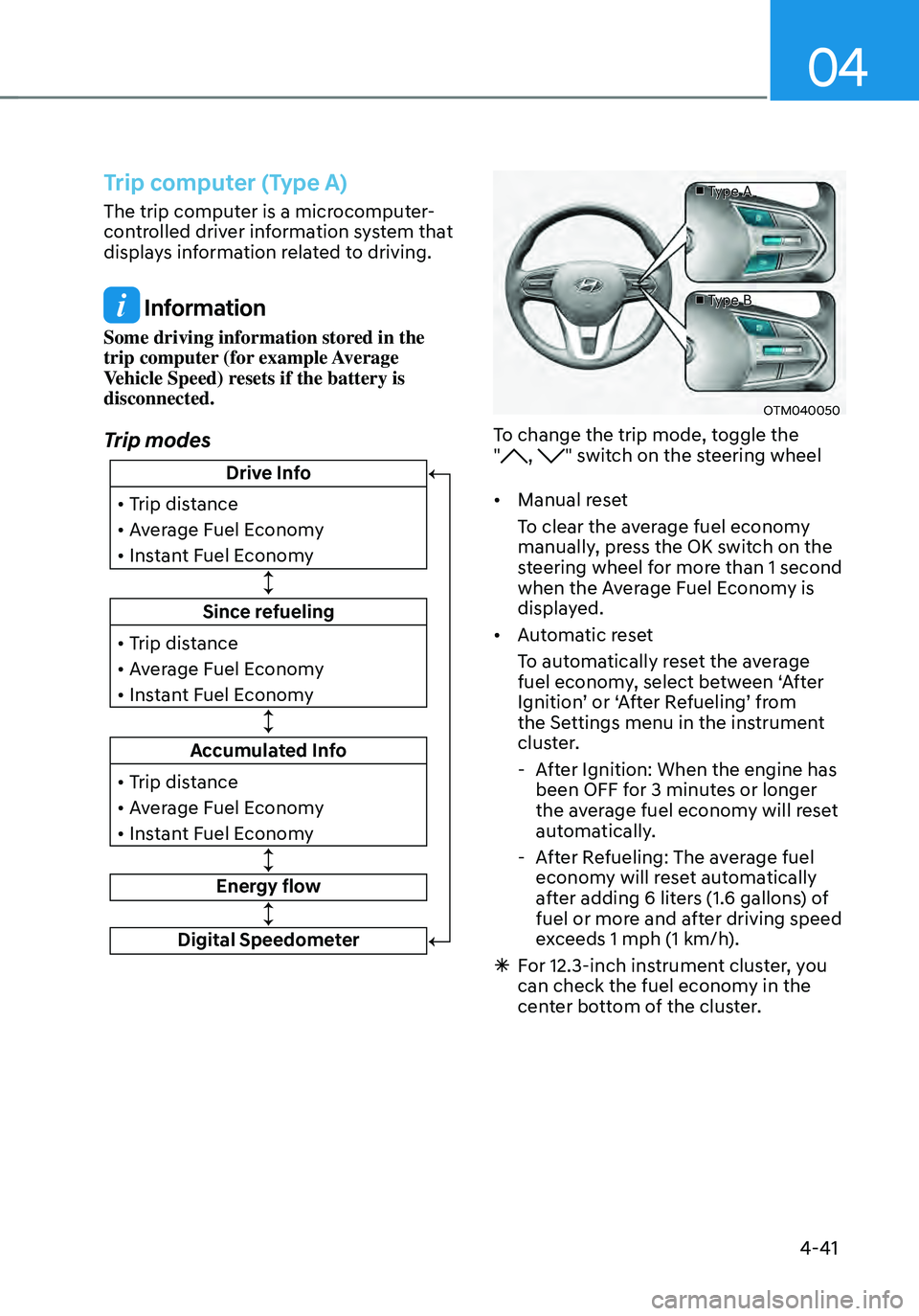
Trip computer (Type A)
The trip computer is a microcomputer-
controlled driver information system that
displays information related to driving.
Information
Some driving information stored in the
trip computer (for example Average
Vehicle Speed) resets if the battery is
disconnected.
Trip modes
Since refueling
• Trip distance
• Average Fuel Economy
• Instant Fuel Economy
Drive Info
• Trip distance
• Average Fuel Economy
• Instant Fuel Economy
Accumulated Info
• Trip distance
• Average Fuel Economy
• Instant Fuel Economy
Energy flow
Digital Speedometer
■ Type A
■ Type B
OTM040050
To change the trip mode, toggle the
", " switch on the steering wheel
• Manual reset
To clear the average fuel economy
manually, press the OK switch on the
steering wheel for more than 1 second
when the Average Fuel Economy is
displayed.
• Automatic reset
To automatically reset the average
fuel economy, select between ‘After
Ignition’ or ‘After Refueling’ from
the Settings menu in the instrument
cluster.
- After Ignition: When the engine has
been OFF for 3 minutes or longer
the average fuel economy will reset
automatically.
-After Refueling: The average fuel
economy will reset automatically
after adding 6 liters (1.6 gallons) of
fuel or more and after driving speed
exceeds 1 mph (1 km/h).
à For 12.3-inch instrument cluster, you
can check the fuel economy in the
center bottom of the cluster.
Page 154 of 598
Instrument cluster
4-42
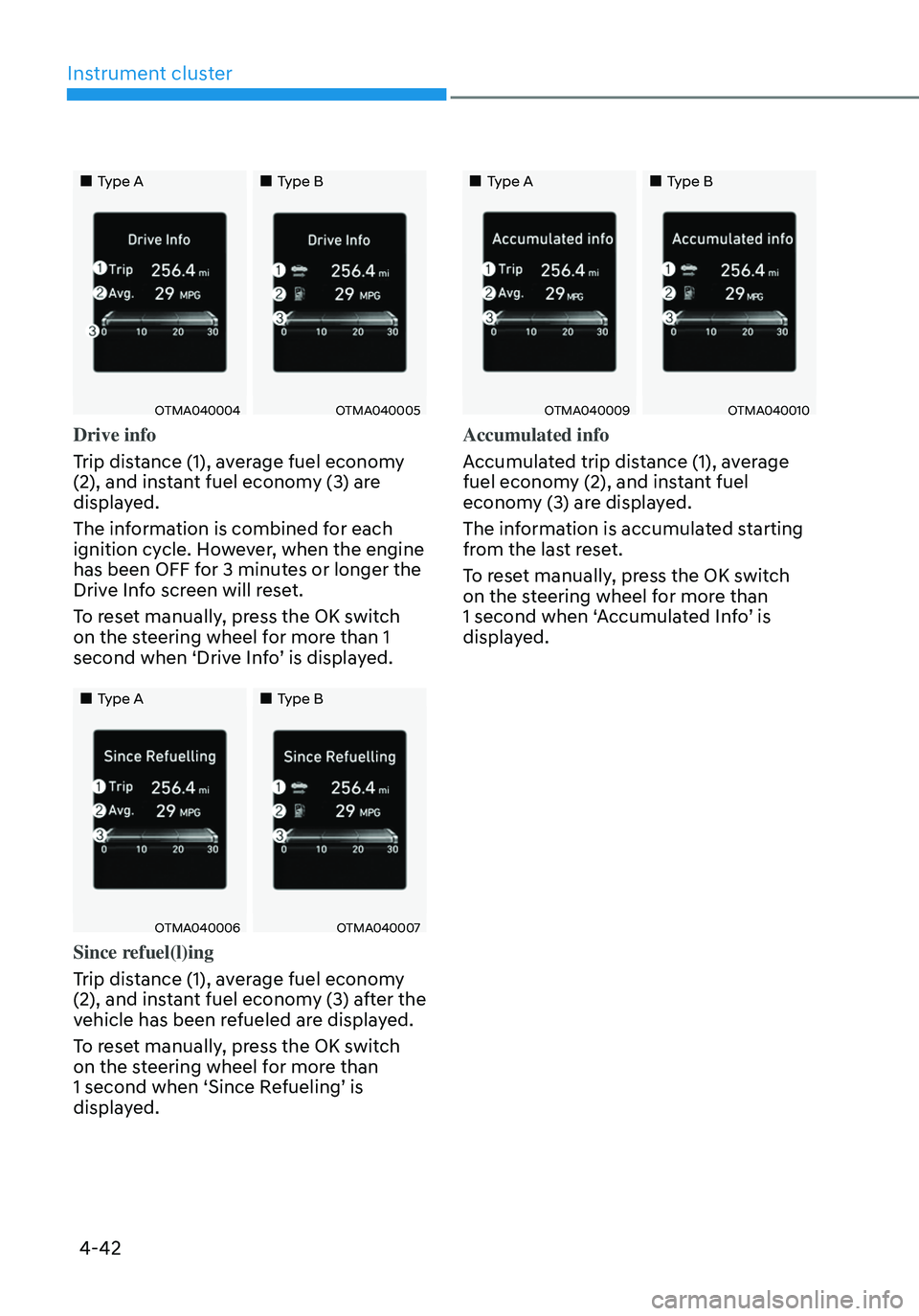
„„Type A„„Type B
OTMA040004OTMA040005
Drive info
Trip distance (1), average fuel economy
(2), and instant fuel economy (3) are
displayed.
The information is combined for each
ignition cycle. However, when the engine
has been OFF for 3 minutes or longer the
Drive Info screen will reset.
To reset manually, press the OK switch
on the steering wheel for more than 1
second when ‘Drive Info’ is displayed.
„„Type A„„Type B
OTMA040006OTMA040007
Since refuel(l)ing
Trip distance (1), average fuel economy
(2), and instant fuel economy (3) after the
vehicle has been refueled are displayed.
To reset manually, press the OK switch
on the steering wheel for more than
1 second when ‘Since Refueling’ is
displayed.
„„Type A„„Type B
OTMA040009OTMA040010
Accumulated info
Accumulated trip distance (1), average
fuel economy (2), and instant fuel
economy (3) are displayed.
The information is accumulated starting
from the last reset.
To reset manually, press the OK switch
on the steering wheel for more than
1 second when ‘Accumulated Info’ is
displayed.
Page 156 of 598
Instrument cluster
4-44
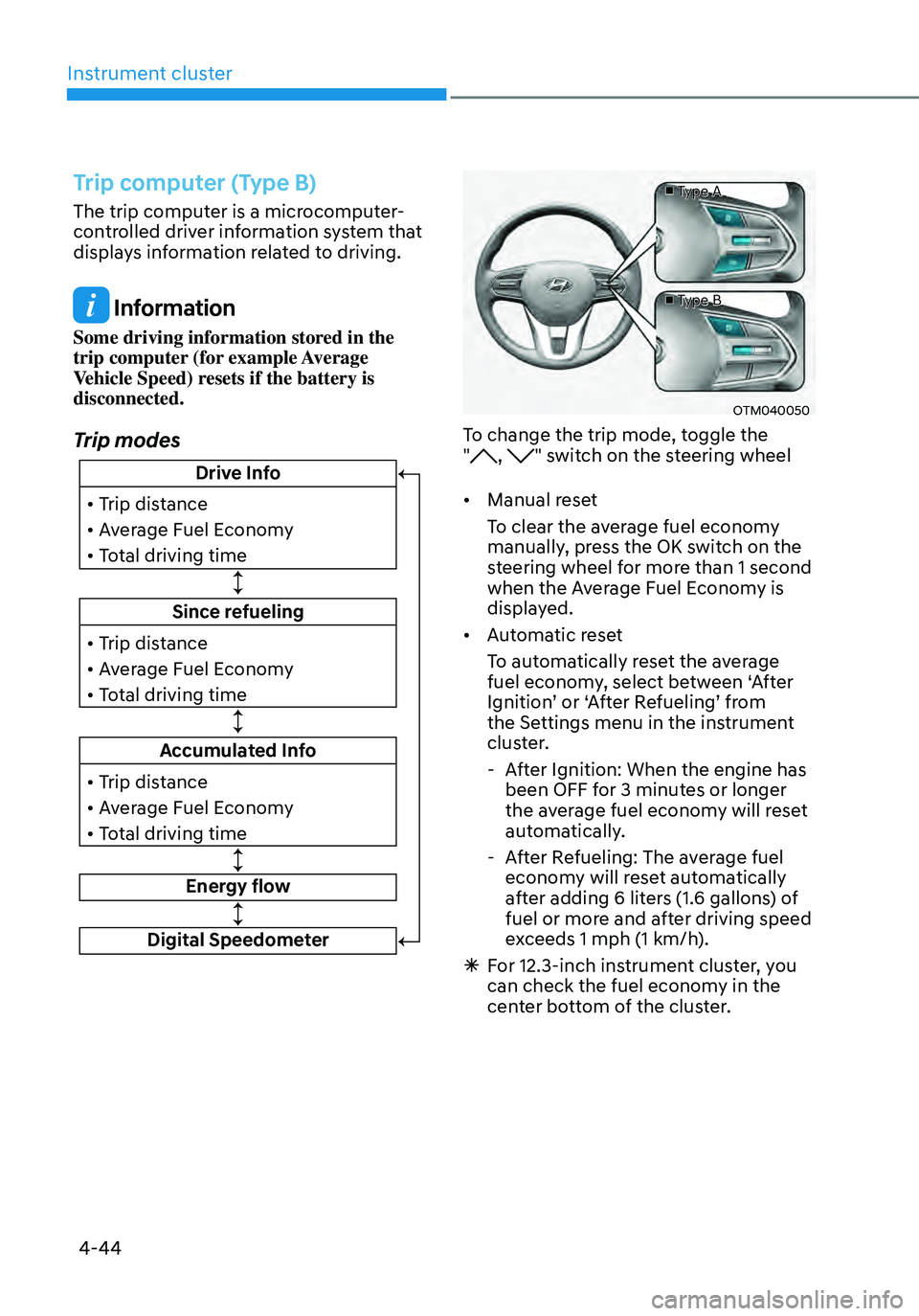
Trip computer (Type B)
The trip computer is a microcomputer-
controlled driver information system that
displays information related to driving.
Information
Some driving information stored in the
trip computer (for example Average
Vehicle Speed) resets if the battery is
disconnected.
Trip modes
Since refueling
• Trip distance
• Average Fuel Economy
• Total driving time
Drive Info
• Trip distance
• Average Fuel Economy
• Total driving time
Accumulated Info
• Trip distance
• Average Fuel Economy
• Total driving time
Energy flow
Digital Speedometer
■ Type A
■ Type B
OTM040050
To change the trip mode, toggle the
", " switch on the steering wheel
• Manual reset
To clear the average fuel economy
manually, press the OK switch on the
steering wheel for more than 1 second
when the Average Fuel Economy is
displayed.
• Automatic reset
To automatically reset the average
fuel economy, select between ‘After
Ignition’ or ‘After Refueling’ from
the Settings menu in the instrument
cluster.
- After Ignition: When the engine has
been OFF for 3 minutes or longer
the average fuel economy will reset
automatically.
-After Refueling: The average fuel
economy will reset automatically
after adding 6 liters (1.6 gallons) of
fuel or more and after driving speed
exceeds 1 mph (1 km/h).
à For 12.3-inch instrument cluster, you
can check the fuel economy in the
center bottom of the cluster.