2021 HYUNDAI SANTA FE HYBRID battery
[x] Cancel search: batteryPage 135 of 598
04
4-23
Press brake pedal to start engine (if
equipped)
This message is displayed if the Engine
Start/Stop button changes to the ACC
position twice by pressing the button
repeatedly without depressing the brake
pedal.
You can start the vehicle by depressing
the brake pedal and then pressing the
Engine Start/Stop button.
Key not in vehicle (if equipped)
This message is displayed if the smart
key is not in the vehicle when you press
the Engine Start/ Stop button.
When attempting to start the vehicle,
always have the smart key with you.
Key not detected (if equipped)
This message is displayed if the smart
key is not detected when you press the
Engine Start/Stop button.
Press START button again (if
equipped)
This message is displayed if you were
unable to start the vehicle when the
Engine Start/Stop button was pressed.
If this occurs, attempt to start the engine
by pressing the Engine Start/ Stop button
again.
If the warning message appears each
time you press the Engine Start/Stop
button, we recommend that you have
the vehicle inspected by an authorized
HYUNDAI dealer.
Press START button with key (if
equipped)
This message is displayed if you press
the Engine Start/Stop button while the
warning message “Key not detected” is
displayed.
At this time, the immobilizer indicator
light blinks.
Check BRAKE SWITCH fuse (if
equipped)
This message is displayed if the brake
switch fuse is disconnected.
You need to replace the fuse with a new
one before starting the engine.
If that is not possible, you can start the
engine by pressing the Engine Start/
Stop button for 10 seconds in the ACC
position.
12V battery discharging due to
additional electrical devices (if
equipped)
This message is displayed if the 12V
battery voltage is weak due to any
non-factory electrical accessories (ex.
dashboard camera) while parking. Be
careful that the battery is not discharged.
If the message appears after removing
the non-factory electrical accessories,
we recommend that you have the vehicle
inspected by an authorized HYUNDAI
dealer.
Page 137 of 598
04
4-25
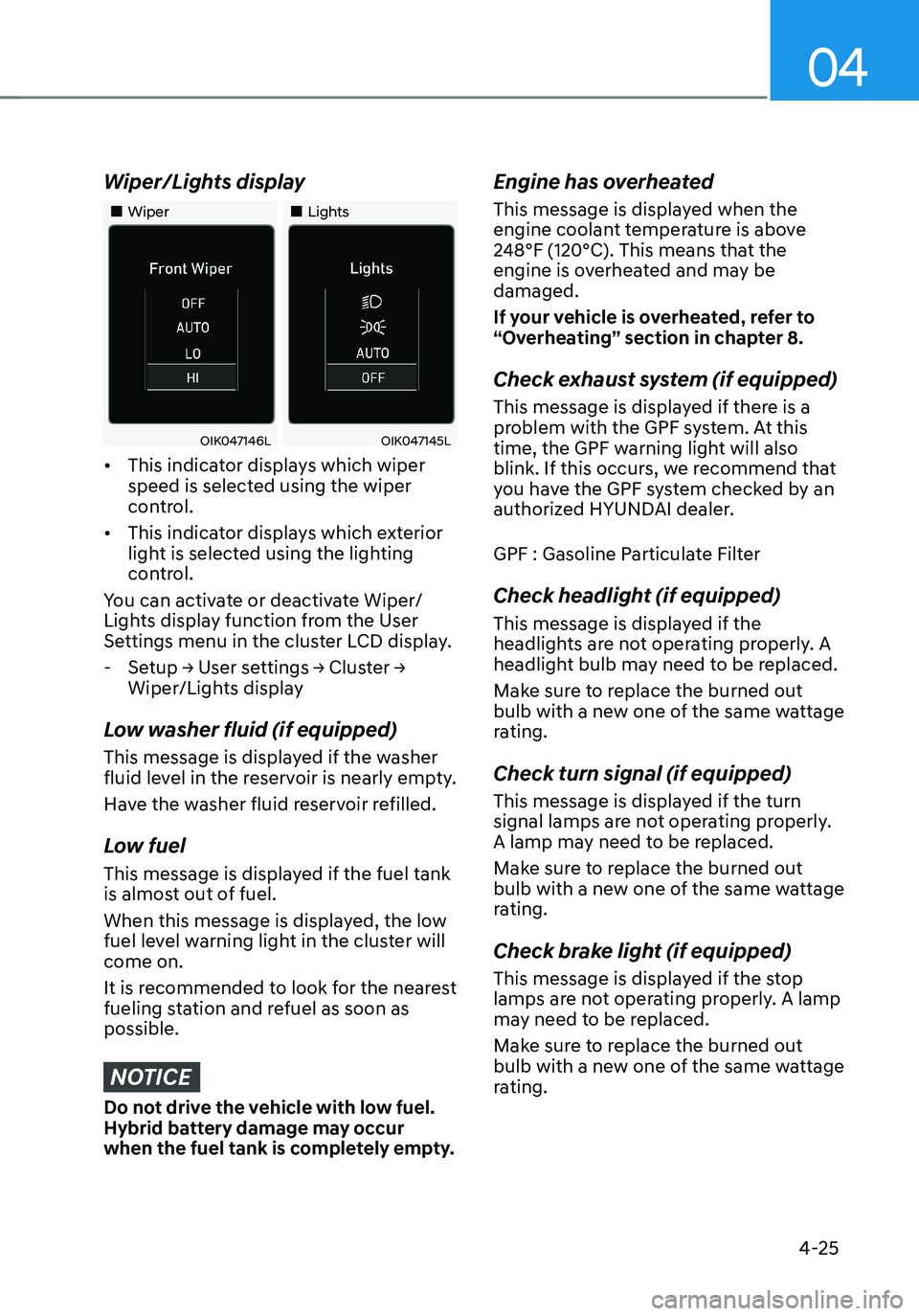
Wiper/Lights display
„„Wiper„„Lights
OIK047146LOIK047145L
• This indicator displays which wiper
speed is selected using the wiper
control.
• This indicator displays which exterior
light is selected using the lighting
control.
You can activate or deactivate Wiper/
Lights display function from the User
Settings menu in the cluster LCD display.
- Setup → User settings → Cluster →
Wiper/Lights display
Low washer fluid (if equipped)
This message is displayed if the washer
fluid level in the reservoir is nearly empty.
Have the washer fluid reservoir refilled.
Low fuel
This message is displayed if the fuel tank
is almost out of fuel.
When this message is displayed, the low
fuel level warning light in the cluster will
come on.
It is recommended to look for the nearest
fueling station and refuel as soon as
possible.
NOTICE
Do not drive the vehicle with low fuel.
Hybrid battery damage may occur
when the fuel tank is completely empty.
Engine has overheated
This message is displayed when the
engine coolant temperature is above
248°F (120°C). This means that the
engine is overheated and may be
damaged.
If your vehicle is overheated, refer to
“Overheating” section in chapter 8.
Check exhaust system (if equipped)
This message is displayed if there is a
problem with the GPF system. At this
time, the GPF warning light will also
blink. If this occurs, we recommend that
you have the GPF system checked by an
authorized HYUNDAI dealer.
GPF : Gasoline Particulate Filter
Check headlight (if equipped)
This message is displayed if the
headlights are not operating properly. A
headlight bulb may need to be replaced.
Make sure to replace the burned out
bulb with a new one of the same wattage
rating.
Check turn signal (if equipped)
This message is displayed if the turn
signal lamps are not operating properly.
A lamp may need to be replaced.
Make sure to replace the burned out
bulb with a new one of the same wattage
rating.
Check brake light (if equipped)
This message is displayed if the stop
lamps are not operating properly. A lamp
may need to be replaced.
Make sure to replace the burned out
bulb with a new one of the same wattage
rating.
Page 138 of 598

Instrument cluster
4-26
Check headlamp LED (if equipped)
This message is displayed if there is a
problem with the LED headlamp. We
recommend that you have the vehicle
inspected by an authorized HYUNDAI
dealer.
Check Active Air Flap system
This message is displayed in the
following situations:
-There is a malfunction with the
actuator flap
-There is a malfunction with the
actuator air flap controller
-The air flap does not open
When all of the above conditions are
fixed, the warning will disappear.
Ready to start driving
This message is displayed when the
vehicle is ready to be driven.
Check regenerative brakes
This message is displayed when the brake
performance is low or the regenerative
brake does not work properly due to a
failure in the brake system.
If this occurs, it may take longer for the
brake pedal to operate and the braking
distance may become longer.
Stop vehicle and check brakes
This message is displayed when a failure
occurs in the brake system.
If this occurs, park the vehicle in a
safe location and we recommend that
you tow your vehicle to the nearest
authorized HYUNDAI dealer and have the
vehicle inspected.
Check Hybrid system
This message is displayed when there
is a problem with the hybrid system.
Refrain from driving when the warning
message is displayed.
If this occurs, we recommend that
you have the vehicle inspected by an
authorized HYUNDAI dealer.
Stop safely and check Hybrid system
This message is displayed when there is
a problem with the hybrid system. The
“
” indicator will blink and a warning
chime will sound until the problem is
solved. Refrain from driving when the
warning message is displayed.
If this occurs, we recommend that
you have the vehicle inspected by an
authorized HYUNDAI dealer.
Check Hybrid system. Do not start
engine
This message is displayed when the
hybrid battery power (SOC) level is low.
A warning chime will sound until the
problem is solved. Refrain from driving
when the warning message is displayed.
If this occurs, we recommend that
you have the vehicle inspected by an
authorized HYUNDAI dealer.
Page 139 of 598
04
4-27
Stop safely and check power supply
This message is displayed when a failure
occurs in the power supply system.
If this occurs, park the vehicle in a safe
location and tow your vehicle to the
nearest authorized HYUNDAI dealer and
have the vehicle inspected.
Check virtual engine sound system
This message is displayed when there is
a problem with the Virtual Engine Sound
System (VESS).
If this occurs, we recommend that
you have the vehicle inspected by an
authorized HYUNDAI dealer.
Refill inverter coolant
This message is displayed when the
inverter coolant is nearly empty.
You should refill the inverter coolant.
Park with engine On to charge
battery
This message is displayed when the
hybrid battery power (SOC) level is low.
If this occurs, park the vehicle in a safe
location and wait until the hybrid battery
is charged.
Start engine to avoid battery
discharge
This message is displayed to inform the
driver the 12V battery may be discharged
if the ignition switch is in ON position
(without the
indicator ON).
Set the vehicle to the ready () mode
to prevent the 12V battery from being
discharged.
Page 153 of 598
04
4-41
Trip computer (Type A)
The trip computer is a microcomputer-
controlled driver information system that
displays information related to driving.
Information
Some driving information stored in the
trip computer (for example Average
Vehicle Speed) resets if the battery is
disconnected.
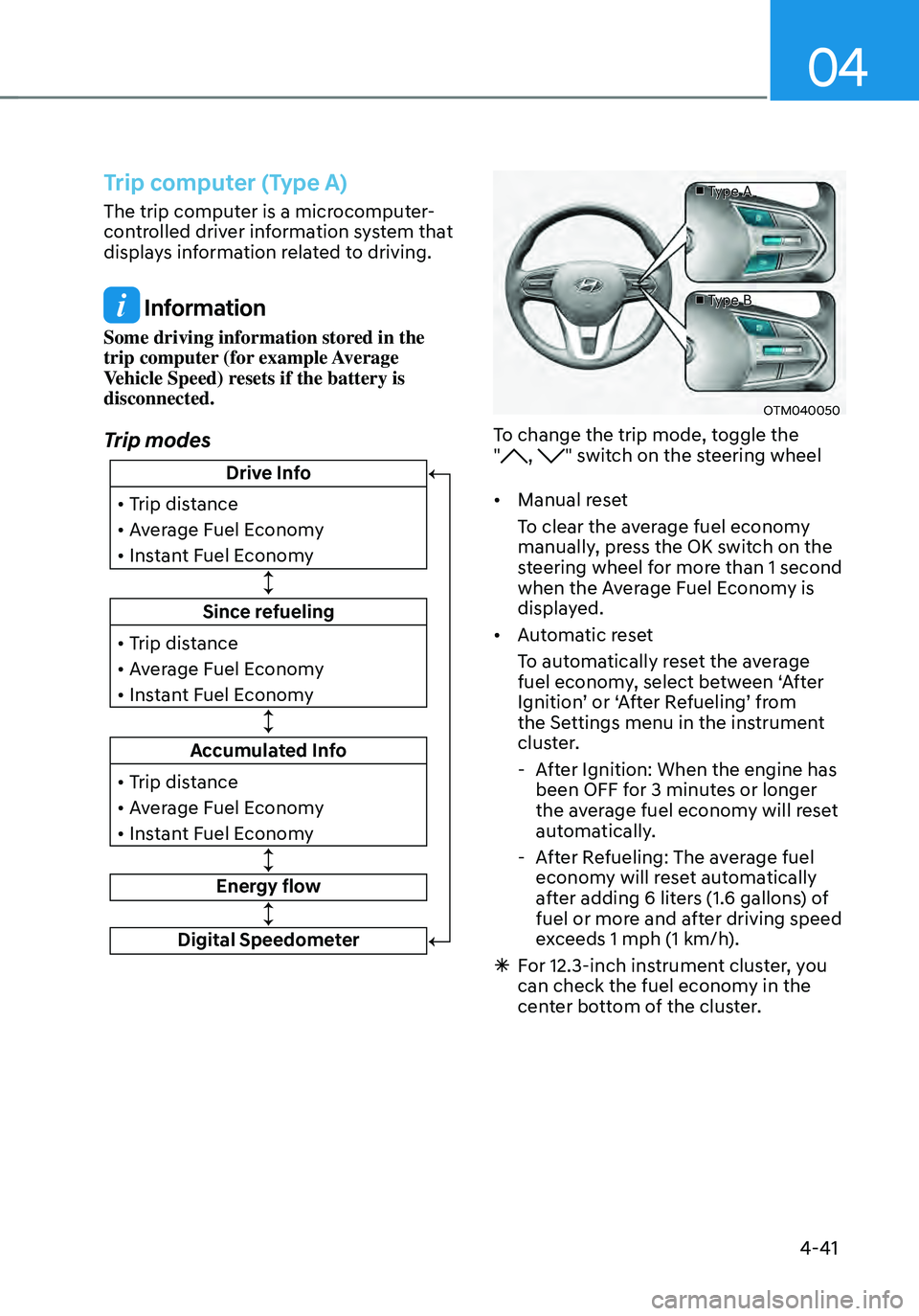
Trip modes
Since refueling
• Trip distance
• Average Fuel Economy
• Instant Fuel Economy
Drive Info
• Trip distance
• Average Fuel Economy
• Instant Fuel Economy
Accumulated Info
• Trip distance
• Average Fuel Economy
• Instant Fuel Economy
Energy flow
Digital Speedometer
■ Type A
■ Type B
OTM040050
To change the trip mode, toggle the
", " switch on the steering wheel
• Manual reset
To clear the average fuel economy
manually, press the OK switch on the
steering wheel for more than 1 second
when the Average Fuel Economy is
displayed.
• Automatic reset
To automatically reset the average
fuel economy, select between ‘After
Ignition’ or ‘After Refueling’ from
the Settings menu in the instrument
cluster.
- After Ignition: When the engine has
been OFF for 3 minutes or longer
the average fuel economy will reset
automatically.
-After Refueling: The average fuel
economy will reset automatically
after adding 6 liters (1.6 gallons) of
fuel or more and after driving speed
exceeds 1 mph (1 km/h).
à For 12.3-inch instrument cluster, you
can check the fuel economy in the
center bottom of the cluster.
Page 156 of 598
Instrument cluster
4-44
Trip computer (Type B)
The trip computer is a microcomputer-
controlled driver information system that
displays information related to driving.
Information
Some driving information stored in the
trip computer (for example Average
Vehicle Speed) resets if the battery is
disconnected.
Trip modes
Since refueling
• Trip distance
• Average Fuel Economy
• Total driving time
Drive Info
• Trip distance
• Average Fuel Economy
• Total driving time
Accumulated Info
• Trip distance
• Average Fuel Economy
• Total driving time
Energy flow
Digital Speedometer
■ Type A
■ Type B
OTM040050
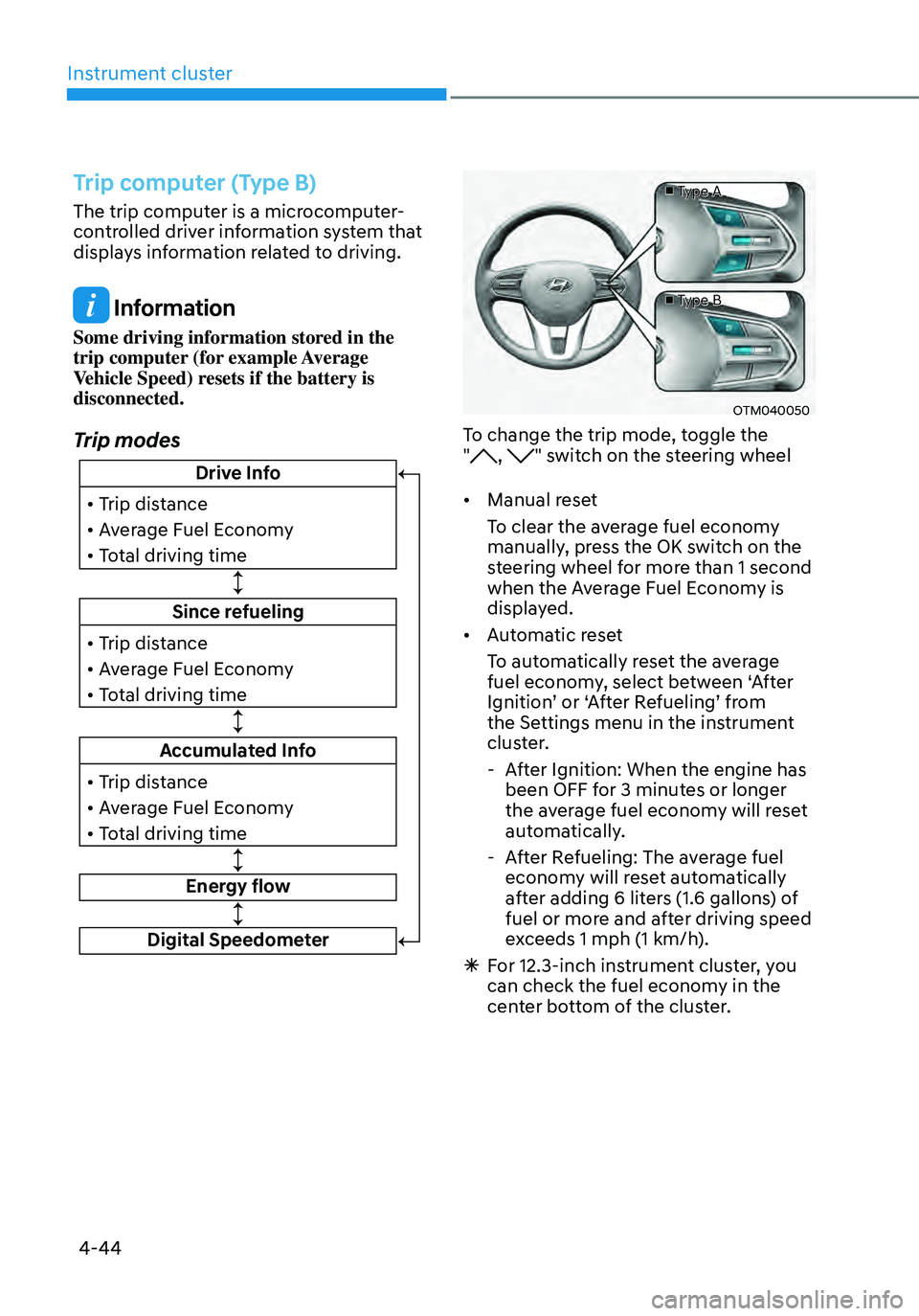
To change the trip mode, toggle the
", " switch on the steering wheel
• Manual reset
To clear the average fuel economy
manually, press the OK switch on the
steering wheel for more than 1 second
when the Average Fuel Economy is
displayed.
• Automatic reset
To automatically reset the average
fuel economy, select between ‘After
Ignition’ or ‘After Refueling’ from
the Settings menu in the instrument
cluster.
- After Ignition: When the engine has
been OFF for 3 minutes or longer
the average fuel economy will reset
automatically.
-After Refueling: The average fuel
economy will reset automatically
after adding 6 liters (1.6 gallons) of
fuel or more and after driving speed
exceeds 1 mph (1 km/h).
à For 12.3-inch instrument cluster, you
can check the fuel economy in the
center bottom of the cluster.
Page 167 of 598
05
5-9
Information
This device complies with Part 15 of the
FCC rules.
Operation is subject to the following three
conditions:
1. This device may not cause harmful
interference.
2. This device must accept any
interference received, including
interference that may cause undesired
operation.
3. Changes or modifications not expressly
approved by the party responsible
for compliance could void the user’s
authority to operate the device.
NOTICE
• Keep the smart key away from
electromagnetic materials that
blocks electromagnetic waves to the
key surface.
• Always have the smart key with
you when leaving the vehicle. If the
smart key is left near the vehicle, the
vehicle battery may be discharged.
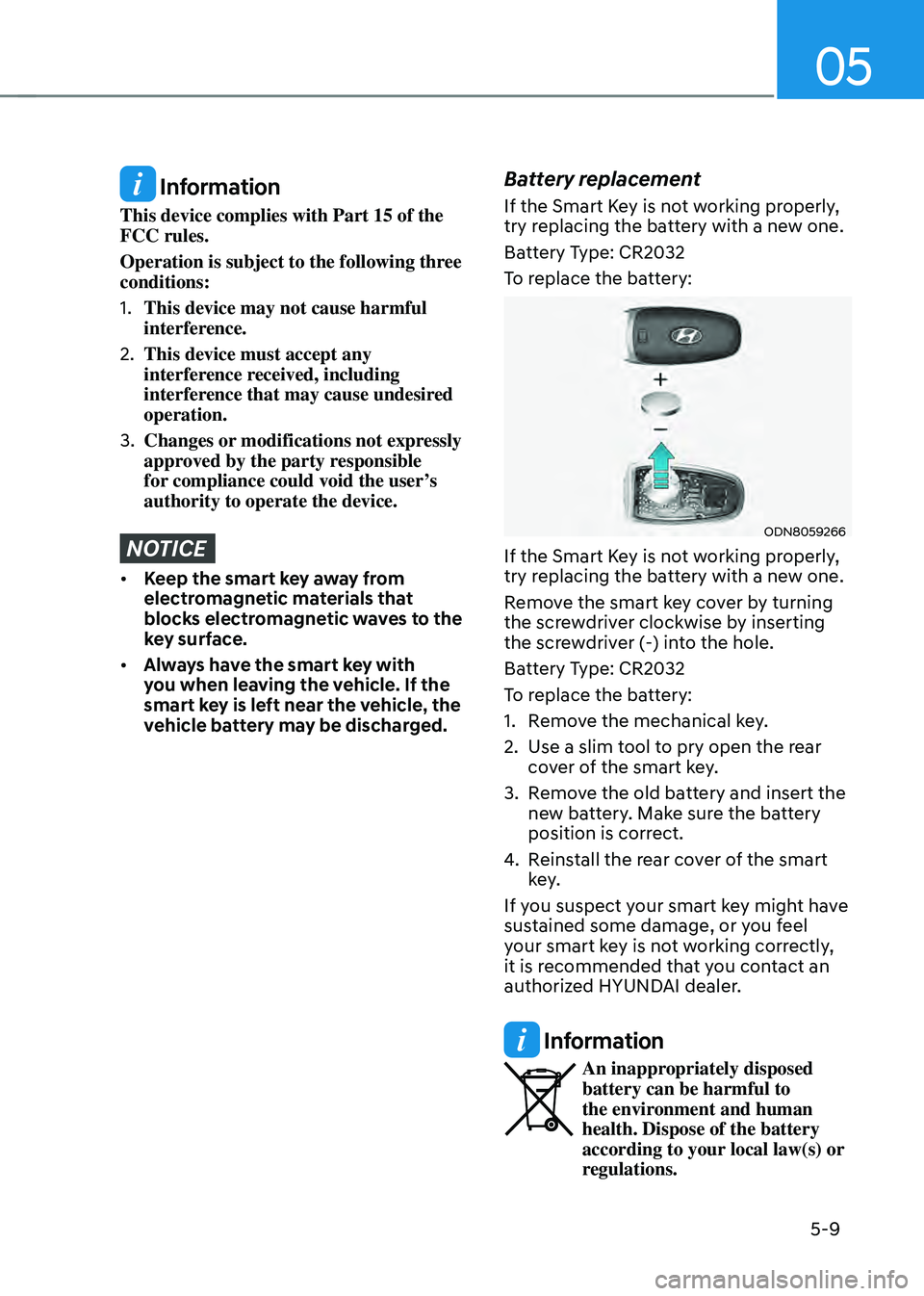
Battery replacement
If the Smart Key is not working properly,
try replacing the battery with a new one.
Battery Type: CR2032
To replace the battery:
ODN8059266
If the Smart Key is not working properly,
try replacing the battery with a new one.
Remove the smart key cover by turning
the screwdriver clockwise by inserting
the screwdriver (-) into the hole.
Battery Type: CR2032
To replace the battery:
1. Remove the mechanical key.
2. Use a slim tool to pry open the rear
cover of the smart key.
3. Remove the old battery and insert the
new battery. Make sure the battery
position is correct.
4. Reinstall the rear cover of the smart
key.
If you suspect your smart key might have
sustained some damage, or you feel
your smart key is not working correctly,
it is recommended that you contact an
authorized HYUNDAI dealer.
Information
An inappropriately disposed battery can be harmful to
the environment and human
health. Dispose of the battery
according to your local law(s) or
regulations.
Page 173 of 598
05
5-15
After unlock the door or start up the
vehicle with digital key, even though
the driver tries to lock the doors by the
central door lock switch, the door lock
will be once locked and immediately
released at the moment of door closed.
Start-up with Digital Key
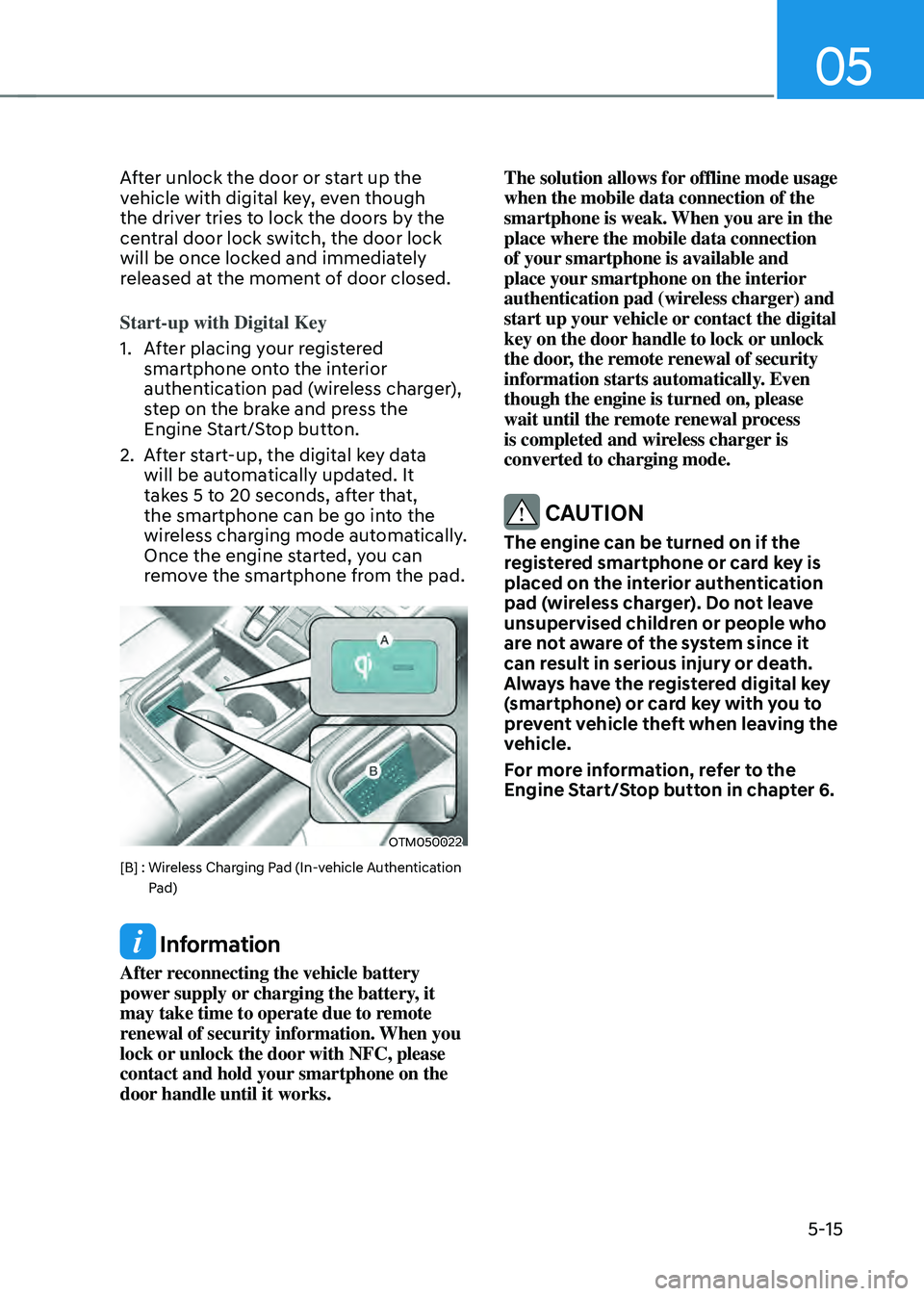
1. After placing your registered
smartphone onto the interior
authentication pad (wireless charger),
step on the brake and press the
Engine Start/Stop button.
2. After start-up, the digital key data
will be automatically updated. It
takes 5 to 20 seconds, after that,
the smartphone can be go into the
wireless charging mode automatically.
Once the engine started, you can
remove the smartphone from the pad.
OTM050022
[B] : Wireless Charging Pad (In-vehicle Authentication Pad)
Information
After reconnecting the vehicle battery
power supply or charging the battery, it
may take time to operate due to remote
renewal of security information. When you
lock or unlock the door with NFC, please
contact and hold your smartphone on the
door handle until it works. The solution allows for offline mode usage
when the mobile data connection of the
smartphone is weak. When you are in the
place where the mobile data connection
of your smartphone is available and
place your smartphone on the interior
authentication pad (wireless charger) and
start up your vehicle or contact the digital
key on the door handle to lock or unlock
the door, the remote renewal of security
information starts automatically. Even
though the engine is turned on, please
wait until the remote renewal process
is completed and wireless charger is
converted to charging mode.
CAUTION
The engine can be turned on if the
registered smartphone or card key is
placed on the interior authentication
pad (wireless charger). Do not leave
unsupervised children or people who
are not aware of the system since it
can result in serious injury or death.
Always have the registered digital key
(smartphone) or card key with you to
prevent vehicle theft when leaving the
vehicle.
For more information, refer to the
Engine Start/Stop button in chapter 6.