2021 HYUNDAI PALISADE reset
[x] Cancel search: resetPage 311 of 612

5
Blind-Spot Collision Warning/
Blind-Spot Collision-Avoidance Assist .............5-78
System Description .........................................................5-78
System Setting and Operation .....................................5-79
Warning and System Control .......................................5-82
Detecting Sensor (Camera and Radar) ......................5-84
Limitations of the System .............................................5-87
Declaration of conformity .................................5-92
The radio frequency components
(Rear Corner Radar) complies: ....................................5-92
Rear Cross-Traffic Collision Warning (RCCW)/
Rear Cross-Traffic Collision-Avoidance Assist
(RCCA) ...................................................................5-93
System Description .........................................................5-93
System Setting and Operation .....................................5-94
Warning and System Control .......................................5-96
Detecting Sensor .............................................................5-99
Limitations of the System...........................................5-100
Lane Following Assist (LFA) system ...............5-104
LFA Setting and Operation .........................................5-105
Warning Message .........................................................5-106
Limitations of the System...........................................5-108
Lane Keeping Assist (LKA) system .................5-110
LKA System Operation.................................................5-111
Warning Light and Message ......................................5-113
Limitations of the System...........................................5-115
LKA System Function Change ...................................5-117
Driver Attention Warning (DAW) system .......5-118
System Setting and Operation...................................5-118
Resetting the System ...................................................5-119
System Standby.............................................................5-120
System Malfunction .....................................................5-120
Highway Driving Assist (HDA) system ............5-122
System Setting and Operation...................................5-122
Warning Message .........................................................5-125
Smart Cruise Control With Stop &
Go System ...........................................................5-129
Smart Cruise Control Switch ......................................5-130
Adjusting the Sensitivity of Smart Cruise
Control .............................................................................5-130
To Convert to Cruise Control Mode .........................5-131
Smart Cruise Control Speed .......................................5-132
Smart Cruise Control Vehicle-to-Vehicle
Distance ...........................................................................5-136
Sensor to Detect Distance to the
Vehicle Ahead ................................................................5-139
Limitations of the System...........................................5-141
Page 428 of 612
5-119
Driving your vehicle
5
When the driver turns on the sys-
tem while driving, it displays 'Last
Break time' and level.
Take a break
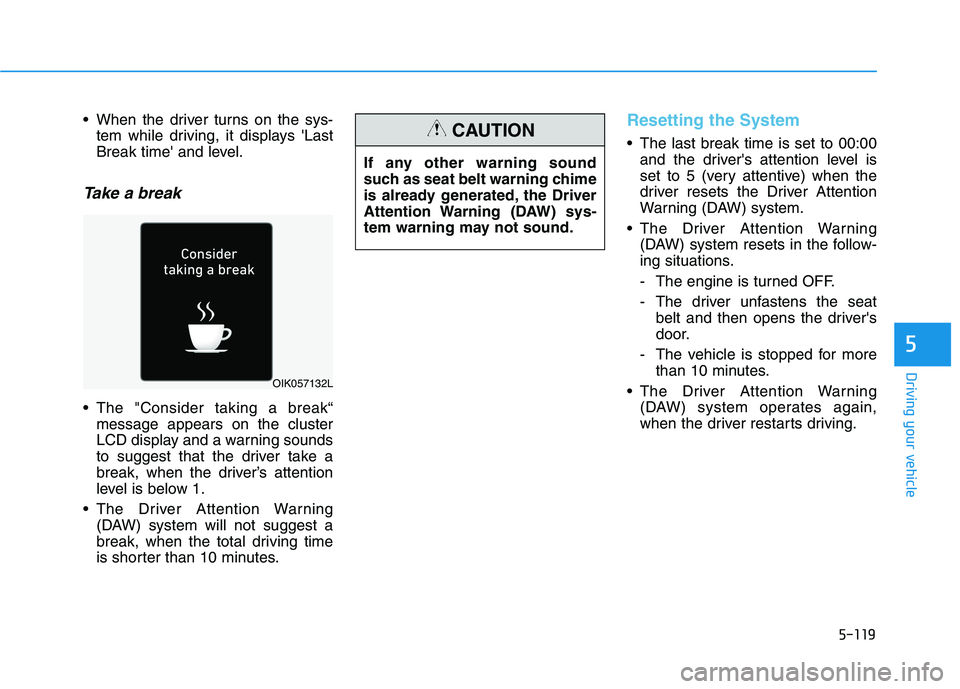
The "Consider taking a break“
message appears on the cluster
LCD display and a warning sounds
to suggest that the driver take a
break, when the driver’s attention
level is below 1.
The Driver Attention Warning
(DAW) system will not suggest a
break, when the total driving time
is shorter than 10 minutes.
Resetting the System
The last break time is set to 00:00
and the driver's attention level is
set to 5 (very attentive) when the
driver resets the Driver Attention
Warning (DAW) system.
The Driver Attention Warning
(DAW) system resets in the follow-
ing situations.
- The engine is turned OFF.
- The driver unfastens the seat
belt and then opens the driver's
door.
- The vehicle is stopped for more
than 10 minutes.
The Driver Attention Warning
(DAW) system operates again,
when the driver restarts driving.
OIK057132L
If any other warning sound
such as seat belt warning chime
is already generated, the Driver
Attention Warning (DAW) sys-
tem warning may not sound.
CAUTION
Page 436 of 612

5-127
Driving your vehicle
5
Information
• Highway Driving Assist is limited in
other countries.
• Highway Driving Assist only oper-
ates based on the speed limits of the
highway but it does not work with
the speed cameras.
• The time gap could occur between
the navigation speed warning and
system operation.
• The system is not designed to work
on highways other than mentioned
as a controlled access road. The sys-
tem automatically cancels when you
leave the highway.
• If there is a problem with Highway
Driving Assist, the system cannot be
activated in the infotainment system
screen.
• If your vehicle is 1640 ft. (500 m)
ahead and behind of an open toll-
gate, the system is automatically
canceled. Also, it is converted to
Smart Cruise Control automatically
with a pop-up message on the navi-
gation.• In the automatic speed setting
mode, the vehicle automatically
accelerates or decelerates when the
highway speed limit changes.
• If your vehicle speed exceeds 95
mph (153 km/h), Highway Driving
Assist is automatically canceled.
Also, it is converted to Smart Cruise
Control automatically with a pop-
up message on the navigation.
• If you enter a rest area on the high-
way or a IC/JC (intersection/junc-
tion) without a destination set, the
system is canceled later than when
the vehicle actually leaves the high-
way.
i
The Highway Driving Assist
system may not function prop-
erly in the following situations:
The navigation is not working
properly.
The navigation is not updated.
The real-time GPS or map
information provided has
errors.
The navigation is overloaded
by performing functions such
as route search, video play-
back, voice recognition, etc.
are performing simultaneous-
ly.
GPS signals are blocked in
areas such as a tunnel.
The driver goes off course or
the route to the destination is
changed or canceled by reset-
ting the navigation.
The vehicle enters a service
station or rest area
Android Auto or Car Play is
operating.
CAUTION
Page 437 of 612
5-128
Driving your vehicle
Information
• For information's on vehicle to vehi-
cle distance control and the front
radar, refer to "Smart Cruise
Control (Stop & Go)" in this chap-
ter.
• For information's on steering con-
trol and distance control and the
front camera, refer to "Lane
Following Assist (LFA)" in this
chapter.
Information
This device complies with Part 15 of
the FCC rules.
Operation is subject to the following
three conditions:
1. This device may not cause harmful
interference, and
2. This device must accept any inter-
ference received, including interfer-
ence that may cause undesired
operation.
3. Changes or modifications not
expressly approved by the party
responsible for compliance could
void the user's authority to operate
the device.
Information
Radio frequency radiation exposure
information:
This equipment complies with FCC
radiation exposure limits set forth for
an uncontrolled environment.
This equipment should be installed
and operated with minimum distance
of 8 in. (20 cm) between the radiator
(antenna) and your body.
This transmitter must not be co-locat-
ed or operating in conjunction with
any other antenna or transmitter.
ii
i
The navigation cannot detect
the current vehicle position
(ex: elevated roads including
overpass adjacent to general
roads or nearby roads exist in
a parallel way).
The navigation is being updat-
ed while driving.
The navigation is being reset
while driving.
The road is slippery due to
bad weather such as rain or
snow.
Page 505 of 612
7
Maintenance
7
Maintenance
Engine compartment .............................................7-3
Maintenance services ...........................................7-4
Owner's Responsibility .....................................................7-4
Owner Maintenance Precautions..................................7-4
Owner maintenance ...............................................7-5
Owner Maintenance Schedule .......................................7-6
Scheduled maintenance services.........................7-7
Normal Maintenance Schedule (3.8 GDI) ....................7-8
Maintenance Under Severe Usage Conditions
(3.8 GDI) .............................................................................7-11
Explanation of scheduled maintenance items .7-13
Engine oil ..............................................................7-16
Checking the Engine Oil Level .....................................7-16
Checking the Engine Oil and Filter .............................7-17
Engine coolant......................................................7-18
Checking the Engine Coolant Level ............................7-18
Changing Engine Coolant ..............................................7-20
Brake fluid ............................................................7-21
Checking the Brake Fluid Level ...................................7-21
Washer fluid .........................................................7-22
Checking the Washer Fluid Level................................7-22
Air cleaner ............................................................7-22
Filter Replacement ..........................................................7-22
Climate control air filter .....................................7-24
Filter Inspection ...............................................................7-24
Wiper blades .........................................................7-26
Blade Inspection ..............................................................7-26
Blade Replacement .........................................................7-26
Battery...................................................................7-29
For Best Battery Service ..............................................7-30
Battery Recharging ........................................................7-31
Reset Features.................................................................7-32
Tires and wheels ..................................................7-33
Tire Care ............................................................................7-33
Recommended Cold Tire Inflation Pressures ...........7-34
Check Tire Inflation Pressure ......................................7-35
Tire Rotation.....................................................................7-35
Wheel Alignment and Tire Balance ............................7-36
Tire Replacement ...........................................................7-37
Wheel Replacement ........................................................7-38
Tire Traction .....................................................................7-38
Tire Maintenance ............................................................7-39
Tire Sidewall Labeling ....................................................7-39
Tire Terminology and Definitions................................7-43
All Season Tires ...............................................................7-46
Snow Tires ........................................................................7-46
Radial-Ply Tires ...............................................................7-46
7
Page 536 of 612

7-32
Maintenance
By jump starting
After a jump start from a good bat-
tery, drive the vehicle for at least 30
minutes or operate at idle for at least
60 minutes before it is shutoff.
Alternatively you may visit a dealer
for charge and battery test.
The vehicle may not restart if you
shut it off before the battery had a
chance to adequately recharge. See
"Jump Starting" in chapter 6 for more
information on jump starting proce-
dures.
Information
An inappropriately disposed
battery can be harmful to
the environment and human
health. Dispose of the bat-
tery according to your local
law(s) or regulations.
Reset Features
The following items may need to be
reset after the battery has been dis-
charged or the battery has been dis-
connected. See chapter 3 or 4 for:
Power Windows
Driver Position Memory System
Trip Computer
Climate Control System
Clock
Audio System
Sunroof
i
Page 540 of 612
7-36
Maintenance
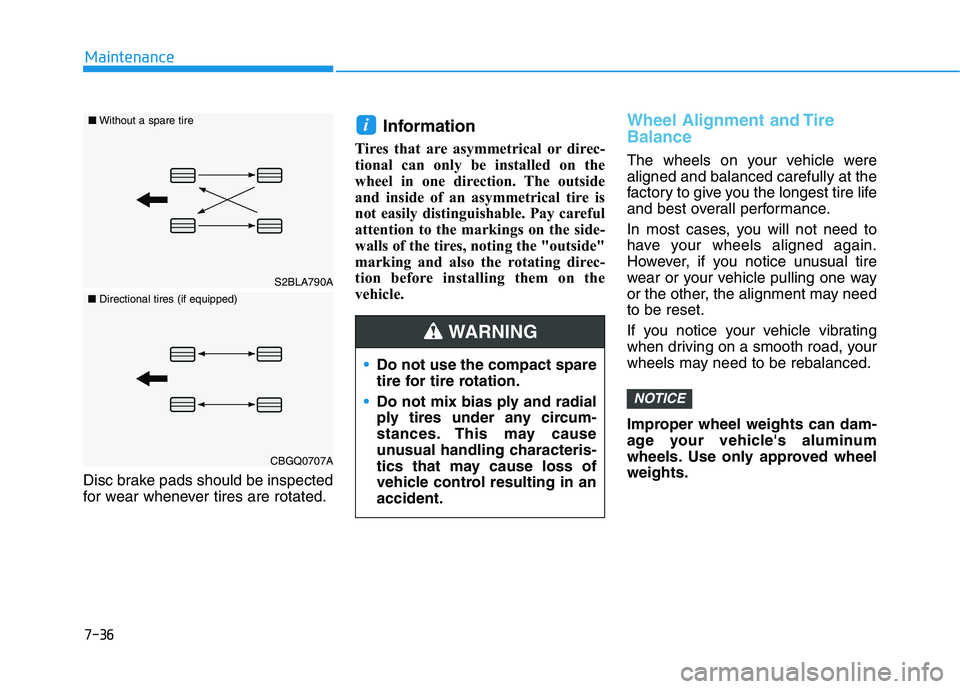
Disc brake pads should be inspected
for wear whenever tires are rotated.
Information
Tires that are asymmetrical or direc-
tional can only be installed on the
wheel in one direction. The outside
and inside of an asymmetrical tire is
not easily distinguishable. Pay careful
attention to the markings on the side-
walls of the tires, noting the "outside"
marking and also the rotating direc-
tion before installing them on the
vehicle.
Wheel Alignment and Tire
Balance
The wheels on your vehicle were
aligned and balanced carefully at the
factory to give you the longest tire life
and best overall performance.
In most cases, you will not need to
have your wheels aligned again.
However, if you notice unusual tire
wear or your vehicle pulling one way
or the other, the alignment may need
to be reset.
If you notice your vehicle vibrating
when driving on a smooth road, your
wheels may need to be rebalanced.
Improper wheel weights can dam-
age your vehicle's aluminum
wheels. Use only approved wheel
weights.
NOTICE
i
Do not use the compact spare
tire for tire rotation.
Do not mix bias ply and radial
ply tires under any circum-
stances. This may cause
unusual handling characteris-
tics that may cause loss of
vehicle control resulting in an
accident.
WARNING
S2BLA790A
■Without a spare tire
CBGQ0707A
■Directional tires (if equipped)
Page 602 of 612

I-4
Child restraint system (CRS) ..........................................2-46
Booster seats...............................................................2-48
Forward-facing child restraints ..................................2-48
Installing a child restraint system (CRS) ...................2-49
Lower anchors and tether for children
(LATCH system) .....................................................2-50
Securing a child restraint seat with "Tether Anchor"
system......................................................................2-52
Securing a child restraint with lap/shoulder belt .......2-53
Securing a child restraint with the LATCH anchors
system......................................................................2-51
Selecting a child restraint system (CRS) ...................2-47
Child-protector rear door lock ........................................3-20
Climate control air filter .................................................7-24
Clock .............................................................................3-203
Cluster ionizer ...............................................................3-191
Coat hanger ...................................................................3-203
Crankcase emission control system ................................7-77
Cup holder.....................................................................3-194
Curtain air bags ...............................................................2-62
Day/night rearview mirror ..............................................3-33
Daytime running light (DRL) .......................................3-132
Declaration of conformity .............................................5-92
Defroster .......................................................................3-190
Rear window defroster .............................................3-190Dimensions .......................................................................8-2
Door locks .......................................................................3-15
Auto door lock/unlock features ..................................3-19
Central door lock/unlock switch ................................3-17
Child-protector rear door lock....................................3-20
Electronic child safety lock system............................3-20
Downhill Brake Control (DBC) .....................................5-39
Drive Mode............................................................5-55, 5-59
Drive mode integrated control system
Drive Mode ................................................................5-55
Drive mode integrated control system (AWD)
Drive Mode ................................................................5-59
Driver Attention Warning (DAW) system ....................5-118
Driver position memory system .....................................3-27
Easy access function ..................................................3-29
Recalling positions from memory ..............................3-28
Resetting the driver's seat memory system ................3-28
Storing positions into memory ...................................3-27
Driver's air bag................................................................2-59
Driver's knee air bag .......................................................2-59
Driving at night .............................................................5-150
Driving in flooded areas ...............................................5-151
Driving in the rain.........................................................5-150
Index
D