2021 HYUNDAI PALISADE cruise control
[x] Cancel search: cruise controlPage 345 of 612

5-36
Driving your vehicle
When operating
When the ESC is in opera-
tion, the ESC indicator light
blinks:
When you apply your brakes under
conditions which may lock the
wheels, you may hear sounds from
the brakes, or feel a corresponding
sensation in the brake pedal. This
is normal and it means your ESC is
active.
When the ESC activates, the
engine may not respond to the
accelerator as it does under rou-
tine conditions.
If the Cruise Control was in use
when the ESC activates, the Cruise
Control automatically disengages.
The Cruise Control can be reen-
gaged when the road conditions
allow. See "Cruise Control System"
later in this chapter. (if equipped)
When moving out of the mud or
driving on a slippery road, the
engine RPM (revolutions per
minute) may not increase even if
you press the accelerator pedal
deeply. This is to maintain the sta-
bility and traction of the vehicle and
does not indicate a problem.
ESC OFF condition
To cancel ESC operation :
State 1
Press the ESC OFF button briefly.
The ESC OFF indicator light and
message "Traction Control disabled"
will illuminate. In this state, the trac-
tion control function of ESC (engine
management) is disabled, but the
brake control function of ESC (brak-
ing management) still operates.
Press and hold the ESC OFF button
continuously for more than 3 sec-
onds. The ESC OFF indicator light
and message "Traction and Stability
Control disabled" illuminates and a
warning chime sounds. In this state,
both the traction control function of
ESC (engine management) and the
brake control function of ESC (brak-
ing management) are disabled.
If the ignition switch is placed to the
LOCK/OFF position when ESC is off,
ESC remains off. Upon restarting the
engine, the ESC will automatically turn
on again.
Indicator lights
When the ignition switch is placed to
the ON position, the ESC indicator
light illuminates, then goes off if the
ESC system is operating normally.
The ESC indicator light blinks when-
ever the ESC is operating.
If ESC indicator light stays on, your
vehicle may have a malfunction with
the ESC system. When this warning
light illuminates have your vehicle
checked by an authorized HYUNDAI
dealer as soon as possible.
The ESC OFF indicator light comes
on when the ESC is turned off.
■ESC indicator light (blinks)
■ ESC OFF indicator light (comes on)
Page 366 of 612
5-57
Driving your vehicle
5
Limitation of SMART mode
The SMART mode may be limited in
following situations. (The OFF indica-
tor illuminates in those situations.)
The driver uses the paddle shifter
(manual shift mode) :
It deactivates SMART mode. The
vehicle drives, as the driver manu-
ally changes gear with the paddle
shifter.
The cruise control is activated :
The cruise control system may
deactivate the SMART mode when
the vehicle is controlled by the set
speed of the smart cruise control
system. (SMART mode is not
deactivated just by activating the
cruise control system.)
The transmission oil temperature is
either extremely low or extremely
high :
The SMART mode can be active in
most of the normal driving situa-
tions. However, an extremely high/
low transmission oil temperature
may temporarily deactivate the
SMART mode, because the trans-
mission condition is out of normal
operation condition.
SPORT
SPORT mode manages
the driving dynamics by
automatically adjusting
the steering effort, and
the engine and transmission control
logic for enhanced driver perform-
ance.
When SPORT mode is selected by
rotating the DRIVE MODE selec-
tion knob, the SPORT indicator will
illuminate.
Whenever the engine is restarted,
the drive mode will revert back to
COMFORT mode. If SPORT mode
is desired, re-select SPORT mode.
When SPORT mode is activated:
- The engine rpm will tend to
remain a little higher for a brief
time even after releasing the
accelerator. This is typical when
the SPORT mode is activated.
- Upshifts are delayed when accel-
erating
Information
In SPORT mode, the fuel efficiency
may decrease.
ECO mode
When the drive mode is
set to ECO mode, the
engine and transmission
control logic are changed
to maximize fuel efficien-
cy.
When ECO mode is selected by
rotating the DRIVE MODE selec-
tion knob, the ECO indicator will
illuminate.
The vehicle starts in ECO mode,
when the engine was turned OFF
in ECO mode.
Information
Fuel efficiency depends on the driver's
driving habit and road condition.
i
i
SPORTECO
Page 370 of 612
5-61
Driving your vehicle
5
The driving mode automatically
changes to SMART SPORT, when
you abruptly accelerate the vehicle
or repetitively operate the steering
wheel (Your driving is categorized
to be aggressive.). In this mode,
your vehicle drives in a lower gear
for abrupt accelerating/decelerat-
ing and increases the engine brake
performance.
You may still sense the engine
braking performance, even when
you release the accelerator pedal
in SMART SPORT mode. It is
because your vehicle remains in
lower gear over a certain period of
time for next acceleration. Thus, it
is a normal driving situation, not
indicating any malfunction.
The driving mode automatically
changes to SMART SPORT mode
only in harsh driving situations. In
most of the normal driving situa-
tions, the driving mode sets to be
either in SMART ECO mode or in
SMART COMFORT mode.Limitation of SMART mode
The SMART mode may be limited in
following situations. (The OFF indica-
tor illuminates in those situations.)
The driver uses the paddle shifter
(manual shift mode) :
It deactivates SMART mode. The
vehicle drives, as the driver manu-
ally changes gear with the paddle
shifter.
The cruise control is activated :
The cruise control system may
deactivate the SMART mode when
the vehicle is controlled by the set
speed of the smart cruise control
system. (SMART mode is not
deactivated just by activating the
cruise control system.)
The transmission oil temperature is
either extremely low or extremely
high :
The SMART mode can be active in
most of the normal driving situa-
tions. However, an extremely high/
low transmission oil temperature
may temporarily deactivate the
SMART mode, because the trans-
mission condition is out of normal
operation condition.
SPORT
SPORT mode manages
the driving dynamics by
automatically adjusting
the steering effort, and
the engine and transmission control
logic for enhanced driver perform-
ance.
When SPORT mode is selected by
rotating the DRIVE/TERRAIN
mode selection knob, the SPORT
indicator will illuminate.
Whenever the engine is restarted,
the drive mode will revert back to
COMFORT mode. If SPORT mode
is desired, re-select SPORT mode.
When SPORT mode is activated:
- The engine rpm will tend to
remain a little higher for a brief
time even after releasing the
accelerator. This is typical when
the SPORT mode is activated.
- Upshifts are delayed when accel-
erating
Information
In SPORT mode, the fuel efficiency
may decrease.
i
SPORT
Page 414 of 612

5-105
Driving your vehicle
5
LFA Setting and Operation
System setting
With the ignition switch in the ON
position, the Lane Following Assist
can be activated by selecting 'User
settings →Driver Assistance →
Driving Assist →Lane Following
Assist' in the cluster LCD display.
Deselect the setting to turn off the
system.
If the engine is turned off then on
again, the system maintains the
last setting.
Operating conditions
Select 'Lane Following Assist' from
the Settings menu in the cluster LCD
display and satisfy the following con-
ditions for the system to operate.
- The Smart Cruise Control is oper-
ating
- Vehicle speed is lower than 95
mph (153 km/h)
When the system is activated, the
indicator ( ) on the cluster will illu-
minate. The color of the indicator will
change depending on the condition
of the LFA system.
- Green : Steering assist mode is
ON.
- White :Steering assist mode is
OFF.You may not hear a warning
sound of LFA system if the
audio volume is high.
Do not place objects on the
dashboard that reflects light
such as mirrors, white paper,
etc. This may prevent the LFA
system from functioning
properly.
Always have your hands on
the steering wheel while the
LFA system is activated.
The steering wheel is not con-
tinuously controlled so if the
vehicle speed is at a higher
rate when leaving a lane the
vehicle may not be controlled
by the system. The driver
must always follow the speed
limit when using the system.
If you attach objects to the
steering wheel, the system
may not assist steering or the
hands off alarm may not work
properly.
When you tow a trailer, make
sure that you turn off the LFA
system.
Page 430 of 612

5-121
Driving your vehicle
5
The Driver Attention Warning sys-
tem utilizes the camera sensor on
the front windshield for its opera-
tion. To keep the camera sensor in
the best condition, you should
observe the followings:
NEVER install any accessories
or stickers on the front wind-
shield, or tint the front wind-
shield.
NEVER place any reflective
objects (i.e. white paper, mirror)
over the crash pad. Any light
reflection may prevent the sys-
tem from functioning properly.
Pay extreme caution to keep the
camera sensor dry.
Never disassemble the camera
assembly, or apply any impact
on the camera assembly.
If the sensor is forcibly moved
out of proper alignment, the sys-
tem may not operate correctly.
Take your vehicle to an author-
ized HYUNDAI dealer and have
the system checked for calibra-
tion.
NOTICE
The Driver Attention Warning
(DAW) system may not provide
alerts in the following situa-
tions:
The lane detection perform-
ance is limited. (For more
details, refer to "Lane Keeping
Assist (LKA) system" in this
chapter.)
The vehicle is erratically driv-
en or is abruptly turned for
obstacle avoidance (e.g. con-
struction area, other vehicles,
fallen objects, bumpy road).
Forward drivability of the vehi-
cle is severely undermined
(possibly due to wide variation
in tire pressures, uneven tire
wear-out, toe-in/toe-out align-
ment).
The vehicle drives on a curvy
road.
The vehicle drives on a bumpy
road.
The vehicle drives through a
windy area.
The vehicle is controlled by the
following driving assist sys-
tems:
- Forward Collision-avoidance
Assist (FCA)
- Smart Cruise Control (SCC)
- Lane Following Assist (LFA)
- Lane Keeping Assist (LKA)
- Blind-Spot Collision-
Avoidance Assist (BCA)
- Highway Driving Assist
(HDA)
CAUTION
Playing the vehicle audio sys-
tem at high volume may prevent
occupants from hearing the
Driver Attention Warning (DAW)
system warning sounds.
CAUTION
Page 432 of 612
5-123
Driving your vehicle
5
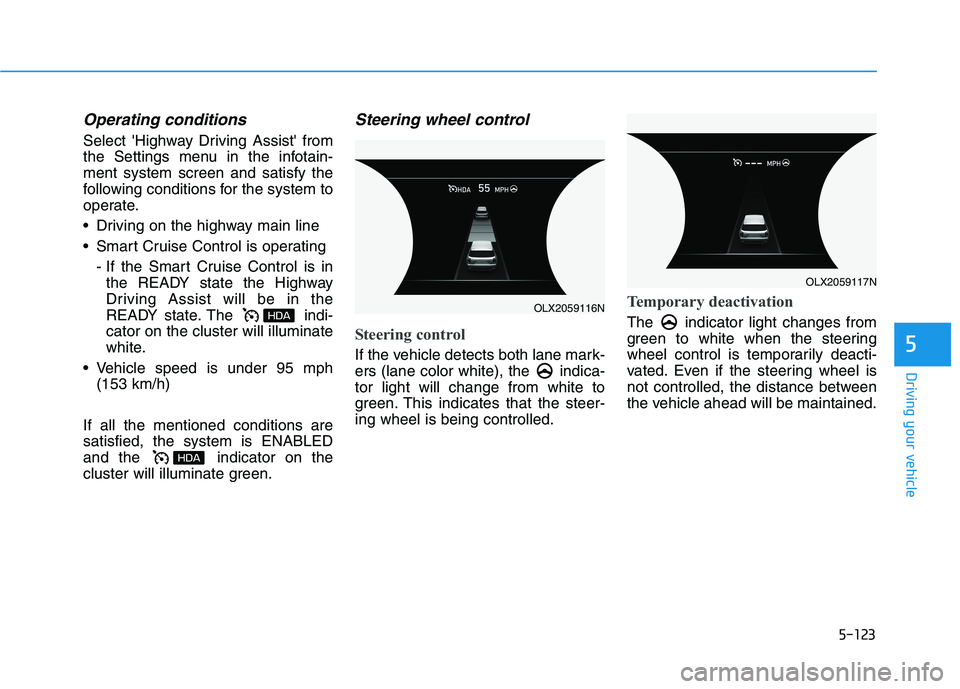
Operating conditions
Select 'Highway Driving Assist' from
the Settings menu in the infotain-
ment system screen and satisfy the
following conditions for the system to
operate.
Driving on the highway main line
Smart Cruise Control is operating
- If the Smart Cruise Control is in
the READY state the Highway
Driving Assist will be in the
READY state. The indi-
cator on the cluster will illuminate
white.
Vehicle speed is under 95 mph
(153 km/h)
If all the mentioned conditions are
satisfied, the system is ENABLED
and the indicator on the
cluster will illuminate green.
Steering wheel control
Steering control
If the vehicle detects both lane mark-
ers (lane color white), the indica-
tor light will change from white to
green. This indicates that the steer-
ing wheel is being controlled.
Temporary deactivation
The indicator light changes from
green to white when the steering
wheel control is temporarily deacti-
vated. Even if the steering wheel is
not controlled, the distance between
the vehicle ahead will be maintained.
OLX2059116N
OLX2059117N
Page 433 of 612
5-124
Driving your vehicle
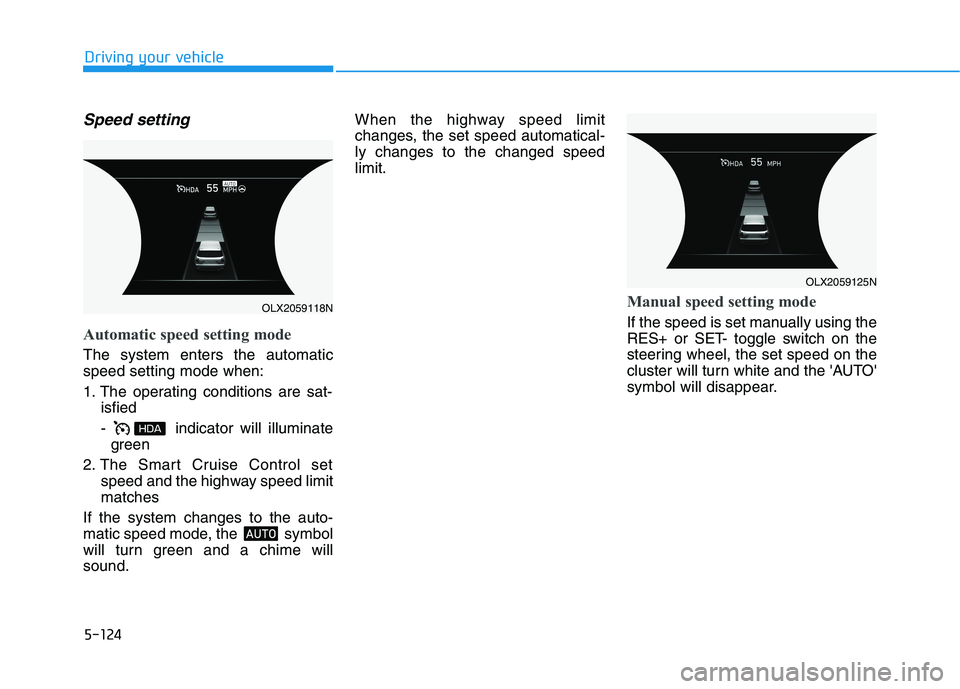
Speed setting
Automatic speed setting mode
The system enters the automatic
speed setting mode when:
1. The operating conditions are sat-
isfied
- indicator will illuminate
green
2. The Smart Cruise Control set
speed and the highway speed limit
matches
If the system changes to the auto-
matic speed mode, the symbol
will turn green and a chime will
sound.When the highway speed limit
changes, the set speed automatical-
ly changes to the changed speed
limit.
Manual speed setting mode
If the speed is set manually using the
RES+ or SET- toggle switch on the
steering wheel, the set speed on the
cluster will turn white and the 'AUTO'
symbol will disappear.
OLX2059125N
OLX2059118N
Page 434 of 612
5-125
Driving your vehicle
5
Warning Message
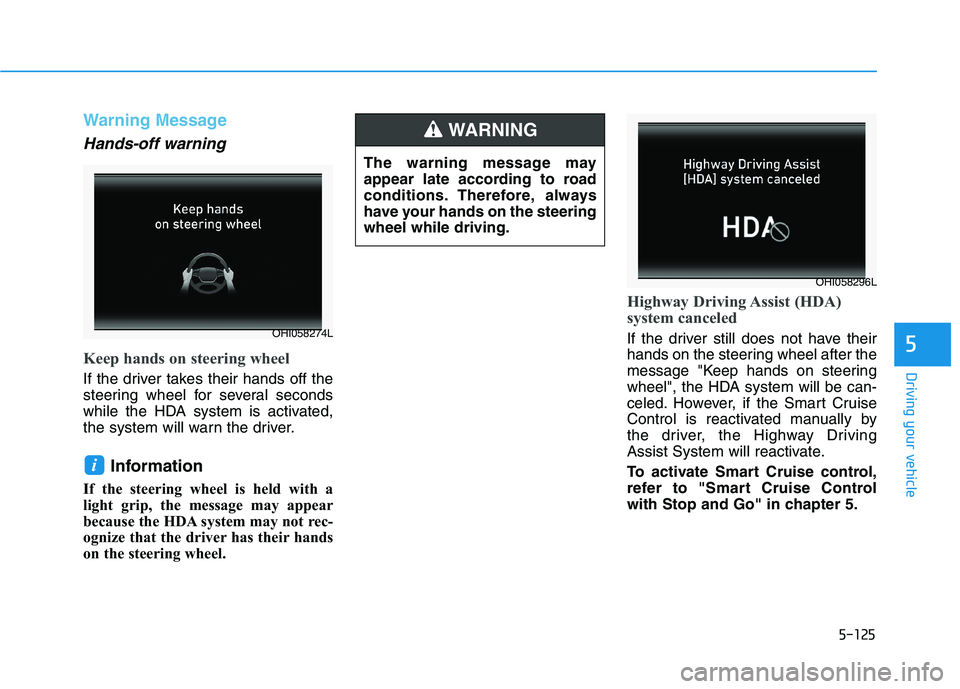
Hands-off warning
Keep hands on steering wheel
If the driver takes their hands off the
steering wheel for several seconds
while the HDA system is activated,
the system will warn the driver.
Information
If the steering wheel is held with a
light grip, the message may appear
because the HDA system may not rec-
ognize that the driver has their hands
on the steering wheel.
Highway Driving Assist (HDA)
system canceled
If the driver still does not have their
hands on the steering wheel after the
message "Keep hands on steering
wheel", the HDA system will be can-
celed. However, if the Smart Cruise
Control is reactivated manually by
the driver, the Highway Driving
Assist System will reactivate.
To activate Smart Cruise control,
refer to "Smart Cruise Control
with Stop and Go" in chapter 5.
i
The warning message may
appear late according to road
conditions. Therefore, always
have your hands on the steering
wheel while driving.
WARNING
OHI058296L
OHI058274L