Page 158 of 478
3-74
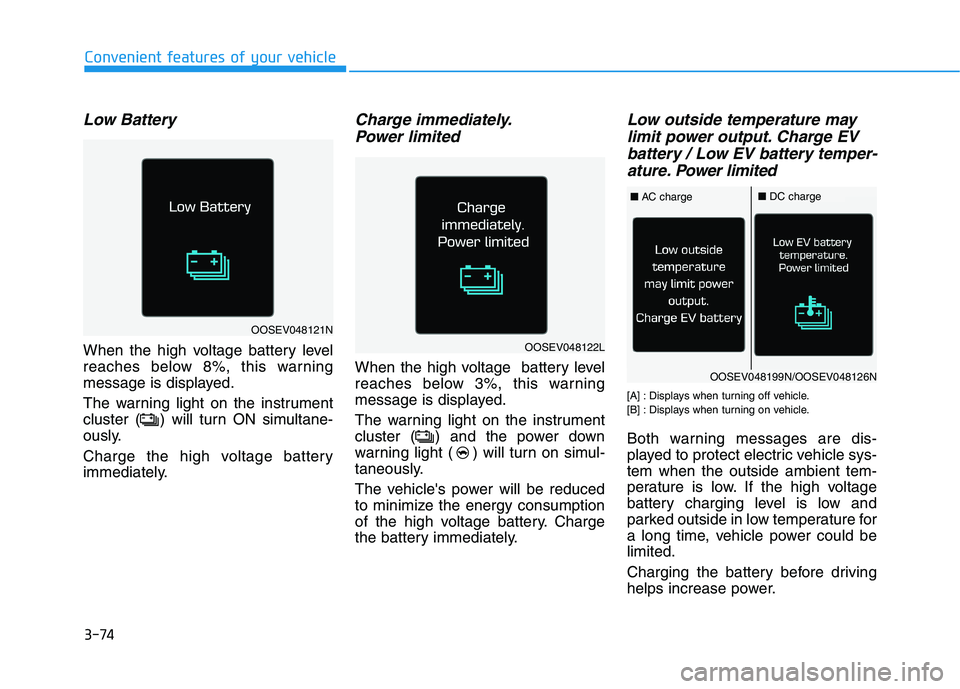
Low Battery
When the high voltage battery level
reaches below 8%, this warning
message is displayed.
The warning light on the instrument
cluster ( ) will turn ON simultane-
ously.
Charge the high voltage battery
immediately.
Charge immediately.
Power limited
When the high voltage battery level
reaches below 3%, this warning
message is displayed.
The warning light on the instrument
cluster ( ) and the power down
warning light ( ) will turn on simul-
taneously.
The vehicle's power will be reduced
to minimize the energy consumption
of the high voltage battery. Charge
the battery immediately.
Low outside temperature may
limit power output. Charge EV
battery / Low EV battery temper-
ature. Power limited
[A] : Displays when turning off vehicle.
[B] : Displays when turning on vehicle.
Both warning messages are dis-
played to protect electric vehicle sys-
tem when the outside ambient tem-
perature is low. If the high voltage
battery charging level is low and
parked outside in low temperature for
a long time, vehicle power could be
limited.
Charging the battery before driving
helps increase power.
Convenient features of your vehicle
OOSEV048121N
OOSEV048122L
OOSEV048199N/OOSEV048126N
■AC charge■DC charge
Page 160 of 478
3-76
When this warning message is
displayed, do not accelerate or
start the vehicle suddenly.
When the high voltage battery
level is low, the power down
warning illuminates and the
power output from the vehicle is
limited. Charge the battery
immediately since your vehicle
may not drive uphill or skid on a
slope with the warning light ON.
Stop vehicle and check power
supply
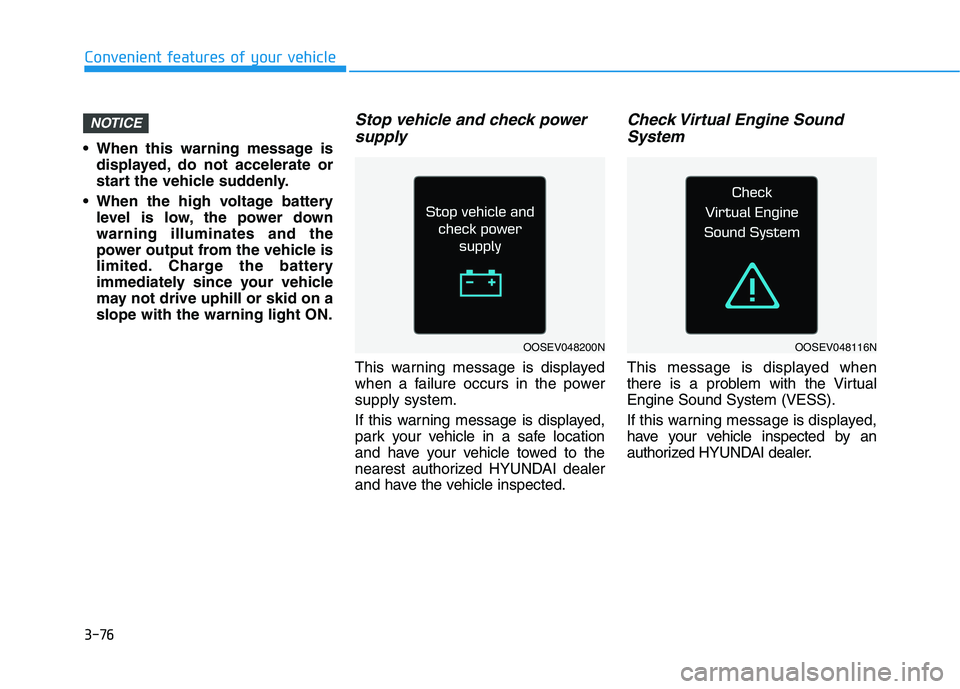
This warning message is displayed
when a failure occurs in the power
supply system.
If this warning message is displayed,
park your vehicle in a safe location
and have your vehicle towed to the
nearest authorized HYUNDAI dealer
and have the vehicle inspected.
Check Virtual Engine Sound
System
This message is displayed when
there is a problem with the Virtual
Engine Sound System (VESS).
If this warning message is displayed,
have your vehicle inspected by an
authorized HYUNDAI dealer.
NOTICE
Convenient features of your vehicle
OOSEV048200NOOSEV048116N
Page 163 of 478
3-79
Convenient features of your vehicle
3
The information provided may differ depending on which functions are applicable to your vehicle.
LCD Display Modes
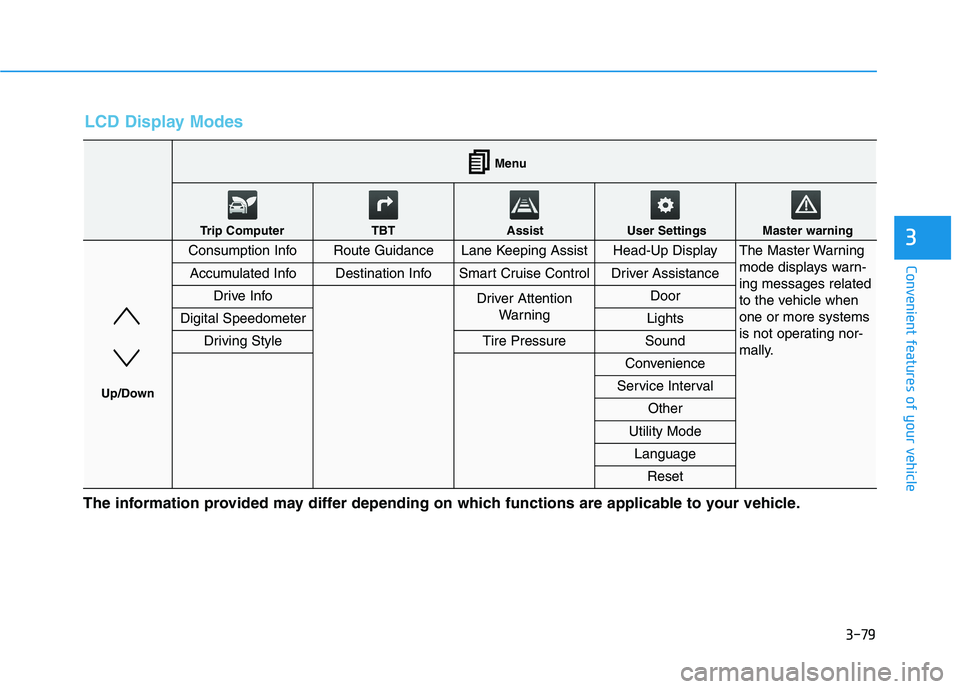
Consumption InfoRoute GuidanceLane Keeping AssistHead-Up DisplayThe Master Warning
mode displays warn-
ing messages related
to the vehicle when
one or more systems
is not operating nor-
mally.
Accumulated InfoDestination InfoSmart Cruise ControlDriver Assistance
Drive InfoDriver Attention
Warning Door
Digital SpeedometerLights
Driving StyleTire PressureSound
Convenience
Service Interval
Other
Utility Mode
Language
Reset
Menu
Trip Computer TBT Assist User Settings Master warning
Up/Down
Page 165 of 478
3-81
Convenient features of your vehicle
3
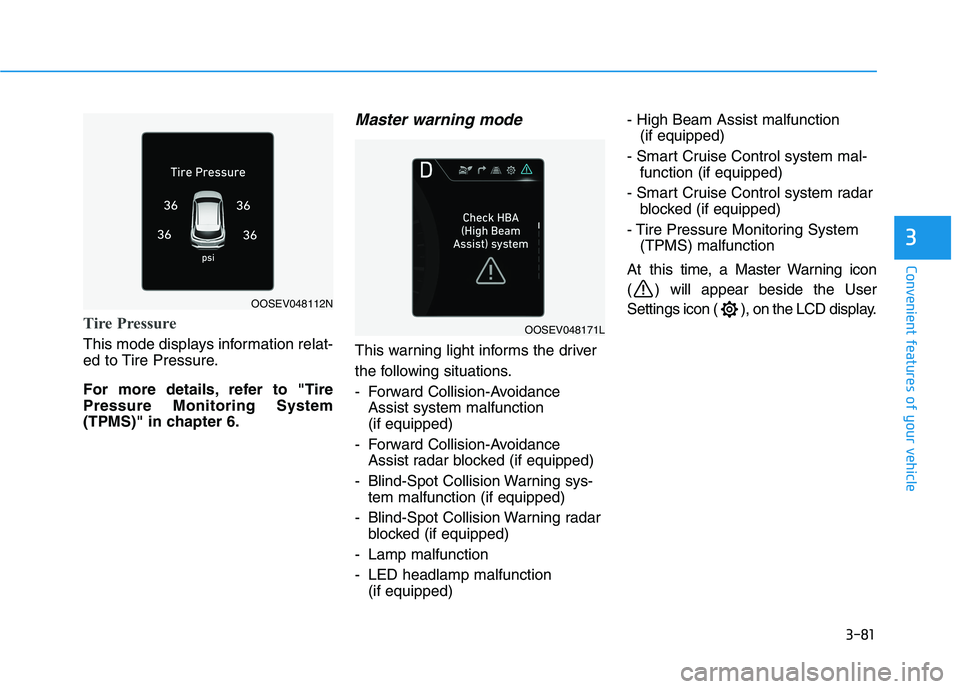
Tire Pressure
This mode displays information relat-
ed to Tire Pressure.
For more details, refer to "Tire
Pressure Monitoring System
(TPMS)" in chapter 6.
Master warning mode
This warning light informs the driver
the following situations.
- Forward Collision-Avoidance
Assist system malfunction
(if equipped)
- Forward Collision-Avoidance
Assist radar blocked (if equipped)
- Blind-Spot Collision Warning sys-
tem malfunction (if equipped)
- Blind-Spot Collision Warning radar
blocked (if equipped)
- Lamp malfunction
- LED headlamp malfunction
(if equipped)- High Beam Assist malfunction
(if equipped)
- Smart Cruise Control system mal-
function (if equipped)
- Smart Cruise Control system radar
blocked (if equipped)
- Tire Pressure Monitoring System
(TPMS) malfunction
At this time, a Master Warning icon
( ) will appear beside the User
Settings icon ( ), on the LCD display.
OOSEV048112N
OOSEV048171L
Page 166 of 478
3-82
Convenient features of your vehicle
User settings mode
In this mode, you can change the
settings of the instrument cluster,
doors, lamps, etc.
1. Head-up display
2. Driver Assistance
3. Door
4. Lights
5. Sound
6. Convenience
7. Service interval
8. Other
9. Utility Mode
10. Language
11. ResetThe information provided may differ
depending on which functions are
applicable to your vehicle.
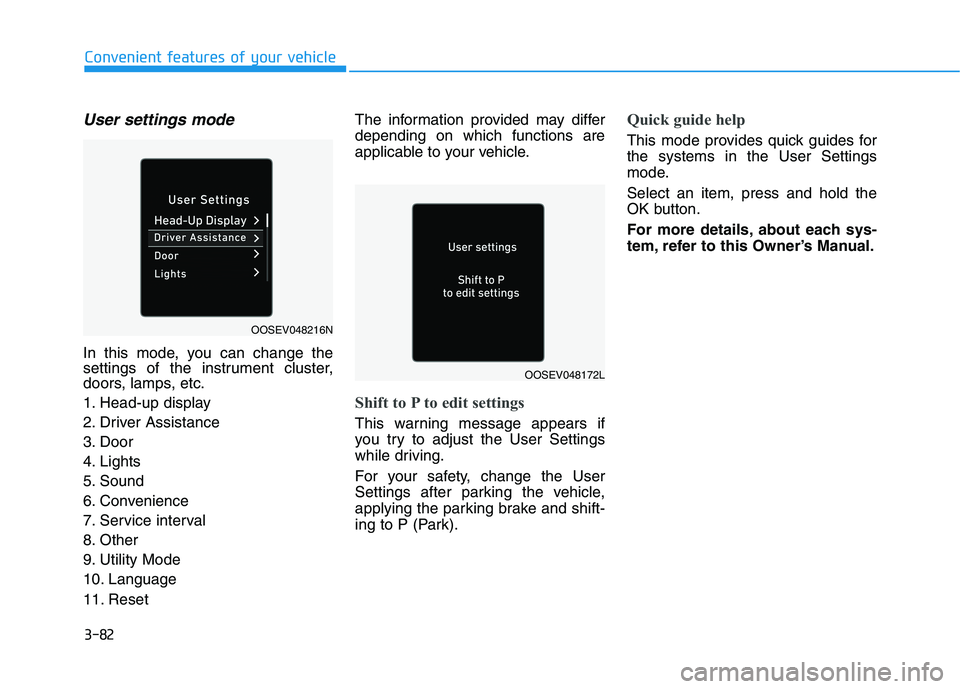
Shift to P to edit settings
This warning message appears if
you try to adjust the User Settings
while driving.
For your safety, change the User
Settings after parking the vehicle,
applying the parking brake and shift-
ing to P (Park).
Quick guide help
This mode provides quick guides for
the systems in the User Settings
mode.
Select an item, press and hold the
OK button.
For more details, about each sys-
tem, refer to this Owner’s Manual.
OOSEV048216N
OOSEV048172L
Page 171 of 478
3-87
Convenient features of your vehicle
3
ItemsExplanation
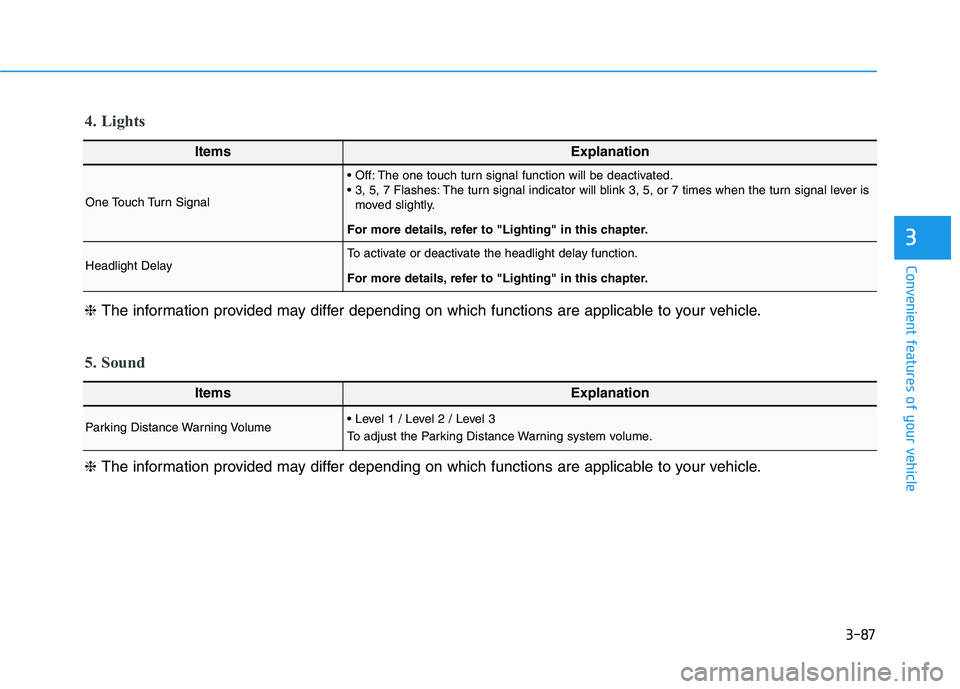
One Touch Turn Signal
The one touch turn signal function will be deactivated.
The turn signal indicator will blink 3, 5, or 7 times when the turn signal lever is
moved slightly.
For more details, refer to "Lighting" in this chapter.
Headlight DelayTo activate or deactivate the headlight delay function.
For more details, refer to "Lighting" in this chapter.
4. Lights
ItemsExplanation
Parking Distance Warning Volume
To adjust the Parking Distance Warning system volume.
5. Sound
❈The information provided may differ depending on which functions are applicable to your vehicle. ❈The information provided may differ depending on which functions are applicable to your vehicle.
Page 172 of 478
3-88
Convenient features of your vehicle
ItemsExplanation
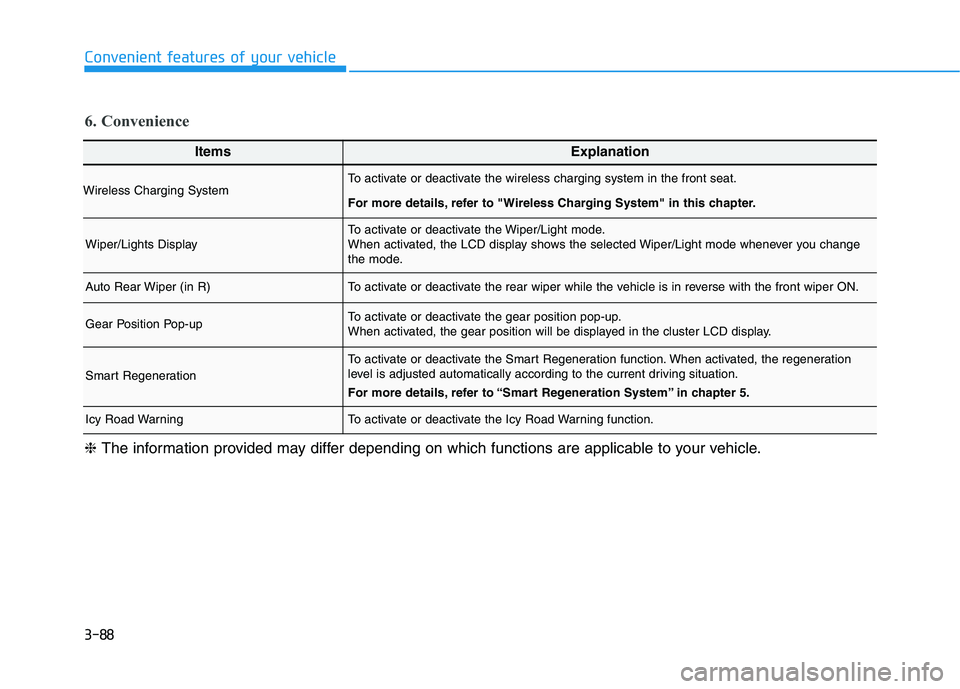
Wireless Charging SystemTo activate or deactivate the wireless charging system in the front seat.
For more details, refer to "Wireless Charging System" in this chapter.
Wiper/Lights DisplayTo activate or deactivate the Wiper/Light mode.
When activated, the LCD display shows the selected Wiper/Light mode whenever you change
the mode.
Auto Rear Wiper (in R)To activate or deactivate the rear wiper while the vehicle is in reverse with the front wiper ON.
Gear Position Pop-upTo activate or deactivate the gear position pop-up.
When activated, the gear position will be displayed in the cluster LCD display.
Smart Regeneration
To activate or deactivate the Smart Regeneration function. When activated, the regeneration
level is adjusted automatically according to the current driving situation.
For more details, refer to “Smart Regeneration System” in chapter 5.
Icy Road WarningTo activate or deactivate the Icy Road Warning function.
6. Convenience
❈The information provided may differ depending on which functions are applicable to your vehicle.
Page 178 of 478
3-94
Convenient features of your vehicle
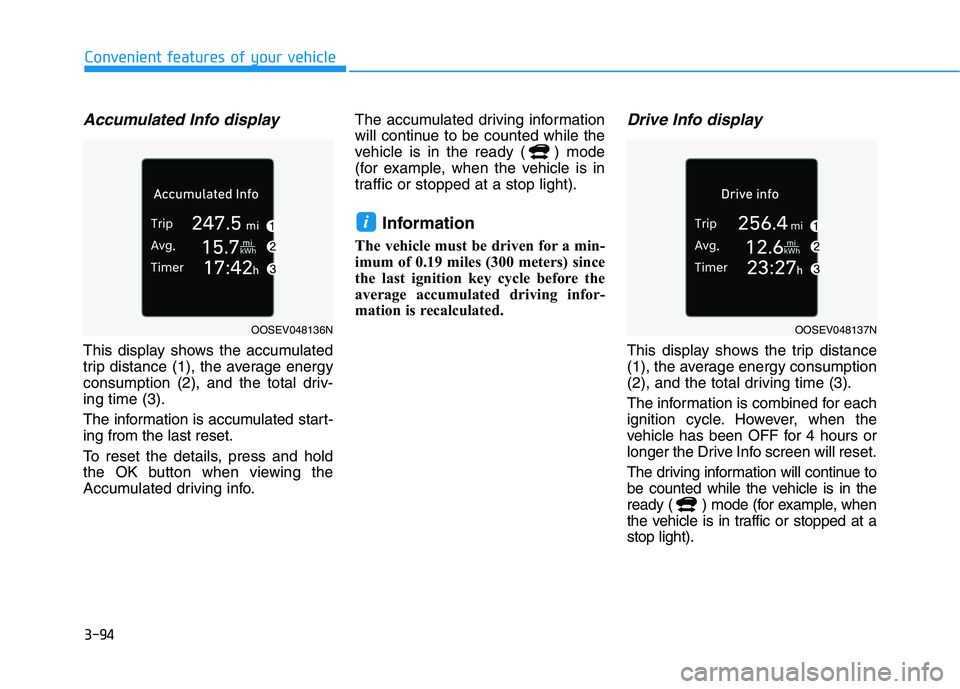
Accumulated Info display
This display shows the accumulated
trip distance (1), the average energy
consumption (2), and the total driv-
ing time (3).
The information is accumulated start-
ing from the last reset.
To reset the details, press and hold
the OK button when viewing the
Accumulated driving info.The accumulated driving information
will continue to be counted while the
vehicle is in the ready ( ) mode
(for example, when the vehicle is in
traffic or stopped at a stop light).
Information
The vehicle must be driven for a min-
imum of 0.19 miles (300 meters) since
the last ignition key cycle before the
average accumulated driving infor-
mation is recalculated.
Drive Info display
This display shows the trip distance
(1), the average energy consumption
(2), and the total driving time (3).
The information is combined for each
ignition cycle. However, when the
vehicle has been OFF for 4 hours or
longer the Drive Info screen will reset.
The driving information will continue to
be counted while the vehicle is in the
ready ( ) mode (for example, when
the vehicle is in traffic or stopped at a
stop light).
i
OOSEV048136NOOSEV048137N