Page 328 of 546
5-38
Driving your vehicle
ESC operation
ESC ON condition
When the POWER button is in the ON position, the ESC and the ESC
OFF indicator lights illuminate for
approximately three seconds. After
both lights go off, the ESC is
enabled.
When operating
When the ESC is in opera- tion, the ESC indicator light
blinks:
conditions which may lock the
wheels, you may hear sounds from
the brakes, or feel a corresponding
sensation in the brake pedal. This is
normal and it means your ESC is
active.
cle may not respond to the acceler-ator as it does under routine condi-
tions.
when the ESC activates, the Cruise
Control automatically disengages.
The Cruise Control can be reen-
gaged when the road conditions
allow. See "Cruise Control System"
later in this chapter. (if equipped)
Never drive too fast for the road
conditions or too quickly when
cornering. The ESC system will
not prevent accidents. Excessive speed in turns,
abrupt maneuvers, and
hydroplaning on wet surfaces
can result in severe accidents.WARNING
Page 331 of 546
5-41
Driving your vehicle
5
Vehicle Stability Management (VSM)
The Vehicle Stability Management (VSM) is a function of the Electronic
Stability Control (ESC) system. It
helps ensure the vehicle stays stable
when accelerating or braking sud-
denly on wet, slippery and rough
roads where traction over the four
tires can suddenly become uneven.
VSM operation
VSM ON condition
The VSM operates when:
The Electronic Stability Control(ESC) is on.
Vehicle speed is approximately above 15 km/h (9 mph) on curve
roads.
Vehicle speed is approximately above 20 km/h (12 mph) when the
vehicle is braking on rough roads.
When operating
When you apply your brakes under
conditions which may activate the
ESC, you may hear sounds from the
brakes, or feel a corresponding sen-
sation in the brake pedal. This is nor-
mal and it means your VSM is active. Information
The VSM does not operate when:
Driving on a banked road such as a gradient or incline.
Driving in reverse.
The ESC OFF indicator light is on.
The EPS (Electric power steering) warning light ( ) is on or blinks.
i
Take the following precautions
when using the Vehicle Stability
Management (VSM):
ALWAYS check the speed and
the distance to the vehicle
ahead. The VSM is not a substi-
tute for safe driving practices.
Never drive too fast for the
road conditions. The VSM sys-
tem will not prevent acci-
dents. Excessive speed in bad
weather, slippery and uneven
roads can result in severeaccidents.
WARNING
Page 332 of 546
5-42
Driving your vehicle
VSM OFF condition
To cancel VSM operation, press the
ESC OFF button. ESC OFF indicator
light ( ) will illuminate.
To turn on VSM, press the ESC OFF
button again. The ESC OFF indicatorlight will go out. Driving with wheels and tires with
different sizes may cause the VSM
system to malfunction. Before
replacing tires, make sure all fourtires and wheels are the same
size. Never drive the vehicle with
different sized tires and wheelsinstalled.
Hill-Start Assist Control (HAC)
The Hill-Start Assist Control (HAC)
helps prevent the vehicle from rolling
backwards when starting a vehicle
from a stop on a hill. The system
operates the brakes automatically for
approximately 2 seconds and releas-
es the brake after 2 seconds or when
the accelerator pedal is depressed.Information
The HAC does not operate when the gear is in P (Park) or N (Neutral).
The HAC activates even when the ESC (Electronic Stability Control) is
off. However, it does not activate,
when the ESC does not operate nor-
mally.
i
NOTICE
If the ESC indicator light ( ) or
EPS warning light ( ) stays
on or blinks, your vehicle may
have a malfunction with the
VSM system. When the warning
light illuminates, have the vehi-
cle checked by an authorized
HYUNDAI dealer as soon as
possible.
WARNING
Always be ready to depress the
accelerator pedal when starting
off an incline.The HAC activates
only for approximately 2 sec-onds.
WARNING
Page 333 of 546
5-43
Driving your vehicle
5
Good Braking Practices Wet brakes can be dangerous! The
brakes may get wet if the vehicle is
driven through standing water or if it
is washed. Your vehicle will not stop
as quickly if the brakes are wet. Wet
brakes may cause the vehicle to pull
to one side.
To dry the brakes, apply the brakes
lightly until the braking action returns
to normal. If the braking action does
not return to normal, stop as soon as
it is safe to do so and call an author-
ized HYUNDAI dealer for assistance.
DO NOT drive with your foot resting
on the brake pedal. Even light, butconstant pedal pressure can result in
the brakes overheating, brake wear,
and possibly even brake failure.
If a tire goes flat while you are driv-
ing, apply the brakes gently and
keep the vehicle pointed straight
ahead while you slow down. When
you are moving slowly enough for it
to be safe to do so, pull off the road
and stop in a safe location.
Keep your foot firmly on the brake
pedal when the vehicle is stopped to
prevent the vehicle from rolling for-
ward.
Whenever leaving the vehicle or
parking, always come to a com-
plete stop and continue to
depress the brake pedal. Shift
to the P (Park) position, then
apply the parking brake, and
place the POWER button in theOFF position.
Vehicles parked with the park- ing brake not applied or not
fully engaged may roll inadver-
tently and may cause injury to
the driver and others. ALWAYS
apply the parking brake before
exiting the vehicle.
WARNING
Page 337 of 546
5-47
Driving your vehicle
5
Prerequisite for activation
FCA gets ready to be activated,
when 'Active Assist' or 'Warning
Only' under Forward Safety is select-
ed in the cluster LCD display, and
when the following prerequisites aresatisfied.
- ESC (Electronic Stability Control)is on.
- Vehicle speed is over 8 km/h (5 mph). (FCA is only activated within
a certain speed range.)
- The system detects a pedestrian, cyclist (if equipped) or a vehicle in
front, which may collide with your
vehicle. However, FCA may not be
activated or may only sound a
warning alarm depending on the
driving or vehicle conditions.
The FCA may not operate properly according to the frontal situation,
the direction of pedestrian orcyclist (if equipped) and speed.
FCA warning message and
brake control
FCA produces warning messages,
warning alarms, and emergency
braking based on the level of risk ofa frontal collision, such as when a
vehicle ahead suddenly brakes, orthe system detects that a collision
with a pedestrian or cyclist (ifequipped) is imminent.To avoid driver distractions, do not attempt to set or can-cel FCA while driving the vehi-
cle. Always completely stop
the vehicle at a safe place
before setting or cancelingthe system.
FCA automatically activates
when the POWER button is in
the ON position. The driver
can deactivate FCA by cancel-ing the system setting on the
LCD display.
FCA automatically deactivates upon canceling the ESC
(Electronic Stability Control).When the ESC is canceled,
FCA cannot be activated on
the LCD display. In this situa-
tion, the FCA warning light will
illuminate which is normal.
WARNING
Page 357 of 546
5-67
Driving your vehicle
5
LKA system will not be in the
ENABLED state and the steering
wheel will not be assisted when:
The turn signal is turned on beforechanging a lane. If you change
lanes without the turn signal on,
the steering wheel might be con-trolled.
The vehicle is not driven in the mid- dle of the lane when the system is
turned on or right after changing a
lane.
ESC (Electronic Stability Control) or VSM (Vehicle Stability Management)
is activated.
The vehicle is driven on a sharp curve.
Vehicle speed is below 60 km/h (37 mph) and over 180 km/h (112mph).
The vehicle makes sharp lane changes.
The vehicle brakes suddenly.
One lane marker is detected.
The lane is very wide or narrow. There are more than two lane
markers on the road. (e.g. construc- tion area)
The vehicle is driven on a steep incline.
The steering wheel is turned sud- denly.
There are more than two lane markers on the road in front of you.
The system may not operate for 15 seconds after the vehicle is started
or the camera is initialized or
rebooting of the front view camera.
Radius of a curve is too small.
Limitations of the System
LKA system may operate premature-
ly even if the vehicle does not depart
from the intended lane, OR, LKA
system may not assist your steering
or warn you if the vehicle leaves the
intended lane under the following cir-cumstances:
When the lane and road condi- tions are poor
It is difficult to distinguish the lane marking from the road surface or
the lane marking is faded or not
clearly marked.
It is difficult to distinguish the color of the lane marker from the road.
There are markings on the road surface that look like a lane marker
that is inadvertently being detected
by the camera.
The lane marker is merged or divided (e.g. tollgate).
The lane number increases or decreases or the lane marker are
crossing complicatedly.
There are more than two lane markers on the road in front of you.
Page 394 of 546
5-104
Driving your vehicle
Limitations of the system
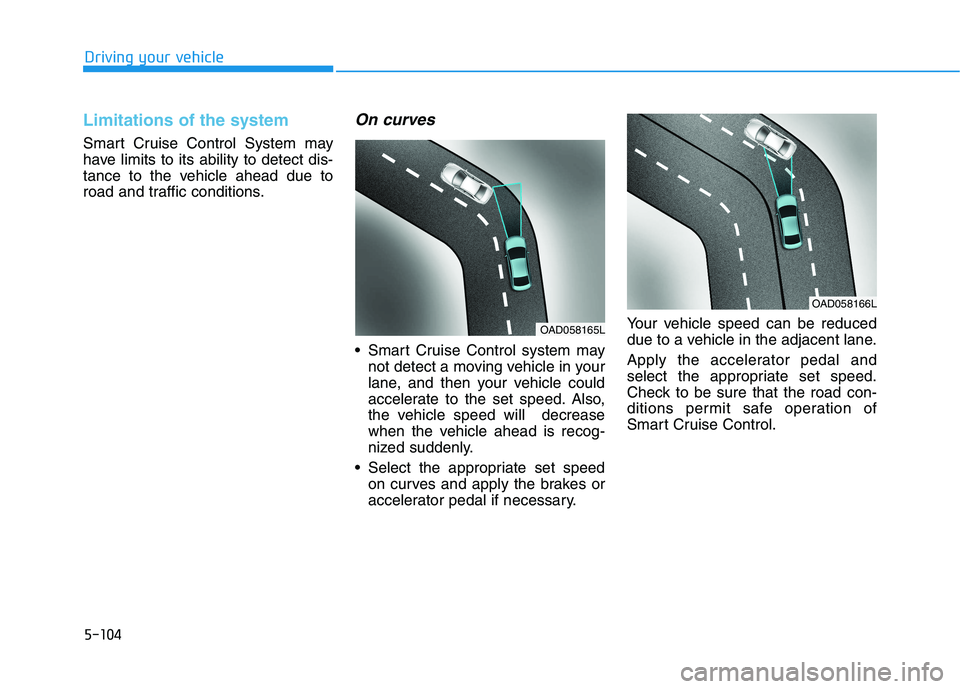
Smart Cruise Control System may
have limits to its ability to detect dis-
tance to the vehicle ahead due to
road and traffic conditions.
On curves
Smart Cruise Control system maynot detect a moving vehicle in your
lane, and then your vehicle could
accelerate to the set speed. Also,
the vehicle speed will decrease
when the vehicle ahead is recog-
nized suddenly.
Select the appropriate set speed on curves and apply the brakes or
accelerator pedal if necessary. Your vehicle speed can be reduced
due to a vehicle in the adjacent lane.
Apply the accelerator pedal and
select the appropriate set speed.
Check to be sure that the road con-
ditions permit safe operation of
Smart Cruise Control.
OAD058166L
OAD058165L
Page 397 of 546
5-107
Driving your vehicle
5
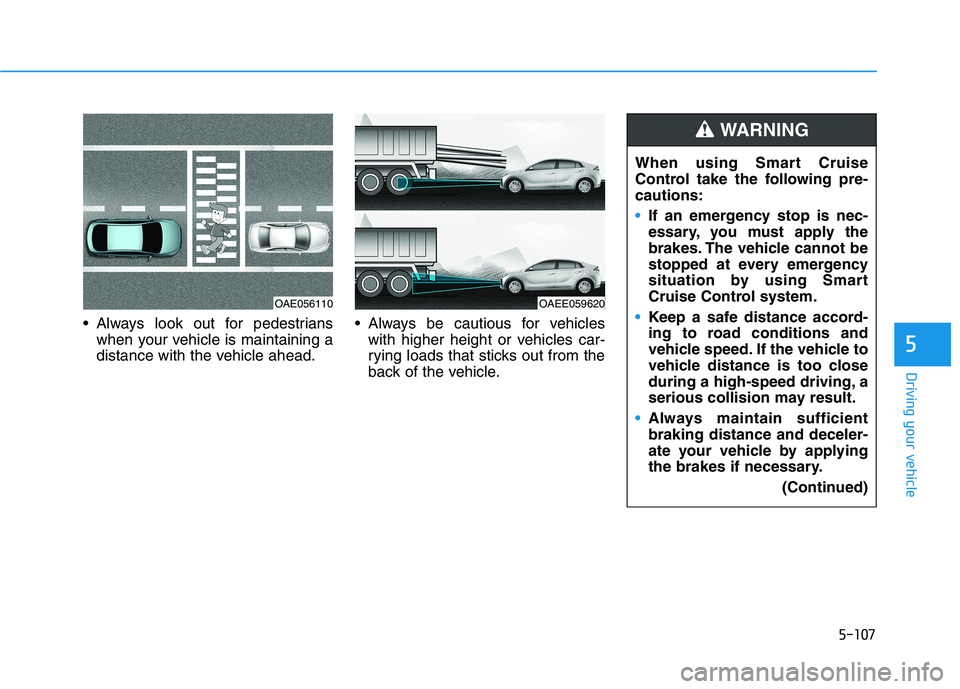
Always look out for pedestrianswhen your vehicle is maintaining a
distance with the vehicle ahead. Always be cautious for vehicles
with higher height or vehicles car-
rying loads that sticks out from the
back of the vehicle.
OAE056110OAEE059620 When using Smart Cruise
Control take the following pre-cautions:
If an emergency stop is nec-
essary, you must apply the
brakes. The vehicle cannot be
stopped at every emergency
situation by using Smart
Cruise Control system.
Keep a safe distance accord-
ing to road conditions and
vehicle speed. If the vehicle to
vehicle distance is too close
during a high-speed driving, a
serious collision may result.
Always maintain sufficient braking distance and deceler-
ate your vehicle by applying
the brakes if necessary.
(Continued)
WARNING