Page 131 of 555
Instrument Cluster
4-30
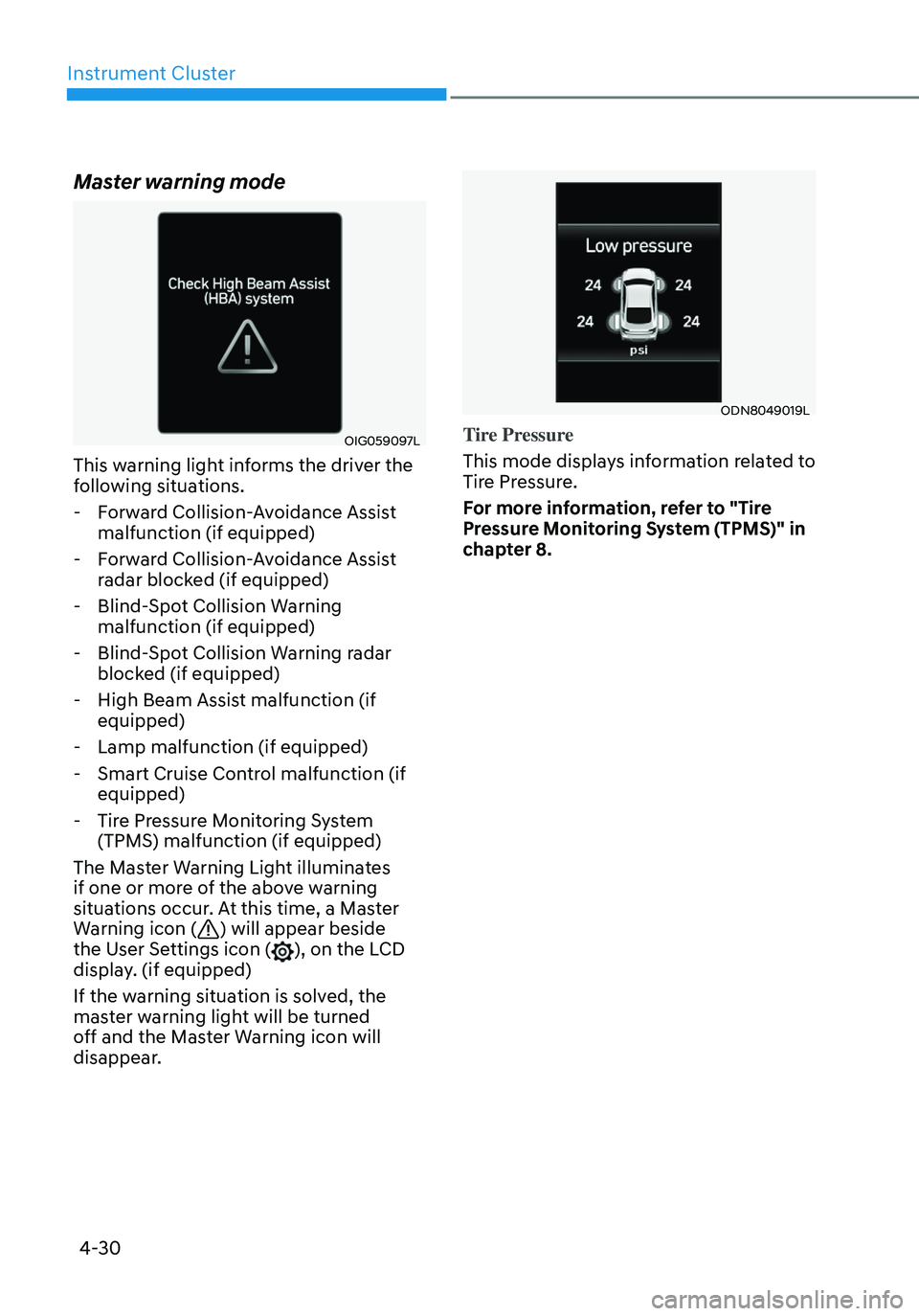
Master warning mode
OIG059097L
This warning light informs the driver the
following situations.
-Forward Collision-Avoidance Assist
malfunction (if equipped)
-Forward Collision-Avoidance Assist
radar blocked (if equipped)
-Blind-Spot Collision Warning
malfunction (if equipped)
-Blind-Spot Collision Warning radar
blocked (if equipped)
-High Beam Assist malfunction (if
equipped)
-Lamp malfunction (if equipped)
-Smart Cruise Control malfunction (if
equipped)
-Tire Pressure Monitoring System
(TPMS) malfunction (if equipped)
The Master Warning Light illuminates
if one or more of the above warning
situations occur. At this time, a Master
Warning icon (
) will appear beside
the User Settings icon (), on the LCD display. (if equipped)
If the warning situation is solved, the
master warning light will be turned
off and the Master Warning icon will
disappear.
ODN8049019L
Tire Pressure
This mode displays information related to
Tire Pressure.
For more information, refer to "Tire
Pressure Monitoring System (TPMS)" in
chapter 8.
Page 132 of 555

04
4-31
User settings mode
OCN7040038N
In this mode, you can change the
settings of the instrument cluster, doors,
lamps, etc.
1. Driver Assistance
2. Door
3. Lights
4. Sound
5. Convenience
6. Service interval
7. Theme selection
8. Other
9. ECO vehicle
10. Language
11. Reset
The information provided may differ
depending on which functions are
applicable to your vehicle. Shift to P to edit settings / Engage parking
brake to edit settings
This warning message illuminates if
you try to select an item from the User
Settings mode while driving.
•
Intelligent variable transmission
For your safety, change the User
Settings after parking the vehicle,
applying the parking brake and
moving the shift level to P(Park).
• Manual transmission
For your safety, change the User
Settings after engaging the parking
brake.
Quick guide (Help)
This mode provides quick guides for the
systems in the User Settings mode.
Select an item, press and hold the OK
button.
For more details about each system,
refer to this Owner’s Manual.
Page 133 of 555
Instrument Cluster
4-32
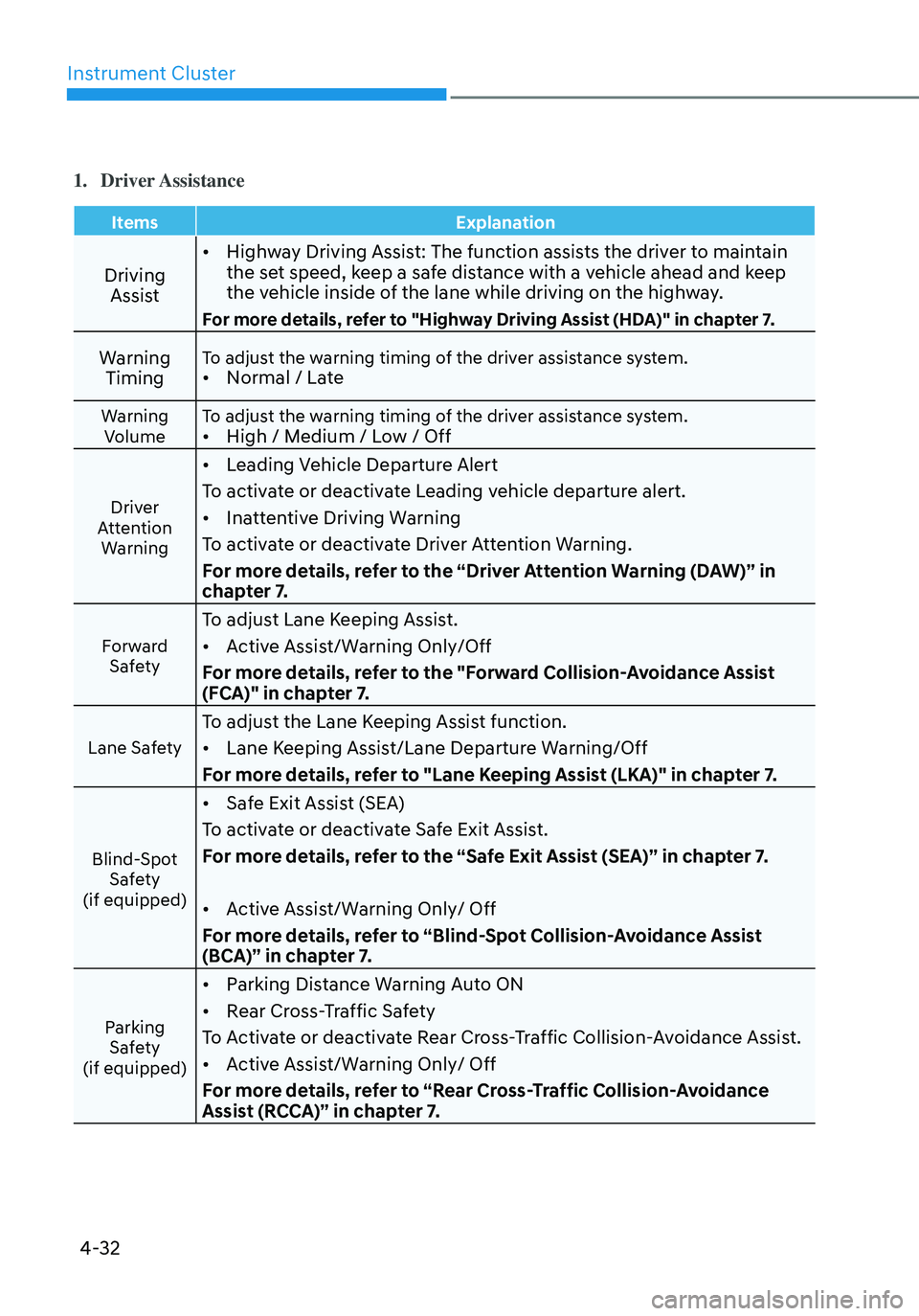
1. Driver Assistance
ItemsExplanation
Driving
Assist •
Highway Driving Assist: The function assists the driver to maintain
the set speed, keep a safe distance with a vehicle ahead and keep
the vehicle inside of the lane while driving on the highway.
For more details, refer to "Highway Driving Assist (HDA)" in chapter 7.
Warning
TimingTo adjust the warning timing of the driver assistance system.• Normal / Late
Warning
Volume To adjust the warning timing of the driver assistance system.•
High / Medium / Low / Off
Driver
Attention Warning
• Leading Vehicle Departure Alert
To activate or deactivate Leading vehicle departure alert.
• Inattentive Driving Warning
To activate or deactivate Driver Attention Warning.
For more details, refer to the “Driver Attention Warning (DAW)” in
chapter 7.
Forward Safety
To adjust Lane Keeping Assist.
• Active Assist/Warning Only/Off
For more details, refer to the "Forward Collision-Avoidance Assist
(FCA)" in chapter 7.
Lane Safety
To adjust the Lane Keeping Assist function.
• Lane Keeping Assist/Lane Departure Warning/Off
For more details, refer to "Lane Keeping Assist (LKA)" in chapter 7.
Blind-Spot Safety
(if equipped)
• Safe Exit Assist (SEA)
To activate or deactivate Safe Exit Assist.
For more details, refer to the “Safe Exit Assist (SEA)” in chapter 7.
• Active Assist/Warning Only/ Off
For more details, refer to “Blind-Spot Collision-Avoidance Assist
(BCA)” in chapter 7.
Parking Safety
(if equipped)
• Parking Distance Warning Auto ON
• Rear Cross-Traffic Safety
To Activate or deactivate Rear Cross-Traffic Collision-Avoidance Assist.
• Active Assist/Warning Only/ Off
For more details, refer to “Rear Cross-Traffic Collision-Avoidance
Assist (RCCA)” in chapter 7.
Page 135 of 555
Instrument Cluster
4-34
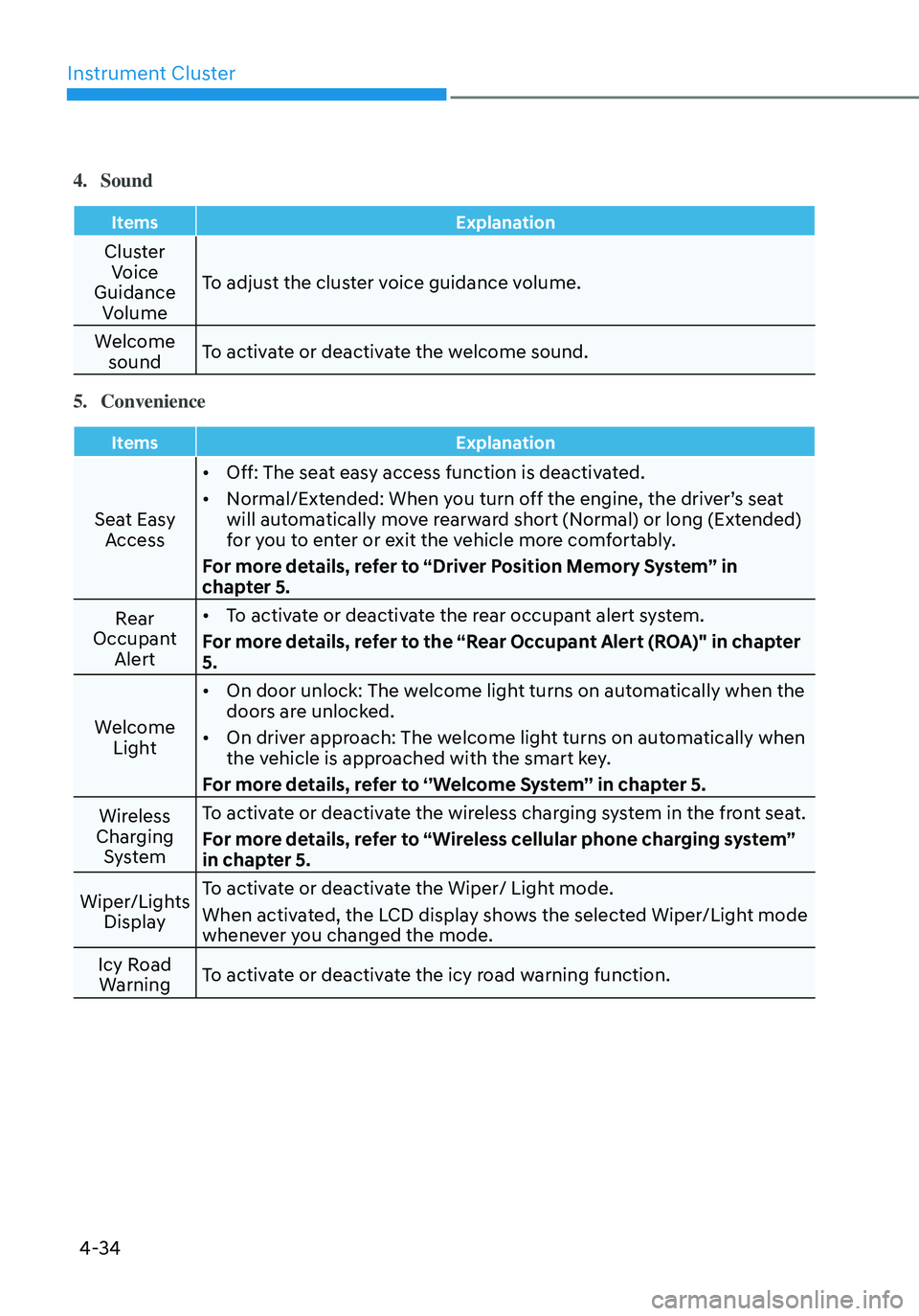
4. Sound
ItemsExplanation
Cluster
Voice
Guidance Volume To adjust the cluster voice guidance volume.
Welcome sound To activate or deactivate the welcome sound.
5. Convenience
Items
Explanation
Seat Easy
Access •
Off: The seat easy access function is deactivated.
• Normal/Extended: When you turn off the engine, the driver’s seat
will automatically move rearward short (Normal) or long (Extended)
for you to enter or exit the vehicle more comfortably.
For more details, refer to “Driver Position Memory System” in
chapter 5.
Rear
Occupant Alert •
To activate or deactivate the rear occupant alert system.
For more details, refer to the “Rear Occupant Alert (ROA)" in chapter
5.
Welcome Light •
On door unlock: The welcome light turns on automatically when the
doors are unlocked.
• On driver approach: The welcome light turns on automatically when
the vehicle is approached with the smart key.
For more details, refer to ‘’Welcome System’’ in chapter 5.
Wireless
Charging System To activate or deactivate the wireless charging system in the front seat.
For more details, refer to “Wireless cellular phone charging system”
in chapter 5.
Wiper/Lights Display To activate or deactivate the Wiper/ Light mode.
When activated, the LCD display shows the selected Wiper/Light mode
whenever you changed the mode.
Icy Road Warning To activate or deactivate the icy road warning function.
Page 136 of 555
04
4-35
6. Service interval
ItemsExplanation
Enable
Service
Interval To activate or deactivate the service interval function.
Information
To use the service interval menu, consult an authorized HYUNDAI dealer.
If the service interval is activated and the time and distance is adjusted, messages are
displayed in the following situations each time the vehicle is turned on.
-
Service in
: Displayed to inform the driver the remaining mileage and days to service.
- Service required
: Displayed when the mileage and days to service has been reached or passed.
Information
If any of the following conditions occur, the mileage and number of days to service may be
incorrect.
- The battery cable is disconnected.
-The fuse switch is turned off.
-The battery is discharged.
7. Theme selection
To select the style of instrument cluster graphic style and setting.
• Theme A / Theme B / Theme C
Page 137 of 555
Instrument Cluster
4-36
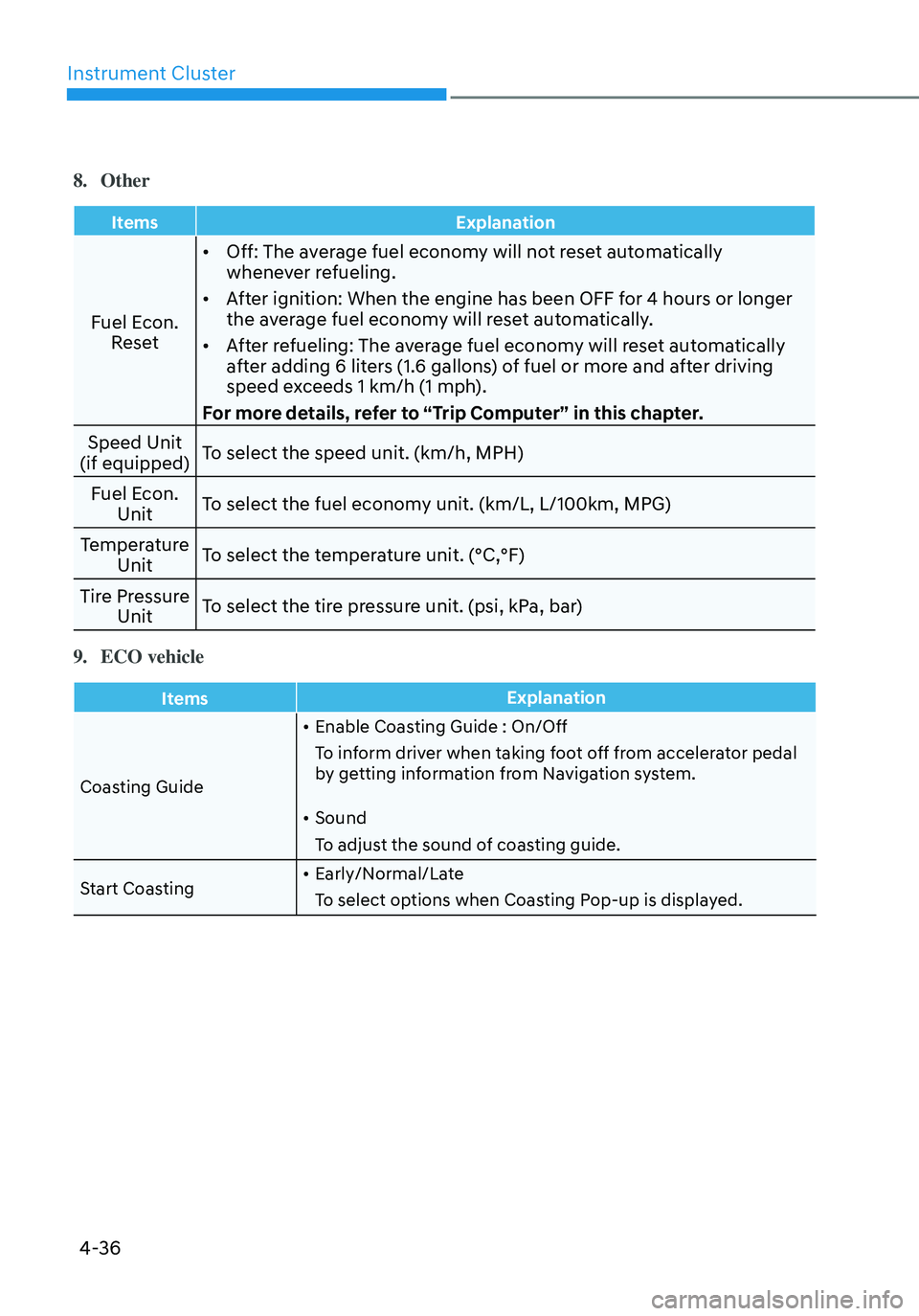
8. Other
ItemsExplanation
Fuel Econ.
Reset •
Off: The average fuel economy will not reset automatically
whenever refueling.
• After ignition: When the engine has been OFF for 4 hours or longer
the average fuel economy will reset automatically.
• After refueling: The average fuel economy will reset automatically
after adding 6 liters (1.6 gallons) of fuel or more and after driving
speed exceeds 1 km/h (1 mph).
For more details, refer to “Trip Computer” in this chapter.
Speed Unit
(if equipped) To select the speed unit. (km/h, MPH)
Fuel Econ. Unit To select the fuel economy unit. (km/L, L/100km, MPG)
Temperature Unit To select the temperature unit. (°C,°F)
Tire Pressure Unit To select the tire pressure unit. (psi, kPa, bar)
9. ECO vehicle
Items
Explanation
Coasting Guide •
Enable Coasting Guide : On/Off
To inform driver when taking foot off from accelerator pedal
by getting information from Navigation system.
• Sound
To adjust the sound of coasting guide.
Start Coasting •
Early/Normal/Late
To select options when Coasting Pop-up is displayed.
Page 139 of 555
Instrument Cluster
4-38
Trip Computer
The trip computer is a microcomputer-
controlled driver information system that
displays information related to driving.
Information
Some driving information stored in the
trip computer (for example Average
Vehicle Speed) resets if the battery is
disconnected.
Trip modes
Fuel Economy
• Average Fuel Economy
• Instant Fuel Economy
Accumulated Info
• Tripmeter
• Average Fuel Economy
• Elapsed Time
Drive Info
• Tripmeter
• Average Fuel Economy
• Elapsed Time
Digital Speedometer
Auto Stop (if equipped)
• Auto Stop accumulated
time
Smart Shift
ODN8A069203
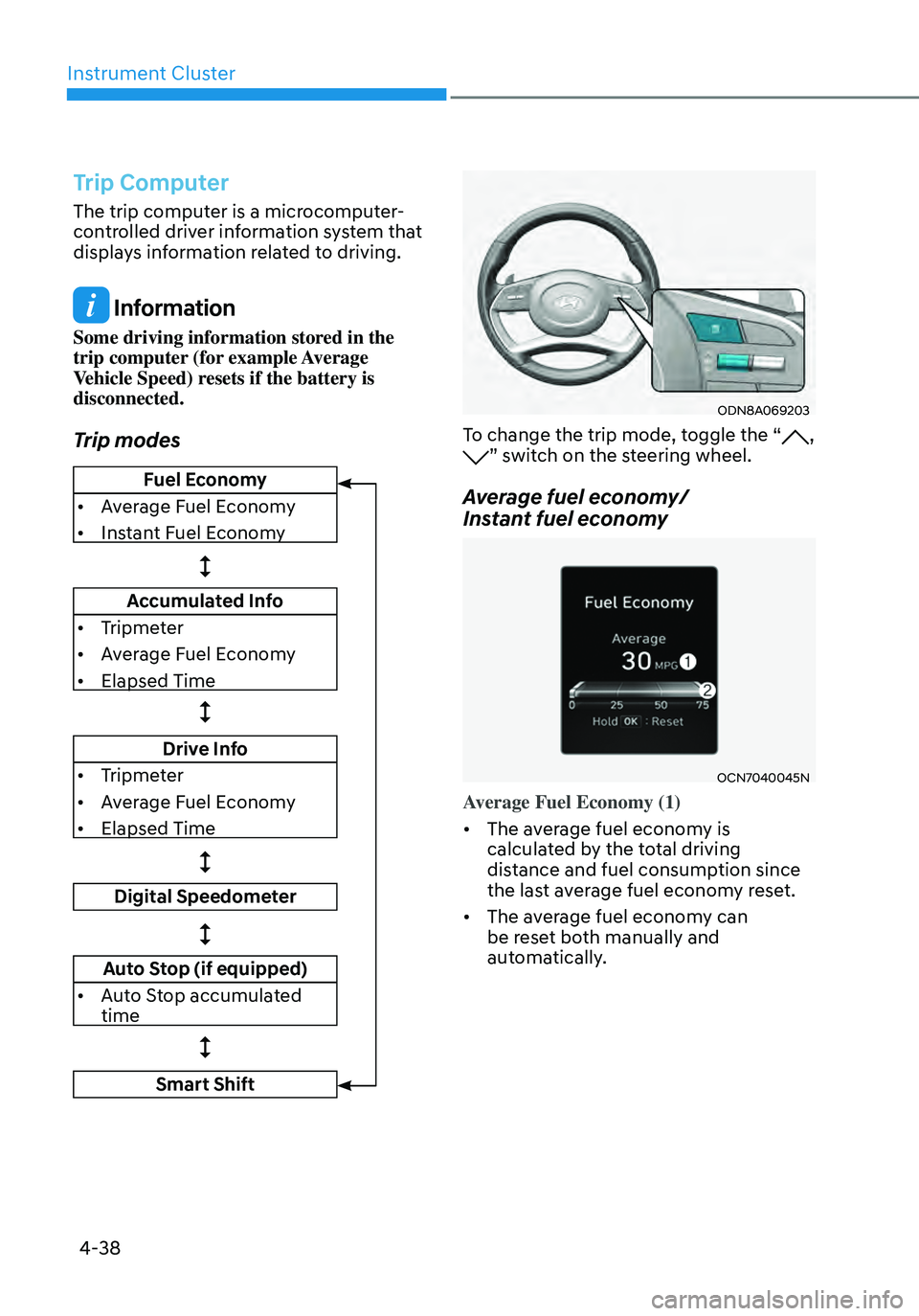
To change the trip mode, toggle the “, ” switch on the steering wheel.
Average fuel economy/
Instant fuel economy
OCN7040045N
Average Fuel Economy (1)
• The average fuel economy is
calculated by the total driving
distance and fuel consumption since
the last average fuel econ omy r eset.
• The average fuel economy can
be reset both manually and
automatically.
Page 141 of 555
Instrument Cluster
4-40
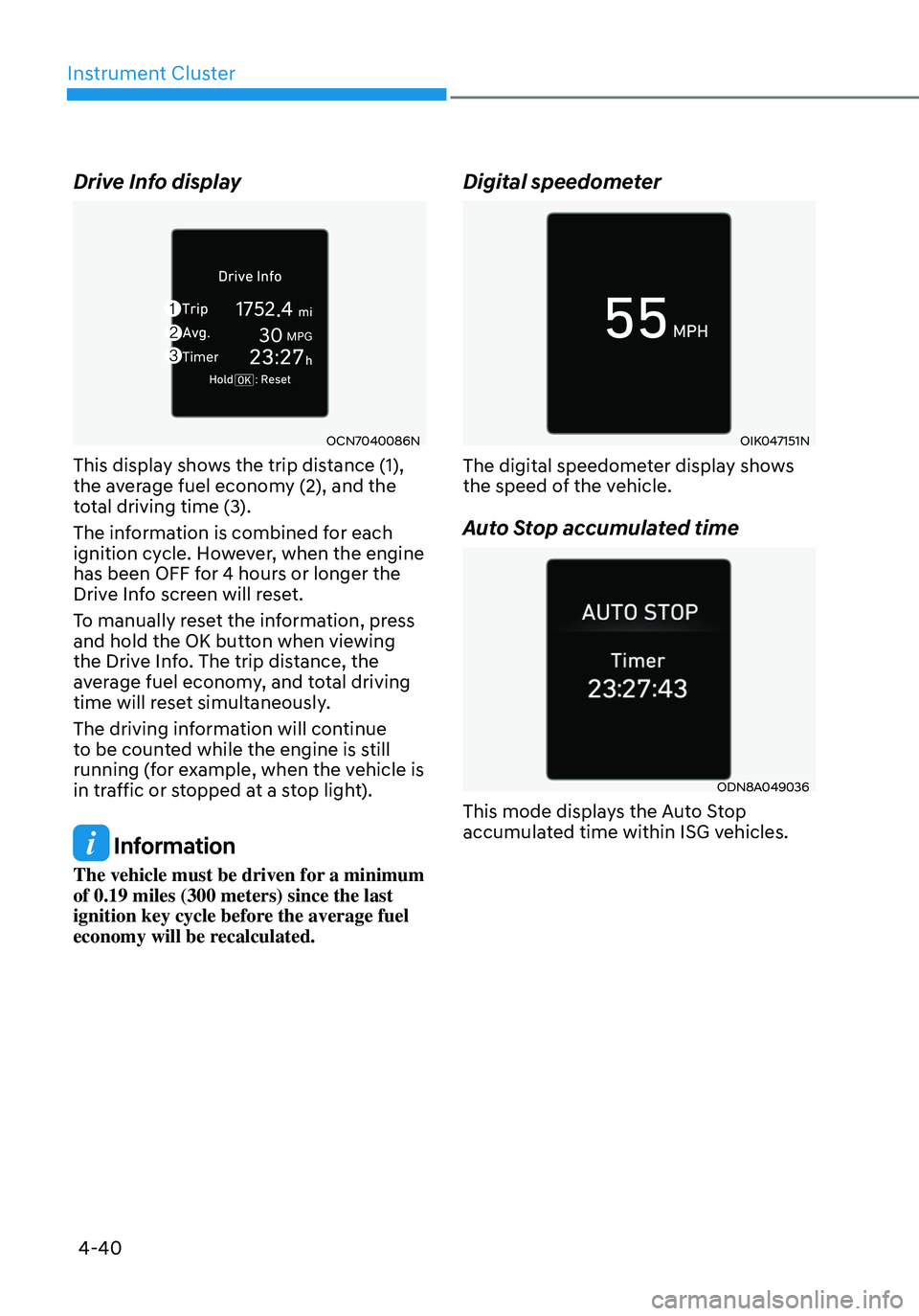
Drive Info display
OCN7040086N
This display shows the trip distance (1),
the average fuel economy (2), and the
total driving time (3).
The information is combined for each
ignition cycle. However, when the engine
has been OFF for 4 hours or longer the
Drive Info screen will reset.
To manually reset the information, press
and hold the OK button when viewing
the Drive Info. The trip distance, the
average fuel economy, and total driving
time will reset simultaneously.
The driving information will continue
to be counted while the engine is still
running (for example, when the vehicle is
in traffic or stopped at a stop light).
Information
The vehicle must be driven for a minimum
of 0.19 miles (300 meters) since the last
ignition key cycle before the average fuel
economy will be recalculated.
Digital speedometer
OIK047151N
The digital speedometer display shows
the speed of the vehicle.
Auto Stop accumulated time
ODN8A049036
This mode displays the Auto Stop
accumulated time within ISG vehicles.