Page 6 of 555
Contents
This manual should be considered a permanent part of the vehicle
and should remain with the vehicle when it is sold.
This manual covers all models of your vehicle. You may find
descriptions of equipment and features that are not on your
particular model.
Images throughout this manual (including the front cover) represent
features and equipment that are available on some, but not all,
models. Your particular model may no t have some of these features.
The information and specifications in cluded in this publication were
in effect at the time of approval for printing. Honda Motor Co., Ltd.
reserves the right, however, to discontinue or change specifications
or design at any time without notice and without incurring any
obligation.2 Safe Driving P. 43
For Safe Driving P. 44 Seat Belts P. 48 Airbags P. 55
2Instrument Panel P. 87
Indicators P. 88 Gauges and Driver Information Interface P. 118
2Controls P. 133
Clock P. 134 Locking and Unlocking the Doors P. 135
Operating the Switches Ar ound the Steering Wheel P. 156
Interior Lights/Interior Convenience Items P. 180
2 Features P. 199
Audio System P. 200 Audio System Basic Operation P. 206
Customized Features P. 302 HomeLink® Universal Transceiver P. 328
2 Driving P. 365
Before Driving P. 366 Towing a Trailer P. 371
Multi-View Rear Camera P. 445 Refueling P. 447
2 Maintenance P. 451
Before Performing Maintenance P. 452 Maintenance MinderTM P. 455
Checking and Maintaining Wiper Blades P. 467
Climate Control System Main tenance P. 482 Cleaning P. 483
2Handling the Unexpected P. 491
If a Tire Goes Flat P. 492 Handling of the Jack P. 504
If Hydrogen Gas is Leaking P. 513 Indicator, Coming On/Blinking P. 515
If You Cannot Unlock the Hydrogen Fuel Lid P. 529
2 Information P. 531
Specifications P. 532 Identification Numbers P. 534
Warranty Coverages P. 537 Authorized Manuals P. 540
21 CLARITY FCV CSS-31TRT6400_02.book 4 ページ 2020年9月25日 金曜日 午後3時15分
Page 7 of 555
Contents
Child Safety P. 72Safety Labels P. 85
Opening and Closing the Trunk P. 148 Security System P. 151 Opening and Closing the Windows P. 154
Adjusting the Mirrors P. 172 Adjusting the Seats P. 174
Climate Control System P. 190
Audio Error Messages P. 279 General Information on the Audio System P. 283
Bluetooth ® HandsFreeLink ® P. 331
When Driving P. 372 Braking P. 427Parking Your Vehicle P. 443
Fuel Economy P. 450
Maintenance Under the Hood P. 459 Replacing Light Bulbs P. 465
Checking and Maintaining Tires P. 470 12-Volt Battery P. 479 Remote Transmitter Care P. 481
Accessories and Modifications P. 489
Power System Won’t Start P. 505 If the 12-Volt Battery Is Dead P. 508 Overheating P. 511
Fuses P. 520 Emergency Towing P. 528
If You Cannot Open the Trunk P. 530
Devices that Emit Radio Waves P. 535 Reporting Safety Defects P. 536
Customer Service Information P. 541
Quick Reference GuideP. 6
Safe DrivingP. 43
Instrument PanelP. 87
ControlsP. 133
FeaturesP. 199
DrivingP. 365
MaintenanceP. 451
Handling the UnexpectedP. 491
InformationP. 531
IndexP. 543
21 CLARITY FCV CSS-31TRT6400_02.book 5 ページ 2020年9月25日 金曜日 午後3時15分
Page 9 of 555
7
Quick Reference Guide
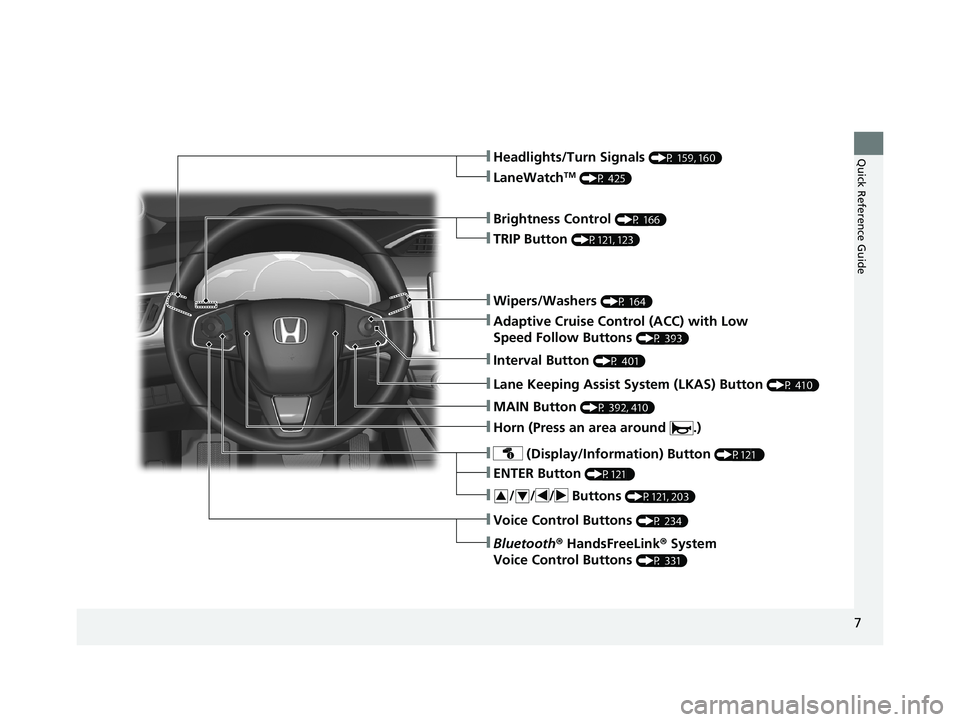
❚Wipers/Washers (P 164)
❚Headlights/Turn Signals (P 159, 160)
❚Brightness Control (P 166)
❚LaneWatchTM (P 425)
❚TRIP Button (P121, 123)
❚Adaptive Cruise Control (ACC) with Low
Speed Follow Buttons
(P 393)
❚ (Display/Information) Button (P121 )
❚/ / / Buttons (P121, 203)34
❚ENTER Button (P121 )
❚Bluetooth® HandsFreeLink ® System
Voice Control Buttons
(P 331)
❚Horn (Press an area around .)
❚Voice Control Buttons (P 234)
❚Interval Button (P 401)
❚Lane Keeping Assist System (LKAS) Button (P 410)
❚MAIN Button (P 392, 410)
21 CLARITY FCV CSS-31TRT6400_02.book 7 ページ 2020年9月25日 金曜日 午後3時15分
Page 11 of 555
9
Quick Reference Guide
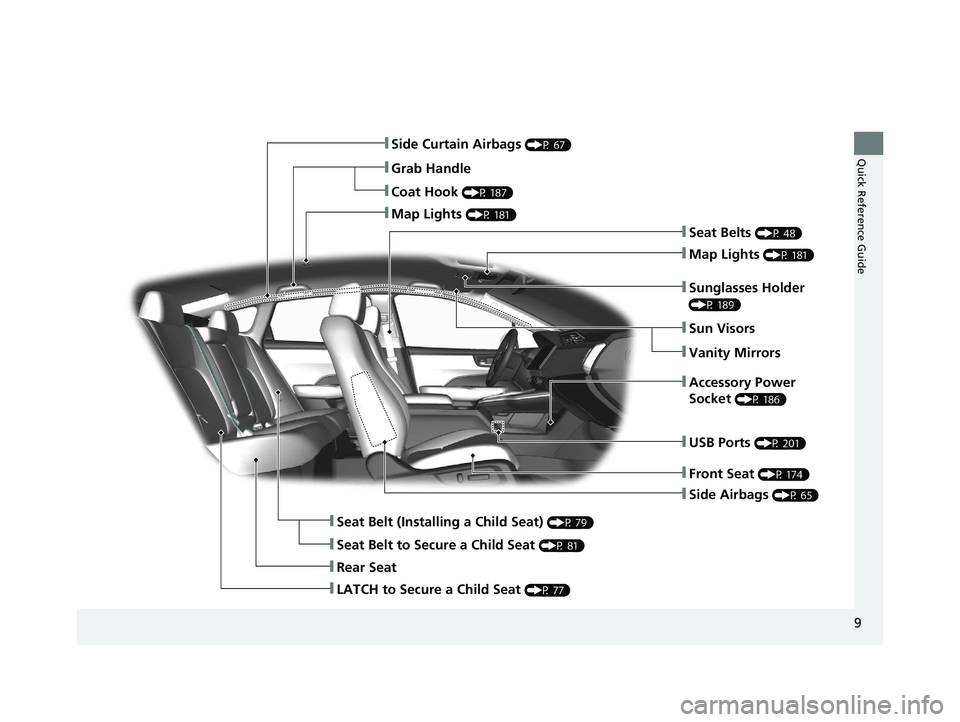
❚Side Airbags (P 65)
❚Side Curtain Airbags (P 67)
❚Seat Belts (P 48)
❚Seat Belt (Installing a Child Seat) (P 79)
❚Rear Seat
❚Coat Hook (P 187)
❚Map Lights (P 181)
❚Sun Visors
❚Vanity Mirrors
❚Seat Belt to Secure a Child Seat (P 81)
❚Map Lights (P 181)
❚Grab Handle
❚Sunglasses Holder
(P 189)
❚Accessory Power
Socket
(P 186)
❚Front Seat (P 174)
❚USB Ports (P 201)
❚LATCH to Secure a Child Seat (P 77)
21 CLARITY FCV CSS-31TRT6400_02.book 9 ページ 2020年9月25日 金曜日 午後3時15分
Page 12 of 555
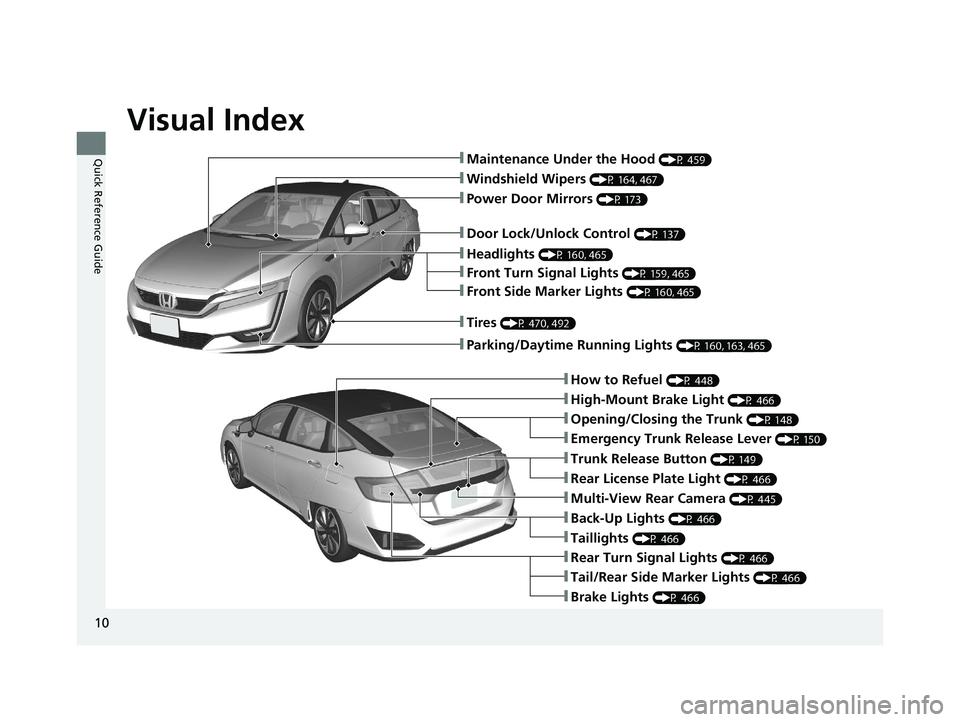
Visual Index
10
Quick Reference Guide❚Maintenance Under the Hood (P 459)
❚Windshield Wipers (P 164, 467)
❚Door Lock/Unlock Control (P 137)
❚Power Door Mirrors (P 173)
❚Headlights (P 160, 465)
❚Front Side Marker Lights (P 160, 465)
❚Front Turn Signal Lights (P 159, 465)
❚How to Refuel (P 448)
❚High-Mount Brake Light (P 466)
❚Emergency Trunk Release Lever (P 150)
❚Opening/Closing the Trunk (P 148)
❚Brake Lights (P 466)
❚Rear Turn Signal Lights (P 466)
❚Back-Up Lights (P 466)
❚Taillights (P 466)
❚Trunk Release Button (P 149)
❚Rear License Plate Light (P 466)
❚Multi-View Rear Camera (P 445)
❚Parking/Daytime Running Lights (P 160, 163, 465)
❚Tires (P 470, 492)
❚Tail/Rear Side Marker Lights (P 466)
21 CLARITY FCV CSS-31TRT6400_02.book 10 ページ 2020年9月25日 金曜日 午後3時15分
Page 18 of 555
16
Quick Reference Guide
High Voltage Battery
Because electricity generated by the fuel cells and through regenerative braking recharges the High Voltage battery, the batter y does not
need to be recharged from an outside source; however, the High Voltage battery gradually discharges when the vehicle is not in use. If
allowed to discharge too much, the battery may become damaged.
If your vehicle is parked for an extended period of time, during storage for example, periodically recharge the battery to main tain sufficient
charge levels. At least once every three months, turn on the power system, and keep it on for more than 30 minutes to allow the battery to
recharge.
Excessive heat can also damage the batter y. On hot, sunny days, try to avoid parking your vehicle under direct sunlight.
If the High Voltage battery becomes fully discharged or damage d and you are unable to start the FC system as a result, consult an
authorized Honda Clarity Fuel Cell dealer.
Temperature
When storing the vehicle, make sure not to expose it to extremel y low temperatures: It may take a longer time to start in very cold
conditions or may not start at all until temperatures rise. If th e temperature of the fuel cell or the High Voltage battery drops below –4°F
(–20°C), the fuel cells will not operate and, as a result, the vehicle will not start.
21 CLARITY FCV CSS-31TRT6400_02.book 16 ページ 2020年9月25日 金曜日 午後3時15分
Page 28 of 555
26
Quick Reference Guide
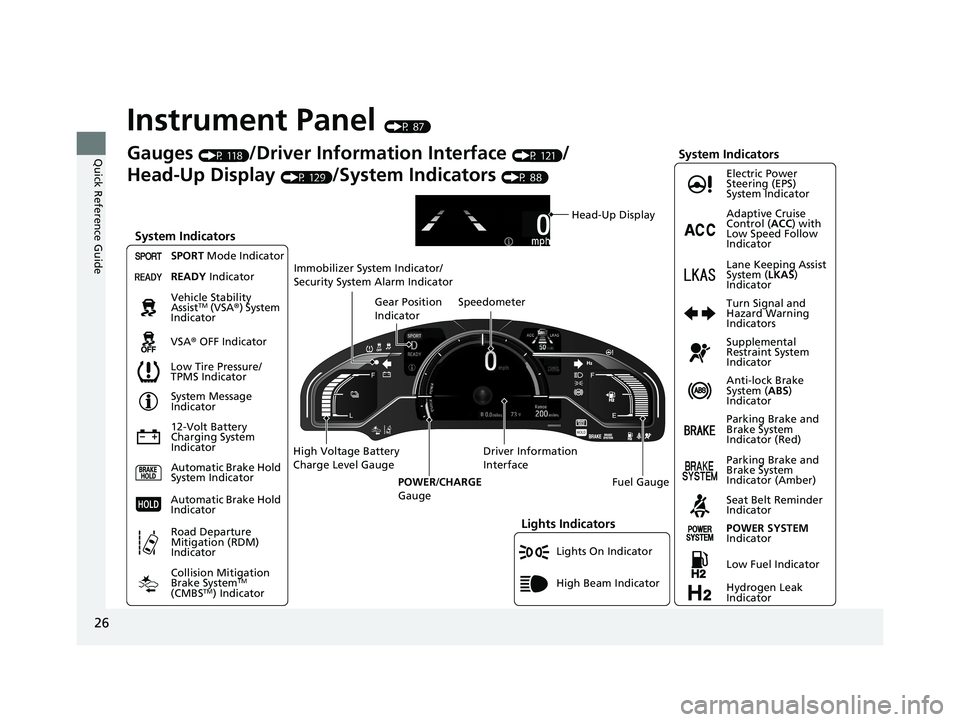
Instrument Panel (P 87)
Lights On Indicator
System Indicators
12-Volt Battery
Charging System
IndicatorAnti-lock Brake
System (
ABS)
Indicator
Vehicle Stability
Assist
TM (VSA
®) System
Indicator
VSA ® OFF Indicator Electric Power
Steering (EPS)
System Indicator
Lights Indicators
High Beam Indicator
Seat Belt Reminder
Indicator
System Indicators
System Message
Indicator
Parking Brake and
Brake System
Indicator (Red) Supplemental
Restraint System
Indicator
Gauges (P 118)/Driver Information Interface (P 121)/
Head-Up Display
(P 129)/System Indicators (P 88)
Low Tire Pressure/
TPMS Indicator Turn Signal and
Hazard Warning
Indicators
Speedometer
Automatic Brake Hold
System Indicator Parking Brake and
Brake System
Indicator (Amber)
SPORT
Mode Indicator
Collision Mitigation
Brake System
TM
(CMBSTM) Indicator
Road Departure
Mitigation (RDM)
Indicator
Immobilizer System Indicator/
Security System Alarm Indicator
Automatic Brake Hold
Indicator
Head-Up Display
READY Indicator
POWER SYSTEM
Indicator
Gear Position
Indicator
Fuel Gauge
Driver Information
Interface
High Voltage Battery
Charge Level Gauge
POWER/CHARGE
Gauge
Low Fuel Indicator
Hydrogen Leak
Indicator Adaptive Cruise
Control ( ACC) with
Low Speed Follow
Indicator
Lane Keeping Assist
System ( LKAS)
Indicator
21 CLARITY FCV CSS-31TRT6400_02.book 26 ページ 2020年9月25日 金曜日 午後3時15分
Page 29 of 555
27
Quick Reference Guide
Controls (P 133)
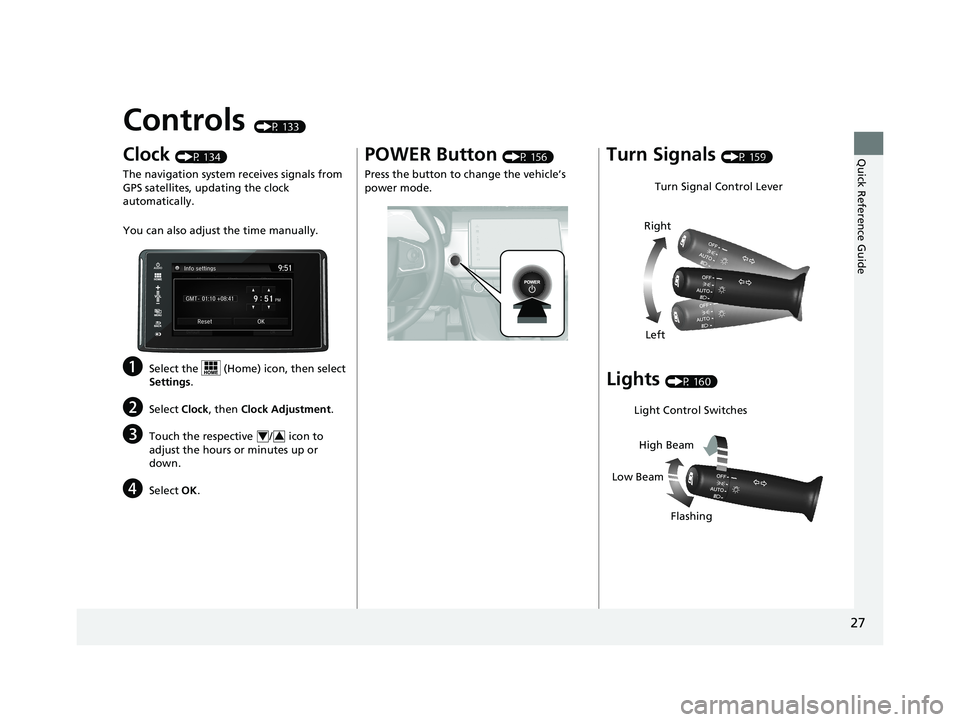
Clock (P 134)
The navigation system receives signals from
GPS satellites, updating the clock
automatically.
You can also adjust the time manually.
aSelect the (Home) icon, then select
Settings.
bSelect Clock, then Clock Adjustment .
cTouch the respective / icon to
adjust the hours or minutes up or
down.
dSelect OK.
43
POWER Button (P 156)
Press the button to ch ange the vehicle’s
power mode.Turn Signals (P 159)
Lights (P 160)
Turn Signal Control Lever
Right
Left
Light Control Switches
Low Beam High Beam
Flashing
21 CLARITY FCV CSS-31TRT6400_02.book 27 ページ 2020年9月25日 金曜日 午後3時15分