2021 FORD TRANSIT ECU
[x] Cancel search: ECUPage 94 of 509

ANTI-THEFT ALARM -
VEHICLES WITH: ANTI-THEFT
ALARM HORN WITH INTEGRAL
BATTERY
Alarm System
Your vehicle may have one of the following
alarm systems:
•
Category one alarm with interior
sensors and battery back-up sounder.
• Perimeter alarm.
Perimeter Alarm
The perimeter alarm is a deterrent against
unauthorized access to your vehicle
through the doors and the hood.
Interior Sensors (If Equipped) Note:
Do not cover up the interior scanning
sensors.
The sensors act as a deterrent against
unauthorized intrusion by sensing any
movement within your vehicle. Battery Back-up Sounder
The battery back-up sounder is an
additional alarm system this will sound a
siren when the alarm is triggered. When
you lock your vehicle the system is armed.
The sounder has its own battery and will
sound an alarm siren even if someone
disconnects your vehicle battery or the
battery back-up sounder itself.
Triggering the Alarm
Once armed, the alarm is triggered in any
of the following ways:
•
If someone opens a door or the hood
without a valid key or remote control.
• If you switch the ignition on without a
valid key.
• If the interior sensors detect movement
within your vehicle.
• On vehicles with a battery back-up
sounder, if someone disconnects your
vehicle battery or the battery back-up
sounder itself.
If the alarm is triggered, the alarm horn will
sound for 30 seconds and the hazard
warning flashers will flash for five minutes.
Any further attempts to perform one of the
above will trigger the alarm again.
Guard Settings
Note: Do not arm the alarm with full guard
if passengers, animals or other moving
objects are inside your vehicle, as this could
trigger the alarm.
91
2021 Transit (TTH) Canada/United States of America, MK3J 19A321 AA enUSA, Edition date: 202010, Second-Printing SecurityE131656
Page 95 of 509

Description
Message
The interior sensors are on when you arm the alarm.
Full guard
The interior sensors are off when you arm the alarm. You can
set the alarm to reduced guard for the current ignition cycle
only. The alarm will reset to full guard the next time you
switch the ignition on.
Reduced
You can set the information display to ask you each time
which level of guard you wish to set.
Ask on exit
A message appears in the information display each time you
switch the ignition off. If you wish to arm the alarm with
reduced guard, press the OK button when this message
appears. If you wish to arm the alarm with full guard, leave
your vehicle without pressing the
OK button.
Selecting Full or Reduced Guard
Note: Selecting reduced guard does not set
the alarm permanently to reduced guard. It
sets it to reduced guard only for the current
ignition cycle. If you regularly set the alarm
to reduced guard, select the option to ask
when you exit.
You can select full or reduced guard using
the information display. See Information
Displays
(page 115).
Arming the Alarm
To arm the alarm, lock your vehicle. See
Doors and Locks
(page 76).
Disarming the Alarm
Disarm and silence the alarm by unlocking
the doors and switching your vehicle on or
by unlocking the doors or the liftgate with
the remote control.
92
2021 Transit (TTH) Canada/United States of America, MK3J 19A321 AA enUSA, Edition date: 202010, Second-Printing Security
Page 123 of 509

WHAT IS REMOTE START
The system allows you to remotely start
your vehicle and therefore to heat or cool
the interior to a predetermined
temperature.
REMOTE START LIMITATIONS
Remote start does not work if:
•
The alarm horn is sounding.
• The hood is open.
• The transmission is not in park (P).
• Remote start is not enabled.
• The ignition is on.
Note: Do not use remote start if your fuel
level is low.
ENABLING REMOTE START
1. Using the information display controls on the steering wheel, select Settings.
2. Select Vehicle Settings.
3. Select
Remote Start.
4. Switch
System on.
Note: To use remote start, make sure that
the modem is enabled. See
Enabling and
Disabling the Modem (page 371).
REMOTELY STARTING AND
STOPPING THE VEHICLE WARNING: Do not start the engine
in a closed garage or in other enclosed
areas. Exhaust fumes are toxic. Always
open the garage door before you start
the engine. Failure to follow this
instruction could result in personal injury
or death. Use the FordPass App to start the vehicle.
Note:
The turn signal lamps flash twice.
Note: The parking lamps turn on when the
vehicle is running.
Note: The horn sounds if the system fails
to start.
Note: All other vehicle systems remain off
when you have remotely started the vehicle.
Note: You may have to wait a short period
of time before remotely starting the vehicle
after the vehicle stops running.
Note: The vehicle remains secured when
you have remotely started it. A valid key
must be inside your vehicle to switch the
ignition on and drive your vehicle.
Note: A maximum of two remote starts are
allowed. After that you need to turn the
ignition on and off before you can use
remote start again.
Use the FordPass App to switch the vehicle
off.
REMOTE START SETTINGS
Climate Control Settings
1. Using the information display controls on the steering wheel, select Settings.
2. Select Vehicle Settings.
3. Select
Remote Start.
4. Select
Climate Control.
5. Select
Auto or Last Settings.
Note: If you select
Auto, the system
attempts to heat or cool the interior to 72°F
(22°C)
.
Note: If you select
Last Settings, the
system remembers the last used settings.
Note: You cannot adjust the climate control
settings when you have remotely started
the vehicle.
120
2021 Transit (TTH) Canada/United States of America, MK3J 19A321 AA enUSA, Edition date: 202010, Second-Printing Remote Start
Page 130 of 509

The head restraint consists of:
Energy absorbing head restraint.
A
Guide sleeve adjust and unlock
button.
B
Guide sleeve unlock and remove
button.
C
Steel stems.
D
Adjusting the Head Restraint WARNING: Adjust the head
restraints for all passengers before you
drive your vehicle. This will help minimize
the risk of neck injury in the event of a
crash. Do not adjust the head restraints
when your vehicle is moving.
Note: Adjust the seat backrest to an upright
driving position before adjusting the head
restraint. Adjust the head restraint so that
the top of it is level with the top of your head
and as far forward as possible.
Raising the Head Restraint
Lift the head restraint up.
Lowering the Head Restraint
1. Press and hold button B.
2. Push the head restraint down. Removing the Head Restraint WARNING:
Do not remove the
head restraint from an occupied seat.
1. Lift the head restraint up until it reaches its highest position.
2. Press and hold buttons B and C.
3. Remove the head restraint.
Installing the Head Restraint WARNING:
Install head restraints
correctly to help minimize the risk of neck
injury in the event of a crash.
1. Align the steel stems into the guide sleeves.
2. Press and hold buttons B and C.
3. Push the head restraint down.
MANUAL SEATS - VEHICLES
WITH: 2-WAY MANUAL SEAT WARNING: Do not adjust the driver
seat when your vehicle is moving. WARNING:
Do not place cargo or
any objects behind the seatback before
returning it to the original position.
Moving the Seat Backward and
Forward WARNING: Make sure the seat fully
locks into place by rocking it backward
and forward. Not securing the seat into
the locked position can be dangerous in
a crash and could cause serious personal
injury or death.
127
2021 Transit (TTH) Canada/United States of America, MK3J 19A321 AA enUSA, Edition date: 202010, Second-Printing SeatsE215998
Page 132 of 509

WARNING: Do not place cargo or
any objects behind the seatback before
returning it to the original position.
Moving the Seat Backward and
Forward WARNING: Make sure the seat fully
locks into place by rocking it backward
and forward. Not securing the seat into
the locked position can be dangerous in
a crash and could cause serious personal
injury or death. Note:
The driver seat has removable stop
bolts on the track to enable access to the
vehicle battery. See
Changing the 12V
Battery (page 290). Adjusting the Seat Backrest
Adjusting the Seat Height
129
2021 Transit (TTH) Canada/United States of America, MK3J 19A321 AA enUSA, Edition date: 202010, Second-Printing SeatsE130249 E146385 E146384
Page 137 of 509

2. While holding the handle in this
position, tilt the top of the seat forward
to release the seat frame rear catches
from the floor.
3. When the rear seat latches are clear of
the floor, release the handle.
4. Pull the seat backward to release the seat frame front catches.
5. Remove the seat from the vehicle.
Note: Two persons are required to release
the seat handles and remove the seat.
Note: You can only remove seats that have
integral release handles.
Note: The seatback does not fold forward.
Installing the Seats WARNING: Make sure that the
floor catches are free from foreign
material before installing the seats. WARNING:
Make sure that you
securely fasten the seat catches when
installing. Check the latches are correctly
engaged by checking the red latch
indicators. 1. Align the seat frame front catches.
2. Push the seat forward to engage the
seat frame front catches.
3. Align the seat frame rear catches.
4. Allow the seat to drop under its own weight for the last 6-8 in (15-20 cm).
134
2021 Transit (TTH) Canada/United States of America, MK3J 19A321 AA enUSA, Edition date: 202010, Second-Printing SeatsE178062
Page 231 of 509

ROOF RACKS AND LOAD
CARRIERS - BUS
WARNING: Your vehicle is not
approved for roof racks. Never install a
roof rack to your vehicle.
ROOF RACKS AND LOAD
CARRIERS - VAN WARNING:
When loading the roof
racks, we recommend you evenly
distribute the load, as well as maintain
a low center of gravity. Loaded vehicles,
with higher centers of gravity, may
handle differently than unloaded
vehicles. Take extra precautions, such
as slower speeds and increased stopping
distance, when driving a heavily loaded
vehicle. WARNING:
Do not exceed the
maximum front and rear axle loads for
your vehicle. WARNING:
Read and follow the
manufacturer's instructions when you
are fitting a roof rack.
Maximum Roof Load lb (kg)
Variant
419 (190)
Low-Roof.
331 (150)
Medium-Roof.
220 (100)
High-Roof.
Make sure that you securely fasten the
load. Check that the straps are secure
before driving and at each fuel stop. We recommend that you use genuine Ford
accessory crossbars specifically designed
for your vehicle.
Never place loads directly on the roof
panel.
LOAD RETAINING FIXTURES
Securing Cargo
Maximum Load
Value
Variant
1,125 lb (5,000 N)
All Van
Note: The number of load retaining fixtures
may vary depending on your vehicle model.
228
2021 Transit (TTH) Canada/United States of America, MK3J 19A321 AA enUSA, Edition date: 202010, Second-Printing Load CarryingE175810
Page 250 of 509
BREAKING-IN
You need to break in new tires for
approximately 300 mi (480 km). During
this time, your vehicle may exhibit some
unusual driving characteristics. The engine
also needs to break in. Avoid hard
accelerations and driving too fast for the
first 1,000 mi (1,600 km). If possible, avoid
carrying heavy loads up steep grades
during the break-in period.
DRIVING THROUGH WATER WARNING:
Do not drive through
flowing or deep water as you may lose
control of your vehicle.
Note: Driving through standing water can
cause vehicle damage.
Note: Engine damage can occur if water
enters the air filter.
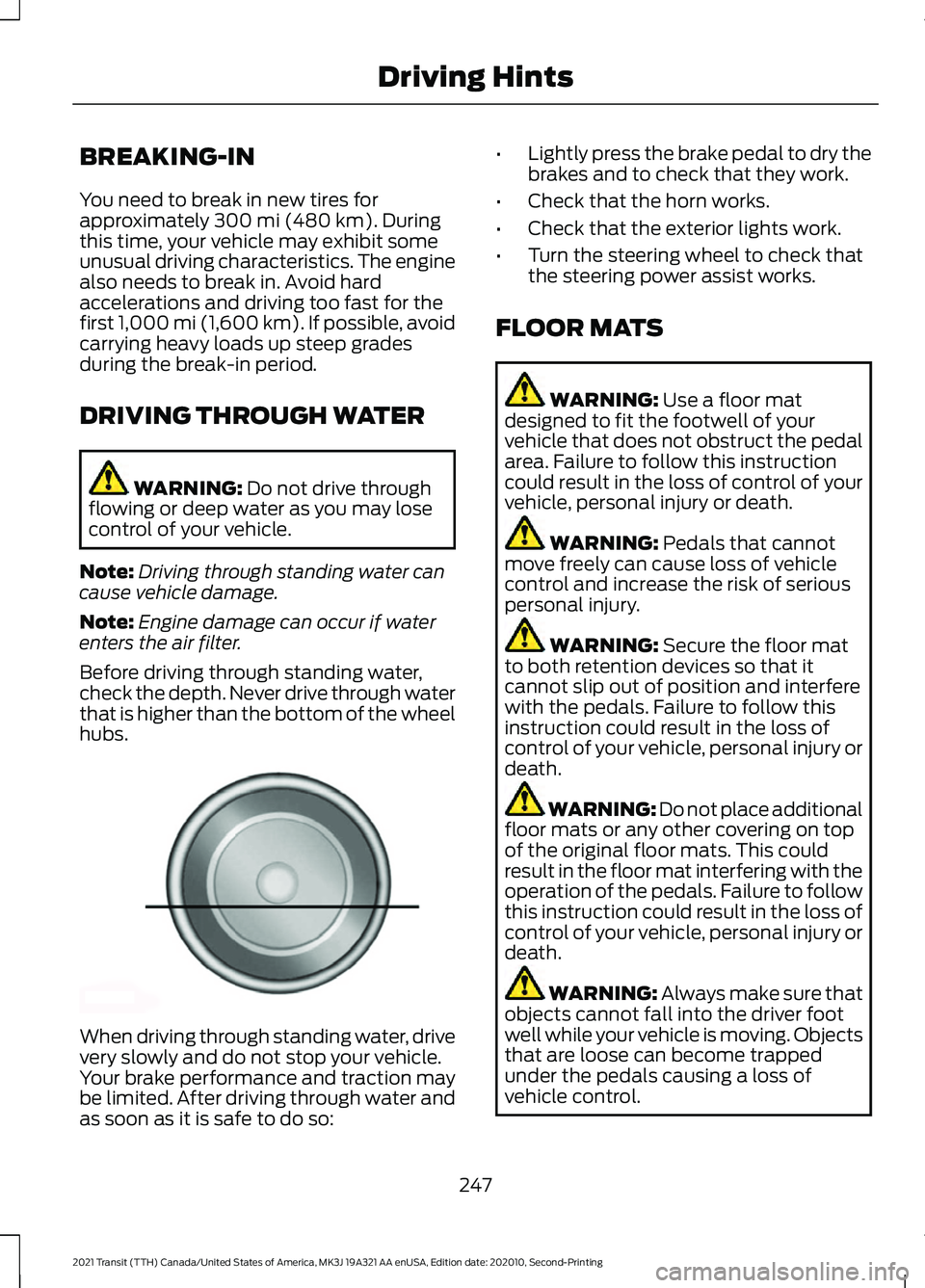
Before driving through standing water,
check the depth. Never drive through water
that is higher than the bottom of the wheel
hubs. When driving through standing water, drive
very slowly and do not stop your vehicle.
Your brake performance and traction may
be limited. After driving through water and
as soon as it is safe to do so: •
Lightly press the brake pedal to dry the
brakes and to check that they work.
• Check that the horn works.
• Check that the exterior lights work.
• Turn the steering wheel to check that
the steering power assist works.
FLOOR MATS WARNING:
Use a floor mat
designed to fit the footwell of your
vehicle that does not obstruct the pedal
area. Failure to follow this instruction
could result in the loss of control of your
vehicle, personal injury or death. WARNING:
Pedals that cannot
move freely can cause loss of vehicle
control and increase the risk of serious
personal injury. WARNING:
Secure the floor mat
to both retention devices so that it
cannot slip out of position and interfere
with the pedals. Failure to follow this
instruction could result in the loss of
control of your vehicle, personal injury or
death. WARNING: Do not place additional
floor mats or any other covering on top
of the original floor mats. This could
result in the floor mat interfering with the
operation of the pedals. Failure to follow
this instruction could result in the loss of
control of your vehicle, personal injury or
death. WARNING:
Always make sure that
objects cannot fall into the driver foot
well while your vehicle is moving. Objects
that are loose can become trapped
under the pedals causing a loss of
vehicle control.
247
2021 Transit (TTH) Canada/United States of America, MK3J 19A321 AA enUSA, Edition date: 202010, Second-Printing Driving HintsE176913