2021 FORD F-150 cooling
[x] Cancel search: coolingPage 195 of 796
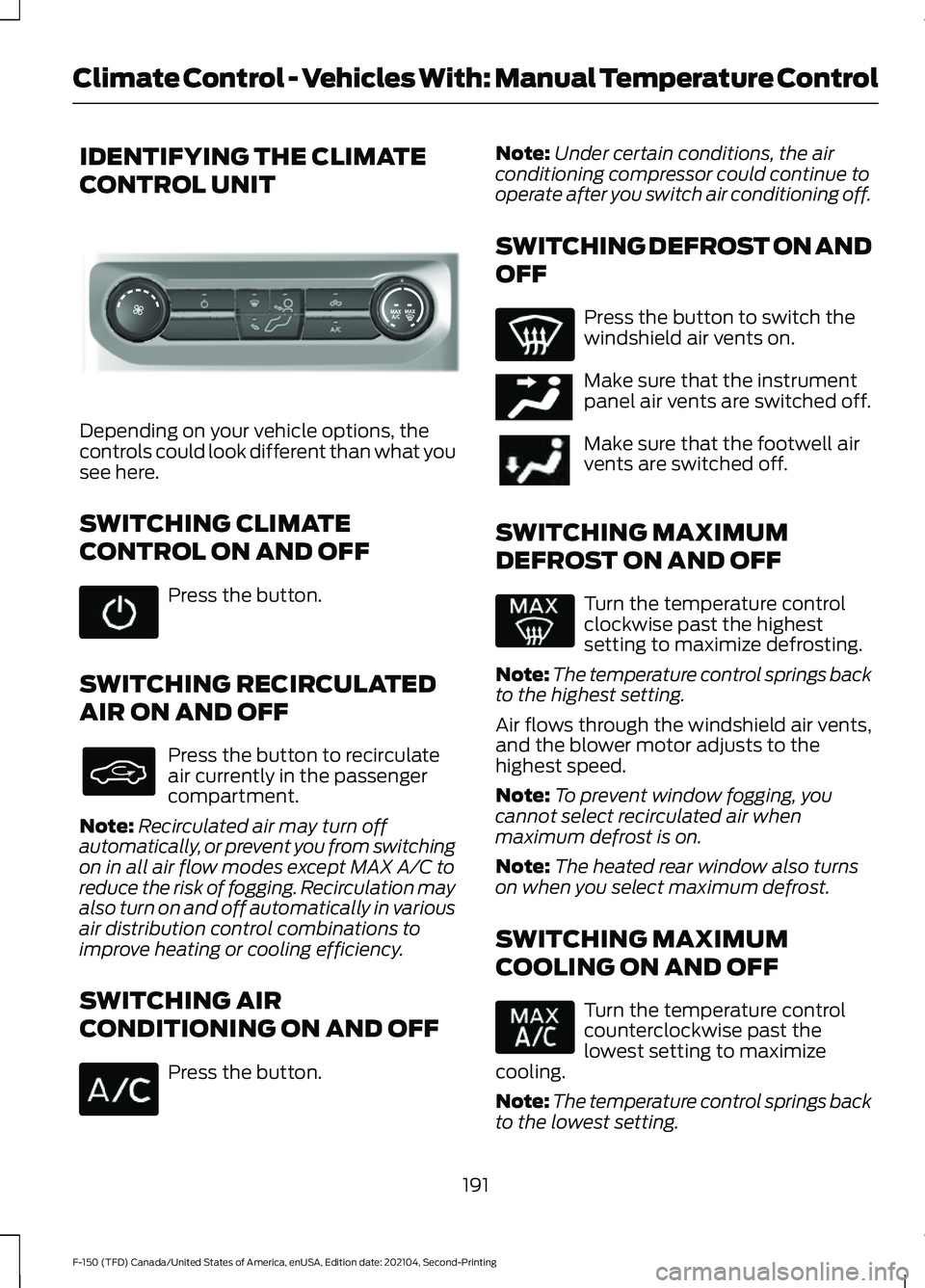
IDENTIFYING THE CLIMATE
CONTROL UNIT
Depending on your vehicle options, the
controls could look different than what you
see here.
SWITCHING CLIMATE
CONTROL ON AND OFF
Press the button.
SWITCHING RECIRCULATED
AIR ON AND OFF Press the button to recirculate
air currently in the passenger
compartment.
Note: Recirculated air may turn off
automatically, or prevent you from switching
on in all air flow modes except MAX A/C to
reduce the risk of fogging. Recirculation may
also turn on and off automatically in various
air distribution control combinations to
improve heating or cooling efficiency.
SWITCHING AIR
CONDITIONING ON AND OFF Press the button. Note:
Under certain conditions, the air
conditioning compressor could continue to
operate after you switch air conditioning off.
SWITCHING DEFROST ON AND
OFF Press the button to switch the
windshield air vents on.
Make sure that the instrument
panel air vents are switched off.
Make sure that the footwell air
vents are switched off.
SWITCHING MAXIMUM
DEFROST ON AND OFF Turn the temperature control
clockwise past the highest
setting to maximize defrosting.
Note: The temperature control springs back
to the highest setting.
Air flows through the windshield air vents,
and the blower motor adjusts to the
highest speed.
Note: To prevent window fogging, you
cannot select recirculated air when
maximum defrost is on.
Note: The heated rear window also turns
on when you select maximum defrost.
SWITCHING MAXIMUM
COOLING ON AND OFF Turn the temperature control
counterclockwise past the
lowest setting to maximize
cooling.
Note: The temperature control springs back
to the lowest setting.
191
F-150 (TFD) Canada/United States of America, enUSA, Edition date: 202104, Second-Printing Climate Control - Vehicles With: Manual Temperature ControlE308141 E244097
Page 196 of 796
Note:
When you switch maximum cooling
off, air conditioning remains on.
SWITCHING THE HEATED
REAR WINDOW ON AND OFF Press the button to clear the rear
window of thin ice and fog. The
heated rear window turns off
after a short period of time.
Note: Do not use harsh chemicals, razor
blades or other sharp objects to clean or
remove decals from the inside of the heated
rear window as this could cause damage to
the heated rear window grid lines not
covered by the vehicle Warranty.
SETTING THE BLOWER MOTOR
SPEED Note:
Lights on the control illuminate to
indicate the blower motor speed.
Note: When you switch the blower motor
off, air conditioning turns off and the
windows could fog up.
SWITCHING THE HEATED
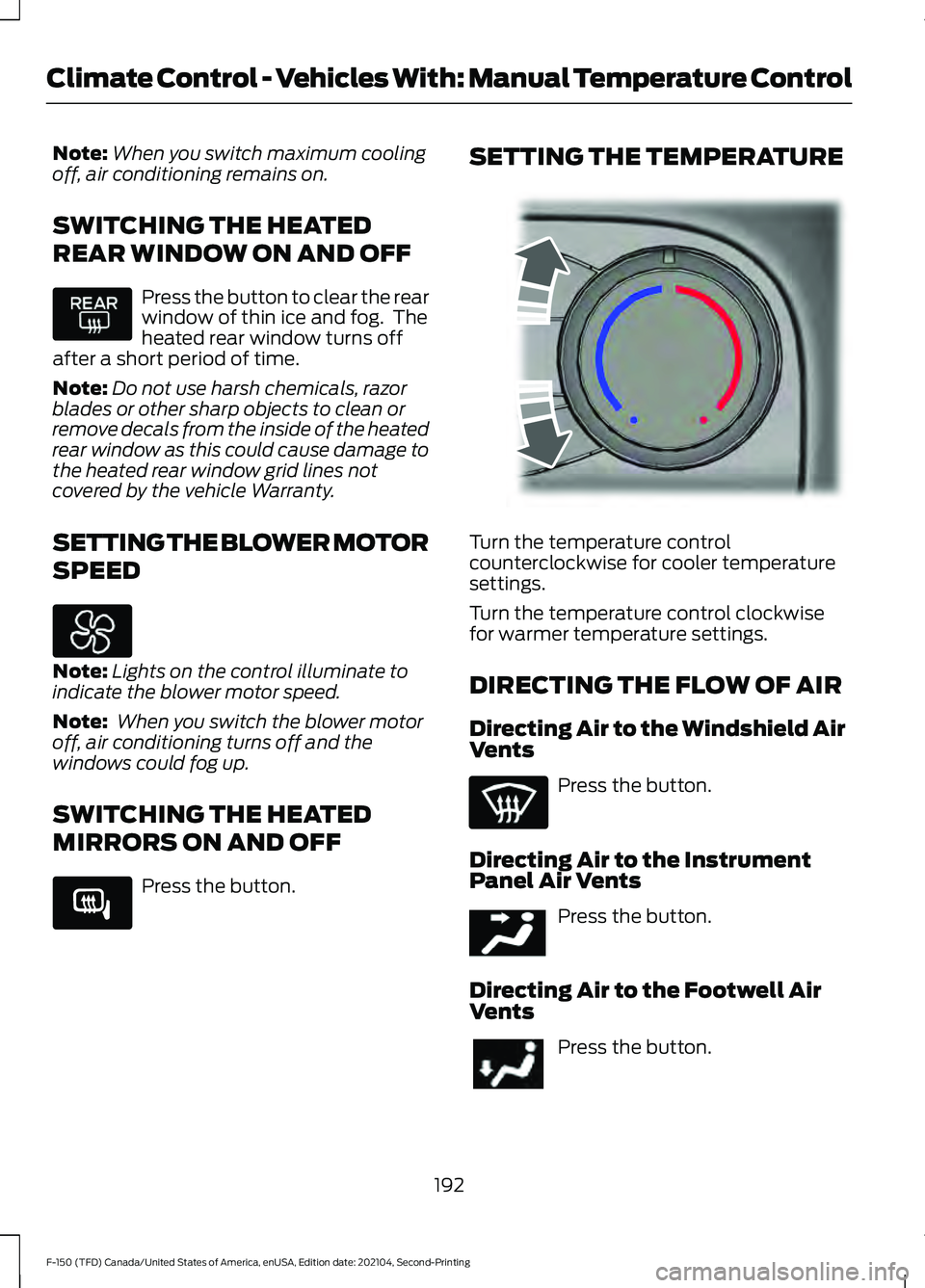
MIRRORS ON AND OFF Press the button. SETTING THE TEMPERATURE
Turn the temperature control
counterclockwise for cooler temperature
settings.
Turn the temperature control clockwise
for warmer temperature settings.
DIRECTING THE FLOW OF AIR
Directing Air to the Windshield Air
Vents
Press the button.
Directing Air to the Instrument
Panel Air Vents Press the button.
Directing Air to the Footwell Air
Vents Press the button.
192
F-150 (TFD) Canada/United States of America, enUSA, Edition date: 202104, Second-Printing Climate Control - Vehicles With: Manual Temperature Control E266189 E244106 E244097
Page 197 of 796
CLIMATE CONTROL HINTS
General Hints
•
Prolonged use of recirculated air may
cause the windows to fog up.
• You may feel a small amount of air
from the footwell air vents regardless
of the air distribution setting.
• To reduce humidity build-up inside your
vehicle, do not drive with the system
switched off or with recirculated air
always switched on.
• Do not place objects under the front
seats as this may interfere with the
airflow to the rear seats.
• Remove any snow, ice or leaves from
the air intake area at the base of the
windshield.
• To improve the time to reach a
comfortable temperature in hot
weather, drive with the windows open
until you feel cold air through the air
vents.
Quickly Heating the Interior
1. Adjust the blower motor speed to the highest speed setting.
2. Adjust the temperature control to the highest setting.
3. Direct air to the footwell air vents.
Recommended Settings for
Heating
1. Adjust the blower motor speed to the center setting.
2. Adjust the temperature control to the midway point of the hot settings.
3. Direct air to the footwell air vents.
Quickly Cooling the Interior
1. Press MAX A/C. 2.
Drive with the windows open for a short
period of time.
Recommended Settings for
Cooling
1. Adjust the blower motor speed to the center setting.
2. Adjust the temperature control to the midway point of the cold settings.
3. Direct air to the instrument panel air vents.
Defogging the Side Windows in
Cold Weather
1. Direct air to the instrument panel and windshield air vents.
2. Press and release
A/C.
3. Adjust the temperature control to the setting you prefer.
4. Adjust the blower motor speed to the highest setting.
5. Direct air toward the side windows.
6. Close the instrument panel air vents.
193
F-150 (TFD) Canada/United States of America, enUSA, Edition date: 202104, Second-Printing Climate Control - Vehicles With: Manual Temperature Control
Page 207 of 796

Press the heated seat symbol on the
climate controls or touchscreen to cycle
through the various heat settings and off.
The more indicators that display, the
warmer the temperature of the seat.
Note:
The heated seats may remain on
after you remote start your vehicle, based
on your remote start settings. The heated
seats may also turn on when you start your
vehicle if they were on when you switched
your vehicle off.
VENTILATED SEATS (IF EQUIPPED)
VENTILATED SEAT PRECAUTIONS
Do not:
• Spill liquid on the front seats. This may
cause the air vent holes to become
blocked and not work properly.
• Place cargo or objects under the seats.
They may block the air intake causing
the air vents to not work properly.
SWITCHING THE VENTILATED
SEATS ON AND OFF
The vehicle must be running to use this
feature. Press this symbol on the climate controls
or the touchscreen to cycle through the
various ventilation settings and off. More
indicator lights indicate higher fan speeds.
Note:
When you switch the climate control
fan speed and the ventilated seats to their
maximum settings, the ventilated seats
provide increased cooling.
If the engine falls below 350 RPM while
the ventilated seats are on, the feature
turns itself off unless the vehicle is in
Auto-Start-Stop mode. You may need to
reactivate the ventilated seats.
Note: The ventilated seats may remain on
after you remote start your vehicle, based
on your remote start settings. The ventilated
seats may also turn on when you start your
vehicle if they were on when you switched
your vehicle off.
203
F-150 (TFD) Canada/United States of America, enUSA, Edition date: 202104, Second-Printing Front SeatsE146322 E224689
Page 253 of 796

WHAT IS A HYBRID ELECTRIC
VEHICLE
A hybrid vehicle has an electric motor and
a high voltage battery combined with a
gasoline engine.
HOW DOES A HYBRID
ELECTRIC VEHICLE WORK
The hybrid vehicle combines electric and
gasoline propulsion to provide optimal
performance and improved efficiency.
HYBRID ELECTRIC VEHICLE
DRIVING CHARACTERISTICS
The gasoline engine starts and stops to
provide power when required and to save
fuel when not needed. When coasting at
low speeds, coming to a stop or standing,
the gas engine normally shuts down and
your vehicle operates in electric-only
mode.
Conditions that may cause the gasoline
engine to start or remain running include:
•
Considerable vehicle acceleration.
• Driving uphill.
• The high voltage battery charge level
is low.
• Heating or cooling the vehicle interior
in high or low outside temperatures.
• The gasoline engine is below normal
operating temperature.
• Towing a trailer.
• Certain selectable drive modes could
cause the engine to run. See Selecting
a Drive Mode (page 373). Use of the
paddle shifters while in drive (D) could
cause the engine to run. Your hybrid vehicle also comes with
standard hydraulic braking and
regenerative braking. Regenerative braking
is performed by your transmission and
captures brake energy and stores it in the
high voltage battery.
You could also notice that your engine
continues to run instead of shutting off
during extended downhill driving. The
engine stays on during this engine braking
but is not using any fuel.
You could also hear a slight whine or
whistle when operating your vehicle. This
is the normal operation of the electric
motor in the hybrid system.
HYBRID ELECTRIC VEHICLE
INDICATORS
When you start your vehicle, a
green READY indicator light
appears in the instrument cluster
letting you know that your vehicle is ready
for driving.
The engine may not start because your
vehicle has a silent key start feature. This
fuel saving feature allows your vehicle to
be ready to drive without requiring the gas
engine to be running.
The indicator remains on when your vehicle
is on, whether the engine is running or not,
to indicate your vehicle is capable of
movement using the electric motor, gas
engine or both.
Typically, the engine does not start unless
the vehicle is cold, a climate control
change is requested or you press the
accelerator pedal.
249
F-150 (TFD) Canada/United States of America, enUSA, Edition date: 202104, Second-Printing Hybrid Electric Vehicle Information
(If Equipped)E293827
Page 274 of 796

Before you start manual regeneration, do
the following:
•
Shift into park (P) and apply the
parking brake, on stable, level ground.
• Park your vehicle outside of any
structure.
• Park your vehicle 10– 15 ft (3–5 m)
away from any obstructions and away
from materials that can easily combust
or melt, for example paper, leaves,
petroleum products, fuels, plastics and
other dry organic material.
• Make sure there is a minimum of 1/8
tank of fuel.
• Make sure all fluids are at proper levels.
DIESEL PARTICULATE FILTER
MANUAL REGENERATION
LIMITATIONS
You cannot use manual regeneration until
the diesel particulate filter load percentage
has reached 100%. The diesel particulate
filter load percentage fluctuates up and
down when driving your vehicle due to
active and passive regenerations.
If your vehicle is operated with significant
stationary operation, low speed drive
cycles less than
25 mph (40 km/h), short
drive cycles, drive time less than 15 minutes
or the vehicle does not fully warm up,
passive and active regeneration may not
sufficiently clean the diesel particulate
filter system.
Aftermarket devices or modifications to
the exhaust system may reduce the
effectiveness of the exhaust system as
well as cause damage to the exhaust
system or engine. This may also degrade
vehicle performance and could lead to
engine damage that may not be covered
by the vehicle Warranty. STARTING DIESEL PARTICULATE
FILTER MANUAL REGENERATION
Start with your vehicle engine and when it
has reached the normal operating
temperature, press the information display
control button on the steering wheel. See
Instrument Cluster Display
(page 178).
If the diesel particulate filter is near or at
saturation, a message requesting
permission to initiate filter cleaning
appears in the information display. See
What Is the Diesel Particulate Filter
(page 268). Answer yes to this prompt and
then follow the next prompts regarding
exhaust position required to initiate
manual regeneration. Be sure to
understand each prompt. If you are not
sure what is being asked by each prompt,
contact an authorized dealer. The display
confirms the operation has started and
when it has finished. You can also drive to
clean the filter. When the system is at the point
of oversaturation, the service
engine warning lamp illuminates
and a message appears in the information
display. You cannot initiate filter cleaning.
You must have your vehicle checked as
soon as possible.
Once manual regeneration starts, engine
speed increases to approximately 1600
rpm and the cooling fan speed increases.
You will hear a change in audible sound
due to engine speed and cooling fan speed
increases.
It is not necessary to open the hood on the
engine compartment. Once manual
regeneration completes, the engine speed
returns to normal idling. The exhaust
system remains very hot for several
minutes even after regeneration is
complete. Do not reposition the vehicle
over materials that could burn until the
270
F-150 (TFD) Canada/United States of America, enUSA, Edition date: 202104, Second-Printing Diesel Particulate Filter
(If Equipped)
Page 284 of 796
WHAT IS THE HIGH VOLTAGE
BATTERY
The high voltage battery is a highly
sophisticated lithium ion battery system,
used to store electrified propulsion energy
to power the vehicle.
HIGH VOLTAGE BATTERY
PRECAUTIONS
WARNING: This battery pack
should only be serviced by an authorized
electric vehicle technician. Improper
handling can result in personal injury or
death. WARNING:
Apply the parking
brake, shift into park (P), switch the
ignition off and remove the key before
you open the hood or have any service
or repair work completed. If you do not
switch the ignition off, the engine could
restart at any time. Failure to follow this
instruction could result in personal injury
or death. WARNING:
Do not touch the
electronic ignition system parts after you
have switched the ignition on or when
the engine is running. The system
operates at high voltage. Failure to
adhere to this warning could result in
serious personal injury or death. WARNING:
Keep your hands and
clothing clear of the engine cooling fan.
280
F-150 (TFD) Canada/United States of America, enUSA, Edition date: 202104, Second-Printing High Voltage Battery - Hybrid Electric Vehicle (HEV)
Page 334 of 796
WHAT IS HILL DESCENT
CONTROL
Hill descent control allows the driver to set
and maintain vehicle speed while
descending steep slopes in various surface
conditions.
HOW DOES HILL DESCENT
CONTROL WORK
Hill descent control can maintain vehicle
speeds on downhill slopes between
2
– 20 mph (3– 32 km/h). Above 20 mph
(32 km/h), the system remains on but the
descent speed cannot be set or
maintained.
Note: The system does not function below
2 mph (3 km/h)
.
The system requires a cool down interval
after a period of sustained use. Hill descent
control provides a warning in the message
center and a tone sounds when the system
is about to disengage for cooling. At this
time, manually apply the brakes as needed
to maintain descent speed.
Note: The amount of time that the system
can remain active before cooling varies with
conditions.
HILL DESCENT CONTROL
PRECAUTIONS WARNING:
The system does not
control speed in low traction conditions
or extremely steep slopes. The system
is designed to be an aid and does not
relieve you of your responsibility to drive
with due care and attention. Failure to
follow this instruction could result in
personal injury. WARNING:
Hill descent control
cannot control descent in all surface
conditions and circumstances, such as
ice or extremely steep grades. Hill
descent control is a driver assist system
and cannot substitute for good judgment
by the driver. Failure to do so may result
in loss of vehicle control, crash or serious
injury. WARNING:
The system does not
replace the parking brake. When you
leave your vehicle, always apply the
parking brake and shift the transmission
into park (P) for automatic transmission
or first gear for manual transmission.
SWITCHING HILL DESCENT
CONTROL ON AND OFF Press the button on the
instrument panel. A light
illuminates and a tone sounds
when the system is active.
SETTING THE HILL DESCENT
SPEED
To increase or decrease the descent speed,
press the accelerator or brake pedal, or use
the SET
+ and SET - buttons on the
steering wheel. Once you reach the
preferred speed remove your feet from the
pedals.
HILL DESCENT CONTROL
INDICATOR Illuminates when you switch hill
descent control on.
330
F-150 (TFD) Canada/United States of America, enUSA, Edition date: 202104, Second-Printing Hill Descent Control
(If Equipped)E163171 E163171