2021 FORD EXPLORER sensor
[x] Cancel search: sensorPage 127 of 577

Action
Message
The battery management system determines that the 12V batteryis at a low state of charge. Start the engine to charge the batteryor charge the battery using an aftermarket battery charger. This
message clears once you restart your vehicle and the battery state of charge has recovered.
Battery State of
Charge Low
The battery management system determines that the battery is ata low state of charge. Turn the ignition off as soon as possible toprotect the battery. This message will clear once the vehicle has
been started and the battery state of charge has recovered. Turning off unnecessary electrical loads will allow faster battery state-of- charge recovery.
Turn Power Off To
Save Battery
Displays when the battery management system detects an
extended low-voltage condition. Various vehicle features will be disabled to help preserve the battery. Turn off as many of the
electrical loads as soon as possible to improve system voltage. If
the system voltage has recovered, the disabled features will operate again as normal.
Low Battery
Features Tempor- arily Turned Off
Battery and Charging System (High Voltage) Action
Message
Displays when the stop safety hazard warning lamp is illuminated.This indicates an electrical component that requires service. This causes the vehicle to shut down or enter into limited operating mode.
Stop Safely Now
Blind Spot Information and Cross Traffic Alert System Action
Message
A system error has occurred. Have the system checked as soon as possible.
Blind Spot System
Fault
The system sensors are blocked. See Blind Spot Information
System (page 264).
Blind Spot Not
Available Sensor Blocked See Manual
The system detects a vehicle and automatically applied the brakes.
Cross Traffic Alert
Applying Brakes
124
Explorer (CTW), enUSA, Edition date: 202007, Second-Printing Information Displays
Page 128 of 577
Action
Message
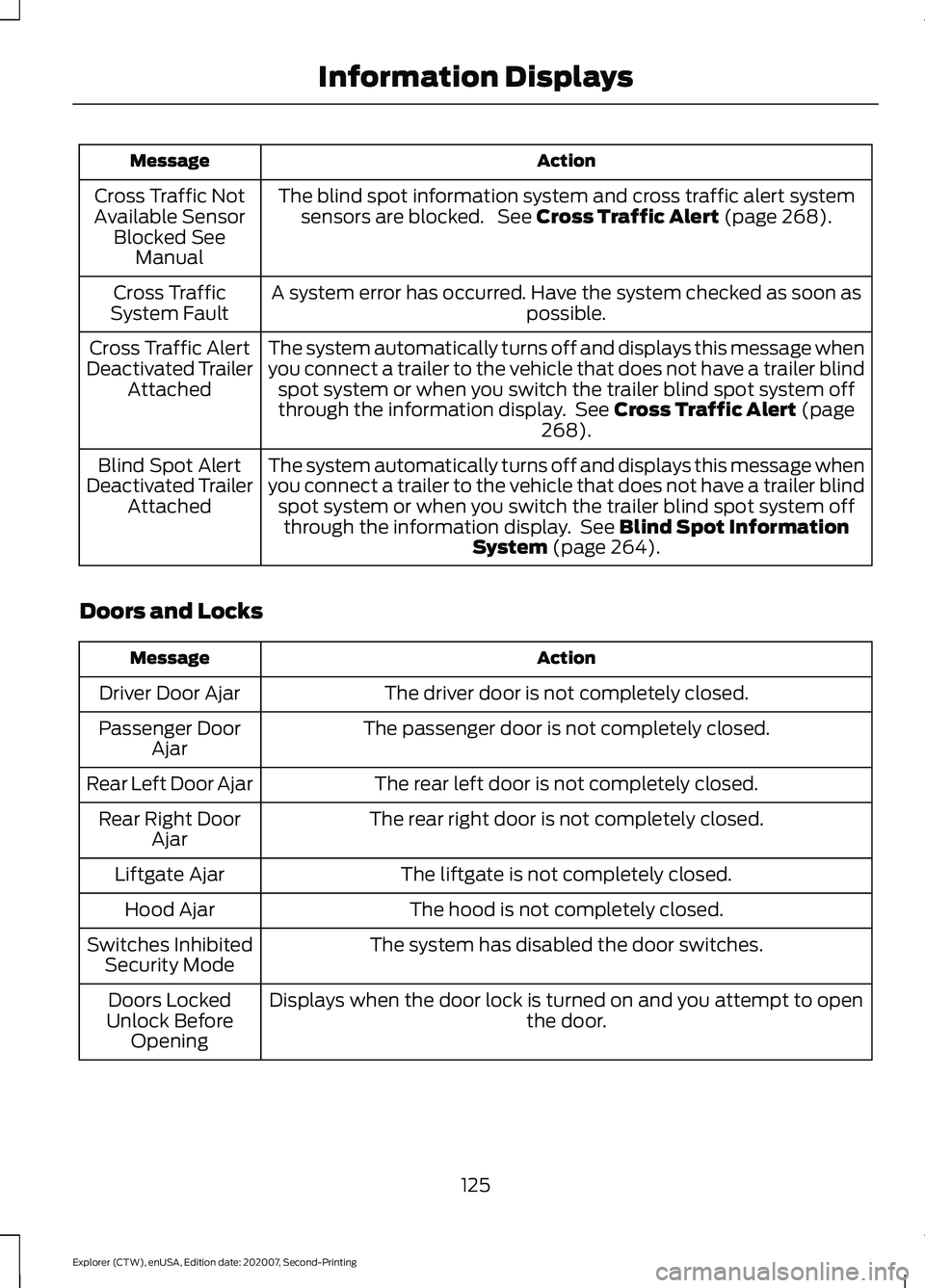
The blind spot information system and cross traffic alert systemsensors are blocked. See Cross Traffic Alert (page 268).
Cross Traffic Not
Available Sensor Blocked See Manual
A system error has occurred. Have the system checked as soon as possible.
Cross Traffic
System Fault
The system automatically turns off and displays this message when
you connect a trailer to the vehicle that does not have a trailer blindspot system or when you switch the trailer blind spot system off
through the information display. See
Cross Traffic Alert (page
268).
Cross Traffic Alert
Deactivated Trailer Attached
The system automatically turns off and displays this message when
you connect a trailer to the vehicle that does not have a trailer blindspot system or when you switch the trailer blind spot system offthrough the information display. See
Blind Spot Information
System (page 264).
Blind Spot Alert
Deactivated Trailer Attached
Doors and Locks Action
Message
The driver door is not completely closed.
Driver Door Ajar
The passenger door is not completely closed.
Passenger Door
Ajar
The rear left door is not completely closed.
Rear Left Door Ajar
The rear right door is not completely closed.
Rear Right Door
Ajar
The liftgate is not completely closed.
Liftgate Ajar
The hood is not completely closed.
Hood Ajar
The system has disabled the door switches.
Switches Inhibited
Security Mode
Displays when the door lock is turned on and you attempt to open the door.
Doors Locked
Unlock Before Opening
125
Explorer (CTW), enUSA, Edition date: 202007, Second-Printing Information Displays
Page 134 of 577

Action
Message
With a MyKey in use, traction control turns on.
Traction Control
On - MyKeySetting
With a MyKey in use, park aid is always on.
MyKey Park Aid
Cannot be Deactiv- ated
With a MyKey in use, lane keeping alert turns on.
Lane Keeping Alert
On MyKey Setting
Park Aid Action
Message
The system detects a fault that requires service. Have your vehicle checked as soon as possible.
Check Front Park
Aid
The system detects a fault that requires service. Have your vehicle checked as soon as possible.
Check Rear Park
Aid
The radar is blocked due to bad weather, ice, mud or water in frontof radar. You can typically clean the sensor to resolve. See Rear
Parking Aid (page 230).
Rear Park Aid Not
Available Sensor Blocked See Manual
The radar is blocked due to bad weather, ice, mud or water in frontof radar. You can typically clean the sensor to resolve. See
Front
Parking Aid (page 232).
Front Park Aid Not
Available Sensor Blocked See Manual
The radar is blocked due to bad weather, ice, mud or water in frontof radar. You can typically clean the sensor to resolve. See
Prin-
ciple of Operation (page 230).
Park Aid Not Avail-
able Sensor
Blocked See Manual
Displays the park aid status.
Front Park Aid On
Off
Displays the park aid status.
Rear Park Aid On
Off
131
Explorer (CTW), enUSA, Edition date: 202007, Second-Printing Information Displays
Page 136 of 577
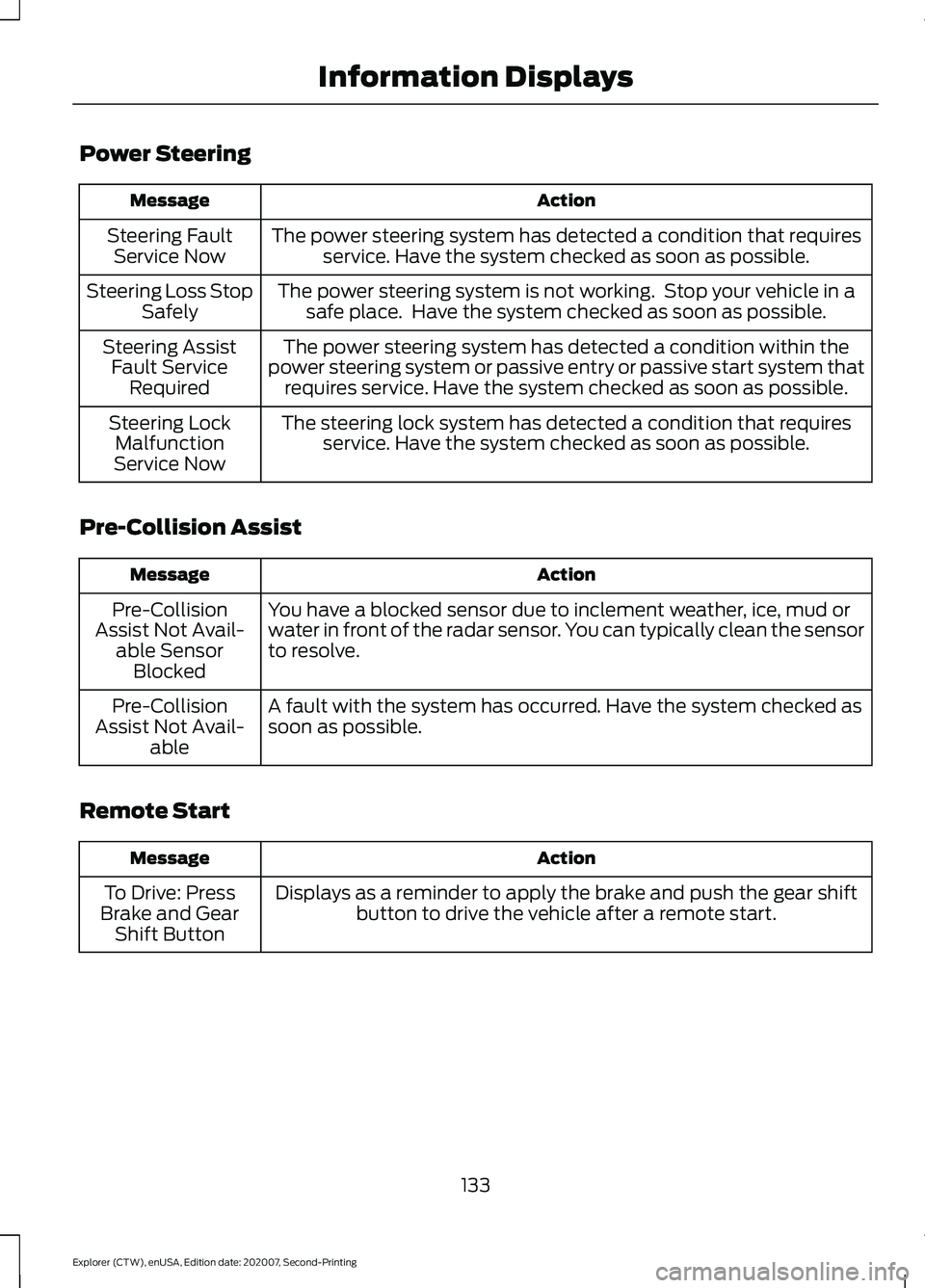
Power Steering
Action
Message
The power steering system has detected a condition that requiresservice. Have the system checked as soon as possible.
Steering Fault
Service Now
The power steering system is not working. Stop your vehicle in asafe place. Have the system checked as soon as possible.
Steering Loss Stop
Safely
The power steering system has detected a condition within the
power steering system or passive entry or passive start system that requires service. Have the system checked as soon as possible.
Steering Assist
Fault Service Required
The steering lock system has detected a condition that requiresservice. Have the system checked as soon as possible.
Steering Lock
Malfunction
Service Now
Pre-Collision Assist Action
Message
You have a blocked sensor due to inclement weather, ice, mud or
water in front of the radar sensor. You can typically clean the sensor
to resolve.
Pre-Collision
Assist Not Avail- able SensorBlocked
A fault with the system has occurred. Have the system checked as
soon as possible.
Pre-Collision
Assist Not Avail- able
Remote Start Action
Message
Displays as a reminder to apply the brake and push the gear shiftbutton to drive the vehicle after a remote start.
To Drive: Press
Brake and Gear Shift Button
133
Explorer (CTW), enUSA, Edition date: 202007, Second-Printing Information Displays
Page 137 of 577

Seats
Action
Message
Objects are by the passenger seat. After the objects are moved
away from the seat, if the warning stays on or continues to come on have the system checked as soon as possible.
Occupant Sensor
BLOCKED Remove Objects Near
Passenger Seat
Displays as a reminder that memory seats are not available while driving.
Memory Recall Not
Permitted While Driving
Displays to show where your memory setting has been saved.
Memory X Saved
Starting System Action
Message
Displays when starting the vehicle as a reminder to apply the brake.
To START Press
Brake
Displays when the starter has exceeded its cranking time inattempting to start the vehicle.
Cranking Time
Exceeded
Displays when the starter is attempting to start the vehicle.
Engine Start
Pending Please Wait
Displays when the pending start has been cancelled.
Pending Start
Cancelled
134
Explorer (CTW), enUSA, Edition date: 202007, Second-Printing Information Displays
Page 138 of 577

Tire Pressure Monitoring System
Action
Message
One or more tires on your vehicle have low tire pressure. See Tire
Pressure Monitoring System (page 368).
Tire Pressure Low
The tire pressure monitoring system is malfunctioning. If the warning
stays on or continues to come on, have the system checked as soonas possible. See
Tire Pressure Monitoring System (page 368).
Tire Pressure
Monitor Fault
A tire pressure sensor is malfunctioning, or your spare tire is in use.For more information on how the system operates under these
conditions, See
Tire Pressure Monitoring System (page 368). If
the warning stays on or continues to come on, have the system checked as soon as possible.
Tire Pressure
Sensor Fault
Trailer Action
Message
A correct trailer connection is sensed duringa given ignition cycle.
Trailer Connected
A trailer connection becomes disconnected,either intentionally or unintentionally, and has been sensed during a given ignition cycle.
Trailer Disconnected
The trailer sway control has detected trailersway.
Trailer Sway Reduce Speed
There are certain faults in your vehicle
wiring and trailer wiring/brake system. See Towing a Trailer
(page 288).
Trailer Wiring Fault
There is a fault with your trailer turn lamp.Check your lamp.
Trailer Left Turn Lamps Fault Check Lamps
There is a fault with your trailer turn lamp.Check your lamp.
Trailer Right Turn Lamps Fault Check
Lamps
There is a fault with your trailer battery.See
Towing a Trailer (page 288).
Trailer Battery Not Charging See Manual
There is a fault with your vehicle trailer
lighting module. See
Towing a Trailer
(page 288).
Trailer Lighting Module Fault See Manual
135
Explorer (CTW), enUSA, Edition date: 202007, Second-Printing Information Displays
Page 171 of 577

When the indicator light on the power point
is:
•
On: The power point is working, the
ignition is ON or the vehicle is in
accessory mode.
• Off: The power point is OFF, the ignition
is OFF or the vehicle is not in accessory
mode.
• Flashing: The power point is in fault
mode.
Due to the different technologies used on
its construction, some devices may exceed
the capacity shown on its label when they
are initially plugged-in.
The power outlet temporarily turns off
power when in fault mode if the device
exceeds the 150 watt limit. Unplug your
device and switch the ignition off. Switch
the ignition back on, but do not plug your
device back in. Let the system cool off and
switch the ignition off to reset the fault
mode. Switch the ignition back on and
make sure the indicator light remains on.
Do not use the power point for certain
electric devices, including:
• Cathode-ray, tube-type televisions.
• Motor loads, such as vacuum cleaners,
electric saws and other electric power
tools or compressor-driven
refrigerators. •
Measuring devices, which process
precise data, such as medical
equipment or measuring equipment.
• Other appliances requiring an
extremely stable power supply such as
microcomputer-controlled electric
blankets or touch-sensor lamps.
WIRELESS ACCESSORY
CHARGER (IF EQUIPPED) WARNING:
Wireless charging
devices can affect the operation of
implanted medical devices, including
cardiac pacemakers. If you have any
implanted medical devices, we
recommend that you consult with your
physician.
Note: Devices without built-in Qi wireless
charging receivers require an additional Qi
receiver or sleeve.
Note: For compatible devices with built-in
Qi wireless charging capability, the charging
performance may be affected if your device
is in a case. It may be necessary to remove
the case to wirelessly charge your device.
The system supports one Qi wireless
charging compatible device on the
charging area.
Keep the charging area clean and remove
foreign objects prior to charging a device.
Do not place items with a magnetic strip,
for example passports, parking tickets or
credit cards, near the charging area when
charging a device. Damage may occur to
the magnetic strip.
Do not place metal objects, for example
remote controls, coins and candy
wrappers, on or near the charging area
when charging a device. Metal objects may
heat up and degrade the charging
performance.
168
Explorer (CTW), enUSA, Edition date: 202007, Second-Printing Auxiliary Power PointsE247586
Page 199 of 577

EMISSION LAW
WARNING: Do not remove or alter
the original equipment floor covering or
insulation between it and the metal floor
of the vehicle. The floor covering and
insulation protect occupants of the
vehicle from the engine and exhaust
system heat and noise. On vehicles with
no original equipment floor covering
insulation, do not carry passengers in a
manner that permits prolonged skin
contact with the metal floor. Failure to
follow these instructions may result in
fire or personal injury.
U.S. federal laws and certain state laws
prohibit removing or rendering inoperative
emission control system components.
Similar federal or provincial laws may
apply in Canada. We do not approve of any
vehicle modification without first
determining applicable laws. Tampering with emissions
control systems including
related sensors or the Diesel
Exhaust Fluid system can result in reduced
engine power and the illumination of the
service engine soon light. Tampering With a Noise Control
System
Federal laws prohibit the following acts:
•
Removal or rendering inoperative by
any person other than for purposes of
maintenance.
• Repair or replacement of any device or
element of the design incorporated into
a new vehicle for the purpose of noise
control prior to its sale or delivery to
the ultimate purchaser or while it is in
use.
• The use of the vehicle after any person
removes or renders inoperative any
device or element of the design.
The U.S. Environmental Protection Agency
may presume to constitute tampering as
follows:
• Removal of hood blanket, fender apron
absorbers, fender apron barriers,
underbody noise shields or acoustically
absorptive material.
• Tampering or rendering inoperative the
engine speed governor, to allow engine
speed to exceed manufacturer
specifications.
If the engine does not start, runs rough,
experiences a decrease in engine
performance, experiences excess fuel
consumption or produces excessive
exhaust smoke, check for the following:
• A plugged or disconnected air inlet
system hose.
• A plugged engine air filter element.
• Water in the fuel filter and water
separator.
• A clogged fuel filter.
• Contaminated fuel.
• Air in the fuel system, due to loose
connections.
• An open or pinched sensor hose.
• Incorrect engine oil level.
196
Explorer (CTW), enUSA, Edition date: 202007, Second-Printing Engine Emission Control