2021 CHEVROLET SILVERADO 2500HD instrument
[x] Cancel search: instrumentPage 2 of 433

Chevrolet Silverado 2500 HD/3500 HD Owner Manual (GMNA-Localizing-U.
S./Canada/Mexico-14632154) - 2021 - CRC - 5/14/21
Contents
Introduction . . . . . . . . . . . . . . . . . . . . . . . . . . . . . . 1
Keys, Doors, and Windows . . . . . . . . . . . . . . . 7
Seats and Restraints . . . . . . . . . . . . . . . . . . . . . 42
Storage . . . . . . . . . . . . . . . . . . . . . . . . . . . . . . . . . . 91
Instruments and Controls . . . . . . . . . . . . . . . 95
Lighting . . . . . . . . . . . . . . . . . . . . . . . . . . . . . . . . 134
Infotainment System . . . . . . . . . . . . . . . . . . . 143
Climate Controls . . . . . . . . . . . . . . . . . . . . . . . 199
Driving and Operating . . . . . . . . . . . . . . . . . 206
Vehicle Care . . . . . . . . . . . . . . . . . . . . . . . . . . . 300
Service and Maintenance . . . . . . . . . . . . . . . 383
Technical Data . . . . . . . . . . . . . . . . . . . . . . . . . 397
Customer Information . . . . . . . . . . . . . . . . . . 401
Reporting Safety Defects . . . . . . . . . . . . . . 409
OnStar . . . . . . . . . . . . . . . . . . . . . . . . . . . . . . . . . . 412
Connected Services . . . . . . . . . . . . . . . . . . . . . 417
Index . . . . . . . . . . . . . . . . . . . . . . . . . . 420
Introduction
The names, logos, emblems, slogans, vehicle
model names, and vehicle body designs
appearing in this manual including, but not
limited to, GM, the GM logo, CHEVROLET,
the CHEVROLET Emblem, SILVERADO, and Z71
are trademarks and/or service marks of
General Motors LLC, its subsidiaries,
affiliates, or licensors.
For vehicles first sold in Canada, substitute
the name“General Motors of Canada
Company” for Chevrolet Motor Division
wherever it appears in this manual.
This manual describes features that may or
may not be on the vehicle because of
optional equipment that was not purchased
on the vehicle, model variants, country
specifications, features/applications that may not be available in your region, or changes
subsequent to the printing of this owner’s
manual.
If the vehicle has the Duramax diesel
engine, see the Duramax diesel supplement
for additional and specific information on
this engine.
Refer to the purchase documentation
relating to your specific vehicle to confirm
the features.
Keep this manual in the vehicle for quick
reference.
Canadian Vehicle Owners
A French language manual can be obtained
from your dealer, at www.helminc.com,
or from:
Propriétaires Canadiens
On peut obtenir un exemplaire de ce guide
en français auprès du concessionnaire ou
à l'adresse suivante:
Litho in U.S.A.
Part No. 84744493 C Third Printing©2021 General Motors LLC. All Rights Reserved.
Page 5 of 433
Chevrolet Silverado 2500 HD/3500 HD Owner Manual (GMNA-Localizing-U.
S./Canada/Mexico-14632154) - 2021 - CRC - 11/20/20
4 Introduction
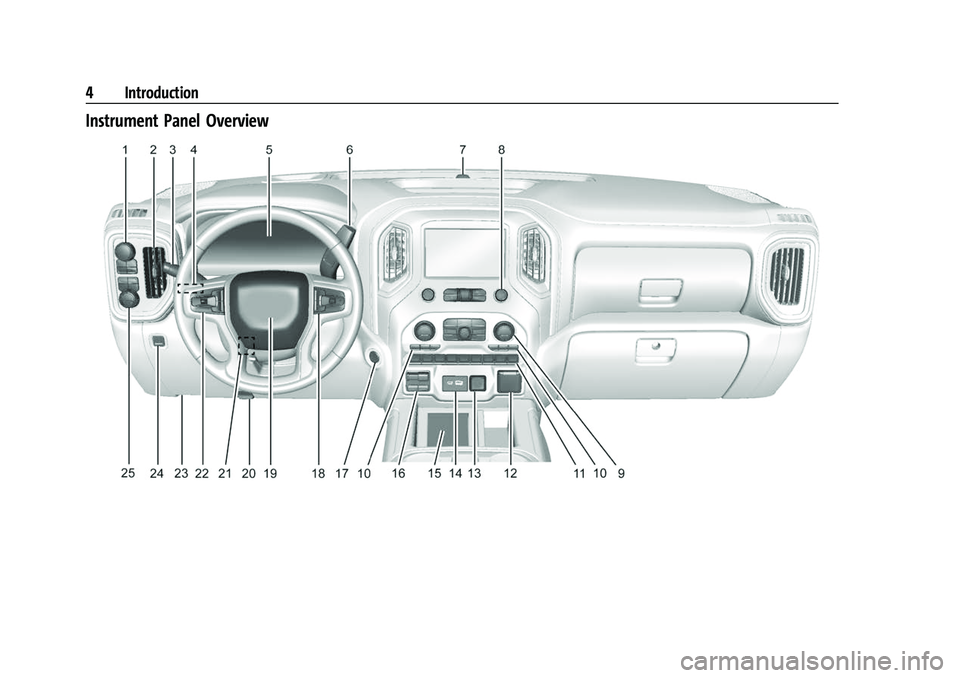
Instrument Panel Overview
Page 6 of 433

Chevrolet Silverado 2500 HD/3500 HD Owner Manual (GMNA-Localizing-U.
S./Canada/Mexico-14632154) - 2021 - CRC - 11/20/20
Introduction 5
1. Tow/Haul Mode (On Some Models). SeeDriver Mode Control 0244.
Automatic Transfer Case Control (If
Equipped). See Four-Wheel Drive 0236.
Driver Mode Control 0244 (If Equipped).
2. Air Vents 0204.
3. Turn Signal Lever. See Turn and
Lane-Change Signals 0138.
Windshield Wiper/Washer 097.
4. Head-Up Display (HUD) 0123 (If
Equipped).
5. Instrument Cluster 0102.
6. Shift Lever. See Automatic Transmission
0 232.
Range Selection Mode. See Manual Mode
0 235.
7. Light Sensor. See Automatic Headlamp
System 0136.
8. Infotainment Controls. See Overview
0 144.
9. Climate Control Systems 0199 (If
Equipped).
Dual Automatic Climate Control System
0 201 (If Equipped).
10. Heated and Ventilated Front Seats 049
(If Equipped). 11.XPark Assist Switch (If Equipped). See
Assistance Systems for Parking or Backing
0 249.
gTraction Control/Electronic Stability
Control 0242.
|Hazard Warning Flashers 0137.
@Lane Departure Warning (LDW) 0262
(If Equipped).
5Hill Descent Control Switch (If
Equipped). See Hill Descent Control (HDC)
0 244.
jPower Assist Steps 026 (If
Equipped).
5Power Release Tailgate (If
Equipped). See Tailgate023.
ADC/AC Switch. See Power Outlets
0 98.
LExpress Window Down Button (If
Equipped). See Power Windows 038.
Tow/Haul Mode 0235 (On Some
Models).
Exhaust Brake (If Equipped). See Duramax
Diesel Supplement.
Power Take-Off (PTO) (If Equipped). See
Duramax Diesel Supplement. 12. Power Outlet (Alternating Current) (If
Equipped). See Power Outlets098.
13. Power Outlets 098.
14. USB Port 0153.
15. Wireless Charging 099 (If Equipped).
16. Trailer Brake Control Panel (If Equipped). See“Integrated Trailer Brake Control
System” underTowing Equipment 0276.
17. ENGINE START/STOP. See Ignition
Positions (Keyless Access) 0226 or
Ignition Positions (Key Access) 0224.
18. Steering Wheel Controls 096 (If
Equipped).
Driver Information Center (DIC) Controls.
See Driver Information Center (DIC) (Base
Level) 0119 or
Driver Information Center (DIC) (Midlevel
and Uplevel) 0120.
19. Horn 097.
20. Hood Release. See Hood0302.
21. Steering Wheel Adjustment 096 (Out
of View).
22. Cruise Control 0246.
Forward Collision Alert (FCA) System
0 257 (If Equipped).
Heated Steering Wheel 096 (If
Equipped).
Page 7 of 433

Chevrolet Silverado 2500 HD/3500 HD Owner Manual (GMNA-Localizing-U.
S./Canada/Mexico-14632154) - 2021 - CRC - 11/20/20
6 Introduction
23. Data Link Connector (DLC) (Out of View).SeeMalfunction Indicator Lamp (Check
Engine Light) 0111.
24. Electric Parking Brake 0240.
25. Fog Lamps 0138 (If Equipped).
Instrument Panel Illumination Control
0 140.
Exterior Cargo Lamps 0139.
Exterior Lamp Controls 0134.
Task Lighting 0139 (If Equipped).
Page 28 of 433

Chevrolet Silverado 2500 HD/3500 HD Owner Manual (GMNA-Localizing-U.
S./Canada/Mexico-14632154) - 2021 - CRC - 11/20/20
Keys, Doors, and Windows 27
Warning (Continued)
hands or other body parts between the
extended power assist step and the
vehicle.
If equipped, the power assist steps will
deploy when the door is opened and
automatically retract three seconds after the
door is closed. The power assist steps will
retract immediately if the vehicle starts
moving.
Disable the power assist steps before jacking
or placing any object under the vehicle. Too
much ice buildup may prevent deployment
of the power assist steps. Check the step
position before exiting the vehicle. If this
happens, disable the power assist steps,
clear the ice, then enable the assist steps
and confirm normal function prior to use.
Keep hands, children, pets, objects, and
clothing clear of the power assist steps
when in motion. The steps will reverse
direction if they encounter an obstruction
when opening or closing. Remove the
obstruction, then open and close the door
on the same side to complete the motion of the assist steps. If the obstruction is not
cleared. the assist steps remain extended
while driving.
To extend both power assist steps
for cleaning, press
jwhile the vehicle is
in P (Park) or N (Neutral). Press
jagain
to retract them. The Driver Information
Center (DIC) will display a message.
Enable/Disable
Press and hold
jfor four seconds to lock
and disable the power assist steps. Press
and hold
jfor four seconds again to
enable them. The DIC will display a
message.
Vehicle Security
This vehicle has theft-deterrent features;
however, they do not make the vehicle
impossible to steal.
Vehicle Alarm System
The indicator light, on the instrument panel
near the windshield, indicates the status of
the system.
Off : Alarm system is disarmed.
On Solid : Vehicle is secured during the
delay to arm the system.
Fast Flash : Vehicle is unsecured. A door or
the hood is open.
Page 30 of 433

Chevrolet Silverado 2500 HD/3500 HD Owner Manual (GMNA-Localizing-U.
S./Canada/Mexico-14632154) - 2021 - CRC - 11/20/20
Keys, Doors, and Windows 29
column, and the vehicle did not start.
If this happens, immediately turn the
steering wheel from side to side to
unbind the column lock. If this does not
unlock the steering column, turn the
vehicle off and open the driver door to
reset the system. Then turn the vehicle
on and immediately turn the steering
wheel side to side for about 15 seconds.
In some cases, it may take significant
force to unbind the column.
To keep the steering column from binding,
straighten the front wheels before turning
off the vehicle.
Immobilizer
See Radio Frequency Statement 0409.
Immobilizer Operation
This vehicle has a passive theft-deterrent
system. The system does not have to be manually
armed or disarmed.
The vehicle is automatically immobilized
when the vehicle is turned off.
The system is automatically disarmed when
the ignition is turned from off to on.
The security light, in the instrument cluster,
comes on if there is a problem with arming
or disarming the theft-deterrent system.
The system has one or more RKE
transmitters matched to an immobilizer
control unit in your vehicle. Only a correctly
matched RKE transmitter will start the
vehicle. If the transmitter is ever damaged,
you may not be able to start your vehicle.
When trying to start the vehicle, the
security light may come on briefly when the
ignition is turned on. If the engine does not
start and the security light stays on, there is
a problem with the system. Turn the
ignition off and try again.
If the vehicle will not change ignition modes
(ACC/ACCESSORY, on, off), and the RKE
transmitter appears to be undamaged, try
another transmitter. Or, you may try placing
the transmitter in the transmitter pocket
located in the center console. See
Remote
Keyless Entry (RKE) System Operation (Key
Access) 010 or
Remote Keyless Entry (RKE) System
Operation (Keyless Access) 013.
If the ignition mode will not change with
the other transmitter or with the
transmitter in the transmitter pocket, your
vehicle needs service. If the ignition does
change modes, the first transmitter may be
faulty. See your dealer who can service the
theft-deterrent system and have a new RKE
transmitter programmed to the vehicle.
It is possible for the immobilizer system to
learn new or replacement RKE transmitters.
Up to eight transmitters can be
programmed for the vehicle. To program
additional transmitters, see "Programming
Transmitters to the Vehicle" under Remote
Keyless Entry (RKE) System Operation (Key
Access) 010 or
Remote Keyless Entry (RKE) System
Operation (Keyless Access) 013
Do not leave the transmitter or device that
disarms or deactivates the vehicle theft
system in the vehicle.
When equipped with a key, if the engine
still does not start, and the key appears to
be undamaged, try another ignition key.
Page 53 of 433
Chevrolet Silverado 2500 HD/3500 HD Owner Manual (GMNA-Localizing-U.
S./Canada/Mexico-14632154) - 2021 - CRC - 11/20/20
52 Seats and Restraints
This vehicle has indicators as a reminder to
buckle the seat belts. SeeSeat Belt
Reminders 0109.
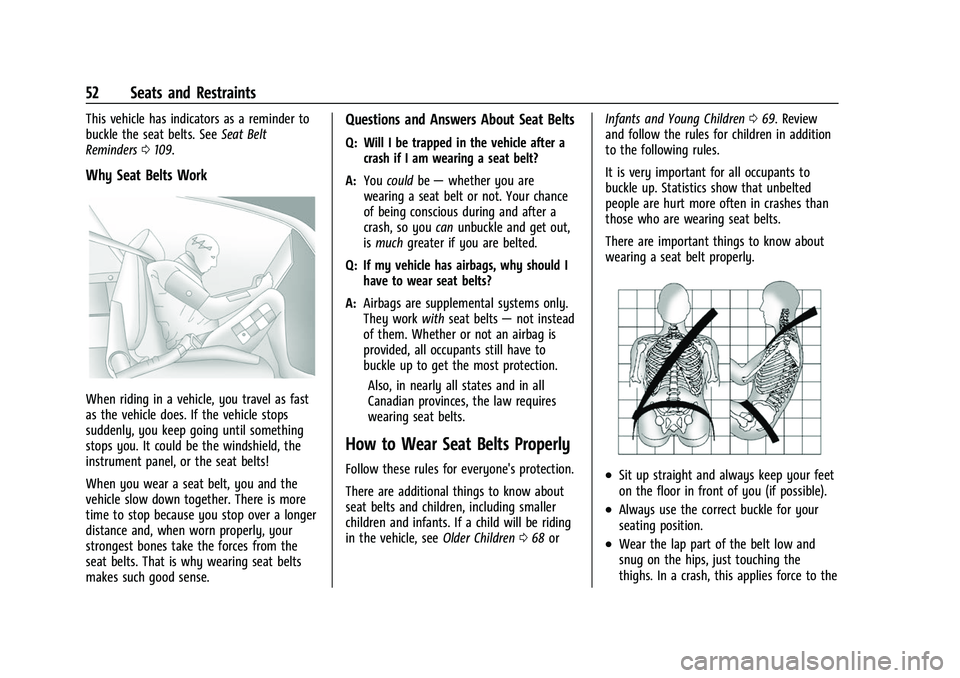
Why Seat Belts Work
When riding in a vehicle, you travel as fast
as the vehicle does. If the vehicle stops
suddenly, you keep going until something
stops you. It could be the windshield, the
instrument panel, or the seat belts!
When you wear a seat belt, you and the
vehicle slow down together. There is more
time to stop because you stop over a longer
distance and, when worn properly, your
strongest bones take the forces from the
seat belts. That is why wearing seat belts
makes such good sense.
Questions and Answers About Seat Belts
Q: Will I be trapped in the vehicle after a
crash if I am wearing a seat belt?
A: You could be— whether you are
wearing a seat belt or not. Your chance
of being conscious during and after a
crash, so you canunbuckle and get out,
is much greater if you are belted.
Q: If my vehicle has airbags, why should I have to wear seat belts?
A: Airbags are supplemental systems only.
They work withseat belts —not instead
of them. Whether or not an airbag is
provided, all occupants still have to
buckle up to get the most protection.
Also, in nearly all states and in all
Canadian provinces, the law requires
wearing seat belts.
How to Wear Seat Belts Properly
Follow these rules for everyone's protection.
There are additional things to know about
seat belts and children, including smaller
children and infants. If a child will be riding
in the vehicle, see Older Children068 or Infants and Young Children
069. Review
and follow the rules for children in addition
to the following rules.
It is very important for all occupants to
buckle up. Statistics show that unbelted
people are hurt more often in crashes than
those who are wearing seat belts.
There are important things to know about
wearing a seat belt properly..Sit up straight and always keep your feet
on the floor in front of you (if possible).
.Always use the correct buckle for your
seating position.
.Wear the lap part of the belt low and
snug on the hips, just touching the
thighs. In a crash, this applies force to the
Page 59 of 433
Chevrolet Silverado 2500 HD/3500 HD Owner Manual (GMNA-Localizing-U.
S./Canada/Mexico-14632154) - 2021 - CRC - 11/20/20
58 Seats and Restraints
All vehicle airbags have the word AIRBAG on
the trim or on a label near the deployment
opening.
For frontal airbags, the word AIRBAG is on
the center of the steering wheel for the
driver and on the instrument panel for the
front outboard passenger.
For seat-mounted side impact airbags, the
word AIRBAG is on the side of the seatback
or side of the seat closest to the door.
For roof-rail airbags, the word AIRBAG is on
the ceiling or trim.
Airbags are designed to supplement the
protection provided by seat belts. Even
though today's airbags are also designed to
help reduce the risk of injury from the force
of an inflating bag, all airbags must inflate
very quickly to do their job.
Here are the most important things to know
about the airbag system:
{Warning
You can be severely injured or killed in a
crash if you are not wearing your seat
belt, even with airbags. Airbags are
designed to work with seat belts, not(Continued)
Warning (Continued)
replace them. Also, airbags are not
designed to inflate in every crash. In
some crashes seat belts are the only
restraint. SeeWhen Should an Airbag
Inflate? 060.
Wearing your seat belt during a crash
helps reduce your chance of hitting
things inside the vehicle or being ejected
from it. Airbags are “supplemental
restraints” to the seat belts. Everyone in
the vehicle should wear a seat belt
properly, whether or not there is an
airbag for that person.
{Warning
Because airbags inflate with great force
and faster than the blink of an eye,
anyone who is up against, or very close
to, any airbag when it inflates can be
seriously injured or killed. Do not sit
unnecessarily close to any airbag, as you
would be if sitting on the edge of the
seat or leaning forward. Seat belts help
keep you in position before and during a
(Continued)
Warning (Continued)
crash. Always wear a seat belt, even with
airbags. The driver should sit as far back
as possible while still maintaining control
of the vehicle. The seat belts and the
front outboard passenger airbags are
most effective when you are sitting well
back and upright in the seat with both
feet on the floor.
Occupants should not lean on or sleep
against the door or side windows in
seating positions with seat-mounted side
impact airbags and/or roof-rail airbags.
{Warning
Children who are up against, or very
close to, any airbag when it inflates can
be seriously injured or killed. Always
secure children properly in the vehicle. To
read how, seeOlder Children 068 or
Infants and Young Children 069.