2021 CHEVROLET BOLT EV instrument panel
[x] Cancel search: instrument panelPage 108 of 293

Chevrolet Bolt EV Owner Manual (GMNA-Localizing-U.S./Canada-
14637856) - 2021 - CRC - 10/2/20
Lighting 107
Lighting
Exterior Lighting
Exterior Lamp Controls . . . . . . . . . . . . . . . . 107
Exterior Lamps Off Reminder . . . . . . . . . . 108
Headlamp High/Low-Beam Changer . . . 108
Flash-to-Pass . . . . . . . . . . . . . . . . . . . . . . . . . . . 109
Daytime Running Lamps (DRL) . . . . . . . . 109
Automatic Headlamp System . . . . . . . . . . 109
Hazard Warning Flashers . . . . . . . . . . . . . . 110
Turn and Lane-Change Signals . . . . . . . . . 110
Interior Lighting
Instrument Panel IlluminationControl . . . . . . . . . . . . . . . . . . . . . . . . . . . . . . . 110
Courtesy Lamps . . . . . . . . . . . . . . . . . . . . . . . . 111
Dome Lamps . . . . . . . . . . . . . . . . . . . . . . . . . . . 111
Reading Lamps . . . . . . . . . . . . . . . . . . . . . . . . . 111
Lighting Features
Entry Lighting . . . . . . . . . . . . . . . . . . . . . . . . . . 111
Exit Lighting . . . . . . . . . . . . . . . . . . . . . . . . . . . 112
Battery Power Protection . . . . . . . . . . . . . . 112
Exterior Lighting Battery Saver . . . . . . . . . 112
Exterior Lighting
Exterior Lamp Controls
The exterior lamp control is on the
instrument panel to the left of the steering
column.
O: Turns the exterior lamps off and
deactivates the AUTO mode. Turn to
O
again to reactivate the AUTO mode.
In Canada, the headlamps will automatically
reactivate when the vehicle is shifted out of
P (Park).
AUTO : Turns the exterior lamps on and off
automatically depending on outside lighting.
;: Turns on the parking lamps including
all lamps, except the headlamps. The
instrument panel lights also turn on.
5: Turns on the headlamps together with
the parking lamps and instrument panel
lights.
IntelliBeam System
If equipped, this system turns the vehicle's
high-beam headlamps on and off according
to surrounding traffic conditions.
The system turns the high-beam headlamps
on when it is dark enough and there is no
other traffic present.
This light comes on in the instrument
cluster when the IntelliBeam system is
enabled.
Page 110 of 293

Chevrolet Bolt EV Owner Manual (GMNA-Localizing-U.S./Canada-
14637856) - 2021 - CRC - 10/2/20
Lighting 109
This indicator light turns on in the
instrument cluster when the high-beam
headlamps are on.
Flash-to-Pass
To flash the high beams, pull the turn signal
lever toward you, and release.
Daytime Running Lamps (DRL)
DRL can make it easier for others to see the
front of your vehicle during the day. Fully
functional DRL are required on all vehicles
first sold in Canada.
The DRL system comes on in daylight when
the following conditions are met:
.The power button is on.
.The exterior lamp control is in AUTO.
.The light sensor determines it is daytime.
.The vehicle is not in P (Park).
When the DRL are on, the taillamps,
sidemarker lamps, instrument panel lights,
and other lamps will not be on. The DRL turn off when the headlamps are
turned to
Por the vehicle is off.
For vehicles first sold in Canada, the DRL can
only be turned off when the vehicle is
parked.
Automatic Headlamp System
The headlamps come on automatically when
the exterior lamp control is set to AUTO and
it is dark enough outside.
There is a light sensor on top of the
instrument panel. Do not cover the sensor,
otherwise the headlamps will come on when
they are not needed. The system may also turn on the headlamps
when driving through a parking garage or
tunnel.
When it is bright enough outside, the
headlamps will turn off or may change to
Daytime Running Lamps (DRL).
The automatic headlamp system turns off
when the exterior lamp control is turned to
Por the vehicle is off.
Lights On with Wipers
If the windshield wipers are activated in
daylight with the vehicle on, and the
exterior lamp control is in AUTO, the
headlamps, parking lamps, and other
exterior lamps come on. The transition time
for the lamps coming on varies based on
wiper speed. When the wipers are not
operating, these lamps turn off. Move the
exterior lamp control to
Por;to
disable this feature.
Page 111 of 293
Chevrolet Bolt EV Owner Manual (GMNA-Localizing-U.S./Canada-
14637856) - 2021 - CRC - 10/2/20
110 Lighting
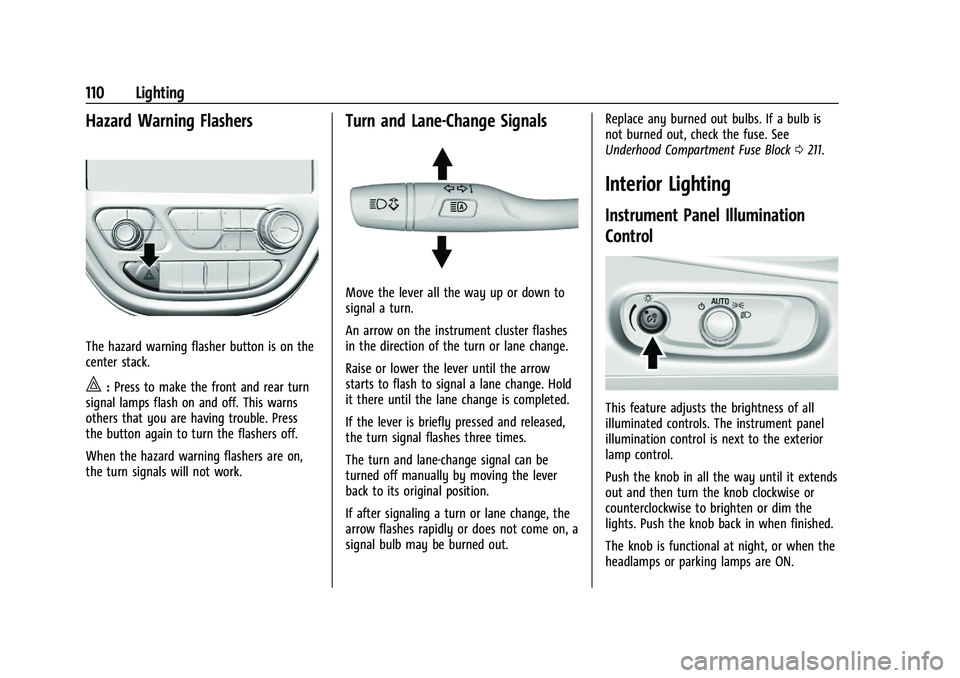
Hazard Warning Flashers
The hazard warning flasher button is on the
center stack.
|:Press to make the front and rear turn
signal lamps flash on and off. This warns
others that you are having trouble. Press
the button again to turn the flashers off.
When the hazard warning flashers are on,
the turn signals will not work.
Turn and Lane-Change Signals
Move the lever all the way up or down to
signal a turn.
An arrow on the instrument cluster flashes
in the direction of the turn or lane change.
Raise or lower the lever until the arrow
starts to flash to signal a lane change. Hold
it there until the lane change is completed.
If the lever is briefly pressed and released,
the turn signal flashes three times.
The turn and lane-change signal can be
turned off manually by moving the lever
back to its original position.
If after signaling a turn or lane change, the
arrow flashes rapidly or does not come on, a
signal bulb may be burned out. Replace any burned out bulbs. If a bulb is
not burned out, check the fuse. See
Underhood Compartment Fuse Block
0211.
Interior Lighting
Instrument Panel Illumination
Control
This feature adjusts the brightness of all
illuminated controls. The instrument panel
illumination control is next to the exterior
lamp control.
Push the knob in all the way until it extends
out and then turn the knob clockwise or
counterclockwise to brighten or dim the
lights. Push the knob back in when finished.
The knob is functional at night, or when the
headlamps or parking lamps are ON.
Page 142 of 293

Chevrolet Bolt EV Owner Manual (GMNA-Localizing-U.S./Canada-
14637856) - 2021 - CRC - 10/2/20
Climate Controls 141
A selection can then be made on the climate
settings page.
Automatic Operation
The system automatically controls the fan
speed, air delivery, air conditioning, electric
heating, and recirculation to heat or cool the
vehicle to the selected temperature.
When AUTO is lit, all five functions operate
automatically. Each function can also be
manually set and the selected setting is
displayed or the indicator is lit. Functions
not manually set will continue to be
automatically controlled, even if the AUTO
indicator is not lit.
For automatic operation:1. Press AUTO.
2. Set the temperature. An initial setting of 22 °C (72 °F) is recommended. Allow the
system time to stabilize. Adjust the
temperature as needed.
Manual Operation
ON : Touch to turn the climate control
system on and off. The climate control system will turn on
when any climate control button is pressed
on the center stack or touched on the
climate control display. To turn the system
off, touch ON again.
DorC:
Press the buttons to increase or
decrease the fan speed. The fan speed
setting appears on the climate control
display. Manually adjusting the fan speed
cancels automatic fan control. Press AUTO to
return to automatic operation. Touch ON to
turn off the fan and the climate control
system.
Temperature Control : Turn the knob
clockwise or counterclockwise to increase or
decrease the temperature setting.
Air Delivery Mode Control : Press
c,
d, or0on the center stack to change
the direction of airflow. Any combination of
the three buttons can be selected. The
selected air delivery mode button indicator
is lit.
Pressing any button cancels automatic air
delivery control and the direction of the
airflow can be controlled manually. Press
AUTO to return to automatic operation.
0: Air is directed to the windshield.
d:Air is directed to the instrument panel
outlets.
c: Air is directed to the floor outlets.
0MAX : Air is directed to the windshield
and the fan runs at a higher speed. Fog or
frost is cleared from the windshield more
quickly. When the button is pressed again,
the system returns to the previous mode
setting.
For best results, clear all snow and ice from
the windshield before defrosting.
L: Touch to turn on recirculation.
An indicator light comes on. Air is
recirculated to quickly cool the inside of the
vehicle or to reduce the entry of outside air
and odors. Using the recirculation mode for
extended periods may cause the windows to
fog. If this happens, select the defrost mode.
Using air conditioning and recirculation
together for long periods of time may cause
the air inside the vehicle to become too dry.
To prevent this from happening, after the
air in the vehicle has cooled, turn the
recirculation mode off.
Page 144 of 293

Chevrolet Bolt EV Owner Manual (GMNA-Localizing-U.S./Canada-
14637856) - 2021 - CRC - 10/2/20
Climate Controls 143
Once the settings are saved through the
application, the vehicle will use these
settings when turned on. After the vehicle is
turned on, use the climate controls if
additional adjustments are desired.
Sensors
Indicator Light and Solar Sensor (ILSS)
The ILSS is on top of the instrument panel,
near the windshield, where it monitors solar
intensity.
The climate control system uses the sensor
information to adjust the temperature, fan
speed, recirculation, and air delivery mode
for best comfort.
Do not cover the sensor; otherwise the
automatic climate control system may not
work properly.
Humidity Sensor
The humidity sensor is near the base of the
inside rearview mirror. The climate control
system uses the sensor information to
adjust the temperature and recirculation for
best comfort.Outside Air Temperature Sensor
The outside air temperature sensor is behind
the front grille of the vehicle. The vehicle
uses the sensor information to display
outside air temperature. The climate control
system uses the information to adjust the
climate system operation.
Air Vents
Adjustable air vents are in the center and on
the side of the instrument panel.
Move the slats to change the direction of
the airflow. The center air vent does not
close completely.
Move the slats to change the direction of
the airflow.
Additional air vents are located beneath the
windshield and the driver and passenger
side door windows, and in the footwells.
These are fixed and cannot be adjusted.
Operation Tips
.Keep all outlets open whenever possible
for best system performance.
.Clear snow off the hood to improve
visibility and help decrease moisture
drawn into the vehicle.
.Keep the path under all seats clear of
objects to help circulate the air inside the
vehicle more effectively.
Page 184 of 293

Chevrolet Bolt EV Owner Manual (GMNA-Localizing-U.S./Canada-
14637856) - 2021 - CRC - 10/2/20
Driving and Operating 183
AC Charging
AC Charge Cord Vehicle Plug
Start Charge 1. Make sure the vehicle is parked.
2. Push the rearward edge of the charge port door and release to open the door. In cold weather conditions, ice may form
around the charge port door. Remove ice
from the area before attempting to open
or close the charge port door.
3. Open the liftgate, lift the load floor
cover, and remove the charge cord.
4. Plug the charge cord into the electrical outlet. Verify the charge cord status and
select the appropriate charge level. See
Electrical Requirements for Battery
Charging 0194. See Charge Cord 0189.
See “Portable Cord Limit Selection” under
Programmable Charging 090.
5. Plug in the AC vehicle plug of the charge
cord into the charge port on the vehicle.
Make sure the AC vehicle plug is fully
connected to the AC charge port. If it is
not properly seated, the charge may not
occur.
6. Verify that the Charging Status Indicator illuminates on top of the instrument
panel and an audible chirp occurs. See
Charging Status Feedback 0186.
7. To arm the charge cord theft alert, lock the vehicle twice with the RKE
transmitter. To disarm this feature, see
Charging Options 098.
Page 186 of 293

Chevrolet Bolt EV Owner Manual (GMNA-Localizing-U.S./Canada-
14637856) - 2021 - CRC - 10/2/20
Driving and Operating 185
6. Once charging, the DC vehicle plug willbe locked to the DC charge port and
cannot be disconnected while charging is
active.
7. Verify that the Charging Status Indicator illuminates on top of the instrument
panel and an audible chirp occurs. See
Charging Status Feedback 0186.
Caution
Do not attempt to disconnect the DC
vehicle plug while charging is active. This
action may damage the vehicle or
charging station hardware.
Stop Charge
Controls on the charging station can be used
to stop the charge process at any time.
To stop the charge when inside the vehicle,
use the Stop button on the Charging screen,
or press the button on top of the AC vehicle
cord handle. Stop Charge
—Automatic
When the vehicle no longer needs to use
power from the charging station, it will stop
charging and the DC vehicle plug will be
unlocked from the DC charge port.
Energy can still be consumed from the
charging station when the vehicle’s displays
and indicators show that the battery is fully
charged. This is to ensure the battery is in
optimal temperature operating range to
maximize vehicle range. See Programmable
Charging 090.
End Charge 1. Wait until the charging process has been fully stopped, the vehicle plug is
unlocked, and the Charging Status
Indicator is solid green or off.
If the vehicle plug does not unlock from
the vehicle charge port after a charge,
contact Roadside Assistance for
assistance. See Roadside Assistance
Program 0266.
2. Unplug the DC vehicle plug from the DC charge port on the vehicle and close the
dust cover. 3. Close the charge port door by pressing
firmly in the center until it latches.
4. The Electric Parking Brake should be manually disengaged before driving the
vehicle.
5. To start another DC charge, remove the DC vehicle plug and reconnect.
Delayed Charging Override
To temporarily override a delayed charge
event, unplug the charge cord from the
charge port and then plug it back in within
five seconds. A single audible chirp will
sound and charging will begin immediately.
To cancel a temporary override, unplug the
charge cord, wait for 10 seconds, and then
plug the charge cord back in. A double
audible chirp will sound and charging will be
delayed.
See Programmable Charging 090 for
advanced charge scheduling options.
Page 187 of 293

Chevrolet Bolt EV Owner Manual (GMNA-Localizing-U.S./Canada-
14637856) - 2021 - CRC - 10/2/20
186 Driving and Operating
Charging Status Feedback
The vehicle has a Charging Status Indicator
(CSI) at the center of the instrument panel
near the windshield. When the vehicle is
plugged in and vehicle power is off, the CSI
indicates the following:
.Short Flashing Green–Vehicle is plugged
in. Battery is not fully charged. Flash rate
increases from one to four flashes as
battery charges.
‐ One Flash: 0–25% Charge
‐ Two Flashes: 26–50% Charge ‐
Three Flashes: 51–75% Charge
‐ Four Flashes: 76–100% Charge
.Long Flashing Green –Vehicle is plugged
in. Battery is not fully charged. Battery
charging is delayed.
.Solid Green –Vehicle is plugged in.
Battery is fully charged.
.Solid Yellow –Vehicle is plugged in. It is
normal for the CSI to turn yellow for a
few seconds after plugging in a
compatible charge cord. The CSI may stay
solid yellow longer depending on the
vehicle and if there is a total utility
interruption. See Utility Interruption of
Charging 0194. This may also indicate
that the charging system has detected a
fault and will not charge the battery. See
“Charge Cord Status Indicators” under
Charge Cord 0189. If the vehicle is plugged in and vehicle
power is on, the CSI will flash or will be
solid green, depending on the charge level.
If the vehicle is plugged in and the CSI is
off, a total utility interruption or a charging
fault has been detected. See
Utility
Interruption of Charging 0194 or“Charge
Cord Status Indicators” underCharge Cord
0 189.
A message displays if the vehicle is not able
to charge.
Following is the vehicle feedback when the
charge cord is plugged in.