2021 CADILLAC ESCALADE diesel engine
[x] Cancel search: diesel enginePage 2 of 492

Cadillac Escalade Owner Manual (GMNA-Localizing-U.S./Canada/Mexico-
13690472) - 2021 - CRC - 8/11/21
Contents
Introduction . . . . . . . . . . . . . . . . . . . . . . . . . . 1
Keys, Doors, and Windows . . . . . . . . . . 6
Seats and Restraints . . . . . . . . . . . . . . . 40
Storage . . . . . . . . . . . . . . . . . . . . . . . . . . . . . . 97
Instruments and Controls . . . . . . . . 103
Lighting . . . . . . . . . . . . . . . . . . . . . . . . . . . . 149
Infotainment System . . . . . . . . . . . . . 157
Climate Controls . . . . . . . . . . . . . . . . . . 220
Driving and Operating . . . . . . . . . . . . 229
Vehicle Care . . . . . . . . . . . . . . . . . . . . . . . 362
Service and Maintenance . . . . . . . . . 441
Technical Data . . . . . . . . . . . . . . . . . . . . 454
Customer Information . . . . . . . . . . . . 458
Reporting Safety Defects . . . . . . . . . 468
OnStar . . . . . . . . . . . . . . . . . . . . . . . . . . . . . . 471
Connected Services . . . . . . . . . . . . . . . 476
Index . . . . . . . . . . . . . . . . . . . . . . . . 479
Introduction
The names, logos, emblems, slogans,
vehicle model names, and vehicle
body designs appearing in this manual
including, but not limited to, GM, the
GM logo, CADILLAC, the CADILLAC
Emblem, and ESCALADE are
trademarks and/or service marks of
General Motors LLC, its subsidiaries,
affiliates, or licensors.
For vehicles first sold in Canada,
substitute the name“General Motors
of Canada Company ”for Cadillac
Motor Car Division wherever it
appears in this manual.
This manual describes features that
may or may not be on the vehicle
because of optional equipment that
was not purchased on the vehicle, model variants, country specifications,
features/applications that may not be
available in your region, or changes
subsequent to the printing of this
owner’s manual, including changes in
standard or optional content.
If the vehicle has the Duramax diesel
engine, see the Duramax diesel
supplement for additional and specific
information on this engine.
Refer to the purchase documentation
relating to your specific vehicle to
confirm the features.
Keep this manual in the vehicle for
quick reference.
Canadian Vehicle Owners
A French language manual can be
obtained from your dealer, at
www.helminc.com, or from:
Propriétaires Canadiens
On peut obtenir un exemplaire de ce
guide en français auprès du
concessionnaire ou à l'adresse
suivante:
Litho in U.S.A.
Part No. 84266974 C Third Printing©2021 General Motors LLC. All Rights Reserved.
Page 115 of 492

Cadillac Escalade Owner Manual (GMNA-Localizing-U.S./Canada/Mexico-
13690472) - 2021 - CRC - 8/10/21
114 INSTRUMENTS AND CONTROLS
Instrument Cluster
English Gauge Cluster Shown, Navigation, Augmented Reality, Night Vision, andMetric Similar
1.Driver Information Center (DIC)
0132
2. Fuel Gauge 0116
3. Speedometer 0115
4. Tachometer 0116Reconfigurable Instrument
Cluster
If equipped with a diesel engine, refer
to the Duramax Diesel Supplement.
The cluster display layout can be
changed. There are three selectable views:
Gauge :
Displays information zones to
the left and right of the speedometer.
Map : Displays a navigation map.
AR Camera : Displays a camera view
in front of the vehicle.
Night Vision : Displays the Night
Vision camera onto the instrument
cluster. See Night Vision System 0319.
To change the cluster configuration,
touch
bon the touchscreen to the
left of the instrument cluster. Select
the desired option from the list.
The cluster layout can also be selected
using the infotainment display. See
Settings 0203.
Page 123 of 492

Cadillac Escalade Owner Manual (GMNA-Localizing-U.S./Canada/Mexico-
13690472) - 2021 - CRC - 8/10/21
122 INSTRUMENTS AND CONTROLS
Warning (Continued)
the vehicle serviced right away. See
Airbag Readiness Light0120 for
more information, including
important safety information.
Charging System Light
The charging system light comes on
briefly when the ignition is turned on,
but the engine is not running, as a
check to show the light is working.
It should go out when the engine is
started.
If the light stays on, or comes on
while driving, there may be a problem
with the electrical charging system.
Have it checked by your dealer.
Driving while this light is on could
drain the battery. When this light comes on, or is
flashing, the Driver Information
Center (DIC) also displays a message.
If a short distance must be driven
with the light on, be sure to turn off
all accessories, such as the radio and
air conditioner. Find a safe place to
stop the vehicle.
Malfunction Indicator Lamp
(Check Engine Light)
If equipped with a diesel engine, see
the Duramax Diesel Supplement.
This light is part of the vehicle’s
emission control on-board diagnostic
system. It is located on the center
stack, below the infotainment screen.
If this light is on while the engine is
running, a malfunction has been
detected and the vehicle may require
service. The light should come on to
show that it is working when the
ignition is in Service Mode. See
Ignition Positions
0245.
Malfunctions are often indicated by
the system before any problem is
noticeable. Being aware of the light
and seeking service promptly when it
comes on may prevent damage.
Caution
If the vehicle is driven continually
with this light on, the emission
control system may not work as
well, the fuel economy may be
lower, and the vehicle may not run
smoothly. This could lead to costly
repairs that might not be covered
by the vehicle warranty.
Caution
Modifications to the engine,
transmission, exhaust, intake,
or fuel system, or the use of
replacement tires that do not meet
(Continued)
Page 133 of 492
Cadillac Escalade Owner Manual (GMNA-Localizing-U.S./Canada/Mexico-
13690472) - 2021 - CRC - 8/10/21
132 INSTRUMENTS AND CONTROLS
Door Ajar Light
This light comes on when a door is
open or not securely latched. Before
driving, check that all doors are
properly closed.
Information Displays
Driver Information
Center (DIC)
The DIC is displayed in the
instrument cluster. It shows the status
of many vehicle systems.
DIC information is broken down into
three main zones:
Zone 1 :A touchscreen display to left
of the instrument cluster.
Zone 2 : Displays on the instrument
cluster to the left of the speedometer. Zone 3 :
Displays on the instrument
cluster to the right of the
speedometer.
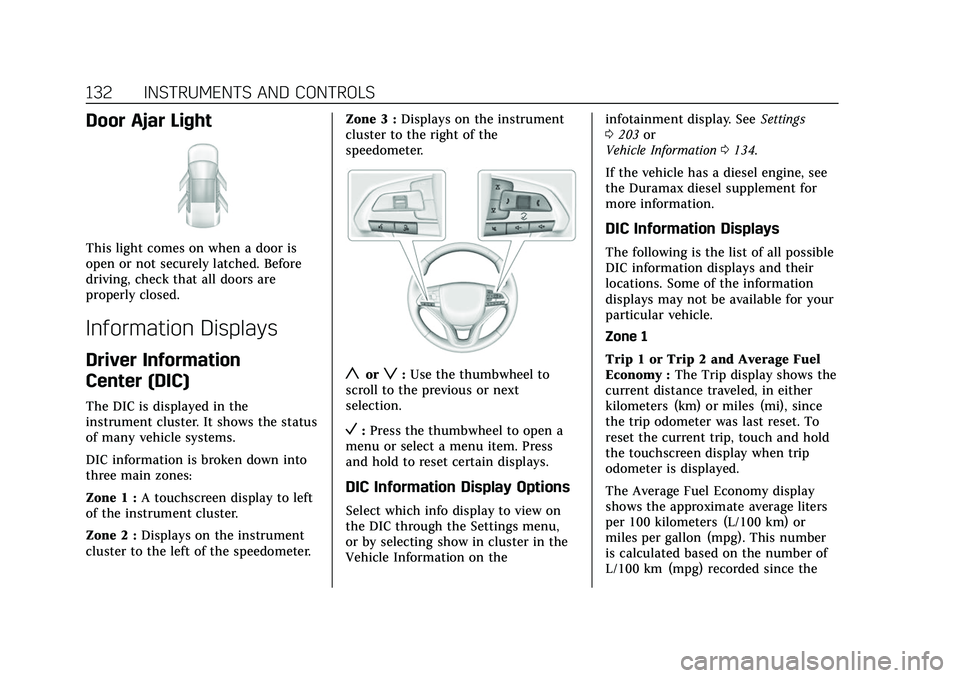
yorz: Use the thumbwheel to
scroll to the previous or next
selection.
V: Press the thumbwheel to open a
menu or select a menu item. Press
and hold to reset certain displays.
DIC Information Display Options
Select which info display to view on
the DIC through the Settings menu,
or by selecting show in cluster in the
Vehicle Information on the infotainment display. See
Settings
0 203 or
Vehicle Information 0134.
If the vehicle has a diesel engine, see
the Duramax diesel supplement for
more information.
DIC Information Displays
The following is the list of all possible
DIC information displays and their
locations. Some of the information
displays may not be available for your
particular vehicle.
Zone 1
Trip 1 or Trip 2 and Average Fuel
Economy : The Trip display shows the
current distance traveled, in either
kilometers (km) or miles (mi), since
the trip odometer was last reset. To
reset the current trip, touch and hold
the touchscreen display when trip
odometer is displayed.
The Average Fuel Economy display
shows the approximate average liters
per 100 kilometers (L/100 km) or
miles per gallon (mpg). This number
is calculated based on the number of
L/100 km (mpg) recorded since the
Page 136 of 492

Cadillac Escalade Owner Manual (GMNA-Localizing-U.S./Canada/Mexico-
13690472) - 2021 - CRC - 8/10/21
INSTRUMENTS AND CONTROLS 135
.Tire Pressure
.Fuel Economy
.Average Speed
.Traffic Sign Memory
.Timer
.Diesel Exhaust Fluid
.Fuel Filter Life
.Off-Road
.Engine Hours
.Battery Voltage
.Oil Pressure
.Trailer Brake
.Coolant Temperature
.Transmission Fluid Temp
.Air Filter Life
.Brake Pad Life
.Traction and Stability
.Time and Date
Head-Up Display (HUD)
{Warning
If the HUD image is too bright or
too high in your field of view, it
may take you more time to see(Continued)
Warning (Continued)
things you need to see when it is
dark outside. Be sure to keep the
HUD image dim and placed low in
your field of view.
If equipped with HUD, some
information about the operation of
the vehicle is projected onto the
windshield. The image is projected
through the HUD lens on top of the
instrument panel. The information
appears as an image focused out
toward the front of the vehicle.
Caution
If you try to use the HUD image as
a parking aid, you may misjudge
the distance and damage your
vehicle. Do not use the HUD image
as a parking aid.
The HUD information can be
displayed in various languages. The
speedometer reading and other
numerical values can be displayed in
either English or metric units. The language selection is changed
through the radio, and the units of
measurement is changed through the
instrument cluster. See
Settings0203.HUD Display on the Windshield
Depending on how the vehicle is
equipped, the HUD may display some
of the following vehicle information
and vehicle messages or alerts:
.Speed
.Audio
.Phone
.Navigation
.Driver Assistance Features
.Vehicle Messages
Page 247 of 492

Cadillac Escalade Owner Manual (GMNA-Localizing-U.S./Canada/Mexico-
13690472) - 2021 - CRC - 8/10/21
246 DRIVING AND OPERATING
2. Shift the vehicle to N (Neutral).This can be done while the vehicle
is moving. After shifting to
N (Neutral), firmly apply the brakes
and steer the vehicle to a safe
location.
3. Come to a complete stop.
4. Hold the brake pedal down and shift to P (Park). The shift lever
must be in P (Park) to turn the
ignition off.
5. Continue to hold the brake pedal down.
6. Set the parking brake. See Electric
Parking Brake 0261.
7. Press ENGINE START/STOP once to turn the ignition off.
8. Release the brake pedal.
If the vehicle cannot be pulled over,
and must be shut off while driving,
press and hold ENGINE START/STOP
for longer than two seconds, or press
twice in five seconds.
ACC/ACCESSORY (Amber Indicator
Light) : This mode allows some
electrical accessories to be used when
the engine is off. With the ignition off, pressing the
button one time without the brake
pedal applied will place the ignition
system in ACC/ACCESSORY.
The ignition will switch from ACC/
ACCESSORY to off after five minutes
to prevent battery rundown.
ON/RUN/START (Green Indicator
Light) :
This mode is for driving and
starting. With the ignition off, and the
brake pedal applied, pressing the
button once will turn the ignition on.
Once engine cranking begins, release
the button. Engine cranking will
continue until the engine starts. See
Starting the Engine 0246.
Service Mode
This power mode is available for
service and diagnostics, and to verify
the proper operation of the
malfunction indicator lamp as may be
required for emission inspection
purposes. With the vehicle off, and the
brake pedal not applied, pressing and
holding the button for more than
five seconds will place the vehicle in
Service Mode. The instruments and
audio systems will operate as they do
when the ignition is on, but the vehicle will not be able to be driven.
The engine will not start in Service
Mode. Press the button again to turn
the ignition off.
Starting the Engine
If the vehicle has a diesel engine, see
the Duramax diesel supplement.
Caution
If you add electrical parts or
accessories, you could change the
way the engine operates. Any
resulting damage would not be
covered by the vehicle warranty. See
Add-On Electrical Equipment
0360.
Shift the vehicle into P (Park) or
N (Neutral). To restart the engine
when the vehicle is already moving,
use N (Neutral) only.
Caution
Do not try to shift to P (Park) if the
vehicle is moving. If you do, you
could damage the transmission.
Shift to P (Park) only when the
vehicle is stopped.
Page 257 of 492

Cadillac Escalade Owner Manual (GMNA-Localizing-U.S./Canada/Mexico-
13690472) - 2021 - CRC - 8/10/21
256 DRIVING AND OPERATING
2. Tap the left steering wheel controlto reduce the highest gear
available, or the right control to
increase the highest gear available.
3. To exit, pull back the shift lever a second time. The D will illuminate
red, and the L will turn white.
When shifting to L (Low), the
transmission shifts to a preset lower
gear range. The highest gear available
while in this range will be displayed
next to the L (Low) in the DIC. See
Driver Information Center (DIC) 0132.
All gears below are available to use.
For example, when 4 (Fourth) is
shown next to the L, 1 (First) through
4 (Fourth) gears are shifted
automatically. To shift to 5 (Fifth)
gear, tap the right steering wheel
control or shift into D (Drive).
L (Low) prevents shifting to a lower
gear range if the engine speed is too
high. If the vehicle speed is not
reduced within the allotted time, the
lower gear range shift will not
complete. Slow the vehicle, then tap
the left steering wheel control to the
desired lower gear range. Cruise control can be used while
in ERS.
Tow/Haul Mode
Use this mode when hauling heavy
loads to provide increased
performance and vehicle control. Tow/
Haul Mode adjusts the transmission
shift pattern, steering, 4WD,
Electronic Stability Control (ESC)
performance and brake feel. If the
vehicle is turned off with Tow/Haul
Mode active and then restarted within
four hours or less, Tow/Haul will
remain active. Otherwise, the vehicle
will start in Tour Mode. See
Driver
Mode Control 0266 to activate Tow/
Haul Mode.
If equipped with a diesel engine,
exhaust braking is automatically
activated when Tow/Haul Mode is
selected. It maintains vehicle speed by
automatically implementing a shift
pattern that uses the engine and the
transmission to slow the vehicle. The
system will command down shifts to
reduce vehicle speed when the brake
is applied. The normal tow/haul shift
pattern will return once the vehicle is
on a low grade or when the accelerator pedal is pressed. While in
the Electronic Range Select (ERS)
mode (see
Manual Mode 0255), grade
braking is deactivated, allowing the
driver to select a range and limiting
the highest gear available.
For more information on trailer
weight specifications, See Towing
Equipment 0338.
Drive Systems
Four-Wheel Drive
If equipped, four-wheel drive engages
the front axle for extra traction.
Four-wheel drive engages the front
axle for extra traction.
Caution
Do not drive on clean, dry
pavement in 4
mand 4n(if
equipped) for an extended period of
time. These conditions may cause
premature wear on the vehicle’s
powertrain.
Page 327 of 492

Cadillac Escalade Owner Manual (GMNA-Localizing-U.S./Canada/Mexico-
13690472) - 2021 - CRC - 8/10/21
326 DRIVING AND OPERATING
Take Steering
The LKA system does not
continuously steer the vehicle. If LKA
does not detect active driver steering,
an alert and chime may be provided.
Steer the vehicle to dismiss. LKA may
become temporarily unavailable after
repeated take steering alerts.
When the System Does Not
Seem to Work Properly
The system performance may be
affected by:
.Close vehicles ahead.
.Sudden lighting changes, such as
when driving through tunnels.
.Banked roads.
.Roads with poor lane markings,
such as two-lane roads.
If the LKA system is not functioning
properly when lane markings are
clearly visible, cleaning the windshield
may help.
A camera blocked message may
display if the camera is blocked. Some
driver assistance systems may have
reduced performance or not work at
all. An LKA or LDW unavailable message may display if the systems
are temporarily unavailable. This
message could be due to a blocked
camera. The LKA system does not
need service. Clean the outside of the
windshield behind the rearview mirror.
LKA assistance and/or LDW alerts
may occur due to tar marks, shadows,
cracks in the road, temporary or
construction lane markings, or other
road imperfections. This is normal
system operation; the vehicle does not
need service. Turn LKA off if these
conditions continue.
Fuel
Top Tier Fuel
GM recommends the use of TOP TIER
Detergent Gasoline to keep the engine
clean, reduce engine deposits, and
maintain optimal vehicle performance.
Look for the TOP TIER Logo or see
www.toptiergas.com for a list of TOP
TIER Detergent Gasoline marketers
and applicable countries.
Recommended Fuel
For diesel engine vehicles, see
“Fuel
for Diesel Engines” in the Duramax
diesel supplement.
Premium unleaded gasoline meeting
ASTM specification D4814 with a
posted octane rating of 93 —(R+M)/2
— is highly recommended for best
performance and fuel economy.
Unleaded gasoline with an octane