2021 AUDI Q7 Page 37
[x] Cancel search: Page 37Page 7 of 332

4M1012721BC
About this Owner's Manual
In this manual, Audi provides important informa-
tion, tips, suggestions, and warnings for using
your vehicle. “Audi” refers to AUDI AG, the re-
spective importer in a country, as well as joint
ventures.
It has always been Audi's policy to continuously
improve its products. Audi reserves the right to
make changes in design and specifications, and
to make additions or improvements in its prod-
ucts without incurring any obligation to install
them on products previously manufactured. This
owner's manual is based on the current data
available when it was printed. Text, illustrations,
and specifications in this owner's manual are
based on the most current information available
at the time of printing, and shall not constitute a
basis for liability claims.
KEEP THIS GUIDE
Keep this manual and any other applicable docu-
ments in your vehicle at all times. This is espe-
cially important if you loan your vehicle to others
or sell it.
This owner's manual describes the equipment
range for all model versions of this vehicle at the
time of printing. Individual equipment options
described may only be available at a later date or
may only be offered in certain countries.
Some sections in this manual do not apply to all
vehicles. When this is the case, the beginning of
the section indicates the validity, for example
“Applies to: vehicles with speed warning sys-
tem”. Optional or vehicle-specific equipment is
ugn also identified with an asterisk “*”.
The illustrations in this manual are a guide.
Some of the details in your vehicle may differ
from the illustration.
All directions, such as “Left”, “right”, “front” and
“rear”, are based on the vehicle's direction of
travel.
* — Optional equipment or vehicle-specific equip-
ment
b> The section continues on the next page.
=> A\ Cross reference to a “WARNING” within a
section. If a page number is indicated, the
WARNING is located outside of the section.
IN WARNING
Text with this symbol contains information
about safety and how to reduce the risk of se-
rious personal injury or death.
C) Note
Text with this symbol contains information
about reducing the risk of damage to your ve-
hicle.
(@) For the sake of the environment
Text with this symbol contains information on
protecting the environment.
G) Tips
Text with this symbol contains additional use-
ful information.
Page 9 of 332

4M1012721BC
Quick access
Cup holden asce es cscvene wv omens x v oe 86
ESOGKE « 2 santice wm aconens we < emommiee © osm 86
— Vehicle key holder
Depending on equipment:
— Audi music interface .......... 224
—Audi phone box ............... 185
@® Electromechanical parking brake
BUERON sese ¢ eevee ¢ x mew © 2 pee 4 108
@9 Automatic transmission selector
EVER” scowp: « 2 gave & o eee Go eee Ee 100
@) [START ENGINE STOP] button .... 98
@) Steering wheel adjustment ...... 69
@3) Lever for:
— Cruise control system ......... 136
— Adaptive cruise assist .......... 139
@4 Connection port for the On Board
Diagnostic System (OBD) ........ 303
@5) Buttons for:
LIQHts: as 5 2 sacs 5 2 eqws 3 o ees ss 50
—All-weather lights ............ 50
—Rear fog lights ............... 50
@8 Hood release ..............00-% 246
@) Button for:
— Luggage compartment lid ...... 41
@8 Exterior mirror adjustment ...... 56
@9) Buttons for:
— Power windows ............-. 45
—Child safety lock .............. 44
@ Tips
Some the equipment listed here is only instal-
led in certain models or is available as an op-
tion.
Indicator lights overview
The indicator lights in the instrument cluster
blink or turn on. They indicate functions or mal-
functions. Some warning and indicator lights
turn on when you switch the ignition on and must
turn off when the drive system is switched on or
while driving.
With some indicator lights, messages may ap-
pear and warning signals may sound. The indica-
tor lights and messages may be covered by other
displays. To show them again, select the second
tab for messages with the multifunction steering
wheel © page 13.
Some indicator lights in the display can display in
several colors.
ON ee tle ins
If the A or A indicator light turns on, check
the message in the instrument cluster.
The following indicator lights may be available,
depending on the vehicle equipment:
Red indicator lights
Central indicator light
=> page 7,
Instrument cluster
=> page 12
Safety belt
=> page 74
Engine start system
=> page 99
Transmission
=> page 103
Drive system
=> page 105,
Electrical system
=> page 254
Electromechanical parking brake
=> page 108
Electromechanical parking brake
=> page 109
Brake system
=> page 108, > page 109,
=> page 253
Brake system
=> page 108, > page 109,
=> page 253
Steering
=>page 116
Steering lock
=>page 116
Page 10 of 332

Quick access
Air suspension
=>page 115
Electrical system
=> page 254
Engine oil level (MIN)
=> page 248
Engine oil pressure
=> page 248
Cooling system
=> page 251
Hood
=> page 247
Loose wheel warning
=> page 274
Night vision assist
=> page 133
Night vision assist
= page 133
Distance warning
=> page 148
Steering intervention request
=> page 143
Safe start monitor
=> page 146,
Driver intervention request
=> page 147
Adaptive cruise assist
=> page 140
Lane departure warning
= page 150,
Emergency assist
=>page 159
Audi pre sense
= page 152,
Intersection assist
=>page 159
Yellow indicator lights
Central indicator light
=> page 7
Safety systems
=> page 76
Transmission
=> page 103
Drive system
=>page 105
Cooling system
=> page 251
Engine start system
=> page 99
Keys
=> page 99
Electromechanical parking brake
=> page 109
Brake system
=> page 108
Electronic Stabilization Control
(ESC)
=>page 117
Electronic Stabilization Control
(ESC)
=>page 117
Electronic Stabilization Control
(ESC)
>page 118
Anti-lock braking system (ABS)
>page 119
Anti-lock braking system (ABS)
=>page 119
Steering
=>page 116
Steering lock
=>page 116
All wheel drive
=>page 117
Suspension control
>page 115
Air suspension
=>page 115
Active roll stabilization
>page 115
Engine speed limitation
=> page 14
Tank system
= page 242
Page 11 of 332

4M1012721BC
Quick access
Electrical system Night vision assist
=> page 254 => page 134
Engine oil level (MIN)
Intersection assist
=> page 248 =>page 159
Engine oil level (MAX) Side assist
=> page 248 => page 157;
Exit warning
=>page 157
Engine oil sensor
=> page 248
Malfunction Indicator Lamp (MIL)
> page 244,
Rear cross-traffic assist
=> page 168
Engine warm-up request Adaptive cruise assist
=> page 248 => page 148
Washer fluid level Steering intervention request
=> page 257 => page 143, > page 150
Windshield wipers Lane departure warning
=> page 60 >page 151
Parking systems Distance warning
=> page 163 = page 148
Park assist plus Audi pre sense
>page 175 =>page 155
Maneuver assist Emergency assist
Spiga 1 pagemes
Tire pressure ra Emergency call function
=> page 277 = page 200
Tire pressure Other indicator lights
> page 277
Start/Stop system
Loose wheel warning => page 105
> page 274 Hill hold assist
Backrest => page 111
> page 67 Trailer turn signals
= page 68 >page 121
Bulb failure indicator Low beam headlights
© page.o4 => page 50
Adaptive light
Parking lights
=> page 54 a9
=> page 50
Light/rain sensor
Turn signals
=> page 54, > page 60
= page 51, > page 53
Door lock Cruise control system
=> page 36 => page 136
Battery in vehicle key Cruise control system
pppage400 > page 136 >
Page 12 of 332
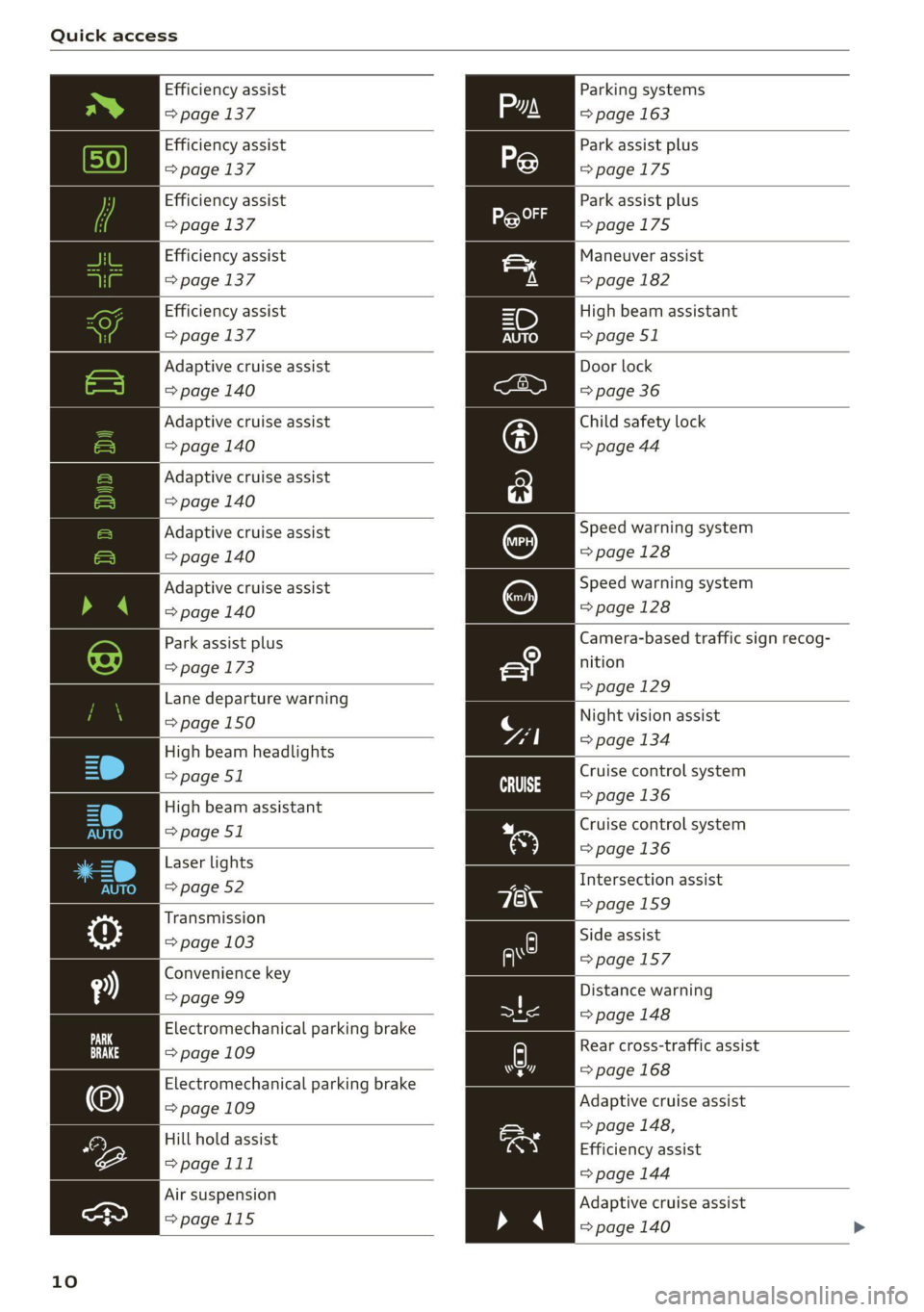
Quick access
Efficiency assist
=> page 137
Efficiency assist
=> page 137
Efficiency assist
=> page 137
Efficiency assist
=> page 137
Efficiency assist
=> page 137
Adaptive cruise assist
=> page 140
Adaptive cruise assist
=> page 140
Adaptive cruise assist
=> page 140
Adaptive cruise assist
=> page 140
Adaptive cruise assist
=> page 140
Park assist plus
=> page 173
Lane departure warning
=> page 150
High beam headlights
=> page 51
High beam assistant
=> page 51
Laser lights
=> page 52
Transmission
=> page 103
Convenience key
=> page 99
Electromechanical parking brake
=> page 109
Electromechanical parking brake
=> page 109
Hill hold assist
=>page 111
Air suspension
>page 115
10
Parking systems
=> page 163
Park assist plus
=>page 175
Park assist plus
=>page 175
Maneuver assist
=> page 182
High beam assistant
=> page 51
Door lock
=> page 36
Child safety lock
=> page 44
Speed warning system
=> page 128
Speed warning system
=> page 128
Camera-based traffic sign recog-
nition
=>page 129
Night vision assist
=> page 134
Cruise control system
=>page
136
Cruise control system
=> page 136
Intersection assist
=>page 159
Side assist
=>page 157
Distance warning
= page 148
A) Rear cross-traffic assist
=> page 168 hr]
Adaptive cruise assist
> page 148,
Efficiency assist
=> page 144
Adaptive cruise assist
=> page 140 >
Page 13 of 332

4M1012721BC
Quick access
Adaptive cruise assist
>page 145
Lane departure warning
=>page 150
Lane departure warning
=>page 151
Audi pre sense
=>page 155
Emergency assist
=>page 159
11
Page 14 of 332

Instrument cluster
Instrument cluster
Instrument cluster overview
12/5/2019
2800 mi 210 mi
RTO Pad
Fig. 2 Instrument cluster overview (Audi virtual cockpit)
Depending on the vehicle equipment, the follow- @ Tips
ing items may appear in the instrument cluster:
— You can select the units used for tempera-
@ Display .
. ture, speed, and other measurements in the
— Engine coolant temperature -E . . 14 :
: Infotainment system > page 236.
@ left dial — Speeds are displayed in mph (miles per
~ Tachometer ......... 1.05.04. 14 hour) or km/h (kilometers per hour).
Tab
area ....... 6. sees eee eee ee 13 — If there is a malfunction in the instrument
Genitiralzarea yan ss ance oo sauise 0 0 13 cluster, DEF will appear in the trip odometer
Status line (one or two lines) display. Have the malfunction corrected as
Right dial soon as possible.
— Certain instrument cluster content can also
be displayed in the head-up display*
=> page 26.
— Convenience display
FueblevelEd) « = secsaw « a secsise vo wena © 242
Right additional display with speed-
ometer
Left additional display with:
—Gear .. eee eee eee eee eee 100
— Audi drive select mode ......... 113
©8®
©OO8®O
©
ZX WARNING
If there is a severe malfunction in the instru-
ment cluster, the display may turn off. The /\|
indicator light may also turn on. Stop the ve-
hicle safely. See an authorized Audi dealer or
authorized Audi Service Facility for assistance.
12
Page 15 of 332

4M1012721BC
Instrument cluster
Operating The following tabs may be available, depending
on vehicle equipment:
First tab Vehicle functions > page 15
Second tab | Driver messages (this is only dis-
played if at least one indicator -5QPM
ce light/message is being displayed)
12/05/2017 Third tab Night vision assist (this is only dis-
played if the night vision assist
has been activated) > page 132
Fourth tab |Radio > page 214
Media > page 226
Fifth tab Telephone > page 187
Sixth tab Navigation > page 202
Fig. 3 Instrument cluster: driver information system
Adjusting the display
=I eR S| >| nN x ec
Fig. 4 Left side of multifunction steering wheel
Information is organized within various tabs @)
in the instrument cluster. The tab contents are
displayed in the central area (2).
i Bad P Fig. 5 Upper display: adjusting the display
Requirement: the ignition must be switched on.
Selecting a tab Switching the view
» Press the button @ repeatedly until the > Press the: VIEW button to switch between the
desired tab is selected. default view @ and the enhanced view (2).
Returning to functions at higher levels Adjusting the layout
> Press the *> button ©) Depending on the vehicle equipment, various lay-
outs may be available.
Opening and closing the menu
P 9 9 > Applies to: MMI: Select on the home screen:
> Press the [=] button ©). SETTINGS > Display & brightness > Audi virtu-
al cockpit.
Selecti d firmi functi
erecting ane’ confirming a function > To adjust the desired layout, press @).
Requirement: a menu or list must be displayed.
Adjusting the additional display
> To select a function, turn the left thumbwheel , ; ; ;
@ to the desired function. Depending on the vehicle equipment, the addi-
» To confirm a selection, press the left thumb- tional displays that can be selected may vary.
wheel (2). >» Applies to: MMI: Select on the home screen:
SETTINGS > Display & brightness > Audi virtu-
al cockpit > Configure.
> Press the VIEW button @). > Select the desired additional display.
Switching the view
13