2021 AUDI E-TRON high beam
[x] Cancel search: high beamPage 8 of 308

Quick access
Quick access
Cockpit
Fig. 1 Cockpit
@ @ @ @
©
OO©CV®O
Door handle
Central locking switch ...........
Vent
Lever for:
—Turn signals and high beams ....
— High beam assistant ..........
— Lane departure warning ........
—Lane guidance ...............
Multifunction steering wheel with:
— Horn be
— Driver's airbag ............005
— Operating buttons ............
— Shift paddles ................
Instrument cluster .. 6.0... een
Head-up display ...............
Windshield washer system lever ..
Upper display: « = cer x seems 2 sense
Lower display .................
Lockable glove compartment with:
34
49 49
155
147
—@D/DVDIdrIVE cyeue: 5 2 ems 5 x were
@ Front passenger's airbag ........
GS Krneerairb ag, cies ss secu 2 swe © aoe
@ Depending on equipment, buttons
for:
— drive Select mex ss wamy sv emma soe
— Electronic Stabilization Control
(0) 0) ee eee
—Emergency flashers ...........
—Defrosting ..................
— Rear window defogger .........
@ MMI On/Off button .............
@ Depending on equipment, buttons
for:
— Parking systems ..............
— Driver assistance systems ......
@ Depending on equipment:
— Starting the vehicle when there is
amalfunction ............200.
—"CupHOlder casa ¢ & cows 5 o wens
215
68 68
102
106
Page 11 of 308
4KE012721BF
Quick access
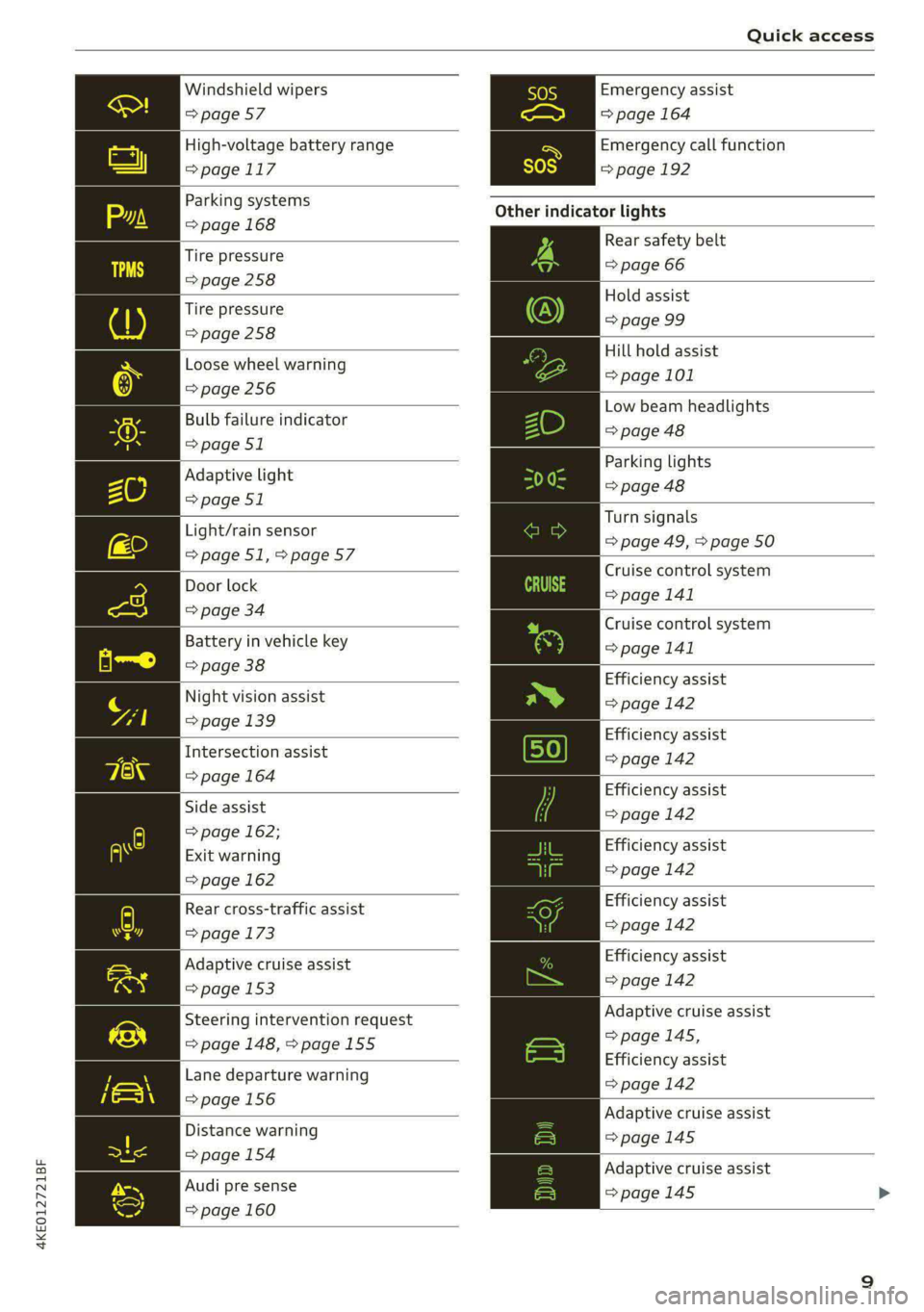
Windshield wipers
=> page 57
High-voltage battery range
>page 117
Parking systems
=> page 168
Tire pressure
=>page 258
Tire pressure
=> page 258
Loose wheel warning
=> page 256
Bulb failure indicator
=> page 51
Adaptive light
=> page 51
Light/rain sensor
=>page 51,>page 57
Door lock
=> page 34
Battery in vehicle key
=> page 38
Night vision assist
=> page 139
Intersection assist
=> page 164
Side assist
=> page 162;
Exit warning
=> page 162
Rear cross-traffic assist
=> page 173
Adaptive cruise assist
=> page 153
Steering intervention request
=> page 148, >page 155
Lane departure warning
=>page 156
Distance warning
=> page 154
Audi pre sense
=> page 160
Emergency assist
=> page 164
Emergency call function
=>page 192
Other indicator lights
Rear safety belt
=> page 66
Hold assist
=> page 99
Hill hold assist
=> page 101
Low beam headlights
=> page 48
Parking lights
=> page 48
Turn signals
=> page 49, > page 50
Cruise control system
= page 141
Cruise control system
>page 141
Efficiency assist
=> page 142
Efficiency assist
=> page 142
Efficiency assist
=> page 142
Efficiency assist
=> page 142
Efficiency assist
=> page 142
Efficiency assist
=>page 142
Adaptive cruise assist
=>page 145,
Efficiency assist
=> page 142
Adaptive cruise assist
=>page 145
Adaptive cruise assist
=> page 145 >
Page 12 of 308
Quick access
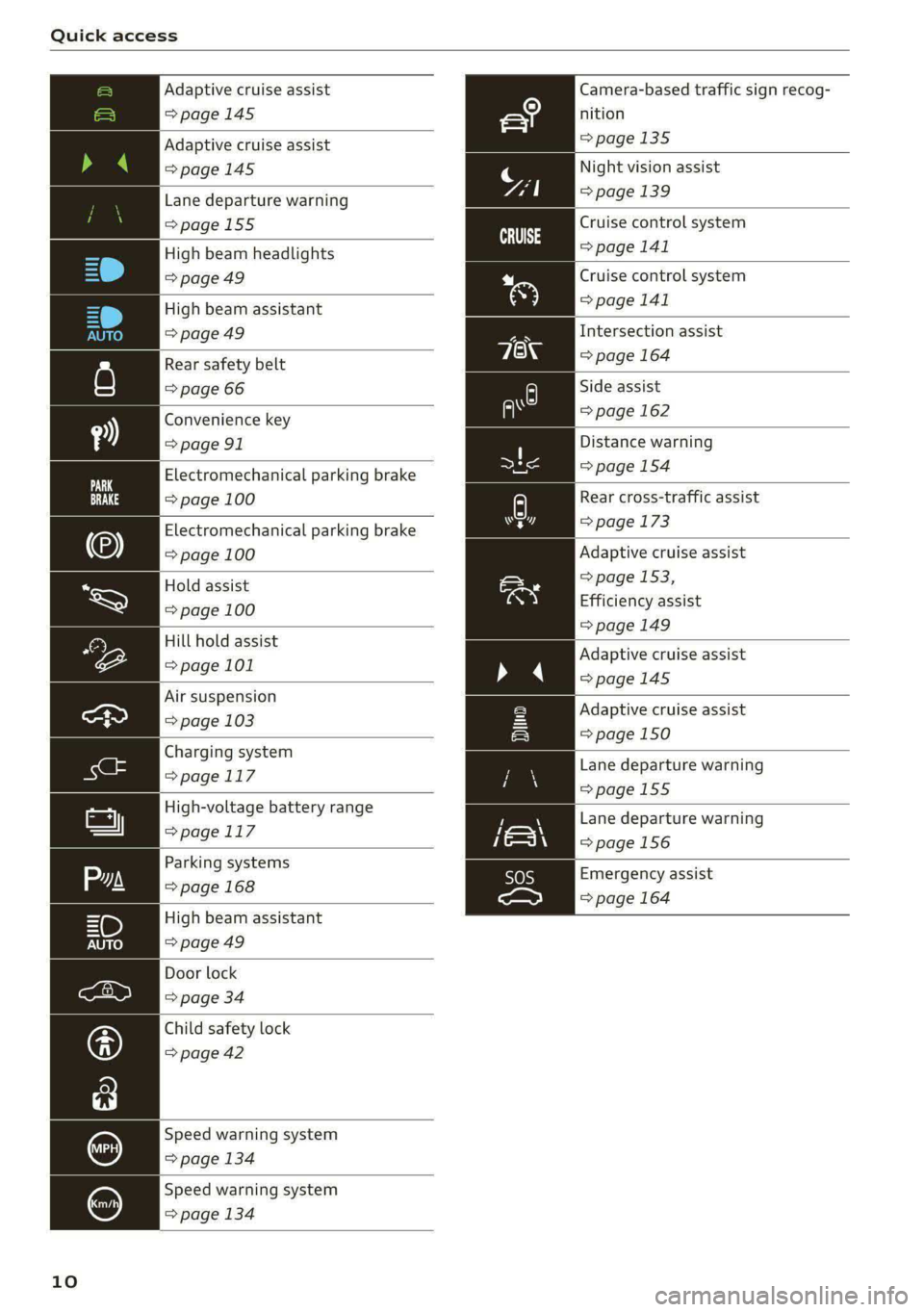
Adaptive cruise assist Camera-based traffic sign recog-
=> page 145 nition
Adaptive cruise assist =>page 135
>page 145
Night vision assist
Lane departure warning page 139
=>page 155
High beam headlights
=>page 49
Cruise control system
=> page 141
Cruise control system
High beam assistant > page 141
=> page 49 Intersection assist
Rear safety belt => page 164
=> page 66 Side assist
Convenience key = page 162
= page 91 Distance warning
Electromechanical parking brake > page 154
=> page 100 Rear cross-traffic assist
Electromechanical parking brake > page 173
=> page 100 Adaptive cruise assist
=> page 153,
Efficiency assist
=> page 149
Hold assist
=> page 100
Hill hold assist
page 101 Adaptive cruise assist
=>page 145
Air suspension
ea > page 103
Charging system
>page 117
High-voltage battery range
> page.1 17
Adaptive cruise assist
=> page 150
Lane departure warning
=>page 155
Lane departure warning
=>page 156
Emergency assist
=> page 164
Door lock
=> page 34
Child safety lock
=> page 42
Speed warning system
=> page 134
Speed warning system
=> page 134
10
Page 51 of 308

4KE012721BF
Lights and Vision
does not affect the service life of the light-
ing.
— When the parking lights are switched on
and the ignition is switched off, the 2002} sym-
bol appears in the light switch module.
Turn signal and high beam lever
BFV-0012
Fig. 35 Lever: switching on the turn signal and high beams
The lever operates the turn signals, the high
beams and the headlight flasher.
Turn signals @>>
The turn signal will activate when you move the
lever into a turn signal position while the ignition
is switched on. The respective Ka] or BY indicator
light flashes.
@ Right turn signal
@ Left turn signal
The turn signal blinks three times if you tap the
lever (convenience turn signal).
If an indicator light blinks twice as fast as usual,
a turn signal bulb has failed. Carefully drive to an
authorized Audi dealer or authorized Audi Service
Facility immediately to have the malfunction cor-
rected.
High beams 2D and headlight flasher
> Move the lever to the corresponding position:
@ High beams on (vehicles with high beam assis-
tant*) > page 49
@ High beams off or headlight flasher
The EJ indicator light in the instrument cluster
will turn on.
ZX WARNING
High beams can cause glare for other drivers,
which increases the risk of an accident. For
this reason, only use the high beams or the
headlight flasher when they will not create
glare for other drivers.
H PTT eld
Applies to: vehicles with high beam assistant
The high beam assistant automatically turns the
high beams on or off depending on the surround-
ing conditions.
A camera on the rearview mirror mount can de-
tect light sources from other road users. The high
beams switch on or off automatically depending
on the position of vehicles driving ahead and on-
coming vehicles, the vehicle speed as well as oth-
er environmental factors and traffic conditions.
Activating high beam assistant
Requirement: the AUTO light function must be
selected and the high beam assistant must be
switched on in the MMI > page 50.
> To activate the high beam assistant, tap the
lever forward @) > page 49, fig. 35. The FM in-
dicator light will appear in the instrument clus-
ter display and the high beams will be switched
on or off automatically. The Ed indicator light
will turn on if the high beams are switched on.
Activating and deactivating the high beam
head lights manually
If the high beams did not switch on or off as ex-
pected, you may switch them on or off manually
instead:
> To activate the high beams manually, tap the
lever
forward @) > page 49, fig. 35. The & in-
dicator light will turn on.
> To deactivate the high beams manually, pull
the lever back @) > page 49, fig. 35. The high
beam assistant is deactivated.
Operating the headlight flasher
> To operate the headlight flashers, pull the lever
back @) > page 49, fig. 35. If the high beam
49
Page 52 of 308

Lights and Vision
headlights are not switched on, the high beam
assistant will remain activated.
Z\ WARNING
— Observe the safety precautions and note the
limits of the assist systems, sensors, and
cameras > page 129.
— High beam assistant is only intended to as-
sist the driver. The driver is responsible for
controlling the high beam headlights and
adjusting them to match the lighting and
visibility conditions.
— High beams can cause glare for other driv-
ers, which increases the risk of an accident.
For this reason, only use the high beams or
the headlight flasher when they will not cre-
ate glare for other drivers.
iG) Tips
Adhere to any local applicable regulations
when using the lighting equipment, for exam-
ple in regard to reducing glare for other driv-
ers. The driver is always responsible for adher-
ing to the regulations applicable in the coun-
try where the vehicle is being operated.
Adjusting the exterior lighting
You can adjust the exterior lighting separately.
The settings depend on the vehicle equipment.
» Applies to: MMI: Select on the home screen:
VEHICLE > Light & Visibility > Exterior light-
ing.
Automatic headlights
You can adjust the following settings in the Auto-
matic
headlights menu:
Activation time - You can adjust if the headlights
switch on Early, Medium, or Late based on the
sensitivity of the light sensor.
High beam assistant - You can switch the high
beam assistant on and off.
Digital Matrix LED functions - You can switch
the digital Matrix LED functions on or off,
D_ No function assigned in certain countries.
sO
Entry/exit lighting
The Entry/exit lighting illuminates the area
around the vehicle when the vehicle is unlocked
or when the driver’s door is opened while the ig-
nition is off. The entry/exit lighting works when it
is dark and when the AUTO light function is
switched on. The front and rear daytime running
lights* switch on automatically each time the ve-
hicle is unlocked regardless of how bright it is
outside the vehicle.
Applies to: vehicles with digital Matrix LED func-
tions: The entry lighting also projects a light ani-
mation when the vehicle is unlocked and the driv-
er's door is opened. The exit lighting also starts
the light animation when the ignition is switched
off. The light animation will appear on surfaces in
front of the vehicle when it is dark. You can
choose from various color profiles, such as Origa-
mi.
Daytime running lights
USA models: The daytime running lights can be
switched on and off.
Canada models: The daytime running lights can-
not be switched off. The lights activate automati-
cally each time the ignition is switched on.
Emergency flashers
3 B
Ig ee
Fig. 36 Center console: emergency flashers
The emergency flashers help to make other driv-
ers aware of your vehicle in dangerous situations.
> Press the A @ button to switch the emergency
flashers on or off.
Page 53 of 308

4KE012721BF
Lights and Vision
When the emergency flashers are turned on, the
a and B indicator lights will flash at the same
time.
You can indicate a lane change or a turn when the
emergency flashers are switched on by using the
turn signal lever. The emergency flashers stop
temporarily.
The emergency flashers also work when the igni-
tion is turned off.
@) Tips
You should switch the emergency flashers on
if:
— you are the last car in a traffic jam so that
all other vehicles approaching from behind
can see your vehicle
— your vehicle has broken down or you are
having an emergency
— your vehicle is being towed or if you are tow-
ing another vehicle
Messages
If the Ea indicator light turns on, a bulb has
failed. The displayed message indicates the cause
and possible solutions. If one of the messages re-
mains on, drive immediately to an authorized
Audi dealer or authorized Audi Service Facility to
have the malfunction repaired.
Bg) Audi adaptive light: malfunction! See own-
er's manual
Adaptive light* is not working. The headlights
still function. Drive immediately to an authorized
Audi dealer or authorized Audi Service Facility to
have the malfunction repaired.
High beam assistant: malfunction! See own-
er's manual
You can still switch the high beams on or off
manually. Drive immediately to an authorized
Audi dealer or authorized Audi Service Facility to
have the malfunction repaired.
High beam assistant: currently unavailable.
Camera view limited due to surroundings. See
owner's manual
This message appears if the camera's visual field
is blocked. The system will switch itself off. Try
switching the systems on later.
a Automatic headlights: malfunction! See
owner's manual
The light/rain sensor is malfunctioning. When
the AUTO light function is on, the low beams will
remain switched on at all times for safety rea-
sons. Drive immediately to an authorized Audi
dealer or authorized Audi Service Facility to have
the malfunction repaired.
Interior lighting
Front interior lighting
Fig. 37 Headliner: interior lighting
Interior lighting buttons
ax* — Interior lighting on/off
4J- Door contact switch on/off. The interior light-
ing is controlled automatically.
Touch-sensitive reading lights
> To turn a reading light on or off, touch the sur-
face @ briefly.
> To activate the manual dimming function,
touch the surface @) when the light is switched
off and keep touching it until the desired
brightness is reached.
51
Page 57 of 308

4KE012721BF
Lights and Vision
exceeds approximately 2 mph (4 km/h) and it is
raining. The higher the sensitivity of the rain sen-
sor that is set (switch ©) to the right), the earlier
the windshield wipers react to moisture on the
windshield. You can deactivate the rain sensor
mode, which switches the interval mode on. In
intermittent mode, you can adjust the interval
time using the switch ©).
> Applies to: MMI: Select on the home screen:
VEHICLE > Light & Visibility > Rain sensor.
@ Slow wiping
@ Fast wiping
@ Single wipe. If you hold the lever in this posi-
tion longer, the wipers switch from slow wiping
to fast wiping.
© Clean the windshield &. The number of wipes
and afterwipes depends on how long the lever is
held in position G).
The wipers wipe one time after several seconds of
driving to remove water droplets. You can switch
this function off by moving the lever to position
© within ten seconds of the afterwipe. The after-
wipe function is reactivated the next time you
switch the ignition on.
If you hold the lever in position ©) for longer
than half a second, the edge wiping feature will
be activated. This moves the windshield wipers
closer to the edge of the windshield and per-
forms an afterwipe to clean the residue that re-
sults from the wiping process from the edge of
the windshield. The function is available when
driving at speeds up to 75 mph (120 km/h).
The headlight washer system* operates only
when the low beam headlights are on. If you
move the lever to position ©), the headlights and
the night vision assist camera* are cleaned at in-
tervals.
@ Wipe the rear window ©. The number of
wipes depends on the windshield wiper move-
ment.
The rear wiper automatically switches on when
the reverse gear is selected and the front wind-
shield wipers are on and running.
Clean the rear window &. The number of
wipes depends on how long the lever is held in
position (8). This may also clean the rearview
camera, depending on the vehicle equipment.
A WARNING
—The rain sensor is only intended to assist the
driver. The driver may still be responsible for
manually switching the wipers on based on
visibility conditions.
— The windshield must not be treated with
water-repelling windshield coating agents.
Under unfavorable conditions, such as wet-
ness, darkness, and when the sun is low,
these coatings can cause increased glare,
which increases the risk of an accident. They
can also cause wiper blade chatter.
— Properly functioning windshield wiper
blades are required for a clear view and safe
driving > page 56, Cleaning/changing wip-
er blades.
@) Note
— If there is frost, make sure the windshield
wiper blades are not frozen to the wind-
shield. Switching on the windshield wipers
when the blades are frozen to the wind-
shield can damage the wiper blades.
— Prior to using a car wash, the windshield
wiper system must be switched off (lever in
position @). This prevents the wipers from
switching on unintentionally and causing
damage to the windshield wiper system.
(i) Tips
— The windshield wipers switch off when the
ignition is switched off. You can activate the
windshield wipers after the ignition is
switched on again by moving the windshield
wiper lever to any position. The single wipe
function (lever in position @)) also functions
when the ignition is switched off.
— Worn or dirty windshield wiper blades result
in streaking. This can affect the rain sensor
function. Check your windshield wiper
blades regularly.
55
Page 140 of 308

Driving information
— The silhouette in the display appears in-
complete or interrupted, for example be-
cause the pedestrian is partially behind a
vehicle or an animal is partially covered by
tall grass.
— Never attempt to swerve around animals if
doing so would endanger you or other road
users.
G) Tips
— Even though the system evaluates the
shape and heat given off by all detected ob-
jects, there are limits to the system. There
may be false warnings.
— For technical reasons, the image pauses in
split second intervals.
Scale emo
Applies to: vehicles with night vision assist
The system can be switched on and off in the
MMI & page 132.
> The AUTO light function must be selected for
the night vision assist to automatically activate
when it is dark.
> Switch on the low beams manually to activate
night
vision assist immediately. To do so,
press @) on the light switch module and select
When activated, the % tab appears in the instru-
ment cluster.
> Select in the instrument cluster: $1 tab
G) Tips
When the night vision assist tab is selected in
the instrument cluster and the low beams are
switched off, the thermal image display dis-
appears only after you have exited the tab.
138
Marking and warning
Applies to: vehicles with night vision assist
Fig. 97 Instrument cluster: pedestrian marking and warn-
ing
Highlighting detected pedestrians and wild
animals
Within the limits of the system, the night vision
assist can detect pedestrians and wild animals
that are between approximately 32 feet (10 m)
and 295 feet (90 m) in front of the vehicle and
within the detection zone. Animal recognition is
not active within highly developed areas. The sys-
tem only detects large wild animals such as deer.
When it is dark outside and the low beams are
switched on, detected objects are marked in yel-
low @), within the limits of the system.
Pedestrian and wild animal warning
This system limits are based on the vehicle speed
and steering angle. Pedestrian and wild animal
warning encourages you to pay more attention.
If there are pedestrians or wild animals in front
of your vehicle that could pose a danger, the sys-
tem will direct your attention to this.
— Pedestrians or wild animals are highlighted in
red in the instrument cluster (2) and the J or
BAN symbol turns on @.
— When the head-up display* is switched on, the
additional indicator [AM or EM appears.
—Achime will sound if something is detected.
—If the night vision assist thermal image is re-
placed by another display (such as the on-board
computer), the red A or A indicator light will
appear if there is a pedestrian or wild animal
warning.