2021 AUDI E-TRON ECU
[x] Cancel search: ECUPage 83 of 308

4KE012721BF
Storage and convenience
Luggage compartment cover
Applies to: vehicles with luggage compartment cover
Fig. 69 Luggage compartment: removing the luggage
compartment cover
Observe the safety precautions > page 79.
> To attach the luggage compartment cover, pull
the cover out by the handle @) and secure it in
the mounting eyelets (2) on the side trim pan-
els.
> To remove the luggage compartment cover,
pull both levers () firmly in the direction of the
arrow and remove the cover upward.
> To install the luggage compartment cover,
place the cover in the mounts on the side trim
panels on the left and right side.
> Push the cover downward until it clicks into
place.
Two-part luggage compartment cover
Applies to: vehicles with two-part luggage compartment cov-
er
Fig. 70 Luggage compartment: luggage compartment lid
cover
Fig. 71 Luggage compartment: cover behind the rear
bench seat
Observe the safety precautions > page 79.
Removing and installing the luggage
compartment lid cover
> To remove the luggage compartment lid cover
@, turn the knob to a horizontal position.
> Pull the cover out of the retainers in the direc-
tion of the arrow.
> To install the cover, slide it forward on the re-
tainers until they engage.
> Turn the knob to a vertical position.
Removing and installing the cover behind
the rear bench seat
> To remove the cover behind the rear bench seat
@, pull the cover in the direction of the arrow.
> Pull the cover upward to release.
> To install the cover, insert the left and right
sides of the cover into the mounts on the side
trim panel.
> Slide the cover forward until it locks into place.
81
Page 85 of 308

4KE012721BF
Storage and convenience
Tie-downs
There are tie-downs (a) in the luggage compart-
ment to secure pieces of luggage and objects.
>» Use the tie-downs to secure the cargo.
Cargo net
Applies to: vehicles with cargo net
Use the cargo net (2) to secure lighter objects in
the luggage compartment
> Fold the clip for the tie-downs upward.
> Attach the hooks for the cargo net to the tie-
downs.
Cargo floor
Depending on vehicle equipment, there may be a
removable box under the cargo floor.
> To remove the cargo floor, pull the entire cargo
floor toward the back of the vehicle.
> To insert the cargo floor, lay the cargo floor into
the guide and then slide it toward the backrest
all the way until it stops.
Roof rack
General information
Applies to: vehicles with roof rack mount
Fig. 77 Roof rail: mounting points
If luggage or cargo is to be carried on the roof,
you must observe the following:
— These roof racks are the basis for a complete
roof rack system. Only roof racks that are suita-
ble for your vehicle may be used. Audi recom-
mends roof racks and attachments from the
Audi Genuine Accessories program.
— Make sure the roof rack is mounted on the vehi-
cle only at the specified locations @.
— Note the permitted axle load, permitted total
weight, and permitted roof load of your vehicle
= page 291. The roof load is the total of the
weight of the roof rack, the attachments and
the cargo you are carrying. However, you must
also note the permitted load of the carrier sys-
tem being used.
Z\ WARNING
— Follow the installation instructions provided
with the roof rack system. If you do not se-
cure the roof rack system and objects on the
roof correctly, they could come loose from
the vehicle and cause an accident.
—The risk of an accident increases when using
a roof rack system, because it changes the
driving characteristics by shifting the center
of gravity and/or the increasing the surface
area exposed to wind. You may need to
adapt your driving style and speed to the
current conditions.
® Note
Make sure that the luggage compartment lid
and the panoramic glass roof* do not come in-
to contact with objects on the roof when they
are open.
(@) For the sake of the environment
Energy usage will increase because of the in-
creased wind resistance. Remove the roof rack
when you are no longer using it.
83
Page 91 of 308
![AUDI E-TRON 2021 Owners Manual 4KE012721BF
Warm and cold
Symbol | Meaning
The A/C system must only be serv-
e
8] iced by qualified technicians.
Flammable refrigerant
Make sure all components are dis-
posed of](/manual-img/6/57622/w960_57622-90.png "AUDI E-TRON 2021 Owners Manual 4KE012721BF
Warm and cold
Symbol | Meaning
The A/C system must only be serv-
e
8] iced by qualified technicians.
Flammable refrigerant
Make sure all components are dis-
posed of")
4KE012721BF
Warm and cold
Symbol | Meaning
The A/C system must only be serv-
e
8] iced by qualified technicians.
Flammable refrigerant
Make sure all components are dis-
posed of correctly and never install
y components in the vehicle that have
been removed from old vehicles or
taken from recycling.
Lubricant in the A/C system
The sticker in the motor compartment provides
information about the type and amount of refrig-
erant oil used in the vehicle’s A/C system. For the
refrigerant oil quantity, refer to the Technical Da-
ta> page 291.
ZA WARNING
To ensure secure and safe operation, the A/C
system must only be serviced by qualified
technicians and certified technicians (SAE
standard J2845).
@ Tips
— Never repair the A/C system evaporator with
components from old vehicles or from recy-
cling.
— New replacement evaporators for portable
A/C systems must be certified and labeled
as such, so that they comply with the SAE
standard J2842 HFO-1234yf and R744.
89
Page 92 of 308

Driving
Driving
Starting the vehicle
pyre d | ola eda)
Fig. 79 Center console: switching on the drive system
Your vehicle is powered by electricity. Similar to a
vehicle with a combustion engine, the ignition
and drive system can be switched on separately.
When only the ignition is switched on, electronic
systems such as the MMI are available. However,
the vehicle is not ready to drive. Electric power is
able to move the vehicle once the drive system is
switched on and becomes active.
Requirement: the key must be in the vehicle.
Switching the drive system on
> Press and hold the brake pedal.
> Press the [START STOP] button. The drive sys-
tem switches on.
It is indicated in the power meter whether the
drive system is switched on > page 13.
Switching the drive system off
> Bring the vehicle to a full stop.
> Press the [START STOP] button. The drive sys-
tem switches off.
The steering is locked when you switch off the
drive
system in “P” and open the driver's door.
The steering lock helps prevent vehicle theft.
Switching the drive system off in an
emergency
If necessary in an emergency, the drive system
can also be switched off while driving using the
emergency off function*.
90
> Press the [START STOP] button twice in a row or
press and hold it one time.
Switching on and off
If you would like to switch the ignition on or off
without switching on the drive system, follow
these steps:
> Press the [START STOP] button without pressing
the brake pedal.
Switching the ignition off automatically
To prevent the vehicle battery from draining, the
ignition and possibly the exterior lighting may
switch off automatically.
Requirements:
— You must have driven the vehicle.
— You must have left the vehicle for longer than
30 seconds.
— The ignition must be switched on.
Among other indicators, the system detects that
you have left the vehicle based on the following
factors:
— The driver's door has been opened.
— The driver's safety belt has been unbuckled.
— The brake pedal is not being pressed.
— The driver's seat is not occupied.
The ignition will also be switched off after 30 mi-
nutes or if you lock the vehicle from the outside.
ZA WARNING
— Never switch off the drive system before the
vehicle has come to a complete stop.
Switching it off before the vehicle has stop-
ped may impair the function of the brake
booster and power steering. You would then
need to use more force to steer and brake
the vehicle. The fact that you cannot steer
and brake as usual may increase the risk of
accidents and serious injuries.
— Secure the vehicle against rolling before ex-
iting the vehicle > page 91. >
Page 93 of 308

4KE012721BF
Driving
@) Tips
— Brief noises are normal when starting and
stopping the vehicle and are no cause for
concern.
— It may not be possible to start the vehicle in
extremely low temperatures.
— The drive power depends on the tempera-
ture and the charge level of the high-volt-
age battery.
Messages
E Engine start system: malfunction! Please
contact Service
Do not switch the ignition off because you may
not be able to switch it on again. Drive to an au-
thorized Audi dealer or authorized Audi Service
Facility immediately to have the malfunction cor-
rected.
E Engine start system: malfunction! Please
contact Service
There is a malfunction in the engine start system.
Drive immediately to an authorized Audi dealer
or authorized Audi Service Facility to have the
malfunction repaired.
B Remote control key: key not detected. Is the
key
still in the vehicle?
The vehicle key was removed from the vehicle
while the drive system was active. If the vehicle
key is no longer in the vehicle, you can no longer
switch on the ignition or the drive system after
switching off the drive system. You also cannot
lock the vehicle from the outside.
Remote control key: hold back of key
against the designated area. See owner's man-
ual
The battery in the vehicle key may be drained or
there may be a malfunction. To start the vehicle,
you must also hold the vehicle key against the lo-
cation shown ?) > page 90, fig. 79.
If the malfunction remains, drive immediately to
an authorized Audi dealer or authorized Audi
Service Facility to have the malfunction correct-
ed.
When driving
Starting to drive, stopping, and parking
Starting from a stop
> Press and hold the brake pedal.
> Switch on the drive system.
> Select a gear.
> Release the parking brake.
> Release the brake pedal.
> Press the accelerator pedal to accelerate.
Always make sure that the vehicle does not
“creep” when starting to drive and maneuvering.
If you take your foot off the brake pedal, the ve-
hicle will not be set into motion by the drive sys-
tem.
Securing the vehicle against rolling
Secure your vehicle to prevent it from rolling be-
fore exiting the vehicle.
>» Set the parking brake.
> Select the “P” selector lever position.
> If parking on a steep road, turn the steering
wheel so that your vehicle will roll against the
curb in case it should start to move.
If one of these measures is not possible, for ex-
ample because there is no vehicle power, you
must secure your vehicle against rolling using ad-
ditional measures.
> Only park the vehicle on a level surface.
> Use suitable objects to block the front and rear
wheels.
Set the parking brake before selecting the “P” se-
lector lever position. This prevents too much
stress from being placed on the locking mecha-
nism when parking on a steep surface.
ZA WARNING
— Always set the parking brake when leaving
your vehicle, even if for a short period of
time. If the parking brake is not set, the ve-
hicle could roll away, increasing the risk of
an accident.
— Do not leave your vehicle unattended while
the drive system is active, because this in-
creases the risk of an accident. >
91
Page 95 of 308

4KE012721BF
Driving
“N” (Neutral) gear
In the “N” gear, power is not transmitted to the
driving wheels. Use the “N” gear in a car wash
(with conveyor belts), for example.
If you unintentionally select “N” while driving
(faster than 1 mph (2 km/h)), you can also shift
back to “D” without pressing the brake pedal.
For safety reasons, the vehicle cannot be locked
when the transmission is in the "N” gear.
“Pp” (Park) gear
The vehicle is secured from rolling away by the
parking lock when in the “P” gear.
— Bring the vehicle to a full stop and press the
brake pedal.
— Press the “P” button @ on the selector lever.
— The “P” next to the selector lever will light up.
“P” engages automatically if you switch the drive
system off while the “D” or “R” gear is selected.
If you switch the drive system off in “N”, “P” will
engage automatically after approximately 30 mi-
nutes.
If you want to switch from “P” to “D” or “R”, the
drive system must be active.
Selecting the driving program
Various driving programs can be selected when in
the “D” gear. The programs influence how the ac-
celerator pedal and drive system respond.
If you select the dynamic or offroad Audi drive
select* mode, the “S” driving program will be ac-
tivated. If you select efficiency, “E” will be acti-
vated. When the ignition is switched off, the driv-
ing program may be reset to “D”.
To switch between the current driving program
and “S”, push the selector lever toward the rear.
ZA WARNING
— Before you start driving, check if the label
for the desired selector lever position next
to the selector lever is lit up.
— Secure the vehicle against rolling before ex-
iting the vehicle > page 91.
— To reduce the risk of an accident, do not
press the accelerator pedal when changing
gears if the vehicle is stationary and the
drive system is active.
— Never select the “R" or "P” gears while driv-
ing. Doing so could cause an accident.
—The vehicle can roll even if the ignition is
switched off.
(Gi) Tips
If you shift between “D” and “R” within one
second, you do not need to press the brake
pedal. This makes it possible to “rock” if it is
stuck, for example.
Accelerator pedal
You can accelerate the vehicle using the accelera-
tor pedal.
Maximum acceleration
If you press the accelerator pedal all the way
down, the motor’s full power will be used and
you will reach maximum acceleration, also called
“kick-down”.
Applies to: vehicles with boost function: In the
“S” driving program, even more power is utilized
for a brief period of time via the boost function.
The availability of this function depends on the
charge level of the high-voltage battery and the
temperature of the drive system components,
among other things.
Z\ WARNING
The driving wheels could spin and the vehicle
could swerve on slick or slippery road surfaces
when using kick-down, which increases the
risk of an accident.
Launch Control
Applies to: vehicles with Launch Control
Launch Control provides the best possible accel-
eration when starting from a stop.
93
>
Page 96 of 308

Driving
Requirements
— Driving program “S” > page 93 or the dynamic
Audi drive select* mode must be selected
=> page 102.
— The boost function is available > page 93.
Using Launch Control
— Press the brake pedal with your left foot and
hold it all the way down for at least one second.
— With the brake pedal pressed, press the accel-
erator pedal all the way down with your right
foot at the same time.
— As soon as the colored edge of the power meter
actively flashes, remove your foot from the
brake pedal.
ZA WARNING
Only use Launch Control when road and traffic
conditions allow it and other road users will
not be endangered or impacted by your driv-
ing and the vehicle's acceleration. The driving
wheels could spin and the vehicle could
swerve, especially on slick or slippery road
surfaces, which increases the risk of an acci-
dent.
@) Note
When accelerating using Launch Control, all
vehicle components are subject to heavy
loads. This can result in increased wear.
G) Tips
After accelerating using the Launch Control,
the temperature of some vehicle components
may increase greatly. If that happens, the
function will not be available for a few mi-
nutes to reduce the risk of damage. After a
cool-down period, Launch Control will be
available again.
Messages
& Transmission: malfunction! Safely stop vehi-
cle
Do not continue driving. Stop the vehicle as soon
as possible in a safe location and secure it so it
does not roll > page 91. See an authorized Audi
94
dealer or authorized Audi Service Facility for as-
sistance.
i Selector lever: malfunction! Gear change on-
ly possible if using both shift paddles.
There is a system malfunction in the selector lev-
er. You can continue driving with restricted func-
tion. The selector lever is not working. Gears can
only be selected by tapping both shift paddles at
the same time when the vehicle is stationary. The
“P” gear is automatically engaged when you
switch off the drive system. Drive to an author-
ized Audi dealer or authorized Audi Service Facili-
ty immediately to have the malfunction correct-
ed.
i P button: malfunction! Auto P when engine
off. Please contact Service
There is a malfunction in the "P" button on the
selector lever. The “P” gear is automatically en-
gaged when you switch off the drive system.
Drive to an authorized Audi dealer or authorized
Audi Service Facility immediately to have the
malfunction corrected.
i Danger of rolling away! P not possible.
Please apply parking brake
Drive system
aa da eee
Vehicles with an electric drive system are pow-
ered by an electric motor. The drive power de-
pends on the temperature and the charge level of
the high-voltage battery.
The vehicle is able to recover energy by using “re-
cuperation”. The electric drive system operates
like a generator and converts a large portion of
kinetic energy into electrical energy that is stored
in the high-voltage battery. The vehicle is braked
during recuperation, which is similar to the en-
gine braking effect on a vehicle with a combus-
tion engine. This will happen automatically when
you press the brake pedal while driving in “D”
gear, or when you remove your foot from the ac-
celerator pedal.
Page 97 of 308
4KE012721BF
Driving
When you press the brake pedal, recuperation is
used to brake the vehicle. The brakes will only be
activated if necessary. When driving normally,
this makes it possible to brake using only recu-
peration just before coming to stop and to lose
little energy and range from braking.
Setting options
You can set how strongly the vehicle should be
braked by recuperation while coasting.
> Applies to: MMI: Select on the home screen:
VEHICLE > Charging & Efficiency > Efficiency
assist > Recuperation.
Automatic: the recuperation braking effect is ad-
justed proactively* to the route or vehicles driv-
ing ahead, for example. You can temporarily ad-
just the braking effect by selecting a recuperation
level with the shift paddles.
Manual: the recuperation braking effect is con-
trolled manually. You can select a recuperation
level using the shift paddles.
Settings using the shift paddles:
>» Select © for a stronger braking effect.
> Select (+) for a weaker braking effect.
ZA WARNING
In certain situations, the recuperation may
brake proactively. However, the recuperation
braking effect is limited. Always be ready to
brake to reduce the risk of an accident.
G) Tips
If the ESC is limited or switched off, automat-
ic recuperation is not available and will not
brake.
Deuce ee
) 2)
(1)
(3 ae
@- Ceneae
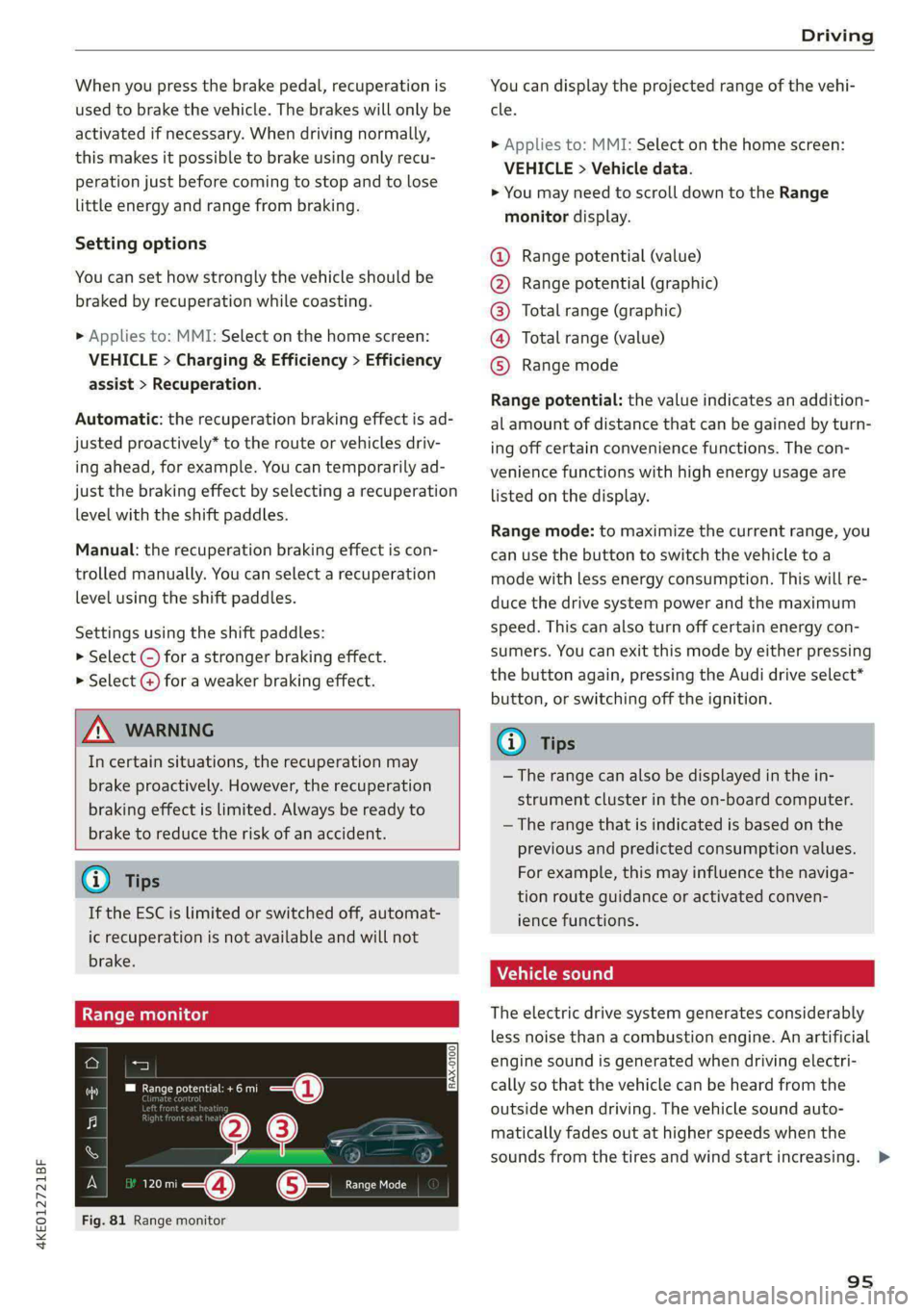
Fig. 81 Range monitor
You can display the projected range of the vehi-
cle.
> Applies to: MMI: Select on the home screen:
VEHICLE > Vehicle data.
> You may need to scroll down to the Range
monitor display.
Range potential (value)
Range potential (graphic)
Total range (graphic)
Total range (value)
Range mode OOOO
Range potential: the value indicates an addition-
al amount of distance that can be gained by turn-
ing off certain convenience functions. The con-
venience functions with high energy usage are
listed on
the display.
Range mode: to maximize the current range, you
can use the button to switch the vehicle to a
mode with less energy consumption. This will re-
duce the drive system power and the maximum
speed. This can also turn off certain energy con-
sumers. You can exit this mode by either pressing
the button again, pressing the Audi drive select*
button, or switching off the ignition.
G) Tips
— The range can also be displayed in the in-
strument cluster in the on-board computer.
— The range that is indicated is based on the
previous and predicted consumption values.
For example, this may influence the naviga-
tion route guidance or activated conven-
ience functions.
Vehicle sound
The electric drive system generates considerably
less noise than a combustion engine. An artificial
engine sound is generated when driving electri-
cally so that the vehicle can be heard from the
outside when driving. The vehicle sound auto-
matically fades out at higher speeds when the
sounds from the tires and wind start increasing. >
95